


 Home
HomeHow to activate Central Bank of India internet banking in 2026? Step-by-step guide.
Activating internet banking with the Central Bank of India (CBI) provides a simple and efficient way to handle your finances online. This guide offers a clear, step-by-step process for first-time users to activate their CBI internet banking account, ensuring a secure and straightforward setup. We'll walk you through everything from the initial registration to creating transaction passwords, helping you get started with CBI's online banking services.
Key Points
Understanding the requirements for activating CBI internet banking.
Step-by-step guidance for initial registration and login.
How to securely generate a new login password.
Creating a transaction password for safe online payments.
Navigating the CBI internet banking portal and its main features.
Essential security tips to keep your online account protected.
Activating Your Central Bank of India Internet Banking
Initial Setup and Login
To begin activating your Central Bank of India internet banking, go to the official CBI net banking website. The activation involves several security steps. First, make sure you have your CIF number ready, as you will need it during setup. This unique identifier is found on your bank statement.
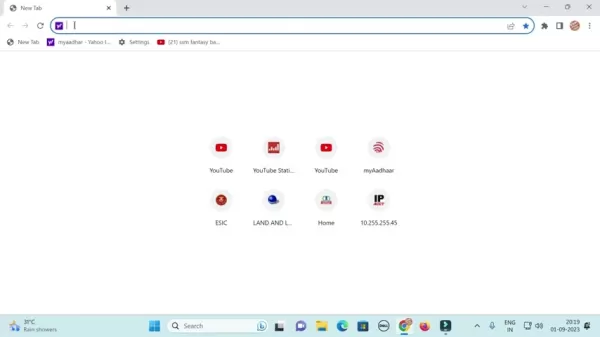
Enter "CBI net banking" into your browser's search bar. Click the official "Central Bank of India Net Banking" link from the search results to open the portal, where you can start the activation process.
Once on the site, find the "Personal Banking" section. If you have a corporate account, select the corporate option. Click "Login." For first-time users, begin registration by clicking "Online Password Generation" or a similar option for new users. Be sure to select the correct account type: personal for individual accounts or corporate for business-related accounts.
A pop-up with helpful information might appear; simply close it by clicking the "X" button and continue. Direct access to this page is also available via a link in the video description. You are now ready to set up your login. Note that the site may require the desktop version for proper display on mobile devices. To enable this, tap the three-dot menu and choose "Desktop site" for a full-screen experience.
Generating Your Login Password
As a new user, you must create a login password. Click "Online Password Generation" or a similar option to start.
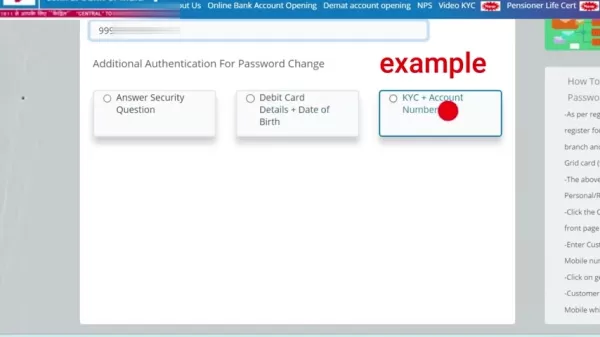
You will be asked to enter your 10-digit CIF number, available on your bank statement. Next, choose a verification method for password creation. Options usually include answering a security question, using debit card details along with your date of birth, or providing KYC (Know Your Customer) details and your account number. Select the method that is most convenient for you.
If you choose the "Debit Card Details + Date of Birth" method, enter the last six digits of your debit card number, the card's expiry month and year, and your date of birth. This method is often the easiest since the information is on your card. After entering the details, click "Submit."
You may need to provide your mobile number. Ensure the number you enter is the one registered with your bank account. Input your valid Central Bank of India-registered mobile number and click "Generate OTP." An OTP (One-Time Password) will be sent to your phone. Enter the OTP, create a new login password, and confirm it. You have now successfully logged in and can access the system.
Generating Transaction Password for Secure Transactions
Although you have a login password, a separate transaction password is required for financial operations. To set this up, go to the "Profile Setting" section on your internet banking dashboard. Look for an option like "Generate Transaction Password" or "Change Transaction Password" and select it.
To generate the transaction password, choose the OTP via SMS option and click generate. You will need to enter the received OTP and create a new transaction password. Note that your login and transaction passwords cannot be the same.
Once you have set your transaction password, you can perform transactions, check your account balance, and more.
FAQ
What do I need to activate CBI internet banking?
You will need your CIF number, debit card details (if using that method), your registered mobile number, and access to that mobile for OTP verification.
What if I don't receive the OTP?
You can select the "Resend OTP" option on the verification page. Double-check that your mobile number is correctly registered with the bank.
Can I use the same password for login and transactions?
For security, it is strongly advised to use different passwords for login and transactions.
How do I reset my internet banking password if I forget it?
Use the "Forgot Password" link on the login page and follow the steps, using available authentication methods such as debit card details or security questions.
Is CBI internet banking secure?
CBI uses multiple security layers, including OTP verification, encryption, and regular security checks, to safeguard your online transactions and personal data.
Related Questions
What are the benefits of using Central Bank of India internet banking?
Central Bank of India (CBI) internet banking offers many advantages, making financial management easier and more efficient. A major benefit is convenience. You can access your account and perform transactions from anywhere with an internet connection, reducing the need to visit a branch. This is ideal for people with busy schedules.Another key advantage is 24/7 availability. Unlike physical banks, internet banking lets you manage your money anytime. You can check balances, view statements, transfer funds, pay bills, and more, all at your convenience.CBI internet banking also provides real-time updates. You can monitor transactions, review account activity, and get instant alerts, helping you stay informed about your finances. This supports better planning and decision-making.Security is a priority for CBI internet banking. The platform uses multiple security features, such as multi-factor authentication, encryption, and secure login processes, to prevent unauthorized access. These steps help keep your financial information and transactions safe.Additionally, internet banking can lead to cost savings. Many online transactions have lower fees compared to in-branch services. You also save on travel time and expenses.Overall, CBI internet banking offers a convenient, accessible, and secure method for managing your finances, giving you greater control and efficiency in your banking activities.
Related article
 U.S. Stocks Hit Historic Milestone as AI and Aerospace Giants Prepare for Trillion-Dollar Debut
Elon Musk, Sam Altman, and Dario Amodei, three titans of the technology sector, are advancing toward initial public offerings for their respective ventures. With SpaceX, OpenAI, and Anthropic—three industry behemoths nearing trillion-dollar valuation
Swedish AI Startup Lovable Eyes $13.2 Billion Valuation After Major Funding Round
As AI-driven coding tools gain traction, Swedish startup Lovable has secured a major funding round. The company aims to raise $3 billion, potentially boosting its valuation to $13.2 billion—double the $6.6 billion recorded last December. Menlo Ventur
Google Tests Remy AI Agent for Gemini as Focus Shifts to User Control
According to Business Insider, Google is testing Remy, a new AI personal agent for Gemini. This tool aims to execute tasks on behalf of users, streamlining both professional workflows and daily routines.Currently, Remy is undergoing testing in an int
Related Special Topic Recommendations
writing
U.S. Stocks Hit Historic Milestone as AI and Aerospace Giants Prepare for Trillion-Dollar Debut
Elon Musk, Sam Altman, and Dario Amodei, three titans of the technology sector, are advancing toward initial public offerings for their respective ventures. With SpaceX, OpenAI, and Anthropic—three industry behemoths nearing trillion-dollar valuation
Swedish AI Startup Lovable Eyes $13.2 Billion Valuation After Major Funding Round
As AI-driven coding tools gain traction, Swedish startup Lovable has secured a major funding round. The company aims to raise $3 billion, potentially boosting its valuation to $13.2 billion—double the $6.6 billion recorded last December. Menlo Ventur
Google Tests Remy AI Agent for Gemini as Focus Shifts to User Control
According to Business Insider, Google is testing Remy, a new AI personal agent for Gemini. This tool aims to execute tasks on behalf of users, streamlining both professional workflows and daily routines.Currently, Remy is undergoing testing in an int
Related Special Topic Recommendations
writing
 Best AI Outline Generators for Long-Form SEO Articles
2026 Latest Best Top-Rated AI Outline Generators for Long-Form SEO Articles, meticulously curated by XIX.AI. These powerful tools offer game-changing assistance in creating high-quality content quickly, boosting writing efficiency significantly. Get a free vs paid comparison along with real-world tests and detailed rankings to help you find the must-try option that suits your needs. Explore now to unlock your AI edge.
 8 tools
 xix.ai
Education and Learning
AI Study Tools for Homework and Exam Prep
xix.ai
Education and Learning
AI Study Tools for Homework and Exam Prep
2026 Latest Best AI Study Tools for Homework and Exam Prep! XIX.AI curates a top-rated list of powerful, game-changing tools that help students boost productivity, streamline homework completion, and ace exams through real-world tests. Get a free vs paid comparison, detailed rankings, and must-try options to unlock your AI edge. Explore now!
10 tools
xix.ai
Music composition
AI Vocal Demo Tools for Songwriters, Hooks, Toplines, and Multilingual Draft Sessions
2026 Latest Best AI Vocal Demo Tools for Songwriters, Hook Creators, and Multi-Language Content Teams! XIX.AI has curated a top-rated list of powerful game-changing tools that go through rigorous real-world tests. You’ll find detailed free vs paid comparison data, comprehensive rankings, and must-try options to help you boost writing efficiency and unlock your creative potential. Explore now to discover your perfect tool for all your content needs!
9 tools
xix.ai
Business
Best AI Competitive Research Tools for Small Businesses
2026 Latest Best Top-rated AI Competitive Research Tools for Small Businesses! XIX.AI has curated a highly powerful game-changing collection, updated weekly with rigorous real-world tests and detailed rankings. You can find a comprehensive free vs paid comparison to help you identify the must-try tools that boost your productivity and give you a competitive edge. Explore now to discover your perfect tool!
9 tools
xix.ai
Image editing
Photoshop AI Retouch Tools for Ecommerce Apparel, Skin Cleanup, and Color Consistency
2026 Latest Best Photoshop AI retouch tools for ecommerce apparel, skin cleanup, and color consistency! This top-rated curated list features powerful game-changing solutions that help you boost writing efficiency, streamline content creation, and achieve perfect visual results effortlessly. Each tool has undergone real-world tests through weekly updated rankings, complete with free vs paid comparison details. Backed by XIX.AI, it’s the must-try guide for anyone aiming to unlock your AI edge. Explore now!
10 tools
xix.ai
Prompt
Best AI Prompt Libraries for ChatGPT Workflows
2026 Latest Best Top-Rated AI Prompt Libraries for optimizing all types of ChatGPT workflows. XIX.AI has curated a powerful, game-changing collection that goes through rigorous real-world tests to ensure top performance. You can find detailed free vs paid comparisons and expert rankings to help you choose the must-try tools that boost your productivity and unlock your AI edge. Explore now!
11 tools
xix.ai

 Comments (1)
0/500
Comments (1)
0/500
![RyanSanchez]()
So you need a step-by-step guide in 2026? Guess banks still can't make it simple... 😅
Activating internet banking with the Central Bank of India (CBI) provides a simple and efficient way to handle your finances online. This guide offers a clear, step-by-step process for first-time users to activate their CBI internet banking account, ensuring a secure and straightforward setup. We'll walk you through everything from the initial registration to creating transaction passwords, helping you get started with CBI's online banking services.
Key Points
Understanding the requirements for activating CBI internet banking.
Step-by-step guidance for initial registration and login.
How to securely generate a new login password.
Creating a transaction password for safe online payments.
Navigating the CBI internet banking portal and its main features.
Essential security tips to keep your online account protected.
Activating Your Central Bank of India Internet Banking
Initial Setup and Login
To begin activating your Central Bank of India internet banking, go to the official CBI net banking website. The activation involves several security steps. First, make sure you have your CIF number ready, as you will need it during setup. This unique identifier is found on your bank statement.
Enter "CBI net banking" into your browser's search bar. Click the official "Central Bank of India Net Banking" link from the search results to open the portal, where you can start the activation process.
Once on the site, find the "Personal Banking" section. If you have a corporate account, select the corporate option. Click "Login." For first-time users, begin registration by clicking "Online Password Generation" or a similar option for new users. Be sure to select the correct account type: personal for individual accounts or corporate for business-related accounts.
A pop-up with helpful information might appear; simply close it by clicking the "X" button and continue. Direct access to this page is also available via a link in the video description. You are now ready to set up your login. Note that the site may require the desktop version for proper display on mobile devices. To enable this, tap the three-dot menu and choose "Desktop site" for a full-screen experience.
Generating Your Login Password
As a new user, you must create a login password. Click "Online Password Generation" or a similar option to start.
You will be asked to enter your 10-digit CIF number, available on your bank statement. Next, choose a verification method for password creation. Options usually include answering a security question, using debit card details along with your date of birth, or providing KYC (Know Your Customer) details and your account number. Select the method that is most convenient for you.
If you choose the "Debit Card Details + Date of Birth" method, enter the last six digits of your debit card number, the card's expiry month and year, and your date of birth. This method is often the easiest since the information is on your card. After entering the details, click "Submit."
You may need to provide your mobile number. Ensure the number you enter is the one registered with your bank account. Input your valid Central Bank of India-registered mobile number and click "Generate OTP." An OTP (One-Time Password) will be sent to your phone. Enter the OTP, create a new login password, and confirm it. You have now successfully logged in and can access the system.
Generating Transaction Password for Secure Transactions
Although you have a login password, a separate transaction password is required for financial operations. To set this up, go to the "Profile Setting" section on your internet banking dashboard. Look for an option like "Generate Transaction Password" or "Change Transaction Password" and select it.
To generate the transaction password, choose the OTP via SMS option and click generate. You will need to enter the received OTP and create a new transaction password. Note that your login and transaction passwords cannot be the same.
Once you have set your transaction password, you can perform transactions, check your account balance, and more.
FAQ
What do I need to activate CBI internet banking?
You will need your CIF number, debit card details (if using that method), your registered mobile number, and access to that mobile for OTP verification.
What if I don't receive the OTP?
You can select the "Resend OTP" option on the verification page. Double-check that your mobile number is correctly registered with the bank.
Can I use the same password for login and transactions?
For security, it is strongly advised to use different passwords for login and transactions.
How do I reset my internet banking password if I forget it?
Use the "Forgot Password" link on the login page and follow the steps, using available authentication methods such as debit card details or security questions.
Is CBI internet banking secure?
CBI uses multiple security layers, including OTP verification, encryption, and regular security checks, to safeguard your online transactions and personal data.
Related Questions
What are the benefits of using Central Bank of India internet banking?
Central Bank of India (CBI) internet banking offers many advantages, making financial management easier and more efficient. A major benefit is convenience. You can access your account and perform transactions from anywhere with an internet connection, reducing the need to visit a branch. This is ideal for people with busy schedules.Another key advantage is 24/7 availability. Unlike physical banks, internet banking lets you manage your money anytime. You can check balances, view statements, transfer funds, pay bills, and more, all at your convenience.CBI internet banking also provides real-time updates. You can monitor transactions, review account activity, and get instant alerts, helping you stay informed about your finances. This supports better planning and decision-making.Security is a priority for CBI internet banking. The platform uses multiple security features, such as multi-factor authentication, encryption, and secure login processes, to prevent unauthorized access. These steps help keep your financial information and transactions safe.Additionally, internet banking can lead to cost savings. Many online transactions have lower fees compared to in-branch services. You also save on travel time and expenses.Overall, CBI internet banking offers a convenient, accessible, and secure method for managing your finances, giving you greater control and efficiency in your banking activities.








 U.S. Stocks Hit Historic Milestone as AI and Aerospace Giants Prepare for Trillion-Dollar Debut
Elon Musk, Sam Altman, and Dario Amodei, three titans of the technology sector, are advancing toward initial public offerings for their respective ventures. With SpaceX, OpenAI, and Anthropic—three industry behemoths nearing trillion-dollar valuation
U.S. Stocks Hit Historic Milestone as AI and Aerospace Giants Prepare for Trillion-Dollar Debut
Elon Musk, Sam Altman, and Dario Amodei, three titans of the technology sector, are advancing toward initial public offerings for their respective ventures. With SpaceX, OpenAI, and Anthropic—three industry behemoths nearing trillion-dollar valuation
 Swedish AI Startup Lovable Eyes $13.2 Billion Valuation After Major Funding Round
As AI-driven coding tools gain traction, Swedish startup Lovable has secured a major funding round. The company aims to raise $3 billion, potentially boosting its valuation to $13.2 billion—double the $6.6 billion recorded last December. Menlo Ventur
Google Tests Remy AI Agent for Gemini as Focus Shifts to User Control
According to Business Insider, Google is testing Remy, a new AI personal agent for Gemini. This tool aims to execute tasks on behalf of users, streamlining both professional workflows and daily routines.Currently, Remy is undergoing testing in an int
Swedish AI Startup Lovable Eyes $13.2 Billion Valuation After Major Funding Round
As AI-driven coding tools gain traction, Swedish startup Lovable has secured a major funding round. The company aims to raise $3 billion, potentially boosting its valuation to $13.2 billion—double the $6.6 billion recorded last December. Menlo Ventur
Google Tests Remy AI Agent for Gemini as Focus Shifts to User Control
According to Business Insider, Google is testing Remy, a new AI personal agent for Gemini. This tool aims to execute tasks on behalf of users, streamlining both professional workflows and daily routines.Currently, Remy is undergoing testing in an int

2026 Latest Best Top-Rated AI Outline Generators for Long-Form SEO Articles, meticulously curated by XIX.AI. These powerful tools offer game-changing assistance in creating high-quality content quickly, boosting writing efficiency significantly. Get a free vs paid comparison along with real-world tests and detailed rankings to help you find the must-try option that suits your needs. Explore now to unlock your AI edge.
8 tools
xix.ai

2026 Latest Best AI Study Tools for Homework and Exam Prep! XIX.AI curates a top-rated list of powerful, game-changing tools that help students boost productivity, streamline homework completion, and ace exams through real-world tests. Get a free vs paid comparison, detailed rankings, and must-try options to unlock your AI edge. Explore now!
10 tools
xix.ai

2026 Latest Best AI Vocal Demo Tools for Songwriters, Hook Creators, and Multi-Language Content Teams! XIX.AI has curated a top-rated list of powerful game-changing tools that go through rigorous real-world tests. You’ll find detailed free vs paid comparison data, comprehensive rankings, and must-try options to help you boost writing efficiency and unlock your creative potential. Explore now to discover your perfect tool for all your content needs!
9 tools
xix.ai

2026 Latest Best Top-rated AI Competitive Research Tools for Small Businesses! XIX.AI has curated a highly powerful game-changing collection, updated weekly with rigorous real-world tests and detailed rankings. You can find a comprehensive free vs paid comparison to help you identify the must-try tools that boost your productivity and give you a competitive edge. Explore now to discover your perfect tool!
9 tools
xix.ai

2026 Latest Best Photoshop AI retouch tools for ecommerce apparel, skin cleanup, and color consistency! This top-rated curated list features powerful game-changing solutions that help you boost writing efficiency, streamline content creation, and achieve perfect visual results effortlessly. Each tool has undergone real-world tests through weekly updated rankings, complete with free vs paid comparison details. Backed by XIX.AI, it’s the must-try guide for anyone aiming to unlock your AI edge. Explore now!
10 tools
xix.ai

2026 Latest Best Top-Rated AI Prompt Libraries for optimizing all types of ChatGPT workflows. XIX.AI has curated a powerful, game-changing collection that goes through rigorous real-world tests to ensure top performance. You can find detailed free vs paid comparisons and expert rankings to help you choose the must-try tools that boost your productivity and unlock your AI edge. Explore now!
11 tools
xix.ai

So you need a step-by-step guide in 2026? Guess banks still can't make it simple... 😅












