


 Home
HomeAI-Powered PDF Summarization: A Complete Guide
In today's fast-paced world, the ability to quickly and effectively summarize large PDF documents is more important than ever. AI-powered tools like Claude AI offer a solution, providing concise summaries that save time and enhance understanding. This guide explores how to use Claude AI for PDF summarization, completely free of charge.
Key Points
- Learn how to use Claude AI to summarize PDFs for free.
- Follow a step-by-step guide to signing up and setting up Claude AI.
- Understand how to upload and command Claude AI to summarize your PDF documents.
- Discover the benefits of using AI for document summarization.
- Get tips for optimizing your summarization requests for the best results.
- Learn how to save the AI-summarized documents to your desktop.
Getting Started with Claude AI for PDF Summarization
Why Use AI for PDF Summarization?
AI-driven PDF summarization brings a host of advantages over manual methods. First off, it's all about time efficiency; AI algorithms can process documents much faster than a human could. What might take hours or days manually, AI can do in seconds. Moreover, AI keeps things objective, minimizing personal bias in the summaries. It uses consistent criteria across documents, ensuring fair and reliable results. And let's not forget accuracy—AI captures key details, which is crucial in lengthy documents where important information could easily be missed. With Claude AI, all these benefits come at no cost.
Step 1: Accessing Claude AI
First things first, you'll need to navigate to Claude AI. Just open your web browser and type "Claude AI" into the Google search bar. The official website should pop up as the first result. Make sure the URL is claude.ai to avoid any phishing sites. Once you're on the homepage, you can start the signup process and get ready to let AI take care of your PDF summarization needs.
Step 2: Signing Up for a Claude AI Account
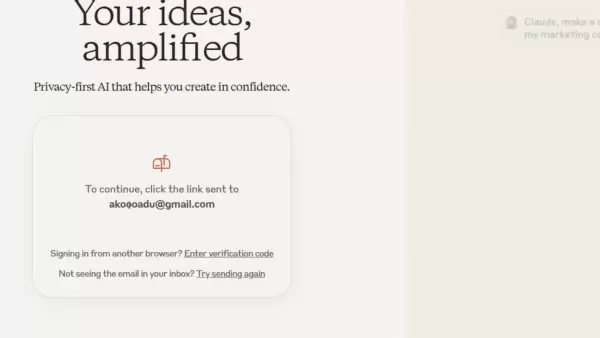
On the Claude AI homepage, you'll need to create an account to access its features. Look for the sign-up or registration button—it's hard to miss. You can either sign up using your Google account for quick access or go the traditional route with an email. If you choose email registration, enter your email address and follow the prompts. You'll get a verification email from Claude AI shortly after. Just click the link in that email to verify your account and move on to the next step.

Step 3: Verifying Your Account
After clicking the verification link in your email, you'll be taken back to the Claude AI platform to finish verifying your account. Depending on their security measures, you might need to enter a code sent to your email or phone. Just fill in the code and click 'verify email address.' You might also need to enter your phone number for further verification. Confirm you're over 18, and request another code if needed. This multi-step verification keeps your account secure. Remember, without a verified account, you won't be able to use Claude AI to summarize your PDFs.
Configuring Claude AI Settings
Step 4: Setting Up Your Profile
Once your account is verified, Claude AI will ask you to set up your profile. This is where you enter your name and any other optional details to personalize your experience. Just type your name where it says, 'Nice to meet you, I’m…', click the send button, and agree to Anthropic’s terms of service. Setting up your profile tailors the AI to your needs, getting you ready to summarize those PDFs with ease.
Step 5: Uploading Your PDF File to Claude AI
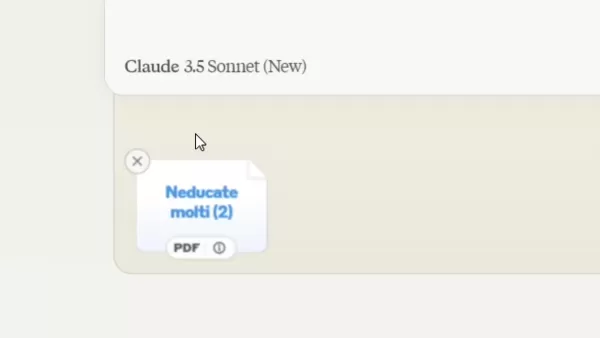
Now, it's time to upload your PDF. Look for the upload button or icon on the interface, click it, and navigate to your file on your computer. Select the PDF and click 'open' to upload it to Claude AI. Make sure your file meets their size limit. Once it's uploaded, the PDF is ready for summarization. This straightforward process makes it easy to use AI for your PDF needs.
Step 6: Commanding Claude AI to Summarize
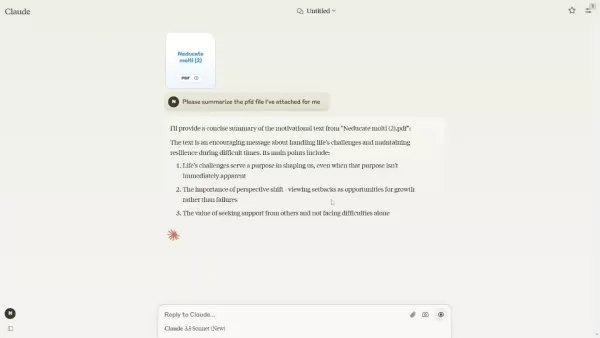
With your PDF uploaded, it's time to tell Claude AI what to do. Use the text input field to type your command, something like, 'Please summarize the PDF file I’ve attached for me.' Then hit the send or enter button. The AI will start processing your request and generate a summary. It's that simple to get the summaries you need.
Advanced Techniques for PDF Summarization with Claude AI
Refining Summarization Commands
To get the best out of Claude AI's summaries, refine your commands. Be specific about what you need—focus on particular sections or themes, and specify how long you want the summary to be. For example, you might say, 'Summarize the key points in three sentences.' This helps the AI tailor the summary to your needs.
Improvement Description Example Specificity Focus on particular sections or themes. “Summarize the findings related to market analysis.” Length Specification Define the desired summary length. “Summarize the report in 200 words.” Language Precision Use clear, unambiguous language. Avoid vague terms; use precise wording. Contextual Information Provide relevant background for better summary generation. “Include background on recent company changes.”
Reviewing and Editing Summaries
Once you've got your summary, take a moment to review it. Check for accuracy and make sure all the important points are covered. If something's missing, you can use the retry option or give the AI more specific instructions. Edit the summary to improve clarity and flow. For a more detailed version, you might even edit it in Notepad. By refining the AI-generated summaries, you ensure they meet your needs perfectly.
Step 7: Saving Your Summarized PDF Document
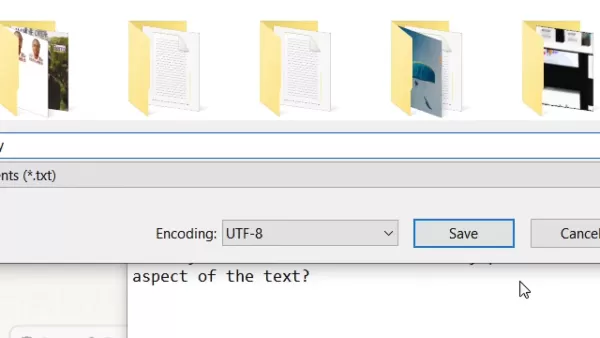
When you're happy with the summary, save it for future use. Copy the text, open Notepad, and paste it in. Go to 'File' and select 'Save As.' Choose where you want to save it on your computer, give it a descriptive name, and save it. This way, you'll have easy access to the concise information from your PDFs whenever you need it.
The Pros and Cons of Using AI for PDF Summary
Pros
- AI processes documents much faster than manual methods.
- It maintains objectivity, eliminating personal bias.
- AI ensures accuracy by capturing key details.
- Free options make AI summarization accessible to everyone.
Cons
- AI summaries depend on the quality of the commands given.
- Uploaded files are stored on third-party servers, posing security and privacy risks.
FAQ
Is Claude AI really free for summarizing PDFs?
Yes, Claude AI offers a free plan for summarizing PDFs. However, there might be limits on the number of summaries or the size of the PDFs you can upload. Check the platform's pricing details for specifics.
What types of PDF documents can Claude AI summarize?
Claude AI can handle various types of PDFs, like reports, articles, and books. The quality of the summary depends on the document's structure and complexity. Well-formatted PDFs usually yield better results.
Can I summarize password-protected PDFs using Claude AI?
No, Claude AI can't summarize password-protected PDFs. You'll need to remove the password first using online tools or PDF editors.
What if the AI-generated summary is not accurate or complete?
If the summary isn't quite right, refine your command with more specific instructions or use the retry option. You can also edit the PDF in Notepad for a more detailed summary.
Related Questions
Are there alternative AI tools for summarizing PDFs?
Yes, there are other AI tools like LightPDF for summarizing PDFs. Each has its strengths and weaknesses, so it's worth trying a few to find the best fit for you.
How can I improve the accuracy of AI-generated summaries?
To boost accuracy, use clear and specific commands. Focus on extracting the key information you need from your documents.
Is it safe to upload sensitive documents to AI summarization tools?
It depends on the tool's privacy and security practices. Review the privacy policy and terms of service to see how your data is handled. If you're concerned about security, look for tools that offer local processing or encryption.
Related article
 Musk Considered Leaving OpenAI to His Kids as Altman Testifies
This morning, OpenAI CEO Sam Altman took the stand to address former co-founder Elon Musk’s lawsuit challenging the company’s corporate structure.When asked about Musk’s claim that other founders “stole a charity” by launching a for-profit subsidiary
Sam Altman Sparks Debate Over AI's Deceleration
Listen onApple PodcastsListen onSpotifyOpenAI CEO Sam Altman recently suggested that it may be time to “pace the rate of AI development” to allow society to “harden around some of these new capability levels.”On the latest episode of TechCrunch’s Equ
Anthropic Opens Doors to EU Cybersecurity Agency as Mythos5 Model Faces Compliance Exam
Artificial intelligence compliance regulations are advancing significantly. Leading AI firm Anthropic has officially granted the European Union's cybersecurity authority access to its Mythos AI model, a pivotal move for this advanced large language m
Related Special Topic Recommendations
Prompt
Musk Considered Leaving OpenAI to His Kids as Altman Testifies
This morning, OpenAI CEO Sam Altman took the stand to address former co-founder Elon Musk’s lawsuit challenging the company’s corporate structure.When asked about Musk’s claim that other founders “stole a charity” by launching a for-profit subsidiary
Sam Altman Sparks Debate Over AI's Deceleration
Listen onApple PodcastsListen onSpotifyOpenAI CEO Sam Altman recently suggested that it may be time to “pace the rate of AI development” to allow society to “harden around some of these new capability levels.”On the latest episode of TechCrunch’s Equ
Anthropic Opens Doors to EU Cybersecurity Agency as Mythos5 Model Faces Compliance Exam
Artificial intelligence compliance regulations are advancing significantly. Leading AI firm Anthropic has officially granted the European Union's cybersecurity authority access to its Mythos AI model, a pivotal move for this advanced large language m
Related Special Topic Recommendations
Prompt
 Best AI Prompt Libraries for ChatGPT Workflows
2026 Latest Best Top-Rated AI Prompt Libraries for optimizing all types of ChatGPT workflows. XIX.AI has curated a powerful, game-changing collection that goes through rigorous real-world tests to ensure top performance. You can find detailed free vs paid comparisons and expert rankings to help you choose the must-try tools that boost your productivity and unlock your AI edge. Explore now!
 11 tools
 xix.ai
Education and Learning
AI Quiz Builder Platforms for Teachers, Tutors, and Cohort-Based Learning Programs
xix.ai
Education and Learning
AI Quiz Builder Platforms for Teachers, Tutors, and Cohort-Based Learning Programs
2026 Latest Best AI Quiz Builder Platforms for Teachers, Tutors, and Cohort-Based Learning Programs! XIX.AI has curated a top-rated list of powerful game-changing tools that go through real-world tests to deliver accurate rankings. These must-try platforms help boost writing efficiency, streamline content creation, and simplify quiz design across all learning scenarios. Explore now to discover your perfect tool for unlocking your AI edge in teaching!
13 tools
xix.ai
code
AI Pull Request Review Tools for GitHub Teams Handling Refactors, Bugs, and Security Gaps
2026 Latest Best AI Pull Request Review Tools for GitHub Teams are here on XIX.AI! This top-rated curated list showcases powerful game-changing solutions that streamline refactoring, bug fixing, and security gap detection across all team workflows. Enjoy a free vs paid comparison along with real-world tests and detailed rankings to help you find the perfect tool that boosts productivity significantly. Explore now to unlock your AI edge!
12 tools
xix.ai
Text-to-speech
Best AI Text to Speech Tools for Natural Voiceovers
2026 Latest Best Top-rated AI Text to Speech Tools for Natural Voiceovers are here on XIX.AI! This curated list features powerful, game-changing options that deliver crystal-clear voices for every use case, backed by real-world tests and weekly updated rankings. Get a free vs paid comparison to find the must-try solution that boosts your productivity instantly. Explore now to Unlock your AI edge!
11 tools
xix.ai
Comic Creation
Manga AI Background Generators for Serialized Chapters, Covers, and Promo Art
2026 Latest Best Manga AI Background Generators Ranked Top-Rated! This curated collection showcases powerful game-changing tools perfect for creating high-quality chapter backgrounds, book covers, and promotional art. Every option has undergone rigorous real-world tests to ensure reliability. Get a free vs paid comparison along with detailed insights. Explore now to discover your perfect tool and unlock your AI edge in manga creation.
6 tools
xix.ai
Image editing
AI Object Removal Editors: Clean Up Portraits, Travel, and Product Shots
2026 Latest Best Top-rated AI Object Removal Editors for portraits travel product shots! XIX.AI curates a powerful game-changing collection regularly updated with weekly rankings. These tools offer real-world tests to help you quickly remove unwanted elements, boost content quality, and save tons of time without compromising results. Must-try for anyone aiming to unlock their AI creation edge. Explore now!
10 tools
xix.ai

 Comments (10)
0/500
Comments (10)
0/500
![KevinBaker]()
Claude AI for PDF summarization? Honestly, I've been waiting for something that actually works. This guide makes it sound easy but is it really that good? Hope so! 🧐
![GaryTaylor]()
Je me demande si ces outils de résumé IA vont vraiment comprendre la nuance dans des documents complexes comme des contrats juridiques. J'ai essayé un autre outil l'autre jour et il a complètement raté le point principal d'un rapport 😅 Est-ce que Claude AI fait mieux avec le contexte ?
![CharlesRoberts]()
Intéressant ! Ça me rappelle que j'ai passé des heures à résumer des rapports la semaine dernière 😅 L'IA pourrait vraiment nous libérer du temps pour des tâches plus créatives. Mais est-ce que ces résumés gardent les nuances importantes ? Des fois, le diable se cache dans les détails, non ? 🤔
![WillieLee]()
Super cool guide! Claude AI summarizing PDFs sounds like a total game-changer for students drowning in research papers. 😎 Anyone tried it for super long reports yet?
![AlbertSanchez]()
Super cool guide! Claude AI sounds like a time-saver for tackling huge PDFs. Anyone tried it for research papers yet? 🧠
![BenWalker]()
ИИ для summing up PDF? Круто! 😎 Но интересно, как он справляется с научными статьями. Надо проверить.
In today's fast-paced world, the ability to quickly and effectively summarize large PDF documents is more important than ever. AI-powered tools like Claude AI offer a solution, providing concise summaries that save time and enhance understanding. This guide explores how to use Claude AI for PDF summarization, completely free of charge.
Key Points
- Learn how to use Claude AI to summarize PDFs for free.
- Follow a step-by-step guide to signing up and setting up Claude AI.
- Understand how to upload and command Claude AI to summarize your PDF documents.
- Discover the benefits of using AI for document summarization.
- Get tips for optimizing your summarization requests for the best results.
- Learn how to save the AI-summarized documents to your desktop.
Getting Started with Claude AI for PDF Summarization
Why Use AI for PDF Summarization?
AI-driven PDF summarization brings a host of advantages over manual methods. First off, it's all about time efficiency; AI algorithms can process documents much faster than a human could. What might take hours or days manually, AI can do in seconds. Moreover, AI keeps things objective, minimizing personal bias in the summaries. It uses consistent criteria across documents, ensuring fair and reliable results. And let's not forget accuracy—AI captures key details, which is crucial in lengthy documents where important information could easily be missed. With Claude AI, all these benefits come at no cost.
Step 1: Accessing Claude AI
First things first, you'll need to navigate to Claude AI. Just open your web browser and type "Claude AI" into the Google search bar. The official website should pop up as the first result. Make sure the URL is claude.ai to avoid any phishing sites. Once you're on the homepage, you can start the signup process and get ready to let AI take care of your PDF summarization needs.
Step 2: Signing Up for a Claude AI Account
On the Claude AI homepage, you'll need to create an account to access its features. Look for the sign-up or registration button—it's hard to miss. You can either sign up using your Google account for quick access or go the traditional route with an email. If you choose email registration, enter your email address and follow the prompts. You'll get a verification email from Claude AI shortly after. Just click the link in that email to verify your account and move on to the next step.
Step 3: Verifying Your Account
After clicking the verification link in your email, you'll be taken back to the Claude AI platform to finish verifying your account. Depending on their security measures, you might need to enter a code sent to your email or phone. Just fill in the code and click 'verify email address.' You might also need to enter your phone number for further verification. Confirm you're over 18, and request another code if needed. This multi-step verification keeps your account secure. Remember, without a verified account, you won't be able to use Claude AI to summarize your PDFs.
Configuring Claude AI Settings
Step 4: Setting Up Your Profile
Once your account is verified, Claude AI will ask you to set up your profile. This is where you enter your name and any other optional details to personalize your experience. Just type your name where it says, 'Nice to meet you, I’m…', click the send button, and agree to Anthropic’s terms of service. Setting up your profile tailors the AI to your needs, getting you ready to summarize those PDFs with ease.
Step 5: Uploading Your PDF File to Claude AI
Now, it's time to upload your PDF. Look for the upload button or icon on the interface, click it, and navigate to your file on your computer. Select the PDF and click 'open' to upload it to Claude AI. Make sure your file meets their size limit. Once it's uploaded, the PDF is ready for summarization. This straightforward process makes it easy to use AI for your PDF needs.
Step 6: Commanding Claude AI to Summarize
With your PDF uploaded, it's time to tell Claude AI what to do. Use the text input field to type your command, something like, 'Please summarize the PDF file I’ve attached for me.' Then hit the send or enter button. The AI will start processing your request and generate a summary. It's that simple to get the summaries you need.
Advanced Techniques for PDF Summarization with Claude AI
Refining Summarization Commands
To get the best out of Claude AI's summaries, refine your commands. Be specific about what you need—focus on particular sections or themes, and specify how long you want the summary to be. For example, you might say, 'Summarize the key points in three sentences.' This helps the AI tailor the summary to your needs.
| Improvement | Description | Example |
|---|---|---|
| Specificity | Focus on particular sections or themes. | “Summarize the findings related to market analysis.” |
| Length Specification | Define the desired summary length. | “Summarize the report in 200 words.” |
| Language Precision | Use clear, unambiguous language. | Avoid vague terms; use precise wording. |
| Contextual Information | Provide relevant background for better summary generation. | “Include background on recent company changes.” |
Reviewing and Editing Summaries
Once you've got your summary, take a moment to review it. Check for accuracy and make sure all the important points are covered. If something's missing, you can use the retry option or give the AI more specific instructions. Edit the summary to improve clarity and flow. For a more detailed version, you might even edit it in Notepad. By refining the AI-generated summaries, you ensure they meet your needs perfectly.
Step 7: Saving Your Summarized PDF Document
When you're happy with the summary, save it for future use. Copy the text, open Notepad, and paste it in. Go to 'File' and select 'Save As.' Choose where you want to save it on your computer, give it a descriptive name, and save it. This way, you'll have easy access to the concise information from your PDFs whenever you need it.
The Pros and Cons of Using AI for PDF Summary
Pros
- AI processes documents much faster than manual methods.
- It maintains objectivity, eliminating personal bias.
- AI ensures accuracy by capturing key details.
- Free options make AI summarization accessible to everyone.
Cons
- AI summaries depend on the quality of the commands given.
- Uploaded files are stored on third-party servers, posing security and privacy risks.
FAQ
Is Claude AI really free for summarizing PDFs?
Yes, Claude AI offers a free plan for summarizing PDFs. However, there might be limits on the number of summaries or the size of the PDFs you can upload. Check the platform's pricing details for specifics.
What types of PDF documents can Claude AI summarize?
Claude AI can handle various types of PDFs, like reports, articles, and books. The quality of the summary depends on the document's structure and complexity. Well-formatted PDFs usually yield better results.
Can I summarize password-protected PDFs using Claude AI?
No, Claude AI can't summarize password-protected PDFs. You'll need to remove the password first using online tools or PDF editors.
What if the AI-generated summary is not accurate or complete?
If the summary isn't quite right, refine your command with more specific instructions or use the retry option. You can also edit the PDF in Notepad for a more detailed summary.
Related Questions
Are there alternative AI tools for summarizing PDFs?
Yes, there are other AI tools like LightPDF for summarizing PDFs. Each has its strengths and weaknesses, so it's worth trying a few to find the best fit for you.
How can I improve the accuracy of AI-generated summaries?
To boost accuracy, use clear and specific commands. Focus on extracting the key information you need from your documents.
Is it safe to upload sensitive documents to AI summarization tools?
It depends on the tool's privacy and security practices. Review the privacy policy and terms of service to see how your data is handled. If you're concerned about security, look for tools that offer local processing or encryption.








 Musk Considered Leaving OpenAI to His Kids as Altman Testifies
This morning, OpenAI CEO Sam Altman took the stand to address former co-founder Elon Musk’s lawsuit challenging the company’s corporate structure.When asked about Musk’s claim that other founders “stole a charity” by launching a for-profit subsidiary
Musk Considered Leaving OpenAI to His Kids as Altman Testifies
This morning, OpenAI CEO Sam Altman took the stand to address former co-founder Elon Musk’s lawsuit challenging the company’s corporate structure.When asked about Musk’s claim that other founders “stole a charity” by launching a for-profit subsidiary
 Sam Altman Sparks Debate Over AI's Deceleration
Listen onApple PodcastsListen onSpotifyOpenAI CEO Sam Altman recently suggested that it may be time to “pace the rate of AI development” to allow society to “harden around some of these new capability levels.”On the latest episode of TechCrunch’s Equ
Sam Altman Sparks Debate Over AI's Deceleration
Listen onApple PodcastsListen onSpotifyOpenAI CEO Sam Altman recently suggested that it may be time to “pace the rate of AI development” to allow society to “harden around some of these new capability levels.”On the latest episode of TechCrunch’s Equ
 Anthropic Opens Doors to EU Cybersecurity Agency as Mythos5 Model Faces Compliance Exam
Artificial intelligence compliance regulations are advancing significantly. Leading AI firm Anthropic has officially granted the European Union's cybersecurity authority access to its Mythos AI model, a pivotal move for this advanced large language m
Anthropic Opens Doors to EU Cybersecurity Agency as Mythos5 Model Faces Compliance Exam
Artificial intelligence compliance regulations are advancing significantly. Leading AI firm Anthropic has officially granted the European Union's cybersecurity authority access to its Mythos AI model, a pivotal move for this advanced large language m

2026 Latest Best Top-Rated AI Prompt Libraries for optimizing all types of ChatGPT workflows. XIX.AI has curated a powerful, game-changing collection that goes through rigorous real-world tests to ensure top performance. You can find detailed free vs paid comparisons and expert rankings to help you choose the must-try tools that boost your productivity and unlock your AI edge. Explore now!
11 tools
xix.ai

2026 Latest Best AI Quiz Builder Platforms for Teachers, Tutors, and Cohort-Based Learning Programs! XIX.AI has curated a top-rated list of powerful game-changing tools that go through real-world tests to deliver accurate rankings. These must-try platforms help boost writing efficiency, streamline content creation, and simplify quiz design across all learning scenarios. Explore now to discover your perfect tool for unlocking your AI edge in teaching!
13 tools
xix.ai

2026 Latest Best AI Pull Request Review Tools for GitHub Teams are here on XIX.AI! This top-rated curated list showcases powerful game-changing solutions that streamline refactoring, bug fixing, and security gap detection across all team workflows. Enjoy a free vs paid comparison along with real-world tests and detailed rankings to help you find the perfect tool that boosts productivity significantly. Explore now to unlock your AI edge!
12 tools
xix.ai

2026 Latest Best Top-rated AI Text to Speech Tools for Natural Voiceovers are here on XIX.AI! This curated list features powerful, game-changing options that deliver crystal-clear voices for every use case, backed by real-world tests and weekly updated rankings. Get a free vs paid comparison to find the must-try solution that boosts your productivity instantly. Explore now to Unlock your AI edge!
11 tools
xix.ai

2026 Latest Best Manga AI Background Generators Ranked Top-Rated! This curated collection showcases powerful game-changing tools perfect for creating high-quality chapter backgrounds, book covers, and promotional art. Every option has undergone rigorous real-world tests to ensure reliability. Get a free vs paid comparison along with detailed insights. Explore now to discover your perfect tool and unlock your AI edge in manga creation.
6 tools
xix.ai

2026 Latest Best Top-rated AI Object Removal Editors for portraits travel product shots! XIX.AI curates a powerful game-changing collection regularly updated with weekly rankings. These tools offer real-world tests to help you quickly remove unwanted elements, boost content quality, and save tons of time without compromising results. Must-try for anyone aiming to unlock their AI creation edge. Explore now!
10 tools
xix.ai

Claude AI for PDF summarization? Honestly, I've been waiting for something that actually works. This guide makes it sound easy but is it really that good? Hope so! 🧐
Je me demande si ces outils de résumé IA vont vraiment comprendre la nuance dans des documents complexes comme des contrats juridiques. J'ai essayé un autre outil l'autre jour et il a complètement raté le point principal d'un rapport 😅 Est-ce que Claude AI fait mieux avec le contexte ?
Intéressant ! Ça me rappelle que j'ai passé des heures à résumer des rapports la semaine dernière 😅 L'IA pourrait vraiment nous libérer du temps pour des tâches plus créatives. Mais est-ce que ces résumés gardent les nuances importantes ? Des fois, le diable se cache dans les détails, non ? 🤔
Super cool guide! Claude AI summarizing PDFs sounds like a total game-changer for students drowning in research papers. 😎 Anyone tried it for super long reports yet?
Super cool guide! Claude AI sounds like a time-saver for tackling huge PDFs. Anyone tried it for research papers yet? 🧠
ИИ для summing up PDF? Круто! 😎 Но интересно, как он справляется с научными статьями. Надо проверить.












