


 Home
HomeNext-Gen PDF Tools: AI Revolutionizes Document Management Workflows
Effective PDF file management is essential in today's fast-paced digital landscape. Users commonly struggle with tasks like conducting searches within PDFs, copying text, creating summaries, generating questions, and rewriting content. This guide examines how Artificial Intelligence (AI) is transforming PDF management, streamlining these tasks for greater efficiency. We will explore the practical AI tool PDF.ai, which directly tackles these challenges to enhance your document workflow and boost overall productivity. Discover how you can leverage the power of AI to solve all your PDF-related issues.
Key Points
AI is revolutionizing PDF management by simplifying complex tasks like searching, summarizing, and rewriting.
PDF.ai offers an intuitive AI tool for more efficient interaction with PDF documents.
Users can generate questions, create text, rewrite content, and summarize PDFs using advanced AI.
The platform accommodates PDFs up to 10MB in size, providing flexibility for various document types.
This AI-driven method saves time and delivers greater accuracy compared to traditional PDF management approaches.
Smart Tech Expert features this practical solution for AI-powered PDF management.
The PDF Problem: Common Challenges and Inefficiencies
Searching and Copying Text from PDFs
One of the most frequent frustrations with PDF files involves the difficulty of locating specific information
. Unlike editable documents, PDFs often force users to scroll through pages manually, which proves both time-consuming and inefficient. Additionally, copying text from PDFs frequently results in formatting problems that require extra editing to make the content usable. These issues significantly hinder productivity, particularly when handling extensive documents or working under tight deadlines.
Numerous professionals encounter these challenges daily:
- Research professionals needing to extract data from academic papers.
- Students requiring source citations and information compilation for assignments.
- Business analysts who must pull critical insights from financial reports.
Creating Summaries and Rewriting Content
Generating concise summaries from lengthy PDF documents presents another significant challenge
. Manually reading and extracting key points demands substantial time and effort. Similarly, rewriting sections of PDF content to adapt language or simplify complex material can be exceptionally tedious. These tasks become particularly cumbersome when dealing with intricate legal documents or technical manuals.
Consider these practical applications:
- Legal professionals: Quickly summarize case files or contract documents.
- Technical writers: Adapt technical documentation for different audience levels.
- Project managers: Condense comprehensive project reports into executive summaries.
Generating Questions and Extracting Answers
Creating questions based on PDF content for quizzes, training materials, or self-assessment represents another area where conventional PDF management falls short
. Manually formulating questions and locating answers within documents requires intensive labor.
Furthermore, extracting precise answers from PDFs often demands careful reading and interpretation.
These scenarios demonstrate common applications:
- Educators: Creating student quizzes based on textbook chapters.
- Corporate trainers: Developing training materials and self-assessment questionnaires.
- Self-learners: Testing topic comprehension by generating and answering questions.
Formatting and Alignment Issues
Another common obstacle involves formatting and alignment problems that frequently emerge when copying and pasting content from PDFs into other formats like Word
. These issues can disrupt information flow and visual presentation.
Users then waste valuable time manually correcting formatting errors before they can effectively utilize the content. Proper alignment ensures both readability and professional presentation.
Common formatting challenges include:
- Paragraph alignment problems after transferring to Word
- Inconsistent font styles and sizes
- Disrupted tables and chart formatting
- Incorrect rendering of special characters and symbols
Introducing PDF.ai: Your AI-Powered PDF Solution
Overview of PDF.ai
PDF.ai is an innovative AI-powered platform specifically designed to address common PDF management challenges
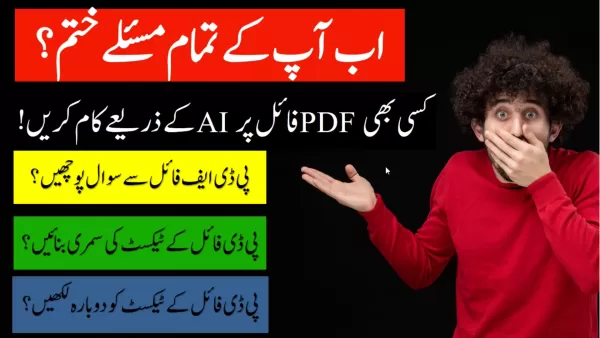
. It enables users to interact with their PDF documents through a more intuitive and efficient interface. By harnessing AI technology, PDF.ai simplifies traditionally time-consuming tasks like summarization, question answering, and text rewriting. This approach significantly reduces the time required to process PDF files.
Primary advantages:
- Time-efficient AI capabilities
- Intuitive user interface
- Significant productivity improvements
Core Capabilities of PDF.ai
PDF.ai provides a comprehensive suite of powerful features designed to optimize your PDF workflow
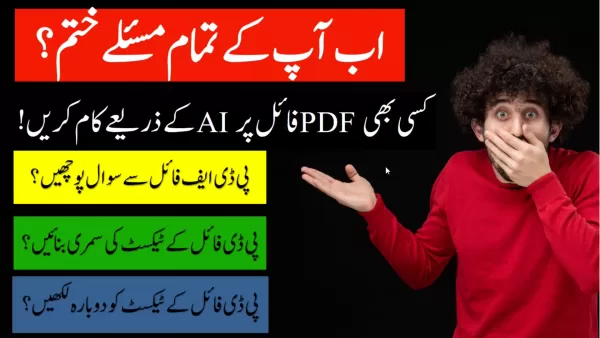
. The platform's fundamental capabilities include:
- AI-Powered Question Answering: Pose questions about your PDF content and receive immediate AI-generated responses.
- Automatic Summarization: Generate condensed summaries of lengthy PDF documents.
- Text Rewriting: Modify text sections to adapt language complexity or adjust tone.
- Intelligent Searching: Quickly locate specific information using AI-enhanced search functionality.
These features deliver substantial efficiency improvements for users handling multiple PDF files.
Getting Started with PDF.ai: A Step-by-Step Guide
Getting started with PDF.ai is straightforward.
- Access PDF.ai Website: Navigate to the PDF.ai website
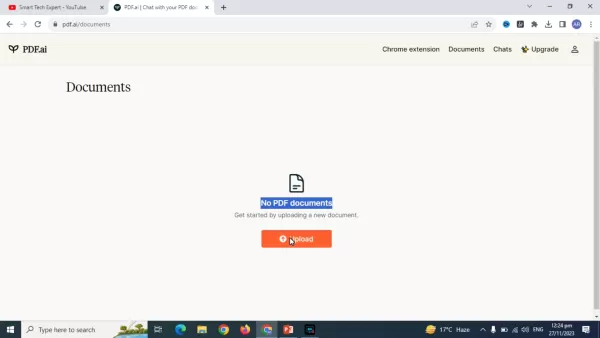
.
- Start For Free: Select the 'Get Started For Free' option
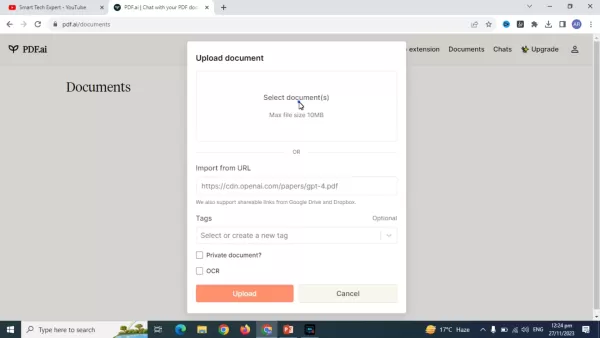
.
- Sign up or Sign in: Create an account or sign in to access the service. You can register using your email, Google account, or GitHub credentials.
- Upload a PDF Document: Upload any PDF file under 10MB in size.
- Interact with Your PDF: Begin interacting with your document using the methods described below.
Following these simple steps will enable you to effectively utilize AI-powered PDF tools.
Unlocking the Power of PDF.ai: How to Effectively Use the Tool
Question Answering with PDF.ai
One of PDF.ai's most valuable features is its capacity to answer questions directly from your PDF documents. This functions similarly to a chat-based AI interface, allowing you to type queries and receive relevant answers in real-time.
- Type your question: Enter your query into the text box within the PDF.ai interface.
- Review the AI-generated response: PDF.ai analyzes your question and provides a concise answer based on your document's content.
This functionality enables rapid information retrieval without manual document searching.
Summarizing PDFs with AI
PDF.ai's summarization tool helps condense lengthy documents into concise overviews. This proves particularly valuable when you need quick content understanding without reading entire files.
- Access the summarization feature: Locate the summarization option within the PDF.ai interface (typically available as a button or menu selection).
- Generate the summary: Activate the summarization function. The AI algorithms analyze the PDF and extract essential points.
Use this feature to quickly grasp main concepts and themes, conserving valuable time.
Rewriting Text with PDF.ai
PDF.ai includes text rewriting capabilities that allow you to select specific text sections and have the AI tool reformulate them for various purposes, such as simplifying complex language or adjusting tone.
- Select the text: Highlight the specific text requiring rewriting.
- Choose the rewriting option: Utilize rewriting tools to rephrase document sections for better alignment with specific use cases.
This approach enables users to better adapt PDF content to their personal style and enhance overall readability.
Pricing: PDF.ai cost
PDF.ai Free version vs Premium
PDF.ai provides both free and premium subscription options to accommodate different user requirements. The free plan offers basic access to core features, allowing users to experience AI-powered PDF management benefits without initial investment. For users with more extensive needs, the premium subscription unlocks additional capabilities and resources.
The free version includes these features:
- Basic summarization and question answering capabilities
- Limited monthly PDF uploads
- Standard customer support access
Premium Subscription provides:
- Unlimited PDF upload capacity
- Advanced AI features (including detailed summaries and complex question answering)
- Priority customer support
- Additional tools and integration options
Pros and Cons of Using PDF.ai
Pros
Significant time savings through automated PDF tasks.
Enhanced productivity via streamlined document workflows.
User-friendly interface design.
Accurate results powered by sophisticated AI algorithms.
Flexible free and premium options suited to various user needs.
Cons
10MB file size limitation may prove insufficient for very large documents.
Full feature access requires premium subscription.
Mandatory internet connection for tool operation.
AI accuracy may vary depending on document quality and complexity.
PDF.ai: Core Features
PDF.ai Interface and File Management
These are the platform's fundamental features:
- Simple Interface: PDF.ai offers a clean and easily navigable interface.
- File Access: Secure storage for PDF files within your AI account.
- File Upload: Simple file upload functionality directly to your account.
- AI Assistant: Dedicated AI assistant for enhanced document interaction.
PDF.ai: Use Cases
Use Cases
These scenarios demonstrate PDF.ai's practical applications.
- Legal Files: Legal professionals can efficiently process case files using AI tools.
- Education: Education professionals can create multiple-choice questions for classroom use.
- Research: Research teams can better organize and analyze research documents.
FAQ
What is the Maximum File Size?
The platform supports PDF files up to 10MB in size.
Can I use a URL to upload the file?
Yes, PDF.ai enables PDF importation via URL links.
How many pages was the PDF book in the example?
The demonstration video featured a 146-page PDF document.
Related Questions
How can AI improve document management workflows?
AI significantly enhances document management workflows by automating tasks like document classification, data extraction, and content summarization. Machine learning algorithms can analyze and categorize documents based on content, streamlining organization and retrieval processes. AI-powered Optical Character Recognition (OCR) converts scanned documents and images into editable, searchable text. Natural Language Processing (NLP) extracts crucial information from documents, reducing manual review requirements and accelerating decision-making. AI-driven tools can also identify and redact sensitive information, improving compliance with privacy regulations. These capabilities minimize time investment while enhancing file quality and organization. AI technology substantially improves business efficiency. PDF.ai specifically enables business practice automation in this context.
Related article
 Six Tech Giants Back Linux Foundation With $12.5M to Tackle AI Vulnerability Noise
To tackle the flood of low-quality security reports produced by AI automation tools, six major tech companies—Anthropic, Amazon (AWS), GitHub, Google, Microsoft, and OpenAI—have collectively contributed $12.5 million in funding to Linux Foundation in
Musk Considered Leaving OpenAI to His Kids as Altman Testifies
This morning, OpenAI CEO Sam Altman took the stand to address former co-founder Elon Musk’s lawsuit challenging the company’s corporate structure.When asked about Musk’s claim that other founders “stole a charity” by launching a for-profit subsidiary
Sam Altman Sparks Debate Over AI's Deceleration
Listen onApple PodcastsListen onSpotifyOpenAI CEO Sam Altman recently suggested that it may be time to “pace the rate of AI development” to allow society to “harden around some of these new capability levels.”On the latest episode of TechCrunch’s Equ
Related Special Topic Recommendations
Business
Six Tech Giants Back Linux Foundation With $12.5M to Tackle AI Vulnerability Noise
To tackle the flood of low-quality security reports produced by AI automation tools, six major tech companies—Anthropic, Amazon (AWS), GitHub, Google, Microsoft, and OpenAI—have collectively contributed $12.5 million in funding to Linux Foundation in
Musk Considered Leaving OpenAI to His Kids as Altman Testifies
This morning, OpenAI CEO Sam Altman took the stand to address former co-founder Elon Musk’s lawsuit challenging the company’s corporate structure.When asked about Musk’s claim that other founders “stole a charity” by launching a for-profit subsidiary
Sam Altman Sparks Debate Over AI's Deceleration
Listen onApple PodcastsListen onSpotifyOpenAI CEO Sam Altman recently suggested that it may be time to “pace the rate of AI development” to allow society to “harden around some of these new capability levels.”On the latest episode of TechCrunch’s Equ
Related Special Topic Recommendations
Business
 Best AI Competitive Research Tools for Small Businesses
2026 Latest Best Top-rated AI Competitive Research Tools for Small Businesses! XIX.AI has curated a highly powerful game-changing collection, updated weekly with rigorous real-world tests and detailed rankings. You can find a comprehensive free vs paid comparison to help you identify the must-try tools that boost your productivity and give you a competitive edge. Explore now to discover your perfect tool!
 9 tools
 xix.ai
Image editing
Photoshop AI Retouch Tools for Ecommerce Apparel, Skin Cleanup, and Color Consistency
xix.ai
Image editing
Photoshop AI Retouch Tools for Ecommerce Apparel, Skin Cleanup, and Color Consistency
2026 Latest Best Photoshop AI retouch tools for ecommerce apparel, skin cleanup, and color consistency! This top-rated curated list features powerful game-changing solutions that help you boost writing efficiency, streamline content creation, and achieve perfect visual results effortlessly. Each tool has undergone real-world tests through weekly updated rankings, complete with free vs paid comparison details. Backed by XIX.AI, it’s the must-try guide for anyone aiming to unlock your AI edge. Explore now!
10 tools
xix.ai
Prompt
Best AI Prompt Libraries for ChatGPT Workflows
2026 Latest Best Top-Rated AI Prompt Libraries for optimizing all types of ChatGPT workflows. XIX.AI has curated a powerful, game-changing collection that goes through rigorous real-world tests to ensure top performance. You can find detailed free vs paid comparisons and expert rankings to help you choose the must-try tools that boost your productivity and unlock your AI edge. Explore now!
11 tools
xix.ai
Education and Learning
AI Quiz Builder Platforms for Teachers, Tutors, and Cohort-Based Learning Programs
2026 Latest Best AI Quiz Builder Platforms for Teachers, Tutors, and Cohort-Based Learning Programs! XIX.AI has curated a top-rated list of powerful game-changing tools that go through real-world tests to deliver accurate rankings. These must-try platforms help boost writing efficiency, streamline content creation, and simplify quiz design across all learning scenarios. Explore now to discover your perfect tool for unlocking your AI edge in teaching!
13 tools
xix.ai
code
AI Pull Request Review Tools for GitHub Teams Handling Refactors, Bugs, and Security Gaps
2026 Latest Best AI Pull Request Review Tools for GitHub Teams are here on XIX.AI! This top-rated curated list showcases powerful game-changing solutions that streamline refactoring, bug fixing, and security gap detection across all team workflows. Enjoy a free vs paid comparison along with real-world tests and detailed rankings to help you find the perfect tool that boosts productivity significantly. Explore now to unlock your AI edge!
12 tools
xix.ai
Text-to-speech
Best AI Text to Speech Tools for Natural Voiceovers
2026 Latest Best Top-rated AI Text to Speech Tools for Natural Voiceovers are here on XIX.AI! This curated list features powerful, game-changing options that deliver crystal-clear voices for every use case, backed by real-world tests and weekly updated rankings. Get a free vs paid comparison to find the must-try solution that boosts your productivity instantly. Explore now to Unlock your AI edge!
11 tools
xix.ai

 Comments (3)
0/500
Comments (3)
0/500
![KeithSanchez]()
Mais pourquoi personne n'a mis d'IA dans les PDF avant ? 😅 Ça fait des années que j'utilise ce genre de logiciel, et j'ai toujours dû tout faire à la main. Si c'est vraiment efficace, ça pourrait tout changer pour les étudiants et les freelances. Par contre, j'espère que la nouvelle génération sera plus respectueuse de la vie privée. Les docs qu'on traite sont souvent sensibles !
![BrianMartinez]()
Honestly, I'm a bit skeptical about the 'revolution' part. Every tool claims to be AI-powered now. I'd love to see a real-world comparison of how this actually saves time versus just using Ctrl+F and a basic editor. The summary feature sounds useful for research though! 🤔
![NicholasClark]()
この記事を読んで、AIがPDF管理をこんなに変えるとは思わなかった!特に要約生成機能は、長い報告書を読む時間がない時に本当に助かるな。でも、AIが間違った要約を作成したら責任は誰が取るんだろう?ちょっと心配… 🤔
Effective PDF file management is essential in today's fast-paced digital landscape. Users commonly struggle with tasks like conducting searches within PDFs, copying text, creating summaries, generating questions, and rewriting content. This guide examines how Artificial Intelligence (AI) is transforming PDF management, streamlining these tasks for greater efficiency. We will explore the practical AI tool PDF.ai, which directly tackles these challenges to enhance your document workflow and boost overall productivity. Discover how you can leverage the power of AI to solve all your PDF-related issues.
Key Points
AI is revolutionizing PDF management by simplifying complex tasks like searching, summarizing, and rewriting.
PDF.ai offers an intuitive AI tool for more efficient interaction with PDF documents.
Users can generate questions, create text, rewrite content, and summarize PDFs using advanced AI.
The platform accommodates PDFs up to 10MB in size, providing flexibility for various document types.
This AI-driven method saves time and delivers greater accuracy compared to traditional PDF management approaches.
Smart Tech Expert features this practical solution for AI-powered PDF management.
The PDF Problem: Common Challenges and Inefficiencies
Searching and Copying Text from PDFs
One of the most frequent frustrations with PDF files involves the difficulty of locating specific information
. Unlike editable documents, PDFs often force users to scroll through pages manually, which proves both time-consuming and inefficient. Additionally, copying text from PDFs frequently results in formatting problems that require extra editing to make the content usable. These issues significantly hinder productivity, particularly when handling extensive documents or working under tight deadlines.
Numerous professionals encounter these challenges daily:
- Research professionals needing to extract data from academic papers.
- Students requiring source citations and information compilation for assignments.
- Business analysts who must pull critical insights from financial reports.
Creating Summaries and Rewriting Content
Generating concise summaries from lengthy PDF documents presents another significant challenge
. Manually reading and extracting key points demands substantial time and effort. Similarly, rewriting sections of PDF content to adapt language or simplify complex material can be exceptionally tedious. These tasks become particularly cumbersome when dealing with intricate legal documents or technical manuals.
Consider these practical applications:
- Legal professionals: Quickly summarize case files or contract documents.
- Technical writers: Adapt technical documentation for different audience levels.
- Project managers: Condense comprehensive project reports into executive summaries.
Generating Questions and Extracting Answers
Creating questions based on PDF content for quizzes, training materials, or self-assessment represents another area where conventional PDF management falls short
. Manually formulating questions and locating answers within documents requires intensive labor.
Furthermore, extracting precise answers from PDFs often demands careful reading and interpretation.
These scenarios demonstrate common applications:
- Educators: Creating student quizzes based on textbook chapters.
- Corporate trainers: Developing training materials and self-assessment questionnaires.
- Self-learners: Testing topic comprehension by generating and answering questions.
Formatting and Alignment Issues
Another common obstacle involves formatting and alignment problems that frequently emerge when copying and pasting content from PDFs into other formats like Word
. These issues can disrupt information flow and visual presentation.
Users then waste valuable time manually correcting formatting errors before they can effectively utilize the content. Proper alignment ensures both readability and professional presentation.
Common formatting challenges include:
- Paragraph alignment problems after transferring to Word
- Inconsistent font styles and sizes
- Disrupted tables and chart formatting
- Incorrect rendering of special characters and symbols
Introducing PDF.ai: Your AI-Powered PDF Solution
Overview of PDF.ai
PDF.ai is an innovative AI-powered platform specifically designed to address common PDF management challenges
. It enables users to interact with their PDF documents through a more intuitive and efficient interface. By harnessing AI technology, PDF.ai simplifies traditionally time-consuming tasks like summarization, question answering, and text rewriting. This approach significantly reduces the time required to process PDF files.
Primary advantages:
- Time-efficient AI capabilities
- Intuitive user interface
- Significant productivity improvements
Core Capabilities of PDF.ai
PDF.ai provides a comprehensive suite of powerful features designed to optimize your PDF workflow
. The platform's fundamental capabilities include:
- AI-Powered Question Answering: Pose questions about your PDF content and receive immediate AI-generated responses.
- Automatic Summarization: Generate condensed summaries of lengthy PDF documents.
- Text Rewriting: Modify text sections to adapt language complexity or adjust tone.
- Intelligent Searching: Quickly locate specific information using AI-enhanced search functionality.
These features deliver substantial efficiency improvements for users handling multiple PDF files.
Getting Started with PDF.ai: A Step-by-Step Guide
Getting started with PDF.ai is straightforward.
- Access PDF.ai Website: Navigate to the PDF.ai website
.
- Start For Free: Select the 'Get Started For Free' option
.
- Sign up or Sign in: Create an account or sign in to access the service. You can register using your email, Google account, or GitHub credentials.
- Upload a PDF Document: Upload any PDF file under 10MB in size.
- Interact with Your PDF: Begin interacting with your document using the methods described below.
Following these simple steps will enable you to effectively utilize AI-powered PDF tools.
Unlocking the Power of PDF.ai: How to Effectively Use the Tool
Question Answering with PDF.ai
One of PDF.ai's most valuable features is its capacity to answer questions directly from your PDF documents. This functions similarly to a chat-based AI interface, allowing you to type queries and receive relevant answers in real-time.
- Type your question: Enter your query into the text box within the PDF.ai interface.
- Review the AI-generated response: PDF.ai analyzes your question and provides a concise answer based on your document's content.
This functionality enables rapid information retrieval without manual document searching.
Summarizing PDFs with AI
PDF.ai's summarization tool helps condense lengthy documents into concise overviews. This proves particularly valuable when you need quick content understanding without reading entire files.
- Access the summarization feature: Locate the summarization option within the PDF.ai interface (typically available as a button or menu selection).
- Generate the summary: Activate the summarization function. The AI algorithms analyze the PDF and extract essential points.
Use this feature to quickly grasp main concepts and themes, conserving valuable time.
Rewriting Text with PDF.ai
PDF.ai includes text rewriting capabilities that allow you to select specific text sections and have the AI tool reformulate them for various purposes, such as simplifying complex language or adjusting tone.
- Select the text: Highlight the specific text requiring rewriting.
- Choose the rewriting option: Utilize rewriting tools to rephrase document sections for better alignment with specific use cases.
This approach enables users to better adapt PDF content to their personal style and enhance overall readability.
Pricing: PDF.ai cost
PDF.ai Free version vs Premium
PDF.ai provides both free and premium subscription options to accommodate different user requirements. The free plan offers basic access to core features, allowing users to experience AI-powered PDF management benefits without initial investment. For users with more extensive needs, the premium subscription unlocks additional capabilities and resources.
The free version includes these features:
- Basic summarization and question answering capabilities
- Limited monthly PDF uploads
- Standard customer support access
Premium Subscription provides:
- Unlimited PDF upload capacity
- Advanced AI features (including detailed summaries and complex question answering)
- Priority customer support
- Additional tools and integration options
Pros and Cons of Using PDF.ai
Pros
Significant time savings through automated PDF tasks.
Enhanced productivity via streamlined document workflows.
User-friendly interface design.
Accurate results powered by sophisticated AI algorithms.
Flexible free and premium options suited to various user needs.
Cons
10MB file size limitation may prove insufficient for very large documents.
Full feature access requires premium subscription.
Mandatory internet connection for tool operation.
AI accuracy may vary depending on document quality and complexity.
PDF.ai: Core Features
PDF.ai Interface and File Management
These are the platform's fundamental features:
- Simple Interface: PDF.ai offers a clean and easily navigable interface.
- File Access: Secure storage for PDF files within your AI account.
- File Upload: Simple file upload functionality directly to your account.
- AI Assistant: Dedicated AI assistant for enhanced document interaction.
PDF.ai: Use Cases
Use Cases
These scenarios demonstrate PDF.ai's practical applications.
- Legal Files: Legal professionals can efficiently process case files using AI tools.
- Education: Education professionals can create multiple-choice questions for classroom use.
- Research: Research teams can better organize and analyze research documents.
FAQ
What is the Maximum File Size?
The platform supports PDF files up to 10MB in size.
Can I use a URL to upload the file?
Yes, PDF.ai enables PDF importation via URL links.
How many pages was the PDF book in the example?
The demonstration video featured a 146-page PDF document.
Related Questions
How can AI improve document management workflows?
AI significantly enhances document management workflows by automating tasks like document classification, data extraction, and content summarization. Machine learning algorithms can analyze and categorize documents based on content, streamlining organization and retrieval processes. AI-powered Optical Character Recognition (OCR) converts scanned documents and images into editable, searchable text. Natural Language Processing (NLP) extracts crucial information from documents, reducing manual review requirements and accelerating decision-making. AI-driven tools can also identify and redact sensitive information, improving compliance with privacy regulations. These capabilities minimize time investment while enhancing file quality and organization. AI technology substantially improves business efficiency. PDF.ai specifically enables business practice automation in this context.








 Six Tech Giants Back Linux Foundation With $12.5M to Tackle AI Vulnerability Noise
To tackle the flood of low-quality security reports produced by AI automation tools, six major tech companies—Anthropic, Amazon (AWS), GitHub, Google, Microsoft, and OpenAI—have collectively contributed $12.5 million in funding to Linux Foundation in
Six Tech Giants Back Linux Foundation With $12.5M to Tackle AI Vulnerability Noise
To tackle the flood of low-quality security reports produced by AI automation tools, six major tech companies—Anthropic, Amazon (AWS), GitHub, Google, Microsoft, and OpenAI—have collectively contributed $12.5 million in funding to Linux Foundation in
 Musk Considered Leaving OpenAI to His Kids as Altman Testifies
This morning, OpenAI CEO Sam Altman took the stand to address former co-founder Elon Musk’s lawsuit challenging the company’s corporate structure.When asked about Musk’s claim that other founders “stole a charity” by launching a for-profit subsidiary
Musk Considered Leaving OpenAI to His Kids as Altman Testifies
This morning, OpenAI CEO Sam Altman took the stand to address former co-founder Elon Musk’s lawsuit challenging the company’s corporate structure.When asked about Musk’s claim that other founders “stole a charity” by launching a for-profit subsidiary
 Sam Altman Sparks Debate Over AI's Deceleration
Listen onApple PodcastsListen onSpotifyOpenAI CEO Sam Altman recently suggested that it may be time to “pace the rate of AI development” to allow society to “harden around some of these new capability levels.”On the latest episode of TechCrunch’s Equ
Sam Altman Sparks Debate Over AI's Deceleration
Listen onApple PodcastsListen onSpotifyOpenAI CEO Sam Altman recently suggested that it may be time to “pace the rate of AI development” to allow society to “harden around some of these new capability levels.”On the latest episode of TechCrunch’s Equ

2026 Latest Best Top-rated AI Competitive Research Tools for Small Businesses! XIX.AI has curated a highly powerful game-changing collection, updated weekly with rigorous real-world tests and detailed rankings. You can find a comprehensive free vs paid comparison to help you identify the must-try tools that boost your productivity and give you a competitive edge. Explore now to discover your perfect tool!
9 tools
xix.ai

2026 Latest Best Photoshop AI retouch tools for ecommerce apparel, skin cleanup, and color consistency! This top-rated curated list features powerful game-changing solutions that help you boost writing efficiency, streamline content creation, and achieve perfect visual results effortlessly. Each tool has undergone real-world tests through weekly updated rankings, complete with free vs paid comparison details. Backed by XIX.AI, it’s the must-try guide for anyone aiming to unlock your AI edge. Explore now!
10 tools
xix.ai

2026 Latest Best Top-Rated AI Prompt Libraries for optimizing all types of ChatGPT workflows. XIX.AI has curated a powerful, game-changing collection that goes through rigorous real-world tests to ensure top performance. You can find detailed free vs paid comparisons and expert rankings to help you choose the must-try tools that boost your productivity and unlock your AI edge. Explore now!
11 tools
xix.ai

2026 Latest Best AI Quiz Builder Platforms for Teachers, Tutors, and Cohort-Based Learning Programs! XIX.AI has curated a top-rated list of powerful game-changing tools that go through real-world tests to deliver accurate rankings. These must-try platforms help boost writing efficiency, streamline content creation, and simplify quiz design across all learning scenarios. Explore now to discover your perfect tool for unlocking your AI edge in teaching!
13 tools
xix.ai

2026 Latest Best AI Pull Request Review Tools for GitHub Teams are here on XIX.AI! This top-rated curated list showcases powerful game-changing solutions that streamline refactoring, bug fixing, and security gap detection across all team workflows. Enjoy a free vs paid comparison along with real-world tests and detailed rankings to help you find the perfect tool that boosts productivity significantly. Explore now to unlock your AI edge!
12 tools
xix.ai

2026 Latest Best Top-rated AI Text to Speech Tools for Natural Voiceovers are here on XIX.AI! This curated list features powerful, game-changing options that deliver crystal-clear voices for every use case, backed by real-world tests and weekly updated rankings. Get a free vs paid comparison to find the must-try solution that boosts your productivity instantly. Explore now to Unlock your AI edge!
11 tools
xix.ai

Mais pourquoi personne n'a mis d'IA dans les PDF avant ? 😅 Ça fait des années que j'utilise ce genre de logiciel, et j'ai toujours dû tout faire à la main. Si c'est vraiment efficace, ça pourrait tout changer pour les étudiants et les freelances. Par contre, j'espère que la nouvelle génération sera plus respectueuse de la vie privée. Les docs qu'on traite sont souvent sensibles !
Honestly, I'm a bit skeptical about the 'revolution' part. Every tool claims to be AI-powered now. I'd love to see a real-world comparison of how this actually saves time versus just using Ctrl+F and a basic editor. The summary feature sounds useful for research though! 🤔
この記事を読んで、AIがPDF管理をこんなに変えるとは思わなかった!特に要約生成機能は、長い報告書を読む時間がない時に本当に助かるな。でも、AIが間違った要約を作成したら責任は誰が取るんだろう?ちょっと心配… 🤔












