


 Home
HomeAI-Powered Formula Editor Enhances Excel Efficiency and Productivity
Unlock Excel's Full Potential with the AI-Aided Formula Editor
Excel is a powerhouse for data analysis, but mastering its complex formulas can be daunting. If you've ever struggled with nested functions, array formulas, or even simple VLOOKUPs, you're not alone. That’s where the AI-Aided Formula Editor comes in—a revolutionary add-in that simplifies formula creation using artificial intelligence.
Whether you're a beginner or an Excel veteran, this tool can save you time, reduce errors, and help you work smarter. In this guide, we’ll explore:
✅ What the AI-Aided Formula Editor is
✅ How to install it
✅ Step-by-step use cases
✅ Pros and cons
✅ Pricing & availability
Let’s dive in!
What is the AI-Aided Formula Editor?
The AI-Aided Formula Editor is an Excel add-in that generates formulas based on plain-language descriptions. Instead of memorizing syntax, you simply describe what you need—like "Sum all sales from January"—and the AI suggests the correct formula.
Why It’s a Game-Changer
✔ Simplifies formula creation – No more guessing syntax.
✔ Reduces errors – AI-generated formulas minimize mistakes.
✔ Boosts productivity – Spend less time debugging, more time analyzing.
✔ Helps you learn – See how formulas are built step-by-step.
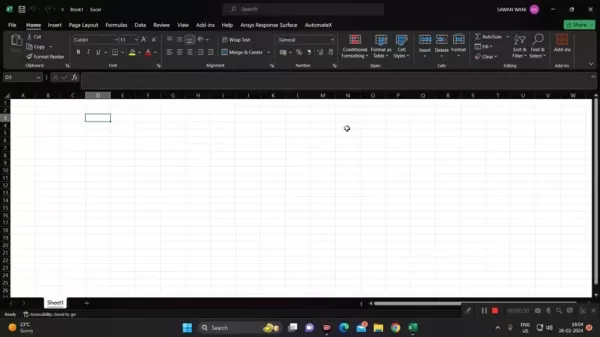
The AI-Aided Formula Editor in action—your personal Excel assistant.
How to Install the AI-Aided Formula Editor
Step-by-Step Installation Guide
- Open Excel → Go to the "Insert" tab.
- Click "Get Add-ins" (Office Add-ins store).
- Search for "AI-Aided Formula Editor".
- Click "Add" → Accept permissions.
- Restart Excel if needed.
Easy installation—just a few clicks and you're ready.
How to Use the AI-Aided Formula Editor
Generating Formulas with AI
- Open the add-in from the Excel ribbon.
- Describe your formula in plain language (e.g., "Calculate average revenue for Q1").
- Review the AI’s suggestion (e.g.,
=AVERAGE(B2:B10)). - Insert the formula into your sheet.
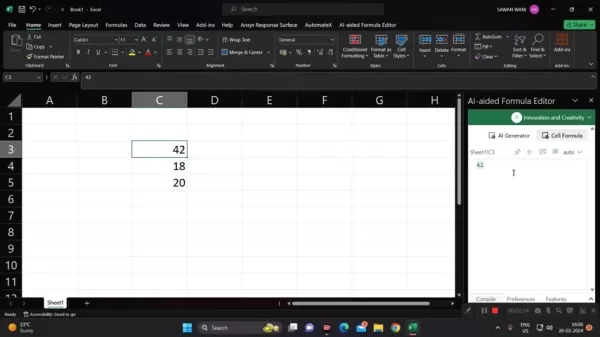
Just type what you need—the AI does the rest.
Real-World Use Cases
- Finance: Automate NPV & IRR calculations.
- Sales: Sum monthly revenue with a single description.
- HR: Calculate payroll deductions without manual errors.
Pricing & Availability
Free vs. Paid Versions
- Free tier (limited features, great for testing).
- Subscription plans (unlimited AI-generated formulas).
- One-time purchase (some versions offer lifetime access).
Check the Office Add-ins store for the latest pricing.
Pros & Cons
✅ Advantages
✔ Saves time – No more manual formula writing.
✔ Reduces errors – AI ensures accuracy.
✔ Great for beginners – Learn Excel faster.
✔ Works with complex formulas – Even handles nested functions.
❌ Limitations
✖ Requires internet – Cloud-based AI needs a connection.
✖ May not support every niche function – Some advanced formulas may still need manual tweaking.
✖ Privacy concerns – Cloud processing means data leaves Excel.
Final Verdict: Is It Worth It?
If you work with Excel regularly—yes, absolutely. The AI-Aided Formula Editor eliminates guesswork, speeds up workflows, and helps users at all levels.
🔹 Best for:
- Beginners learning Excel.
- Busy professionals who need quick solutions.
- Teams looking to standardize formula accuracy.
🚀 Try it today and transform how you use Excel!
Got Questions?
Drop them in the comments or join our Discord for real-time support!
More AI-powered Excel tools? Check out our guide on ChatGPT for Excel! 🚀
Related article
 ByteDance Boosts Core AI Incentives as Doubao Surges 14.6%
ByteDance recently convened a DouBao equity briefing to unveil fresh incentive policies for staff involved in the DouBao division. The strike price for DouBao shares has been lifted from $14.85 in June 2026 to $17.02, marking an approximate 14.6% inc
MiniMax Unveils 10x Team Program to Incentivize Global AI Experts
MiniMax (Xiyu Technology), the General Artificial Intelligence Lab, has officially launched "10x Team," a global talent collaboration initiative. This program aims to recruit top experts across industries to explore the deep application of large mode
South Korea Breaks Ground on National AI Computing Center, Investing 2.5 Trillion Won with 2028 Target
South Korean outlet EtNews reports that groundbreaking for the Korea AI Computing Center (KOACC) took place on August 3 at the Solar City data center park in Sunan, Jeollanam-do. Backed by a total investment of 2.5 trillion KRW (roughly 11.838 billio
Related Special Topic Recommendations
Education and Learning
ByteDance Boosts Core AI Incentives as Doubao Surges 14.6%
ByteDance recently convened a DouBao equity briefing to unveil fresh incentive policies for staff involved in the DouBao division. The strike price for DouBao shares has been lifted from $14.85 in June 2026 to $17.02, marking an approximate 14.6% inc
MiniMax Unveils 10x Team Program to Incentivize Global AI Experts
MiniMax (Xiyu Technology), the General Artificial Intelligence Lab, has officially launched "10x Team," a global talent collaboration initiative. This program aims to recruit top experts across industries to explore the deep application of large mode
South Korea Breaks Ground on National AI Computing Center, Investing 2.5 Trillion Won with 2028 Target
South Korean outlet EtNews reports that groundbreaking for the Korea AI Computing Center (KOACC) took place on August 3 at the Solar City data center park in Sunan, Jeollanam-do. Backed by a total investment of 2.5 trillion KRW (roughly 11.838 billio
Related Special Topic Recommendations
Education and Learning
 AI Study Tools for Homework and Exam Prep
2026 Latest Best AI Study Tools for Homework and Exam Prep! XIX.AI curates a top-rated list of powerful, game-changing tools that help students boost productivity, streamline homework completion, and ace exams through real-world tests. Get a free vs paid comparison, detailed rankings, and must-try options to unlock your AI edge. Explore now!
 10 tools
 xix.ai
Music composition
AI Vocal Demo Tools for Songwriters, Hooks, Toplines, and Multilingual Draft Sessions
xix.ai
Music composition
AI Vocal Demo Tools for Songwriters, Hooks, Toplines, and Multilingual Draft Sessions
2026 Latest Best AI Vocal Demo Tools for Songwriters, Hook Creators, and Multi-Language Content Teams! XIX.AI has curated a top-rated list of powerful game-changing tools that go through rigorous real-world tests. You’ll find detailed free vs paid comparison data, comprehensive rankings, and must-try options to help you boost writing efficiency and unlock your creative potential. Explore now to discover your perfect tool for all your content needs!
9 tools
xix.ai
Business
Best AI Competitive Research Tools for Small Businesses
2026 Latest Best Top-rated AI Competitive Research Tools for Small Businesses! XIX.AI has curated a highly powerful game-changing collection, updated weekly with rigorous real-world tests and detailed rankings. You can find a comprehensive free vs paid comparison to help you identify the must-try tools that boost your productivity and give you a competitive edge. Explore now to discover your perfect tool!
9 tools
xix.ai
Image editing
Photoshop AI Retouch Tools for Ecommerce Apparel, Skin Cleanup, and Color Consistency
2026 Latest Best Photoshop AI retouch tools for ecommerce apparel, skin cleanup, and color consistency! This top-rated curated list features powerful game-changing solutions that help you boost writing efficiency, streamline content creation, and achieve perfect visual results effortlessly. Each tool has undergone real-world tests through weekly updated rankings, complete with free vs paid comparison details. Backed by XIX.AI, it’s the must-try guide for anyone aiming to unlock your AI edge. Explore now!
10 tools
xix.ai
Prompt
Best AI Prompt Libraries for ChatGPT Workflows
2026 Latest Best Top-Rated AI Prompt Libraries for optimizing all types of ChatGPT workflows. XIX.AI has curated a powerful, game-changing collection that goes through rigorous real-world tests to ensure top performance. You can find detailed free vs paid comparisons and expert rankings to help you choose the must-try tools that boost your productivity and unlock your AI edge. Explore now!
11 tools
xix.ai
Education and Learning
AI Quiz Builder Platforms for Teachers, Tutors, and Cohort-Based Learning Programs
2026 Latest Best AI Quiz Builder Platforms for Teachers, Tutors, and Cohort-Based Learning Programs! XIX.AI has curated a top-rated list of powerful game-changing tools that go through real-world tests to deliver accurate rankings. These must-try platforms help boost writing efficiency, streamline content creation, and simplify quiz design across all learning scenarios. Explore now to discover your perfect tool for unlocking your AI edge in teaching!
13 tools
xix.ai

 Comments (3)
0/500
Comments (3)
0/500
![KeithMoore]()
This AI formula editor sounds like a game-changer for Excel nerds like me! 😎 I’m curious, though—how does it handle super complex datasets? Anyone tried it yet?
![DanielPerez]()
This AI formula editor sounds like a game-changer for Excel! I always mess up those nested functions, so having a smart tool to guide me is awesome. Can't wait to try it and see how much time I save! 😎
![JustinMartin]()
This AI formula editor sounds like a game-changer for Excel! I always mess up those nested functions, so this could save me hours of frustration. 😅 Anyone tried it yet? How’s it holding up with big datasets?
Unlock Excel's Full Potential with the AI-Aided Formula Editor
Excel is a powerhouse for data analysis, but mastering its complex formulas can be daunting. If you've ever struggled with nested functions, array formulas, or even simple VLOOKUPs, you're not alone. That’s where the AI-Aided Formula Editor comes in—a revolutionary add-in that simplifies formula creation using artificial intelligence.
Whether you're a beginner or an Excel veteran, this tool can save you time, reduce errors, and help you work smarter. In this guide, we’ll explore:
✅ What the AI-Aided Formula Editor is
✅ How to install it
✅ Step-by-step use cases
✅ Pros and cons
✅ Pricing & availability
Let’s dive in!
What is the AI-Aided Formula Editor?
The AI-Aided Formula Editor is an Excel add-in that generates formulas based on plain-language descriptions. Instead of memorizing syntax, you simply describe what you need—like "Sum all sales from January"—and the AI suggests the correct formula.
Why It’s a Game-Changer
✔ Simplifies formula creation – No more guessing syntax.
✔ Reduces errors – AI-generated formulas minimize mistakes.
✔ Boosts productivity – Spend less time debugging, more time analyzing.
✔ Helps you learn – See how formulas are built step-by-step.
The AI-Aided Formula Editor in action—your personal Excel assistant.
How to Install the AI-Aided Formula Editor
Step-by-Step Installation Guide
- Open Excel → Go to the "Insert" tab.
- Click "Get Add-ins" (Office Add-ins store).
- Search for "AI-Aided Formula Editor".
- Click "Add" → Accept permissions.
- Restart Excel if needed.
Easy installation—just a few clicks and you're ready.
How to Use the AI-Aided Formula Editor
Generating Formulas with AI
- Open the add-in from the Excel ribbon.
- Describe your formula in plain language (e.g., "Calculate average revenue for Q1").
- Review the AI’s suggestion (e.g.,
=AVERAGE(B2:B10)). - Insert the formula into your sheet.
Just type what you need—the AI does the rest.
Real-World Use Cases
- Finance: Automate NPV & IRR calculations.
- Sales: Sum monthly revenue with a single description.
- HR: Calculate payroll deductions without manual errors.
Pricing & Availability
Free vs. Paid Versions
- Free tier (limited features, great for testing).
- Subscription plans (unlimited AI-generated formulas).
- One-time purchase (some versions offer lifetime access).
Check the Office Add-ins store for the latest pricing.
Pros & Cons
✅ Advantages
✔ Saves time – No more manual formula writing.
✔ Reduces errors – AI ensures accuracy.
✔ Great for beginners – Learn Excel faster.
✔ Works with complex formulas – Even handles nested functions.
❌ Limitations
✖ Requires internet – Cloud-based AI needs a connection.
✖ May not support every niche function – Some advanced formulas may still need manual tweaking.
✖ Privacy concerns – Cloud processing means data leaves Excel.
Final Verdict: Is It Worth It?
If you work with Excel regularly—yes, absolutely. The AI-Aided Formula Editor eliminates guesswork, speeds up workflows, and helps users at all levels.
🔹 Best for:
- Beginners learning Excel.
- Busy professionals who need quick solutions.
- Teams looking to standardize formula accuracy.
🚀 Try it today and transform how you use Excel!
Got Questions?
Drop them in the comments or join our Discord for real-time support!
More AI-powered Excel tools? Check out our guide on ChatGPT for Excel! 🚀








 ByteDance Boosts Core AI Incentives as Doubao Surges 14.6%
ByteDance recently convened a DouBao equity briefing to unveil fresh incentive policies for staff involved in the DouBao division. The strike price for DouBao shares has been lifted from $14.85 in June 2026 to $17.02, marking an approximate 14.6% inc
ByteDance Boosts Core AI Incentives as Doubao Surges 14.6%
ByteDance recently convened a DouBao equity briefing to unveil fresh incentive policies for staff involved in the DouBao division. The strike price for DouBao shares has been lifted from $14.85 in June 2026 to $17.02, marking an approximate 14.6% inc
 MiniMax Unveils 10x Team Program to Incentivize Global AI Experts
MiniMax (Xiyu Technology), the General Artificial Intelligence Lab, has officially launched "10x Team," a global talent collaboration initiative. This program aims to recruit top experts across industries to explore the deep application of large mode
MiniMax Unveils 10x Team Program to Incentivize Global AI Experts
MiniMax (Xiyu Technology), the General Artificial Intelligence Lab, has officially launched "10x Team," a global talent collaboration initiative. This program aims to recruit top experts across industries to explore the deep application of large mode
 South Korea Breaks Ground on National AI Computing Center, Investing 2.5 Trillion Won with 2028 Target
South Korean outlet EtNews reports that groundbreaking for the Korea AI Computing Center (KOACC) took place on August 3 at the Solar City data center park in Sunan, Jeollanam-do. Backed by a total investment of 2.5 trillion KRW (roughly 11.838 billio
South Korea Breaks Ground on National AI Computing Center, Investing 2.5 Trillion Won with 2028 Target
South Korean outlet EtNews reports that groundbreaking for the Korea AI Computing Center (KOACC) took place on August 3 at the Solar City data center park in Sunan, Jeollanam-do. Backed by a total investment of 2.5 trillion KRW (roughly 11.838 billio

2026 Latest Best AI Study Tools for Homework and Exam Prep! XIX.AI curates a top-rated list of powerful, game-changing tools that help students boost productivity, streamline homework completion, and ace exams through real-world tests. Get a free vs paid comparison, detailed rankings, and must-try options to unlock your AI edge. Explore now!
10 tools
xix.ai

2026 Latest Best AI Vocal Demo Tools for Songwriters, Hook Creators, and Multi-Language Content Teams! XIX.AI has curated a top-rated list of powerful game-changing tools that go through rigorous real-world tests. You’ll find detailed free vs paid comparison data, comprehensive rankings, and must-try options to help you boost writing efficiency and unlock your creative potential. Explore now to discover your perfect tool for all your content needs!
9 tools
xix.ai

2026 Latest Best Top-rated AI Competitive Research Tools for Small Businesses! XIX.AI has curated a highly powerful game-changing collection, updated weekly with rigorous real-world tests and detailed rankings. You can find a comprehensive free vs paid comparison to help you identify the must-try tools that boost your productivity and give you a competitive edge. Explore now to discover your perfect tool!
9 tools
xix.ai

2026 Latest Best Photoshop AI retouch tools for ecommerce apparel, skin cleanup, and color consistency! This top-rated curated list features powerful game-changing solutions that help you boost writing efficiency, streamline content creation, and achieve perfect visual results effortlessly. Each tool has undergone real-world tests through weekly updated rankings, complete with free vs paid comparison details. Backed by XIX.AI, it’s the must-try guide for anyone aiming to unlock your AI edge. Explore now!
10 tools
xix.ai

2026 Latest Best Top-Rated AI Prompt Libraries for optimizing all types of ChatGPT workflows. XIX.AI has curated a powerful, game-changing collection that goes through rigorous real-world tests to ensure top performance. You can find detailed free vs paid comparisons and expert rankings to help you choose the must-try tools that boost your productivity and unlock your AI edge. Explore now!
11 tools
xix.ai

2026 Latest Best AI Quiz Builder Platforms for Teachers, Tutors, and Cohort-Based Learning Programs! XIX.AI has curated a top-rated list of powerful game-changing tools that go through real-world tests to deliver accurate rankings. These must-try platforms help boost writing efficiency, streamline content creation, and simplify quiz design across all learning scenarios. Explore now to discover your perfect tool for unlocking your AI edge in teaching!
13 tools
xix.ai

This AI formula editor sounds like a game-changer for Excel nerds like me! 😎 I’m curious, though—how does it handle super complex datasets? Anyone tried it yet?
This AI formula editor sounds like a game-changer for Excel! I always mess up those nested functions, so having a smart tool to guide me is awesome. Can't wait to try it and see how much time I save! 😎
This AI formula editor sounds like a game-changer for Excel! I always mess up those nested functions, so this could save me hours of frustration. 😅 Anyone tried it yet? How’s it holding up with big datasets?












