


 Home
HomeAI-Powered 3D Model Creation: The Ultimate Guide
Transforming 2D Images into 3D Models with AI: A Comprehensive Guide
Ever wondered how you can turn a flat image into a vibrant 3D model? Thanks to artificial intelligence, what was once a daunting task has become much simpler. This guide walks you through the process of using AI to convert your 2D images into 3D models, opening up a world of possibilities for designers, artists, and hobbyists. Whether you're crafting characters for video games, visualizing architectural designs, or simply diving into 3D art, this guide is your key to bringing your ideas to life with AI.
Key Points
- Transform 2D images into 3D models using AI.
- Harness Google Colab and PiFuHD for 3D model creation.
- Simplify the 3D modeling process with AI tools.
- Discover new avenues in 3D art, design, and visualization.
- Download and integrate your 3D models into various projects.
Understanding AI-Powered 3D Model Creation
What is AI-Powered 3D Modeling?
AI-powered 3D modeling uses advanced algorithms to transform 2D images into 3D models automatically. This approach drastically cuts down the time and expertise needed compared to traditional methods. By analyzing a 2D image, AI can interpret its geometry and construct a 3D model. This technology is revolutionizing fields like gaming, architecture, and product design, making 3D modeling more accessible. The real game-changer? The ability to quickly experiment with designs and create complex models with less hassle.
Key benefits include:
- Efficiency: Speed up the model creation process.
- Accessibility: Open up 3D modeling to those without extensive experience.
- Innovation: Unlock new design and visualization opportunities.
- Automation: Minimize manual work and boost productivity.
The Role of PiFuHD in 3D Modeling
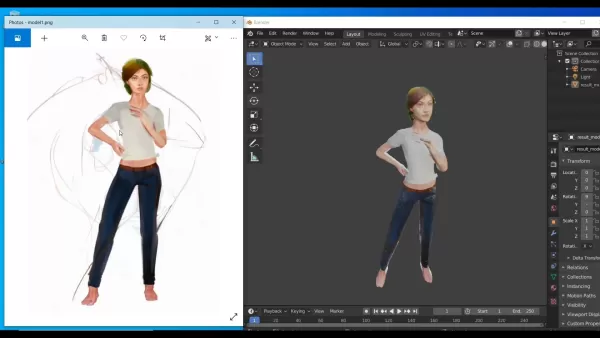
PiFuHD, or Pixel-aligned Implicit Function for High-Definition Human Digitization, is a cutting-edge AI framework that creates detailed 3D human models from 2D images. It's excellent at capturing intricate details and producing high-resolution models, making it perfect for creating realistic human avatars for VR, AR, and gaming.
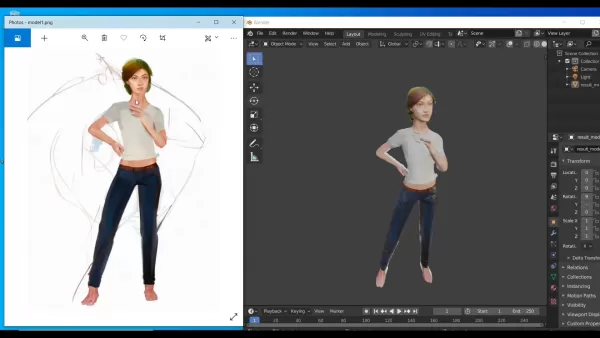
What makes PiFuHD stand out is its ability to handle complex human poses and clothing details. It uses implicit functions to represent the 3D surface, allowing for top-notch reconstructions even with limited data. This innovation has made PiFuHD a go-to tool for 3D human digitization, pushing the boundaries of virtual character design.
Features of PiFuHD:
- High-Definition Reconstruction: Captures minute details for lifelike models.
- Pose and Clothing Handling: Manages complex human poses and clothing intricacies.
- Implicit Function Representation: Utilizes implicit functions for superior quality reconstructions.
- Single or Multiple Image Input: Works with one or several 2D images for 3D reconstruction.
Step-by-Step Guide to Transforming 2D Images into 3D Models
Prerequisites and Setup
Before you start, make sure you have:
- A Google Account for accessing Google Colab.
- A web browser—Google Chrome works best.
- A clear, high-resolution 2D image of your subject.
To set up:
- Open Google Colab and start a new notebook.
- Access the PiFuHD demo notebook via the provided link.
- Sign in to your Google account to enable the necessary permissions.
Getting this right from the start ensures a smooth 3D modeling journey.
Cloning the PiFuHD Repository
Cloning the PiFuHD repository is essential to get all the code and resources you need in Google Colab. Here's how you do it:

- Find the cloning command in the notebook, usually starting with `git clone`.
- Run the command by clicking the play button next to it.
- Wait for the process to finish, keeping an eye on the output logs for success messages.
This step ensures you have everything you need to run PiFuHD effectively.
Configuring Input Data and Uploading Your Image
Next, you'll need to configure the input data and upload your image. This tells PiFuHD which image to work with for the best results.
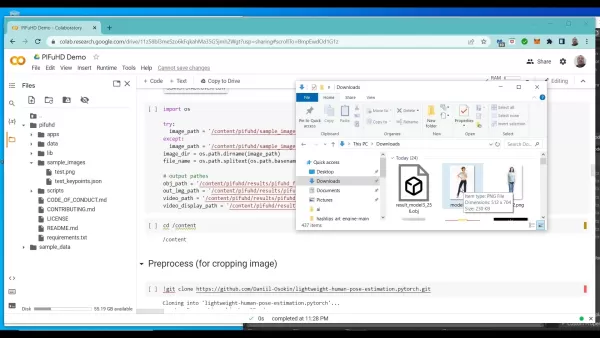
- Locate the input configuration section in the notebook.
- Upload your image using the notebook's file upload feature, ensuring it's in a supported format like PNG or JPEG.
- Update the image path in the code to point to your uploaded image.
- Rename your image to 'model1.png' in the file list.
With these steps, you're ready for PiFuHD to work its magic.
Running the PiFuHD Model
Now, it's time to run the PiFuHD model and see your 2D image come to life in 3D.
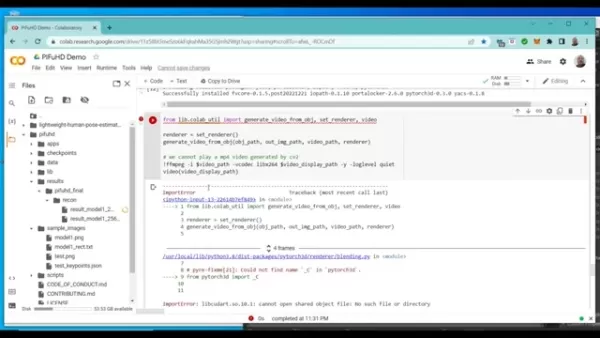
- Find the section with the code for running the PiFuHD model.
- Click the play button to start the process.
- Keep an eye on the output logs to monitor progress.
- Be patient; the process might take a few minutes.
Once complete, you'll have a 3D model ready to download and use.
Downloading and Using the 3D Model
After PiFuHD does its thing, you can download and use your new 3D model. Typically, it's in OBJ format, which works with most 3D software.
- Go to the directory in Google Colab where the output files are stored.
- Look for the OBJ file with your model.
- Download the file to your local machine.
- Import the OBJ file into your preferred 3D software like Blender to view, edit, and refine it.
Now, you can take your 3D model to the next level with further customization.
Practical Applications of AI-Generated 3D Models
Gaming and Virtual Reality
AI-generated 3D models are shaking up the gaming and VR industries. They offer a cost-effective way to create realistic characters and environments, enhancing player immersion. In VR, these models help create convincing, lifelike worlds, whether for social platforms or educational simulations.
Benefits include:
- Realistic Characters: Bring games and VR to life with detailed models.
- Cost-Effective: Save time and money on 3D modeling.
- Scalability: Easily create a variety of characters and settings.
- Immersive Experience: Create a sense of presence in virtual worlds.
Architecture and Design Visualization
Architects and designers can use AI-generated 3D models to bring their visions to life with stunning realism. By turning 2D blueprints into 3D models, they can better understand spatial relationships and aesthetics, leading to more informed decisions and clearer communication with clients.
These models can also create virtual tours, allowing clients to explore designs before construction, identifying potential issues early and reducing costly changes.
Advantages:
- Realistic Visualization: See your designs in a new light.
- Client Communication: Share your vision more effectively.
- Virtual Tours: Offer immersive experiences for feedback.
- Early Issue Detection: Spot and fix design flaws before they become costly.
Product Design and Prototyping
In product design, AI-generated 3D models speed up the prototyping process. By converting 2D sketches into 3D models, designers can quickly iterate and test their ideas before moving to physical production, saving both time and money.
Benefits:
- Faster Iteration: Rapidly refine your product designs.
- Virtual Prototyping: Test designs virtually before physical production.
- Cost Reduction: Cut down on prototyping expenses.
- Improved Design: Gain deeper insights into product form and function.
Pricing Models for AI-Powered 3D Modeling Tools
Overview of Common Pricing Structures
Pricing for AI-powered 3D modeling tools can vary widely. Here are some common structures:
- Subscription-Based: Pay a regular fee for ongoing access and updates.
- Pay-Per-Use: Charged based on the number of models you create or resources used.
- One-Time Purchase: Buy a perpetual license, though updates might not be included.
- Free Tier: Limited features for beginners or to test the software.
Pros and Cons of Using PiFuHD for 3D Human Digitization
Pros
- High-Definition Reconstruction: Creates highly detailed models.
- Pose and Clothing Handling: Manages complex human poses and clothing details well.
- Implicit Function Representation: Ensures high-quality reconstructions.
- Single or Multiple Image Input: Flexible input options for 3D reconstruction.
Cons
- Computational Resources: Requires significant computing power.
- Data Dependency: Quality depends on training data.
- Generalization: May struggle with subjects outside its training data.
- Complex Setup: Can be challenging for those new to the technology.
Key Features of AI-Powered 3D Modeling Platforms
Core Features that Drive Efficiency and Innovation
AI-powered 3D modeling platforms come packed with features that streamline the creation process and foster innovation:
- Automated 3D Reconstruction: Turn 2D images into 3D models automatically.
- Intelligent Texture Generation: Apply realistic textures with AI.
- Pose Estimation: Accurately estimate object or character poses in 2D images.
- Scene Understanding: Analyze context and relationships within a scene.
- AI-Powered Editing Tools: Simplify editing and refining 3D models.
- Integration with 3D Software: Works seamlessly with popular 3D software.
- Cloud-Based Processing: Utilize cloud resources for faster processing.
Real-World Use Cases of AI-Powered 3D Modeling
Transforming Industries with AI-Driven 3D Content Creation
AI-powered 3D modeling is making waves across various industries:
- Gaming: Crafting realistic characters and environments.
- Virtual Reality: Building immersive virtual worlds for training and entertainment.
- Architecture: Visualizing designs and offering virtual tours.
- Product Design: Streamlining the design and prototyping process.
- Healthcare: Creating 3D models for medical training and diagnostics.
- Manufacturing: Optimizing processes and creating virtual prototypes.
- Film and Animation: Generating 3D characters and settings for projects.
Frequently Asked Questions
What are the main advantages of using AI for 3D modeling?
The advantages include faster model creation, accessibility for non-experts, new design and visualization opportunities, and reduced manual effort with increased productivity.
Is it necessary to have prior 3D modeling experience to use AI-powered tools?
No, AI tools are designed to be user-friendly, making them accessible even to those without prior 3D modeling experience.
What types of input images are best suited for AI-powered 3D reconstruction?
Clear, high-resolution 2D images with good lighting and minimal occlusions work best. Multiple views of the subject can enhance reconstruction accuracy.
What file formats are typically supported for AI-generated 3D models?
Common formats include OBJ, STL, and FBX, which are compatible with most 3D software.
Can AI-generated 3D models be edited and refined in traditional 3D software?
Yes, these models can be imported into software like Blender, Maya, or 3ds Max for further editing, refining, and texturing.
Related Questions
How does AI compare to traditional 3D modeling methods?
Traditional 3D modeling requires manual effort and expertise, while AI automates much of the process, offering greater efficiency and accessibility. Traditional methods provide more control and precision, but AI speeds up the process.
What are the limitations of AI-powered 3D modeling?
AI-powered modeling depends on the quality of input images, can struggle with complex scenes, and may need additional refinement in traditional software to meet high-quality standards.
What are the ethical considerations associated with AI-generated 3D models?
Ethical concerns include the potential for misuse, such as creating deepfakes or offensive content. Responsible use is crucial to prevent harm.
What are the future trends in AI-powered 3D modeling?
Future trends point towards more accurate and realistic models, increased automation, and integration with technologies like AR and the metaverse, promising even more powerful tools ahead.
Related article
 Musk Considered Leaving OpenAI to His Kids as Altman Testifies
This morning, OpenAI CEO Sam Altman took the stand to address former co-founder Elon Musk’s lawsuit challenging the company’s corporate structure.When asked about Musk’s claim that other founders “stole a charity” by launching a for-profit subsidiary
Sam Altman Sparks Debate Over AI's Deceleration
Listen onApple PodcastsListen onSpotifyOpenAI CEO Sam Altman recently suggested that it may be time to “pace the rate of AI development” to allow society to “harden around some of these new capability levels.”On the latest episode of TechCrunch’s Equ
Anthropic Opens Doors to EU Cybersecurity Agency as Mythos5 Model Faces Compliance Exam
Artificial intelligence compliance regulations are advancing significantly. Leading AI firm Anthropic has officially granted the European Union's cybersecurity authority access to its Mythos AI model, a pivotal move for this advanced large language m
Related Special Topic Recommendations
Business
Musk Considered Leaving OpenAI to His Kids as Altman Testifies
This morning, OpenAI CEO Sam Altman took the stand to address former co-founder Elon Musk’s lawsuit challenging the company’s corporate structure.When asked about Musk’s claim that other founders “stole a charity” by launching a for-profit subsidiary
Sam Altman Sparks Debate Over AI's Deceleration
Listen onApple PodcastsListen onSpotifyOpenAI CEO Sam Altman recently suggested that it may be time to “pace the rate of AI development” to allow society to “harden around some of these new capability levels.”On the latest episode of TechCrunch’s Equ
Anthropic Opens Doors to EU Cybersecurity Agency as Mythos5 Model Faces Compliance Exam
Artificial intelligence compliance regulations are advancing significantly. Leading AI firm Anthropic has officially granted the European Union's cybersecurity authority access to its Mythos AI model, a pivotal move for this advanced large language m
Related Special Topic Recommendations
Business
 Best AI Competitive Research Tools for Small Businesses
2026 Latest Best Top-rated AI Competitive Research Tools for Small Businesses! XIX.AI has curated a highly powerful game-changing collection, updated weekly with rigorous real-world tests and detailed rankings. You can find a comprehensive free vs paid comparison to help you identify the must-try tools that boost your productivity and give you a competitive edge. Explore now to discover your perfect tool!
 9 tools
 xix.ai
Image editing
Photoshop AI Retouch Tools for Ecommerce Apparel, Skin Cleanup, and Color Consistency
xix.ai
Image editing
Photoshop AI Retouch Tools for Ecommerce Apparel, Skin Cleanup, and Color Consistency
2026 Latest Best Photoshop AI retouch tools for ecommerce apparel, skin cleanup, and color consistency! This top-rated curated list features powerful game-changing solutions that help you boost writing efficiency, streamline content creation, and achieve perfect visual results effortlessly. Each tool has undergone real-world tests through weekly updated rankings, complete with free vs paid comparison details. Backed by XIX.AI, it’s the must-try guide for anyone aiming to unlock your AI edge. Explore now!
10 tools
xix.ai
Prompt
Best AI Prompt Libraries for ChatGPT Workflows
2026 Latest Best Top-Rated AI Prompt Libraries for optimizing all types of ChatGPT workflows. XIX.AI has curated a powerful, game-changing collection that goes through rigorous real-world tests to ensure top performance. You can find detailed free vs paid comparisons and expert rankings to help you choose the must-try tools that boost your productivity and unlock your AI edge. Explore now!
11 tools
xix.ai
Education and Learning
AI Quiz Builder Platforms for Teachers, Tutors, and Cohort-Based Learning Programs
2026 Latest Best AI Quiz Builder Platforms for Teachers, Tutors, and Cohort-Based Learning Programs! XIX.AI has curated a top-rated list of powerful game-changing tools that go through real-world tests to deliver accurate rankings. These must-try platforms help boost writing efficiency, streamline content creation, and simplify quiz design across all learning scenarios. Explore now to discover your perfect tool for unlocking your AI edge in teaching!
13 tools
xix.ai
code
AI Pull Request Review Tools for GitHub Teams Handling Refactors, Bugs, and Security Gaps
2026 Latest Best AI Pull Request Review Tools for GitHub Teams are here on XIX.AI! This top-rated curated list showcases powerful game-changing solutions that streamline refactoring, bug fixing, and security gap detection across all team workflows. Enjoy a free vs paid comparison along with real-world tests and detailed rankings to help you find the perfect tool that boosts productivity significantly. Explore now to unlock your AI edge!
12 tools
xix.ai
Text-to-speech
Best AI Text to Speech Tools for Natural Voiceovers
2026 Latest Best Top-rated AI Text to Speech Tools for Natural Voiceovers are here on XIX.AI! This curated list features powerful, game-changing options that deliver crystal-clear voices for every use case, backed by real-world tests and weekly updated rankings. Get a free vs paid comparison to find the must-try solution that boosts your productivity instantly. Explore now to Unlock your AI edge!
11 tools
xix.ai

 Comments (11)
0/500
Comments (11)
0/500
![JasonJackson]()
This guide is super cool! Turning 2D images into 3D models with AI sounds like magic. I’m curious if this tech could be used for video game design—imagine creating characters in seconds! 😎
![JustinScott]()
This guide is super cool! Turning 2D images into 3D models with AI sounds like magic 🪄. I’m curious how user-friendly these tools are for beginners. Anyone tried this yet?
![JohnYoung]()
This guide is super cool! I never thought turning 2D images into 3D models could be this easy with AI. Can’t wait to try it out myself! 😎
![DonaldYoung]()
This guide is a game-changer! Turning 2D images into 3D models with AI sounds like magic. I’m curious how user-friendly these tools are for beginners. Anyone tried this yet? 🤔
![AlbertJones]()
This guide on turning 2D images into 3D models is super cool! 😎 I never thought AI could make it so easy to create something this complex. Gonna try it out for my next game dev project!
![BrianRoberts]()
Turning 2D images into 3D models with AI sounds like magic! 🪄 I’m amazed at how far tech has come—can’t wait to try this out and see what crazy designs I can create!
Transforming 2D Images into 3D Models with AI: A Comprehensive Guide
Ever wondered how you can turn a flat image into a vibrant 3D model? Thanks to artificial intelligence, what was once a daunting task has become much simpler. This guide walks you through the process of using AI to convert your 2D images into 3D models, opening up a world of possibilities for designers, artists, and hobbyists. Whether you're crafting characters for video games, visualizing architectural designs, or simply diving into 3D art, this guide is your key to bringing your ideas to life with AI.
Key Points
- Transform 2D images into 3D models using AI.
- Harness Google Colab and PiFuHD for 3D model creation.
- Simplify the 3D modeling process with AI tools.
- Discover new avenues in 3D art, design, and visualization.
- Download and integrate your 3D models into various projects.
Understanding AI-Powered 3D Model Creation
What is AI-Powered 3D Modeling?
AI-powered 3D modeling uses advanced algorithms to transform 2D images into 3D models automatically. This approach drastically cuts down the time and expertise needed compared to traditional methods. By analyzing a 2D image, AI can interpret its geometry and construct a 3D model. This technology is revolutionizing fields like gaming, architecture, and product design, making 3D modeling more accessible. The real game-changer? The ability to quickly experiment with designs and create complex models with less hassle.
Key benefits include:
- Efficiency: Speed up the model creation process.
- Accessibility: Open up 3D modeling to those without extensive experience.
- Innovation: Unlock new design and visualization opportunities.
- Automation: Minimize manual work and boost productivity.
The Role of PiFuHD in 3D Modeling
PiFuHD, or Pixel-aligned Implicit Function for High-Definition Human Digitization, is a cutting-edge AI framework that creates detailed 3D human models from 2D images. It's excellent at capturing intricate details and producing high-resolution models, making it perfect for creating realistic human avatars for VR, AR, and gaming.
What makes PiFuHD stand out is its ability to handle complex human poses and clothing details. It uses implicit functions to represent the 3D surface, allowing for top-notch reconstructions even with limited data. This innovation has made PiFuHD a go-to tool for 3D human digitization, pushing the boundaries of virtual character design.
Features of PiFuHD:
- High-Definition Reconstruction: Captures minute details for lifelike models.
- Pose and Clothing Handling: Manages complex human poses and clothing intricacies.
- Implicit Function Representation: Utilizes implicit functions for superior quality reconstructions.
- Single or Multiple Image Input: Works with one or several 2D images for 3D reconstruction.
Step-by-Step Guide to Transforming 2D Images into 3D Models
Prerequisites and Setup
Before you start, make sure you have:
- A Google Account for accessing Google Colab.
- A web browser—Google Chrome works best.
- A clear, high-resolution 2D image of your subject.
To set up:
- Open Google Colab and start a new notebook.
- Access the PiFuHD demo notebook via the provided link.
- Sign in to your Google account to enable the necessary permissions.
Getting this right from the start ensures a smooth 3D modeling journey.
Cloning the PiFuHD Repository
Cloning the PiFuHD repository is essential to get all the code and resources you need in Google Colab. Here's how you do it:
- Find the cloning command in the notebook, usually starting with `git clone`.
- Run the command by clicking the play button next to it.
- Wait for the process to finish, keeping an eye on the output logs for success messages.
This step ensures you have everything you need to run PiFuHD effectively.
Configuring Input Data and Uploading Your Image
Next, you'll need to configure the input data and upload your image. This tells PiFuHD which image to work with for the best results.
- Locate the input configuration section in the notebook.
- Upload your image using the notebook's file upload feature, ensuring it's in a supported format like PNG or JPEG.
- Update the image path in the code to point to your uploaded image.
- Rename your image to 'model1.png' in the file list.
With these steps, you're ready for PiFuHD to work its magic.
Running the PiFuHD Model
Now, it's time to run the PiFuHD model and see your 2D image come to life in 3D.
- Find the section with the code for running the PiFuHD model.
- Click the play button to start the process.
- Keep an eye on the output logs to monitor progress.
- Be patient; the process might take a few minutes.
Once complete, you'll have a 3D model ready to download and use.
Downloading and Using the 3D Model
After PiFuHD does its thing, you can download and use your new 3D model. Typically, it's in OBJ format, which works with most 3D software.
- Go to the directory in Google Colab where the output files are stored.
- Look for the OBJ file with your model.
- Download the file to your local machine.
- Import the OBJ file into your preferred 3D software like Blender to view, edit, and refine it.
Now, you can take your 3D model to the next level with further customization.
Practical Applications of AI-Generated 3D Models
Gaming and Virtual Reality
AI-generated 3D models are shaking up the gaming and VR industries. They offer a cost-effective way to create realistic characters and environments, enhancing player immersion. In VR, these models help create convincing, lifelike worlds, whether for social platforms or educational simulations.
Benefits include:
- Realistic Characters: Bring games and VR to life with detailed models.
- Cost-Effective: Save time and money on 3D modeling.
- Scalability: Easily create a variety of characters and settings.
- Immersive Experience: Create a sense of presence in virtual worlds.
Architecture and Design Visualization
Architects and designers can use AI-generated 3D models to bring their visions to life with stunning realism. By turning 2D blueprints into 3D models, they can better understand spatial relationships and aesthetics, leading to more informed decisions and clearer communication with clients.
These models can also create virtual tours, allowing clients to explore designs before construction, identifying potential issues early and reducing costly changes.
Advantages:
- Realistic Visualization: See your designs in a new light.
- Client Communication: Share your vision more effectively.
- Virtual Tours: Offer immersive experiences for feedback.
- Early Issue Detection: Spot and fix design flaws before they become costly.
Product Design and Prototyping
In product design, AI-generated 3D models speed up the prototyping process. By converting 2D sketches into 3D models, designers can quickly iterate and test their ideas before moving to physical production, saving both time and money.
Benefits:
- Faster Iteration: Rapidly refine your product designs.
- Virtual Prototyping: Test designs virtually before physical production.
- Cost Reduction: Cut down on prototyping expenses.
- Improved Design: Gain deeper insights into product form and function.
Pricing Models for AI-Powered 3D Modeling Tools
Overview of Common Pricing Structures
Pricing for AI-powered 3D modeling tools can vary widely. Here are some common structures:
- Subscription-Based: Pay a regular fee for ongoing access and updates.
- Pay-Per-Use: Charged based on the number of models you create or resources used.
- One-Time Purchase: Buy a perpetual license, though updates might not be included.
- Free Tier: Limited features for beginners or to test the software.
Pros and Cons of Using PiFuHD for 3D Human Digitization
Pros
- High-Definition Reconstruction: Creates highly detailed models.
- Pose and Clothing Handling: Manages complex human poses and clothing details well.
- Implicit Function Representation: Ensures high-quality reconstructions.
- Single or Multiple Image Input: Flexible input options for 3D reconstruction.
Cons
- Computational Resources: Requires significant computing power.
- Data Dependency: Quality depends on training data.
- Generalization: May struggle with subjects outside its training data.
- Complex Setup: Can be challenging for those new to the technology.
Key Features of AI-Powered 3D Modeling Platforms
Core Features that Drive Efficiency and Innovation
AI-powered 3D modeling platforms come packed with features that streamline the creation process and foster innovation:
- Automated 3D Reconstruction: Turn 2D images into 3D models automatically.
- Intelligent Texture Generation: Apply realistic textures with AI.
- Pose Estimation: Accurately estimate object or character poses in 2D images.
- Scene Understanding: Analyze context and relationships within a scene.
- AI-Powered Editing Tools: Simplify editing and refining 3D models.
- Integration with 3D Software: Works seamlessly with popular 3D software.
- Cloud-Based Processing: Utilize cloud resources for faster processing.
Real-World Use Cases of AI-Powered 3D Modeling
Transforming Industries with AI-Driven 3D Content Creation
AI-powered 3D modeling is making waves across various industries:
- Gaming: Crafting realistic characters and environments.
- Virtual Reality: Building immersive virtual worlds for training and entertainment.
- Architecture: Visualizing designs and offering virtual tours.
- Product Design: Streamlining the design and prototyping process.
- Healthcare: Creating 3D models for medical training and diagnostics.
- Manufacturing: Optimizing processes and creating virtual prototypes.
- Film and Animation: Generating 3D characters and settings for projects.
Frequently Asked Questions
What are the main advantages of using AI for 3D modeling?
The advantages include faster model creation, accessibility for non-experts, new design and visualization opportunities, and reduced manual effort with increased productivity.
Is it necessary to have prior 3D modeling experience to use AI-powered tools?
No, AI tools are designed to be user-friendly, making them accessible even to those without prior 3D modeling experience.
What types of input images are best suited for AI-powered 3D reconstruction?
Clear, high-resolution 2D images with good lighting and minimal occlusions work best. Multiple views of the subject can enhance reconstruction accuracy.
What file formats are typically supported for AI-generated 3D models?
Common formats include OBJ, STL, and FBX, which are compatible with most 3D software.
Can AI-generated 3D models be edited and refined in traditional 3D software?
Yes, these models can be imported into software like Blender, Maya, or 3ds Max for further editing, refining, and texturing.
Related Questions
How does AI compare to traditional 3D modeling methods?
Traditional 3D modeling requires manual effort and expertise, while AI automates much of the process, offering greater efficiency and accessibility. Traditional methods provide more control and precision, but AI speeds up the process.
What are the limitations of AI-powered 3D modeling?
AI-powered modeling depends on the quality of input images, can struggle with complex scenes, and may need additional refinement in traditional software to meet high-quality standards.
What are the ethical considerations associated with AI-generated 3D models?
Ethical concerns include the potential for misuse, such as creating deepfakes or offensive content. Responsible use is crucial to prevent harm.
What are the future trends in AI-powered 3D modeling?
Future trends point towards more accurate and realistic models, increased automation, and integration with technologies like AR and the metaverse, promising even more powerful tools ahead.








 Musk Considered Leaving OpenAI to His Kids as Altman Testifies
This morning, OpenAI CEO Sam Altman took the stand to address former co-founder Elon Musk’s lawsuit challenging the company’s corporate structure.When asked about Musk’s claim that other founders “stole a charity” by launching a for-profit subsidiary
Musk Considered Leaving OpenAI to His Kids as Altman Testifies
This morning, OpenAI CEO Sam Altman took the stand to address former co-founder Elon Musk’s lawsuit challenging the company’s corporate structure.When asked about Musk’s claim that other founders “stole a charity” by launching a for-profit subsidiary
 Sam Altman Sparks Debate Over AI's Deceleration
Listen onApple PodcastsListen onSpotifyOpenAI CEO Sam Altman recently suggested that it may be time to “pace the rate of AI development” to allow society to “harden around some of these new capability levels.”On the latest episode of TechCrunch’s Equ
Sam Altman Sparks Debate Over AI's Deceleration
Listen onApple PodcastsListen onSpotifyOpenAI CEO Sam Altman recently suggested that it may be time to “pace the rate of AI development” to allow society to “harden around some of these new capability levels.”On the latest episode of TechCrunch’s Equ
 Anthropic Opens Doors to EU Cybersecurity Agency as Mythos5 Model Faces Compliance Exam
Artificial intelligence compliance regulations are advancing significantly. Leading AI firm Anthropic has officially granted the European Union's cybersecurity authority access to its Mythos AI model, a pivotal move for this advanced large language m
Anthropic Opens Doors to EU Cybersecurity Agency as Mythos5 Model Faces Compliance Exam
Artificial intelligence compliance regulations are advancing significantly. Leading AI firm Anthropic has officially granted the European Union's cybersecurity authority access to its Mythos AI model, a pivotal move for this advanced large language m

2026 Latest Best Top-rated AI Competitive Research Tools for Small Businesses! XIX.AI has curated a highly powerful game-changing collection, updated weekly with rigorous real-world tests and detailed rankings. You can find a comprehensive free vs paid comparison to help you identify the must-try tools that boost your productivity and give you a competitive edge. Explore now to discover your perfect tool!
9 tools
xix.ai

2026 Latest Best Photoshop AI retouch tools for ecommerce apparel, skin cleanup, and color consistency! This top-rated curated list features powerful game-changing solutions that help you boost writing efficiency, streamline content creation, and achieve perfect visual results effortlessly. Each tool has undergone real-world tests through weekly updated rankings, complete with free vs paid comparison details. Backed by XIX.AI, it’s the must-try guide for anyone aiming to unlock your AI edge. Explore now!
10 tools
xix.ai

2026 Latest Best Top-Rated AI Prompt Libraries for optimizing all types of ChatGPT workflows. XIX.AI has curated a powerful, game-changing collection that goes through rigorous real-world tests to ensure top performance. You can find detailed free vs paid comparisons and expert rankings to help you choose the must-try tools that boost your productivity and unlock your AI edge. Explore now!
11 tools
xix.ai

2026 Latest Best AI Quiz Builder Platforms for Teachers, Tutors, and Cohort-Based Learning Programs! XIX.AI has curated a top-rated list of powerful game-changing tools that go through real-world tests to deliver accurate rankings. These must-try platforms help boost writing efficiency, streamline content creation, and simplify quiz design across all learning scenarios. Explore now to discover your perfect tool for unlocking your AI edge in teaching!
13 tools
xix.ai

2026 Latest Best AI Pull Request Review Tools for GitHub Teams are here on XIX.AI! This top-rated curated list showcases powerful game-changing solutions that streamline refactoring, bug fixing, and security gap detection across all team workflows. Enjoy a free vs paid comparison along with real-world tests and detailed rankings to help you find the perfect tool that boosts productivity significantly. Explore now to unlock your AI edge!
12 tools
xix.ai

2026 Latest Best Top-rated AI Text to Speech Tools for Natural Voiceovers are here on XIX.AI! This curated list features powerful, game-changing options that deliver crystal-clear voices for every use case, backed by real-world tests and weekly updated rankings. Get a free vs paid comparison to find the must-try solution that boosts your productivity instantly. Explore now to Unlock your AI edge!
11 tools
xix.ai

This guide is super cool! Turning 2D images into 3D models with AI sounds like magic. I’m curious if this tech could be used for video game design—imagine creating characters in seconds! 😎
This guide is super cool! Turning 2D images into 3D models with AI sounds like magic 🪄. I’m curious how user-friendly these tools are for beginners. Anyone tried this yet?
This guide is super cool! I never thought turning 2D images into 3D models could be this easy with AI. Can’t wait to try it out myself! 😎
This guide is a game-changer! Turning 2D images into 3D models with AI sounds like magic. I’m curious how user-friendly these tools are for beginners. Anyone tried this yet? 🤔
This guide on turning 2D images into 3D models is super cool! 😎 I never thought AI could make it so easy to create something this complex. Gonna try it out for my next game dev project!
Turning 2D images into 3D models with AI sounds like magic! 🪄 I’m amazed at how far tech has come—can’t wait to try this out and see what crazy designs I can create!












