


 Home
HomeAI-Enhanced Music Creation: A Step-by-Step Suno Tutorial
If you're eager to expand your musical horizons, AI technology now makes it easier than ever to extend your music. Suno offers a user-friendly platform where you can generate AI music extensions, helping you to build on existing tracks and delve into new creative territories. This guide simplifies the process, making it approachable for everyone, no matter your level of technical know-how. You'll learn how to turn brief musical snippets into full-fledged songs using Suno's cutting-edge AI music generation tools.
Key Points
- Learn how to access the Suno platform and sign up for a free account.
- Discover the steps to upload your own audio file for AI music extension.
- Understand the importance of audio file length and editing techniques.
- Explore the various options for generating music extensions using Suno's AI.
- Learn to download your newly created AI music extension for use in projects.
Getting Started with Suno for AI Music Extension
Accessing and Signing Up on Suno
Kicking off your journey with AI music extensions is as simple as visiting Suno.com in your browser. The platform's interface is designed to be intuitive, and signing up is a breeze.
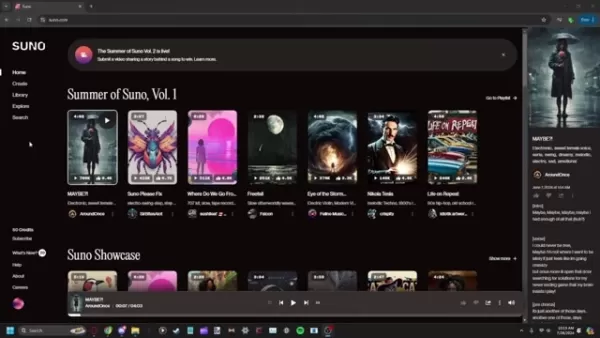
Registration is free, and you'll start with a set amount of credits to begin creating music right away. While there's an optional subscription, it's not necessary to dive into the platform's basic features. Suno's accessibility makes it a fantastic choice for both novices and seasoned music creators.
Navigating the Creation Interface
Once you're signed up, take a moment to get to know the creation interface. You'll find a 'Create' button in the navigation menu, which leads you to the music creation area. Here, you have the choice to either generate a song from scratch with text prompts or extend an existing track. Our focus here is on the latter, so keep that in mind as you navigate.
Tips for Better AI Music Extension Results
Working with Audio Editing Software
Getting the hang of audio editing tools like Audacity or Adobe Audition is crucial. If you've got a longer audio file that needs trimming, just import it into your editing software. Use the selection tool to pick out the section you want to use for your AI extension, ensuring it ends on a beat to keep transitions smooth. Then, use the 'Trim' or 'Cut' function to remove the excess, and save the edited clip in a format like MP3 or WAV that meets Suno's requirements.
Choosing a Vague Musical Style
When you're setting the style for your AI extension, go for broad terms like 'chill', 'upbeat', or 'melancholic' instead of specific subgenres. This gives Suno's AI more room to be creative, often resulting in more surprising and innovative outcomes. Be ready to tweak and try different styles to find the best fit for your original track.
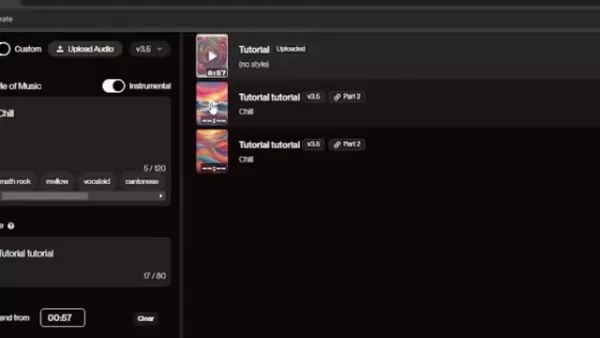
Experimenting with these vague descriptors can lead to more consistent and high-quality extensions that harmonize well with your original song.
Giving Credit to The Original Creators
When you're sharing your AI-generated music extensions publicly, it's essential to credit both Suno and the original artist, if relevant. Transparency is key to ethical AI music creation. Make sure to state that the music was created with AI to avoid any confusion about authorship, and include any necessary copyright or licensing info. This practice respects intellectual property rights and fosters a community of openness and creativity.
Step-by-Step Guide to Creating AI Music Extensions with Suno
Step 1: Uploading Your Audio
Head to the 'Create' section and choose 'Upload Audio' to extend your existing piece. You'll see a prompt to select your audio file from your computer.

Remember, the audio file needs to be under 60 seconds long.
Step 2: Preparing Your Audio File
Suno requires your audio to be between 4 and 60 seconds. You might need to edit it down using software like Audacity or Adobe Audition. When trimming, aim to cut at the closest measure to the 60-second mark to keep things smooth for Suno. It's best to avoid extending tracks with vocals.
Step 3: Upload Audio File and Accept Terms
Once your audio is ready, upload it from your device. You'll see the file name on screen, and an AI-generated image will appear as the cover for your new track. Hit 'Continue', agree to the terms and conditions, and your song will be uploaded successfully.
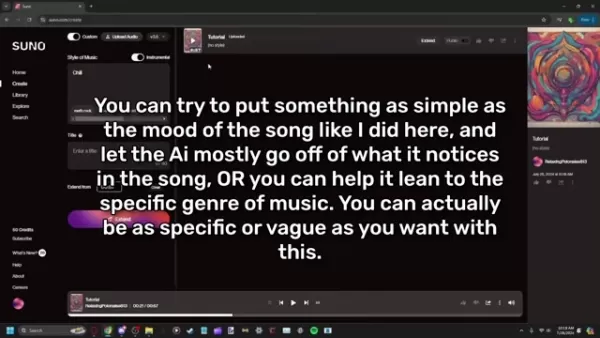
Step 4: Extending the Audio
After uploading, click 'Extend' on the right side of the screen. Make sure the instrumental switch is on, enter a style of music, and optionally name your file for easier tracking. Click 'Extend' to let Suno generate two extension options for you.
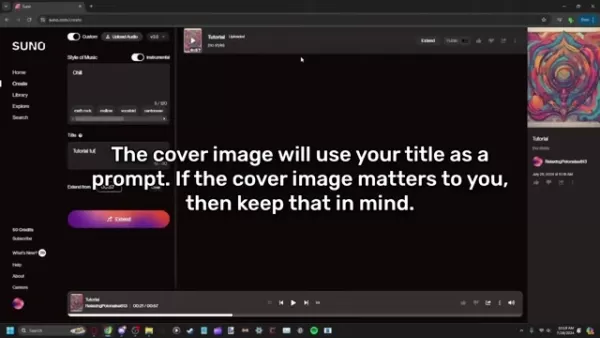
Step 5: Review and Download
Once the extensions are generated, you can listen to them and pick your favorite. Hover over the file to access options like making it public, liking or disliking it, or downloading it via the kebab menu. You can also delete files from here if needed.
Evaluating Suno: Pros and Cons of AI Music Extension
Pros
- The user-friendly interface makes AI music extension accessible to everyone.
- The free tier offers a cost-effective way to experiment with AI music creation.
- AI delivers surprising and innovative results, expanding creative possibilities.
- It allows the extension of creative vision without traditional music production skills.
- Efficiently generates music, reducing the time required for songwriting and composition.
Cons
- AI music may lack the nuance and emotional depth of human-composed music.
- The free tier has generation or feature limitations.
- File size limitations can make it difficult to match a creative vision.
- Ethical concerns surrounding intellectual property and copyright compliance.
- Generations can take time and there can be frequent buffering.
Frequently Asked Questions
Is Suno really free to use?
Yes, Suno does offer a free tier that lets you generate music extensions. However, there might be limitations on the number of generations or access to certain features. The subscription option adds more benefits, but you can still explore Suno's core functionalities without it.
How do I ensure my audio file meets Suno's requirements?
Suno requires audio files to be between 4 and 60 seconds long. Consider the genre to align with your expectations. Use audio editing software to trim if needed, and ensure the file is in a compatible format like MP3 or WAV, within the size limits set by Suno.
What type of music styles work best for AI extensions?
Opt for more vague terms instead of specific genres. This approach gives the AI more creative freedom, helping it to better match the original file. You might need to experiment a bit, but the goal is to capture the mood of your audio.
Related Questions
Are there other AI music generation platforms besides Suno?
Yes, the AI music generation scene is growing fast. Other notable platforms include Amper Music, Jukebox by OpenAI, and AIVA. Each has its unique features and pricing. It's worth checking them out to find the best fit for your creative needs and budget.
Can I use AI music extensions for commercial purposes?
The rules on using AI-generated music commercially can vary by platform. Always review the licensing agreements and copyright policies for Suno or any alternative. Some might give you full commercial rights, while others might have restrictions or require attribution. For clarity, it might be wise to consult with a copyright law specialist.
Related article
 Six Tech Giants Back Linux Foundation With $12.5M to Tackle AI Vulnerability Noise
To tackle the flood of low-quality security reports produced by AI automation tools, six major tech companies—Anthropic, Amazon (AWS), GitHub, Google, Microsoft, and OpenAI—have collectively contributed $12.5 million in funding to Linux Foundation in
Musk Considered Leaving OpenAI to His Kids as Altman Testifies
This morning, OpenAI CEO Sam Altman took the stand to address former co-founder Elon Musk’s lawsuit challenging the company’s corporate structure.When asked about Musk’s claim that other founders “stole a charity” by launching a for-profit subsidiary
Sam Altman Sparks Debate Over AI's Deceleration
Listen onApple PodcastsListen onSpotifyOpenAI CEO Sam Altman recently suggested that it may be time to “pace the rate of AI development” to allow society to “harden around some of these new capability levels.”On the latest episode of TechCrunch’s Equ
Related Special Topic Recommendations
Business
Six Tech Giants Back Linux Foundation With $12.5M to Tackle AI Vulnerability Noise
To tackle the flood of low-quality security reports produced by AI automation tools, six major tech companies—Anthropic, Amazon (AWS), GitHub, Google, Microsoft, and OpenAI—have collectively contributed $12.5 million in funding to Linux Foundation in
Musk Considered Leaving OpenAI to His Kids as Altman Testifies
This morning, OpenAI CEO Sam Altman took the stand to address former co-founder Elon Musk’s lawsuit challenging the company’s corporate structure.When asked about Musk’s claim that other founders “stole a charity” by launching a for-profit subsidiary
Sam Altman Sparks Debate Over AI's Deceleration
Listen onApple PodcastsListen onSpotifyOpenAI CEO Sam Altman recently suggested that it may be time to “pace the rate of AI development” to allow society to “harden around some of these new capability levels.”On the latest episode of TechCrunch’s Equ
Related Special Topic Recommendations
Business
 Best AI Competitive Research Tools for Small Businesses
2026 Latest Best Top-rated AI Competitive Research Tools for Small Businesses! XIX.AI has curated a highly powerful game-changing collection, updated weekly with rigorous real-world tests and detailed rankings. You can find a comprehensive free vs paid comparison to help you identify the must-try tools that boost your productivity and give you a competitive edge. Explore now to discover your perfect tool!
 9 tools
 xix.ai
Image editing
Photoshop AI Retouch Tools for Ecommerce Apparel, Skin Cleanup, and Color Consistency
xix.ai
Image editing
Photoshop AI Retouch Tools for Ecommerce Apparel, Skin Cleanup, and Color Consistency
2026 Latest Best Photoshop AI retouch tools for ecommerce apparel, skin cleanup, and color consistency! This top-rated curated list features powerful game-changing solutions that help you boost writing efficiency, streamline content creation, and achieve perfect visual results effortlessly. Each tool has undergone real-world tests through weekly updated rankings, complete with free vs paid comparison details. Backed by XIX.AI, it’s the must-try guide for anyone aiming to unlock your AI edge. Explore now!
10 tools
xix.ai
Prompt
Best AI Prompt Libraries for ChatGPT Workflows
2026 Latest Best Top-Rated AI Prompt Libraries for optimizing all types of ChatGPT workflows. XIX.AI has curated a powerful, game-changing collection that goes through rigorous real-world tests to ensure top performance. You can find detailed free vs paid comparisons and expert rankings to help you choose the must-try tools that boost your productivity and unlock your AI edge. Explore now!
11 tools
xix.ai
Education and Learning
AI Quiz Builder Platforms for Teachers, Tutors, and Cohort-Based Learning Programs
2026 Latest Best AI Quiz Builder Platforms for Teachers, Tutors, and Cohort-Based Learning Programs! XIX.AI has curated a top-rated list of powerful game-changing tools that go through real-world tests to deliver accurate rankings. These must-try platforms help boost writing efficiency, streamline content creation, and simplify quiz design across all learning scenarios. Explore now to discover your perfect tool for unlocking your AI edge in teaching!
13 tools
xix.ai
code
AI Pull Request Review Tools for GitHub Teams Handling Refactors, Bugs, and Security Gaps
2026 Latest Best AI Pull Request Review Tools for GitHub Teams are here on XIX.AI! This top-rated curated list showcases powerful game-changing solutions that streamline refactoring, bug fixing, and security gap detection across all team workflows. Enjoy a free vs paid comparison along with real-world tests and detailed rankings to help you find the perfect tool that boosts productivity significantly. Explore now to unlock your AI edge!
12 tools
xix.ai
Text-to-speech
Best AI Text to Speech Tools for Natural Voiceovers
2026 Latest Best Top-rated AI Text to Speech Tools for Natural Voiceovers are here on XIX.AI! This curated list features powerful, game-changing options that deliver crystal-clear voices for every use case, backed by real-world tests and weekly updated rankings. Get a free vs paid comparison to find the must-try solution that boosts your productivity instantly. Explore now to Unlock your AI edge!
11 tools
xix.ai

 Comments (10)
0/500
Comments (10)
0/500
![DanielWalker]()
这篇文章真不错!Suno看起来操作很简单,适合像我这样完全不懂作曲又想试着创作的人。不过有点好奇,这种AI生成的音乐版权怎么算?会不会和人类作曲家的作品有冲突呢?打算周末就试试看!🎵
![AlbertEvans]()
Echt beeindruckend, wie Suno selbst Laien ermöglicht, Musikstücke zu erweitern! Habe gerade eine eigene Klavierspur damit experimentell verlängert – die KI schlägt überraschend passende Drum-Patterns vor. Aber frage mich, ob solche Tools langfristig Produzenten ersetzen werden... Trotzdem mega für kreative Blockaden!
![WillMitchell]()
¡Qué guía más práctica para crear música con Suno! 🎶 Siempre tuve curiosidad por usar IA en mis proyectos musicales, pero parecía demasiado técnico. Ahora siento que podría intentarlo sin morir en el intento. ¿Alguien ya probó hacer remixes con esta herramienta? Me pregunto cómo sonará.
![JimmyWhite]()
This Suno tutorial is a game-changer! 🎵 I had no idea AI could make music creation so seamless. Tried it out and ended up with a cool track extension in minutes. Anyone else hooked on experimenting with AI music tools?
![EdwardYoung]()
This Suno tutorial is a game-changer! 😍 I tried extending my old guitar riff, and the AI added such a cool vibe. Anyone else using this to remix their tracks?
![FrankJackson]()
Sunoを使ってAIで音楽を拡張するのは本当に楽しいです!新しいクリエイティブな領域に挑戦できるのが好きです。ただ、もっと多様なジャンルがあればいいのにと思います。それでも、音楽を探求するなら試すべきツールです!🎶🚀
If you're eager to expand your musical horizons, AI technology now makes it easier than ever to extend your music. Suno offers a user-friendly platform where you can generate AI music extensions, helping you to build on existing tracks and delve into new creative territories. This guide simplifies the process, making it approachable for everyone, no matter your level of technical know-how. You'll learn how to turn brief musical snippets into full-fledged songs using Suno's cutting-edge AI music generation tools.
Key Points
- Learn how to access the Suno platform and sign up for a free account.
- Discover the steps to upload your own audio file for AI music extension.
- Understand the importance of audio file length and editing techniques.
- Explore the various options for generating music extensions using Suno's AI.
- Learn to download your newly created AI music extension for use in projects.
Getting Started with Suno for AI Music Extension
Accessing and Signing Up on Suno
Kicking off your journey with AI music extensions is as simple as visiting Suno.com in your browser. The platform's interface is designed to be intuitive, and signing up is a breeze.
Registration is free, and you'll start with a set amount of credits to begin creating music right away. While there's an optional subscription, it's not necessary to dive into the platform's basic features. Suno's accessibility makes it a fantastic choice for both novices and seasoned music creators.
Navigating the Creation Interface
Once you're signed up, take a moment to get to know the creation interface. You'll find a 'Create' button in the navigation menu, which leads you to the music creation area. Here, you have the choice to either generate a song from scratch with text prompts or extend an existing track. Our focus here is on the latter, so keep that in mind as you navigate.
Tips for Better AI Music Extension Results
Working with Audio Editing Software
Getting the hang of audio editing tools like Audacity or Adobe Audition is crucial. If you've got a longer audio file that needs trimming, just import it into your editing software. Use the selection tool to pick out the section you want to use for your AI extension, ensuring it ends on a beat to keep transitions smooth. Then, use the 'Trim' or 'Cut' function to remove the excess, and save the edited clip in a format like MP3 or WAV that meets Suno's requirements.
Choosing a Vague Musical Style
When you're setting the style for your AI extension, go for broad terms like 'chill', 'upbeat', or 'melancholic' instead of specific subgenres. This gives Suno's AI more room to be creative, often resulting in more surprising and innovative outcomes. Be ready to tweak and try different styles to find the best fit for your original track.
Experimenting with these vague descriptors can lead to more consistent and high-quality extensions that harmonize well with your original song.
Giving Credit to The Original Creators
When you're sharing your AI-generated music extensions publicly, it's essential to credit both Suno and the original artist, if relevant. Transparency is key to ethical AI music creation. Make sure to state that the music was created with AI to avoid any confusion about authorship, and include any necessary copyright or licensing info. This practice respects intellectual property rights and fosters a community of openness and creativity.
Step-by-Step Guide to Creating AI Music Extensions with Suno
Step 1: Uploading Your Audio
Head to the 'Create' section and choose 'Upload Audio' to extend your existing piece. You'll see a prompt to select your audio file from your computer.
Remember, the audio file needs to be under 60 seconds long.
Step 2: Preparing Your Audio File
Suno requires your audio to be between 4 and 60 seconds. You might need to edit it down using software like Audacity or Adobe Audition. When trimming, aim to cut at the closest measure to the 60-second mark to keep things smooth for Suno. It's best to avoid extending tracks with vocals.
Step 3: Upload Audio File and Accept Terms
Once your audio is ready, upload it from your device. You'll see the file name on screen, and an AI-generated image will appear as the cover for your new track. Hit 'Continue', agree to the terms and conditions, and your song will be uploaded successfully.
Step 4: Extending the Audio
After uploading, click 'Extend' on the right side of the screen. Make sure the instrumental switch is on, enter a style of music, and optionally name your file for easier tracking. Click 'Extend' to let Suno generate two extension options for you.
Step 5: Review and Download
Once the extensions are generated, you can listen to them and pick your favorite. Hover over the file to access options like making it public, liking or disliking it, or downloading it via the kebab menu. You can also delete files from here if needed.
Evaluating Suno: Pros and Cons of AI Music Extension
Pros
- The user-friendly interface makes AI music extension accessible to everyone.
- The free tier offers a cost-effective way to experiment with AI music creation.
- AI delivers surprising and innovative results, expanding creative possibilities.
- It allows the extension of creative vision without traditional music production skills.
- Efficiently generates music, reducing the time required for songwriting and composition.
Cons
- AI music may lack the nuance and emotional depth of human-composed music.
- The free tier has generation or feature limitations.
- File size limitations can make it difficult to match a creative vision.
- Ethical concerns surrounding intellectual property and copyright compliance.
- Generations can take time and there can be frequent buffering.
Frequently Asked Questions
Is Suno really free to use?
Yes, Suno does offer a free tier that lets you generate music extensions. However, there might be limitations on the number of generations or access to certain features. The subscription option adds more benefits, but you can still explore Suno's core functionalities without it.
How do I ensure my audio file meets Suno's requirements?
Suno requires audio files to be between 4 and 60 seconds long. Consider the genre to align with your expectations. Use audio editing software to trim if needed, and ensure the file is in a compatible format like MP3 or WAV, within the size limits set by Suno.
What type of music styles work best for AI extensions?
Opt for more vague terms instead of specific genres. This approach gives the AI more creative freedom, helping it to better match the original file. You might need to experiment a bit, but the goal is to capture the mood of your audio.
Related Questions
Are there other AI music generation platforms besides Suno?
Yes, the AI music generation scene is growing fast. Other notable platforms include Amper Music, Jukebox by OpenAI, and AIVA. Each has its unique features and pricing. It's worth checking them out to find the best fit for your creative needs and budget.
Can I use AI music extensions for commercial purposes?
The rules on using AI-generated music commercially can vary by platform. Always review the licensing agreements and copyright policies for Suno or any alternative. Some might give you full commercial rights, while others might have restrictions or require attribution. For clarity, it might be wise to consult with a copyright law specialist.








 Six Tech Giants Back Linux Foundation With $12.5M to Tackle AI Vulnerability Noise
To tackle the flood of low-quality security reports produced by AI automation tools, six major tech companies—Anthropic, Amazon (AWS), GitHub, Google, Microsoft, and OpenAI—have collectively contributed $12.5 million in funding to Linux Foundation in
Six Tech Giants Back Linux Foundation With $12.5M to Tackle AI Vulnerability Noise
To tackle the flood of low-quality security reports produced by AI automation tools, six major tech companies—Anthropic, Amazon (AWS), GitHub, Google, Microsoft, and OpenAI—have collectively contributed $12.5 million in funding to Linux Foundation in
 Musk Considered Leaving OpenAI to His Kids as Altman Testifies
This morning, OpenAI CEO Sam Altman took the stand to address former co-founder Elon Musk’s lawsuit challenging the company’s corporate structure.When asked about Musk’s claim that other founders “stole a charity” by launching a for-profit subsidiary
Musk Considered Leaving OpenAI to His Kids as Altman Testifies
This morning, OpenAI CEO Sam Altman took the stand to address former co-founder Elon Musk’s lawsuit challenging the company’s corporate structure.When asked about Musk’s claim that other founders “stole a charity” by launching a for-profit subsidiary
 Sam Altman Sparks Debate Over AI's Deceleration
Listen onApple PodcastsListen onSpotifyOpenAI CEO Sam Altman recently suggested that it may be time to “pace the rate of AI development” to allow society to “harden around some of these new capability levels.”On the latest episode of TechCrunch’s Equ
Sam Altman Sparks Debate Over AI's Deceleration
Listen onApple PodcastsListen onSpotifyOpenAI CEO Sam Altman recently suggested that it may be time to “pace the rate of AI development” to allow society to “harden around some of these new capability levels.”On the latest episode of TechCrunch’s Equ

2026 Latest Best Top-rated AI Competitive Research Tools for Small Businesses! XIX.AI has curated a highly powerful game-changing collection, updated weekly with rigorous real-world tests and detailed rankings. You can find a comprehensive free vs paid comparison to help you identify the must-try tools that boost your productivity and give you a competitive edge. Explore now to discover your perfect tool!
9 tools
xix.ai

2026 Latest Best Photoshop AI retouch tools for ecommerce apparel, skin cleanup, and color consistency! This top-rated curated list features powerful game-changing solutions that help you boost writing efficiency, streamline content creation, and achieve perfect visual results effortlessly. Each tool has undergone real-world tests through weekly updated rankings, complete with free vs paid comparison details. Backed by XIX.AI, it’s the must-try guide for anyone aiming to unlock your AI edge. Explore now!
10 tools
xix.ai

2026 Latest Best Top-Rated AI Prompt Libraries for optimizing all types of ChatGPT workflows. XIX.AI has curated a powerful, game-changing collection that goes through rigorous real-world tests to ensure top performance. You can find detailed free vs paid comparisons and expert rankings to help you choose the must-try tools that boost your productivity and unlock your AI edge. Explore now!
11 tools
xix.ai

2026 Latest Best AI Quiz Builder Platforms for Teachers, Tutors, and Cohort-Based Learning Programs! XIX.AI has curated a top-rated list of powerful game-changing tools that go through real-world tests to deliver accurate rankings. These must-try platforms help boost writing efficiency, streamline content creation, and simplify quiz design across all learning scenarios. Explore now to discover your perfect tool for unlocking your AI edge in teaching!
13 tools
xix.ai

2026 Latest Best AI Pull Request Review Tools for GitHub Teams are here on XIX.AI! This top-rated curated list showcases powerful game-changing solutions that streamline refactoring, bug fixing, and security gap detection across all team workflows. Enjoy a free vs paid comparison along with real-world tests and detailed rankings to help you find the perfect tool that boosts productivity significantly. Explore now to unlock your AI edge!
12 tools
xix.ai

2026 Latest Best Top-rated AI Text to Speech Tools for Natural Voiceovers are here on XIX.AI! This curated list features powerful, game-changing options that deliver crystal-clear voices for every use case, backed by real-world tests and weekly updated rankings. Get a free vs paid comparison to find the must-try solution that boosts your productivity instantly. Explore now to Unlock your AI edge!
11 tools
xix.ai

这篇文章真不错!Suno看起来操作很简单,适合像我这样完全不懂作曲又想试着创作的人。不过有点好奇,这种AI生成的音乐版权怎么算?会不会和人类作曲家的作品有冲突呢?打算周末就试试看!🎵
Echt beeindruckend, wie Suno selbst Laien ermöglicht, Musikstücke zu erweitern! Habe gerade eine eigene Klavierspur damit experimentell verlängert – die KI schlägt überraschend passende Drum-Patterns vor. Aber frage mich, ob solche Tools langfristig Produzenten ersetzen werden... Trotzdem mega für kreative Blockaden!
¡Qué guía más práctica para crear música con Suno! 🎶 Siempre tuve curiosidad por usar IA en mis proyectos musicales, pero parecía demasiado técnico. Ahora siento que podría intentarlo sin morir en el intento. ¿Alguien ya probó hacer remixes con esta herramienta? Me pregunto cómo sonará.
This Suno tutorial is a game-changer! 🎵 I had no idea AI could make music creation so seamless. Tried it out and ended up with a cool track extension in minutes. Anyone else hooked on experimenting with AI music tools?
This Suno tutorial is a game-changer! 😍 I tried extending my old guitar riff, and the AI added such a cool vibe. Anyone else using this to remix their tracks?
Sunoを使ってAIで音楽を拡張するのは本当に楽しいです!新しいクリエイティブな領域に挑戦できるのが好きです。ただ、もっと多様なジャンルがあればいいのにと思います。それでも、音楽を探求するなら試すべきツールです!🎶🚀












