


 Home
HomeAI-Powered YouTube Thumbnails: Easy Creation and Seamless Face Swap
Crafting compelling YouTube thumbnails is vital for grabbing viewers' attention. However, designing visually striking thumbnails often demands significant time and financial investment, with top creators such as MrBeast rumored to spend thousands on a single image. Thankfully, Artificial Intelligence (AI) provides a practical alternative, allowing you to generate professional-looking thumbnails rapidly and affordably. This guide delves into methods for using AI to simplify YouTube thumbnail creation, covering style emulation, idea generation, and even face replacement—all without cost.
Key Points
Generate AI-powered YouTube thumbnails swiftly and for free.
Discover how to replicate the style of high-performing thumbnails using AI.
Use AI to brainstorm concepts for your own distinctive thumbnails.
Employ AI to swap faces in thumbnails for a customized look.
Explore AI-driven websites and applications for thumbnail design.
Introduction to AI Thumbnail Creation
The Cost of Traditional Thumbnail Creation
Compelling thumbnails are key to YouTube success, but they frequently involve a substantial expense. Many prominent creators allocate major resources to thumbnail design, which affects their overall budget. Conventional techniques are typically slow and demand proficiency in graphic design and photo editing software.
AI as a Game-Changer
AI is transforming numerous fields within content creation, and thumbnail design is a prime example. AI-driven tools present a budget-friendly and time-efficient option compared to traditional approaches. These platforms can produce attractive thumbnails in moments, freeing you to concentrate on other essential parts of your content plan. Additionally, the minimal expense is highly appealing.
AI Thumbnail Techniques
Face Swapping in Thumbnails with Remaker AI
One intriguing use of AI for thumbnails is face swapping. This method entails substituting the face in a current thumbnail with your own or someone else's. It can help in creating personalized thumbnails or injecting humor into your content. Remaker AI is a tool designed for this task.

This platform lets you upload a base thumbnail and a source face image, and the AI merges them seamlessly.
Step-by-step Guide to Face Swapping:
- Download the Target Thumbnail: Start by saving the thumbnail you wish to alter. Apps from the Play Store generally offer simple download features.
- Navigate to Remaker AI: Go to the Remaker AI website. A link is usually available in the original video's description.
- Select Face Swap: Choose the 'Photo Face Swap' function on the Remaker AI main page.
- Upload Images: Provide the original thumbnail and the picture with the face you want to insert.
- Initiate Swap: Press the 'Swap' button and allow the AI to process.
- Download the New Thumbnail: After completion, save your newly created thumbnail with the swapped face.
Important Note: Though face swapping can be entertaining, refrain from duplicating other creators' thumbnails directly. Apply this method responsibly and inventively to strengthen your individual brand identity.
Generating Thumbnail Inspiration
Developing new thumbnail concepts can be difficult. AI can support this process by offering creative prompts based on existing successful thumbnails. By evaluating the visual components and motifs of top-performing images, AI can supply ideas and recommendations for your designs. This stimulates creativity and keeps your thumbnails relevant to prevailing trends.
ChatGPT can be employed for this purpose. This AI can assess which features are currently popular in a specific niche.
Generating Inspiration Using ChatGPT and Ideogram:
Upload an Image to ChatGPT: Submit a reference thumbnail image to ChatGPT.
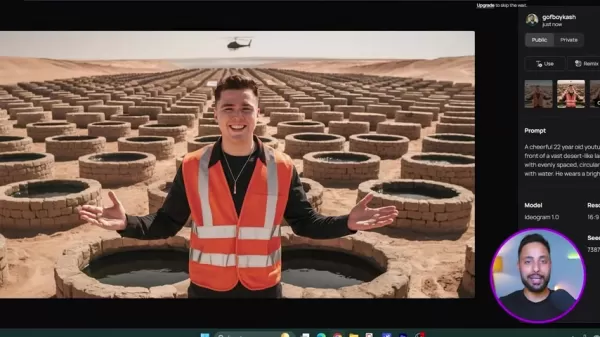
Request an ai Prompt: Instruct ChatGPT to "Give me an AI image Prompt for this image."
Copy the Prompt: ChatGPT will produce a comprehensive text description of the image.
Use Ideogram to Generate Images: Input the prompt into Ideogram and create new images from the description.
Ideogram is another AI application skilled at producing attention-grabbing AI thumbnails. With ChatGPT's assistance, the thumbnail creation workflow becomes much more efficient.
Ideogram vs. Leonardo AI vs. Bing Image Creator
The video mentions Ideogram, Leonardo AI, and Bing Image Creator as services that create images from text prompts. All three are suitable for AI-generated thumbnails. Each platform has its own advantages and limitations. For thumbnail generation specifically, their capabilities are quite similar.
- Ideogram: Ideogram specializes in creating images from written prompts, positioning it as an excellent resource for developing original thumbnails from your concepts. Users can generate 10 free images per day. If you create thumbnails regularly, this site is a practical choice.
- Leonardo AI: Leonardo AI is proficient at producing high-resolution images with an artistic touch. It's a solid option if your goal is visually impressive thumbnails that capture attention.
- Bing Image Creator: Integrated directly into the Bing search engine, Bing Image Creator is readily available. It also features an intuitive interface for generating images from text descriptions.
Creating Thumbnails With a Unique Twist
Combining Generated Images and Face Swapping
The objective is a thumbnail that feels personal yet draws inspiration from popular content. Begin by creating several images using one of the aforementioned platforms. Then, use the Remaker AI site to perform a smooth face swap into your chosen thumbnail. This approach yields a creative and unique result. Face swapping can be used appropriately to highlight your individual content style.
Pricing Structure
Remaker AI Free Credits
Remaker AI offers users five free credits every day. These credits let you experiment with thumbnails before deciding to purchase the service. With the free allowance, you can feasibly swap faces on three different thumbnails. This is usually sufficient to determine if the tool meets your requirements.
Pros and Cons
Pros
Cost-effective: Creating thumbnails with AI is free.
Time-saving: AI applications can produce thumbnails almost instantly.
Creative Inspiration: AI can offer novel concepts and layout ideas.
Easy to use: AI tools are generally straightforward and accessible.
Cons
Quality can vary: The output quality from AI image generators depends on the specific tool and the clarity of your prompt.
Ethical concerns: Employing AI to duplicate other creators' thumbnails poses ethical issues.
Frequently Asked Questions About AI Thumbnail Creation
Is it legal to copy other people's thumbnails?
No, directly replicating another person's thumbnail is generally inadvisable, as it may violate copyright laws. It's preferable to seek inspiration and develop your own original compositions.
Can I use AI-generated thumbnails for commercial purposes?
Yes, the majority of AI image generators permit commercial use of the images you create. Nonetheless, always review the specific terms of service for each platform to be certain.
Are AI thumbnails as effective as professionally designed thumbnails?
AI-generated thumbnails can perform very well, particularly when used tactically and blended with other design components. It's crucial, however, that your thumbnails maintain high quality and accurately represent your video's content.
Related Questions
What are the best AI tools for thumbnail creation?
Notable AI tools for thumbnail creation include Ideogram, Leonardo AI, Bing Image Creator, and Remaker AI. There isn't a single definitive best tool; individual preference plays a significant role. All mentioned options are effective.
Related article
 Apple, Google Partner With Anthropic to Address 27-Year-Old Vulnerability via Glass Wing Protection
As artificial intelligence advances rapidly in code generation and logical reasoning, the cybersecurity landscape faces unprecedented challenges. Recently, the prominent AI startup Anthropic officially launched a cross-industry collaboration called *
OpenAI Chief Scientist Addresses AI Reasoning Transparency Debate: Complexity Steady, No Sudden Jump
On September 2, Jakub Pachocki, OpenAI’s Chief Scientist, addressed public concerns on X regarding the AI model Astra, clarifying claims that it operates without oversight and lacks transparent reasoning.Why the Controversy Erupted: Deep Recurrence O
U.S. Navy Selects Blue Water Autonomy for Deep-Sea Survey Missions
Blue Water Autonomy’s Liberty Class is a 190-foot steel autonomous ship. | Source: Blue Water AutonomyBoston-based technology and shipbuilding firm Blue Water Autonomy has secured a multiple-award contract with the Naval Oceanographic Office (NAVOCEA
Related Special Topic Recommendations
Text-to-speech
Apple, Google Partner With Anthropic to Address 27-Year-Old Vulnerability via Glass Wing Protection
As artificial intelligence advances rapidly in code generation and logical reasoning, the cybersecurity landscape faces unprecedented challenges. Recently, the prominent AI startup Anthropic officially launched a cross-industry collaboration called *
OpenAI Chief Scientist Addresses AI Reasoning Transparency Debate: Complexity Steady, No Sudden Jump
On September 2, Jakub Pachocki, OpenAI’s Chief Scientist, addressed public concerns on X regarding the AI model Astra, clarifying claims that it operates without oversight and lacks transparent reasoning.Why the Controversy Erupted: Deep Recurrence O
U.S. Navy Selects Blue Water Autonomy for Deep-Sea Survey Missions
Blue Water Autonomy’s Liberty Class is a 190-foot steel autonomous ship. | Source: Blue Water AutonomyBoston-based technology and shipbuilding firm Blue Water Autonomy has secured a multiple-award contract with the Naval Oceanographic Office (NAVOCEA
Related Special Topic Recommendations
Text-to-speech
 Best AI Text to Speech Tools for Online Courses
2026 Latest Best Top-rated AI Text to Speech Tools for Online Courses are curated by XIX.AI based on rigorous real-world tests and weekly updated rankings. These powerful tools help creators deliver crystal-clear audio content effortlessly, boosting writing efficiency and streamlining course production. Check out the free vs paid comparison to find your perfect fit. Explore now to unlock your AI edge in online education.
 10 tools
 xix.ai
writing
AI Blog Title Tools for Higher Click Through Rates
xix.ai
writing
AI Blog Title Tools for Higher Click Through Rates
2026 Latest Best Top-Rated AI Blog Title Tools for Higher Click Through Rates! XIX.AI has carefully curated a powerful, game-changing collection of top tools that go through rigorous real-world tests. You’ll find a free vs paid comparison, weekly updated rankings, and detailed insights to help you boost your blog’s traffic efficiently. Must-try options are highlighted to help you unlock your AI edge. Explore now!
10 tools
xix.ai
automation
Best AI Task Routing Tools for Support Workflows
2026 Latest Best Top-rated AI Task Routing Tools for Support Workflows! XIX.AI has curated a highly powerful game-changing collection of must-try solutions, all undergoing rigorous real-world tests and updated weekly. These tools streamline workflows, boost productivity, and help teams deliver faster, more efficient support. Explore now to discover your perfect tool and unlock your AI edge!
17 tools
xix.ai
Academic Research
AI Citation and Paper Summary Tools
2026 Latest Best Top-Rated AI Citation and Paper Summary Tools Curated by XIX.AI. Get powerful game-changing solutions for quick content creation, improved writing efficiency, and boosting productivity. We offer a free vs paid comparison along with real-world tests and weekly updated rankings to help you find the must-try tool that fits your needs perfectly. Explore now to Unlock your AI edge.
10 tools
xix.ai
Productivity
Best AI Productivity Tools for Daily Work
2026 Latest Best Top-Rated AI Productivity Tools for Daily Work! XIX.AI has curated a powerful, game-changing selection based on rigorous weekly updated rankings and real-world tests. You’ll find must-try options that boost writing efficiency, streamline content creation, and help you overcome daily work challenges. Get a free vs paid comparison to find the perfect fit for your needs. Explore now to unlock your AI edge!
9 tools
xix.ai
Academic Research
AI Systematic Review Tools for Research Screening
2026 Latest Best Top-Rated AI Systematic Review Tools for Research Screening are here on XIX.AI! This curated collection includes powerful, game-changing solutions that go through rigorous real-world tests to deliver accurate results. We also offer a free vs paid comparison along with weekly updated rankings to help you find the must-try option that boosts your research efficiency significantly. Explore now to unlock your AI edge in academic work!
11 tools
xix.ai

 Comments (0)
0/500
Comments (0)
0/500
Crafting compelling YouTube thumbnails is vital for grabbing viewers' attention. However, designing visually striking thumbnails often demands significant time and financial investment, with top creators such as MrBeast rumored to spend thousands on a single image. Thankfully, Artificial Intelligence (AI) provides a practical alternative, allowing you to generate professional-looking thumbnails rapidly and affordably. This guide delves into methods for using AI to simplify YouTube thumbnail creation, covering style emulation, idea generation, and even face replacement—all without cost.
Key Points
Generate AI-powered YouTube thumbnails swiftly and for free.
Discover how to replicate the style of high-performing thumbnails using AI.
Use AI to brainstorm concepts for your own distinctive thumbnails.
Employ AI to swap faces in thumbnails for a customized look.
Explore AI-driven websites and applications for thumbnail design.
Introduction to AI Thumbnail Creation
The Cost of Traditional Thumbnail Creation
Compelling thumbnails are key to YouTube success, but they frequently involve a substantial expense. Many prominent creators allocate major resources to thumbnail design, which affects their overall budget. Conventional techniques are typically slow and demand proficiency in graphic design and photo editing software.
AI as a Game-Changer
AI is transforming numerous fields within content creation, and thumbnail design is a prime example. AI-driven tools present a budget-friendly and time-efficient option compared to traditional approaches. These platforms can produce attractive thumbnails in moments, freeing you to concentrate on other essential parts of your content plan. Additionally, the minimal expense is highly appealing.
AI Thumbnail Techniques
Face Swapping in Thumbnails with Remaker AI
One intriguing use of AI for thumbnails is face swapping. This method entails substituting the face in a current thumbnail with your own or someone else's. It can help in creating personalized thumbnails or injecting humor into your content. Remaker AI is a tool designed for this task.
This platform lets you upload a base thumbnail and a source face image, and the AI merges them seamlessly.
Step-by-step Guide to Face Swapping:
- Download the Target Thumbnail: Start by saving the thumbnail you wish to alter. Apps from the Play Store generally offer simple download features.
- Navigate to Remaker AI: Go to the Remaker AI website. A link is usually available in the original video's description.
- Select Face Swap: Choose the 'Photo Face Swap' function on the Remaker AI main page.
- Upload Images: Provide the original thumbnail and the picture with the face you want to insert.
- Initiate Swap: Press the 'Swap' button and allow the AI to process.
- Download the New Thumbnail: After completion, save your newly created thumbnail with the swapped face.
Important Note: Though face swapping can be entertaining, refrain from duplicating other creators' thumbnails directly. Apply this method responsibly and inventively to strengthen your individual brand identity.
Generating Thumbnail Inspiration
Developing new thumbnail concepts can be difficult. AI can support this process by offering creative prompts based on existing successful thumbnails. By evaluating the visual components and motifs of top-performing images, AI can supply ideas and recommendations for your designs. This stimulates creativity and keeps your thumbnails relevant to prevailing trends.
ChatGPT can be employed for this purpose. This AI can assess which features are currently popular in a specific niche.
Generating Inspiration Using ChatGPT and Ideogram:
Upload an Image to ChatGPT: Submit a reference thumbnail image to ChatGPT.
Request an ai Prompt: Instruct ChatGPT to "Give me an AI image Prompt for this image."
Copy the Prompt: ChatGPT will produce a comprehensive text description of the image.
Use Ideogram to Generate Images: Input the prompt into Ideogram and create new images from the description.
Ideogram is another AI application skilled at producing attention-grabbing AI thumbnails. With ChatGPT's assistance, the thumbnail creation workflow becomes much more efficient.
Ideogram vs. Leonardo AI vs. Bing Image Creator
The video mentions Ideogram, Leonardo AI, and Bing Image Creator as services that create images from text prompts. All three are suitable for AI-generated thumbnails. Each platform has its own advantages and limitations. For thumbnail generation specifically, their capabilities are quite similar.
- Ideogram: Ideogram specializes in creating images from written prompts, positioning it as an excellent resource for developing original thumbnails from your concepts. Users can generate 10 free images per day. If you create thumbnails regularly, this site is a practical choice.
- Leonardo AI: Leonardo AI is proficient at producing high-resolution images with an artistic touch. It's a solid option if your goal is visually impressive thumbnails that capture attention.
- Bing Image Creator: Integrated directly into the Bing search engine, Bing Image Creator is readily available. It also features an intuitive interface for generating images from text descriptions.
Creating Thumbnails With a Unique Twist
Combining Generated Images and Face Swapping
The objective is a thumbnail that feels personal yet draws inspiration from popular content. Begin by creating several images using one of the aforementioned platforms. Then, use the Remaker AI site to perform a smooth face swap into your chosen thumbnail. This approach yields a creative and unique result. Face swapping can be used appropriately to highlight your individual content style.
Pricing Structure
Remaker AI Free Credits
Remaker AI offers users five free credits every day. These credits let you experiment with thumbnails before deciding to purchase the service. With the free allowance, you can feasibly swap faces on three different thumbnails. This is usually sufficient to determine if the tool meets your requirements.
Pros and Cons
Pros
Cost-effective: Creating thumbnails with AI is free.
Time-saving: AI applications can produce thumbnails almost instantly.
Creative Inspiration: AI can offer novel concepts and layout ideas.
Easy to use: AI tools are generally straightforward and accessible.
Cons
Quality can vary: The output quality from AI image generators depends on the specific tool and the clarity of your prompt.
Ethical concerns: Employing AI to duplicate other creators' thumbnails poses ethical issues.
Frequently Asked Questions About AI Thumbnail Creation
Is it legal to copy other people's thumbnails?
No, directly replicating another person's thumbnail is generally inadvisable, as it may violate copyright laws. It's preferable to seek inspiration and develop your own original compositions.
Can I use AI-generated thumbnails for commercial purposes?
Yes, the majority of AI image generators permit commercial use of the images you create. Nonetheless, always review the specific terms of service for each platform to be certain.
Are AI thumbnails as effective as professionally designed thumbnails?
AI-generated thumbnails can perform very well, particularly when used tactically and blended with other design components. It's crucial, however, that your thumbnails maintain high quality and accurately represent your video's content.
Related Questions
What are the best AI tools for thumbnail creation?
Notable AI tools for thumbnail creation include Ideogram, Leonardo AI, Bing Image Creator, and Remaker AI. There isn't a single definitive best tool; individual preference plays a significant role. All mentioned options are effective.








 Apple, Google Partner With Anthropic to Address 27-Year-Old Vulnerability via Glass Wing Protection
As artificial intelligence advances rapidly in code generation and logical reasoning, the cybersecurity landscape faces unprecedented challenges. Recently, the prominent AI startup Anthropic officially launched a cross-industry collaboration called *
Apple, Google Partner With Anthropic to Address 27-Year-Old Vulnerability via Glass Wing Protection
As artificial intelligence advances rapidly in code generation and logical reasoning, the cybersecurity landscape faces unprecedented challenges. Recently, the prominent AI startup Anthropic officially launched a cross-industry collaboration called *
 OpenAI Chief Scientist Addresses AI Reasoning Transparency Debate: Complexity Steady, No Sudden Jump
On September 2, Jakub Pachocki, OpenAI’s Chief Scientist, addressed public concerns on X regarding the AI model Astra, clarifying claims that it operates without oversight and lacks transparent reasoning.Why the Controversy Erupted: Deep Recurrence O
OpenAI Chief Scientist Addresses AI Reasoning Transparency Debate: Complexity Steady, No Sudden Jump
On September 2, Jakub Pachocki, OpenAI’s Chief Scientist, addressed public concerns on X regarding the AI model Astra, clarifying claims that it operates without oversight and lacks transparent reasoning.Why the Controversy Erupted: Deep Recurrence O
 U.S. Navy Selects Blue Water Autonomy for Deep-Sea Survey Missions
Blue Water Autonomy’s Liberty Class is a 190-foot steel autonomous ship. | Source: Blue Water AutonomyBoston-based technology and shipbuilding firm Blue Water Autonomy has secured a multiple-award contract with the Naval Oceanographic Office (NAVOCEA
U.S. Navy Selects Blue Water Autonomy for Deep-Sea Survey Missions
Blue Water Autonomy’s Liberty Class is a 190-foot steel autonomous ship. | Source: Blue Water AutonomyBoston-based technology and shipbuilding firm Blue Water Autonomy has secured a multiple-award contract with the Naval Oceanographic Office (NAVOCEA

2026 Latest Best Top-rated AI Text to Speech Tools for Online Courses are curated by XIX.AI based on rigorous real-world tests and weekly updated rankings. These powerful tools help creators deliver crystal-clear audio content effortlessly, boosting writing efficiency and streamlining course production. Check out the free vs paid comparison to find your perfect fit. Explore now to unlock your AI edge in online education.
10 tools
xix.ai

2026 Latest Best Top-Rated AI Blog Title Tools for Higher Click Through Rates! XIX.AI has carefully curated a powerful, game-changing collection of top tools that go through rigorous real-world tests. You’ll find a free vs paid comparison, weekly updated rankings, and detailed insights to help you boost your blog’s traffic efficiently. Must-try options are highlighted to help you unlock your AI edge. Explore now!
10 tools
xix.ai

2026 Latest Best Top-rated AI Task Routing Tools for Support Workflows! XIX.AI has curated a highly powerful game-changing collection of must-try solutions, all undergoing rigorous real-world tests and updated weekly. These tools streamline workflows, boost productivity, and help teams deliver faster, more efficient support. Explore now to discover your perfect tool and unlock your AI edge!
17 tools
xix.ai

2026 Latest Best Top-Rated AI Citation and Paper Summary Tools Curated by XIX.AI. Get powerful game-changing solutions for quick content creation, improved writing efficiency, and boosting productivity. We offer a free vs paid comparison along with real-world tests and weekly updated rankings to help you find the must-try tool that fits your needs perfectly. Explore now to Unlock your AI edge.
10 tools
xix.ai

2026 Latest Best Top-Rated AI Productivity Tools for Daily Work! XIX.AI has curated a powerful, game-changing selection based on rigorous weekly updated rankings and real-world tests. You’ll find must-try options that boost writing efficiency, streamline content creation, and help you overcome daily work challenges. Get a free vs paid comparison to find the perfect fit for your needs. Explore now to unlock your AI edge!
9 tools
xix.ai

2026 Latest Best Top-Rated AI Systematic Review Tools for Research Screening are here on XIX.AI! This curated collection includes powerful, game-changing solutions that go through rigorous real-world tests to deliver accurate results. We also offer a free vs paid comparison along with weekly updated rankings to help you find the must-try option that boosts your research efficiency significantly. Explore now to unlock your AI edge in academic work!
11 tools
xix.ai












