


 Home
HomeGen-AI SQL Tutor: Master Coding with AI Mentorship
Embark on a journey to master SQL with AI SQL Tutor, a revolutionary platform using Gen-AI to deliver tailored SQL mentorship. Whether you're a beginner learning the basics or a professional honing your skills, AI SQL Tutor offers an interactive space to learn and practice SQL effectively. Solve hundreds of problems, from beginner to advanced, and gain invaluable hands-on experience to elevate your data skills.
Key Points
AI SQL Tutor is an innovative Gen-AI powered platform for learning SQL.
It provides interactive, hands-on SQL practice.
Users can customize practice by selecting topics and difficulty levels.
AI SQL Tutor offers personalized guidance and query feedback.
The platform features multiple question formats, including multiple-choice and SQL query problems.
Introduction to AI SQL Tutor
What is AI SQL Tutor?
AI SQL Tutor is a cutting-edge tool that uses artificial intelligence to build comprehensive SQL skills. It delivers Gen-AI-powered SQL mentorship for a dynamic, personalized learning experience. Unlike traditional methods, it adapts to your learning style with tailored guidance. Solve hundreds of SQL problems from beginner to advanced levels for practical experience in an interactive setting. From account creation to dashboard navigation, AI SQL Tutor ensures a seamless learning journey.
Why Choose AI SQL Tutor?
In today's data-driven world, SQL proficiency is a valuable skill across industries. AI SQL Tutor stands out from conventional learning methods with its unique approach:
- Personalized Learning: AI adapts to your skill level and preferences, delivering customized content and guidance.
- Interactive Environment: Gain hands-on experience by solving real-world SQL problems in an engaging setting.
- AI-Powered Mentorship: Get expert feedback from AI assistants to identify and correct errors in your queries.
- Comprehensive Curriculum: Master SQL topics, from basic syntax to advanced techniques, through a structured curriculum.
- Convenient Access: Learn SQL anytime, anywhere on AI SQL Tutor's web-based platform, accessible on any device.
Getting Started with AI SQL Tutor
Creating Your Account
Begin your learning journey by creating a personal account on AI SQL Tutor.
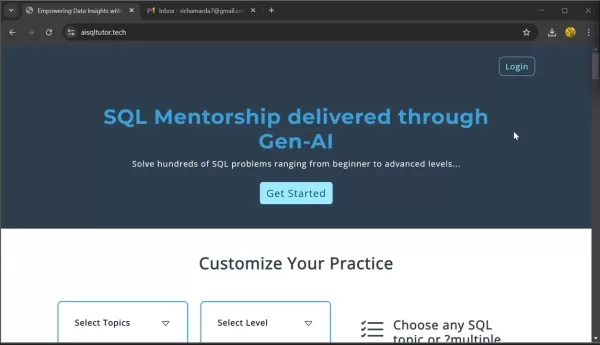
This simple process unlocks learning resources and lets you track your progress.
- Click the Login Button: Find the "Login" button at the top-right corner of the page.
- Enter Your Email Address: Provide your email and click "Sign Up and Continue".
- Check Your Email: A confirmation will appear, stating login credentials have been emailed.
- Retrieve Your Credentials: Open the email from AI SQL Tutor containing your login ID (your email) and a one-time password (OTP).
- Log In: Return to AI SQL Tutor, click "Login", and enter your login ID and the OTP.
- Change Your Password: You'll be redirected to the "Change Password" page to create a new, secure password. Enter a new password, confirm it, and click “Change Password”. With your credentials set, you're ready to start learning SQL.
Navigating the Dashboard
After logging in, you'll see your personalized dashboard
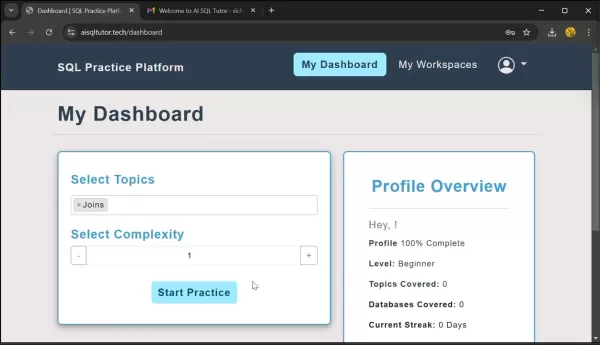
, your central hub for SQL learning. The dashboard gives an overview of your profile and options to customize your experience:
- Select Topics: Choose specific SQL topics to focus on, like "Joins", "Order By", "Aggregate Functions", or "Subquery".
- Select Complexity: Adjust the difficulty level to match your current skills for a suitable challenge.
- Start Practice: After selecting topics and complexity, click "Start Practice" to begin. This generates a tailored workspace for your session.
Exploring the Workspace
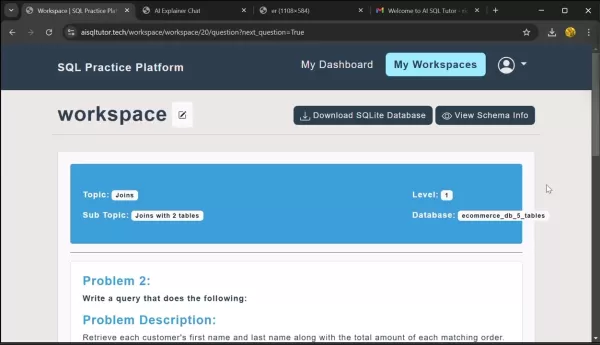
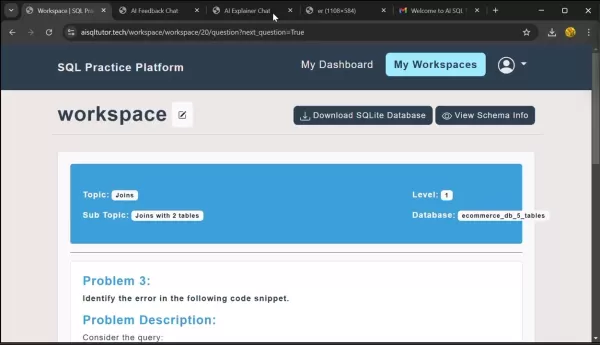
The workspace
is where you practice and refine your SQL skills:
- View Topic and Level: See the practice topic, complexity level, subtopic, and selected database.
- Rename Workspace: Personalize your workspace by editing its name.
- View Schema Info: Click "View Schema Info" for a visual database schema to understand tables and relationships.
- Download SQLite Database: Download the SQLite file for offline practice without an internet connection.
Mastering SQL with AI SQL Tutor: A Step-by-Step Guide
Understanding Question Formats
AI SQL Tutor presents questions in two formats
:
- Multiple Choice Questions (MCQs): Test your understanding of SQL concepts by selecting the correct answer from options.
- SQL Query-Based Problems: Challenge you to write SQL queries to complete specific data tasks.
Each question, whether MCQ or query-based, includes a clear problem statement and description, with MCQs offering answer choices. This ensures you understand the task before solving it.
Leveraging the AI Explainer
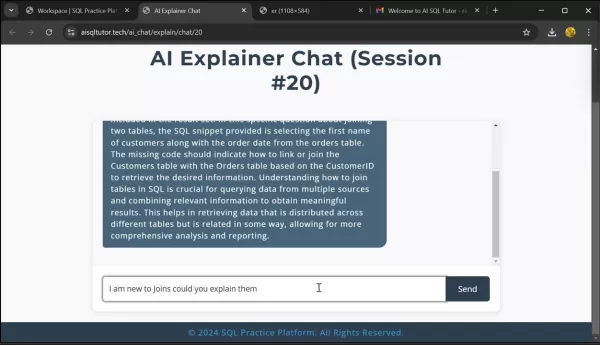
A key feature is the AI Explainer, your AI-powered mentor. Access it via the "AI Explainer" button
to start a chat session with an AI assistant for clarifying SQL concepts:
- Click "AI Explainer": Start the chat by clicking the button.
- Ask Your Question: Type your query in the chat box. For example, "Can you explain joins for a beginner?"
- Receive Guidance: The AI assistant provides tailored explanations to clarify complex topics, helping you overcome learning hurdles.
Answering Multiple Choice Questions
Approach MCQs like this:
- Read the Question: Carefully review the problem statement and options.
- Select Your Answer: Choose the option you think is correct.
- Check Your Answer: Click "Check Answer"
for instant feedback on your choice.
- Move On: With feedback received, click "Next Question" to continue improving your skills.
Tackling Query-Based Challenges
Follow these steps for SQL query-based questions:
- Understand the Problem: Read the problem statement, description, and expected output.
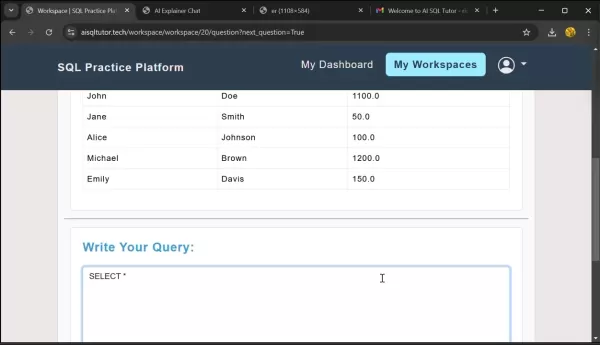
- Write Your Query: Compose your SQL query in the provided input box .
- Run Your Query: Click "Run Query"to see the results.
- Check Your Answer: Click “Check Answer”to see if your query is correct. Mistakes will be highlighted.
- Utilize AI Feedback: Use the “AI Feedback” buttonto get insights for improving your query.
- Refine and Proceed: This interactive process helps build a strong understanding of SQL.
Weighing the Benefits: Pros and Cons of AI SQL Tutor
Pros
AI-driven personalization tailors the learning to individual needs.
Interactive, hands-on practice accelerates skill development.
The AI Explainer provides instant guidance on SQL concepts.
A wide range of problems caters to all skill levels.
Cross-device accessibility allows learning anytime, anywhere.
Cons
Reliance on AI for feedback may reduce opportunities for human interaction.
The one-time password system might feel less secure compared to other methods.
The AI assistant does not provide complete solutions to problems.
Frequently Asked Questions
What types of SQL problems can I solve on AI SQL Tutor?
AI SQL Tutor offers a broad range of SQL problems from beginner to advanced levels, covering topics like joins, order by, aggregate functions, subqueries, window functions, and performance tuning.
Can I access AI SQL Tutor on my mobile device?
Yes, AI SQL Tutor is a web-based platform accessible on any device with a browser, including desktops, laptops, tablets, and smartphones.
Is there a community forum or support group where I can connect with other AI SQL Tutor users?
AI SQL Tutor does not currently have a dedicated community forum, but the platform provides AI-powered mentorship and guidance to help with any questions or challenges.
Related Questions
What are the benefits of learning SQL with AI?
Learning SQL with AI offers advantages like personalized learning paths, adaptive difficulty, AI-powered mentorship, and real-time feedback. AI analyzes your performance to identify areas needing support, providing targeted guidance for efficient mastery.
How does AI SQL Tutor compare to traditional SQL learning methods?
AI SQL Tutor provides a more engaging and effective experience than traditional methods like textbooks or courses. Its interactive environment, AI mentorship, and personalized curriculum make learning SQL more accessible and enjoyable.
Related article
 Musk Considered Leaving OpenAI to His Kids as Altman Testifies
This morning, OpenAI CEO Sam Altman took the stand to address former co-founder Elon Musk’s lawsuit challenging the company’s corporate structure.When asked about Musk’s claim that other founders “stole a charity” by launching a for-profit subsidiary
Sam Altman Sparks Debate Over AI's Deceleration
Listen onApple PodcastsListen onSpotifyOpenAI CEO Sam Altman recently suggested that it may be time to “pace the rate of AI development” to allow society to “harden around some of these new capability levels.”On the latest episode of TechCrunch’s Equ
Anthropic Opens Doors to EU Cybersecurity Agency as Mythos5 Model Faces Compliance Exam
Artificial intelligence compliance regulations are advancing significantly. Leading AI firm Anthropic has officially granted the European Union's cybersecurity authority access to its Mythos AI model, a pivotal move for this advanced large language m
Related Special Topic Recommendations
Image editing
Musk Considered Leaving OpenAI to His Kids as Altman Testifies
This morning, OpenAI CEO Sam Altman took the stand to address former co-founder Elon Musk’s lawsuit challenging the company’s corporate structure.When asked about Musk’s claim that other founders “stole a charity” by launching a for-profit subsidiary
Sam Altman Sparks Debate Over AI's Deceleration
Listen onApple PodcastsListen onSpotifyOpenAI CEO Sam Altman recently suggested that it may be time to “pace the rate of AI development” to allow society to “harden around some of these new capability levels.”On the latest episode of TechCrunch’s Equ
Anthropic Opens Doors to EU Cybersecurity Agency as Mythos5 Model Faces Compliance Exam
Artificial intelligence compliance regulations are advancing significantly. Leading AI firm Anthropic has officially granted the European Union's cybersecurity authority access to its Mythos AI model, a pivotal move for this advanced large language m
Related Special Topic Recommendations
Image editing
 Photoshop AI Retouch Tools for Ecommerce Apparel, Skin Cleanup, and Color Consistency
2026 Latest Best Photoshop AI retouch tools for ecommerce apparel, skin cleanup, and color consistency! This top-rated curated list features powerful game-changing solutions that help you boost writing efficiency, streamline content creation, and achieve perfect visual results effortlessly. Each tool has undergone real-world tests through weekly updated rankings, complete with free vs paid comparison details. Backed by XIX.AI, it’s the must-try guide for anyone aiming to unlock your AI edge. Explore now!
 10 tools
 xix.ai
Prompt
Best AI Prompt Libraries for ChatGPT Workflows
xix.ai
Prompt
Best AI Prompt Libraries for ChatGPT Workflows
2026 Latest Best Top-Rated AI Prompt Libraries for optimizing all types of ChatGPT workflows. XIX.AI has curated a powerful, game-changing collection that goes through rigorous real-world tests to ensure top performance. You can find detailed free vs paid comparisons and expert rankings to help you choose the must-try tools that boost your productivity and unlock your AI edge. Explore now!
11 tools
xix.ai
Education and Learning
AI Quiz Builder Platforms for Teachers, Tutors, and Cohort-Based Learning Programs
2026 Latest Best AI Quiz Builder Platforms for Teachers, Tutors, and Cohort-Based Learning Programs! XIX.AI has curated a top-rated list of powerful game-changing tools that go through real-world tests to deliver accurate rankings. These must-try platforms help boost writing efficiency, streamline content creation, and simplify quiz design across all learning scenarios. Explore now to discover your perfect tool for unlocking your AI edge in teaching!
13 tools
xix.ai
code
AI Pull Request Review Tools for GitHub Teams Handling Refactors, Bugs, and Security Gaps
2026 Latest Best AI Pull Request Review Tools for GitHub Teams are here on XIX.AI! This top-rated curated list showcases powerful game-changing solutions that streamline refactoring, bug fixing, and security gap detection across all team workflows. Enjoy a free vs paid comparison along with real-world tests and detailed rankings to help you find the perfect tool that boosts productivity significantly. Explore now to unlock your AI edge!
12 tools
xix.ai
Text-to-speech
Best AI Text to Speech Tools for Natural Voiceovers
2026 Latest Best Top-rated AI Text to Speech Tools for Natural Voiceovers are here on XIX.AI! This curated list features powerful, game-changing options that deliver crystal-clear voices for every use case, backed by real-world tests and weekly updated rankings. Get a free vs paid comparison to find the must-try solution that boosts your productivity instantly. Explore now to Unlock your AI edge!
11 tools
xix.ai
Comic Creation
Manga AI Background Generators for Serialized Chapters, Covers, and Promo Art
2026 Latest Best Manga AI Background Generators Ranked Top-Rated! This curated collection showcases powerful game-changing tools perfect for creating high-quality chapter backgrounds, book covers, and promotional art. Every option has undergone rigorous real-world tests to ensure reliability. Get a free vs paid comparison along with detailed insights. Explore now to discover your perfect tool and unlock your AI edge in manga creation.
6 tools
xix.ai

 Comments (2)
0/500
Comments (2)
0/500
![BillyYoung]()
Wait, so AI is gonna teach me SQL now? 😅 I've tried those generic tutorials before, but they never adapt to my pace. If this Gen-AI tutor actually explains JOINs in a way that doesn't make my brain melt, I'm sold. Still, I'm skeptical about the 'mentorship' part—can it really replace a human who knows when you're stuck? 🤔 Let's see.
![WilliamAnderson]()
This sounds like a game-changer for learning SQL! I've tried a few online courses before, but having an AI mentor that can tailor explanations sounds way more effective. Hope it doesn't just give away the answers but actually guides you to think through the logic. The interactive part is key! 🤔
Embark on a journey to master SQL with AI SQL Tutor, a revolutionary platform using Gen-AI to deliver tailored SQL mentorship. Whether you're a beginner learning the basics or a professional honing your skills, AI SQL Tutor offers an interactive space to learn and practice SQL effectively. Solve hundreds of problems, from beginner to advanced, and gain invaluable hands-on experience to elevate your data skills.
Key Points
AI SQL Tutor is an innovative Gen-AI powered platform for learning SQL.
It provides interactive, hands-on SQL practice.
Users can customize practice by selecting topics and difficulty levels.
AI SQL Tutor offers personalized guidance and query feedback.
The platform features multiple question formats, including multiple-choice and SQL query problems.
Introduction to AI SQL Tutor
What is AI SQL Tutor?
AI SQL Tutor is a cutting-edge tool that uses artificial intelligence to build comprehensive SQL skills. It delivers Gen-AI-powered SQL mentorship for a dynamic, personalized learning experience. Unlike traditional methods, it adapts to your learning style with tailored guidance. Solve hundreds of SQL problems from beginner to advanced levels for practical experience in an interactive setting. From account creation to dashboard navigation, AI SQL Tutor ensures a seamless learning journey.
Why Choose AI SQL Tutor?
In today's data-driven world, SQL proficiency is a valuable skill across industries. AI SQL Tutor stands out from conventional learning methods with its unique approach:
- Personalized Learning: AI adapts to your skill level and preferences, delivering customized content and guidance.
- Interactive Environment: Gain hands-on experience by solving real-world SQL problems in an engaging setting.
- AI-Powered Mentorship: Get expert feedback from AI assistants to identify and correct errors in your queries.
- Comprehensive Curriculum: Master SQL topics, from basic syntax to advanced techniques, through a structured curriculum.
- Convenient Access: Learn SQL anytime, anywhere on AI SQL Tutor's web-based platform, accessible on any device.
Getting Started with AI SQL Tutor
Creating Your Account
Begin your learning journey by creating a personal account on AI SQL Tutor.
This simple process unlocks learning resources and lets you track your progress.
- Click the Login Button: Find the "Login" button at the top-right corner of the page.
- Enter Your Email Address: Provide your email and click "Sign Up and Continue".
- Check Your Email: A confirmation will appear, stating login credentials have been emailed.
- Retrieve Your Credentials: Open the email from AI SQL Tutor containing your login ID (your email) and a one-time password (OTP).
- Log In: Return to AI SQL Tutor, click "Login", and enter your login ID and the OTP.
- Change Your Password: You'll be redirected to the "Change Password" page to create a new, secure password. Enter a new password, confirm it, and click “Change Password”. With your credentials set, you're ready to start learning SQL.
Navigating the Dashboard
After logging in, you'll see your personalized dashboard
, your central hub for SQL learning. The dashboard gives an overview of your profile and options to customize your experience:
- Select Topics: Choose specific SQL topics to focus on, like "Joins", "Order By", "Aggregate Functions", or "Subquery".
- Select Complexity: Adjust the difficulty level to match your current skills for a suitable challenge.
- Start Practice: After selecting topics and complexity, click "Start Practice" to begin. This generates a tailored workspace for your session.
Exploring the Workspace
The workspace
is where you practice and refine your SQL skills:
- View Topic and Level: See the practice topic, complexity level, subtopic, and selected database.
- Rename Workspace: Personalize your workspace by editing its name.
- View Schema Info: Click "View Schema Info" for a visual database schema to understand tables and relationships.
- Download SQLite Database: Download the SQLite file for offline practice without an internet connection.
Mastering SQL with AI SQL Tutor: A Step-by-Step Guide
Understanding Question Formats
AI SQL Tutor presents questions in two formats
:
- Multiple Choice Questions (MCQs): Test your understanding of SQL concepts by selecting the correct answer from options.
- SQL Query-Based Problems: Challenge you to write SQL queries to complete specific data tasks.
Each question, whether MCQ or query-based, includes a clear problem statement and description, with MCQs offering answer choices. This ensures you understand the task before solving it.
Leveraging the AI Explainer
A key feature is the AI Explainer, your AI-powered mentor. Access it via the "AI Explainer" button
to start a chat session with an AI assistant for clarifying SQL concepts:
- Click "AI Explainer": Start the chat by clicking the button.
- Ask Your Question: Type your query in the chat box. For example, "Can you explain joins for a beginner?"
- Receive Guidance: The AI assistant provides tailored explanations to clarify complex topics, helping you overcome learning hurdles.
Answering Multiple Choice Questions
Approach MCQs like this:
- Read the Question: Carefully review the problem statement and options.
- Select Your Answer: Choose the option you think is correct.
- Check Your Answer: Click "Check Answer"
for instant feedback on your choice.
- Move On: With feedback received, click "Next Question" to continue improving your skills.
Tackling Query-Based Challenges
Follow these steps for SQL query-based questions:
- Understand the Problem: Read the problem statement, description, and expected output.
- Write Your Query: Compose your SQL query in the provided input box .
- Run Your Query: Click "Run Query"to see the results.
- Check Your Answer: Click “Check Answer”to see if your query is correct. Mistakes will be highlighted.
- Utilize AI Feedback: Use the “AI Feedback” buttonto get insights for improving your query.
- Refine and Proceed: This interactive process helps build a strong understanding of SQL.
Weighing the Benefits: Pros and Cons of AI SQL Tutor
Pros
AI-driven personalization tailors the learning to individual needs.
Interactive, hands-on practice accelerates skill development.
The AI Explainer provides instant guidance on SQL concepts.
A wide range of problems caters to all skill levels.
Cross-device accessibility allows learning anytime, anywhere.
Cons
Reliance on AI for feedback may reduce opportunities for human interaction.
The one-time password system might feel less secure compared to other methods.
The AI assistant does not provide complete solutions to problems.
Frequently Asked Questions
What types of SQL problems can I solve on AI SQL Tutor?
AI SQL Tutor offers a broad range of SQL problems from beginner to advanced levels, covering topics like joins, order by, aggregate functions, subqueries, window functions, and performance tuning.
Can I access AI SQL Tutor on my mobile device?
Yes, AI SQL Tutor is a web-based platform accessible on any device with a browser, including desktops, laptops, tablets, and smartphones.
Is there a community forum or support group where I can connect with other AI SQL Tutor users?
AI SQL Tutor does not currently have a dedicated community forum, but the platform provides AI-powered mentorship and guidance to help with any questions or challenges.
Related Questions
What are the benefits of learning SQL with AI?
Learning SQL with AI offers advantages like personalized learning paths, adaptive difficulty, AI-powered mentorship, and real-time feedback. AI analyzes your performance to identify areas needing support, providing targeted guidance for efficient mastery.
How does AI SQL Tutor compare to traditional SQL learning methods?
AI SQL Tutor provides a more engaging and effective experience than traditional methods like textbooks or courses. Its interactive environment, AI mentorship, and personalized curriculum make learning SQL more accessible and enjoyable.








 Musk Considered Leaving OpenAI to His Kids as Altman Testifies
This morning, OpenAI CEO Sam Altman took the stand to address former co-founder Elon Musk’s lawsuit challenging the company’s corporate structure.When asked about Musk’s claim that other founders “stole a charity” by launching a for-profit subsidiary
Musk Considered Leaving OpenAI to His Kids as Altman Testifies
This morning, OpenAI CEO Sam Altman took the stand to address former co-founder Elon Musk’s lawsuit challenging the company’s corporate structure.When asked about Musk’s claim that other founders “stole a charity” by launching a for-profit subsidiary
 Sam Altman Sparks Debate Over AI's Deceleration
Listen onApple PodcastsListen onSpotifyOpenAI CEO Sam Altman recently suggested that it may be time to “pace the rate of AI development” to allow society to “harden around some of these new capability levels.”On the latest episode of TechCrunch’s Equ
Sam Altman Sparks Debate Over AI's Deceleration
Listen onApple PodcastsListen onSpotifyOpenAI CEO Sam Altman recently suggested that it may be time to “pace the rate of AI development” to allow society to “harden around some of these new capability levels.”On the latest episode of TechCrunch’s Equ
 Anthropic Opens Doors to EU Cybersecurity Agency as Mythos5 Model Faces Compliance Exam
Artificial intelligence compliance regulations are advancing significantly. Leading AI firm Anthropic has officially granted the European Union's cybersecurity authority access to its Mythos AI model, a pivotal move for this advanced large language m
Anthropic Opens Doors to EU Cybersecurity Agency as Mythos5 Model Faces Compliance Exam
Artificial intelligence compliance regulations are advancing significantly. Leading AI firm Anthropic has officially granted the European Union's cybersecurity authority access to its Mythos AI model, a pivotal move for this advanced large language m

2026 Latest Best Photoshop AI retouch tools for ecommerce apparel, skin cleanup, and color consistency! This top-rated curated list features powerful game-changing solutions that help you boost writing efficiency, streamline content creation, and achieve perfect visual results effortlessly. Each tool has undergone real-world tests through weekly updated rankings, complete with free vs paid comparison details. Backed by XIX.AI, it’s the must-try guide for anyone aiming to unlock your AI edge. Explore now!
10 tools
xix.ai

2026 Latest Best Top-Rated AI Prompt Libraries for optimizing all types of ChatGPT workflows. XIX.AI has curated a powerful, game-changing collection that goes through rigorous real-world tests to ensure top performance. You can find detailed free vs paid comparisons and expert rankings to help you choose the must-try tools that boost your productivity and unlock your AI edge. Explore now!
11 tools
xix.ai

2026 Latest Best AI Quiz Builder Platforms for Teachers, Tutors, and Cohort-Based Learning Programs! XIX.AI has curated a top-rated list of powerful game-changing tools that go through real-world tests to deliver accurate rankings. These must-try platforms help boost writing efficiency, streamline content creation, and simplify quiz design across all learning scenarios. Explore now to discover your perfect tool for unlocking your AI edge in teaching!
13 tools
xix.ai

2026 Latest Best AI Pull Request Review Tools for GitHub Teams are here on XIX.AI! This top-rated curated list showcases powerful game-changing solutions that streamline refactoring, bug fixing, and security gap detection across all team workflows. Enjoy a free vs paid comparison along with real-world tests and detailed rankings to help you find the perfect tool that boosts productivity significantly. Explore now to unlock your AI edge!
12 tools
xix.ai

2026 Latest Best Top-rated AI Text to Speech Tools for Natural Voiceovers are here on XIX.AI! This curated list features powerful, game-changing options that deliver crystal-clear voices for every use case, backed by real-world tests and weekly updated rankings. Get a free vs paid comparison to find the must-try solution that boosts your productivity instantly. Explore now to Unlock your AI edge!
11 tools
xix.ai

2026 Latest Best Manga AI Background Generators Ranked Top-Rated! This curated collection showcases powerful game-changing tools perfect for creating high-quality chapter backgrounds, book covers, and promotional art. Every option has undergone rigorous real-world tests to ensure reliability. Get a free vs paid comparison along with detailed insights. Explore now to discover your perfect tool and unlock your AI edge in manga creation.
6 tools
xix.ai

Wait, so AI is gonna teach me SQL now? 😅 I've tried those generic tutorials before, but they never adapt to my pace. If this Gen-AI tutor actually explains JOINs in a way that doesn't make my brain melt, I'm sold. Still, I'm skeptical about the 'mentorship' part—can it really replace a human who knows when you're stuck? 🤔 Let's see.
This sounds like a game-changer for learning SQL! I've tried a few online courses before, but having an AI mentor that can tailor explanations sounds way more effective. Hope it doesn't just give away the answers but actually guides you to think through the logic. The interactive part is key! 🤔












