


 Home
HomeAI Tools Transform Text into Free Sound Effects for Creative Projects
Producing sound effects once demanded costly equipment and expert sound designers. Now, AI-powered tools are reshaping audio creation by generating sounds from simple text descriptions. This article highlights two remarkable AI platforms that offer free text-to-sound effect generation, unlocking endless possibilities for your creative endeavors.
Key Highlights
Create sound effects with ElevenLabs by typing descriptive text.
Discover Hugging Face AudioLDM 2, an open-source tool, for crafting lifelike audio samples.
Both platforms provide free tiers, allowing diverse sound effect creation at no cost.
Apply sound effects to enhance videos, games, podcasts, and more.
Tweak prompts and settings to fine-tune audio outputs for your needs.
Unlocking Creativity with AI Sound Effects
Text-to-Sound AI Revolution
Audio production is experiencing a transformative wave, driven by artificial intelligence. Traditional sound design, often labor-intensive and expensive, is now being complemented—or even surpassed—by AI tools that generate sound effects from text inputs. This breakthrough makes audio creation accessible to independent artists, small businesses, and enthusiasts without access to professional resources.
These AI tools use advanced machine learning to interpret text prompts and produce corresponding audio. By entering phrases like "a motorcycle roaring past" or "waves crashing on a shore," users can create vivid soundscapes that elevate their projects. This technology is invaluable for video production, game development, podcasting, and even therapeutic uses where specific sounds evoke targeted emotions.
As AI continues to evolve, it promises even greater precision in sound generation. Future advancements will capture intricate details, distinguishing between a soft rain and a thunderstorm or a wooden gate versus a metal one. This opens new doors for immersive storytelling and realistic simulations, enriching user experiences across media.
Generating sound effects from text reduces costs, streamlines workflows, and sparks creativity. Creators can experiment freely, testing various audio options that were once impractical with traditional methods. This flexibility leads to polished, high-impact projects, raising the bar for audio quality across platforms.
Why Choose AI for Sound Effects?
AI-driven sound effect generation isn’t just a trend—it’s a practical solution to longstanding audio production challenges. Here’s why integrating AI into your sound design workflow makes sense:
- Cost Savings: Professional sound designers and extensive libraries can be expensive. AI tools offer budget-friendly alternatives, often with free or low-cost plans.
- Time Efficiency: Searching through sound libraries or waiting for custom audio slows projects. AI delivers instant sound effects, speeding up production.
- Ease of Use: No advanced audio software or expertise is required. AI platforms feature user-friendly interfaces, empowering creators of all levels.
- Tailored Audio: Generic sound clips often fall short. AI enables precise customization to match a project’s unique needs.
- Creative Freedom: The speed and ease of AI tools encourage experimentation, leading to innovative soundscapes that enhance creative output.
With AI, creators can focus on their project’s vision, knowing high-quality, tailored audio is within reach. As AI technology advances, its role in audio production will grow, blending human creativity with machine precision.
Comparing AI Sound Effect Tools
Feature Breakdown
Choosing the right AI sound effect generator requires understanding their strengths and limitations. Here’s a comparison of ElevenLabs and Hugging Face AudioLDM 2:
Feature ElevenLabs Hugging Face AudioLDM 2 Accessibility Intuitive, user-friendly platform Requires coding and model-handling skills Cost Free tier with usage limits Open-source, free, with potential infrastructure costs Customization Options Basic customization features Highly customizable settings Integration Seamless integration with popular tools Requires setup for project integration Sound Quality Premium sound effect quality High-quality audio with technical know-how Community Support Dedicated customer support Community-driven assistance
This comparison outlines each platform’s offerings, helping creators choose based on their needs and technical expertise.
Free AI Tools for Text-to-Sound Creation
Creating Sounds with ElevenLabs
ElevenLabs is a versatile AI platform known for voice and audio generation. While celebrated for text-to-speech, it also excels at generating sound effects from text. Here’s how to use it:
Step 1: Search for ElevenLabs
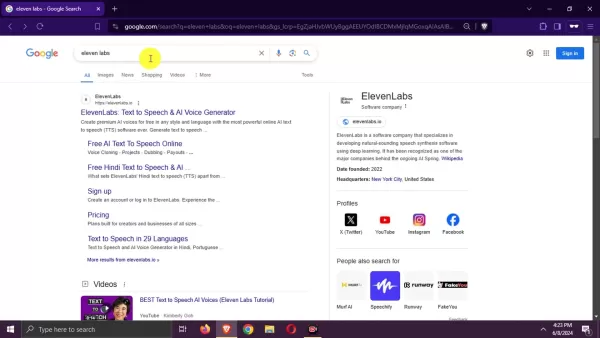
Search for “ElevenLabs” in your preferred search engine and click the official website link.
Step 2: Explore the Platform
On the ElevenLabs website, review the interface to understand its features. While it emphasizes voice AI, focus on the sound effects tool.
Step 3: Create an Account
Sign up by clicking the “Sign Up” button, usually in the top-right corner. Use your Google account or provide an email and password, agreeing to the terms of service and privacy policy.
Step 4: Bypass Extra Details
After signing up, you may be asked for additional information like your name. Skip these to head straight to the sound effects tool.
Step 5: Access Sound Effects
In the ElevenLabs dashboard, locate the “Sound Effects” section in the left-hand menu. Click it to open the text-to-sound effect generator.
Step 6: Input Your Prompt
In the generator’s text box, describe the desired sound effect in detail, such as “a galloping horse.” Adjust settings like duration or prompt influence for refined results.
Step 7: Generate Audio
Click “Generate sound effects” after entering your prompt. ElevenLabs will produce four unique sound effects based on your input.
Step 8: Review and Save
Listen to the generated effects and select the best one. Download it by clicking the download icon, saving the file for use in your projects.
ElevenLabs’ free tier offers ample generation capacity. If you hit the quota, upgrade to a paid plan or create a new account to continue for free.
Using Hugging Face AudioLDM 2 for Audio Creation
Hugging Face is a go-to platform for machine learning enthusiasts, offering tools like AudioLDM 2, a text-to-audio diffusion model for realistic sound generation. Here’s how to use it:
Step 1: Search for AudioLDM 2
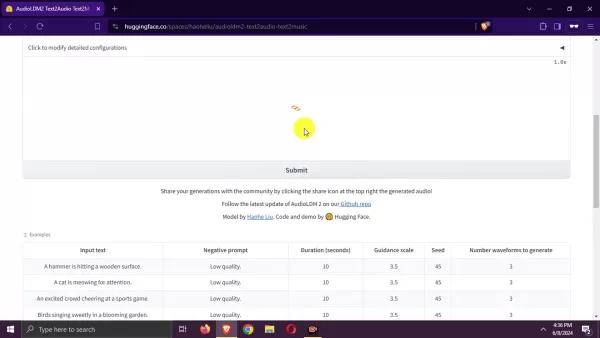
Search for “Hugging Face AudioLDM 2” and click the official model page link in the results.
Step 2: Explore the Model Page
The Hugging Face model page details AudioLDM 2’s capabilities and usage. Review this to grasp its potential.
Step 3: Access the Space
Navigate to the model’s dedicated space, an interactive environment for testing. Look for a “Spaces using cvssp/audioIdm2” link or button.
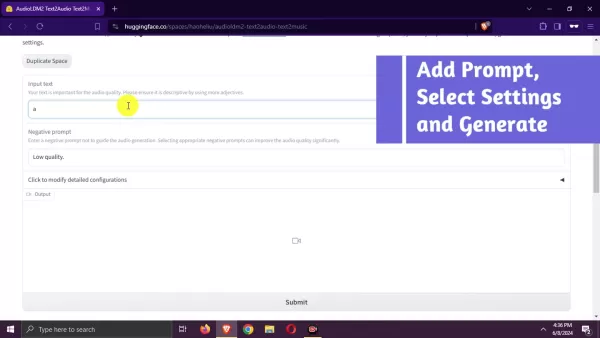
Step 4: Enter Your Prompt
In the space, find the “Input text” box and describe the sound, like “a thunderstorm.” Be specific for optimal results.
Step 5: Adjust Settings (Optional)
Customize settings like duration or guidance scale to refine the output. Experiment to get the desired effect, then click “Submit.”
Step 6: Generate the Audio
AudioLDM 2 will process your prompt, which may take a moment. A progress bar will show the generation status.
Step 7: Review and Download
Listen to the generated audio in the space. If satisfied, download it as an .mp4 video file for your projects.
AudioLDM 2’s open-source nature offers flexibility but may require technical skills for advanced customization.
Pricing and Usage Limits
ElevenLabs Pricing
ElevenLabs offers flexible pricing plans for various user needs:
Free Plan: Ideal for testing, this plan includes a character quota limiting monthly text-to-speech conversions.
It suits basic use but restricts advanced features and usage volume.
Creator Plan: Perfect for individuals and small businesses, it offers a higher character quota, voice cloning, and commercial use rights.
Independent Publisher Plan: Designed for larger teams, it provides a generous quota, priority support, and collaboration tools.
Business Plan: Built for enterprises, it includes a high character quota, priority support, and tailored service agreements.
Enterprise Plan: Customized for large organizations, it offers dedicated support, advanced security, and integration options. Contact ElevenLabs for tailored pricing.
Hugging Face AudioLDM 2 Pricing
Hugging Face’s AudioLDM 2 is an open-source model, free to use with no direct costs:
Open-Source Access: Use, modify, and distribute AudioLDM 2 freely under its open-source license via Hugging Face’s platform.
Community Support: Benefit from developer and researcher contributions, enhancing the model without financial costs.
Infrastructure Costs: Running AudioLDM 2 on Hugging Face Spaces may incur computational costs, though free or affordable tiers are available. Enterprises may need dedicated resources for large-scale use.
Applications of AI-Generated Sound Effects
Elevating Video and Film Production
AI-generated sound effects enhance videos and films by adding depth and realism. From ambient backgrounds to dramatic action sounds, these tools help creators craft immersive audio that matches their visuals, ideal for budget-conscious filmmakers and YouTubers.
Enriching Gaming Experiences
Sound effects are vital for immersive gaming. AI tools enable developers to create diverse sounds, from environmental effects to character voices, allowing rapid iteration to perfect a game’s audio and boost player engagement.
Enhancing Podcasts and Audiobooks
High-quality audio is key for podcasts and audiobooks. AI sound effects add subtle ambiance, smooth transitions, or dramatic emphasis, helping listeners stay engaged and visualize the story.
Supporting Therapeutic Uses
AI-generated sounds, like calming nature effects or energizing tones, can create therapeutic environments to reduce stress, promote relaxation, or boost focus, offering tailored audio solutions for well-being.
Frequently Asked Questions
Can AI-generated sound effects be used commercially?
Yes, but check the tool’s licensing terms. ElevenLabs permits commercial use in select paid plans, while Hugging Face AudioLDM 2’s open-source license typically allows it, but always confirm compliance.
Do I need sound design experience to use AI tools?
No, these tools are beginner-friendly, requiring no prior expertise. Advanced customization may benefit from technical knowledge, but basic use is accessible to all.
Are AI-generated sound effects unique?
Yes, these tools synthesize unique sounds based on your prompts, not existing libraries, offering tailored audio with creative control.
What file formats do these tools support?
ElevenLabs typically outputs MP3 and WAV files. Hugging Face AudioLDM 2 supports various formats, including .mp4 video files for audio.
Related Questions
What other AI tools exist for audio production?
Beyond sound effect generators, AI tools include music composition software, audio editing platforms, and voice cloning technologies, aiding tasks like music creation, voiceovers, and audio enhancement.
How do AI sound effect tools compare to traditional methods?
AI tools offer cost savings, speed, accessibility, and customization compared to traditional methods, though human designers may still provide superior control and fidelity in specific cases.
Can AI sound effects replace human designers?
AI streamlines tasks and cuts costs but is unlikely to fully replace human designers, who offer unique creative perspectives that complement machine-generated audio.
Related article
 Claude Opus 5.2 Night Gray Launches with Faster Response, Solving Laziness Issue
Opus 5.2 quietly launched this morning, prompting many developers to notice that the updated model, Claude Opus 5.2, has begun a limited rollout within Claude Code.Yesterday evening, X users observed that invoking Opus 5 in Claude Code yielded perfor
Fireworks AI Unveils FireRouter with Opus: Cuts Encoding Costs by 57% with Minimal Accuracy Drop
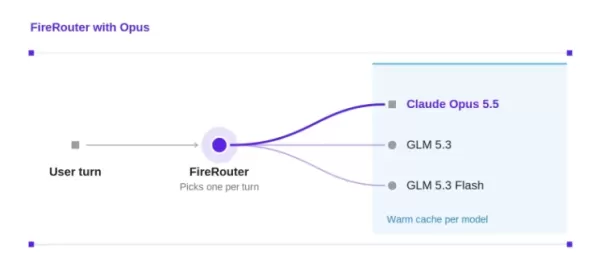
Fireworks AI has introduced FireRouter with Opus, the industry’s first cache-aware routing system tailored for the Claude Opus series. Now accessible via a serverless endpoint, this independent routing model underwent over a month of internal A/B tes
NVIDIA Unveils Nemotron-Labs-Audex-30B-A3B Unified Audio Intelligence Model
As multimodal large models evolve rapidly, audio processing capabilities are frequently compromised—many models improve audio understanding at the expense of text logic. To address this, NVIDIA researchers have introduced Nemotron-Labs-Audex-30B-A3B
Related Special Topic Recommendations
Data Analysis
Claude Opus 5.2 Night Gray Launches with Faster Response, Solving Laziness Issue
Opus 5.2 quietly launched this morning, prompting many developers to notice that the updated model, Claude Opus 5.2, has begun a limited rollout within Claude Code.Yesterday evening, X users observed that invoking Opus 5 in Claude Code yielded perfor
Fireworks AI Unveils FireRouter with Opus: Cuts Encoding Costs by 57% with Minimal Accuracy Drop
Fireworks AI has introduced FireRouter with Opus, the industry’s first cache-aware routing system tailored for the Claude Opus series. Now accessible via a serverless endpoint, this independent routing model underwent over a month of internal A/B tes
NVIDIA Unveils Nemotron-Labs-Audex-30B-A3B Unified Audio Intelligence Model
As multimodal large models evolve rapidly, audio processing capabilities are frequently compromised—many models improve audio understanding at the expense of text logic. To address this, NVIDIA researchers have introduced Nemotron-Labs-Audex-30B-A3B
Related Special Topic Recommendations
Data Analysis
 Best AI Chart Builder Tools for Fast Reporting
2026 Latest Best Top-rated AI Chart Builder Tools for Fast Reporting are here on XIX.AI! This curated list features powerful game-changing tools that deliver accurate professional charts with just a few clicks, helping you boost writing efficiency and streamline content creation. Get a free vs paid comparison along with real-world tests and detailed rankings to find the must-try solution for your needs. Explore now to unlock your AI edge!
 9 tools
 xix.ai
chatbot
AI Live Chat Routing Tools for Ecommerce Queues, VIP Buyers, and Return Requests
xix.ai
chatbot
AI Live Chat Routing Tools for Ecommerce Queues, VIP Buyers, and Return Requests
2026 Latest Best Top-rated AI Live Chat Routing Tools for Ecommerce Queues, VIP Buyers, and Return Requests. This curated list features powerful game-changing solutions that boost productivity dramatically through real-world tests. It includes a free vs paid comparison along with detailed rankings to help you find the perfect fit. XIX.AI stands out as a trusted provider in this space. Explore now to Unlock your AI edge!
9 tools
xix.ai
writing
Best AI Editing Tools for ESL Writers: Improve Tone, Grammar, and Flow
2026 Latest Best Top-Rated AI Editing Tools for ESL Writers are here on XIX.AI! This curated list features powerful game-changing tools that go through real-world tests to ensure accuracy. You can find a free vs paid comparison alongside detailed rankings to help you pick the must-try solution that boosts your writing tone, grammar, and flow perfectly. Explore now to Unlock your AI edge!
9 tools
xix.ai
Software Development
Best AI Bug Triage Tools for Engineering Teams
2026 Latest Best Top-Rated AI Bug Triage Tools for Engineering Teams! XIX.AI has curated a powerful, game-changing collection of must-try tools that go through rigorous real-world tests to deliver accurate issue analysis and efficient resolution. Get a free vs paid comparison along with detailed rankings to help you find the perfect solution that boosts your team’s productivity significantly. Explore now to unlock your AI edge!
9 tools
xix.ai
Image editing
Best AI Portrait Enhancers: Improve Lighting, Skin Tone, and Sharpness
2026 Latest Best Top-rated AI Portrait Enhancers curated for ultimate image quality. These powerful tools deliver game-changing results by boosting lighting, skin tone, and sharpness effortlessly, perfect for creators needing to enhance photos quickly. XIX.AI provides a free vs paid comparison along with real-world tests and weekly updated rankings. Discover your perfect tool to unlock your AI edge today. Explore now!
7 tools
xix.ai
writing
AI Technical Documentation Tools for API Guides, Release Notes, and Onboarding Docs
2026 Latest Best Top-rated AI Technical Documentation Tools for API Guides Release Notes and Onboarding Docs. This curated list features powerful game-changing solutions that streamline content creation boost writing efficiency and save time across all project phases. XIX.AI provides weekly updated rankings along with free vs paid comparison results from real-world tests. Explore now to Discover your perfect tool and Unlock your AI edge.
10 tools
xix.ai

 Comments (1)
0/500
Comments (1)
0/500
![JoseDavis]()
J'ai testé un outil similaire récemment et c'est assez bluffant pour les petits projets ! Par contre, la qualité sonore reste parfois un peu artificielle sur les sons complexes 😅 Est-ce que l'article parle des limites actuelles de ces IA ?
Producing sound effects once demanded costly equipment and expert sound designers. Now, AI-powered tools are reshaping audio creation by generating sounds from simple text descriptions. This article highlights two remarkable AI platforms that offer free text-to-sound effect generation, unlocking endless possibilities for your creative endeavors.
Key Highlights
Create sound effects with ElevenLabs by typing descriptive text.
Discover Hugging Face AudioLDM 2, an open-source tool, for crafting lifelike audio samples.
Both platforms provide free tiers, allowing diverse sound effect creation at no cost.
Apply sound effects to enhance videos, games, podcasts, and more.
Tweak prompts and settings to fine-tune audio outputs for your needs.
Unlocking Creativity with AI Sound Effects
Text-to-Sound AI Revolution
Audio production is experiencing a transformative wave, driven by artificial intelligence. Traditional sound design, often labor-intensive and expensive, is now being complemented—or even surpassed—by AI tools that generate sound effects from text inputs. This breakthrough makes audio creation accessible to independent artists, small businesses, and enthusiasts without access to professional resources.
These AI tools use advanced machine learning to interpret text prompts and produce corresponding audio. By entering phrases like "a motorcycle roaring past" or "waves crashing on a shore," users can create vivid soundscapes that elevate their projects. This technology is invaluable for video production, game development, podcasting, and even therapeutic uses where specific sounds evoke targeted emotions.
As AI continues to evolve, it promises even greater precision in sound generation. Future advancements will capture intricate details, distinguishing between a soft rain and a thunderstorm or a wooden gate versus a metal one. This opens new doors for immersive storytelling and realistic simulations, enriching user experiences across media.
Generating sound effects from text reduces costs, streamlines workflows, and sparks creativity. Creators can experiment freely, testing various audio options that were once impractical with traditional methods. This flexibility leads to polished, high-impact projects, raising the bar for audio quality across platforms.
Why Choose AI for Sound Effects?
AI-driven sound effect generation isn’t just a trend—it’s a practical solution to longstanding audio production challenges. Here’s why integrating AI into your sound design workflow makes sense:
- Cost Savings: Professional sound designers and extensive libraries can be expensive. AI tools offer budget-friendly alternatives, often with free or low-cost plans.
- Time Efficiency: Searching through sound libraries or waiting for custom audio slows projects. AI delivers instant sound effects, speeding up production.
- Ease of Use: No advanced audio software or expertise is required. AI platforms feature user-friendly interfaces, empowering creators of all levels.
- Tailored Audio: Generic sound clips often fall short. AI enables precise customization to match a project’s unique needs.
- Creative Freedom: The speed and ease of AI tools encourage experimentation, leading to innovative soundscapes that enhance creative output.
With AI, creators can focus on their project’s vision, knowing high-quality, tailored audio is within reach. As AI technology advances, its role in audio production will grow, blending human creativity with machine precision.
Comparing AI Sound Effect Tools
Feature Breakdown
Choosing the right AI sound effect generator requires understanding their strengths and limitations. Here’s a comparison of ElevenLabs and Hugging Face AudioLDM 2:
| Feature | ElevenLabs | Hugging Face AudioLDM 2 |
|---|---|---|
| Accessibility | Intuitive, user-friendly platform | Requires coding and model-handling skills |
| Cost | Free tier with usage limits | Open-source, free, with potential infrastructure costs |
| Customization Options | Basic customization features | Highly customizable settings |
| Integration | Seamless integration with popular tools | Requires setup for project integration |
| Sound Quality | Premium sound effect quality | High-quality audio with technical know-how |
| Community Support | Dedicated customer support | Community-driven assistance |
This comparison outlines each platform’s offerings, helping creators choose based on their needs and technical expertise.
Free AI Tools for Text-to-Sound Creation
Creating Sounds with ElevenLabs
ElevenLabs is a versatile AI platform known for voice and audio generation. While celebrated for text-to-speech, it also excels at generating sound effects from text. Here’s how to use it:
Step 1: Search for ElevenLabs
Search for “ElevenLabs” in your preferred search engine and click the official website link.
Step 2: Explore the Platform
On the ElevenLabs website, review the interface to understand its features. While it emphasizes voice AI, focus on the sound effects tool.
Step 3: Create an Account
Sign up by clicking the “Sign Up” button, usually in the top-right corner. Use your Google account or provide an email and password, agreeing to the terms of service and privacy policy.
Step 4: Bypass Extra Details
After signing up, you may be asked for additional information like your name. Skip these to head straight to the sound effects tool.
Step 5: Access Sound Effects
In the ElevenLabs dashboard, locate the “Sound Effects” section in the left-hand menu. Click it to open the text-to-sound effect generator.
Step 6: Input Your Prompt
In the generator’s text box, describe the desired sound effect in detail, such as “a galloping horse.” Adjust settings like duration or prompt influence for refined results.
Step 7: Generate Audio
Click “Generate sound effects” after entering your prompt. ElevenLabs will produce four unique sound effects based on your input.
Step 8: Review and Save
Listen to the generated effects and select the best one. Download it by clicking the download icon, saving the file for use in your projects.
ElevenLabs’ free tier offers ample generation capacity. If you hit the quota, upgrade to a paid plan or create a new account to continue for free.
Using Hugging Face AudioLDM 2 for Audio Creation
Hugging Face is a go-to platform for machine learning enthusiasts, offering tools like AudioLDM 2, a text-to-audio diffusion model for realistic sound generation. Here’s how to use it:
Step 1: Search for AudioLDM 2
Search for “Hugging Face AudioLDM 2” and click the official model page link in the results.
Step 2: Explore the Model Page
The Hugging Face model page details AudioLDM 2’s capabilities and usage. Review this to grasp its potential.
Step 3: Access the Space
Navigate to the model’s dedicated space, an interactive environment for testing. Look for a “Spaces using cvssp/audioIdm2” link or button.
Step 4: Enter Your Prompt
In the space, find the “Input text” box and describe the sound, like “a thunderstorm.” Be specific for optimal results.
Step 5: Adjust Settings (Optional)
Customize settings like duration or guidance scale to refine the output. Experiment to get the desired effect, then click “Submit.”
Step 6: Generate the Audio
AudioLDM 2 will process your prompt, which may take a moment. A progress bar will show the generation status.
Step 7: Review and Download
Listen to the generated audio in the space. If satisfied, download it as an .mp4 video file for your projects.
AudioLDM 2’s open-source nature offers flexibility but may require technical skills for advanced customization.
Pricing and Usage Limits
ElevenLabs Pricing
ElevenLabs offers flexible pricing plans for various user needs:
Free Plan: Ideal for testing, this plan includes a character quota limiting monthly text-to-speech conversions.
It suits basic use but restricts advanced features and usage volume.
Creator Plan: Perfect for individuals and small businesses, it offers a higher character quota, voice cloning, and commercial use rights.
Independent Publisher Plan: Designed for larger teams, it provides a generous quota, priority support, and collaboration tools.
Business Plan: Built for enterprises, it includes a high character quota, priority support, and tailored service agreements.
Enterprise Plan: Customized for large organizations, it offers dedicated support, advanced security, and integration options. Contact ElevenLabs for tailored pricing.
Hugging Face AudioLDM 2 Pricing
Hugging Face’s AudioLDM 2 is an open-source model, free to use with no direct costs:
Open-Source Access: Use, modify, and distribute AudioLDM 2 freely under its open-source license via Hugging Face’s platform.
Community Support: Benefit from developer and researcher contributions, enhancing the model without financial costs.
Infrastructure Costs: Running AudioLDM 2 on Hugging Face Spaces may incur computational costs, though free or affordable tiers are available. Enterprises may need dedicated resources for large-scale use.
Applications of AI-Generated Sound Effects
Elevating Video and Film Production
AI-generated sound effects enhance videos and films by adding depth and realism. From ambient backgrounds to dramatic action sounds, these tools help creators craft immersive audio that matches their visuals, ideal for budget-conscious filmmakers and YouTubers.
Enriching Gaming Experiences
Sound effects are vital for immersive gaming. AI tools enable developers to create diverse sounds, from environmental effects to character voices, allowing rapid iteration to perfect a game’s audio and boost player engagement.
Enhancing Podcasts and Audiobooks
High-quality audio is key for podcasts and audiobooks. AI sound effects add subtle ambiance, smooth transitions, or dramatic emphasis, helping listeners stay engaged and visualize the story.
Supporting Therapeutic Uses
AI-generated sounds, like calming nature effects or energizing tones, can create therapeutic environments to reduce stress, promote relaxation, or boost focus, offering tailored audio solutions for well-being.
Frequently Asked Questions
Can AI-generated sound effects be used commercially?
Yes, but check the tool’s licensing terms. ElevenLabs permits commercial use in select paid plans, while Hugging Face AudioLDM 2’s open-source license typically allows it, but always confirm compliance.
Do I need sound design experience to use AI tools?
No, these tools are beginner-friendly, requiring no prior expertise. Advanced customization may benefit from technical knowledge, but basic use is accessible to all.
Are AI-generated sound effects unique?
Yes, these tools synthesize unique sounds based on your prompts, not existing libraries, offering tailored audio with creative control.
What file formats do these tools support?
ElevenLabs typically outputs MP3 and WAV files. Hugging Face AudioLDM 2 supports various formats, including .mp4 video files for audio.
Related Questions
What other AI tools exist for audio production?
Beyond sound effect generators, AI tools include music composition software, audio editing platforms, and voice cloning technologies, aiding tasks like music creation, voiceovers, and audio enhancement.
How do AI sound effect tools compare to traditional methods?
AI tools offer cost savings, speed, accessibility, and customization compared to traditional methods, though human designers may still provide superior control and fidelity in specific cases.
Can AI sound effects replace human designers?
AI streamlines tasks and cuts costs but is unlikely to fully replace human designers, who offer unique creative perspectives that complement machine-generated audio.








 Claude Opus 5.2 Night Gray Launches with Faster Response, Solving Laziness Issue
Opus 5.2 quietly launched this morning, prompting many developers to notice that the updated model, Claude Opus 5.2, has begun a limited rollout within Claude Code.Yesterday evening, X users observed that invoking Opus 5 in Claude Code yielded perfor
Claude Opus 5.2 Night Gray Launches with Faster Response, Solving Laziness Issue
Opus 5.2 quietly launched this morning, prompting many developers to notice that the updated model, Claude Opus 5.2, has begun a limited rollout within Claude Code.Yesterday evening, X users observed that invoking Opus 5 in Claude Code yielded perfor
 Fireworks AI Unveils FireRouter with Opus: Cuts Encoding Costs by 57% with Minimal Accuracy Drop
Fireworks AI has introduced FireRouter with Opus, the industry’s first cache-aware routing system tailored for the Claude Opus series. Now accessible via a serverless endpoint, this independent routing model underwent over a month of internal A/B tes
Fireworks AI Unveils FireRouter with Opus: Cuts Encoding Costs by 57% with Minimal Accuracy Drop
Fireworks AI has introduced FireRouter with Opus, the industry’s first cache-aware routing system tailored for the Claude Opus series. Now accessible via a serverless endpoint, this independent routing model underwent over a month of internal A/B tes
 NVIDIA Unveils Nemotron-Labs-Audex-30B-A3B Unified Audio Intelligence Model
As multimodal large models evolve rapidly, audio processing capabilities are frequently compromised—many models improve audio understanding at the expense of text logic. To address this, NVIDIA researchers have introduced Nemotron-Labs-Audex-30B-A3B
NVIDIA Unveils Nemotron-Labs-Audex-30B-A3B Unified Audio Intelligence Model
As multimodal large models evolve rapidly, audio processing capabilities are frequently compromised—many models improve audio understanding at the expense of text logic. To address this, NVIDIA researchers have introduced Nemotron-Labs-Audex-30B-A3B

2026 Latest Best Top-rated AI Chart Builder Tools for Fast Reporting are here on XIX.AI! This curated list features powerful game-changing tools that deliver accurate professional charts with just a few clicks, helping you boost writing efficiency and streamline content creation. Get a free vs paid comparison along with real-world tests and detailed rankings to find the must-try solution for your needs. Explore now to unlock your AI edge!
9 tools
xix.ai

2026 Latest Best Top-rated AI Live Chat Routing Tools for Ecommerce Queues, VIP Buyers, and Return Requests. This curated list features powerful game-changing solutions that boost productivity dramatically through real-world tests. It includes a free vs paid comparison along with detailed rankings to help you find the perfect fit. XIX.AI stands out as a trusted provider in this space. Explore now to Unlock your AI edge!
9 tools
xix.ai

2026 Latest Best Top-Rated AI Editing Tools for ESL Writers are here on XIX.AI! This curated list features powerful game-changing tools that go through real-world tests to ensure accuracy. You can find a free vs paid comparison alongside detailed rankings to help you pick the must-try solution that boosts your writing tone, grammar, and flow perfectly. Explore now to Unlock your AI edge!
9 tools
xix.ai

2026 Latest Best Top-Rated AI Bug Triage Tools for Engineering Teams! XIX.AI has curated a powerful, game-changing collection of must-try tools that go through rigorous real-world tests to deliver accurate issue analysis and efficient resolution. Get a free vs paid comparison along with detailed rankings to help you find the perfect solution that boosts your team’s productivity significantly. Explore now to unlock your AI edge!
9 tools
xix.ai

2026 Latest Best Top-rated AI Portrait Enhancers curated for ultimate image quality. These powerful tools deliver game-changing results by boosting lighting, skin tone, and sharpness effortlessly, perfect for creators needing to enhance photos quickly. XIX.AI provides a free vs paid comparison along with real-world tests and weekly updated rankings. Discover your perfect tool to unlock your AI edge today. Explore now!
7 tools
xix.ai
2026 Latest Best Top-rated AI Technical Documentation Tools for API Guides Release Notes and Onboarding Docs. This curated list features powerful game-changing solutions that streamline content creation boost writing efficiency and save time across all project phases. XIX.AI provides weekly updated rankings along with free vs paid comparison results from real-world tests. Explore now to Discover your perfect tool and Unlock your AI edge.
10 tools
xix.ai

J'ai testé un outil similaire récemment et c'est assez bluffant pour les petits projets ! Par contre, la qualité sonore reste parfois un peu artificielle sur les sons complexes 😅 Est-ce que l'article parle des limites actuelles de ces IA ?












