


 Home
HomeAI Revolutionizes Video Creation by Converting Text to Engaging Visuals
In today's digital world, video content is king. But let's be honest, crafting those engaging videos can be a real hassle, taking up heaps of time and resources. Luckily, AI is stepping in to shake things up, making it a breeze to turn text into eye-catching visuals. In this article, we'll dive into how AI-powered tools like Microsoft's Prompt Flow and services like the Pexels API are transforming video production, making it a cinch for everyone to get in on the action.
Key Points
- AI tools streamline the process of creating videos from text.
- Microsoft Prompt Flow makes integrating AI for video generation a walk in the park.
- The Pexels API helps you snag video content that matches your script's keywords.
- React and Tailwind CSS team up to create a smooth, user-friendly front-end interface.
- AWS S3 storage offers a scalable solution for hosting and sharing your videos.
Revolutionizing Video Creation with AI
What is AI-Powered Video Creation?
AI-powered video creation is all about using artificial intelligence to automate the video-making process. Forget the tedious task of hunting down footage, animating scenes, and tweaking audio—AI tools take care of all that for you. This game-changer drastically cuts down the time and effort needed to whip up video content, making it a godsend for marketers, educators, and content creators alike.

The magic happens with text-to-video conversion. Just pop in a script or text outline, and the AI gets to work, crafting a video that brings your words to life. It digs into the text, picks out the key themes and concepts, and then goes on a hunt for the perfect video clips, images, and audio to stitch together a video that's both cohesive and captivating. This automation means even those of us who aren't video editing wizards can create top-notch content.
At the heart of this tech is the ability to understand the intent behind your text prompt and find the video elements that match it. Keyword extraction and natural language processing play a big role here, helping the tool source and create videos that hit the mark.
The Role of Microsoft Prompt Flow
Microsoft's Prompt Flow is like the backbone of this whole operation, simplifying the integration of AI into video creation. It's a structured environment that helps manage and orchestrate all the different AI components you need.
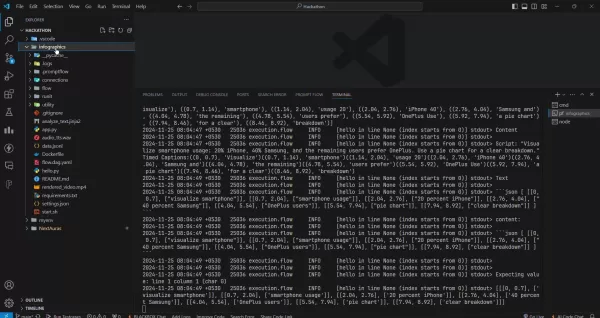
In the world of video creation, Prompt Flow lets you set up workflows that cover everything from text analysis to script generation, content retrieval, and video assembly. This modular approach means you can tweak and expand the video creation process to fit your needs.
With Prompt Flow, you can plug in various AI services, like natural language processing engines, video search APIs, and audio synthesis tools. This seamless integration means you can build complex video creation pipelines without needing to be a tech whiz. The flow uses a directed acyclic graph (DAG) to make the whole process easy to follow and tweak.
Using Prompt Flow, you can create and manage AI-driven applications with ease, as this project shows. It's all about streamlining the video production cycle.
Leveraging Pexels API for Video Content
The Pexels API is a goldmine for sourcing video content in an AI-driven workflow. It gives you access to a huge library of royalty-free videos, letting AI tools find footage that matches the keywords and themes in your script.
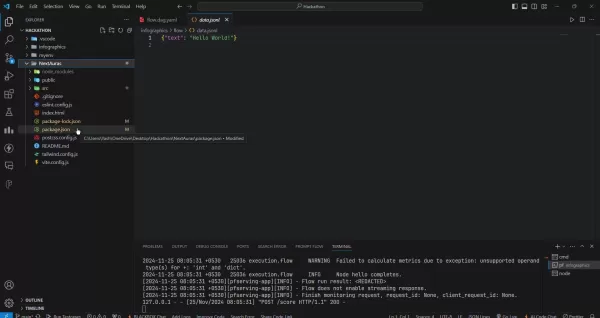
The AI dives into your script, picks out the key concepts, and then uses the Pexels API to find video clips that visually represent those ideas. This integration cuts down the manual work of finding footage, freeing you up to focus on refining your script and polishing the overall video structure. The result? A more polished and engaging final product.
Pexels is a free stock photo and video site, providing the AI with the video elements it needs to create a successful video.
Building a Video Creation Pipeline: Technical Deep Dive
Backend Architecture with Prompt Flow
The backend of this AI-powered video creation tool is built using Microsoft's Prompt Flow. This framework helps you set up a structured workflow that automates the various stages of video production. It starts with analyzing your input text, generating a script, and extracting relevant keywords, which are then used to search for video clips via the Pexels API.
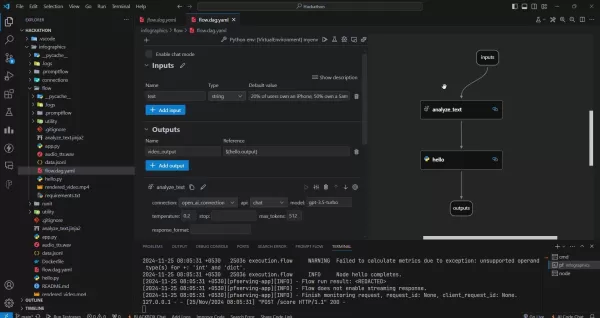
The Directed Acyclic Graph (DAG) in Prompt Flow visually maps out the workflow, showing the sequence of operations from start to finish. Each node in the DAG represents a specific task, like text analysis or video retrieval, making it easier to understand and tweak the video creation process.
The key components of the backend architecture include:
- Text Analysis: Uses natural language processing (NLP) to dig into the input text and identify key themes, concepts, and keywords.
- Script Generation: Based on the text analysis, this component crafts a detailed script that outlines the video's narrative and structure.
- Content Retrieval: This component taps into the Pexels API to find video clips that visually represent the concepts in the script.
- Video Assembly: This component pieces together the retrieved video clips, adds audio and captions, and creates the final video output.
Frontend Development with React and Tailwind CSS
The frontend of the video creation tool is built using React, a popular JavaScript library for building user interfaces. React's component-based architecture makes it easy to create reusable UI elements, simplifying development and maintenance. Tailwind CSS is used for styling, offering a set of pre-designed CSS classes that you can quickly apply to HTML elements.
React handles the structure to manage the state and render content dynamically, while Tailwind CSS provides quick styling and theming options.
The frontend architecture includes:
- Input Form: A form where users can enter text for video creation.
- Video Preview: A component that displays the generated video output.
- Download Button: A button that lets users download the generated video.
Using React and Tailwind CSS provides a solid foundation for creating a modern, responsive UI. The simple UI makes it easy for new users to jump in and start using the tool right away.
Video Storage and Delivery with AWS S3
To store and deliver the generated videos, the tool uses Amazon Web Services (AWS) S3. AWS S3 offers scalable and cost-effective object storage, making it perfect for hosting video content. Once a video is created, it's automatically uploaded to an S3 bucket, where it can be accessed via a unique URL. This URL can then be shared with others, allowing them to view and download the video.
AWS S3 offers several advantages for video storage and delivery:
- Scalability: S3 can handle large volumes of video data, making it suitable for growing video libraries.
- Cost-Effectiveness: S3 offers competitive pricing for object storage, making it a cost-effective solution for storing video content.
- Reliability: S3 provides high availability and durability, ensuring that videos are always accessible.
By leveraging AWS S3, the video creation tool can reliably store and deliver videos to users around the world.
Steps to Use the AI-Powered Video Creation Tool
Step 1: Input Text
Start by entering the text you want to convert into a video into the input field.
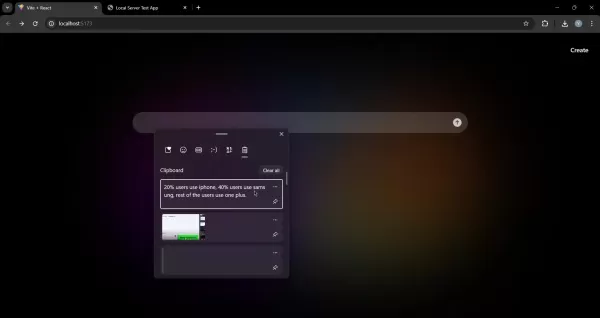
This can be a script, a blog post, or any other text-based content. Just make sure the text is well-structured and provides clear context for the video.
Step 2: Generate Video
Click the generate button to kick off the video creation process. The AI will analyze the text, generate a script, retrieve relevant video clips from the Pexels API, and assemble the video. This might take a few minutes, depending on the length and complexity of the video.
Step 3: Preview and Download
Once the video is generated, you can preview it in the video player. If you're happy with the result, hit the download button to save the video to your computer. From there, you can share it with others via social media, email, or any other channel.
Pricing
Cost Considerations
While tools like Pexels offer royalty-free videos, there might be costs associated with other AI services in the workflow. Keep an eye on the pricing models of any NLP engines, audio synthesis tools, or cloud storage services you integrate into your video creation pipeline. Also, consider whether any premium features could help streamline your workflows.
Pros and Cons of Using Prompt Flow for Video Creation
Pros
- Streamlined AI Integration: Makes integrating various AI services into video creation workflows a breeze.
- Customizable Workflows: Allows for the creation of structured workflows for different stages of video production.
- Visual Representation: Uses a Directed Acyclic Graph (DAG) to visually represent the workflow, making it easier to understand and modify.
- Modular Approach: Offers a modular approach to video creation, making it easier to customize and extend the process.
Cons
- Requires Technical Expertise: Setting up and managing Prompt Flow might require some technical know-how.
- Dependency on Microsoft Ecosystem: It's tightly integrated with Microsoft services, which might limit your flexibility.
- Potential Docker Container Issues: You might run into issues with Docker container deployment, requiring careful configuration.
- Local Execution Limitations: It's primarily demonstrated for local execution, with limited deployment options.
FAQ
What types of text can be converted into video?
Pretty much any type of text can be turned into a video, from scripts and blog posts to articles and presentations. The trick is to make sure the text provides clear context and structure for the video.
How long does it take to generate a video?
The time it takes to generate a video depends on its length and complexity, as well as the speed of the AI services used. Simple videos can be whipped up in a few minutes, while more complex ones might take a bit longer.
Can I customize the generated videos?
Yes, most AI-powered video creation tools let you customize the generated videos. You can swap out video clips, add text overlays, tweak the audio, and adjust the overall structure of the video.
Related Questions
What are the benefits of using AI for video creation?
AI-powered video creation comes with a bunch of benefits, like increased efficiency, reduced costs, and improved quality. AI tools can automate many of the tasks involved in video production, freeing up creators to focus on the more creative stuff. Plus, AI lets you create high-quality videos without needing deep technical expertise.
What are some popular AI-powered video creation tools?
There are several AI-powered video creation tools out there, including Pictory, Synthesia, Lumen5, and Designs.ai. Each tool offers different features and pricing models, so it's worth choosing one that fits your specific needs.
How can I use AI to improve my video marketing strategy?
AI can help you boost your video marketing strategy in several ways, like generating video scripts, optimizing video titles and descriptions, and targeting video ads to the right audience. AI can also analyze video performance and pinpoint areas for improvement.
Related article
 ByteDance Boosts Core AI Incentives as Doubao Surges 14.6%
ByteDance recently convened a DouBao equity briefing to unveil fresh incentive policies for staff involved in the DouBao division. The strike price for DouBao shares has been lifted from $14.85 in June 2026 to $17.02, marking an approximate 14.6% inc
MiniMax Unveils 10x Team Program to Incentivize Global AI Experts
MiniMax (Xiyu Technology), the General Artificial Intelligence Lab, has officially launched "10x Team," a global talent collaboration initiative. This program aims to recruit top experts across industries to explore the deep application of large mode
South Korea Breaks Ground on National AI Computing Center, Investing 2.5 Trillion Won with 2028 Target
South Korean outlet EtNews reports that groundbreaking for the Korea AI Computing Center (KOACC) took place on August 3 at the Solar City data center park in Sunan, Jeollanam-do. Backed by a total investment of 2.5 trillion KRW (roughly 11.838 billio
Related Special Topic Recommendations
Education and Learning
ByteDance Boosts Core AI Incentives as Doubao Surges 14.6%
ByteDance recently convened a DouBao equity briefing to unveil fresh incentive policies for staff involved in the DouBao division. The strike price for DouBao shares has been lifted from $14.85 in June 2026 to $17.02, marking an approximate 14.6% inc
MiniMax Unveils 10x Team Program to Incentivize Global AI Experts
MiniMax (Xiyu Technology), the General Artificial Intelligence Lab, has officially launched "10x Team," a global talent collaboration initiative. This program aims to recruit top experts across industries to explore the deep application of large mode
South Korea Breaks Ground on National AI Computing Center, Investing 2.5 Trillion Won with 2028 Target
South Korean outlet EtNews reports that groundbreaking for the Korea AI Computing Center (KOACC) took place on August 3 at the Solar City data center park in Sunan, Jeollanam-do. Backed by a total investment of 2.5 trillion KRW (roughly 11.838 billio
Related Special Topic Recommendations
Education and Learning
 AI Study Tools for Homework and Exam Prep
2026 Latest Best AI Study Tools for Homework and Exam Prep! XIX.AI curates a top-rated list of powerful, game-changing tools that help students boost productivity, streamline homework completion, and ace exams through real-world tests. Get a free vs paid comparison, detailed rankings, and must-try options to unlock your AI edge. Explore now!
 10 tools
 xix.ai
Music composition
AI Vocal Demo Tools for Songwriters, Hooks, Toplines, and Multilingual Draft Sessions
xix.ai
Music composition
AI Vocal Demo Tools for Songwriters, Hooks, Toplines, and Multilingual Draft Sessions
2026 Latest Best AI Vocal Demo Tools for Songwriters, Hook Creators, and Multi-Language Content Teams! XIX.AI has curated a top-rated list of powerful game-changing tools that go through rigorous real-world tests. You’ll find detailed free vs paid comparison data, comprehensive rankings, and must-try options to help you boost writing efficiency and unlock your creative potential. Explore now to discover your perfect tool for all your content needs!
9 tools
xix.ai
Business
Best AI Competitive Research Tools for Small Businesses
2026 Latest Best Top-rated AI Competitive Research Tools for Small Businesses! XIX.AI has curated a highly powerful game-changing collection, updated weekly with rigorous real-world tests and detailed rankings. You can find a comprehensive free vs paid comparison to help you identify the must-try tools that boost your productivity and give you a competitive edge. Explore now to discover your perfect tool!
9 tools
xix.ai
Image editing
Photoshop AI Retouch Tools for Ecommerce Apparel, Skin Cleanup, and Color Consistency
2026 Latest Best Photoshop AI retouch tools for ecommerce apparel, skin cleanup, and color consistency! This top-rated curated list features powerful game-changing solutions that help you boost writing efficiency, streamline content creation, and achieve perfect visual results effortlessly. Each tool has undergone real-world tests through weekly updated rankings, complete with free vs paid comparison details. Backed by XIX.AI, it’s the must-try guide for anyone aiming to unlock your AI edge. Explore now!
10 tools
xix.ai
Prompt
Best AI Prompt Libraries for ChatGPT Workflows
2026 Latest Best Top-Rated AI Prompt Libraries for optimizing all types of ChatGPT workflows. XIX.AI has curated a powerful, game-changing collection that goes through rigorous real-world tests to ensure top performance. You can find detailed free vs paid comparisons and expert rankings to help you choose the must-try tools that boost your productivity and unlock your AI edge. Explore now!
11 tools
xix.ai
Education and Learning
AI Quiz Builder Platforms for Teachers, Tutors, and Cohort-Based Learning Programs
2026 Latest Best AI Quiz Builder Platforms for Teachers, Tutors, and Cohort-Based Learning Programs! XIX.AI has curated a top-rated list of powerful game-changing tools that go through real-world tests to deliver accurate rankings. These must-try platforms help boost writing efficiency, streamline content creation, and simplify quiz design across all learning scenarios. Explore now to discover your perfect tool for unlocking your AI edge in teaching!
13 tools
xix.ai

 Comments (5)
0/500
Comments (5)
0/500
![LarryMitchell]()
Honestly, I'm a bit skeptical. I've seen so many 'AI-powered' tools that promise the moon but deliver a blurry mess. Still, if this one actually works, it could be a game-changer for small creators like me. Anyone tried it yet? 🤔
![DavidLewis]()
This is wild! I've been spending hours editing videos, and now AI does it in seconds? 😅 Definitely a game-changer for small creators like me. But I wonder how much control we'll lose over the creative process...
![AlbertThomas]()
Ну наконец-то! Я полжизни потратил на монтаж видео, а нейросети теперь за пару минут делают из моего текста целые ролики 😂 Интересно, скоро ли дизайнеры останутся без работы? Хотя пока AI иногда генерирует такие сюрреалистичные картинки, что хоть в галерею неси... Крутая статья, кстати!
![StevenGreen]()
¡Qué locura! El AI convirtiendo texto en videos es como magia digital. ¿Esto hará que todos seamos cineastas o solo inundará internet de clips raros? 😅
![FrankTaylor]()
This AI video stuff is wild! Turning text into visuals like magic? I’m curious how it handles complex scripts. Hope it’s not just flashy gimmicks! 😎
In today's digital world, video content is king. But let's be honest, crafting those engaging videos can be a real hassle, taking up heaps of time and resources. Luckily, AI is stepping in to shake things up, making it a breeze to turn text into eye-catching visuals. In this article, we'll dive into how AI-powered tools like Microsoft's Prompt Flow and services like the Pexels API are transforming video production, making it a cinch for everyone to get in on the action.
Key Points
- AI tools streamline the process of creating videos from text.
- Microsoft Prompt Flow makes integrating AI for video generation a walk in the park.
- The Pexels API helps you snag video content that matches your script's keywords.
- React and Tailwind CSS team up to create a smooth, user-friendly front-end interface.
- AWS S3 storage offers a scalable solution for hosting and sharing your videos.
Revolutionizing Video Creation with AI
What is AI-Powered Video Creation?
AI-powered video creation is all about using artificial intelligence to automate the video-making process. Forget the tedious task of hunting down footage, animating scenes, and tweaking audio—AI tools take care of all that for you. This game-changer drastically cuts down the time and effort needed to whip up video content, making it a godsend for marketers, educators, and content creators alike.
The magic happens with text-to-video conversion. Just pop in a script or text outline, and the AI gets to work, crafting a video that brings your words to life. It digs into the text, picks out the key themes and concepts, and then goes on a hunt for the perfect video clips, images, and audio to stitch together a video that's both cohesive and captivating. This automation means even those of us who aren't video editing wizards can create top-notch content.
At the heart of this tech is the ability to understand the intent behind your text prompt and find the video elements that match it. Keyword extraction and natural language processing play a big role here, helping the tool source and create videos that hit the mark.
The Role of Microsoft Prompt Flow
Microsoft's Prompt Flow is like the backbone of this whole operation, simplifying the integration of AI into video creation. It's a structured environment that helps manage and orchestrate all the different AI components you need.
In the world of video creation, Prompt Flow lets you set up workflows that cover everything from text analysis to script generation, content retrieval, and video assembly. This modular approach means you can tweak and expand the video creation process to fit your needs.
With Prompt Flow, you can plug in various AI services, like natural language processing engines, video search APIs, and audio synthesis tools. This seamless integration means you can build complex video creation pipelines without needing to be a tech whiz. The flow uses a directed acyclic graph (DAG) to make the whole process easy to follow and tweak.
Using Prompt Flow, you can create and manage AI-driven applications with ease, as this project shows. It's all about streamlining the video production cycle.
Leveraging Pexels API for Video Content
The Pexels API is a goldmine for sourcing video content in an AI-driven workflow. It gives you access to a huge library of royalty-free videos, letting AI tools find footage that matches the keywords and themes in your script.
The AI dives into your script, picks out the key concepts, and then uses the Pexels API to find video clips that visually represent those ideas. This integration cuts down the manual work of finding footage, freeing you up to focus on refining your script and polishing the overall video structure. The result? A more polished and engaging final product.
Pexels is a free stock photo and video site, providing the AI with the video elements it needs to create a successful video.
Building a Video Creation Pipeline: Technical Deep Dive
Backend Architecture with Prompt Flow
The backend of this AI-powered video creation tool is built using Microsoft's Prompt Flow. This framework helps you set up a structured workflow that automates the various stages of video production. It starts with analyzing your input text, generating a script, and extracting relevant keywords, which are then used to search for video clips via the Pexels API.
The Directed Acyclic Graph (DAG) in Prompt Flow visually maps out the workflow, showing the sequence of operations from start to finish. Each node in the DAG represents a specific task, like text analysis or video retrieval, making it easier to understand and tweak the video creation process.
The key components of the backend architecture include:
- Text Analysis: Uses natural language processing (NLP) to dig into the input text and identify key themes, concepts, and keywords.
- Script Generation: Based on the text analysis, this component crafts a detailed script that outlines the video's narrative and structure.
- Content Retrieval: This component taps into the Pexels API to find video clips that visually represent the concepts in the script.
- Video Assembly: This component pieces together the retrieved video clips, adds audio and captions, and creates the final video output.
Frontend Development with React and Tailwind CSS
The frontend of the video creation tool is built using React, a popular JavaScript library for building user interfaces. React's component-based architecture makes it easy to create reusable UI elements, simplifying development and maintenance. Tailwind CSS is used for styling, offering a set of pre-designed CSS classes that you can quickly apply to HTML elements.
React handles the structure to manage the state and render content dynamically, while Tailwind CSS provides quick styling and theming options.
The frontend architecture includes:
- Input Form: A form where users can enter text for video creation.
- Video Preview: A component that displays the generated video output.
- Download Button: A button that lets users download the generated video.
Using React and Tailwind CSS provides a solid foundation for creating a modern, responsive UI. The simple UI makes it easy for new users to jump in and start using the tool right away.
Video Storage and Delivery with AWS S3
To store and deliver the generated videos, the tool uses Amazon Web Services (AWS) S3. AWS S3 offers scalable and cost-effective object storage, making it perfect for hosting video content. Once a video is created, it's automatically uploaded to an S3 bucket, where it can be accessed via a unique URL. This URL can then be shared with others, allowing them to view and download the video.
AWS S3 offers several advantages for video storage and delivery:
- Scalability: S3 can handle large volumes of video data, making it suitable for growing video libraries.
- Cost-Effectiveness: S3 offers competitive pricing for object storage, making it a cost-effective solution for storing video content.
- Reliability: S3 provides high availability and durability, ensuring that videos are always accessible.
By leveraging AWS S3, the video creation tool can reliably store and deliver videos to users around the world.
Steps to Use the AI-Powered Video Creation Tool
Step 1: Input Text
Start by entering the text you want to convert into a video into the input field.
This can be a script, a blog post, or any other text-based content. Just make sure the text is well-structured and provides clear context for the video.
Step 2: Generate Video
Click the generate button to kick off the video creation process. The AI will analyze the text, generate a script, retrieve relevant video clips from the Pexels API, and assemble the video. This might take a few minutes, depending on the length and complexity of the video.
Step 3: Preview and Download
Once the video is generated, you can preview it in the video player. If you're happy with the result, hit the download button to save the video to your computer. From there, you can share it with others via social media, email, or any other channel.
Pricing
Cost Considerations
While tools like Pexels offer royalty-free videos, there might be costs associated with other AI services in the workflow. Keep an eye on the pricing models of any NLP engines, audio synthesis tools, or cloud storage services you integrate into your video creation pipeline. Also, consider whether any premium features could help streamline your workflows.
Pros and Cons of Using Prompt Flow for Video Creation
Pros
- Streamlined AI Integration: Makes integrating various AI services into video creation workflows a breeze.
- Customizable Workflows: Allows for the creation of structured workflows for different stages of video production.
- Visual Representation: Uses a Directed Acyclic Graph (DAG) to visually represent the workflow, making it easier to understand and modify.
- Modular Approach: Offers a modular approach to video creation, making it easier to customize and extend the process.
Cons
- Requires Technical Expertise: Setting up and managing Prompt Flow might require some technical know-how.
- Dependency on Microsoft Ecosystem: It's tightly integrated with Microsoft services, which might limit your flexibility.
- Potential Docker Container Issues: You might run into issues with Docker container deployment, requiring careful configuration.
- Local Execution Limitations: It's primarily demonstrated for local execution, with limited deployment options.
FAQ
What types of text can be converted into video?
Pretty much any type of text can be turned into a video, from scripts and blog posts to articles and presentations. The trick is to make sure the text provides clear context and structure for the video.
How long does it take to generate a video?
The time it takes to generate a video depends on its length and complexity, as well as the speed of the AI services used. Simple videos can be whipped up in a few minutes, while more complex ones might take a bit longer.
Can I customize the generated videos?
Yes, most AI-powered video creation tools let you customize the generated videos. You can swap out video clips, add text overlays, tweak the audio, and adjust the overall structure of the video.
Related Questions
What are the benefits of using AI for video creation?
AI-powered video creation comes with a bunch of benefits, like increased efficiency, reduced costs, and improved quality. AI tools can automate many of the tasks involved in video production, freeing up creators to focus on the more creative stuff. Plus, AI lets you create high-quality videos without needing deep technical expertise.
What are some popular AI-powered video creation tools?
There are several AI-powered video creation tools out there, including Pictory, Synthesia, Lumen5, and Designs.ai. Each tool offers different features and pricing models, so it's worth choosing one that fits your specific needs.
How can I use AI to improve my video marketing strategy?
AI can help you boost your video marketing strategy in several ways, like generating video scripts, optimizing video titles and descriptions, and targeting video ads to the right audience. AI can also analyze video performance and pinpoint areas for improvement.








 ByteDance Boosts Core AI Incentives as Doubao Surges 14.6%
ByteDance recently convened a DouBao equity briefing to unveil fresh incentive policies for staff involved in the DouBao division. The strike price for DouBao shares has been lifted from $14.85 in June 2026 to $17.02, marking an approximate 14.6% inc
ByteDance Boosts Core AI Incentives as Doubao Surges 14.6%
ByteDance recently convened a DouBao equity briefing to unveil fresh incentive policies for staff involved in the DouBao division. The strike price for DouBao shares has been lifted from $14.85 in June 2026 to $17.02, marking an approximate 14.6% inc
 MiniMax Unveils 10x Team Program to Incentivize Global AI Experts
MiniMax (Xiyu Technology), the General Artificial Intelligence Lab, has officially launched "10x Team," a global talent collaboration initiative. This program aims to recruit top experts across industries to explore the deep application of large mode
MiniMax Unveils 10x Team Program to Incentivize Global AI Experts
MiniMax (Xiyu Technology), the General Artificial Intelligence Lab, has officially launched "10x Team," a global talent collaboration initiative. This program aims to recruit top experts across industries to explore the deep application of large mode
 South Korea Breaks Ground on National AI Computing Center, Investing 2.5 Trillion Won with 2028 Target
South Korean outlet EtNews reports that groundbreaking for the Korea AI Computing Center (KOACC) took place on August 3 at the Solar City data center park in Sunan, Jeollanam-do. Backed by a total investment of 2.5 trillion KRW (roughly 11.838 billio
South Korea Breaks Ground on National AI Computing Center, Investing 2.5 Trillion Won with 2028 Target
South Korean outlet EtNews reports that groundbreaking for the Korea AI Computing Center (KOACC) took place on August 3 at the Solar City data center park in Sunan, Jeollanam-do. Backed by a total investment of 2.5 trillion KRW (roughly 11.838 billio

2026 Latest Best AI Study Tools for Homework and Exam Prep! XIX.AI curates a top-rated list of powerful, game-changing tools that help students boost productivity, streamline homework completion, and ace exams through real-world tests. Get a free vs paid comparison, detailed rankings, and must-try options to unlock your AI edge. Explore now!
10 tools
xix.ai

2026 Latest Best AI Vocal Demo Tools for Songwriters, Hook Creators, and Multi-Language Content Teams! XIX.AI has curated a top-rated list of powerful game-changing tools that go through rigorous real-world tests. You’ll find detailed free vs paid comparison data, comprehensive rankings, and must-try options to help you boost writing efficiency and unlock your creative potential. Explore now to discover your perfect tool for all your content needs!
9 tools
xix.ai

2026 Latest Best Top-rated AI Competitive Research Tools for Small Businesses! XIX.AI has curated a highly powerful game-changing collection, updated weekly with rigorous real-world tests and detailed rankings. You can find a comprehensive free vs paid comparison to help you identify the must-try tools that boost your productivity and give you a competitive edge. Explore now to discover your perfect tool!
9 tools
xix.ai

2026 Latest Best Photoshop AI retouch tools for ecommerce apparel, skin cleanup, and color consistency! This top-rated curated list features powerful game-changing solutions that help you boost writing efficiency, streamline content creation, and achieve perfect visual results effortlessly. Each tool has undergone real-world tests through weekly updated rankings, complete with free vs paid comparison details. Backed by XIX.AI, it’s the must-try guide for anyone aiming to unlock your AI edge. Explore now!
10 tools
xix.ai

2026 Latest Best Top-Rated AI Prompt Libraries for optimizing all types of ChatGPT workflows. XIX.AI has curated a powerful, game-changing collection that goes through rigorous real-world tests to ensure top performance. You can find detailed free vs paid comparisons and expert rankings to help you choose the must-try tools that boost your productivity and unlock your AI edge. Explore now!
11 tools
xix.ai

2026 Latest Best AI Quiz Builder Platforms for Teachers, Tutors, and Cohort-Based Learning Programs! XIX.AI has curated a top-rated list of powerful game-changing tools that go through real-world tests to deliver accurate rankings. These must-try platforms help boost writing efficiency, streamline content creation, and simplify quiz design across all learning scenarios. Explore now to discover your perfect tool for unlocking your AI edge in teaching!
13 tools
xix.ai

Honestly, I'm a bit skeptical. I've seen so many 'AI-powered' tools that promise the moon but deliver a blurry mess. Still, if this one actually works, it could be a game-changer for small creators like me. Anyone tried it yet? 🤔
This is wild! I've been spending hours editing videos, and now AI does it in seconds? 😅 Definitely a game-changer for small creators like me. But I wonder how much control we'll lose over the creative process...
Ну наконец-то! Я полжизни потратил на монтаж видео, а нейросети теперь за пару минут делают из моего текста целые ролики 😂 Интересно, скоро ли дизайнеры останутся без работы? Хотя пока AI иногда генерирует такие сюрреалистичные картинки, что хоть в галерею неси... Крутая статья, кстати!
¡Qué locura! El AI convirtiendo texto en videos es como magia digital. ¿Esto hará que todos seamos cineastas o solo inundará internet de clips raros? 😅
This AI video stuff is wild! Turning text into visuals like magic? I’m curious how it handles complex scripts. Hope it’s not just flashy gimmicks! 😎












