


 Home
HomeRunway AI Tools Revolutionize Animation Film Production
The filmmaking landscape is transforming with AI tools, empowering creators to produce animated films independently. Runway ML's Act-One platform lets you convert video footage into AI-driven animations. Enhance your digital characters with precise lip-syncing, expressive facial gestures, and natural head movements. Integrate voice modulation tools like ElevenLabs to further refine performances and learn professional techniques for producing polished animated content.
Key Points
Leverage Runway ML's Act-One tool to convert video recordings into AI-generated animations.
Incorporate lip-syncing, facial expressions, and head movements to bring AI characters to life.
Use character reference images to define and animate specific visual styles.
Record video clips up to 30 seconds in length for use within Runway ML.
Employ ElevenLabs to modify your voice, aligning it with your AI character’s identity.
Understanding AI Movie Creation
Creating AI Movies Independently
Producing films is now achievable on a personal scale, eliminating the need for large budgets or extensive teams. Tools like Runway ML's Act-One simplify the process, allowing anyone to bring their creative visions to screen. AI is redefining content creation, enabling individuals with limited technical expertise to produce high-quality animated work. You can start by filming yourself and then converting the footage into an animated AI film complete with lifelike character performances. Adding lip-sync, facial reactions, and head motions makes these characters appear more genuine and engaging. Act-One lets you upload a video performance and convert it into an AI animation with integrated lip-syncing, expressions, and head movements—essentially providing an AI actor to perform your script. This methodology grants a level of creative control and personalization that was once out of reach for independent creators. AI facilitates the exploration of diverse animation aesthetics and the development of compelling stories with unique characters. You can utilize brief video clips of your own acting as source material for the AI.
AI-driven filmmaking empowers creators by drastically cutting down the time and expenses linked to conventional animation. It democratizes advanced production methods, letting filmmakers concentrate more on narrative and less on technical hurdles. Moreover, the iterative nature of AI tools encourages ongoing experimentation and refinement, helping the final product closely match the creator's intent. Runway ML offers a wealth of creative possibilities for aspiring directors. Whether you're producing a short film, promotional material, or a full-length animated feature, AI provides a scalable and adaptable solution tailored to your specific creative requirements. Adopting AI in filmmaking opens a future where creative expression is limitless and innovative storytelling is available to all.
Using Runway ML's Act-One Tool
Runway ML’s Act-One tool democratizes the animation process. This feature enables you to inject a driving performance into your projects.
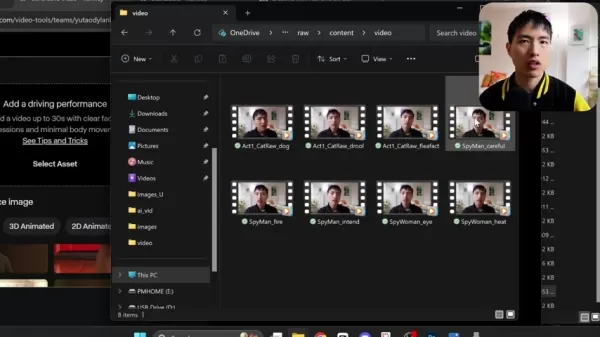
Simply upload a video of yourself performing a scene. By linking a reference image, the tool animates the footage. Press the generate button to start the animation process. The tool processes your video and converts it into an AI-driven animation with synchronized lip movements, facial expressions, and head motions. It functions like a dedicated AI actor, ready to realize your storyline. The technology analyzes the video and maps the facial performance onto an animation, guided by your reference photo. To use Act-One, select the feature and upload a video clip of your performance. Ensure you have adequate lighting and good video quality. Keep hand movements out of the frame, focusing the shot on your upper chest and head. You can upload your own images. Act-One takes your video and transposes the facial performance onto an animated character based on the reference photo. An ideal reference image has the head facing forward with all facial features clearly visible.
Runway ML’s Act-One streamlines animation, allowing for rapid iteration and scene refinement. Its automated facial tracking and expression mapping reduce the manual labor typical in traditional animation, freeing you to focus on creative decisions. The ease of uploading and testing different reference images unlocks endless potential for character design and stylistic variation. Act-One also fosters a collaborative community where creators exchange projects and techniques. This shared knowledge base provides continuous access to new methods and best practices, helping you refine your craft and produce increasingly captivating work. The AI revolution is making animation accessible to a broader audience.
ElevenLabs for Voice Changes
Enhancing AI Characters with Voice AI
ElevenLabs offers a powerful voice modulation tool. Using voice AI is crucial for adapting your voice to fit a character, such as changing a male voice to female. ElevenLabs provides the underlying Voice AI technology. You can choose between Text-to-Speech and Voice Changer functionalities. Text-to-Speech generates entirely new audio from typed text, offering a selection of diverse vocal profiles. The Voice Changer allows you to upload existing audio files and adjust voice attributes, simplifying alterations to pitch and gender.
ElevenLabs elevates AI films by refining character audio. By adjusting pitch, tone, and emotional inflections, you can create more powerful and convincing performances. Furthermore, ElevenLabs' AI technology minimizes audio artifacts, ensuring that modified voices sound smooth and natural. This degree of audio quality can significantly boost the overall impact of your AI productions. ElevenLabs also includes an API for real-time voice alteration, useful for interactive projects or live presentations. This flexibility allows you to tailor your creative process to your film's specific demands. Combining ElevenLabs with Runway ML unlocks new dimensions in film production, leading to more dynamic and engaging content.
Steps to Create AI Movies Using Runway ML and ElevenLabs
Step-by-Step Guide
Follow this step-by-step guide to create AI movies using Runway ML and ElevenLabs:
Step 1: Record Your Video Clip
- Film a short video of yourself performing a scene. Ensure proper lighting and clear sound. Clips can be a maximum of 30 seconds.
Step 2: Access Runway ML's Act-One Tool
- Visit Runway ML's website and find the 'Generative Video' tools section.
Step 3: Upload Your Video
- Upload your video clip into the Act-One tool.
Step 4: Select a Reference Image
- Pick a reference image that represents the character you wish to animate. The image should have the head facing forward with all facial features clear.
Step 5: Generate the AI Video
- Click 'Generate' and allow Runway ML to process the video into an AI animation.
Step 6: Export the AI Video
- After generation, export the finished AI video from the platform.
Step 7: Use ElevenLabs for Voice Change
- Go to the ElevenLabs website and upload the audio from your video.
Step 8: Change Your Voice
- Use the Voice Changer tool to adjust your voice to fit the AI character.
Step 9: Download the Changed Audio
- Download the modified audio file from ElevenLabs.
Step 10: Combine Video and Audio
- Use video editing software to synchronize the AI video with the new audio track.
By following these steps, you can produce an AI movie featuring believable character acting and matching voice work. This approach enables efficient content creation with minimal resources.
Pros and Cons of Using AI for Movie Creation
Pros
Accessibility: AI tools open up filmmaking to individuals without deep technical knowledge.
Cost-Effective: Lowers the dependency on large teams and costly equipment.
Efficiency: Accelerates the animation workflow, enabling quicker project turnaround.
Customization: Provides extensive control over character design and animation aesthetics.
Innovation: Fosters creative experimentation through iterative, AI-powered processes.
Cons
Quality Limitations: AI-generated output may not always reach the standard of traditional animation.
Technical Issues: Demands good lighting, clean audio, and high-quality video footage.
Voice Matching: The AI may not perfectly align the voice with the character, necessitating additional voice tools.
Limited Movement: The technology mainly concentrates on the upper torso and head, restricting full-body animation.
Ethical Concerns: Introduces discussions about copyright and artistic originality.
FAQ
What is Runway ML's Act-One tool?
Runway ML’s Act-One tool converts video recordings into AI animations featuring lip-syncing, facial expressions, and head movements. It animates the footage using a reference image to create convincing character performances.
How long can the video clips be that I upload to Runway ML?
Video clips uploaded to Runway ML can have a maximum duration of 30 seconds.
Why is it important to use a reference image with the head facing forward?
A forward-facing reference image guarantees that all facial features are visible, enabling the AI to map the face accurately and produce a more lifelike animation.
What is ElevenLabs, and how is it used in AI movie creation?
ElevenLabs is a voice AI platform that modifies your voice to align with your AI character. Its text-to-speech and voice changer features make it straightforward to adjust audio pitch and gender characteristics.
What factors contribute to the quality of AI movie creation?
Key factors for quality include effective lighting, clear audio recording, high-definition video quality, and limited hand motions in the source footage. Choosing appropriate reference images and applying suitable voice modifications also improve the end product.
Related Questions
How can I enhance the realism of my AI character's performance?
To improve the realism of your AI character's performance, concentrate on several crucial elements. First, record your video with good lighting and clean audio. High-quality source material enhances the AI's accuracy in replicating facial cues and lip movements. Second, pick a reference image that accurately reflects the intended character's look and style. This image guides the animation, so a well-suited reference can dramatically improve the outcome. Third, utilize ElevenLabs to adjust your voice to fit the character's gender, vocal pitch, and emotional delivery. Convincing voice work is vital for character believability. Also, minimize hand gestures in your video since the AI is optimized for the upper chest and head region. Lastly, refine your AI movie through repeated testing with various settings and reference images to reach the desired realism. Here are several tips for boosting your AI character's realism:Use Good Lighting: Properly lit video improves the AI's facial mapping accuracy.Ensure Clear Audio: High-fidelity audio results in better lip-sync and a more natural performance.Select a Suitable Reference Image: Choose an image that closely corresponds to your character's intended appearance and style.Optimize Voice with ElevenLabs: Fine-tune your voice using ElevenLabs to match the character's vocal traits.Avoid Excessive Hand Movements: Keep hands still to let the AI focus on facial and upper body animation.Iterate and Refine: Test different configurations and reference images to perfect the character's realism.
Related article
 How to fix Core Web Vitals for better SEO rankings
How to Build a Free Website: Free Domain, Hosting & AI Website BuilderTable of ContentsIntroductionAI Website Builder 1: Hookous AIStep 1: Sign UpStep 2: Choose Business Type/NicheStep 3: Select ServicesStep 4: Define Website GoalsStep 5: Enter Busin
Apple, Google Partner With Anthropic to Address 27-Year-Old Vulnerability via Glass Wing Protection
As artificial intelligence advances rapidly in code generation and logical reasoning, the cybersecurity landscape faces unprecedented challenges. Recently, the prominent AI startup Anthropic officially launched a cross-industry collaboration called *
OpenAI Chief Scientist Addresses AI Reasoning Transparency Debate: Complexity Steady, No Sudden Jump
On September 2, Jakub Pachocki, OpenAI’s Chief Scientist, addressed public concerns on X regarding the AI model Astra, clarifying claims that it operates without oversight and lacks transparent reasoning.Why the Controversy Erupted: Deep Recurrence O
Related Special Topic Recommendations
Image editing
How to fix Core Web Vitals for better SEO rankings
How to Build a Free Website: Free Domain, Hosting & AI Website BuilderTable of ContentsIntroductionAI Website Builder 1: Hookous AIStep 1: Sign UpStep 2: Choose Business Type/NicheStep 3: Select ServicesStep 4: Define Website GoalsStep 5: Enter Busin
Apple, Google Partner With Anthropic to Address 27-Year-Old Vulnerability via Glass Wing Protection
As artificial intelligence advances rapidly in code generation and logical reasoning, the cybersecurity landscape faces unprecedented challenges. Recently, the prominent AI startup Anthropic officially launched a cross-industry collaboration called *
OpenAI Chief Scientist Addresses AI Reasoning Transparency Debate: Complexity Steady, No Sudden Jump
On September 2, Jakub Pachocki, OpenAI’s Chief Scientist, addressed public concerns on X regarding the AI model Astra, clarifying claims that it operates without oversight and lacks transparent reasoning.Why the Controversy Erupted: Deep Recurrence O
Related Special Topic Recommendations
Image editing
 AI Object Removal Editors: Clean Up Portraits, Travel, and Product Shots
2026 Latest Best Top-rated AI Object Removal Editors for portraits travel product shots! XIX.AI curates a powerful game-changing collection regularly updated with weekly rankings. These tools offer real-world tests to help you quickly remove unwanted elements, boost content quality, and save tons of time without compromising results. Must-try for anyone aiming to unlock their AI creation edge. Explore now!
 10 tools
 xix.ai
Text-to-speech
Best AI Text to Speech Tools for Online Courses
xix.ai
Text-to-speech
Best AI Text to Speech Tools for Online Courses
2026 Latest Best Top-rated AI Text to Speech Tools for Online Courses are curated by XIX.AI based on rigorous real-world tests and weekly updated rankings. These powerful tools help creators deliver crystal-clear audio content effortlessly, boosting writing efficiency and streamlining course production. Check out the free vs paid comparison to find your perfect fit. Explore now to unlock your AI edge in online education.
10 tools
xix.ai
writing
AI Blog Title Tools for Higher Click Through Rates
2026 Latest Best Top-Rated AI Blog Title Tools for Higher Click Through Rates! XIX.AI has carefully curated a powerful, game-changing collection of top tools that go through rigorous real-world tests. You’ll find a free vs paid comparison, weekly updated rankings, and detailed insights to help you boost your blog’s traffic efficiently. Must-try options are highlighted to help you unlock your AI edge. Explore now!
10 tools
xix.ai
automation
Best AI Task Routing Tools for Support Workflows
2026 Latest Best Top-rated AI Task Routing Tools for Support Workflows! XIX.AI has curated a highly powerful game-changing collection of must-try solutions, all undergoing rigorous real-world tests and updated weekly. These tools streamline workflows, boost productivity, and help teams deliver faster, more efficient support. Explore now to discover your perfect tool and unlock your AI edge!
17 tools
xix.ai
Academic Research
AI Citation and Paper Summary Tools
2026 Latest Best Top-Rated AI Citation and Paper Summary Tools Curated by XIX.AI. Get powerful game-changing solutions for quick content creation, improved writing efficiency, and boosting productivity. We offer a free vs paid comparison along with real-world tests and weekly updated rankings to help you find the must-try tool that fits your needs perfectly. Explore now to Unlock your AI edge.
10 tools
xix.ai
Productivity
Best AI Productivity Tools for Daily Work
2026 Latest Best Top-Rated AI Productivity Tools for Daily Work! XIX.AI has curated a powerful, game-changing selection based on rigorous weekly updated rankings and real-world tests. You’ll find must-try options that boost writing efficiency, streamline content creation, and help you overcome daily work challenges. Get a free vs paid comparison to find the perfect fit for your needs. Explore now to unlock your AI edge!
9 tools
xix.ai

 Comments (1)
0/500
Comments (1)
0/500
![DouglasMartínez]()
This is wild! Imagine indie filmmakers ditching expensive software and just using their phone footage to create pro-level animations. Runway's Act-One sounds like a game changer, but I wonder about the learning curve. Also, ethical concerns? Deepfake potential? Still, props for democratizing animation.
The filmmaking landscape is transforming with AI tools, empowering creators to produce animated films independently. Runway ML's Act-One platform lets you convert video footage into AI-driven animations. Enhance your digital characters with precise lip-syncing, expressive facial gestures, and natural head movements. Integrate voice modulation tools like ElevenLabs to further refine performances and learn professional techniques for producing polished animated content.
Key Points
Leverage Runway ML's Act-One tool to convert video recordings into AI-generated animations.
Incorporate lip-syncing, facial expressions, and head movements to bring AI characters to life.
Use character reference images to define and animate specific visual styles.
Record video clips up to 30 seconds in length for use within Runway ML.
Employ ElevenLabs to modify your voice, aligning it with your AI character’s identity.
Understanding AI Movie Creation
Creating AI Movies Independently
Producing films is now achievable on a personal scale, eliminating the need for large budgets or extensive teams. Tools like Runway ML's Act-One simplify the process, allowing anyone to bring their creative visions to screen. AI is redefining content creation, enabling individuals with limited technical expertise to produce high-quality animated work. You can start by filming yourself and then converting the footage into an animated AI film complete with lifelike character performances. Adding lip-sync, facial reactions, and head motions makes these characters appear more genuine and engaging. Act-One lets you upload a video performance and convert it into an AI animation with integrated lip-syncing, expressions, and head movements—essentially providing an AI actor to perform your script. This methodology grants a level of creative control and personalization that was once out of reach for independent creators. AI facilitates the exploration of diverse animation aesthetics and the development of compelling stories with unique characters. You can utilize brief video clips of your own acting as source material for the AI.
AI-driven filmmaking empowers creators by drastically cutting down the time and expenses linked to conventional animation. It democratizes advanced production methods, letting filmmakers concentrate more on narrative and less on technical hurdles. Moreover, the iterative nature of AI tools encourages ongoing experimentation and refinement, helping the final product closely match the creator's intent. Runway ML offers a wealth of creative possibilities for aspiring directors. Whether you're producing a short film, promotional material, or a full-length animated feature, AI provides a scalable and adaptable solution tailored to your specific creative requirements. Adopting AI in filmmaking opens a future where creative expression is limitless and innovative storytelling is available to all.
Using Runway ML's Act-One Tool
Runway ML’s Act-One tool democratizes the animation process. This feature enables you to inject a driving performance into your projects.
Simply upload a video of yourself performing a scene. By linking a reference image, the tool animates the footage. Press the generate button to start the animation process. The tool processes your video and converts it into an AI-driven animation with synchronized lip movements, facial expressions, and head motions. It functions like a dedicated AI actor, ready to realize your storyline. The technology analyzes the video and maps the facial performance onto an animation, guided by your reference photo. To use Act-One, select the feature and upload a video clip of your performance. Ensure you have adequate lighting and good video quality. Keep hand movements out of the frame, focusing the shot on your upper chest and head. You can upload your own images. Act-One takes your video and transposes the facial performance onto an animated character based on the reference photo. An ideal reference image has the head facing forward with all facial features clearly visible.
Runway ML’s Act-One streamlines animation, allowing for rapid iteration and scene refinement. Its automated facial tracking and expression mapping reduce the manual labor typical in traditional animation, freeing you to focus on creative decisions. The ease of uploading and testing different reference images unlocks endless potential for character design and stylistic variation. Act-One also fosters a collaborative community where creators exchange projects and techniques. This shared knowledge base provides continuous access to new methods and best practices, helping you refine your craft and produce increasingly captivating work. The AI revolution is making animation accessible to a broader audience.
ElevenLabs for Voice Changes
Enhancing AI Characters with Voice AI
ElevenLabs offers a powerful voice modulation tool. Using voice AI is crucial for adapting your voice to fit a character, such as changing a male voice to female. ElevenLabs provides the underlying Voice AI technology. You can choose between Text-to-Speech and Voice Changer functionalities. Text-to-Speech generates entirely new audio from typed text, offering a selection of diverse vocal profiles. The Voice Changer allows you to upload existing audio files and adjust voice attributes, simplifying alterations to pitch and gender.
ElevenLabs elevates AI films by refining character audio. By adjusting pitch, tone, and emotional inflections, you can create more powerful and convincing performances. Furthermore, ElevenLabs' AI technology minimizes audio artifacts, ensuring that modified voices sound smooth and natural. This degree of audio quality can significantly boost the overall impact of your AI productions. ElevenLabs also includes an API for real-time voice alteration, useful for interactive projects or live presentations. This flexibility allows you to tailor your creative process to your film's specific demands. Combining ElevenLabs with Runway ML unlocks new dimensions in film production, leading to more dynamic and engaging content.
Steps to Create AI Movies Using Runway ML and ElevenLabs
Step-by-Step Guide
Follow this step-by-step guide to create AI movies using Runway ML and ElevenLabs:
Step 1: Record Your Video Clip
- Film a short video of yourself performing a scene. Ensure proper lighting and clear sound. Clips can be a maximum of 30 seconds.
Step 2: Access Runway ML's Act-One Tool
- Visit Runway ML's website and find the 'Generative Video' tools section.
Step 3: Upload Your Video
- Upload your video clip into the Act-One tool.
Step 4: Select a Reference Image
- Pick a reference image that represents the character you wish to animate. The image should have the head facing forward with all facial features clear.
Step 5: Generate the AI Video
- Click 'Generate' and allow Runway ML to process the video into an AI animation.
Step 6: Export the AI Video
- After generation, export the finished AI video from the platform.
Step 7: Use ElevenLabs for Voice Change
- Go to the ElevenLabs website and upload the audio from your video.
Step 8: Change Your Voice
- Use the Voice Changer tool to adjust your voice to fit the AI character.
Step 9: Download the Changed Audio
- Download the modified audio file from ElevenLabs.
Step 10: Combine Video and Audio
- Use video editing software to synchronize the AI video with the new audio track.
By following these steps, you can produce an AI movie featuring believable character acting and matching voice work. This approach enables efficient content creation with minimal resources.
Pros and Cons of Using AI for Movie Creation
Pros
Accessibility: AI tools open up filmmaking to individuals without deep technical knowledge.
Cost-Effective: Lowers the dependency on large teams and costly equipment.
Efficiency: Accelerates the animation workflow, enabling quicker project turnaround.
Customization: Provides extensive control over character design and animation aesthetics.
Innovation: Fosters creative experimentation through iterative, AI-powered processes.
Cons
Quality Limitations: AI-generated output may not always reach the standard of traditional animation.
Technical Issues: Demands good lighting, clean audio, and high-quality video footage.
Voice Matching: The AI may not perfectly align the voice with the character, necessitating additional voice tools.
Limited Movement: The technology mainly concentrates on the upper torso and head, restricting full-body animation.
Ethical Concerns: Introduces discussions about copyright and artistic originality.
FAQ
What is Runway ML's Act-One tool?
Runway ML’s Act-One tool converts video recordings into AI animations featuring lip-syncing, facial expressions, and head movements. It animates the footage using a reference image to create convincing character performances.
How long can the video clips be that I upload to Runway ML?
Video clips uploaded to Runway ML can have a maximum duration of 30 seconds.
Why is it important to use a reference image with the head facing forward?
A forward-facing reference image guarantees that all facial features are visible, enabling the AI to map the face accurately and produce a more lifelike animation.
What is ElevenLabs, and how is it used in AI movie creation?
ElevenLabs is a voice AI platform that modifies your voice to align with your AI character. Its text-to-speech and voice changer features make it straightforward to adjust audio pitch and gender characteristics.
What factors contribute to the quality of AI movie creation?
Key factors for quality include effective lighting, clear audio recording, high-definition video quality, and limited hand motions in the source footage. Choosing appropriate reference images and applying suitable voice modifications also improve the end product.
Related Questions
How can I enhance the realism of my AI character's performance?
To improve the realism of your AI character's performance, concentrate on several crucial elements. First, record your video with good lighting and clean audio. High-quality source material enhances the AI's accuracy in replicating facial cues and lip movements. Second, pick a reference image that accurately reflects the intended character's look and style. This image guides the animation, so a well-suited reference can dramatically improve the outcome. Third, utilize ElevenLabs to adjust your voice to fit the character's gender, vocal pitch, and emotional delivery. Convincing voice work is vital for character believability. Also, minimize hand gestures in your video since the AI is optimized for the upper chest and head region. Lastly, refine your AI movie through repeated testing with various settings and reference images to reach the desired realism. Here are several tips for boosting your AI character's realism:Use Good Lighting: Properly lit video improves the AI's facial mapping accuracy.Ensure Clear Audio: High-fidelity audio results in better lip-sync and a more natural performance.Select a Suitable Reference Image: Choose an image that closely corresponds to your character's intended appearance and style.Optimize Voice with ElevenLabs: Fine-tune your voice using ElevenLabs to match the character's vocal traits.Avoid Excessive Hand Movements: Keep hands still to let the AI focus on facial and upper body animation.Iterate and Refine: Test different configurations and reference images to perfect the character's realism.








 How to fix Core Web Vitals for better SEO rankings
How to Build a Free Website: Free Domain, Hosting & AI Website BuilderTable of ContentsIntroductionAI Website Builder 1: Hookous AIStep 1: Sign UpStep 2: Choose Business Type/NicheStep 3: Select ServicesStep 4: Define Website GoalsStep 5: Enter Busin
How to fix Core Web Vitals for better SEO rankings
How to Build a Free Website: Free Domain, Hosting & AI Website BuilderTable of ContentsIntroductionAI Website Builder 1: Hookous AIStep 1: Sign UpStep 2: Choose Business Type/NicheStep 3: Select ServicesStep 4: Define Website GoalsStep 5: Enter Busin
 Apple, Google Partner With Anthropic to Address 27-Year-Old Vulnerability via Glass Wing Protection
As artificial intelligence advances rapidly in code generation and logical reasoning, the cybersecurity landscape faces unprecedented challenges. Recently, the prominent AI startup Anthropic officially launched a cross-industry collaboration called *
Apple, Google Partner With Anthropic to Address 27-Year-Old Vulnerability via Glass Wing Protection
As artificial intelligence advances rapidly in code generation and logical reasoning, the cybersecurity landscape faces unprecedented challenges. Recently, the prominent AI startup Anthropic officially launched a cross-industry collaboration called *
 OpenAI Chief Scientist Addresses AI Reasoning Transparency Debate: Complexity Steady, No Sudden Jump
On September 2, Jakub Pachocki, OpenAI’s Chief Scientist, addressed public concerns on X regarding the AI model Astra, clarifying claims that it operates without oversight and lacks transparent reasoning.Why the Controversy Erupted: Deep Recurrence O
OpenAI Chief Scientist Addresses AI Reasoning Transparency Debate: Complexity Steady, No Sudden Jump
On September 2, Jakub Pachocki, OpenAI’s Chief Scientist, addressed public concerns on X regarding the AI model Astra, clarifying claims that it operates without oversight and lacks transparent reasoning.Why the Controversy Erupted: Deep Recurrence O

2026 Latest Best Top-rated AI Object Removal Editors for portraits travel product shots! XIX.AI curates a powerful game-changing collection regularly updated with weekly rankings. These tools offer real-world tests to help you quickly remove unwanted elements, boost content quality, and save tons of time without compromising results. Must-try for anyone aiming to unlock their AI creation edge. Explore now!
10 tools
xix.ai

2026 Latest Best Top-rated AI Text to Speech Tools for Online Courses are curated by XIX.AI based on rigorous real-world tests and weekly updated rankings. These powerful tools help creators deliver crystal-clear audio content effortlessly, boosting writing efficiency and streamlining course production. Check out the free vs paid comparison to find your perfect fit. Explore now to unlock your AI edge in online education.
10 tools
xix.ai

2026 Latest Best Top-Rated AI Blog Title Tools for Higher Click Through Rates! XIX.AI has carefully curated a powerful, game-changing collection of top tools that go through rigorous real-world tests. You’ll find a free vs paid comparison, weekly updated rankings, and detailed insights to help you boost your blog’s traffic efficiently. Must-try options are highlighted to help you unlock your AI edge. Explore now!
10 tools
xix.ai

2026 Latest Best Top-rated AI Task Routing Tools for Support Workflows! XIX.AI has curated a highly powerful game-changing collection of must-try solutions, all undergoing rigorous real-world tests and updated weekly. These tools streamline workflows, boost productivity, and help teams deliver faster, more efficient support. Explore now to discover your perfect tool and unlock your AI edge!
17 tools
xix.ai

2026 Latest Best Top-Rated AI Citation and Paper Summary Tools Curated by XIX.AI. Get powerful game-changing solutions for quick content creation, improved writing efficiency, and boosting productivity. We offer a free vs paid comparison along with real-world tests and weekly updated rankings to help you find the must-try tool that fits your needs perfectly. Explore now to Unlock your AI edge.
10 tools
xix.ai

2026 Latest Best Top-Rated AI Productivity Tools for Daily Work! XIX.AI has curated a powerful, game-changing selection based on rigorous weekly updated rankings and real-world tests. You’ll find must-try options that boost writing efficiency, streamline content creation, and help you overcome daily work challenges. Get a free vs paid comparison to find the perfect fit for your needs. Explore now to unlock your AI edge!
9 tools
xix.ai

This is wild! Imagine indie filmmakers ditching expensive software and just using their phone footage to create pro-level animations. Runway's Act-One sounds like a game changer, but I wonder about the learning curve. Also, ethical concerns? Deepfake potential? Still, props for democratizing animation.












