


 Home
HomeHow to build profitable AI games fast in 2026? Step-by-step guide.
The game development landscape is transforming at a rapid pace. In 2025, artificial intelligence unlocks incredible new opportunities for aspiring creators. Discover how to build a fully monetized game using AI tools, even if you have no coding background. This guide uncovers the secrets that 99% of budding game developers have yet to learn. Explore how to efficiently create and monetize your own game in record time.
Key Points
Create a fully monetized game without writing any code.
Use AI agents to automate the majority of the game development workflow.
Connect your game to Stripe for smooth payment processing and monetization.
Generate stunning visuals and professional-grade sound effects using AI.
Uncover undervalued AI game-building tools available today.
Master a 5-step method to turn a game concept into a launched product.
Utilize Meshy AI for quick and easy 3D game asset generation.
Employ ElevenLabs for professional sound design and audio effects.
Use Rosebud AI to define your game's structure and integrate assets.
The New Era of Game Development with AI
The $10,000 Game in 30 Minutes: Is It Possible?
Forget traditional game development, which demands thousands of coding hours and large teams of experienced developers. The rise of AI game development tools enables game creation in a fraction of the time and with far fewer resources. Imagine building a game worth $10,000 in just half an hour! This isn't a distant dream; it's the reality of 2025, where AI agents handle the bulk of the work for game creators.
This article details how aspiring developers can enter the industry by leveraging AI power. We'll explore the specific tools and methods used to construct a fully monetized game, even without any coding knowledge. Prepare to be impressed by how AI-driven game development is democratizing the field, enabling individuals to bring their creative visions to life.
The tools and techniques will be revealed step-by-step, ensuring even beginners can grasp and successfully execute the entire process.
The AI Game Development Revolution: No Coding Required
Many assume that creating a profitable game requires endless coding, a skilled developer team, and years of experience. However, AI game development changes everything. You can rapidly build and launch a monetized game using cutting-edge AI tools, saving significant time and money. This approach levels the playing field, allowing anyone with creativity and a vision to step into the game development world.
The key is to utilize AI agents that manage complex tasks typically done by human programmers. These agents can generate game structures, design impressive visuals, and produce professional sound effects, all without a single line of code from you. This "no-code" method creates opportunities for artists, designers, and entrepreneurs without technical skills to build and monetize their game ideas.
But how is it possible to create games without traditional programming? Let's examine the tools making the AI revolution in gaming a reality.
The Arsenal: Key AI Tools for Game Creation
The Core AI Game Building Tools
Constructing a game, even with AI assistance, requires the right toolkit. The selected tools can significantly impact and accelerate the entire creative process.

Here are three essential AI-driven tools you need in your arsenal for optimal results:
AI Agent (Rosebud AI): This is the core component. The most powerful AI game builder available. Rosebud enables you to construct the game's structure and make crucial design decisions by prompting its language model and selecting elements from its output. The most critical aspect is ensuring seamless integration of various other programs with this core game framework.
Meshy AI: For generating detailed 3D models. This platform is your source for the various 3D assets you'll incorporate into the game environment. It simplifies model creation from text prompts. Meshy transforms text descriptions into fully-realized 3D assets, useful for numerous applications, including gaming and virtual reality.
ElevenLabs: ElevenLabs handles all sound effects and voice acting needs. This is the ideal tool for enhancing the game experience with realistic, professional sound design. It provides all necessary audio to bring your game to life.
With these tools at your disposal, you're ready to embark on your game development journey and create something extraordinary. Let's begin with AI-powered game creation.
Important Note: You can find special offers for all these tools in the description below!
5-Step Process to Build a Monetized Game with AI
Step 1: Generating Game Assets with AI
The initial step in any game development project is creating or sourcing the assets for the game. AI makes this process remarkably efficient. Begin by using Meshy AI to generate your game's 3D models. In this example, we start by creating the fighter jet for the game.
Simply describe the asset you need. The first generation provides several options. After selecting one, it delivers the asset. Meshy is a high-quality, user-friendly platform for generating gaming assets. Next, create any premium assets. Name them descriptively for easy identification.
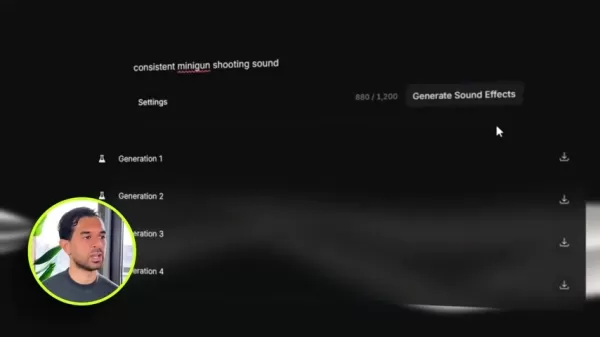
Then, use ElevenLabs to produce professional-sounding sound effects. Start by creating a loop of a realistic fighter jet sound. You'll also need a gun firing sound. Remember to describe these effects thoroughly so the AI can generate the best possible audio.
Step 2: Laying the Foundation with Rosebud AI
Every game needs a world to exist in. Rosebud AI assists in this stage. Start your project by prompting the AI to build a flight simulator. For example:
"Let’s create a flight simulator using three.js. Create a runway environment with an airstrip in the middle."
Rosebud’s AI will provide a foundation for your gaming environment. After processing for a few seconds, it generates a world for your simulator. If any elements are unsatisfactory, you can request removals, like the placement of aircraft, or edits to features such as runway colors and dimensions. This is how you design your game world with Rosebud's help!
Step 3: Importing Your Assets and Sound Effects
With a foundation and environment established, the game needs assets. This is where you integrate the Meshy AI models, providing essential game components.

First, navigate to the assets panel and upload your previously created models, which will be stored here. Once loaded, you'll see the plane has appeared in the middle of the runway, though you may want it positioned differently, such as at the far end. This adjustment can be included in your prompts to Rosebud's AI.
Now, instruct Rosebud on making changes. Use prompts like:
"Now create a simple aircraft model and mount the camera on it. Spawn it at the end of the runway." "Okay great, assign NASD Up/Down/Left/Right arrow key controls. Use W and S for forward thrust. The up and down arrow keys control pitch. The A and D keys handle rotation."
With the game and assets functioning, it's time to implement audio. Ask Rosebud to:
“Finally, let’s add the jet engine and firing sounds. I uploaded a JettingineSound asset; please play this during gameplay and make it realistic. Then, add the Gun sound whenever the gun is fired.”
Step 4: Adjusting Physics And Game Elements
With the environment assembled and models integrated, fine-tune the gameplay elements. This is achieved through prompt-based communication with Rosebud AI, though it can be challenging. Here are ways to adjust specific aspects:
"Great. But let’s fine-tune the physics for realism. The plane should only lift off once it generates sufficient speed. Also, detach the camera from the plane's rotation axis. It should follow behind but not move or rotate with the plane." With the game world operational, enhance the environment by refining details like terrain, edge lights, models, and other elements to improve visibility and make the layout feel more dynamic.
Step 5: Fine-Tuning for Functionality
With assets in place and functions running, you're ready to monetize and plan the rest of your project. Key considerations include:
Add A Menu: Starting a game without a menu feels disjointed. Address this by adding a proper menu screen. "Okay, now create a Menu. Design a game with a dusk setting. Show visible stars at the far end of the skybox."
Add a Loading Screen: Incorporating a loading screen can also help. Loading screens ensure smooth transitions between game elements, reducing bugs and slow loading times. "Okay great. The purpose of these steps is to smooth transitions. Please, in the Menu, add a 100% loading bar."
That’s it—a fully functional game created entirely with AI!
Pricing of Key AI Tools
Cost Considerations
The cost of these tools can vary, so checking their current pricing models is important. Here’s a summary:
Rosebud AI: Visit Rosebud AI's official website for the latest pricing. Costs depend on your specific needs, so select the plan that fits you best.
Meshy AI: For Meshy offers, check their official website. Offers may vary based on market demand and current business objectives.
ElevenLabs: Current information for ElevenLabs is available on their official website.
The pricing of these tools will influence your profit potential, so choosing the right plan is crucial.
Pros and Cons of Using AI in Game Development
Pros
Accelerated Development
Reduced Costs
Accessibility
Increased Creativity
Cons
Limitations In Current AI
Loss of Finesse
Initial Set-Up
AI can be unreliable
Core Features of AI-Assisted Game Development Tools
AI-Assisted Game Development Toolkit Features
Each AI-assisted game development tool comes packed with a wealth of features and resources. Here’s a summary of each tool’s standout qualities:
No-Code Game Development: With Rosebud AI, you don't need to write any code, a true game-changer in the market. Rosebud handles all the programming for you.
Stunning Visuals With Meshy AI: With Meshy's AI capabilities, you can generate 3D models directly from prompts, eliminating the need to create them from scratch.
High-Quality Audio: You can also develop high-quality sound effects using ElevenLabs, another AI program.
Monetization With Payment APIs: Integrate payment processing into your game via Stripe with code.
Use Cases for AI in Game Development
How AI tools are impacting game creation
Given the ease of building games with AI today, the applications for these tools are virtually limitless. Some include:
Independent Game Developers: Indie developers can bring their visions to life without learning complex coding. AI handles technical tasks, allowing developers to focus on the creative direction.
Education: Teaching students game development fundamentals without the initial coding barrier. It lets students see concepts in practice.
Quick Prototyping: Rapidly test game ideas and mechanics to assess their viability before committing to full-scale development.
Monetization: Since it's fast and easy, you can achieve high-profit margins and potentially grow your studio into a gaming empire!
Frequently Asked Questions About AI Game Development
Can I really build a full game without any coding?
Yes, AI tools like Rosebud AI enable you to create fully functional games without writing code. The AI handles the programming while you focus on design and creativity.
Which AI tools are the most effective for game development?
For game creation, Rosebud AI is highly effective, Meshy AI excels at 3D model generation, and ElevenLabs is perfect for high-quality audio effects.
How can I monetize a game built with AI tools?
Connecting your game to Stripe for seamless payments enables monetization. This allows you to charge for features and updates, providing a steady revenue stream.
Is AI game development suitable for complex games?
Current AI tools are effective for generating assets, building basic mechanics, and creating simple structures. More complex games may still require additional manual coding and customization.
Related Questions on AI Game Development
How does the use of AI impact the game development timeline and budget?
Using AI game development tools significantly reduces costs and accelerates timelines. Traditional development can cost thousands for minimal code, not to mention the time investment. AI shifts responsibilities to areas where you're more proficient, boosting productivity and creativity. AI tools are affordable and easy to start with, enabling rapid game creation. However, remember that AI has limitations, particularly in complex scenarios. Sometimes, AI may generate irrelevant or repetitive content, requiring different phrasing and adjustments for optimal use. If you can handle minor fixes yourself, it helps move the process along. Be prepared to edit the AI's output. It's difficult to quantify the exact time saved or cost reduction, as it depends on several factors. Here's a breakdown:FactorsDetailProject ScopeSimple games with basic mechanics will see more time and cost savings than complex, feature-rich games.Tool ProficiencyThe more skilled and experienced you are with the AI tools, the faster you’ll be able to navigate the creation.Asset RequirementsThe need to create a multitude of 3D models, textures, and audio effects, can add time and cost.Complexity of AI tasksThe level of AI integration needed will determine the final cost and output.Despite these variables, evidence strongly suggests that in 2025, this is the fastest and most cost-effective way to create a game.
Related article
 Swedish AI Startup Lovable Eyes $13.2 Billion Valuation After Major Funding Round
As AI-driven coding tools gain traction, Swedish startup Lovable has secured a major funding round. The company aims to raise $3 billion, potentially boosting its valuation to $13.2 billion—double the $6.6 billion recorded last December. Menlo Ventur
Google Tests Remy AI Agent for Gemini as Focus Shifts to User Control
According to Business Insider, Google is testing Remy, a new AI personal agent for Gemini. This tool aims to execute tasks on behalf of users, streamlining both professional workflows and daily routines.Currently, Remy is undergoing testing in an int
How to fix Core Web Vitals for better SEO rankings
Streamline Report Card Comments with AI ToolsIntroductionAI Tools for Generating Report Card CommentsMagic SchoolAlmanac AIChat GPTUsing Magic School to Generate Report Card CommentsLogging into Magic SchoolSelecting the Report Card Comments ToolCust
Related Special Topic Recommendations
writing
Swedish AI Startup Lovable Eyes $13.2 Billion Valuation After Major Funding Round
As AI-driven coding tools gain traction, Swedish startup Lovable has secured a major funding round. The company aims to raise $3 billion, potentially boosting its valuation to $13.2 billion—double the $6.6 billion recorded last December. Menlo Ventur
Google Tests Remy AI Agent for Gemini as Focus Shifts to User Control
According to Business Insider, Google is testing Remy, a new AI personal agent for Gemini. This tool aims to execute tasks on behalf of users, streamlining both professional workflows and daily routines.Currently, Remy is undergoing testing in an int
How to fix Core Web Vitals for better SEO rankings
Streamline Report Card Comments with AI ToolsIntroductionAI Tools for Generating Report Card CommentsMagic SchoolAlmanac AIChat GPTUsing Magic School to Generate Report Card CommentsLogging into Magic SchoolSelecting the Report Card Comments ToolCust
Related Special Topic Recommendations
writing
 Best AI Outline Generators for Long-Form SEO Articles
2026 Latest Best Top-Rated AI Outline Generators for Long-Form SEO Articles, meticulously curated by XIX.AI. These powerful tools offer game-changing assistance in creating high-quality content quickly, boosting writing efficiency significantly. Get a free vs paid comparison along with real-world tests and detailed rankings to help you find the must-try option that suits your needs. Explore now to unlock your AI edge.
 8 tools
 xix.ai
Education and Learning
AI Study Tools for Homework and Exam Prep
xix.ai
Education and Learning
AI Study Tools for Homework and Exam Prep
2026 Latest Best AI Study Tools for Homework and Exam Prep! XIX.AI curates a top-rated list of powerful, game-changing tools that help students boost productivity, streamline homework completion, and ace exams through real-world tests. Get a free vs paid comparison, detailed rankings, and must-try options to unlock your AI edge. Explore now!
10 tools
xix.ai
Music composition
AI Vocal Demo Tools for Songwriters, Hooks, Toplines, and Multilingual Draft Sessions
2026 Latest Best AI Vocal Demo Tools for Songwriters, Hook Creators, and Multi-Language Content Teams! XIX.AI has curated a top-rated list of powerful game-changing tools that go through rigorous real-world tests. You’ll find detailed free vs paid comparison data, comprehensive rankings, and must-try options to help you boost writing efficiency and unlock your creative potential. Explore now to discover your perfect tool for all your content needs!
9 tools
xix.ai
Business
Best AI Competitive Research Tools for Small Businesses
2026 Latest Best Top-rated AI Competitive Research Tools for Small Businesses! XIX.AI has curated a highly powerful game-changing collection, updated weekly with rigorous real-world tests and detailed rankings. You can find a comprehensive free vs paid comparison to help you identify the must-try tools that boost your productivity and give you a competitive edge. Explore now to discover your perfect tool!
9 tools
xix.ai
Image editing
Photoshop AI Retouch Tools for Ecommerce Apparel, Skin Cleanup, and Color Consistency
2026 Latest Best Photoshop AI retouch tools for ecommerce apparel, skin cleanup, and color consistency! This top-rated curated list features powerful game-changing solutions that help you boost writing efficiency, streamline content creation, and achieve perfect visual results effortlessly. Each tool has undergone real-world tests through weekly updated rankings, complete with free vs paid comparison details. Backed by XIX.AI, it’s the must-try guide for anyone aiming to unlock your AI edge. Explore now!
10 tools
xix.ai
Prompt
Best AI Prompt Libraries for ChatGPT Workflows
2026 Latest Best Top-Rated AI Prompt Libraries for optimizing all types of ChatGPT workflows. XIX.AI has curated a powerful, game-changing collection that goes through rigorous real-world tests to ensure top performance. You can find detailed free vs paid comparisons and expert rankings to help you choose the must-try tools that boost your productivity and unlock your AI edge. Explore now!
11 tools
xix.ai

 Comments (1)
0/500
Comments (1)
0/500
![FredLee]()
Just read this guide and honestly, it feels a bit too good to be true? 'No coding background' but 'fully monetized'... I'm all for AI lowering barriers, but the hype around instant profitability in 2026 worries me. Are we setting realistic expectations for new creators, or just creating another gold rush? The tools are amazing, but sustainable success still needs solid game design, not just AI magic. 🤔
The game development landscape is transforming at a rapid pace. In 2025, artificial intelligence unlocks incredible new opportunities for aspiring creators. Discover how to build a fully monetized game using AI tools, even if you have no coding background. This guide uncovers the secrets that 99% of budding game developers have yet to learn. Explore how to efficiently create and monetize your own game in record time.
Key Points
Create a fully monetized game without writing any code.
Use AI agents to automate the majority of the game development workflow.
Connect your game to Stripe for smooth payment processing and monetization.
Generate stunning visuals and professional-grade sound effects using AI.
Uncover undervalued AI game-building tools available today.
Master a 5-step method to turn a game concept into a launched product.
Utilize Meshy AI for quick and easy 3D game asset generation.
Employ ElevenLabs for professional sound design and audio effects.
Use Rosebud AI to define your game's structure and integrate assets.
The New Era of Game Development with AI
The $10,000 Game in 30 Minutes: Is It Possible?
Forget traditional game development, which demands thousands of coding hours and large teams of experienced developers. The rise of AI game development tools enables game creation in a fraction of the time and with far fewer resources. Imagine building a game worth $10,000 in just half an hour! This isn't a distant dream; it's the reality of 2025, where AI agents handle the bulk of the work for game creators.
This article details how aspiring developers can enter the industry by leveraging AI power. We'll explore the specific tools and methods used to construct a fully monetized game, even without any coding knowledge. Prepare to be impressed by how AI-driven game development is democratizing the field, enabling individuals to bring their creative visions to life.
The tools and techniques will be revealed step-by-step, ensuring even beginners can grasp and successfully execute the entire process.
The AI Game Development Revolution: No Coding Required
Many assume that creating a profitable game requires endless coding, a skilled developer team, and years of experience. However, AI game development changes everything. You can rapidly build and launch a monetized game using cutting-edge AI tools, saving significant time and money. This approach levels the playing field, allowing anyone with creativity and a vision to step into the game development world.
The key is to utilize AI agents that manage complex tasks typically done by human programmers. These agents can generate game structures, design impressive visuals, and produce professional sound effects, all without a single line of code from you. This "no-code" method creates opportunities for artists, designers, and entrepreneurs without technical skills to build and monetize their game ideas.
But how is it possible to create games without traditional programming? Let's examine the tools making the AI revolution in gaming a reality.
The Arsenal: Key AI Tools for Game Creation
The Core AI Game Building Tools
Constructing a game, even with AI assistance, requires the right toolkit. The selected tools can significantly impact and accelerate the entire creative process.
Here are three essential AI-driven tools you need in your arsenal for optimal results:
AI Agent (Rosebud AI): This is the core component. The most powerful AI game builder available. Rosebud enables you to construct the game's structure and make crucial design decisions by prompting its language model and selecting elements from its output. The most critical aspect is ensuring seamless integration of various other programs with this core game framework.
Meshy AI: For generating detailed 3D models. This platform is your source for the various 3D assets you'll incorporate into the game environment. It simplifies model creation from text prompts. Meshy transforms text descriptions into fully-realized 3D assets, useful for numerous applications, including gaming and virtual reality.
ElevenLabs: ElevenLabs handles all sound effects and voice acting needs. This is the ideal tool for enhancing the game experience with realistic, professional sound design. It provides all necessary audio to bring your game to life.
With these tools at your disposal, you're ready to embark on your game development journey and create something extraordinary. Let's begin with AI-powered game creation.
Important Note: You can find special offers for all these tools in the description below!
5-Step Process to Build a Monetized Game with AI
Step 1: Generating Game Assets with AI
The initial step in any game development project is creating or sourcing the assets for the game. AI makes this process remarkably efficient. Begin by using Meshy AI to generate your game's 3D models. In this example, we start by creating the fighter jet for the game.
Simply describe the asset you need. The first generation provides several options. After selecting one, it delivers the asset. Meshy is a high-quality, user-friendly platform for generating gaming assets. Next, create any premium assets. Name them descriptively for easy identification.
Then, use ElevenLabs to produce professional-sounding sound effects. Start by creating a loop of a realistic fighter jet sound. You'll also need a gun firing sound. Remember to describe these effects thoroughly so the AI can generate the best possible audio.
Step 2: Laying the Foundation with Rosebud AI
Every game needs a world to exist in. Rosebud AI assists in this stage. Start your project by prompting the AI to build a flight simulator. For example:
"Let’s create a flight simulator using three.js. Create a runway environment with an airstrip in the middle."
Rosebud’s AI will provide a foundation for your gaming environment. After processing for a few seconds, it generates a world for your simulator. If any elements are unsatisfactory, you can request removals, like the placement of aircraft, or edits to features such as runway colors and dimensions. This is how you design your game world with Rosebud's help!
Step 3: Importing Your Assets and Sound Effects
With a foundation and environment established, the game needs assets. This is where you integrate the Meshy AI models, providing essential game components.
First, navigate to the assets panel and upload your previously created models, which will be stored here. Once loaded, you'll see the plane has appeared in the middle of the runway, though you may want it positioned differently, such as at the far end. This adjustment can be included in your prompts to Rosebud's AI.
Now, instruct Rosebud on making changes. Use prompts like:
"Now create a simple aircraft model and mount the camera on it. Spawn it at the end of the runway." "Okay great, assign NASD Up/Down/Left/Right arrow key controls. Use W and S for forward thrust. The up and down arrow keys control pitch. The A and D keys handle rotation."
With the game and assets functioning, it's time to implement audio. Ask Rosebud to:
“Finally, let’s add the jet engine and firing sounds. I uploaded a JettingineSound asset; please play this during gameplay and make it realistic. Then, add the Gun sound whenever the gun is fired.”
Step 4: Adjusting Physics And Game Elements
With the environment assembled and models integrated, fine-tune the gameplay elements. This is achieved through prompt-based communication with Rosebud AI, though it can be challenging. Here are ways to adjust specific aspects:
"Great. But let’s fine-tune the physics for realism. The plane should only lift off once it generates sufficient speed. Also, detach the camera from the plane's rotation axis. It should follow behind but not move or rotate with the plane." With the game world operational, enhance the environment by refining details like terrain, edge lights, models, and other elements to improve visibility and make the layout feel more dynamic.
Step 5: Fine-Tuning for Functionality
With assets in place and functions running, you're ready to monetize and plan the rest of your project. Key considerations include:
Add A Menu: Starting a game without a menu feels disjointed. Address this by adding a proper menu screen. "Okay, now create a Menu. Design a game with a dusk setting. Show visible stars at the far end of the skybox."
Add a Loading Screen: Incorporating a loading screen can also help. Loading screens ensure smooth transitions between game elements, reducing bugs and slow loading times. "Okay great. The purpose of these steps is to smooth transitions. Please, in the Menu, add a 100% loading bar."
That’s it—a fully functional game created entirely with AI!
Pricing of Key AI Tools
Cost Considerations
The cost of these tools can vary, so checking their current pricing models is important. Here’s a summary:
Rosebud AI: Visit Rosebud AI's official website for the latest pricing. Costs depend on your specific needs, so select the plan that fits you best.
Meshy AI: For Meshy offers, check their official website. Offers may vary based on market demand and current business objectives.
ElevenLabs: Current information for ElevenLabs is available on their official website.
The pricing of these tools will influence your profit potential, so choosing the right plan is crucial.
Pros and Cons of Using AI in Game Development
Pros
Accelerated Development
Reduced Costs
Accessibility
Increased Creativity
Cons
Limitations In Current AI
Loss of Finesse
Initial Set-Up
AI can be unreliable
Core Features of AI-Assisted Game Development Tools
AI-Assisted Game Development Toolkit Features
Each AI-assisted game development tool comes packed with a wealth of features and resources. Here’s a summary of each tool’s standout qualities:
No-Code Game Development: With Rosebud AI, you don't need to write any code, a true game-changer in the market. Rosebud handles all the programming for you.
Stunning Visuals With Meshy AI: With Meshy's AI capabilities, you can generate 3D models directly from prompts, eliminating the need to create them from scratch.
High-Quality Audio: You can also develop high-quality sound effects using ElevenLabs, another AI program.
Monetization With Payment APIs: Integrate payment processing into your game via Stripe with code.
Use Cases for AI in Game Development
How AI tools are impacting game creation
Given the ease of building games with AI today, the applications for these tools are virtually limitless. Some include:
Independent Game Developers: Indie developers can bring their visions to life without learning complex coding. AI handles technical tasks, allowing developers to focus on the creative direction.
Education: Teaching students game development fundamentals without the initial coding barrier. It lets students see concepts in practice.
Quick Prototyping: Rapidly test game ideas and mechanics to assess their viability before committing to full-scale development.
Monetization: Since it's fast and easy, you can achieve high-profit margins and potentially grow your studio into a gaming empire!
Frequently Asked Questions About AI Game Development
Can I really build a full game without any coding?
Yes, AI tools like Rosebud AI enable you to create fully functional games without writing code. The AI handles the programming while you focus on design and creativity.
Which AI tools are the most effective for game development?
For game creation, Rosebud AI is highly effective, Meshy AI excels at 3D model generation, and ElevenLabs is perfect for high-quality audio effects.
How can I monetize a game built with AI tools?
Connecting your game to Stripe for seamless payments enables monetization. This allows you to charge for features and updates, providing a steady revenue stream.
Is AI game development suitable for complex games?
Current AI tools are effective for generating assets, building basic mechanics, and creating simple structures. More complex games may still require additional manual coding and customization.
Related Questions on AI Game Development
How does the use of AI impact the game development timeline and budget?
Using AI game development tools significantly reduces costs and accelerates timelines. Traditional development can cost thousands for minimal code, not to mention the time investment. AI shifts responsibilities to areas where you're more proficient, boosting productivity and creativity. AI tools are affordable and easy to start with, enabling rapid game creation. However, remember that AI has limitations, particularly in complex scenarios. Sometimes, AI may generate irrelevant or repetitive content, requiring different phrasing and adjustments for optimal use. If you can handle minor fixes yourself, it helps move the process along. Be prepared to edit the AI's output. It's difficult to quantify the exact time saved or cost reduction, as it depends on several factors. Here's a breakdown:FactorsDetailProject ScopeSimple games with basic mechanics will see more time and cost savings than complex, feature-rich games.Tool ProficiencyThe more skilled and experienced you are with the AI tools, the faster you’ll be able to navigate the creation.Asset RequirementsThe need to create a multitude of 3D models, textures, and audio effects, can add time and cost.Complexity of AI tasksThe level of AI integration needed will determine the final cost and output.Despite these variables, evidence strongly suggests that in 2025, this is the fastest and most cost-effective way to create a game.








 Swedish AI Startup Lovable Eyes $13.2 Billion Valuation After Major Funding Round
As AI-driven coding tools gain traction, Swedish startup Lovable has secured a major funding round. The company aims to raise $3 billion, potentially boosting its valuation to $13.2 billion—double the $6.6 billion recorded last December. Menlo Ventur
Google Tests Remy AI Agent for Gemini as Focus Shifts to User Control
According to Business Insider, Google is testing Remy, a new AI personal agent for Gemini. This tool aims to execute tasks on behalf of users, streamlining both professional workflows and daily routines.Currently, Remy is undergoing testing in an int
Swedish AI Startup Lovable Eyes $13.2 Billion Valuation After Major Funding Round
As AI-driven coding tools gain traction, Swedish startup Lovable has secured a major funding round. The company aims to raise $3 billion, potentially boosting its valuation to $13.2 billion—double the $6.6 billion recorded last December. Menlo Ventur
Google Tests Remy AI Agent for Gemini as Focus Shifts to User Control
According to Business Insider, Google is testing Remy, a new AI personal agent for Gemini. This tool aims to execute tasks on behalf of users, streamlining both professional workflows and daily routines.Currently, Remy is undergoing testing in an int
 How to fix Core Web Vitals for better SEO rankings
Streamline Report Card Comments with AI ToolsIntroductionAI Tools for Generating Report Card CommentsMagic SchoolAlmanac AIChat GPTUsing Magic School to Generate Report Card CommentsLogging into Magic SchoolSelecting the Report Card Comments ToolCust
How to fix Core Web Vitals for better SEO rankings
Streamline Report Card Comments with AI ToolsIntroductionAI Tools for Generating Report Card CommentsMagic SchoolAlmanac AIChat GPTUsing Magic School to Generate Report Card CommentsLogging into Magic SchoolSelecting the Report Card Comments ToolCust

2026 Latest Best Top-Rated AI Outline Generators for Long-Form SEO Articles, meticulously curated by XIX.AI. These powerful tools offer game-changing assistance in creating high-quality content quickly, boosting writing efficiency significantly. Get a free vs paid comparison along with real-world tests and detailed rankings to help you find the must-try option that suits your needs. Explore now to unlock your AI edge.
8 tools
xix.ai

2026 Latest Best AI Study Tools for Homework and Exam Prep! XIX.AI curates a top-rated list of powerful, game-changing tools that help students boost productivity, streamline homework completion, and ace exams through real-world tests. Get a free vs paid comparison, detailed rankings, and must-try options to unlock your AI edge. Explore now!
10 tools
xix.ai

2026 Latest Best AI Vocal Demo Tools for Songwriters, Hook Creators, and Multi-Language Content Teams! XIX.AI has curated a top-rated list of powerful game-changing tools that go through rigorous real-world tests. You’ll find detailed free vs paid comparison data, comprehensive rankings, and must-try options to help you boost writing efficiency and unlock your creative potential. Explore now to discover your perfect tool for all your content needs!
9 tools
xix.ai

2026 Latest Best Top-rated AI Competitive Research Tools for Small Businesses! XIX.AI has curated a highly powerful game-changing collection, updated weekly with rigorous real-world tests and detailed rankings. You can find a comprehensive free vs paid comparison to help you identify the must-try tools that boost your productivity and give you a competitive edge. Explore now to discover your perfect tool!
9 tools
xix.ai

2026 Latest Best Photoshop AI retouch tools for ecommerce apparel, skin cleanup, and color consistency! This top-rated curated list features powerful game-changing solutions that help you boost writing efficiency, streamline content creation, and achieve perfect visual results effortlessly. Each tool has undergone real-world tests through weekly updated rankings, complete with free vs paid comparison details. Backed by XIX.AI, it’s the must-try guide for anyone aiming to unlock your AI edge. Explore now!
10 tools
xix.ai

2026 Latest Best Top-Rated AI Prompt Libraries for optimizing all types of ChatGPT workflows. XIX.AI has curated a powerful, game-changing collection that goes through rigorous real-world tests to ensure top performance. You can find detailed free vs paid comparisons and expert rankings to help you choose the must-try tools that boost your productivity and unlock your AI edge. Explore now!
11 tools
xix.ai

Just read this guide and honestly, it feels a bit too good to be true? 'No coding background' but 'fully monetized'... I'm all for AI lowering barriers, but the hype around instant profitability in 2026 worries me. Are we setting realistic expectations for new creators, or just creating another gold rush? The tools are amazing, but sustainable success still needs solid game design, not just AI magic. 🤔












