


 Home
HomeAI 2D to 3D Model Showdown: TripoSR vs. Trellis vs. Spar3D
The world of 3D modeling has been transformed by artificial intelligence, turning flat, two-dimensional images into detailed, printable 3D models. In this exciting showdown, we're diving into the capabilities of three open-source AI tools: TripoSR, Trellis, and Spar3D. These tools are in the spotlight as we evaluate their prowess in accuracy, detail, and printability when converting 2D images to 3D models. So, which of these tools will rise to the top and deliver the most impressive results? Let's find out.
Unveiling the Power of AI in 3D Modeling
Artificial intelligence is changing the game in numerous fields, and 3D modeling is no exception. With the power to transform a simple 2D image into a fully realized 3D model, AI opens up a world of possibilities for designers, hobbyists, and professionals. The challenge lies in selecting the perfect tool for your needs. In this article, we're putting three open-source AI tools to the test: TripoSR, Trellis, and Spar3D. Each of these tools brings something unique to the table, promising to turn your 2D images into printable 3D masterpieces. Let's delve into this AI showdown and see which tool truly excels in accuracy, detail, and printability.
Meet the Contenders: TripoSR, Trellis, and Spar3D
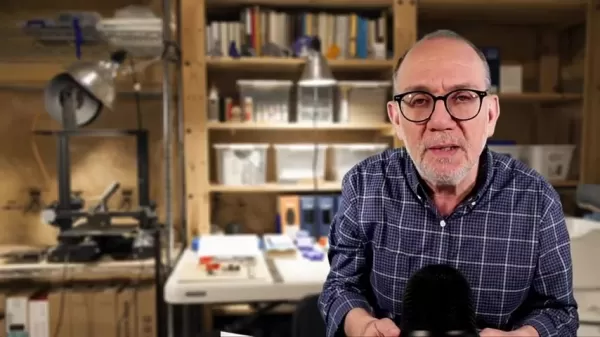
Let's take a closer look at the AI tools competing in this 2D to 3D conversion showdown. We have TripoSR, known for its speed and efficiency, Trellis, which focuses on user-friendliness, and Spar3D, designed for robust and versatile 3D model generation. Each of these tools claims to transform your 2D images into printable 3D models, but how do they stack up in real-world use? Let's dive in and see.
- TripoSR: This AI tool is popular for its ability to quickly reconstruct 3D models from single images. It's designed to be accessible, catering to users of all technical levels.
- Trellis: Trellis aims to make 3D modeling more intuitive with a user-friendly interface and streamlined algorithms. It's perfect for those looking for a simpler 2D to 3D conversion process.
- Spar3D: Spar3D focuses on creating accurate and versatile 3D models that can be further refined for various applications, including 3D printing.
All of these tools are open-source, meaning you can experiment with them freely if your setup supports it.
Image Selection: Optimizing Input for AI Success
Getting the best results from these AI tools starts with choosing the right images. The quality and characteristics of your 2D source images significantly impact the accuracy and detail of the final 3D models. So, what types of images work best for 2D to 3D AI conversion? And what are the best practices for preparing your images? Let's explore.
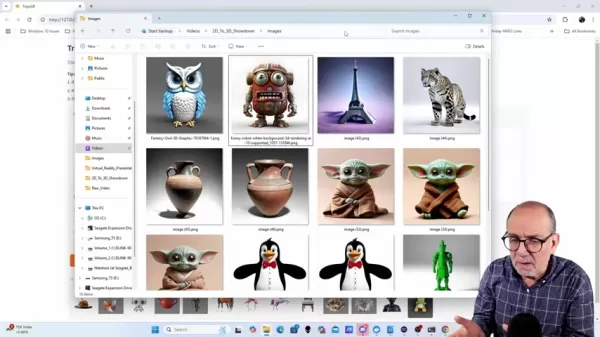
Here are some key characteristics of images that yield the best results:
- Clarity and Focus: Sharp, in-focus images are crucial. The AI needs clear edges and details to work with.
- Even Lighting: Avoid harsh shadows or overexposure. Uniform lighting helps the AI accurately interpret the object's shape.
- High Resolution: Higher resolution images provide more data for the AI, resulting in more detailed 3D models.
- Simple Background: A clean, uncluttered background helps the AI focus on the primary subject.
- Single Subject: Images with only one subject are easier for the AI to process and convert into a 3D model.
Even with the best images, you might encounter limitations. What if the tool doesn't produce a perfect 3D model? Let's look at some troubleshooting tips to improve your conversion results.
Troubleshooting: Improving Conversion Results
Sometimes, despite your best efforts in image selection, the 2D to 3D conversion doesn't go as planned. If the result isn't up to par, it's often due to the images themselves. Here are some steps you can take to enhance your outcomes:
- Adjust Parameters: Experiment with the AI tool's settings, like the level of detail or background removal options. Small adjustments can make a big difference.
- Pre-process Images: Use image editing software to enhance clarity, contrast, or lighting before feeding them to the AI.
- Try Different Images: If one image consistently fails to produce a good 3D model, try using a different image of the same subject.
- Consider the AI Model: Some AI models are better suited for certain types of images. If one tool isn't working, try another.
Practical Testing and Comparison: How to Use the AI Tools
Let's dive into the practical use of these AI tools and see how they perform in real-world scenarios.
TripoSR: Quick 3D Model Generation
To use TripoSR, you'll need to access its interface, upload a 2D image, and hit "Generate". TripoSR processes the image and creates a 3D model in formats such as .obj and .glb. You can adjust settings like foreground ratio and marching cubes resolution to fine-tune your results.
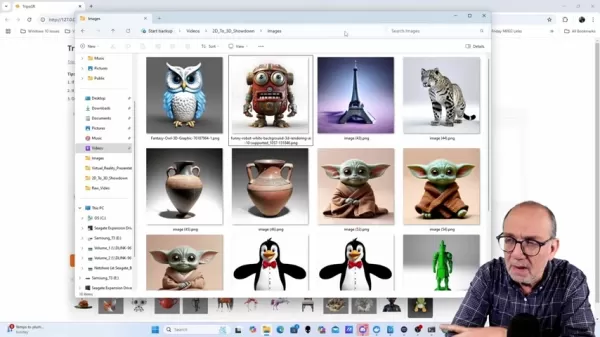
Here are some tips for getting the best results with TripoSR:
- Adjust the foreground ratio if the initial results aren't satisfactory.
- Disable the "Remove Background" option for pre-processed images.
- For images with transparent backgrounds, ensure the object occupies more than 70% of the image.
Understanding the Cost
One of the biggest advantages of using TripoSR, Trellis, and Spar3D is their open-source nature. These tools are free, allowing you to experiment without any financial commitment. This makes them ideal for hobbyists, students, and educators who might not have the budget for commercial 3D modeling software.
Pros and Cons of Open-Source AI Tools for 2D to 3D Conversion
Pros
- Cost-effective: Being free, these tools help reduce project expenses.
- Customizable: Users can modify and adapt the software to fit their specific needs.
- Community Support: Benefit from shared knowledge and collaborative problem-solving.
Cons
- Learning Curve: These tools can be challenging for beginners to master.
- Limited Support: They may lack dedicated customer support.
- Performance Variation: Results can vary depending on image quality and complexity.
Exploring the Core Features of TripoSR, Trellis, and Spar3D
Let's explore what makes each of these tools unique:
- TripoSR: Known for its speed and efficiency in generating 3D models from single images.
- Trellis: Focuses on user-friendliness, aiming to simplify the 2D to 3D conversion process with an intuitive interface.
- Spar3D: Emphasizes generating accurate and versatile 3D models suitable for various applications, including 3D printing.
Each tool has its unique strengths, making them suitable for different needs and skill levels.
Unlocking Potential: Use Cases for 2D to 3D Conversion
The ability to convert 2D images to 3D models opens up a range of exciting use cases across various industries:
- Education: Enhance learning by converting textbook diagrams into interactive 3D models.
- Design: Quickly create 3D prototypes from 2D sketches.
- Hobbyists: Turn photographs into personalized 3D printed objects.
- Archaeology: Reconstruct 3D artifacts from historical images.
Whether you're an educator, designer, hobbyist, or archaeologist, these AI tools offer endless possibilities for your projects.
Frequently Asked Questions
What are the key factors that affect the quality of 2D to 3D AI conversion?
The key factors include image clarity, lighting conditions, resolution, background simplicity, and the choice of AI model.
Can these open-source tools handle complex images with multiple subjects?
These tools perform best with single-subject images. Complex images may require pre-processing or alternative AI models.
What image formats are supported by TripoSR, Trellis, and Spar3D?
Common image formats such as JPEG, PNG, and TIFF are typically supported. Refer to each tool's documentation for specific format compatibility.
Are there any hardware requirements for running these AI tools?
These tools benefit from a powerful GPU and sufficient RAM. Check the documentation for recommended specifications.
By exploring these tools and their capabilities, you can unlock the full potential of AI-driven 3D modeling and bring your 2D images to life in stunning 3D form.
Related article
 ByteDance Boosts Core AI Incentives as Doubao Surges 14.6%
ByteDance recently convened a DouBao equity briefing to unveil fresh incentive policies for staff involved in the DouBao division. The strike price for DouBao shares has been lifted from $14.85 in June 2026 to $17.02, marking an approximate 14.6% inc
MiniMax Unveils 10x Team Program to Incentivize Global AI Experts
MiniMax (Xiyu Technology), the General Artificial Intelligence Lab, has officially launched "10x Team," a global talent collaboration initiative. This program aims to recruit top experts across industries to explore the deep application of large mode
South Korea Breaks Ground on National AI Computing Center, Investing 2.5 Trillion Won with 2028 Target
South Korean outlet EtNews reports that groundbreaking for the Korea AI Computing Center (KOACC) took place on August 3 at the Solar City data center park in Sunan, Jeollanam-do. Backed by a total investment of 2.5 trillion KRW (roughly 11.838 billio
Related Special Topic Recommendations
Education and Learning
ByteDance Boosts Core AI Incentives as Doubao Surges 14.6%
ByteDance recently convened a DouBao equity briefing to unveil fresh incentive policies for staff involved in the DouBao division. The strike price for DouBao shares has been lifted from $14.85 in June 2026 to $17.02, marking an approximate 14.6% inc
MiniMax Unveils 10x Team Program to Incentivize Global AI Experts
MiniMax (Xiyu Technology), the General Artificial Intelligence Lab, has officially launched "10x Team," a global talent collaboration initiative. This program aims to recruit top experts across industries to explore the deep application of large mode
South Korea Breaks Ground on National AI Computing Center, Investing 2.5 Trillion Won with 2028 Target
South Korean outlet EtNews reports that groundbreaking for the Korea AI Computing Center (KOACC) took place on August 3 at the Solar City data center park in Sunan, Jeollanam-do. Backed by a total investment of 2.5 trillion KRW (roughly 11.838 billio
Related Special Topic Recommendations
Education and Learning
 AI Study Tools for Homework and Exam Prep
2026 Latest Best AI Study Tools for Homework and Exam Prep! XIX.AI curates a top-rated list of powerful, game-changing tools that help students boost productivity, streamline homework completion, and ace exams through real-world tests. Get a free vs paid comparison, detailed rankings, and must-try options to unlock your AI edge. Explore now!
 10 tools
 xix.ai
Music composition
AI Vocal Demo Tools for Songwriters, Hooks, Toplines, and Multilingual Draft Sessions
xix.ai
Music composition
AI Vocal Demo Tools for Songwriters, Hooks, Toplines, and Multilingual Draft Sessions
2026 Latest Best AI Vocal Demo Tools for Songwriters, Hook Creators, and Multi-Language Content Teams! XIX.AI has curated a top-rated list of powerful game-changing tools that go through rigorous real-world tests. You’ll find detailed free vs paid comparison data, comprehensive rankings, and must-try options to help you boost writing efficiency and unlock your creative potential. Explore now to discover your perfect tool for all your content needs!
9 tools
xix.ai
Business
Best AI Competitive Research Tools for Small Businesses
2026 Latest Best Top-rated AI Competitive Research Tools for Small Businesses! XIX.AI has curated a highly powerful game-changing collection, updated weekly with rigorous real-world tests and detailed rankings. You can find a comprehensive free vs paid comparison to help you identify the must-try tools that boost your productivity and give you a competitive edge. Explore now to discover your perfect tool!
9 tools
xix.ai
Image editing
Photoshop AI Retouch Tools for Ecommerce Apparel, Skin Cleanup, and Color Consistency
2026 Latest Best Photoshop AI retouch tools for ecommerce apparel, skin cleanup, and color consistency! This top-rated curated list features powerful game-changing solutions that help you boost writing efficiency, streamline content creation, and achieve perfect visual results effortlessly. Each tool has undergone real-world tests through weekly updated rankings, complete with free vs paid comparison details. Backed by XIX.AI, it’s the must-try guide for anyone aiming to unlock your AI edge. Explore now!
10 tools
xix.ai
Prompt
Best AI Prompt Libraries for ChatGPT Workflows
2026 Latest Best Top-Rated AI Prompt Libraries for optimizing all types of ChatGPT workflows. XIX.AI has curated a powerful, game-changing collection that goes through rigorous real-world tests to ensure top performance. You can find detailed free vs paid comparisons and expert rankings to help you choose the must-try tools that boost your productivity and unlock your AI edge. Explore now!
11 tools
xix.ai
Education and Learning
AI Quiz Builder Platforms for Teachers, Tutors, and Cohort-Based Learning Programs
2026 Latest Best AI Quiz Builder Platforms for Teachers, Tutors, and Cohort-Based Learning Programs! XIX.AI has curated a top-rated list of powerful game-changing tools that go through real-world tests to deliver accurate rankings. These must-try platforms help boost writing efficiency, streamline content creation, and simplify quiz design across all learning scenarios. Explore now to discover your perfect tool for unlocking your AI edge in teaching!
13 tools
xix.ai

 Comments (3)
0/500
Comments (3)
0/500
![AlbertSanchez]()
這篇文章提到的三個AI工具真的讓人眼睛一亮!尤其是TripoSR,從2D轉3D的效果超乎預期,不過不知道它在處理複雜紋理時表現如何?有沒有人實際用過可以分享一下經驗?😊
![HenryGonzalez]()
哇,AI把2D转3D的技术真是太酷了!TripoSR速度快得像火箭,Trellis界面简单适合新手,Spar3D感觉更适合专业玩家。不过这些工具会不会让传统建模师失业啊?有点好奇未来的3D市场会怎么变!😄
![JonathanLewis]()
This AI 2D-to-3D stuff is wild! TripoSR sounds like a game-changer for creators, but I wonder if it’s as user-friendly as they claim. Anyone tried it yet? 🤔
The world of 3D modeling has been transformed by artificial intelligence, turning flat, two-dimensional images into detailed, printable 3D models. In this exciting showdown, we're diving into the capabilities of three open-source AI tools: TripoSR, Trellis, and Spar3D. These tools are in the spotlight as we evaluate their prowess in accuracy, detail, and printability when converting 2D images to 3D models. So, which of these tools will rise to the top and deliver the most impressive results? Let's find out.
Unveiling the Power of AI in 3D Modeling
Artificial intelligence is changing the game in numerous fields, and 3D modeling is no exception. With the power to transform a simple 2D image into a fully realized 3D model, AI opens up a world of possibilities for designers, hobbyists, and professionals. The challenge lies in selecting the perfect tool for your needs. In this article, we're putting three open-source AI tools to the test: TripoSR, Trellis, and Spar3D. Each of these tools brings something unique to the table, promising to turn your 2D images into printable 3D masterpieces. Let's delve into this AI showdown and see which tool truly excels in accuracy, detail, and printability.
Meet the Contenders: TripoSR, Trellis, and Spar3D
Let's take a closer look at the AI tools competing in this 2D to 3D conversion showdown. We have TripoSR, known for its speed and efficiency, Trellis, which focuses on user-friendliness, and Spar3D, designed for robust and versatile 3D model generation. Each of these tools claims to transform your 2D images into printable 3D models, but how do they stack up in real-world use? Let's dive in and see.
- TripoSR: This AI tool is popular for its ability to quickly reconstruct 3D models from single images. It's designed to be accessible, catering to users of all technical levels.
- Trellis: Trellis aims to make 3D modeling more intuitive with a user-friendly interface and streamlined algorithms. It's perfect for those looking for a simpler 2D to 3D conversion process.
- Spar3D: Spar3D focuses on creating accurate and versatile 3D models that can be further refined for various applications, including 3D printing.
All of these tools are open-source, meaning you can experiment with them freely if your setup supports it.
Image Selection: Optimizing Input for AI Success
Getting the best results from these AI tools starts with choosing the right images. The quality and characteristics of your 2D source images significantly impact the accuracy and detail of the final 3D models. So, what types of images work best for 2D to 3D AI conversion? And what are the best practices for preparing your images? Let's explore.
Here are some key characteristics of images that yield the best results:
- Clarity and Focus: Sharp, in-focus images are crucial. The AI needs clear edges and details to work with.
- Even Lighting: Avoid harsh shadows or overexposure. Uniform lighting helps the AI accurately interpret the object's shape.
- High Resolution: Higher resolution images provide more data for the AI, resulting in more detailed 3D models.
- Simple Background: A clean, uncluttered background helps the AI focus on the primary subject.
- Single Subject: Images with only one subject are easier for the AI to process and convert into a 3D model.
Even with the best images, you might encounter limitations. What if the tool doesn't produce a perfect 3D model? Let's look at some troubleshooting tips to improve your conversion results.
Troubleshooting: Improving Conversion Results
Sometimes, despite your best efforts in image selection, the 2D to 3D conversion doesn't go as planned. If the result isn't up to par, it's often due to the images themselves. Here are some steps you can take to enhance your outcomes:
- Adjust Parameters: Experiment with the AI tool's settings, like the level of detail or background removal options. Small adjustments can make a big difference.
- Pre-process Images: Use image editing software to enhance clarity, contrast, or lighting before feeding them to the AI.
- Try Different Images: If one image consistently fails to produce a good 3D model, try using a different image of the same subject.
- Consider the AI Model: Some AI models are better suited for certain types of images. If one tool isn't working, try another.
Practical Testing and Comparison: How to Use the AI Tools
Let's dive into the practical use of these AI tools and see how they perform in real-world scenarios.
TripoSR: Quick 3D Model Generation
To use TripoSR, you'll need to access its interface, upload a 2D image, and hit "Generate". TripoSR processes the image and creates a 3D model in formats such as .obj and .glb. You can adjust settings like foreground ratio and marching cubes resolution to fine-tune your results.
Here are some tips for getting the best results with TripoSR:
- Adjust the foreground ratio if the initial results aren't satisfactory.
- Disable the "Remove Background" option for pre-processed images.
- For images with transparent backgrounds, ensure the object occupies more than 70% of the image.
Understanding the Cost
One of the biggest advantages of using TripoSR, Trellis, and Spar3D is their open-source nature. These tools are free, allowing you to experiment without any financial commitment. This makes them ideal for hobbyists, students, and educators who might not have the budget for commercial 3D modeling software.
Pros and Cons of Open-Source AI Tools for 2D to 3D Conversion
Pros
- Cost-effective: Being free, these tools help reduce project expenses.
- Customizable: Users can modify and adapt the software to fit their specific needs.
- Community Support: Benefit from shared knowledge and collaborative problem-solving.
Cons
- Learning Curve: These tools can be challenging for beginners to master.
- Limited Support: They may lack dedicated customer support.
- Performance Variation: Results can vary depending on image quality and complexity.
Exploring the Core Features of TripoSR, Trellis, and Spar3D
Let's explore what makes each of these tools unique:
- TripoSR: Known for its speed and efficiency in generating 3D models from single images.
- Trellis: Focuses on user-friendliness, aiming to simplify the 2D to 3D conversion process with an intuitive interface.
- Spar3D: Emphasizes generating accurate and versatile 3D models suitable for various applications, including 3D printing.
Each tool has its unique strengths, making them suitable for different needs and skill levels.
Unlocking Potential: Use Cases for 2D to 3D Conversion
The ability to convert 2D images to 3D models opens up a range of exciting use cases across various industries:
- Education: Enhance learning by converting textbook diagrams into interactive 3D models.
- Design: Quickly create 3D prototypes from 2D sketches.
- Hobbyists: Turn photographs into personalized 3D printed objects.
- Archaeology: Reconstruct 3D artifacts from historical images.
Whether you're an educator, designer, hobbyist, or archaeologist, these AI tools offer endless possibilities for your projects.
Frequently Asked Questions
What are the key factors that affect the quality of 2D to 3D AI conversion?
The key factors include image clarity, lighting conditions, resolution, background simplicity, and the choice of AI model.
Can these open-source tools handle complex images with multiple subjects?
These tools perform best with single-subject images. Complex images may require pre-processing or alternative AI models.
What image formats are supported by TripoSR, Trellis, and Spar3D?
Common image formats such as JPEG, PNG, and TIFF are typically supported. Refer to each tool's documentation for specific format compatibility.
Are there any hardware requirements for running these AI tools?
These tools benefit from a powerful GPU and sufficient RAM. Check the documentation for recommended specifications.
By exploring these tools and their capabilities, you can unlock the full potential of AI-driven 3D modeling and bring your 2D images to life in stunning 3D form.








 ByteDance Boosts Core AI Incentives as Doubao Surges 14.6%
ByteDance recently convened a DouBao equity briefing to unveil fresh incentive policies for staff involved in the DouBao division. The strike price for DouBao shares has been lifted from $14.85 in June 2026 to $17.02, marking an approximate 14.6% inc
ByteDance Boosts Core AI Incentives as Doubao Surges 14.6%
ByteDance recently convened a DouBao equity briefing to unveil fresh incentive policies for staff involved in the DouBao division. The strike price for DouBao shares has been lifted from $14.85 in June 2026 to $17.02, marking an approximate 14.6% inc
 MiniMax Unveils 10x Team Program to Incentivize Global AI Experts
MiniMax (Xiyu Technology), the General Artificial Intelligence Lab, has officially launched "10x Team," a global talent collaboration initiative. This program aims to recruit top experts across industries to explore the deep application of large mode
MiniMax Unveils 10x Team Program to Incentivize Global AI Experts
MiniMax (Xiyu Technology), the General Artificial Intelligence Lab, has officially launched "10x Team," a global talent collaboration initiative. This program aims to recruit top experts across industries to explore the deep application of large mode
 South Korea Breaks Ground on National AI Computing Center, Investing 2.5 Trillion Won with 2028 Target
South Korean outlet EtNews reports that groundbreaking for the Korea AI Computing Center (KOACC) took place on August 3 at the Solar City data center park in Sunan, Jeollanam-do. Backed by a total investment of 2.5 trillion KRW (roughly 11.838 billio
South Korea Breaks Ground on National AI Computing Center, Investing 2.5 Trillion Won with 2028 Target
South Korean outlet EtNews reports that groundbreaking for the Korea AI Computing Center (KOACC) took place on August 3 at the Solar City data center park in Sunan, Jeollanam-do. Backed by a total investment of 2.5 trillion KRW (roughly 11.838 billio

2026 Latest Best AI Study Tools for Homework and Exam Prep! XIX.AI curates a top-rated list of powerful, game-changing tools that help students boost productivity, streamline homework completion, and ace exams through real-world tests. Get a free vs paid comparison, detailed rankings, and must-try options to unlock your AI edge. Explore now!
10 tools
xix.ai

2026 Latest Best AI Vocal Demo Tools for Songwriters, Hook Creators, and Multi-Language Content Teams! XIX.AI has curated a top-rated list of powerful game-changing tools that go through rigorous real-world tests. You’ll find detailed free vs paid comparison data, comprehensive rankings, and must-try options to help you boost writing efficiency and unlock your creative potential. Explore now to discover your perfect tool for all your content needs!
9 tools
xix.ai

2026 Latest Best Top-rated AI Competitive Research Tools for Small Businesses! XIX.AI has curated a highly powerful game-changing collection, updated weekly with rigorous real-world tests and detailed rankings. You can find a comprehensive free vs paid comparison to help you identify the must-try tools that boost your productivity and give you a competitive edge. Explore now to discover your perfect tool!
9 tools
xix.ai

2026 Latest Best Photoshop AI retouch tools for ecommerce apparel, skin cleanup, and color consistency! This top-rated curated list features powerful game-changing solutions that help you boost writing efficiency, streamline content creation, and achieve perfect visual results effortlessly. Each tool has undergone real-world tests through weekly updated rankings, complete with free vs paid comparison details. Backed by XIX.AI, it’s the must-try guide for anyone aiming to unlock your AI edge. Explore now!
10 tools
xix.ai

2026 Latest Best Top-Rated AI Prompt Libraries for optimizing all types of ChatGPT workflows. XIX.AI has curated a powerful, game-changing collection that goes through rigorous real-world tests to ensure top performance. You can find detailed free vs paid comparisons and expert rankings to help you choose the must-try tools that boost your productivity and unlock your AI edge. Explore now!
11 tools
xix.ai

2026 Latest Best AI Quiz Builder Platforms for Teachers, Tutors, and Cohort-Based Learning Programs! XIX.AI has curated a top-rated list of powerful game-changing tools that go through real-world tests to deliver accurate rankings. These must-try platforms help boost writing efficiency, streamline content creation, and simplify quiz design across all learning scenarios. Explore now to discover your perfect tool for unlocking your AI edge in teaching!
13 tools
xix.ai

這篇文章提到的三個AI工具真的讓人眼睛一亮!尤其是TripoSR,從2D轉3D的效果超乎預期,不過不知道它在處理複雜紋理時表現如何?有沒有人實際用過可以分享一下經驗?😊
哇,AI把2D转3D的技术真是太酷了!TripoSR速度快得像火箭,Trellis界面简单适合新手,Spar3D感觉更适合专业玩家。不过这些工具会不会让传统建模师失业啊?有点好奇未来的3D市场会怎么变!😄
This AI 2D-to-3D stuff is wild! TripoSR sounds like a game-changer for creators, but I wonder if it’s as user-friendly as they claim. Anyone tried it yet? 🤔












