


 Home
Home8 Expert Tips to Begin Using NotebookLM
You might recognize Steven Johnson as the guy behind some fascinating books on the science of thought and innovation. But he's also a Googler who's been diving deep into the NotebookLM project from the get-go, about two years ago. Steven puts it simply: "NotebookLM is a tool for understanding things." Picture it as your go-to virtual assistant for notes and research. It takes your info, chews on it, and spits out insights that help you get more out of what you're studying. It's all about diving deeper into topics, whether you're juggling one or a bunch at once.
With NotebookLM, you can set up notebooks tailored to specific topics or projects. You're allowed to upload up to 50 sources, which can total up to 25 million words, from PDFs and Google Docs to websites and YouTube videos. Then, NotebookLM uses the slick multimodal capabilities of Gemini 1.5 to connect the dots between your sources. You can quiz it on the content or ask it to jazz up the format however you like—it'll even throw in citations that link back to the juicy bits in your sources. And don't worry, your private info stays private; it's not used to train the model.
If you're just starting out, Steven's got eight tips to help you make the most of NotebookLM.
1. Experiment with your recent documents—even if they're random
Steven's first piece of advice for newbies is to chuck your 10 most recent documents into a notebook and start playing around with questions. Even if those docs are all over the place, it's a cool way to see what NotebookLM can do. Whether you know the material like the back of your hand or it's all new to you, NotebookLM will dig up some interesting nuggets.
2. Create one main notebook and then identify topic-based notebooks from there
Steven suggests setting up what he calls an "everything notebook" filled with general knowledge you use daily. This could be anything from inspirational quotes to core company docs or your brainstorming notes over the years. "I do a lot of open-ended thinking and exploring of ideas in my 'everything' notebook," Steven says. But don't stop there—create specific notebooks for different topics or projects. "I've got a notebook just for the work we do on NotebookLM," he explains. "It's got all our press releases, new feature descriptions, and key internal docs." By keeping everything related in one place, Steven has a personalized AI that's almost like having another team member. "I can just type, 'Draft the outline of a blog post for that feature we talked about last week,' and Notebook knows what to do."
3. Use NotebookLM to connect the dots from different materials
NotebookLM is a lifesaver when you're dealing with info scattered across folders, tabs, and who-knows-where. "We all face this problem where we're working on something, and the info we need is all over the place," Steven says. This is exactly what NotebookLM is built for—connecting those scattered dots. It's especially handy after you've used tools like Gemini and Gems for brainstorming. Say you're working on a slide deck: you start with Gemini, open a few articles, save some design inspo images, and jot down notes in a Google Doc. Toss all that into NotebookLM, and it'll whip up a digestible summary you can reference when you're ready to build your presentation in Google Slides.
4. Start with the suggested questions
Once you've loaded up NotebookLM with content, you might not know what to ask. Steven suggests using the suggested questions, just like with the Gemini-powered side panel in Workspace tools. "The model will actually help guide you through the material until you think of something specific to ask," he explains. You can find starter questions in the "Notebook Guide" after uploading your first sources. Plus, as you ask questions, NotebookLM suggests follow-ups based on what you've already asked and uploaded.
5. Ask NotebookLM to deliver info in different ways
Early testing showed that people wanted NotebookLM to present info in different formats. "Everyone processes info differently, or just prefers to see it presented in various ways," Steven says. Using the Notebook Guide feature, you can turn your content into an FAQ, a briefing doc, a timeline, a table of contents, a study guide, or the new Audio Overview, which turns your info into a conversation between two AI "hosts." Try different formats to see what works best for you and for sharing with others.
6. Don't shy away from creative uses
NotebookLM isn't just for work or school projects (though the team just launched a pilot for NotebookLM Business). It's also great for creative endeavors. "We're seeing people use it for writing fantasy and sci-fi novels or building games with intricate world-building and backstories," Steven says. For your screenplay, you might have notes in a doc, saved webpages, and inspiration photos and videos. "It can be tough to keep all that straight," Steven notes. "You can toss it all into a notebook and ask things like, 'What was the deal with that character?' or 'Remind me where each character lives?'" Steven loves that you can ask NotebookLM for creative input with questions like, "Which characters do you think are most compelling?" or "What are your favorite parts?" "It's like being able to search for 'interestingness'!" he says.
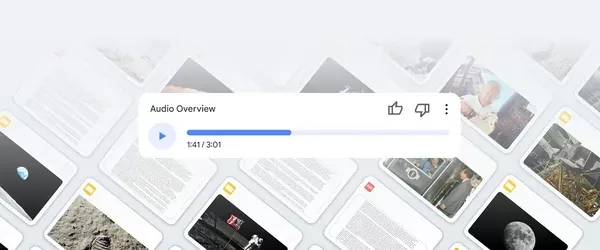
7. Turn your sources into Audio Overviews
Steven recommends turning those 10 starting documents—or whatever else you upload—into Audio Overviews. "After waiting a few minutes for it to generate, you'll have an entertaining, mind-blowing audio conversation about your upload!" Steven says. The team just added a feature to customize the conversation format in Audio Overviews. Just hit "Customize" and enter a brief description of what you want the hosts to focus on. "You can also steer them in terms of the approach or the level of sophistication you want from the Overview," Steven explains. "I've been uploading my own writing and asking them to give me constructive criticism about my work."
8. Revisit your NotebookLM chat sessions
NotebookLM makes it easy to save anything interesting from your text chats with the AI by hitting the "save to note" button. Steven also suggests another trick. "Say you have a conversation about one of your notebooks—you ask questions, follow-ups, and even ask it to refine your idea," he says. You don't want to lose the insights you gathered. "At the end of the chat, you can ask NotebookLM to summarize the key points into a single note that goes into that notebook," Steven explains. "That way, Future You will thank Past You—and NotebookLM—for making it easy to pick up where you left off."
Related article
 Ollie bets privacy focus to win AI assistant race
To be genuinely helpful, an AI assistant must understand its user deeply. Ollie, a personal assistant designed for daily life, operates on the premise that this doesn’t require surrendering your data or compromising your privacy.While certain enterpr
How AI LIVE: London Will Explore AI & Industrial Automation
The summit will convene C-suite executives from around the globe to address pressing challenges in global industries, ranging from AI-driven disruption to economic volatility.AI LIVE: The London Summit will gather over 2,000 international leaders und
Anthropic Enters AI Legal Tech Market as Competition Intensifies
Anthropic unveiled a suite of new chatbot capabilities on Tuesday, aimed at delivering automated support to legal practices. These enhancements expand upon Claude for Legal, the firm-specific platform introduced earlier this year, by adding specializ
Related Special Topic Recommendations
Business
Ollie bets privacy focus to win AI assistant race
To be genuinely helpful, an AI assistant must understand its user deeply. Ollie, a personal assistant designed for daily life, operates on the premise that this doesn’t require surrendering your data or compromising your privacy.While certain enterpr
How AI LIVE: London Will Explore AI & Industrial Automation
The summit will convene C-suite executives from around the globe to address pressing challenges in global industries, ranging from AI-driven disruption to economic volatility.AI LIVE: The London Summit will gather over 2,000 international leaders und
Anthropic Enters AI Legal Tech Market as Competition Intensifies
Anthropic unveiled a suite of new chatbot capabilities on Tuesday, aimed at delivering automated support to legal practices. These enhancements expand upon Claude for Legal, the firm-specific platform introduced earlier this year, by adding specializ
Related Special Topic Recommendations
Business
 Best AI Competitive Research Tools for Small Businesses
2026 Latest Best Top-rated AI Competitive Research Tools for Small Businesses! XIX.AI has curated a highly powerful game-changing collection, updated weekly with rigorous real-world tests and detailed rankings. You can find a comprehensive free vs paid comparison to help you identify the must-try tools that boost your productivity and give you a competitive edge. Explore now to discover your perfect tool!
 9 tools
 xix.ai
Image editing
Photoshop AI Retouch Tools for Ecommerce Apparel, Skin Cleanup, and Color Consistency
xix.ai
Image editing
Photoshop AI Retouch Tools for Ecommerce Apparel, Skin Cleanup, and Color Consistency
2026 Latest Best Photoshop AI retouch tools for ecommerce apparel, skin cleanup, and color consistency! This top-rated curated list features powerful game-changing solutions that help you boost writing efficiency, streamline content creation, and achieve perfect visual results effortlessly. Each tool has undergone real-world tests through weekly updated rankings, complete with free vs paid comparison details. Backed by XIX.AI, it’s the must-try guide for anyone aiming to unlock your AI edge. Explore now!
10 tools
xix.ai
Prompt
Best AI Prompt Libraries for ChatGPT Workflows
2026 Latest Best Top-Rated AI Prompt Libraries for optimizing all types of ChatGPT workflows. XIX.AI has curated a powerful, game-changing collection that goes through rigorous real-world tests to ensure top performance. You can find detailed free vs paid comparisons and expert rankings to help you choose the must-try tools that boost your productivity and unlock your AI edge. Explore now!
11 tools
xix.ai
Education and Learning
AI Quiz Builder Platforms for Teachers, Tutors, and Cohort-Based Learning Programs
2026 Latest Best AI Quiz Builder Platforms for Teachers, Tutors, and Cohort-Based Learning Programs! XIX.AI has curated a top-rated list of powerful game-changing tools that go through real-world tests to deliver accurate rankings. These must-try platforms help boost writing efficiency, streamline content creation, and simplify quiz design across all learning scenarios. Explore now to discover your perfect tool for unlocking your AI edge in teaching!
13 tools
xix.ai
code
AI Pull Request Review Tools for GitHub Teams Handling Refactors, Bugs, and Security Gaps
2026 Latest Best AI Pull Request Review Tools for GitHub Teams are here on XIX.AI! This top-rated curated list showcases powerful game-changing solutions that streamline refactoring, bug fixing, and security gap detection across all team workflows. Enjoy a free vs paid comparison along with real-world tests and detailed rankings to help you find the perfect tool that boosts productivity significantly. Explore now to unlock your AI edge!
12 tools
xix.ai
Text-to-speech
Best AI Text to Speech Tools for Natural Voiceovers
2026 Latest Best Top-rated AI Text to Speech Tools for Natural Voiceovers are here on XIX.AI! This curated list features powerful, game-changing options that deliver crystal-clear voices for every use case, backed by real-world tests and weekly updated rankings. Get a free vs paid comparison to find the must-try solution that boosts your productivity instantly. Explore now to Unlock your AI edge!
11 tools
xix.ai

 Comments (33)
0/500
Comments (33)
0/500
![StevenMartínez]()
Intéressant de voir un auteur réputé comme Steven Johnson impliqué dans le développement d'un outil d'IA. Mais je me demande si ces assistants vont vraiment nous aider à mieux comprendre ou juste nous rendre paresseux intellectuellement ? 🤔
![FrankRodriguez]()
NotebookLM sounds like a game-changer for organizing thoughts! Excited to try these tips and see how it boosts my research. 😎
![FredLee]()
NotebookLM sounds like a game-changer for diving into complex topics! Been playing with it for a bit, and it’s like having a super-smart study buddy who never gets tired. 😎 Anyone else using it for research?
![SebastianAnderson]()
8 Consejos Expertos para Empezar a Usar NotebookLM es una salvación para cualquiera que se sumerja en esta herramienta. Las percepciones de Steven Johnson son acertadas, haciendo que lo complejo sea mucho más fácil de comprender. Solo desearía que hubiera más consejos sobre la integración con otras aplicaciones. Aún así, una lectura imprescindible! 👍
![WillMitchell]()
NotebookLM ha sido una revelación para mí. Como alguien que le gusta profundizar en temas, esta herramienta facilita mucho organizar y entender ideas complejas. La participación de Steven Johnson le da credibilidad. Solo desearía que tuviera más plantillas para diferentes materias.
![PaulSanchez]()
NotebookLM has been a revelation for me! As someone who loves to dive deep into topics, this tool makes it so much easier to organize and understand complex ideas. Steven Johnson's involvement adds credibility. Only wish it had more templates for different subjects.
You might recognize Steven Johnson as the guy behind some fascinating books on the science of thought and innovation. But he's also a Googler who's been diving deep into the NotebookLM project from the get-go, about two years ago. Steven puts it simply: "NotebookLM is a tool for understanding things." Picture it as your go-to virtual assistant for notes and research. It takes your info, chews on it, and spits out insights that help you get more out of what you're studying. It's all about diving deeper into topics, whether you're juggling one or a bunch at once.
With NotebookLM, you can set up notebooks tailored to specific topics or projects. You're allowed to upload up to 50 sources, which can total up to 25 million words, from PDFs and Google Docs to websites and YouTube videos. Then, NotebookLM uses the slick multimodal capabilities of Gemini 1.5 to connect the dots between your sources. You can quiz it on the content or ask it to jazz up the format however you like—it'll even throw in citations that link back to the juicy bits in your sources. And don't worry, your private info stays private; it's not used to train the model.
If you're just starting out, Steven's got eight tips to help you make the most of NotebookLM.
1. Experiment with your recent documents—even if they're random
Steven's first piece of advice for newbies is to chuck your 10 most recent documents into a notebook and start playing around with questions. Even if those docs are all over the place, it's a cool way to see what NotebookLM can do. Whether you know the material like the back of your hand or it's all new to you, NotebookLM will dig up some interesting nuggets.
2. Create one main notebook and then identify topic-based notebooks from there
Steven suggests setting up what he calls an "everything notebook" filled with general knowledge you use daily. This could be anything from inspirational quotes to core company docs or your brainstorming notes over the years. "I do a lot of open-ended thinking and exploring of ideas in my 'everything' notebook," Steven says. But don't stop there—create specific notebooks for different topics or projects. "I've got a notebook just for the work we do on NotebookLM," he explains. "It's got all our press releases, new feature descriptions, and key internal docs." By keeping everything related in one place, Steven has a personalized AI that's almost like having another team member. "I can just type, 'Draft the outline of a blog post for that feature we talked about last week,' and Notebook knows what to do."
3. Use NotebookLM to connect the dots from different materials
NotebookLM is a lifesaver when you're dealing with info scattered across folders, tabs, and who-knows-where. "We all face this problem where we're working on something, and the info we need is all over the place," Steven says. This is exactly what NotebookLM is built for—connecting those scattered dots. It's especially handy after you've used tools like Gemini and Gems for brainstorming. Say you're working on a slide deck: you start with Gemini, open a few articles, save some design inspo images, and jot down notes in a Google Doc. Toss all that into NotebookLM, and it'll whip up a digestible summary you can reference when you're ready to build your presentation in Google Slides.
4. Start with the suggested questions
Once you've loaded up NotebookLM with content, you might not know what to ask. Steven suggests using the suggested questions, just like with the Gemini-powered side panel in Workspace tools. "The model will actually help guide you through the material until you think of something specific to ask," he explains. You can find starter questions in the "Notebook Guide" after uploading your first sources. Plus, as you ask questions, NotebookLM suggests follow-ups based on what you've already asked and uploaded.
5. Ask NotebookLM to deliver info in different ways
Early testing showed that people wanted NotebookLM to present info in different formats. "Everyone processes info differently, or just prefers to see it presented in various ways," Steven says. Using the Notebook Guide feature, you can turn your content into an FAQ, a briefing doc, a timeline, a table of contents, a study guide, or the new Audio Overview, which turns your info into a conversation between two AI "hosts." Try different formats to see what works best for you and for sharing with others.
6. Don't shy away from creative uses
NotebookLM isn't just for work or school projects (though the team just launched a pilot for NotebookLM Business). It's also great for creative endeavors. "We're seeing people use it for writing fantasy and sci-fi novels or building games with intricate world-building and backstories," Steven says. For your screenplay, you might have notes in a doc, saved webpages, and inspiration photos and videos. "It can be tough to keep all that straight," Steven notes. "You can toss it all into a notebook and ask things like, 'What was the deal with that character?' or 'Remind me where each character lives?'" Steven loves that you can ask NotebookLM for creative input with questions like, "Which characters do you think are most compelling?" or "What are your favorite parts?" "It's like being able to search for 'interestingness'!" he says.
7. Turn your sources into Audio Overviews
Steven recommends turning those 10 starting documents—or whatever else you upload—into Audio Overviews. "After waiting a few minutes for it to generate, you'll have an entertaining, mind-blowing audio conversation about your upload!" Steven says. The team just added a feature to customize the conversation format in Audio Overviews. Just hit "Customize" and enter a brief description of what you want the hosts to focus on. "You can also steer them in terms of the approach or the level of sophistication you want from the Overview," Steven explains. "I've been uploading my own writing and asking them to give me constructive criticism about my work."
8. Revisit your NotebookLM chat sessions
NotebookLM makes it easy to save anything interesting from your text chats with the AI by hitting the "save to note" button. Steven also suggests another trick. "Say you have a conversation about one of your notebooks—you ask questions, follow-ups, and even ask it to refine your idea," he says. You don't want to lose the insights you gathered. "At the end of the chat, you can ask NotebookLM to summarize the key points into a single note that goes into that notebook," Steven explains. "That way, Future You will thank Past You—and NotebookLM—for making it easy to pick up where you left off."








 Ollie bets privacy focus to win AI assistant race
To be genuinely helpful, an AI assistant must understand its user deeply. Ollie, a personal assistant designed for daily life, operates on the premise that this doesn’t require surrendering your data or compromising your privacy.While certain enterpr
Ollie bets privacy focus to win AI assistant race
To be genuinely helpful, an AI assistant must understand its user deeply. Ollie, a personal assistant designed for daily life, operates on the premise that this doesn’t require surrendering your data or compromising your privacy.While certain enterpr
 How AI LIVE: London Will Explore AI & Industrial Automation
The summit will convene C-suite executives from around the globe to address pressing challenges in global industries, ranging from AI-driven disruption to economic volatility.AI LIVE: The London Summit will gather over 2,000 international leaders und
How AI LIVE: London Will Explore AI & Industrial Automation
The summit will convene C-suite executives from around the globe to address pressing challenges in global industries, ranging from AI-driven disruption to economic volatility.AI LIVE: The London Summit will gather over 2,000 international leaders und
 Anthropic Enters AI Legal Tech Market as Competition Intensifies
Anthropic unveiled a suite of new chatbot capabilities on Tuesday, aimed at delivering automated support to legal practices. These enhancements expand upon Claude for Legal, the firm-specific platform introduced earlier this year, by adding specializ
Anthropic Enters AI Legal Tech Market as Competition Intensifies
Anthropic unveiled a suite of new chatbot capabilities on Tuesday, aimed at delivering automated support to legal practices. These enhancements expand upon Claude for Legal, the firm-specific platform introduced earlier this year, by adding specializ

2026 Latest Best Top-rated AI Competitive Research Tools for Small Businesses! XIX.AI has curated a highly powerful game-changing collection, updated weekly with rigorous real-world tests and detailed rankings. You can find a comprehensive free vs paid comparison to help you identify the must-try tools that boost your productivity and give you a competitive edge. Explore now to discover your perfect tool!
9 tools
xix.ai

2026 Latest Best Photoshop AI retouch tools for ecommerce apparel, skin cleanup, and color consistency! This top-rated curated list features powerful game-changing solutions that help you boost writing efficiency, streamline content creation, and achieve perfect visual results effortlessly. Each tool has undergone real-world tests through weekly updated rankings, complete with free vs paid comparison details. Backed by XIX.AI, it’s the must-try guide for anyone aiming to unlock your AI edge. Explore now!
10 tools
xix.ai

2026 Latest Best Top-Rated AI Prompt Libraries for optimizing all types of ChatGPT workflows. XIX.AI has curated a powerful, game-changing collection that goes through rigorous real-world tests to ensure top performance. You can find detailed free vs paid comparisons and expert rankings to help you choose the must-try tools that boost your productivity and unlock your AI edge. Explore now!
11 tools
xix.ai

2026 Latest Best AI Quiz Builder Platforms for Teachers, Tutors, and Cohort-Based Learning Programs! XIX.AI has curated a top-rated list of powerful game-changing tools that go through real-world tests to deliver accurate rankings. These must-try platforms help boost writing efficiency, streamline content creation, and simplify quiz design across all learning scenarios. Explore now to discover your perfect tool for unlocking your AI edge in teaching!
13 tools
xix.ai

2026 Latest Best AI Pull Request Review Tools for GitHub Teams are here on XIX.AI! This top-rated curated list showcases powerful game-changing solutions that streamline refactoring, bug fixing, and security gap detection across all team workflows. Enjoy a free vs paid comparison along with real-world tests and detailed rankings to help you find the perfect tool that boosts productivity significantly. Explore now to unlock your AI edge!
12 tools
xix.ai

2026 Latest Best Top-rated AI Text to Speech Tools for Natural Voiceovers are here on XIX.AI! This curated list features powerful, game-changing options that deliver crystal-clear voices for every use case, backed by real-world tests and weekly updated rankings. Get a free vs paid comparison to find the must-try solution that boosts your productivity instantly. Explore now to Unlock your AI edge!
11 tools
xix.ai

Intéressant de voir un auteur réputé comme Steven Johnson impliqué dans le développement d'un outil d'IA. Mais je me demande si ces assistants vont vraiment nous aider à mieux comprendre ou juste nous rendre paresseux intellectuellement ? 🤔
NotebookLM sounds like a game-changer for organizing thoughts! Excited to try these tips and see how it boosts my research. 😎
NotebookLM sounds like a game-changer for diving into complex topics! Been playing with it for a bit, and it’s like having a super-smart study buddy who never gets tired. 😎 Anyone else using it for research?
8 Consejos Expertos para Empezar a Usar NotebookLM es una salvación para cualquiera que se sumerja en esta herramienta. Las percepciones de Steven Johnson son acertadas, haciendo que lo complejo sea mucho más fácil de comprender. Solo desearía que hubiera más consejos sobre la integración con otras aplicaciones. Aún así, una lectura imprescindible! 👍
NotebookLM ha sido una revelación para mí. Como alguien que le gusta profundizar en temas, esta herramienta facilita mucho organizar y entender ideas complejas. La participación de Steven Johnson le da credibilidad. Solo desearía que tuviera más plantillas para diferentes materias.
NotebookLM has been a revelation for me! As someone who loves to dive deep into topics, this tool makes it so much easier to organize and understand complex ideas. Steven Johnson's involvement adds credibility. Only wish it had more templates for different subjects.












