


 Home
HomeWithPoly Unveils AI-Driven Texture Generation for 3D Modeling
In the ever-evolving landscape of digital design, the quest for tools that boost productivity and open new creative paths is relentless. Enter WithPoly, an AI-driven platform that's making waves by transforming the way textures and graphic assets are created. This tool is a game-changer, especially for those working in 3D modeling environments like Blender, offering customizable, high-resolution assets that can be effortlessly incorporated into various projects. Let's dive into what makes WithPoly a must-have for today's designers and artists.
Key Highlights of WithPoly
- An AI-powered platform that speeds up the creation of textures and graphic assets.
- Features a user-friendly text prompt interface, welcoming users of all skill levels.
- Allows for detailed customization to fit specific project needs.
- Capable of producing high-resolution outputs perfect for professional projects.
- Seamlessly integrates with 3D modeling software like Blender.
- Offers commercial licensing options for monetizing your work.
- A pro version that unlocks HD texture generation and more.
- Comes with a library for storing and managing your created assets.
Discovering WithPoly: An AI-Powered Texture and Graphic Asset Generator
What is WithPoly?
WithPoly stands out as a fresh AI tool that's all about making the creation of design assets easier and faster. It lets you whip up textures, graphics, and other visual elements just by typing in a text prompt. This method cuts down the design process significantly, making it a breeze for both newbies and pros to churn out top-notch assets for their projects. It's a godsend for 3D modeling, game development, and visual design, with customizable options and high-res outputs that set it apart. Although still in development, WithPoly is already showing its potential as a must-watch tool for anyone in the digital content creation scene. Its aim? To make creating design assets as straightforward as sending a text message.
Navigating the WithPoly Interface
The WithPoly interface is all about simplicity and ease of use, with a layout that's intuitive and straightforward. When you first log in, you're greeted by a clean home screen that lays out everything you need to know about what WithPoly can do. Key sections include:
- Home: A quick overview of WithPoly's capabilities, showing off its speed in generating design assets.
- My Library: Your personal space to store and manage all the assets you've created.
- Asset Categories: From Visual Design to Creative Writing, WithPoly covers a wide range of design needs.
To start creating, head over to the 'Textures' section 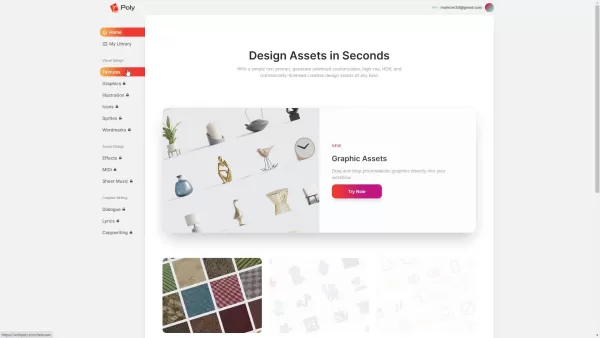 , where you can type in a text prompt to describe the texture you're after. You can also tweak color palettes and pick a license here. Once you've set your prompt, WithPoly generates a variety of texture swatches for you to preview and choose from. If you need something in higher resolution, the pro version has you covered with HD texture generation. The whole process is designed to be user-friendly, taking you smoothly from idea to finished asset.
Real-World Applications of WithPoly Textures in Blender
Seeing WithPoly Textures in Action
Let's see how WithPoly textures can be used in real projects, specifically within Blender. Imagine you're working on an architectural visualization and need a realistic concrete wall. By generating a concrete texture with WithPoly and bringing it into Blender 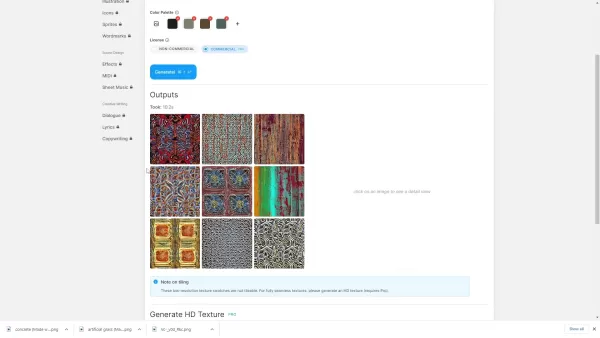 , you can quickly apply a high-quality, seamless texture to your model. Tweak the material settings for realism, adjusting aspects like roughness and reflectivity to get the look just right.
For game developers, WithPoly is a dream come true. You can create unique textures for characters, environments, or props in no time. Think about adding a rusted metal texture to a robot model. With smart UV mapping and a seamless texture, you can achieve a highly realistic look that can really make your game stand out.
How to Generate Textures with WithPoly: A Step-by-Step Walkthrough
Step 1: Accessing the Texture Generation Tool
First things first, log into the WithPoly platform. Once in, find the 'Textures' tab on the left side and click it. This will take you to where you can start creating your custom textures, designed to be easy to use so you can jump right into your project.
Step 2: Describing Your Texture
In the texture generation section, you'll see a box where you can type in what kind of texture you want. The more specific you are, the better the results. For instance, if you type 'concrete' 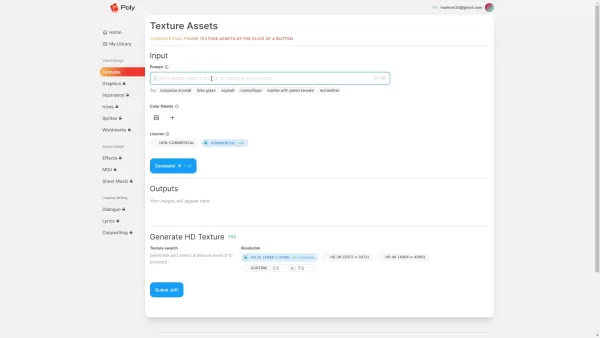 , you'll get concrete textures. WithPoly also offers suggestions like 'turquoise drywall' or 'red leather' to spark your creativity. Just remember, you've got a 40-character limit, so keep it concise.
Step 3: Customizing Your Colors
WithPoly lets you customize the color palette of your texture to match your project's needs. Click the '+' icon next to 'Color Palettes' to add colors. You can pick colors from an image you upload 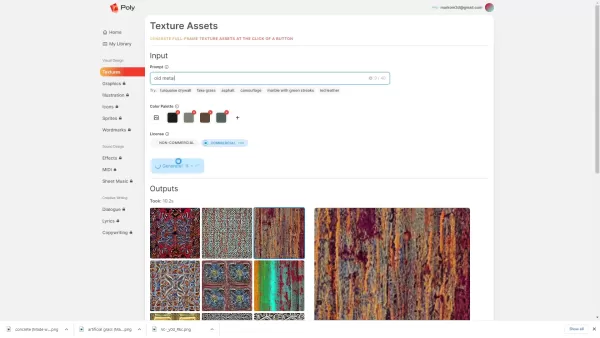 , which is great for keeping your project's colors consistent. After setting your palette, you can adjust how prominent each color should be in your textures.
Step 4: Picking a License
Before you hit generate, choose the right license for your project. WithPoly has both non-commercial and commercial options. If you're planning to use the texture commercially, make sure to pick the commercial license to avoid any legal headaches down the line.
Step 5: Generating and Choosing Your Texture
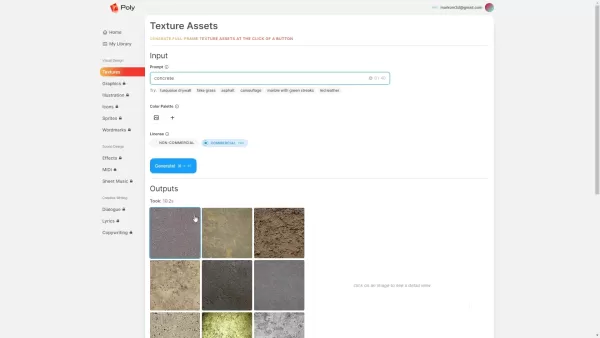
With your prompt in, colors set, and license chosen, click 'Generate'. WithPoly will then show you a range of texture swatches based on your input. Take your time to look through them and pick the one that's just right for your project. If you're on the pro version, you can also opt for HD textures for those high-resolution needs.
Step 6: Generating and Downloading HD Textures (Pro Feature)
For pro users, WithPoly allows you to generate high-definition textures. After selecting a texture, choose your desired resolution (HD 2K, HD 3K, or HD 4K) and click 'Queue Job' 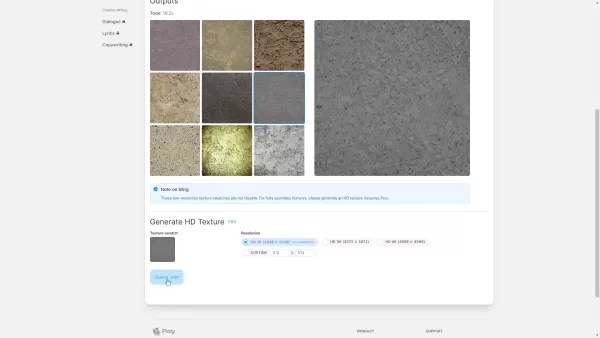 . Once it's ready, you can download it from 'My Library' and use it in your projects.
Step 7: Using Your Texture in Blender
Once you've got your texture, it's time to bring it into Blender. Create a new material, add an image texture node, and load your WithPoly texture. Connect it to the right shader inputs like base color and roughness, then tweak the settings until you're happy with the look. WithPoly's seamless textures make sure your 3D models look as realistic as possible.
WithPoly Pricing: Making AI Texture Generation Accessible
Exploring WithPoly's Subscription Plans
WithPoly offers various pricing plans to suit different needs. There's a free tier for those just starting out, with some limitations on features and usage. Paid plans unlock more capabilities, higher resolutions, and commercial licensing. The pro version includes HD texture generation and priority support. Keep an eye out for discounts, like the current 20% off offer 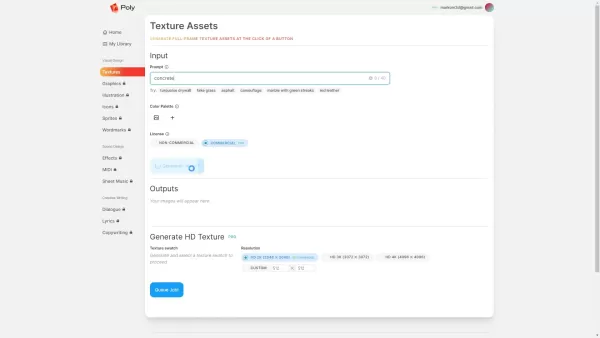 , which can be found through affiliate links or promo codes. For the latest pricing, it's best to check directly on the WithPoly website.
Weighing the Pros and Cons of WithPoly
Advantages of Using WithPoly
- Quick and efficient AI-driven texture generation.
- Easy-to-use text prompt interface.
- Customizable color palettes to match your project's aesthetic.
- Commercial licensing options for professional use.
- Seamless texture generation for professional-grade projects (Pro).
- Convenient asset management with the asset library.
- Smooth integration with Blender.
- 20% discount code available for savings.
Drawbacks to Consider
- Reliance on AI might limit creative control.
- 40-character limit on text prompts can be restrictive.
- The quality of textures depends heavily on the clarity of the prompt.
- There's a chance of getting unexpected results.
- HD texture generation is only available with a Pro subscription.
- As a relatively new tool, it's still in the process of evolving.
Highlighting WithPoly's Key Features: AI-Driven Asset Creation
Unlocking WithPoly's Full Potential
WithPoly is packed with features that make creating assets a breeze:
- Text-to-Texture Generation: Turn text into textures, making asset creation accessible to everyone.
- Customizable Color Palettes: Match your textures to your project's look by selecting colors from uploaded images.
- Commercial Licensing: Use your generated textures commercially and monetize your work.
- High-Resolution Outputs (Pro): Generate HD textures for professional projects.
- Seamless Texture Generation (Pro): Create textures that tile perfectly, eliminating seams in your 3D models.
- Asset Library: A central place to store and manage your assets, making them easy to reuse.
- Integration with Blender: Easily bring WithPoly textures into Blender to enhance your 3D modeling workflow.
- AI-Powered Generation: Advanced AI ensures high-quality, realistic textures with minimal effort.
- Texture Swatches: Preview multiple texture options before finalizing your choice.
Exploring WithPoly's Versatility in Creative Projects
Transforming Your Projects with WithPoly
WithPoly's ability to generate a wide range of visual elements makes it a versatile tool for many applications:
- 3D Modeling: Quickly create textures for your 3D models, enhancing realism and visual appeal. Whether it's characters, environments, or props, WithPoly has you covered. For example, generate concrete textures
 for architectural visualizations or metal textures for realistic vehicles or robots.
 - Game Development: Customize textures for game assets, streamlining development and enhancing uniqueness.
- Visual Design: Create unique backgrounds, patterns, and graphic elements for websites and marketing materials.
- Architectural Visualization: Generate high-resolution, seamless textures for accurate architectural renderings.
- Product Design: Add realistic textures to product renders to bring your concepts to life visually.
Frequently Asked Questions About WithPoly
What is WithPoly?
WithPoly is an AI-powered tool that generates textures, graphics, and other visual assets using simple text prompts, simplifying the design process for users of all levels.
How does WithPoly work?
Using AI algorithms, WithPoly creates textures based on the text prompts you provide. You can customize color palettes and select licenses before generating your final asset.
What are the benefits of using WithPoly?
Benefits include faster asset creation, customizable outputs, high-resolution support (Pro), seamless texture generation (Pro), and the ability to use textures commercially.
Is WithPoly suitable for beginners?
Absolutely, its simple text prompt interface makes it easy for beginners to create high-quality assets.
Does WithPoly offer a free trial?
Yes, WithPoly typically offers a free tier with limited features for new users to explore its capabilities.
Can I use WithPoly textures for commercial purposes?
Yes, you can obtain commercial licenses for WithPoly textures, allowing you to use them in commercial projects and monetize your work.
Does WithPoly integrate with Blender?
Yes, WithPoly textures can be seamlessly integrated into Blender, enhancing your 3D modeling workflow and compatible with other 3D modeling software that imports texture images.
Related Questions About AI Texture Generation
What are the advantages of using AI for texture generation?
Using AI for texture generation speeds up the process, allows for easy customization, makes it accessible to everyone, reduces costs, ensures consistency, and opens up new creative possibilities. For example, typing 'painted metal' or 'old metal' into a prompt can yield surprising results.
How does WithPoly compare to other texture generation tools?
WithPoly stands out with its AI-powered generation, user-friendly text prompt interface, and seamless Blender integration. Here's a quick comparison:
Feature WithPoly Traditional Methods Generation Method AI-powered text prompt Manual creation in software like Photoshop Speed Very fast Time-consuming Customization High, through color palettes and prompts High, but requires advanced skills Skill Level Accessible to all users Requires expertise in design software Cost Subscription-based Software licenses, potential labor costs Integration Seamless with Blender Manual import required Commercial License Included in subscription plans May require additional licensing
Remember, AI is an evolving field, so these details may change over time.
What type of hardware do I need to use WithPoly?
WithPoly is cloud-based, so you don't need powerful hardware. Just a modern web browser and a stable internet connection are enough. A fast internet connection helps with quick texture downloads. For using textures in Blender, you'll need hardware that meets Blender's system requirements.
Are there any limitations to WithPoly's AI texture generation?
While WithPoly is impressive, it has its limits. The quality of the textures depends on your prompt's clarity, and you might occasionally get unexpected results. Current versions also don't include settings for roughness or specular maps. However, WithPoly is continually improving, so these limitations might be addressed in future updates.
Related article
 U.S. Stocks Hit Historic Milestone as AI and Aerospace Giants Prepare for Trillion-Dollar Debut
Elon Musk, Sam Altman, and Dario Amodei, three titans of the technology sector, are advancing toward initial public offerings for their respective ventures. With SpaceX, OpenAI, and Anthropic—three industry behemoths nearing trillion-dollar valuation
Swedish AI Startup Lovable Eyes $13.2 Billion Valuation After Major Funding Round
As AI-driven coding tools gain traction, Swedish startup Lovable has secured a major funding round. The company aims to raise $3 billion, potentially boosting its valuation to $13.2 billion—double the $6.6 billion recorded last December. Menlo Ventur
Google Tests Remy AI Agent for Gemini as Focus Shifts to User Control
According to Business Insider, Google is testing Remy, a new AI personal agent for Gemini. This tool aims to execute tasks on behalf of users, streamlining both professional workflows and daily routines.Currently, Remy is undergoing testing in an int
Related Special Topic Recommendations
Data Analysis
U.S. Stocks Hit Historic Milestone as AI and Aerospace Giants Prepare for Trillion-Dollar Debut
Elon Musk, Sam Altman, and Dario Amodei, three titans of the technology sector, are advancing toward initial public offerings for their respective ventures. With SpaceX, OpenAI, and Anthropic—three industry behemoths nearing trillion-dollar valuation
Swedish AI Startup Lovable Eyes $13.2 Billion Valuation After Major Funding Round
As AI-driven coding tools gain traction, Swedish startup Lovable has secured a major funding round. The company aims to raise $3 billion, potentially boosting its valuation to $13.2 billion—double the $6.6 billion recorded last December. Menlo Ventur
Google Tests Remy AI Agent for Gemini as Focus Shifts to User Control
According to Business Insider, Google is testing Remy, a new AI personal agent for Gemini. This tool aims to execute tasks on behalf of users, streamlining both professional workflows and daily routines.Currently, Remy is undergoing testing in an int
Related Special Topic Recommendations
Data Analysis
 Best AI Anomaly Detection Tools for KPI Monitoring across SaaS and Ecommerce Teams
2026 Latest Best Top-rated AI Anomaly Detection Tools for KPI Monitoring in SaaS and Ecommerce teams! XIX.AI has curated a powerful, game-changing collection based on rigorous real-world tests and weekly updated rankings. You’ll find detailed free vs paid comparison insights to help you identify the must-try solution that boosts productivity and unlocks your AI edge. Explore now!
 10 tools
 xix.ai
writing
Best AI Outline Generators for Long-Form SEO Articles
xix.ai
writing
Best AI Outline Generators for Long-Form SEO Articles
2026 Latest Best Top-Rated AI Outline Generators for Long-Form SEO Articles, meticulously curated by XIX.AI. These powerful tools offer game-changing assistance in creating high-quality content quickly, boosting writing efficiency significantly. Get a free vs paid comparison along with real-world tests and detailed rankings to help you find the must-try option that suits your needs. Explore now to unlock your AI edge.
8 tools
xix.ai
Education and Learning
AI Study Tools for Homework and Exam Prep
2026 Latest Best AI Study Tools for Homework and Exam Prep! XIX.AI curates a top-rated list of powerful, game-changing tools that help students boost productivity, streamline homework completion, and ace exams through real-world tests. Get a free vs paid comparison, detailed rankings, and must-try options to unlock your AI edge. Explore now!
10 tools
xix.ai
Music composition
AI Vocal Demo Tools for Songwriters, Hooks, Toplines, and Multilingual Draft Sessions
2026 Latest Best AI Vocal Demo Tools for Songwriters, Hook Creators, and Multi-Language Content Teams! XIX.AI has curated a top-rated list of powerful game-changing tools that go through rigorous real-world tests. You’ll find detailed free vs paid comparison data, comprehensive rankings, and must-try options to help you boost writing efficiency and unlock your creative potential. Explore now to discover your perfect tool for all your content needs!
9 tools
xix.ai
Business
Best AI Competitive Research Tools for Small Businesses
2026 Latest Best Top-rated AI Competitive Research Tools for Small Businesses! XIX.AI has curated a highly powerful game-changing collection, updated weekly with rigorous real-world tests and detailed rankings. You can find a comprehensive free vs paid comparison to help you identify the must-try tools that boost your productivity and give you a competitive edge. Explore now to discover your perfect tool!
9 tools
xix.ai
Image editing
Photoshop AI Retouch Tools for Ecommerce Apparel, Skin Cleanup, and Color Consistency
2026 Latest Best Photoshop AI retouch tools for ecommerce apparel, skin cleanup, and color consistency! This top-rated curated list features powerful game-changing solutions that help you boost writing efficiency, streamline content creation, and achieve perfect visual results effortlessly. Each tool has undergone real-world tests through weekly updated rankings, complete with free vs paid comparison details. Backed by XIX.AI, it’s the must-try guide for anyone aiming to unlock your AI edge. Explore now!
10 tools
xix.ai

 Comments (34)
0/500
Comments (34)
0/500
![JuanLewis]()
Finally! AI stepping into 3D texturing. I've been waiting for something like this. Hope it handles PBR materials well. 🎨
![HenryGonzalez]()
看了这个介绍感觉3D纹理生成的AI化进展真是快!之前用手动制作材质贴图效率太低,现在这种工具出来应该能大幅节省时间吧?不过AI生成的质量稳定性如何?会不会在细节控制上反而变得复杂了?国内有类似产品吗🤔
![MatthewGonzalez]()
Mais uma ferramenta de IA pra design 3D? 😅 Eles prometem revolucionar tudo, mas será que vai funcionar no meu workflow atual ou só vai atrapalhar? Acho que vou testar antes de me empolgar.
![JuanCarter]()
This WithPoly tool sounds like a total game-changer for 3D modeling! 😍 Generating high-res textures in seconds? That's wild. I wonder how it stacks up against traditional methods in terms of quality. Gotta try it out for my next Blender project!
![JonathanKing]()
La generación de texturas por IA de WithPoly para modelado 3D es impresionante! 🎨 Es como magia, transformando mis modelos básicos en visuales deslumbrantes. Pero a veces las texturas parecen un poco extrañas, como si fueran de otra dimensión. Aún así, ahorra mucho tiempo. ¡Sigue mejorando, WithPoly! 🚀
![LarryHernández]()
Die Texturgenerierung per KI von WithPoly ist unglaublich! Sie hat meinen 3D-Modellierungsworkflow transformiert, aber die Lernkurve ist steil. Trotzdem lohnt es sich, die Ergebnisse sind atemberaubend. Wäre schön, wenn es etwas intuitiver wäre. 🚀
In the ever-evolving landscape of digital design, the quest for tools that boost productivity and open new creative paths is relentless. Enter WithPoly, an AI-driven platform that's making waves by transforming the way textures and graphic assets are created. This tool is a game-changer, especially for those working in 3D modeling environments like Blender, offering customizable, high-resolution assets that can be effortlessly incorporated into various projects. Let's dive into what makes WithPoly a must-have for today's designers and artists.
Key Highlights of WithPoly
- An AI-powered platform that speeds up the creation of textures and graphic assets.
- Features a user-friendly text prompt interface, welcoming users of all skill levels.
- Allows for detailed customization to fit specific project needs.
- Capable of producing high-resolution outputs perfect for professional projects.
- Seamlessly integrates with 3D modeling software like Blender.
- Offers commercial licensing options for monetizing your work.
- A pro version that unlocks HD texture generation and more.
- Comes with a library for storing and managing your created assets.
Discovering WithPoly: An AI-Powered Texture and Graphic Asset Generator
What is WithPoly?
WithPoly stands out as a fresh AI tool that's all about making the creation of design assets easier and faster. It lets you whip up textures, graphics, and other visual elements just by typing in a text prompt. This method cuts down the design process significantly, making it a breeze for both newbies and pros to churn out top-notch assets for their projects. It's a godsend for 3D modeling, game development, and visual design, with customizable options and high-res outputs that set it apart. Although still in development, WithPoly is already showing its potential as a must-watch tool for anyone in the digital content creation scene. Its aim? To make creating design assets as straightforward as sending a text message.
Navigating the WithPoly Interface
The WithPoly interface is all about simplicity and ease of use, with a layout that's intuitive and straightforward. When you first log in, you're greeted by a clean home screen that lays out everything you need to know about what WithPoly can do. Key sections include:
- Home: A quick overview of WithPoly's capabilities, showing off its speed in generating design assets.
- My Library: Your personal space to store and manage all the assets you've created.
- Asset Categories: From Visual Design to Creative Writing, WithPoly covers a wide range of design needs.
To start creating, head over to the 'Textures' section , where you can type in a text prompt to describe the texture you're after. You can also tweak color palettes and pick a license here. Once you've set your prompt, WithPoly generates a variety of texture swatches for you to preview and choose from. If you need something in higher resolution, the pro version has you covered with HD texture generation. The whole process is designed to be user-friendly, taking you smoothly from idea to finished asset.
Real-World Applications of WithPoly Textures in Blender
Seeing WithPoly Textures in Action
Let's see how WithPoly textures can be used in real projects, specifically within Blender. Imagine you're working on an architectural visualization and need a realistic concrete wall. By generating a concrete texture with WithPoly and bringing it into Blender , you can quickly apply a high-quality, seamless texture to your model. Tweak the material settings for realism, adjusting aspects like roughness and reflectivity to get the look just right.
For game developers, WithPoly is a dream come true. You can create unique textures for characters, environments, or props in no time. Think about adding a rusted metal texture to a robot model. With smart UV mapping and a seamless texture, you can achieve a highly realistic look that can really make your game stand out.
How to Generate Textures with WithPoly: A Step-by-Step Walkthrough
Step 1: Accessing the Texture Generation Tool
First things first, log into the WithPoly platform. Once in, find the 'Textures' tab on the left side and click it. This will take you to where you can start creating your custom textures, designed to be easy to use so you can jump right into your project.
Step 2: Describing Your Texture
In the texture generation section, you'll see a box where you can type in what kind of texture you want. The more specific you are, the better the results. For instance, if you type 'concrete' , you'll get concrete textures. WithPoly also offers suggestions like 'turquoise drywall' or 'red leather' to spark your creativity. Just remember, you've got a 40-character limit, so keep it concise.
Step 3: Customizing Your Colors
WithPoly lets you customize the color palette of your texture to match your project's needs. Click the '+' icon next to 'Color Palettes' to add colors. You can pick colors from an image you upload , which is great for keeping your project's colors consistent. After setting your palette, you can adjust how prominent each color should be in your textures.
Step 4: Picking a License
Before you hit generate, choose the right license for your project. WithPoly has both non-commercial and commercial options. If you're planning to use the texture commercially, make sure to pick the commercial license to avoid any legal headaches down the line.
Step 5: Generating and Choosing Your Texture
With your prompt in, colors set, and license chosen, click 'Generate'. WithPoly will then show you a range of texture swatches based on your input. Take your time to look through them and pick the one that's just right for your project. If you're on the pro version, you can also opt for HD textures for those high-resolution needs.
Step 6: Generating and Downloading HD Textures (Pro Feature)
For pro users, WithPoly allows you to generate high-definition textures. After selecting a texture, choose your desired resolution (HD 2K, HD 3K, or HD 4K) and click 'Queue Job' . Once it's ready, you can download it from 'My Library' and use it in your projects.
Step 7: Using Your Texture in Blender
Once you've got your texture, it's time to bring it into Blender. Create a new material, add an image texture node, and load your WithPoly texture. Connect it to the right shader inputs like base color and roughness, then tweak the settings until you're happy with the look. WithPoly's seamless textures make sure your 3D models look as realistic as possible.
WithPoly Pricing: Making AI Texture Generation Accessible
Exploring WithPoly's Subscription Plans
WithPoly offers various pricing plans to suit different needs. There's a free tier for those just starting out, with some limitations on features and usage. Paid plans unlock more capabilities, higher resolutions, and commercial licensing. The pro version includes HD texture generation and priority support. Keep an eye out for discounts, like the current 20% off offer , which can be found through affiliate links or promo codes. For the latest pricing, it's best to check directly on the WithPoly website.
Weighing the Pros and Cons of WithPoly
Advantages of Using WithPoly
- Quick and efficient AI-driven texture generation.
- Easy-to-use text prompt interface.
- Customizable color palettes to match your project's aesthetic.
- Commercial licensing options for professional use.
- Seamless texture generation for professional-grade projects (Pro).
- Convenient asset management with the asset library.
- Smooth integration with Blender.
- 20% discount code available for savings.
Drawbacks to Consider
- Reliance on AI might limit creative control.
- 40-character limit on text prompts can be restrictive.
- The quality of textures depends heavily on the clarity of the prompt.
- There's a chance of getting unexpected results.
- HD texture generation is only available with a Pro subscription.
- As a relatively new tool, it's still in the process of evolving.
Highlighting WithPoly's Key Features: AI-Driven Asset Creation
Unlocking WithPoly's Full Potential
WithPoly is packed with features that make creating assets a breeze:
- Text-to-Texture Generation: Turn text into textures, making asset creation accessible to everyone.
- Customizable Color Palettes: Match your textures to your project's look by selecting colors from uploaded images.
- Commercial Licensing: Use your generated textures commercially and monetize your work.
- High-Resolution Outputs (Pro): Generate HD textures for professional projects.
- Seamless Texture Generation (Pro): Create textures that tile perfectly, eliminating seams in your 3D models.
- Asset Library: A central place to store and manage your assets, making them easy to reuse.
- Integration with Blender: Easily bring WithPoly textures into Blender to enhance your 3D modeling workflow.
- AI-Powered Generation: Advanced AI ensures high-quality, realistic textures with minimal effort.
- Texture Swatches: Preview multiple texture options before finalizing your choice.
Exploring WithPoly's Versatility in Creative Projects
Transforming Your Projects with WithPoly
WithPoly's ability to generate a wide range of visual elements makes it a versatile tool for many applications:
- 3D Modeling: Quickly create textures for your 3D models, enhancing realism and visual appeal. Whether it's characters, environments, or props, WithPoly has you covered. For example, generate concrete textures for architectural visualizations or metal textures for realistic vehicles or robots.
- Game Development: Customize textures for game assets, streamlining development and enhancing uniqueness.
- Visual Design: Create unique backgrounds, patterns, and graphic elements for websites and marketing materials.
- Architectural Visualization: Generate high-resolution, seamless textures for accurate architectural renderings.
- Product Design: Add realistic textures to product renders to bring your concepts to life visually.
Frequently Asked Questions About WithPoly
What is WithPoly?
WithPoly is an AI-powered tool that generates textures, graphics, and other visual assets using simple text prompts, simplifying the design process for users of all levels.
How does WithPoly work?
Using AI algorithms, WithPoly creates textures based on the text prompts you provide. You can customize color palettes and select licenses before generating your final asset.
What are the benefits of using WithPoly?
Benefits include faster asset creation, customizable outputs, high-resolution support (Pro), seamless texture generation (Pro), and the ability to use textures commercially.
Is WithPoly suitable for beginners?
Absolutely, its simple text prompt interface makes it easy for beginners to create high-quality assets.
Does WithPoly offer a free trial?
Yes, WithPoly typically offers a free tier with limited features for new users to explore its capabilities.
Can I use WithPoly textures for commercial purposes?
Yes, you can obtain commercial licenses for WithPoly textures, allowing you to use them in commercial projects and monetize your work.
Does WithPoly integrate with Blender?
Yes, WithPoly textures can be seamlessly integrated into Blender, enhancing your 3D modeling workflow and compatible with other 3D modeling software that imports texture images.
Related Questions About AI Texture Generation
What are the advantages of using AI for texture generation?
Using AI for texture generation speeds up the process, allows for easy customization, makes it accessible to everyone, reduces costs, ensures consistency, and opens up new creative possibilities. For example, typing 'painted metal' or 'old metal' into a prompt can yield surprising results.
How does WithPoly compare to other texture generation tools?
WithPoly stands out with its AI-powered generation, user-friendly text prompt interface, and seamless Blender integration. Here's a quick comparison:
| Feature | WithPoly | Traditional Methods |
|---|---|---|
| Generation Method | AI-powered text prompt | Manual creation in software like Photoshop |
| Speed | Very fast | Time-consuming |
| Customization | High, through color palettes and prompts | High, but requires advanced skills |
| Skill Level | Accessible to all users | Requires expertise in design software |
| Cost | Subscription-based | Software licenses, potential labor costs |
| Integration | Seamless with Blender | Manual import required |
| Commercial License | Included in subscription plans | May require additional licensing |
Remember, AI is an evolving field, so these details may change over time.
What type of hardware do I need to use WithPoly?
WithPoly is cloud-based, so you don't need powerful hardware. Just a modern web browser and a stable internet connection are enough. A fast internet connection helps with quick texture downloads. For using textures in Blender, you'll need hardware that meets Blender's system requirements.
Are there any limitations to WithPoly's AI texture generation?
While WithPoly is impressive, it has its limits. The quality of the textures depends on your prompt's clarity, and you might occasionally get unexpected results. Current versions also don't include settings for roughness or specular maps. However, WithPoly is continually improving, so these limitations might be addressed in future updates.








 U.S. Stocks Hit Historic Milestone as AI and Aerospace Giants Prepare for Trillion-Dollar Debut
Elon Musk, Sam Altman, and Dario Amodei, three titans of the technology sector, are advancing toward initial public offerings for their respective ventures. With SpaceX, OpenAI, and Anthropic—three industry behemoths nearing trillion-dollar valuation
U.S. Stocks Hit Historic Milestone as AI and Aerospace Giants Prepare for Trillion-Dollar Debut
Elon Musk, Sam Altman, and Dario Amodei, three titans of the technology sector, are advancing toward initial public offerings for their respective ventures. With SpaceX, OpenAI, and Anthropic—three industry behemoths nearing trillion-dollar valuation
 Swedish AI Startup Lovable Eyes $13.2 Billion Valuation After Major Funding Round
As AI-driven coding tools gain traction, Swedish startup Lovable has secured a major funding round. The company aims to raise $3 billion, potentially boosting its valuation to $13.2 billion—double the $6.6 billion recorded last December. Menlo Ventur
Google Tests Remy AI Agent for Gemini as Focus Shifts to User Control
According to Business Insider, Google is testing Remy, a new AI personal agent for Gemini. This tool aims to execute tasks on behalf of users, streamlining both professional workflows and daily routines.Currently, Remy is undergoing testing in an int
Swedish AI Startup Lovable Eyes $13.2 Billion Valuation After Major Funding Round
As AI-driven coding tools gain traction, Swedish startup Lovable has secured a major funding round. The company aims to raise $3 billion, potentially boosting its valuation to $13.2 billion—double the $6.6 billion recorded last December. Menlo Ventur
Google Tests Remy AI Agent for Gemini as Focus Shifts to User Control
According to Business Insider, Google is testing Remy, a new AI personal agent for Gemini. This tool aims to execute tasks on behalf of users, streamlining both professional workflows and daily routines.Currently, Remy is undergoing testing in an int

2026 Latest Best Top-rated AI Anomaly Detection Tools for KPI Monitoring in SaaS and Ecommerce teams! XIX.AI has curated a powerful, game-changing collection based on rigorous real-world tests and weekly updated rankings. You’ll find detailed free vs paid comparison insights to help you identify the must-try solution that boosts productivity and unlocks your AI edge. Explore now!
10 tools
xix.ai

2026 Latest Best Top-Rated AI Outline Generators for Long-Form SEO Articles, meticulously curated by XIX.AI. These powerful tools offer game-changing assistance in creating high-quality content quickly, boosting writing efficiency significantly. Get a free vs paid comparison along with real-world tests and detailed rankings to help you find the must-try option that suits your needs. Explore now to unlock your AI edge.
8 tools
xix.ai

2026 Latest Best AI Study Tools for Homework and Exam Prep! XIX.AI curates a top-rated list of powerful, game-changing tools that help students boost productivity, streamline homework completion, and ace exams through real-world tests. Get a free vs paid comparison, detailed rankings, and must-try options to unlock your AI edge. Explore now!
10 tools
xix.ai

2026 Latest Best AI Vocal Demo Tools for Songwriters, Hook Creators, and Multi-Language Content Teams! XIX.AI has curated a top-rated list of powerful game-changing tools that go through rigorous real-world tests. You’ll find detailed free vs paid comparison data, comprehensive rankings, and must-try options to help you boost writing efficiency and unlock your creative potential. Explore now to discover your perfect tool for all your content needs!
9 tools
xix.ai

2026 Latest Best Top-rated AI Competitive Research Tools for Small Businesses! XIX.AI has curated a highly powerful game-changing collection, updated weekly with rigorous real-world tests and detailed rankings. You can find a comprehensive free vs paid comparison to help you identify the must-try tools that boost your productivity and give you a competitive edge. Explore now to discover your perfect tool!
9 tools
xix.ai

2026 Latest Best Photoshop AI retouch tools for ecommerce apparel, skin cleanup, and color consistency! This top-rated curated list features powerful game-changing solutions that help you boost writing efficiency, streamline content creation, and achieve perfect visual results effortlessly. Each tool has undergone real-world tests through weekly updated rankings, complete with free vs paid comparison details. Backed by XIX.AI, it’s the must-try guide for anyone aiming to unlock your AI edge. Explore now!
10 tools
xix.ai

Finally! AI stepping into 3D texturing. I've been waiting for something like this. Hope it handles PBR materials well. 🎨
看了这个介绍感觉3D纹理生成的AI化进展真是快!之前用手动制作材质贴图效率太低,现在这种工具出来应该能大幅节省时间吧?不过AI生成的质量稳定性如何?会不会在细节控制上反而变得复杂了?国内有类似产品吗🤔
Mais uma ferramenta de IA pra design 3D? 😅 Eles prometem revolucionar tudo, mas será que vai funcionar no meu workflow atual ou só vai atrapalhar? Acho que vou testar antes de me empolgar.
This WithPoly tool sounds like a total game-changer for 3D modeling! 😍 Generating high-res textures in seconds? That's wild. I wonder how it stacks up against traditional methods in terms of quality. Gotta try it out for my next Blender project!
La generación de texturas por IA de WithPoly para modelado 3D es impresionante! 🎨 Es como magia, transformando mis modelos básicos en visuales deslumbrantes. Pero a veces las texturas parecen un poco extrañas, como si fueran de otra dimensión. Aún así, ahorra mucho tiempo. ¡Sigue mejorando, WithPoly! 🚀
Die Texturgenerierung per KI von WithPoly ist unglaublich! Sie hat meinen 3D-Modellierungsworkflow transformiert, aber die Lernkurve ist steil. Trotzdem lohnt es sich, die Ergebnisse sind atemberaubend. Wäre schön, wenn es etwas intuitiver wäre. 🚀












