


 Home
HomeUPDF: The AI-Powered PDF Editor Transforming Digital Workflows
Are you a student, an avid reader, or a professional who frequently handles PDF documents? In our fast-moving digital world, a reliable PDF editor and reader for your mobile phone or computer is more essential than ever. UPDF positions itself as a potential disruptor in the world of PDF management. This in-depth review examines UPDF's core attributes, focusing on its AI-driven functionality and contemporary design.
Key Points
UPDF is an AI-powered PDF editor and reader.
It features a modern, aesthetically pleasing user interface.
The software includes tools for summarizing, translating, and explaining PDF content.
UPDF is compatible with Android, iOS, Windows, and macOS.
It delivers a uniform experience across all supported platforms.
The application enables PDF editing, annotation, and conversion to other file formats.
Security measures include password protection for documents.
UPDF is well-suited for students, book lovers, and professionals requiring PDF solutions.
Exploring the World of UPDF: An AI-Driven PDF Solution
What is UPDF?
UPDF is a modern PDF editor and reader, enhanced with AI capabilities for both computers and mobile devices. It is aimed at users who regularly work with PDFs, such as students, bibliophiles, and business professionals. Its primary appeal is the incorporation of AI to deliver functions that go beyond those of conventional PDF readers. In the evolving technological landscape of 2025, where AI and ChatGPT are driving rapid change, UPDF offers a contemporary alternative to legacy PDF editors. Its integration of artificial intelligence and robust feature set make it a current standout.
Modern Design and User Experience

The application prides itself on a modern and visually appealing interface. This is a major benefit compared to older PDF editors with dated designs. UPDF is built to offer a satisfying user experience, focusing on both visual appeal and practical utility. The contemporary aesthetic ensures that working with PDFs is not only efficient but also enjoyable. A well-designed interface plays a crucial role in user contentment. UPDF's modern design elements aim to make PDF management a more engaging task, standing in contrast to the often cumbersome interfaces found in traditional PDF software.
AI-Powered Features: Summarize, Translate, Explain
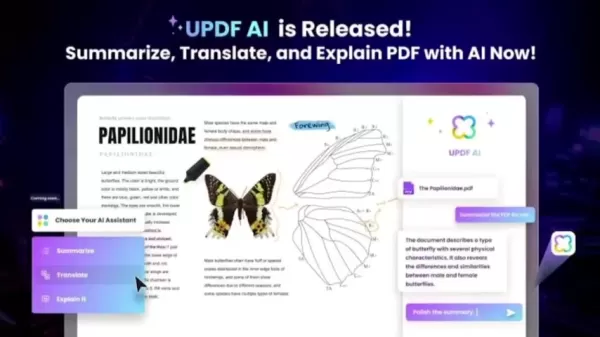
The core strength of UPDF lies in its AI capabilities. It allows users to summarize lengthy documents, translate content into various languages, and receive explanations for complicated text. These functionalities are designed to save time and enhance understanding, which is particularly beneficial for students and professionals handling extensive research papers or reports. The advancement of AI has led many software developers to embed these technologies into their products, and UPDF is part of this trend. It utilizes AI to execute tasks that surpass basic editing, adding intelligence to the application. The translation feature also fosters international collaboration by making it easier to share and comprehend information across different languages, effectively breaking down communication barriers.
Cross-Platform Compatibility

UPDF is engineered to operate flawlessly across multiple platforms, including Android, iOS, Windows, and macOS. This cross-platform functionality guarantees a consistent user experience no matter which device is used. The ability to switch effortlessly between devices can significantly boost productivity, as you are no longer tied to a single machine for accessing, editing, or reading PDFs. Featuring a unified interface across all systems, UPDF empowers you to handle your PDF files from any location, at any time.
Essential PDF Functionality: Editing, Annotating, and Converting

In addition to its AI tools, UPDF provides a full suite of standard PDF functions. Users can edit text, add images, annotate documents with highlights and comments, and convert PDFs to formats like Microsoft Word. These capabilities make UPDF a versatile option for all your PDF management needs. Highlighting and annotating files is a productive method for enhancing efficiency, both for individuals and teams working together. The ability to edit PDFs directly leads to better time management and increased productivity when revising large documents.
A Closer Look at UPDF's Key Features
Aesthetically Designed Interface
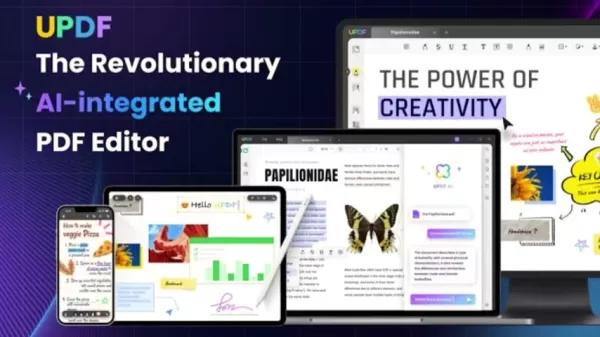
The reviewer highlights UPDF's visual appeal, describing it as 'quite pleasant'. This indicates the software's focus on user-friendliness and thoughtful design, which can increase user engagement. A well-crafted user interface is a key competitive advantage in today's software market. An attractive UI can profoundly improve the overall user experience.
One License for All Devices

UPDF employs a distinctive licensing model where a single license provides access on all your devices. This means you can utilize the software's complete feature set on a Windows laptop, Apple computers, iPhones, and Android phones, offering tremendous value. A device-agnostic approach to software access is vital in today's era of remote learning and work. With UPDF, you can trust that your PDF documents will appear and function identically across every device you own.
AI-Powered Summarization

You can use AI technology to instantly condense long documents into brief summaries. This saves valuable time and helps pinpoint critical information rapidly. Summarizing extensive material offers many advantages, including reducing cognitive load. You can concentrate on grasping the essential points of a document without spending hours reading through it.
Multi-Language Translation with a Click

UPDF's translation feature, driven by AI, provides immediate conversion into numerous languages. This aids collaboration and comprehension in our global, multilingual environment. Communicating across different languages and cultures can often present challenges. UPDF's automatic document translation helps overcome many common language obstacles.
Seamless Transitions With All Your Favorite Books

You can start reading on one device and continue exactly where you left off on another. UPDF enables you to highlight your important notes, no matter your location, while maintaining document consistency across all platforms. By providing access to your entire library of books—whether for study, leisure, or future reference—UPDF ensures you have a reliable and consistent reading experience anytime you need it.
Getting Started With UPDF: A Step-by-Step Guide
Step 1: Download and Install UPDF
Download the UPDF application directly from its official website. It is available for Windows, macOS, iOS, and Android. Follow the on-screen setup instructions to complete the installation. Ensure the application has finished downloading before you proceed.
Step 2: Create an Account or Log In
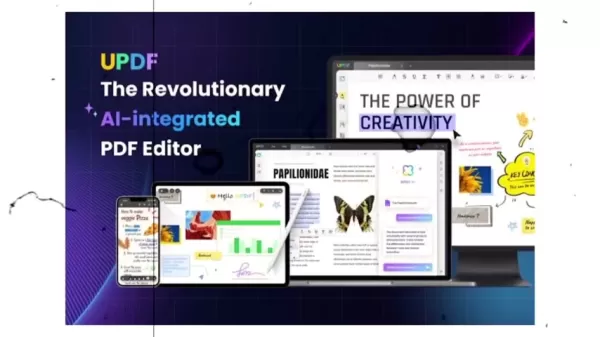
Launch the UPDF application. New users can create an account with an email address or sign up via Google or Apple. If you already have an account, simply log in using your existing credentials.
Step 3: Upload Your PDF File
Once you are logged in, you can upload a PDF file from your computer or mobile device. Click 'Open File' and navigate to select the PDF you want to view or modify. Alternatively, you can download a PDF from an external source before uploading it into UPDF.
Step 4: Explore the Features
The main toolbar provides access to all the application's core functions. Depending on your task, locate the reading, editing, annotation, conversion, or compression tools. You can activate the AI features with a single click from the corner of the screen.
Step 5: Saving Your Changes
After you have finished editing and reviewing your changes, save the PDF file. Choose your preferred file format for saving. You can also apply a password when saving files to prevent unauthorized access to your information.
UPDF's Flexible Pricing Plans
Choosing the Right Plan
UPDF offers both free and paid subscription plans. The free version covers basic functions, while the paid plans provide access to premium features like AI integration and advanced editing tools. A paid subscription is worth considering if your business or remote work demands these enhanced capabilities.
Discount Opportunity
UPDF is currently offering a 73% discount through a link available in the description for new users. Please note that discount offers can change, so act quickly if you are interested in trying a new PDF editor.
Benefits of Premium Plans
Premium plans require a monthly subscription fee to enable UPDF's AI features. By opting for a premium subscription, you are investing in enhanced security, advanced tools, and peace of mind for all your PDF-related tasks.
Benefits and Downsides of UPDF
Pros
Modern and aesthetically pleasing user interface.
AI-powered tools for summarizing, translating, and explaining PDFs.
Cross-platform compatibility for a seamless experience on any device.
Comprehensive tools for PDF editing, annotation, and format conversion.
Affordable pricing with one license covering all your devices.
Cons
It is a newer brand compared to long-established competitors.
Access to the premium AI features requires a recurring subscription fee.
The AI functionality is continually being refined and improved.
Unlocking UPDF: Core Features and Capabilities
Core Features
UPDF's core features encompass editing, annotation, digital signing, and document organization. It supports PDF reading, editing, annotating, converting, organizing, password protection, and OCR (Optical Character Recognition).
Page Layout And Text
For page layout, it offers zoom controls, single or split-page viewing modes, along with tools for inserting and manipulating images and text, and applying watermarks.
Built In Integrations
For additional functionality, UPDF can connect with other applications you might use for file sharing and storage. It also includes a built-in translation feature that supports many popular languages, allowing you to read and understand PDFs from around the world.
Use Cases: How UPDF Can Transform Your PDF Workflow
Students: Streamlining Research and Study
Students can save significant time and effort using UPDF. They can summarize lengthy research papers and highlight key concepts and study notes. For those who need to engage with research documents in foreign languages, the translation tool is highly efficient.
Book Lovers: Enhancing the Reading Experience
Reading enthusiasts can use the application to annotate favorite passages and record their thoughts. UPDF's cross-platform nature ensures you can always resume reading exactly where you stopped, on any device. The attractive interface further enhances user satisfaction.
Professionals: Streamlining Document Management
Professionals will find UPDF's editing and conversion features highly beneficial. They can revise contracts, prepare presentations, and collaborate on documents more effectively. Since UPDF is available on Apple, Windows, and Android devices, you can accomplish tasks efficiently from virtually anywhere.
Frequently Asked Questions About UPDF
Is UPDF available on all devices?
UPDF is designed for seamless operation across various platforms, including Android, iOS, Windows, and macOS.
Does UPDF have AI capabilities?
UPDF's main strength is its AI functionality, enabling users to summarize long PDFs, translate content into various languages, and get clarifications on complex text.
Are there ways to get a free trial of UPDF?
UPDF provides both free and paid plans. The free version includes essential tools, while the paid subscriptions unlock premium features such as AI integration and advanced editing capabilities.
Related Questions About Mobile Video Editing
What are the best AI-integrated mobile video editing apps?
It's worthwhile to explore the top free, AI-powered editing applications available for both Android and iPhone. To learn more about these video editors, you can download them from the app store and consult other reviews. These applications incorporate various AI-driven features.
Related article
 Swedish AI Startup Lovable Eyes $13.2 Billion Valuation After Major Funding Round
As AI-driven coding tools gain traction, Swedish startup Lovable has secured a major funding round. The company aims to raise $3 billion, potentially boosting its valuation to $13.2 billion—double the $6.6 billion recorded last December. Menlo Ventur
Google Tests Remy AI Agent for Gemini as Focus Shifts to User Control
According to Business Insider, Google is testing Remy, a new AI personal agent for Gemini. This tool aims to execute tasks on behalf of users, streamlining both professional workflows and daily routines.Currently, Remy is undergoing testing in an int
How to fix Core Web Vitals for better SEO rankings
Streamline Report Card Comments with AI ToolsIntroductionAI Tools for Generating Report Card CommentsMagic SchoolAlmanac AIChat GPTUsing Magic School to Generate Report Card CommentsLogging into Magic SchoolSelecting the Report Card Comments ToolCust
Related Special Topic Recommendations
writing
Swedish AI Startup Lovable Eyes $13.2 Billion Valuation After Major Funding Round
As AI-driven coding tools gain traction, Swedish startup Lovable has secured a major funding round. The company aims to raise $3 billion, potentially boosting its valuation to $13.2 billion—double the $6.6 billion recorded last December. Menlo Ventur
Google Tests Remy AI Agent for Gemini as Focus Shifts to User Control
According to Business Insider, Google is testing Remy, a new AI personal agent for Gemini. This tool aims to execute tasks on behalf of users, streamlining both professional workflows and daily routines.Currently, Remy is undergoing testing in an int
How to fix Core Web Vitals for better SEO rankings
Streamline Report Card Comments with AI ToolsIntroductionAI Tools for Generating Report Card CommentsMagic SchoolAlmanac AIChat GPTUsing Magic School to Generate Report Card CommentsLogging into Magic SchoolSelecting the Report Card Comments ToolCust
Related Special Topic Recommendations
writing
 Best AI Outline Generators for Long-Form SEO Articles
2026 Latest Best Top-Rated AI Outline Generators for Long-Form SEO Articles, meticulously curated by XIX.AI. These powerful tools offer game-changing assistance in creating high-quality content quickly, boosting writing efficiency significantly. Get a free vs paid comparison along with real-world tests and detailed rankings to help you find the must-try option that suits your needs. Explore now to unlock your AI edge.
 8 tools
 xix.ai
Education and Learning
AI Study Tools for Homework and Exam Prep
xix.ai
Education and Learning
AI Study Tools for Homework and Exam Prep
2026 Latest Best AI Study Tools for Homework and Exam Prep! XIX.AI curates a top-rated list of powerful, game-changing tools that help students boost productivity, streamline homework completion, and ace exams through real-world tests. Get a free vs paid comparison, detailed rankings, and must-try options to unlock your AI edge. Explore now!
10 tools
xix.ai
Music composition
AI Vocal Demo Tools for Songwriters, Hooks, Toplines, and Multilingual Draft Sessions
2026 Latest Best AI Vocal Demo Tools for Songwriters, Hook Creators, and Multi-Language Content Teams! XIX.AI has curated a top-rated list of powerful game-changing tools that go through rigorous real-world tests. You’ll find detailed free vs paid comparison data, comprehensive rankings, and must-try options to help you boost writing efficiency and unlock your creative potential. Explore now to discover your perfect tool for all your content needs!
9 tools
xix.ai
Business
Best AI Competitive Research Tools for Small Businesses
2026 Latest Best Top-rated AI Competitive Research Tools for Small Businesses! XIX.AI has curated a highly powerful game-changing collection, updated weekly with rigorous real-world tests and detailed rankings. You can find a comprehensive free vs paid comparison to help you identify the must-try tools that boost your productivity and give you a competitive edge. Explore now to discover your perfect tool!
9 tools
xix.ai
Image editing
Photoshop AI Retouch Tools for Ecommerce Apparel, Skin Cleanup, and Color Consistency
2026 Latest Best Photoshop AI retouch tools for ecommerce apparel, skin cleanup, and color consistency! This top-rated curated list features powerful game-changing solutions that help you boost writing efficiency, streamline content creation, and achieve perfect visual results effortlessly. Each tool has undergone real-world tests through weekly updated rankings, complete with free vs paid comparison details. Backed by XIX.AI, it’s the must-try guide for anyone aiming to unlock your AI edge. Explore now!
10 tools
xix.ai
Prompt
Best AI Prompt Libraries for ChatGPT Workflows
2026 Latest Best Top-Rated AI Prompt Libraries for optimizing all types of ChatGPT workflows. XIX.AI has curated a powerful, game-changing collection that goes through rigorous real-world tests to ensure top performance. You can find detailed free vs paid comparisons and expert rankings to help you choose the must-try tools that boost your productivity and unlock your AI edge. Explore now!
11 tools
xix.ai

 Comments (4)
0/500
Comments (4)
0/500
![DouglasAnderson]()
Als jemand, der täglich mit PDFs zu tun hat, finde die KI-Funktionen von UPDF echt spannend. Aber mal ehrlich, wie viele dieser 'KI-gestützten' Tools gibt es mittlerweile? 😅 Hoffentlich kann es mehr als nur Text zusammenfassen und übersetzen. Die Preispolitik wäre auch interessant zu wissen – wird es wieder ein Abo-Modell, das mein Budget sprengt?
![BenJackson]()
Als jemand, der täglich mit PDFs zu tun hat, finde ich die KI-Funktionen hier echt vielversprechend. Hoffentlich geht das nicht nur in Richtung Marketing-Buzzword, sondern bringt wirklich praktische Verbesserungen, wie automatische Zusammenfassungen oder intelligentere Bearbeitung. Die Konkurrenz ist ja groß – mal sehen, ob UPDF da mithalten kann. 😅
![RichardJohnson]()
PDF 편집기에 AI가 들어간다고? 정말 기술 발전이 빠르네요. 🤔 근데 이런 AI 도구들 계속 나오는데 다들 비슷한 기능 아닌가? 업무에서는 분명 편리하겠지만, 프라이버시 이슈는 없는지 궁금해요. 혹시 사용해 보신 분 후기 좀 들을 수 있을까요?
![NicholasClark]()
このAI搭載PDFエディタ、実際に使ってみたら結構使いやすかった!注釈機能が特に気に入ってるんだよね✨ ただ、競合他社と比べて価格設定はどうなんだろう?学生にはちょっと高いかも…
Are you a student, an avid reader, or a professional who frequently handles PDF documents? In our fast-moving digital world, a reliable PDF editor and reader for your mobile phone or computer is more essential than ever. UPDF positions itself as a potential disruptor in the world of PDF management. This in-depth review examines UPDF's core attributes, focusing on its AI-driven functionality and contemporary design.
Key Points
UPDF is an AI-powered PDF editor and reader.
It features a modern, aesthetically pleasing user interface.
The software includes tools for summarizing, translating, and explaining PDF content.
UPDF is compatible with Android, iOS, Windows, and macOS.
It delivers a uniform experience across all supported platforms.
The application enables PDF editing, annotation, and conversion to other file formats.
Security measures include password protection for documents.
UPDF is well-suited for students, book lovers, and professionals requiring PDF solutions.
Exploring the World of UPDF: An AI-Driven PDF Solution
What is UPDF?
UPDF is a modern PDF editor and reader, enhanced with AI capabilities for both computers and mobile devices. It is aimed at users who regularly work with PDFs, such as students, bibliophiles, and business professionals. Its primary appeal is the incorporation of AI to deliver functions that go beyond those of conventional PDF readers. In the evolving technological landscape of 2025, where AI and ChatGPT are driving rapid change, UPDF offers a contemporary alternative to legacy PDF editors. Its integration of artificial intelligence and robust feature set make it a current standout.
Modern Design and User Experience
The application prides itself on a modern and visually appealing interface. This is a major benefit compared to older PDF editors with dated designs. UPDF is built to offer a satisfying user experience, focusing on both visual appeal and practical utility. The contemporary aesthetic ensures that working with PDFs is not only efficient but also enjoyable. A well-designed interface plays a crucial role in user contentment. UPDF's modern design elements aim to make PDF management a more engaging task, standing in contrast to the often cumbersome interfaces found in traditional PDF software.
AI-Powered Features: Summarize, Translate, Explain
The core strength of UPDF lies in its AI capabilities. It allows users to summarize lengthy documents, translate content into various languages, and receive explanations for complicated text. These functionalities are designed to save time and enhance understanding, which is particularly beneficial for students and professionals handling extensive research papers or reports. The advancement of AI has led many software developers to embed these technologies into their products, and UPDF is part of this trend. It utilizes AI to execute tasks that surpass basic editing, adding intelligence to the application. The translation feature also fosters international collaboration by making it easier to share and comprehend information across different languages, effectively breaking down communication barriers.
Cross-Platform Compatibility
UPDF is engineered to operate flawlessly across multiple platforms, including Android, iOS, Windows, and macOS. This cross-platform functionality guarantees a consistent user experience no matter which device is used. The ability to switch effortlessly between devices can significantly boost productivity, as you are no longer tied to a single machine for accessing, editing, or reading PDFs. Featuring a unified interface across all systems, UPDF empowers you to handle your PDF files from any location, at any time.
Essential PDF Functionality: Editing, Annotating, and Converting
In addition to its AI tools, UPDF provides a full suite of standard PDF functions. Users can edit text, add images, annotate documents with highlights and comments, and convert PDFs to formats like Microsoft Word. These capabilities make UPDF a versatile option for all your PDF management needs. Highlighting and annotating files is a productive method for enhancing efficiency, both for individuals and teams working together. The ability to edit PDFs directly leads to better time management and increased productivity when revising large documents.
A Closer Look at UPDF's Key Features
Aesthetically Designed Interface
The reviewer highlights UPDF's visual appeal, describing it as 'quite pleasant'. This indicates the software's focus on user-friendliness and thoughtful design, which can increase user engagement. A well-crafted user interface is a key competitive advantage in today's software market. An attractive UI can profoundly improve the overall user experience.
One License for All Devices
UPDF employs a distinctive licensing model where a single license provides access on all your devices. This means you can utilize the software's complete feature set on a Windows laptop, Apple computers, iPhones, and Android phones, offering tremendous value. A device-agnostic approach to software access is vital in today's era of remote learning and work. With UPDF, you can trust that your PDF documents will appear and function identically across every device you own.
AI-Powered Summarization
You can use AI technology to instantly condense long documents into brief summaries. This saves valuable time and helps pinpoint critical information rapidly. Summarizing extensive material offers many advantages, including reducing cognitive load. You can concentrate on grasping the essential points of a document without spending hours reading through it.
Multi-Language Translation with a Click
UPDF's translation feature, driven by AI, provides immediate conversion into numerous languages. This aids collaboration and comprehension in our global, multilingual environment. Communicating across different languages and cultures can often present challenges. UPDF's automatic document translation helps overcome many common language obstacles.
Seamless Transitions With All Your Favorite Books
You can start reading on one device and continue exactly where you left off on another. UPDF enables you to highlight your important notes, no matter your location, while maintaining document consistency across all platforms. By providing access to your entire library of books—whether for study, leisure, or future reference—UPDF ensures you have a reliable and consistent reading experience anytime you need it.
Getting Started With UPDF: A Step-by-Step Guide
Step 1: Download and Install UPDF
Download the UPDF application directly from its official website. It is available for Windows, macOS, iOS, and Android. Follow the on-screen setup instructions to complete the installation. Ensure the application has finished downloading before you proceed.
Step 2: Create an Account or Log In
Launch the UPDF application. New users can create an account with an email address or sign up via Google or Apple. If you already have an account, simply log in using your existing credentials.
Step 3: Upload Your PDF File
Once you are logged in, you can upload a PDF file from your computer or mobile device. Click 'Open File' and navigate to select the PDF you want to view or modify. Alternatively, you can download a PDF from an external source before uploading it into UPDF.
Step 4: Explore the Features
The main toolbar provides access to all the application's core functions. Depending on your task, locate the reading, editing, annotation, conversion, or compression tools. You can activate the AI features with a single click from the corner of the screen.
Step 5: Saving Your Changes
After you have finished editing and reviewing your changes, save the PDF file. Choose your preferred file format for saving. You can also apply a password when saving files to prevent unauthorized access to your information.
UPDF's Flexible Pricing Plans
Choosing the Right Plan
UPDF offers both free and paid subscription plans. The free version covers basic functions, while the paid plans provide access to premium features like AI integration and advanced editing tools. A paid subscription is worth considering if your business or remote work demands these enhanced capabilities.
Discount Opportunity
UPDF is currently offering a 73% discount through a link available in the description for new users. Please note that discount offers can change, so act quickly if you are interested in trying a new PDF editor.
Benefits of Premium Plans
Premium plans require a monthly subscription fee to enable UPDF's AI features. By opting for a premium subscription, you are investing in enhanced security, advanced tools, and peace of mind for all your PDF-related tasks.
Benefits and Downsides of UPDF
Pros
Modern and aesthetically pleasing user interface.
AI-powered tools for summarizing, translating, and explaining PDFs.
Cross-platform compatibility for a seamless experience on any device.
Comprehensive tools for PDF editing, annotation, and format conversion.
Affordable pricing with one license covering all your devices.
Cons
It is a newer brand compared to long-established competitors.
Access to the premium AI features requires a recurring subscription fee.
The AI functionality is continually being refined and improved.
Unlocking UPDF: Core Features and Capabilities
Core Features
UPDF's core features encompass editing, annotation, digital signing, and document organization. It supports PDF reading, editing, annotating, converting, organizing, password protection, and OCR (Optical Character Recognition).
Page Layout And Text
For page layout, it offers zoom controls, single or split-page viewing modes, along with tools for inserting and manipulating images and text, and applying watermarks.
Built In Integrations
For additional functionality, UPDF can connect with other applications you might use for file sharing and storage. It also includes a built-in translation feature that supports many popular languages, allowing you to read and understand PDFs from around the world.
Use Cases: How UPDF Can Transform Your PDF Workflow
Students: Streamlining Research and Study
Students can save significant time and effort using UPDF. They can summarize lengthy research papers and highlight key concepts and study notes. For those who need to engage with research documents in foreign languages, the translation tool is highly efficient.
Book Lovers: Enhancing the Reading Experience
Reading enthusiasts can use the application to annotate favorite passages and record their thoughts. UPDF's cross-platform nature ensures you can always resume reading exactly where you stopped, on any device. The attractive interface further enhances user satisfaction.
Professionals: Streamlining Document Management
Professionals will find UPDF's editing and conversion features highly beneficial. They can revise contracts, prepare presentations, and collaborate on documents more effectively. Since UPDF is available on Apple, Windows, and Android devices, you can accomplish tasks efficiently from virtually anywhere.
Frequently Asked Questions About UPDF
Is UPDF available on all devices?
UPDF is designed for seamless operation across various platforms, including Android, iOS, Windows, and macOS.
Does UPDF have AI capabilities?
UPDF's main strength is its AI functionality, enabling users to summarize long PDFs, translate content into various languages, and get clarifications on complex text.
Are there ways to get a free trial of UPDF?
UPDF provides both free and paid plans. The free version includes essential tools, while the paid subscriptions unlock premium features such as AI integration and advanced editing capabilities.
Related Questions About Mobile Video Editing
What are the best AI-integrated mobile video editing apps?
It's worthwhile to explore the top free, AI-powered editing applications available for both Android and iPhone. To learn more about these video editors, you can download them from the app store and consult other reviews. These applications incorporate various AI-driven features.








 Swedish AI Startup Lovable Eyes $13.2 Billion Valuation After Major Funding Round
As AI-driven coding tools gain traction, Swedish startup Lovable has secured a major funding round. The company aims to raise $3 billion, potentially boosting its valuation to $13.2 billion—double the $6.6 billion recorded last December. Menlo Ventur
Google Tests Remy AI Agent for Gemini as Focus Shifts to User Control
According to Business Insider, Google is testing Remy, a new AI personal agent for Gemini. This tool aims to execute tasks on behalf of users, streamlining both professional workflows and daily routines.Currently, Remy is undergoing testing in an int
Swedish AI Startup Lovable Eyes $13.2 Billion Valuation After Major Funding Round
As AI-driven coding tools gain traction, Swedish startup Lovable has secured a major funding round. The company aims to raise $3 billion, potentially boosting its valuation to $13.2 billion—double the $6.6 billion recorded last December. Menlo Ventur
Google Tests Remy AI Agent for Gemini as Focus Shifts to User Control
According to Business Insider, Google is testing Remy, a new AI personal agent for Gemini. This tool aims to execute tasks on behalf of users, streamlining both professional workflows and daily routines.Currently, Remy is undergoing testing in an int
 How to fix Core Web Vitals for better SEO rankings
Streamline Report Card Comments with AI ToolsIntroductionAI Tools for Generating Report Card CommentsMagic SchoolAlmanac AIChat GPTUsing Magic School to Generate Report Card CommentsLogging into Magic SchoolSelecting the Report Card Comments ToolCust
How to fix Core Web Vitals for better SEO rankings
Streamline Report Card Comments with AI ToolsIntroductionAI Tools for Generating Report Card CommentsMagic SchoolAlmanac AIChat GPTUsing Magic School to Generate Report Card CommentsLogging into Magic SchoolSelecting the Report Card Comments ToolCust

2026 Latest Best Top-Rated AI Outline Generators for Long-Form SEO Articles, meticulously curated by XIX.AI. These powerful tools offer game-changing assistance in creating high-quality content quickly, boosting writing efficiency significantly. Get a free vs paid comparison along with real-world tests and detailed rankings to help you find the must-try option that suits your needs. Explore now to unlock your AI edge.
8 tools
xix.ai

2026 Latest Best AI Study Tools for Homework and Exam Prep! XIX.AI curates a top-rated list of powerful, game-changing tools that help students boost productivity, streamline homework completion, and ace exams through real-world tests. Get a free vs paid comparison, detailed rankings, and must-try options to unlock your AI edge. Explore now!
10 tools
xix.ai

2026 Latest Best AI Vocal Demo Tools for Songwriters, Hook Creators, and Multi-Language Content Teams! XIX.AI has curated a top-rated list of powerful game-changing tools that go through rigorous real-world tests. You’ll find detailed free vs paid comparison data, comprehensive rankings, and must-try options to help you boost writing efficiency and unlock your creative potential. Explore now to discover your perfect tool for all your content needs!
9 tools
xix.ai

2026 Latest Best Top-rated AI Competitive Research Tools for Small Businesses! XIX.AI has curated a highly powerful game-changing collection, updated weekly with rigorous real-world tests and detailed rankings. You can find a comprehensive free vs paid comparison to help you identify the must-try tools that boost your productivity and give you a competitive edge. Explore now to discover your perfect tool!
9 tools
xix.ai

2026 Latest Best Photoshop AI retouch tools for ecommerce apparel, skin cleanup, and color consistency! This top-rated curated list features powerful game-changing solutions that help you boost writing efficiency, streamline content creation, and achieve perfect visual results effortlessly. Each tool has undergone real-world tests through weekly updated rankings, complete with free vs paid comparison details. Backed by XIX.AI, it’s the must-try guide for anyone aiming to unlock your AI edge. Explore now!
10 tools
xix.ai

2026 Latest Best Top-Rated AI Prompt Libraries for optimizing all types of ChatGPT workflows. XIX.AI has curated a powerful, game-changing collection that goes through rigorous real-world tests to ensure top performance. You can find detailed free vs paid comparisons and expert rankings to help you choose the must-try tools that boost your productivity and unlock your AI edge. Explore now!
11 tools
xix.ai

Als jemand, der täglich mit PDFs zu tun hat, finde die KI-Funktionen von UPDF echt spannend. Aber mal ehrlich, wie viele dieser 'KI-gestützten' Tools gibt es mittlerweile? 😅 Hoffentlich kann es mehr als nur Text zusammenfassen und übersetzen. Die Preispolitik wäre auch interessant zu wissen – wird es wieder ein Abo-Modell, das mein Budget sprengt?
Als jemand, der täglich mit PDFs zu tun hat, finde ich die KI-Funktionen hier echt vielversprechend. Hoffentlich geht das nicht nur in Richtung Marketing-Buzzword, sondern bringt wirklich praktische Verbesserungen, wie automatische Zusammenfassungen oder intelligentere Bearbeitung. Die Konkurrenz ist ja groß – mal sehen, ob UPDF da mithalten kann. 😅
PDF 편집기에 AI가 들어간다고? 정말 기술 발전이 빠르네요. 🤔 근데 이런 AI 도구들 계속 나오는데 다들 비슷한 기능 아닌가? 업무에서는 분명 편리하겠지만, 프라이버시 이슈는 없는지 궁금해요. 혹시 사용해 보신 분 후기 좀 들을 수 있을까요?
このAI搭載PDFエディタ、実際に使ってみたら結構使いやすかった!注釈機能が特に気に入ってるんだよね✨ ただ、競合他社と比べて価格設定はどうなんだろう?学生にはちょっと高いかも…












