


 Home
HomeMastering AI Image Editing: An In-Depth Look at Inpainting Technology
Artificial intelligence image generators are transforming the creative field, but initial results are often not flawless. This is where inpainting AI becomes essential, enabling targeted edits and refinements to AI-generated visuals. This guide provides a complete look at inpainting methods in AI image creation, covering how to alter, fix, and enhance details for professional-level outcomes. Whether you are an experienced AI artist or new to the process, learning inpainting AI is key to realizing your creative goals.
Key Points
Inpainting AI enables precise adjustments to AI-created images.
Using clear prompts is vital for successful inpainting.
The 'editing tab' in AI image tools usually includes inpainting features.
Improving specific areas with focused prompts increases image quality.
Inpainting connects AI generation with individual artistic direction.
Understanding Inpainting AI
What is Inpainting AI?
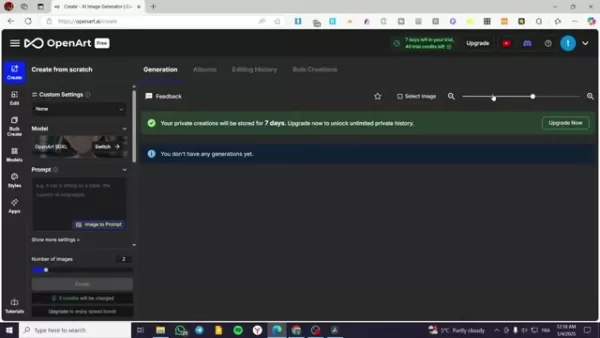
Inpainting AI is fundamentally an advanced technique for improving and perfecting AI-generated images. The word 'inpainting' describes the action of completing missing or undesirable parts of a picture, smoothly merging the new material with the current scene. For AI image generators, inpainting lets users focus on particular sections of a generated image for adjustment, correction, or improvement. This directed method provides unmatched control, allowing creators to fix flaws, add imaginative features, and customize the image to their precise requirements.
In essence, inpainting AI enables you to rewrite parts of an image using artificial intelligence. Rather than restarting entirely or using conventional photo editing software, you can direct the AI to rebuild or exchange components in the image according to your set conditions. This makes it a highly effective and adaptable tool for perfecting your AI artworks.
Consider it as digital reconstructive surgery for pictures. Need to eliminate a distracting item? Inpaint it out! Wish to alter a dress’s color? Inpaint the new shade! Want a new hairstyle for your AI-generated person? Inpainting allows this, all within the AI system.
The main functionalities are:
- Removing Unwanted Objects
- Correcting Imperfections
- Adding Creative Details
- Changing Colors and Textures
- Refining Specific Elements
The Importance of Prompts in Inpainting
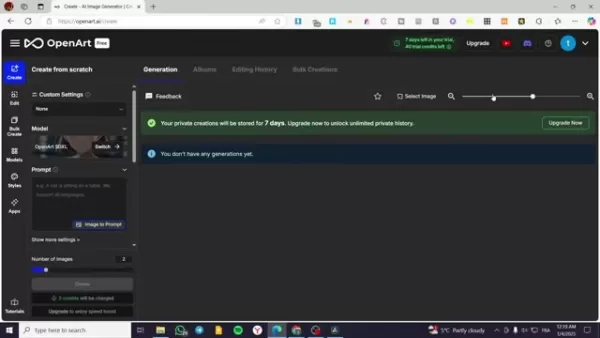
Prompts are the core element of any AI Image Generator, and they hold equal importance in the inpainting process. A prompt is essentially a direction or command provided to the AI, influencing how an image is made or changed. With inpainting, prompts are even more critical because they determine how the AI will modify the chosen section. A carefully written prompt can result in natural and believable outcomes, whereas an unclear or badly phrased prompt might produce unexpected or unsatisfactory results.
To use inpainting AI efficiently, it is important to know how to create straightforward and exact prompts that properly explain your intended edits. This involves identifying the object or feature you want to change, the preferred qualities of the new element, and any relevant background or style details. The more exact and comprehensive your Prompt, the more effectively the AI will interpret and implement your idea.
For instance, to change a shirt's color in an image, your prompt could be: "Change the shirt color to deep blue, keeping the fabric texture and shadow effects." This prompt clearly identifies the focus object (the shirt), the intended adjustment (deep blue color), and key design limits (keeping fabric texture and shadows). This degree of detail aids the AI in creating a result that fits perfectly with the rest of the image.
In contrast, a less useful prompt might state: "Change the shirt." This unclear direction gives the AI too much freedom, possibly causing unplanned and undesired alterations to the shirt's design, texture, or general look.
- Clarity: Use simple and direct wording to prevent misunderstanding.
- Specificity: Identify the target object and desired modifications accurately.
- Context: Include pertinent stylistic or situational details.
- Experimentation: Be willing to test various prompts and improve your method.
- Iteration: Adjust prompts based on early results to reach the best outcome.
OpenArt's Inpainting AI: A Practical Guide
Locating the Inpainting AI Feature in OpenArt
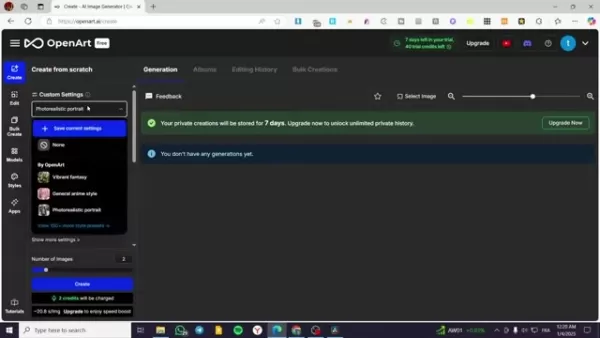
OpenArt is a capable AI image generator that includes a full set of tools, including inpainting functions. Locating the inpainting feature in the OpenArt interface is simple. Generally, you can find it in the 'Editing' tab or a comparable area for post-generation image adjustments. The specific placement might change slightly with platform updates, but it is normally easy to find and use.
After finding the inpainting tool, you will see a workspace where you can upload or pick your AI-generated image. From there, you can employ different selection tools to mark the particular area you wish to adjust. Openart generally provides several selection choices, such as:
- Brush Tool: For manually selecting and covering uneven shapes.
- Rectangle Tool: For marking rectangular sections precisely.
Lasso Tool: For making more detailed and personalized selection boundaries.
After selecting area, you can start to edit.
Step-by-Step Example: Using Inpainting AI in OpenArt
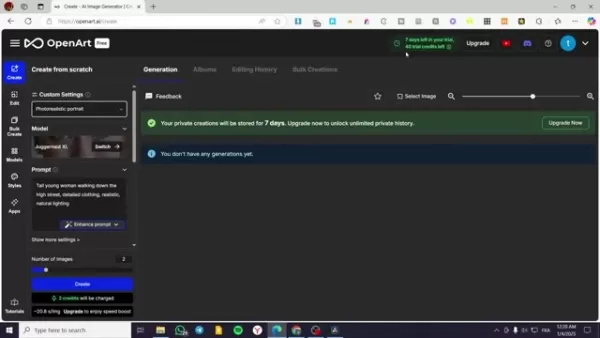
Let's go through a hands-on example of applying inpainting AI in OpenArt to upgrade an AI-generated image. Suppose we have a picture of a fashionable man walking on a New York street and we want to give him sunglasses. Here are the steps to adjust specific parts of your image in OpenArt:
- Upload or Select Image: Start by uploading your current AI-generated image to the OpenArt workspace or choosing a prior image from your OpenArt collection.
- Access the Editing Tab: Go to the 'Editing' tab in OpenArt. This section contains multiple image editing tools, including the inpainting AI function.
- Select the Inpainting Tool: Find the inpainting icon, usually shown as a brush or similar image, and click to start it.
- Choose area for editing: First you need to choose which area you would like to edit. This time, we would like to change the face. In that case, you should select the face in the image
- Define Your Desired Output: Type a detailed prompt that explains the intended change. Here, your prompt might be: "Add realistic sunglasses with dark lenses and a timeless frame design."
- Adjust AI Settings (Optional): Based on the platform, you might have controls to modify factors like the AI's intensity, originality level, or style impact. Try these settings to perfect the output.
- Generate: Start the inpainting process. The AI will examine the chosen section and the prompt, producing a new version of the targeted part that blends naturally with the remaining image.
- Review and Refine: Assess the first result and make any needed modifications. You can improve the prompt, change AI settings, or select another area for inpainting to get the ideal appearance.As you can see on the screen, there are visual instructions about what you should do.
Tips for Mastering Inpainting AI
Effective Prompting Techniques
Creating strong prompts is necessary to achieve the intended outcome with inpainting AI. Be precise, applying descriptive terms to lead the AI and ensure uniformity with the nearby image.
Iterative Refinement
Avoid expecting the best outcome immediately. Test different prompts and settings, repeatedly improving your strategy for the best results.
Understanding AI Controls
Investigate the different options provided by your AI image generator, like strength, creativity, and style impact, to personalize the inpainting procedure.
The Advantages and Disadvantages of Inpainting AI
Pros
Precise Editing: Focus on particular sections for adjustment, providing detailed control.
Seamless Integration: AI-produced content merges smoothly with existing pictures.
Efficiency: Quicker than traditional photo editing methods.
Accessibility: Easy-to-use interfaces allow beginners to access it.
Cons
Prompt Dependency: Outcomes depend significantly on prompt quality.
Potential for Artifacts: Ineffective prompts or too many edits can cause visible artifacts.
Computational Cost: AI operations can demand significant resources, particularly for detailed edits.
Frequently Asked Questions
What is inpainting AI and how does it work?
Inpainting AI is an image editing method employing artificial intelligence to complete absent or undesirable portions of a picture. It functions by assessing adjacent pixels and creating fresh content that integrates smoothly with the current image.
Can I use inpainting AI to remove objects from an image?
Yes, a frequent application of inpainting AI is eliminating unwanted objects from an image. By marking the object and supplying a prompt that defines the preferred background, the AI can smartly fill the area, deleting the object and forming a natural-looking finish.
Is inpainting AI suitable for beginners?
Although advanced methods might need some skill, numerous AI image generators provide intuitive interfaces and preset selections that make inpainting AI approachable for novices. Testing and practice are crucial for learning the method.
Related Questions
What other AI image editing tools are available?
Besides inpainting, various AI-driven image editing tools exist, such as: Outpainting: Expands an image past its original edges.Style Transfer: Implements the artistic style of one image onto another.Image Enhancement: Boosts the general quality, resolution, or sharpness of an image.Object Segmentation: Recognizes and separates particular objects inside an image.
Related article
 Slackbot Becomes an AI Agent
Slackbot, the automated assistant embedded in Salesforce’s corporate messaging platform Slack, is evolving into an AI agent. Salesforce CTO Parker Harris envisions it achieving viral status comparable to OpenAI’s ChatGPT.The cloud software giant laun
ByteDance Boosts Core AI Incentives as Doubao Surges 14.6%
ByteDance recently convened a DouBao equity briefing to unveil fresh incentive policies for staff involved in the DouBao division. The strike price for DouBao shares has been lifted from $14.85 in June 2026 to $17.02, marking an approximate 14.6% inc
MiniMax Unveils 10x Team Program to Incentivize Global AI Experts
MiniMax (Xiyu Technology), the General Artificial Intelligence Lab, has officially launched "10x Team," a global talent collaboration initiative. This program aims to recruit top experts across industries to explore the deep application of large mode
Related Special Topic Recommendations
Education and Learning
Slackbot Becomes an AI Agent
Slackbot, the automated assistant embedded in Salesforce’s corporate messaging platform Slack, is evolving into an AI agent. Salesforce CTO Parker Harris envisions it achieving viral status comparable to OpenAI’s ChatGPT.The cloud software giant laun
ByteDance Boosts Core AI Incentives as Doubao Surges 14.6%
ByteDance recently convened a DouBao equity briefing to unveil fresh incentive policies for staff involved in the DouBao division. The strike price for DouBao shares has been lifted from $14.85 in June 2026 to $17.02, marking an approximate 14.6% inc
MiniMax Unveils 10x Team Program to Incentivize Global AI Experts
MiniMax (Xiyu Technology), the General Artificial Intelligence Lab, has officially launched "10x Team," a global talent collaboration initiative. This program aims to recruit top experts across industries to explore the deep application of large mode
Related Special Topic Recommendations
Education and Learning
 AI Study Tools for Homework and Exam Prep
2026 Latest Best AI Study Tools for Homework and Exam Prep! XIX.AI curates a top-rated list of powerful, game-changing tools that help students boost productivity, streamline homework completion, and ace exams through real-world tests. Get a free vs paid comparison, detailed rankings, and must-try options to unlock your AI edge. Explore now!
 10 tools
 xix.ai
Music composition
AI Vocal Demo Tools for Songwriters, Hooks, Toplines, and Multilingual Draft Sessions
xix.ai
Music composition
AI Vocal Demo Tools for Songwriters, Hooks, Toplines, and Multilingual Draft Sessions
2026 Latest Best AI Vocal Demo Tools for Songwriters, Hook Creators, and Multi-Language Content Teams! XIX.AI has curated a top-rated list of powerful game-changing tools that go through rigorous real-world tests. You’ll find detailed free vs paid comparison data, comprehensive rankings, and must-try options to help you boost writing efficiency and unlock your creative potential. Explore now to discover your perfect tool for all your content needs!
9 tools
xix.ai
Business
Best AI Competitive Research Tools for Small Businesses
2026 Latest Best Top-rated AI Competitive Research Tools for Small Businesses! XIX.AI has curated a highly powerful game-changing collection, updated weekly with rigorous real-world tests and detailed rankings. You can find a comprehensive free vs paid comparison to help you identify the must-try tools that boost your productivity and give you a competitive edge. Explore now to discover your perfect tool!
9 tools
xix.ai
Image editing
Photoshop AI Retouch Tools for Ecommerce Apparel, Skin Cleanup, and Color Consistency
2026 Latest Best Photoshop AI retouch tools for ecommerce apparel, skin cleanup, and color consistency! This top-rated curated list features powerful game-changing solutions that help you boost writing efficiency, streamline content creation, and achieve perfect visual results effortlessly. Each tool has undergone real-world tests through weekly updated rankings, complete with free vs paid comparison details. Backed by XIX.AI, it’s the must-try guide for anyone aiming to unlock your AI edge. Explore now!
10 tools
xix.ai
Prompt
Best AI Prompt Libraries for ChatGPT Workflows
2026 Latest Best Top-Rated AI Prompt Libraries for optimizing all types of ChatGPT workflows. XIX.AI has curated a powerful, game-changing collection that goes through rigorous real-world tests to ensure top performance. You can find detailed free vs paid comparisons and expert rankings to help you choose the must-try tools that boost your productivity and unlock your AI edge. Explore now!
11 tools
xix.ai
Education and Learning
AI Quiz Builder Platforms for Teachers, Tutors, and Cohort-Based Learning Programs
2026 Latest Best AI Quiz Builder Platforms for Teachers, Tutors, and Cohort-Based Learning Programs! XIX.AI has curated a top-rated list of powerful game-changing tools that go through real-world tests to deliver accurate rankings. These must-try platforms help boost writing efficiency, streamline content creation, and simplify quiz design across all learning scenarios. Explore now to discover your perfect tool for unlocking your AI edge in teaching!
13 tools
xix.ai

 Comments (0)
0/500
Comments (0)
0/500
Artificial intelligence image generators are transforming the creative field, but initial results are often not flawless. This is where inpainting AI becomes essential, enabling targeted edits and refinements to AI-generated visuals. This guide provides a complete look at inpainting methods in AI image creation, covering how to alter, fix, and enhance details for professional-level outcomes. Whether you are an experienced AI artist or new to the process, learning inpainting AI is key to realizing your creative goals.
Key Points
Inpainting AI enables precise adjustments to AI-created images.
Using clear prompts is vital for successful inpainting.
The 'editing tab' in AI image tools usually includes inpainting features.
Improving specific areas with focused prompts increases image quality.
Inpainting connects AI generation with individual artistic direction.
Understanding Inpainting AI
What is Inpainting AI?
Inpainting AI is fundamentally an advanced technique for improving and perfecting AI-generated images. The word 'inpainting' describes the action of completing missing or undesirable parts of a picture, smoothly merging the new material with the current scene. For AI image generators, inpainting lets users focus on particular sections of a generated image for adjustment, correction, or improvement. This directed method provides unmatched control, allowing creators to fix flaws, add imaginative features, and customize the image to their precise requirements.
In essence, inpainting AI enables you to rewrite parts of an image using artificial intelligence. Rather than restarting entirely or using conventional photo editing software, you can direct the AI to rebuild or exchange components in the image according to your set conditions. This makes it a highly effective and adaptable tool for perfecting your AI artworks.
Consider it as digital reconstructive surgery for pictures. Need to eliminate a distracting item? Inpaint it out! Wish to alter a dress’s color? Inpaint the new shade! Want a new hairstyle for your AI-generated person? Inpainting allows this, all within the AI system.
The main functionalities are:
- Removing Unwanted Objects
- Correcting Imperfections
- Adding Creative Details
- Changing Colors and Textures
- Refining Specific Elements
The Importance of Prompts in Inpainting
Prompts are the core element of any AI Image Generator, and they hold equal importance in the inpainting process. A prompt is essentially a direction or command provided to the AI, influencing how an image is made or changed. With inpainting, prompts are even more critical because they determine how the AI will modify the chosen section. A carefully written prompt can result in natural and believable outcomes, whereas an unclear or badly phrased prompt might produce unexpected or unsatisfactory results.
To use inpainting AI efficiently, it is important to know how to create straightforward and exact prompts that properly explain your intended edits. This involves identifying the object or feature you want to change, the preferred qualities of the new element, and any relevant background or style details. The more exact and comprehensive your Prompt, the more effectively the AI will interpret and implement your idea.
For instance, to change a shirt's color in an image, your prompt could be: "Change the shirt color to deep blue, keeping the fabric texture and shadow effects." This prompt clearly identifies the focus object (the shirt), the intended adjustment (deep blue color), and key design limits (keeping fabric texture and shadows). This degree of detail aids the AI in creating a result that fits perfectly with the rest of the image.
In contrast, a less useful prompt might state: "Change the shirt." This unclear direction gives the AI too much freedom, possibly causing unplanned and undesired alterations to the shirt's design, texture, or general look.
- Clarity: Use simple and direct wording to prevent misunderstanding.
- Specificity: Identify the target object and desired modifications accurately.
- Context: Include pertinent stylistic or situational details.
- Experimentation: Be willing to test various prompts and improve your method.
- Iteration: Adjust prompts based on early results to reach the best outcome.
OpenArt's Inpainting AI: A Practical Guide
Locating the Inpainting AI Feature in OpenArt
OpenArt is a capable AI image generator that includes a full set of tools, including inpainting functions. Locating the inpainting feature in the OpenArt interface is simple. Generally, you can find it in the 'Editing' tab or a comparable area for post-generation image adjustments. The specific placement might change slightly with platform updates, but it is normally easy to find and use.
After finding the inpainting tool, you will see a workspace where you can upload or pick your AI-generated image. From there, you can employ different selection tools to mark the particular area you wish to adjust. Openart generally provides several selection choices, such as:
- Brush Tool: For manually selecting and covering uneven shapes.
- Rectangle Tool: For marking rectangular sections precisely.
Lasso Tool: For making more detailed and personalized selection boundaries.
After selecting area, you can start to edit.
Step-by-Step Example: Using Inpainting AI in OpenArt
Let's go through a hands-on example of applying inpainting AI in OpenArt to upgrade an AI-generated image. Suppose we have a picture of a fashionable man walking on a New York street and we want to give him sunglasses. Here are the steps to adjust specific parts of your image in OpenArt:
- Upload or Select Image: Start by uploading your current AI-generated image to the OpenArt workspace or choosing a prior image from your OpenArt collection.
- Access the Editing Tab: Go to the 'Editing' tab in OpenArt. This section contains multiple image editing tools, including the inpainting AI function.
- Select the Inpainting Tool: Find the inpainting icon, usually shown as a brush or similar image, and click to start it.
- Choose area for editing: First you need to choose which area you would like to edit. This time, we would like to change the face. In that case, you should select the face in the image
- Define Your Desired Output: Type a detailed prompt that explains the intended change. Here, your prompt might be: "Add realistic sunglasses with dark lenses and a timeless frame design."
- Adjust AI Settings (Optional): Based on the platform, you might have controls to modify factors like the AI's intensity, originality level, or style impact. Try these settings to perfect the output.
- Generate: Start the inpainting process. The AI will examine the chosen section and the prompt, producing a new version of the targeted part that blends naturally with the remaining image.
- Review and Refine: Assess the first result and make any needed modifications. You can improve the prompt, change AI settings, or select another area for inpainting to get the ideal appearance.As you can see on the screen, there are visual instructions about what you should do.
Tips for Mastering Inpainting AI
Effective Prompting Techniques
Creating strong prompts is necessary to achieve the intended outcome with inpainting AI. Be precise, applying descriptive terms to lead the AI and ensure uniformity with the nearby image.
Iterative Refinement
Avoid expecting the best outcome immediately. Test different prompts and settings, repeatedly improving your strategy for the best results.
Understanding AI Controls
Investigate the different options provided by your AI image generator, like strength, creativity, and style impact, to personalize the inpainting procedure.
The Advantages and Disadvantages of Inpainting AI
Pros
Precise Editing: Focus on particular sections for adjustment, providing detailed control.
Seamless Integration: AI-produced content merges smoothly with existing pictures.
Efficiency: Quicker than traditional photo editing methods.
Accessibility: Easy-to-use interfaces allow beginners to access it.
Cons
Prompt Dependency: Outcomes depend significantly on prompt quality.
Potential for Artifacts: Ineffective prompts or too many edits can cause visible artifacts.
Computational Cost: AI operations can demand significant resources, particularly for detailed edits.
Frequently Asked Questions
What is inpainting AI and how does it work?
Inpainting AI is an image editing method employing artificial intelligence to complete absent or undesirable portions of a picture. It functions by assessing adjacent pixels and creating fresh content that integrates smoothly with the current image.
Can I use inpainting AI to remove objects from an image?
Yes, a frequent application of inpainting AI is eliminating unwanted objects from an image. By marking the object and supplying a prompt that defines the preferred background, the AI can smartly fill the area, deleting the object and forming a natural-looking finish.
Is inpainting AI suitable for beginners?
Although advanced methods might need some skill, numerous AI image generators provide intuitive interfaces and preset selections that make inpainting AI approachable for novices. Testing and practice are crucial for learning the method.
Related Questions
What other AI image editing tools are available?
Besides inpainting, various AI-driven image editing tools exist, such as: Outpainting: Expands an image past its original edges.Style Transfer: Implements the artistic style of one image onto another.Image Enhancement: Boosts the general quality, resolution, or sharpness of an image.Object Segmentation: Recognizes and separates particular objects inside an image.








 Slackbot Becomes an AI Agent
Slackbot, the automated assistant embedded in Salesforce’s corporate messaging platform Slack, is evolving into an AI agent. Salesforce CTO Parker Harris envisions it achieving viral status comparable to OpenAI’s ChatGPT.The cloud software giant laun
Slackbot Becomes an AI Agent
Slackbot, the automated assistant embedded in Salesforce’s corporate messaging platform Slack, is evolving into an AI agent. Salesforce CTO Parker Harris envisions it achieving viral status comparable to OpenAI’s ChatGPT.The cloud software giant laun
 ByteDance Boosts Core AI Incentives as Doubao Surges 14.6%
ByteDance recently convened a DouBao equity briefing to unveil fresh incentive policies for staff involved in the DouBao division. The strike price for DouBao shares has been lifted from $14.85 in June 2026 to $17.02, marking an approximate 14.6% inc
ByteDance Boosts Core AI Incentives as Doubao Surges 14.6%
ByteDance recently convened a DouBao equity briefing to unveil fresh incentive policies for staff involved in the DouBao division. The strike price for DouBao shares has been lifted from $14.85 in June 2026 to $17.02, marking an approximate 14.6% inc
 MiniMax Unveils 10x Team Program to Incentivize Global AI Experts
MiniMax (Xiyu Technology), the General Artificial Intelligence Lab, has officially launched "10x Team," a global talent collaboration initiative. This program aims to recruit top experts across industries to explore the deep application of large mode
MiniMax Unveils 10x Team Program to Incentivize Global AI Experts
MiniMax (Xiyu Technology), the General Artificial Intelligence Lab, has officially launched "10x Team," a global talent collaboration initiative. This program aims to recruit top experts across industries to explore the deep application of large mode

2026 Latest Best AI Study Tools for Homework and Exam Prep! XIX.AI curates a top-rated list of powerful, game-changing tools that help students boost productivity, streamline homework completion, and ace exams through real-world tests. Get a free vs paid comparison, detailed rankings, and must-try options to unlock your AI edge. Explore now!
10 tools
xix.ai

2026 Latest Best AI Vocal Demo Tools for Songwriters, Hook Creators, and Multi-Language Content Teams! XIX.AI has curated a top-rated list of powerful game-changing tools that go through rigorous real-world tests. You’ll find detailed free vs paid comparison data, comprehensive rankings, and must-try options to help you boost writing efficiency and unlock your creative potential. Explore now to discover your perfect tool for all your content needs!
9 tools
xix.ai

2026 Latest Best Top-rated AI Competitive Research Tools for Small Businesses! XIX.AI has curated a highly powerful game-changing collection, updated weekly with rigorous real-world tests and detailed rankings. You can find a comprehensive free vs paid comparison to help you identify the must-try tools that boost your productivity and give you a competitive edge. Explore now to discover your perfect tool!
9 tools
xix.ai

2026 Latest Best Photoshop AI retouch tools for ecommerce apparel, skin cleanup, and color consistency! This top-rated curated list features powerful game-changing solutions that help you boost writing efficiency, streamline content creation, and achieve perfect visual results effortlessly. Each tool has undergone real-world tests through weekly updated rankings, complete with free vs paid comparison details. Backed by XIX.AI, it’s the must-try guide for anyone aiming to unlock your AI edge. Explore now!
10 tools
xix.ai

2026 Latest Best Top-Rated AI Prompt Libraries for optimizing all types of ChatGPT workflows. XIX.AI has curated a powerful, game-changing collection that goes through rigorous real-world tests to ensure top performance. You can find detailed free vs paid comparisons and expert rankings to help you choose the must-try tools that boost your productivity and unlock your AI edge. Explore now!
11 tools
xix.ai

2026 Latest Best AI Quiz Builder Platforms for Teachers, Tutors, and Cohort-Based Learning Programs! XIX.AI has curated a top-rated list of powerful game-changing tools that go through real-world tests to deliver accurate rankings. These must-try platforms help boost writing efficiency, streamline content creation, and simplify quiz design across all learning scenarios. Explore now to discover your perfect tool for unlocking your AI edge in teaching!
13 tools
xix.ai












