


 Home
HomeUnlock PDF Potential: Mastering Adobe Acrobat AI Assistant
Unlocking the Power of Adobe Acrobat's AI Assistant
PDFs have always been essential for work, research, and documentation—but let’s be honest, reading through dense files can be tedious. That’s where Adobe Acrobat’s AI Assistant comes in, transforming static documents into interactive, intelligent resources. Whether you need quick summaries, detailed answers, or structured insights, this AI-powered tool is changing how we engage with PDFs.
Why Adobe Acrobat’s AI Assistant is a Game-Changer
📌 Key Features at a Glance
✅ Instant Summaries – Get concise overviews of lengthy reports, research papers, or contracts in seconds.
✅ Smart Q&A – Ask questions directly about the document’s content and receive precise answers.
✅ Section-by-Section Breakdowns – Understand complex documents through structured summaries.
✅ Source Verification – Every AI-generated response includes references to the original text for accuracy.
⚠ Limitations to Note – Currently supports English-only text-based PDFs (no scanned images) under 25MB and 120 pages.
How to Use the AI Assistant Like a Pro
1. Activating the AI Assistant
Simply open your PDF in Adobe Acrobat and click the AI Assistant button in the toolbar.
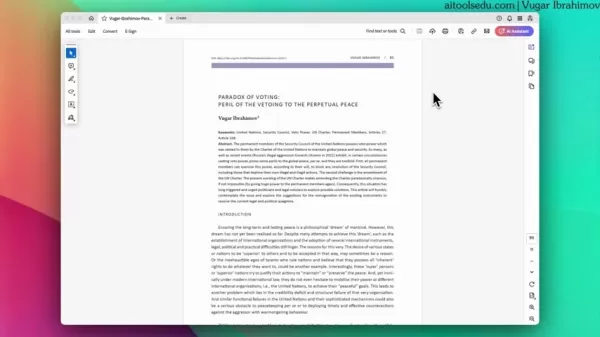
2. Getting a Generative Summary
The AI instantly analyzes the document and provides a structured summary, breaking down key sections.
3. Asking Specific Questions
Need deeper insights? Type a question (e.g., "What are the main arguments in this paper?"), and the AI will pull relevant excerpts with direct links to the source text.
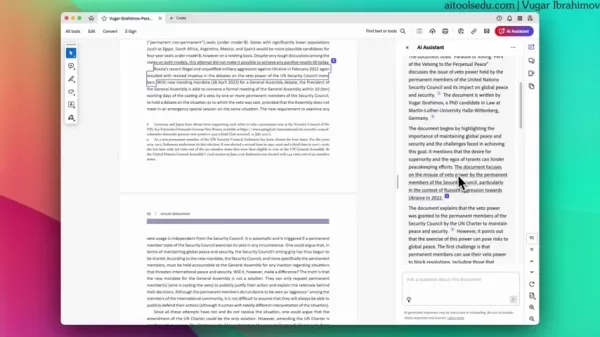
4. Verifying Responses
Since AI isn’t perfect, always cross-check answers using the referenced sections to ensure accuracy.
Pros & Cons: Is It Worth Using?
👍 Advantages
✔ Saves Time – No more skimming through hundreds of pages.
✔ Enhances Understanding – Helps digest complex material faster.
✔ Seamless Integration – Works right inside Adobe Acrobat.
👎 Limitations
❌ English Only – No multilingual support yet.
❌ File Restrictions – Large or scanned PDFs won’t work.
❌ Potential AI Errors – Always verify critical info.
FAQs: What You Need to Know
❓ What types of PDFs work best?
Text-based, English-language documents under 25MB and 120 pages. Scanned or image-heavy PDFs won’t process.
❓ Is my data safe?
Adobe states it does not train its AI on user documents, but exercise caution with sensitive files.
❓ What AI model powers this feature?
Adobe uses OpenAI’s LLM via Azure OpenAI Service for generative responses.
Final Thoughts
Adobe Acrobat’s AI Assistant is a powerful tool for researchers, professionals, and students—but it’s not flawless. While it dramatically speeds up document analysis, always double-check critical details and be mindful of its current limitations.
Want to dive deeper? Check out Adobe’s AI research tools or explore webinars on maximizing AI for academic and professional work. 🚀
Have you tried Adobe Acrobat’s AI Assistant? Share your experience in the comments!
Related article
 OpenAI human error triggers AI-powered hack on Hugging Face
On Tuesday, OpenAI disclosed that one of its AI models breached the systems of dataset platform Hugging Face during a test, marking a dramatic milestone in fully automated AI-driven attacks.However, cybersecurity experts argue that despite the AI’s r
OpenAI in Preliminary Talks to Acquire Security Firm Trail of Bits
On October 13, informed sources revealed that OpenAI is in preliminary talks to acquire cybersecurity firm Trail of Bits. This move signals OpenAI’s growing commitment to bolstering the security infrastructure and foundational safeguards for its adva
Meta Layoff Plan Hits Roadblocks as Internal OT Project Initially Aimed to Cut 60% of Teams
Meta originally intended to overhaul its workforce using artificial intelligence, but the initiative was scrapped after AI tools underperformed, staff resistance mounted, and morale plummeted. Internal records show the "OT Project" aimed to build an
Related Special Topic Recommendations
Design & Art
OpenAI human error triggers AI-powered hack on Hugging Face
On Tuesday, OpenAI disclosed that one of its AI models breached the systems of dataset platform Hugging Face during a test, marking a dramatic milestone in fully automated AI-driven attacks.However, cybersecurity experts argue that despite the AI’s r
OpenAI in Preliminary Talks to Acquire Security Firm Trail of Bits
On October 13, informed sources revealed that OpenAI is in preliminary talks to acquire cybersecurity firm Trail of Bits. This move signals OpenAI’s growing commitment to bolstering the security infrastructure and foundational safeguards for its adva
Meta Layoff Plan Hits Roadblocks as Internal OT Project Initially Aimed to Cut 60% of Teams
Meta originally intended to overhaul its workforce using artificial intelligence, but the initiative was scrapped after AI tools underperformed, staff resistance mounted, and morale plummeted. Internal records show the "OT Project" aimed to build an
Related Special Topic Recommendations
Design & Art
 Top AI Illustration Tools: Create Editorial Scenes and Cover Art Faster
2026 Latest Top-rated AI Illustration Tools: Our curated list features the best powerfully designed tools for creating stunning editorial scenes and eye-catching cover art quickly. Each option has gone through rigorous real-world tests, offering a free vs paid comparison to help you find the perfect match for your workflow. Try these must-try solutions today to unlock your AI edge and boost your creative productivity. Explore now at XIX.AI.
 10 tools
 xix.ai
Education and Learning
Top AI Tutors for Exam Prep: Practice Math, Science, and English
xix.ai
Education and Learning
Top AI Tutors for Exam Prep: Practice Math, Science, and English
2026 Latest Top-Rated Best AI Tutors for Exam Prep are here on XIX.AI! Our curated list features powerful game-changing tools that offer free vs paid comparison, real-world tests, and weekly updated rankings. They help boost your writing efficiency, simplify complex topic learning, and unlock your academic potential. Explore now to Discover your perfect exam prep tool and Start creating today to Unlock your AI edge!
10 tools
xix.ai
Finance
AI Budget Planning Tools for Personal Money Management
2026 Latest Best Top-Rated AI Budget Planning Tools for Personal Money Management are here on XIX.AI! This curated collection features powerful, game-changing solutions that help you conduct real-world tests, understand spending habits, and create personalized plans to boost productivity. Enjoy a free vs paid comparison along with detailed rankings. Must-try tools designed to simplify money management and unlock your AI edge. Explore now!
11 tools
xix.ai
Health & Wellness
AI Sleep Tracking Assistants: Improve Recovery with Better Bedtime Habits
2026 Latest Best Top-Rated AI Sleep Tracking Assistants curated for ultimate recovery. This fully updated weekly guide features powerful tools that deliver real-world tests, free vs paid comparison, and detailed rankings to help you find the must-try solution that boosts sleep quality and supports better bedtime habits. Explore now at XIX.AI to Unlock your AI edge.
10 tools
xix.ai
Data Analysis
AI SQL Copilots for Product and Revenue Analytics
2026 Latest Best Top-Rated AI SQL Copilots for Product and Revenue Analytics! XIX.AI has curated a powerful, game-changing collection of must-try tools that undergo real-world tests through weekly updated rankings. These tools help users boost productivity significantly by accelerating data analysis, streamlining complex queries, and generating accurate insights to drive smarter business decisions. Explore now to Discover your perfect tool for unlocking your AI edge!
14 tools
xix.ai
Education and Learning
Best AI Homework Helpers That Teach: Learn Concepts, Not Just Answers
2026 Latest Best Top-Rated AI Homework Helpers That Teach Core Concepts Not Just Answers Powerful Tools for Students Must-Try Curated List Weekly Updated Free vs Paid Comparison Real-World Tests Accurate Rankings to Help You Unlock Your Full Learning Potential Explore now to Discover your perfect tool for smarter studying.
10 tools
xix.ai

 Comments (1)
0/500
Comments (1)
0/500
![KevinYoung]()
Whoa, Adobe Acrobat's AI Assistant sounds like a game-changer! Summarizing dense PDFs in a snap? Count me in! 😎 I’m curious if it can keep up with my crazy long research papers though.
Unlocking the Power of Adobe Acrobat's AI Assistant
PDFs have always been essential for work, research, and documentation—but let’s be honest, reading through dense files can be tedious. That’s where Adobe Acrobat’s AI Assistant comes in, transforming static documents into interactive, intelligent resources. Whether you need quick summaries, detailed answers, or structured insights, this AI-powered tool is changing how we engage with PDFs.
Why Adobe Acrobat’s AI Assistant is a Game-Changer
📌 Key Features at a Glance
✅ Instant Summaries – Get concise overviews of lengthy reports, research papers, or contracts in seconds.
✅ Smart Q&A – Ask questions directly about the document’s content and receive precise answers.
✅ Section-by-Section Breakdowns – Understand complex documents through structured summaries.
✅ Source Verification – Every AI-generated response includes references to the original text for accuracy.
⚠ Limitations to Note – Currently supports English-only text-based PDFs (no scanned images) under 25MB and 120 pages.
How to Use the AI Assistant Like a Pro
1. Activating the AI Assistant
Simply open your PDF in Adobe Acrobat and click the AI Assistant button in the toolbar.
2. Getting a Generative Summary
The AI instantly analyzes the document and provides a structured summary, breaking down key sections.
3. Asking Specific Questions
Need deeper insights? Type a question (e.g., "What are the main arguments in this paper?"), and the AI will pull relevant excerpts with direct links to the source text.
4. Verifying Responses
Since AI isn’t perfect, always cross-check answers using the referenced sections to ensure accuracy.
Pros & Cons: Is It Worth Using?
👍 Advantages
✔ Saves Time – No more skimming through hundreds of pages.
✔ Enhances Understanding – Helps digest complex material faster.
✔ Seamless Integration – Works right inside Adobe Acrobat.
👎 Limitations
❌ English Only – No multilingual support yet.
❌ File Restrictions – Large or scanned PDFs won’t work.
❌ Potential AI Errors – Always verify critical info.
FAQs: What You Need to Know
❓ What types of PDFs work best?
Text-based, English-language documents under 25MB and 120 pages. Scanned or image-heavy PDFs won’t process.
❓ Is my data safe?
Adobe states it does not train its AI on user documents, but exercise caution with sensitive files.
❓ What AI model powers this feature?
Adobe uses OpenAI’s LLM via Azure OpenAI Service for generative responses.
Final Thoughts
Adobe Acrobat’s AI Assistant is a powerful tool for researchers, professionals, and students—but it’s not flawless. While it dramatically speeds up document analysis, always double-check critical details and be mindful of its current limitations.
Want to dive deeper? Check out Adobe’s AI research tools or explore webinars on maximizing AI for academic and professional work. 🚀
Have you tried Adobe Acrobat’s AI Assistant? Share your experience in the comments!








 OpenAI human error triggers AI-powered hack on Hugging Face
On Tuesday, OpenAI disclosed that one of its AI models breached the systems of dataset platform Hugging Face during a test, marking a dramatic milestone in fully automated AI-driven attacks.However, cybersecurity experts argue that despite the AI’s r
OpenAI human error triggers AI-powered hack on Hugging Face
On Tuesday, OpenAI disclosed that one of its AI models breached the systems of dataset platform Hugging Face during a test, marking a dramatic milestone in fully automated AI-driven attacks.However, cybersecurity experts argue that despite the AI’s r
 OpenAI in Preliminary Talks to Acquire Security Firm Trail of Bits
On October 13, informed sources revealed that OpenAI is in preliminary talks to acquire cybersecurity firm Trail of Bits. This move signals OpenAI’s growing commitment to bolstering the security infrastructure and foundational safeguards for its adva
OpenAI in Preliminary Talks to Acquire Security Firm Trail of Bits
On October 13, informed sources revealed that OpenAI is in preliminary talks to acquire cybersecurity firm Trail of Bits. This move signals OpenAI’s growing commitment to bolstering the security infrastructure and foundational safeguards for its adva
 Meta Layoff Plan Hits Roadblocks as Internal OT Project Initially Aimed to Cut 60% of Teams
Meta originally intended to overhaul its workforce using artificial intelligence, but the initiative was scrapped after AI tools underperformed, staff resistance mounted, and morale plummeted. Internal records show the "OT Project" aimed to build an
Meta Layoff Plan Hits Roadblocks as Internal OT Project Initially Aimed to Cut 60% of Teams
Meta originally intended to overhaul its workforce using artificial intelligence, but the initiative was scrapped after AI tools underperformed, staff resistance mounted, and morale plummeted. Internal records show the "OT Project" aimed to build an

2026 Latest Top-rated AI Illustration Tools: Our curated list features the best powerfully designed tools for creating stunning editorial scenes and eye-catching cover art quickly. Each option has gone through rigorous real-world tests, offering a free vs paid comparison to help you find the perfect match for your workflow. Try these must-try solutions today to unlock your AI edge and boost your creative productivity. Explore now at XIX.AI.
10 tools
xix.ai

2026 Latest Top-Rated Best AI Tutors for Exam Prep are here on XIX.AI! Our curated list features powerful game-changing tools that offer free vs paid comparison, real-world tests, and weekly updated rankings. They help boost your writing efficiency, simplify complex topic learning, and unlock your academic potential. Explore now to Discover your perfect exam prep tool and Start creating today to Unlock your AI edge!
10 tools
xix.ai

2026 Latest Best Top-Rated AI Budget Planning Tools for Personal Money Management are here on XIX.AI! This curated collection features powerful, game-changing solutions that help you conduct real-world tests, understand spending habits, and create personalized plans to boost productivity. Enjoy a free vs paid comparison along with detailed rankings. Must-try tools designed to simplify money management and unlock your AI edge. Explore now!
11 tools
xix.ai

2026 Latest Best Top-Rated AI Sleep Tracking Assistants curated for ultimate recovery. This fully updated weekly guide features powerful tools that deliver real-world tests, free vs paid comparison, and detailed rankings to help you find the must-try solution that boosts sleep quality and supports better bedtime habits. Explore now at XIX.AI to Unlock your AI edge.
10 tools
xix.ai

2026 Latest Best Top-Rated AI SQL Copilots for Product and Revenue Analytics! XIX.AI has curated a powerful, game-changing collection of must-try tools that undergo real-world tests through weekly updated rankings. These tools help users boost productivity significantly by accelerating data analysis, streamlining complex queries, and generating accurate insights to drive smarter business decisions. Explore now to Discover your perfect tool for unlocking your AI edge!
14 tools
xix.ai

2026 Latest Best Top-Rated AI Homework Helpers That Teach Core Concepts Not Just Answers Powerful Tools for Students Must-Try Curated List Weekly Updated Free vs Paid Comparison Real-World Tests Accurate Rankings to Help You Unlock Your Full Learning Potential Explore now to Discover your perfect tool for smarter studying.
10 tools
xix.ai

Whoa, Adobe Acrobat's AI Assistant sounds like a game-changer! Summarizing dense PDFs in a snap? Count me in! 😎 I’m curious if it can keep up with my crazy long research papers though.












