


 Home
HomeAI Video Translation Opens Global Markets for Higher Revenue
Are you a YouTube creator looking to increase your income? Expanding your audience globally can significantly boost your revenue. Translating your content into multiple languages allows you to connect with viewers worldwide, ultimately increasing your CPM and overall earnings. This in-depth guide will show you how to use AI video translation tools to grow your audience and maximize your YouTube revenue. By the end, you'll know exactly how to translate your videos to successfully attract an international viewership. Let's explore how to unlock your channel's true earning potential!
Key Points
Use AI-powered video translation for fast and precise localization.
Translate videos into 95+ languages to engage a global audience.
Clone your voice to maintain consistent branding across languages.
Create and customize subtitles to boost viewer engagement.
Target countries with higher CPM rates to increase your income.
Download separate audio and subtitle files for flexible use.
Consider AI dubbing for a seamless and natural viewing experience.
The Power of AI Video Translation for YouTube Earnings
Why Global Reach Matters for YouTube Creators
In today's digital world, content creators have a nearly unlimited potential audience. Yet, language barriers can limit your viewership. Translating your videos helps you break through these barriers and access new markets. Countries like the United States, United Kingdom, and Australia offer significantly higher CPM rates compared to India.
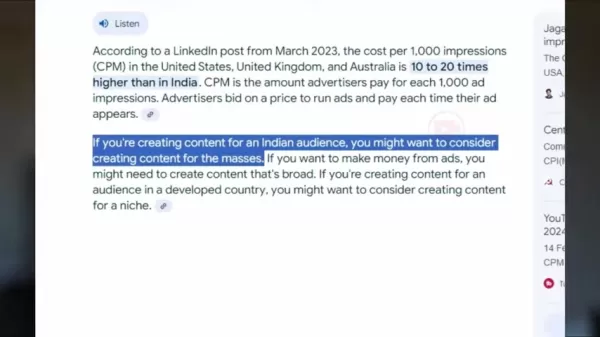
Producing content for a global audience ensures you earn more from every view.
The Key Benefits of Video Translation:
- Higher CPM: International markets often provide CPM rates ten to twenty times greater than India's.
- Expanded Audience: Connect with viewers who speak different languages.
- Improved Engagement: Use localized subtitles so viewers can fully understand your content.
- Better Discovery: Optimize titles and descriptions in multiple languages to enhance search visibility.
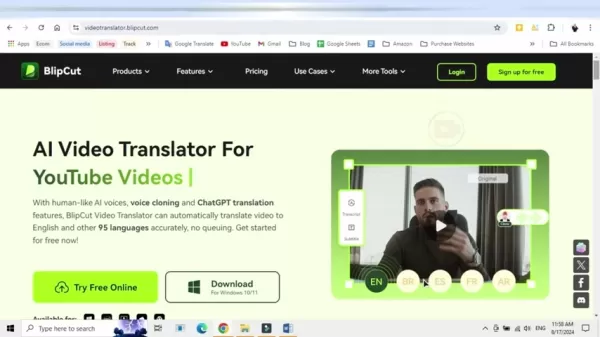
Introducing BlipCut: Your AI Video Translation Solution
You might assume you need to speak multiple languages, but AI tools can translate your videos quickly and accurately. BlipCut is an AI video translator designed to help creators reach a global audience without being multilingual.
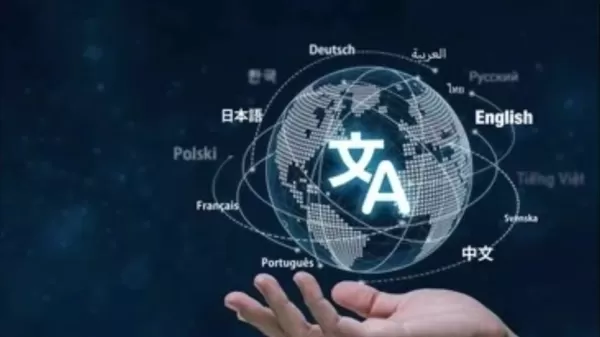
This platform automatically translates your videos into over 95 languages. Its main advantage is producing translations that sound completely natural. Features like Voice Cloning and ChatGPT integration ensure translations are precise.
Using human-like AI voices, your translated videos maintain a personal touch for viewers, regardless of their native language.
Comprehensive Features of BlipCut for Maximizing YouTube Reach
Multi-Language Video Translation & Dubbing
BlipCut provides a range of features to help content creators expand their audience and boost earnings.
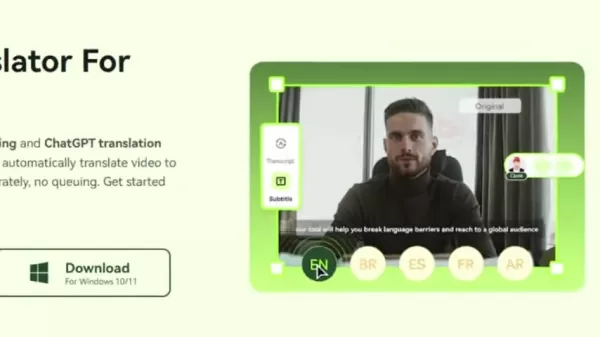
Here are the core features:
- Extensive Language Support: Translate into over 95 languages to target diverse global markets.
- Voice Cloning: Replicate your voice for consistent branding in different languages, keeping your content authentic even when dubbed.
- Subtitle Generation & Editing: Automatically generate subtitles and edit them for accuracy, catering to viewers who prefer to read or need accessibility support.
- AI Dubbing: Automatically translate and dub videos into multiple languages, maintaining engagement without you needing to be fluent.
- Subtitle File Download: Download separate subtitle files to add to existing videos or other platforms.
- Audio File Download: Download standalone audio files for further editing or use elsewhere.
- Automatic Audio Sync: The audio dynamically adjusts as you edit the subtitles.
This allows creators to easily manage every part of the video translation process.
Step-by-Step Guide to Translating Your Video with BlipCut
Now that you know the benefits and features, let's go through the translation process step by step.
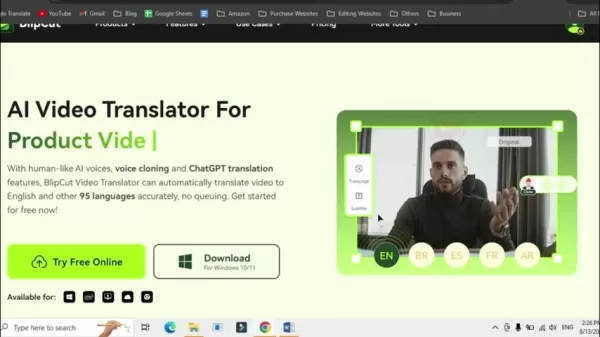
Step 1: Open BlipCut Website:
Visit the BlipCut website [video translator.blipcut.com]. The link is available in the description and comment section.
Step 2: Sign Up:
Click "Sign up for free" in the top right corner to create an account. You'll be taken to your dashboard after signing up.
Step 3: Start Translating Your Video:
On the homepage, click the "Try Free Online" button to begin translation.
Step 4: Upload or Paste your Video:
You have two upload options: directly from your device ("My Device") or by pasting a video URL ("URL").
My Device: Select "Upload File" to choose a file from your computer.
URL: Copy and paste the link from a YouTube, TikTok, or Twitter video.
Step 5: Select your Target and Source Language:
After uploading, choose the source language (the video's current language) and the target language (the language you want to translate into).
For an accurate translation, BlipCut needs to know the language you're speaking.
Select the language and AI voice for the translated video. You can choose a voice style, like androgynous or feminine, for your cloned voice.
Step 6: Enable Speaking Rate Control:
Click the "Advanced Settings" tab, then select "Speaking rate control."
Step 7: Translate and Download:
Click the "Translate" button.
Once processing is complete, you have several download options:
- Select subtitles by enabling the "With Subtitles" option.
- Download the audio file only.
- Download the subtitle file.
- Download the final video.
After choosing your preferred options, click "Download." Now you're ready to start earning!
Unlocking AI Dubbing For Video Localization
If you can't provide your own voice-over, you can use AI dubbing. After localizing the video with your AI voice, you can apply AI dubbing using a voice from BlipCut's library. Here's how:
- In the BlipCut AI Video Translator, select "Try it free" and then "AI Voiceover."
- Enter the script's language and the source/target languages.
- Type what you want the video to say in the text box.
- Choose your preferred AI voice and click the plus (+) button to add it to the script. Preview it with the play button.
- Click "Voiceover" to generate the audio. The resulting MP3 file can be uploaded to your already uploaded video.
Utilizing Translated Content Effectively
Adding Audio Tracks to Existing Videos
Once your video is translated, you can upload it directly to YouTube. You can also download the separate audio track.
Go to your video settings, select "Audio track," and upload the file.
This is helpful for viewers with hearing impairments or those who only need the audio.
Using Subtitle Files
BlipCut also allows you to translate and download subtitle files independently. Select the format and subtitle language, then click download.
After creating the subtitle file, go to your uploaded video. Choose "Subtitles" and then "Upload File."
This means you don't need to re-dub a video that's already published.
The Ups and Downs of Using AI Video Translation
Pros
User-friendly interface
Clone your own voice
Extensive selection of target languages
Cons
Can be time-consuming to use correctly
Payment required after free credits are used
Translation consumes credits
FAQ
Is AI video translation accurate?
AI video translation has become dramatically more accurate. While it once struggled to sound natural, it now commonly achieves this. The technology continues to improve and will likely keep getting better.
How much does AI dubbing on BlipCut cost?
BlipCut provides a free trial with a limited number of credits. After using them, you can move to a paid plan. Pricing depends on the credit amount and features you require, with weekly, monthly, and annual options available. Check their website for the latest pricing details.
Can I edit subtitles generated by AI?
Absolutely. A major benefit of BlipCut's AI subtitles is the ability to edit them for perfect accuracy. Since auto-generated subtitles can contain errors, this feature helps creators ensure their content is correct.
Related Questions
What are some tips for optimizing my translated videos for international audiences?
To effectively optimize your translated videos:Localize Titles and Descriptions: Translate your video titles and descriptions, using keywords that your target audience typically searches for.Create Compelling Thumbnails: Design thumbnails that are visually attractive and culturally appropriate. Use vibrant colors and engaging images to encourage clicks.Promote on Local Platforms: Share your translated videos on social media and forums popular in your target region. Engage with viewers in their language to build community.Collaborate with Local Creators: Partner with well-known creators in your target market to cross-promote content, which can greatly increase your reach and credibility.Engage with Comments: Take time to reply to comments and questions from international viewers in their language. This demonstrates you value their interaction and are dedicated to creating content for them.
Related article
 U.S. Stocks Hit Historic Milestone as AI and Aerospace Giants Prepare for Trillion-Dollar Debut
Elon Musk, Sam Altman, and Dario Amodei, three titans of the technology sector, are advancing toward initial public offerings for their respective ventures. With SpaceX, OpenAI, and Anthropic—three industry behemoths nearing trillion-dollar valuation
Swedish AI Startup Lovable Eyes $13.2 Billion Valuation After Major Funding Round
As AI-driven coding tools gain traction, Swedish startup Lovable has secured a major funding round. The company aims to raise $3 billion, potentially boosting its valuation to $13.2 billion—double the $6.6 billion recorded last December. Menlo Ventur
Google Tests Remy AI Agent for Gemini as Focus Shifts to User Control
According to Business Insider, Google is testing Remy, a new AI personal agent for Gemini. This tool aims to execute tasks on behalf of users, streamlining both professional workflows and daily routines.Currently, Remy is undergoing testing in an int
Related Special Topic Recommendations
SEO
U.S. Stocks Hit Historic Milestone as AI and Aerospace Giants Prepare for Trillion-Dollar Debut
Elon Musk, Sam Altman, and Dario Amodei, three titans of the technology sector, are advancing toward initial public offerings for their respective ventures. With SpaceX, OpenAI, and Anthropic—three industry behemoths nearing trillion-dollar valuation
Swedish AI Startup Lovable Eyes $13.2 Billion Valuation After Major Funding Round
As AI-driven coding tools gain traction, Swedish startup Lovable has secured a major funding round. The company aims to raise $3 billion, potentially boosting its valuation to $13.2 billion—double the $6.6 billion recorded last December. Menlo Ventur
Google Tests Remy AI Agent for Gemini as Focus Shifts to User Control
According to Business Insider, Google is testing Remy, a new AI personal agent for Gemini. This tool aims to execute tasks on behalf of users, streamlining both professional workflows and daily routines.Currently, Remy is undergoing testing in an int
Related Special Topic Recommendations
SEO
 Best AI SERP Analysis Tools for Search Strategy
2026 Latest Best Top-rated AI SERP Analysis Tools for Search Strategy are curated by XIX.AI through rigorous real-world tests and weekly updated rankings. These powerful tools help you unlock hidden optimization opportunities, boost content performance, and gain a competitive edge in search. Discover your perfect tool to elevate your search strategy today. Explore now!
 13 tools
 xix.ai
Data Analysis
Best AI Anomaly Detection Tools for KPI Monitoring across SaaS and Ecommerce Teams
xix.ai
Data Analysis
Best AI Anomaly Detection Tools for KPI Monitoring across SaaS and Ecommerce Teams
2026 Latest Best Top-rated AI Anomaly Detection Tools for KPI Monitoring in SaaS and Ecommerce teams! XIX.AI has curated a powerful, game-changing collection based on rigorous real-world tests and weekly updated rankings. You’ll find detailed free vs paid comparison insights to help you identify the must-try solution that boosts productivity and unlocks your AI edge. Explore now!
10 tools
xix.ai
writing
Best AI Outline Generators for Long-Form SEO Articles
2026 Latest Best Top-Rated AI Outline Generators for Long-Form SEO Articles, meticulously curated by XIX.AI. These powerful tools offer game-changing assistance in creating high-quality content quickly, boosting writing efficiency significantly. Get a free vs paid comparison along with real-world tests and detailed rankings to help you find the must-try option that suits your needs. Explore now to unlock your AI edge.
8 tools
xix.ai
Education and Learning
AI Study Tools for Homework and Exam Prep
2026 Latest Best AI Study Tools for Homework and Exam Prep! XIX.AI curates a top-rated list of powerful, game-changing tools that help students boost productivity, streamline homework completion, and ace exams through real-world tests. Get a free vs paid comparison, detailed rankings, and must-try options to unlock your AI edge. Explore now!
10 tools
xix.ai
Music composition
AI Vocal Demo Tools for Songwriters, Hooks, Toplines, and Multilingual Draft Sessions
2026 Latest Best AI Vocal Demo Tools for Songwriters, Hook Creators, and Multi-Language Content Teams! XIX.AI has curated a top-rated list of powerful game-changing tools that go through rigorous real-world tests. You’ll find detailed free vs paid comparison data, comprehensive rankings, and must-try options to help you boost writing efficiency and unlock your creative potential. Explore now to discover your perfect tool for all your content needs!
9 tools
xix.ai
Business
Best AI Competitive Research Tools for Small Businesses
2026 Latest Best Top-rated AI Competitive Research Tools for Small Businesses! XIX.AI has curated a highly powerful game-changing collection, updated weekly with rigorous real-world tests and detailed rankings. You can find a comprehensive free vs paid comparison to help you identify the must-try tools that boost your productivity and give you a competitive edge. Explore now to discover your perfect tool!
9 tools
xix.ai

 Comments (2)
0/500
Comments (2)
0/500
![DouglasMitchell]()
¿Traducir videos con IA? ¡Qué idea más práctica! Me pregunto si la voz sonará natural o si se notará que es una máquina. De todos modos, abre muchas puertas para creadores pequeños como yo. Habrá que probarlo, aunque me da un poco de miedo perder el toque personal del canal. 😅
![JonathanGreen]()
Ça paraît tellement évident, mais en pratique c'est si complexe d'adapter le ton et l'humour à d'autres cultures ! Je me demande comment l'IA gère les blagues ou les références locales. Un faux pas culturel pourrait vite faire du bruit 😅. Mais l'idée est puissante, surtout pour les créateurs indépendants.
Are you a YouTube creator looking to increase your income? Expanding your audience globally can significantly boost your revenue. Translating your content into multiple languages allows you to connect with viewers worldwide, ultimately increasing your CPM and overall earnings. This in-depth guide will show you how to use AI video translation tools to grow your audience and maximize your YouTube revenue. By the end, you'll know exactly how to translate your videos to successfully attract an international viewership. Let's explore how to unlock your channel's true earning potential!
Key Points
Use AI-powered video translation for fast and precise localization.
Translate videos into 95+ languages to engage a global audience.
Clone your voice to maintain consistent branding across languages.
Create and customize subtitles to boost viewer engagement.
Target countries with higher CPM rates to increase your income.
Download separate audio and subtitle files for flexible use.
Consider AI dubbing for a seamless and natural viewing experience.
The Power of AI Video Translation for YouTube Earnings
Why Global Reach Matters for YouTube Creators
In today's digital world, content creators have a nearly unlimited potential audience. Yet, language barriers can limit your viewership. Translating your videos helps you break through these barriers and access new markets. Countries like the United States, United Kingdom, and Australia offer significantly higher CPM rates compared to India.
Producing content for a global audience ensures you earn more from every view.
The Key Benefits of Video Translation:
- Higher CPM: International markets often provide CPM rates ten to twenty times greater than India's.
- Expanded Audience: Connect with viewers who speak different languages.
- Improved Engagement: Use localized subtitles so viewers can fully understand your content.
- Better Discovery: Optimize titles and descriptions in multiple languages to enhance search visibility.
Introducing BlipCut: Your AI Video Translation Solution
You might assume you need to speak multiple languages, but AI tools can translate your videos quickly and accurately. BlipCut is an AI video translator designed to help creators reach a global audience without being multilingual.
This platform automatically translates your videos into over 95 languages. Its main advantage is producing translations that sound completely natural. Features like Voice Cloning and ChatGPT integration ensure translations are precise.
Using human-like AI voices, your translated videos maintain a personal touch for viewers, regardless of their native language.
Comprehensive Features of BlipCut for Maximizing YouTube Reach
Multi-Language Video Translation & Dubbing
BlipCut provides a range of features to help content creators expand their audience and boost earnings.
Here are the core features:
- Extensive Language Support: Translate into over 95 languages to target diverse global markets.
- Voice Cloning: Replicate your voice for consistent branding in different languages, keeping your content authentic even when dubbed.
- Subtitle Generation & Editing: Automatically generate subtitles and edit them for accuracy, catering to viewers who prefer to read or need accessibility support.
- AI Dubbing: Automatically translate and dub videos into multiple languages, maintaining engagement without you needing to be fluent.
- Subtitle File Download: Download separate subtitle files to add to existing videos or other platforms.
- Audio File Download: Download standalone audio files for further editing or use elsewhere.
- Automatic Audio Sync: The audio dynamically adjusts as you edit the subtitles.
This allows creators to easily manage every part of the video translation process.
Step-by-Step Guide to Translating Your Video with BlipCut
Now that you know the benefits and features, let's go through the translation process step by step.
Step 1: Open BlipCut Website:
Visit the BlipCut website [video translator.blipcut.com]. The link is available in the description and comment section.
Step 2: Sign Up:
Click "Sign up for free" in the top right corner to create an account. You'll be taken to your dashboard after signing up.
Step 3: Start Translating Your Video:
On the homepage, click the "Try Free Online" button to begin translation.
Step 4: Upload or Paste your Video:
You have two upload options: directly from your device ("My Device") or by pasting a video URL ("URL").
My Device: Select "Upload File" to choose a file from your computer.
URL: Copy and paste the link from a YouTube, TikTok, or Twitter video.
Step 5: Select your Target and Source Language:
After uploading, choose the source language (the video's current language) and the target language (the language you want to translate into).
For an accurate translation, BlipCut needs to know the language you're speaking.
Select the language and AI voice for the translated video. You can choose a voice style, like androgynous or feminine, for your cloned voice.
Step 6: Enable Speaking Rate Control:
Click the "Advanced Settings" tab, then select "Speaking rate control."
Step 7: Translate and Download:
Click the "Translate" button.
Once processing is complete, you have several download options:
- Select subtitles by enabling the "With Subtitles" option.
- Download the audio file only.
- Download the subtitle file.
- Download the final video.
After choosing your preferred options, click "Download." Now you're ready to start earning!
Unlocking AI Dubbing For Video Localization
If you can't provide your own voice-over, you can use AI dubbing. After localizing the video with your AI voice, you can apply AI dubbing using a voice from BlipCut's library. Here's how:
- In the BlipCut AI Video Translator, select "Try it free" and then "AI Voiceover."
- Enter the script's language and the source/target languages.
- Type what you want the video to say in the text box.
- Choose your preferred AI voice and click the plus (+) button to add it to the script. Preview it with the play button.
- Click "Voiceover" to generate the audio. The resulting MP3 file can be uploaded to your already uploaded video.
Utilizing Translated Content Effectively
Adding Audio Tracks to Existing Videos
Once your video is translated, you can upload it directly to YouTube. You can also download the separate audio track.
Go to your video settings, select "Audio track," and upload the file.
This is helpful for viewers with hearing impairments or those who only need the audio.
Using Subtitle Files
BlipCut also allows you to translate and download subtitle files independently. Select the format and subtitle language, then click download.
After creating the subtitle file, go to your uploaded video. Choose "Subtitles" and then "Upload File."
This means you don't need to re-dub a video that's already published.
The Ups and Downs of Using AI Video Translation
Pros
User-friendly interface
Clone your own voice
Extensive selection of target languages
Cons
Can be time-consuming to use correctly
Payment required after free credits are used
Translation consumes credits
FAQ
Is AI video translation accurate?
AI video translation has become dramatically more accurate. While it once struggled to sound natural, it now commonly achieves this. The technology continues to improve and will likely keep getting better.
How much does AI dubbing on BlipCut cost?
BlipCut provides a free trial with a limited number of credits. After using them, you can move to a paid plan. Pricing depends on the credit amount and features you require, with weekly, monthly, and annual options available. Check their website for the latest pricing details.
Can I edit subtitles generated by AI?
Absolutely. A major benefit of BlipCut's AI subtitles is the ability to edit them for perfect accuracy. Since auto-generated subtitles can contain errors, this feature helps creators ensure their content is correct.
Related Questions
What are some tips for optimizing my translated videos for international audiences?
To effectively optimize your translated videos:Localize Titles and Descriptions: Translate your video titles and descriptions, using keywords that your target audience typically searches for.Create Compelling Thumbnails: Design thumbnails that are visually attractive and culturally appropriate. Use vibrant colors and engaging images to encourage clicks.Promote on Local Platforms: Share your translated videos on social media and forums popular in your target region. Engage with viewers in their language to build community.Collaborate with Local Creators: Partner with well-known creators in your target market to cross-promote content, which can greatly increase your reach and credibility.Engage with Comments: Take time to reply to comments and questions from international viewers in their language. This demonstrates you value their interaction and are dedicated to creating content for them.








 U.S. Stocks Hit Historic Milestone as AI and Aerospace Giants Prepare for Trillion-Dollar Debut
Elon Musk, Sam Altman, and Dario Amodei, three titans of the technology sector, are advancing toward initial public offerings for their respective ventures. With SpaceX, OpenAI, and Anthropic—three industry behemoths nearing trillion-dollar valuation
U.S. Stocks Hit Historic Milestone as AI and Aerospace Giants Prepare for Trillion-Dollar Debut
Elon Musk, Sam Altman, and Dario Amodei, three titans of the technology sector, are advancing toward initial public offerings for their respective ventures. With SpaceX, OpenAI, and Anthropic—three industry behemoths nearing trillion-dollar valuation
 Swedish AI Startup Lovable Eyes $13.2 Billion Valuation After Major Funding Round
As AI-driven coding tools gain traction, Swedish startup Lovable has secured a major funding round. The company aims to raise $3 billion, potentially boosting its valuation to $13.2 billion—double the $6.6 billion recorded last December. Menlo Ventur
Google Tests Remy AI Agent for Gemini as Focus Shifts to User Control
According to Business Insider, Google is testing Remy, a new AI personal agent for Gemini. This tool aims to execute tasks on behalf of users, streamlining both professional workflows and daily routines.Currently, Remy is undergoing testing in an int
Swedish AI Startup Lovable Eyes $13.2 Billion Valuation After Major Funding Round
As AI-driven coding tools gain traction, Swedish startup Lovable has secured a major funding round. The company aims to raise $3 billion, potentially boosting its valuation to $13.2 billion—double the $6.6 billion recorded last December. Menlo Ventur
Google Tests Remy AI Agent for Gemini as Focus Shifts to User Control
According to Business Insider, Google is testing Remy, a new AI personal agent for Gemini. This tool aims to execute tasks on behalf of users, streamlining both professional workflows and daily routines.Currently, Remy is undergoing testing in an int

2026 Latest Best Top-rated AI SERP Analysis Tools for Search Strategy are curated by XIX.AI through rigorous real-world tests and weekly updated rankings. These powerful tools help you unlock hidden optimization opportunities, boost content performance, and gain a competitive edge in search. Discover your perfect tool to elevate your search strategy today. Explore now!
13 tools
xix.ai

2026 Latest Best Top-rated AI Anomaly Detection Tools for KPI Monitoring in SaaS and Ecommerce teams! XIX.AI has curated a powerful, game-changing collection based on rigorous real-world tests and weekly updated rankings. You’ll find detailed free vs paid comparison insights to help you identify the must-try solution that boosts productivity and unlocks your AI edge. Explore now!
10 tools
xix.ai

2026 Latest Best Top-Rated AI Outline Generators for Long-Form SEO Articles, meticulously curated by XIX.AI. These powerful tools offer game-changing assistance in creating high-quality content quickly, boosting writing efficiency significantly. Get a free vs paid comparison along with real-world tests and detailed rankings to help you find the must-try option that suits your needs. Explore now to unlock your AI edge.
8 tools
xix.ai

2026 Latest Best AI Study Tools for Homework and Exam Prep! XIX.AI curates a top-rated list of powerful, game-changing tools that help students boost productivity, streamline homework completion, and ace exams through real-world tests. Get a free vs paid comparison, detailed rankings, and must-try options to unlock your AI edge. Explore now!
10 tools
xix.ai

2026 Latest Best AI Vocal Demo Tools for Songwriters, Hook Creators, and Multi-Language Content Teams! XIX.AI has curated a top-rated list of powerful game-changing tools that go through rigorous real-world tests. You’ll find detailed free vs paid comparison data, comprehensive rankings, and must-try options to help you boost writing efficiency and unlock your creative potential. Explore now to discover your perfect tool for all your content needs!
9 tools
xix.ai

2026 Latest Best Top-rated AI Competitive Research Tools for Small Businesses! XIX.AI has curated a highly powerful game-changing collection, updated weekly with rigorous real-world tests and detailed rankings. You can find a comprehensive free vs paid comparison to help you identify the must-try tools that boost your productivity and give you a competitive edge. Explore now to discover your perfect tool!
9 tools
xix.ai

¿Traducir videos con IA? ¡Qué idea más práctica! Me pregunto si la voz sonará natural o si se notará que es una máquina. De todos modos, abre muchas puertas para creadores pequeños como yo. Habrá que probarlo, aunque me da un poco de miedo perder el toque personal del canal. 😅
Ça paraît tellement évident, mais en pratique c'est si complexe d'adapter le ton et l'humour à d'autres cultures ! Je me demande comment l'IA gère les blagues ou les références locales. Un faux pas culturel pourrait vite faire du bruit 😅. Mais l'idée est puissante, surtout pour les créateurs indépendants.












