


 Home
HomeUnlock AI Power in Microsoft Word: A Comprehensive Guide
Microsoft Word, a cornerstone in both office environments and academic settings, is transforming with the integration of artificial intelligence. AI isn't just a trendy term; it's a practical tool that can accelerate your writing process, spark your creativity, and polish your documents to a professional standard. This guide will walk you through how to harness AI within Microsoft Word, highlighting its key features and real-world applications.
Key Points
- AI integration in Microsoft Word is now a reality, delivering tangible benefits to users.
- AI can help you brainstorm, providing creative solutions to overcome writer's block.
- AI tools offer advanced grammar and style checks, ensuring your documents are error-free.
- Add-ins enhance Word's capabilities, giving you access to specialized AI-driven tools like Legal AI Assistant.
- It's important to verify AI-generated content to avoid plagiarism and ensure accuracy.
- Microsoft Office 365 subscribers can utilize Copilot, an advanced AI assistant that offers a range of helpful features.
Introduction to AI in Microsoft Word
The Power of Microsoft Word and AI
Microsoft Word is more than just a word processor; it's an indispensable tool for creating professional documents. The integration of AI into Microsoft Word enhances its capabilities, offering innovative ways to streamline your workflow. Imagine having a digital assistant that helps refine your work, making it easier to produce high-quality documents, whether for work or academic purposes.

Leveraging AI for Enhanced Productivity
One of the most significant advantages of integrating AI into Microsoft Word is the boost in productivity. AI can inspire you, assist with content development, and automate repetitive tasks. This means you can spend more time focusing on the critical aspects of your writing. Whether you're crafting a business proposal or writing a research paper, AI can guide you every step of the way. Its algorithms understand context, offer suggestions, and correct errors, ensuring your work is both accurate and impactful. This is the future of word processing—intelligent assistance that enhances your output.
Practical Guide: Using AI Features in Word
Overcoming Writer’s Block with AI Brainstorming
Writer's block can be a major hurdle, stalling your progress. But with AI in Microsoft Word, you can find inspiration and overcome these creative blocks. AI algorithms can suggest relevant topics, offer different perspectives, and provide content ideas to get your creative juices flowing. By using AI-powered tools, you can transform a blank page into a canvas of possibilities. AI acts as your muse, offering a variety of ideas and viewpoints to ignite your imagination and help you get started. This is especially useful when you're under pressure to produce content quickly.
Ensuring Accuracy: AI Grammar and Style Check
AI excels at ensuring error-free writing. Microsoft Word's AI features automatically analyze your grammar and style, correcting errors and offering suggestions for improvement. These checks do more than just catch mistakes; they enhance the readability and impact of your writing. AI-driven grammar and style checks go beyond basic proofreading, examining sentence structure, clarity, and tone to ensure your writing is refined. This is invaluable for both native and non-native English speakers, guaranteeing professional-quality output. It also reduces the need for external proofreading, saving time and resources.
Add-ins: Legal AI Assistant & More
To enhance functionality, consider using add-ins. The Legal AI Assistant stands out, especially for legal professionals. It assists with drafting contracts, identifying missing clauses, and ensuring legal documents are precise and error-free. This tool can significantly streamline the process of creating legal documents.
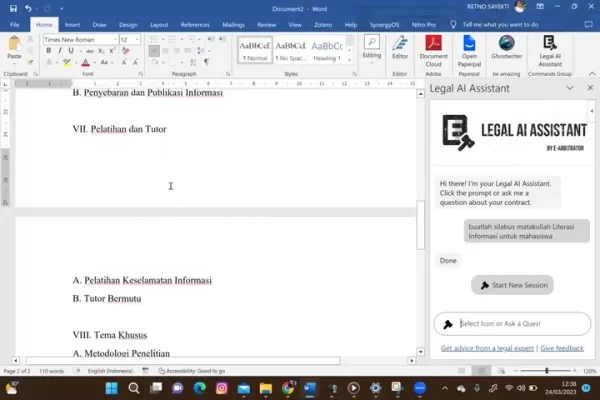
In addition to the Legal AI Assistant, other AI add-ins cater to various needs, from research to creative writing. These add-ins increase Microsoft Word's effectiveness by offering features tailored to specific tasks. You can find and install add-ins directly within Microsoft Word through the 'Insert' tab.Step-by-Step Guide: Activating and Using AI Features
How to Add Legal AI Assistant to Microsoft Word
- Open Microsoft Word and access a new or existing document.
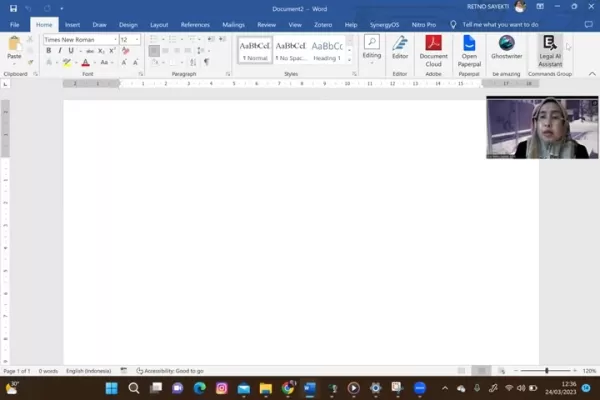
- Go to the 'Insert' tab and click on 'Get Add-ins'.
- Search for 'AI Legal Assistant' in the Office Add-ins store.
- Select Legal AI Assistant from the search results and click 'Add' to install it in your Word.
- Legal AI Assistant will appear on the right side of the Word screen.
These simple steps allow you to start using the powerful AI features for legal documents.
Exploring AI Legal Assistant Functions
- With Legal AI Assistant active, use the prompts and ask questions related to your contract.
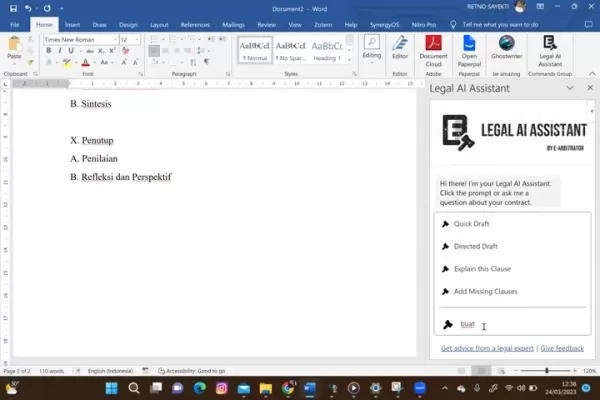
- Use AI for document drafting, missing clause identification, and to get legal advice from an expert.
- Review the responses. Although AI-generated, always verify their accuracy before using them in actual documents.
Legal AI Assistant streamlines legal projects by incorporating AI intelligence.
Weighing the Options: AI in Microsoft Word
Pros
- Improved productivity and time-saving.
- Inspiration to overcome writer's block.
- Enhanced accuracy through grammar and style checks.
- Streamlined drafting of contracts and legal documents.
- Access to expert legal advice.
- Improved document accessibility.
Cons
- Initial cost of software and add-ins.
- Potential for over-reliance on AI.
- Verification requirements to avoid errors and plagiarism.
- Accuracy and plagiarism concerns.
- Limitations compared to a human editor.
- Requires Microsoft 365 subscription.
Frequently Asked Questions
Can AI replace human editors in Microsoft Word?
While AI can assist with grammar and style, it can't replicate the nuanced judgment of a human editor. Manual reviews remain essential for ensuring the tone and flow of your writing.
Is AI integration free in Microsoft Word?
Some AI features are available in Microsoft Word, but enhanced capabilities may require a subscription. Be sure to check the details of specific add-ins.
What measures prevent plagiarism while utilizing AI in Microsoft Word?
Always check AI-generated content with plagiarism detection tools before finalizing your document. Modify and properly credit the content to avoid plagiarism.
Does AI work well with other Microsoft Office programs?
AI integration works across Word, Excel, and PowerPoint, providing consistent assistance throughout the Office suite.
Which Microsoft Office version offers optimal AI integration?
Office 365 provides the most advanced AI capabilities, including the Copilot feature, which may not be available in older versions.
Related Questions
Are there legal restrictions to using AI-generated content in professional documents?
Yes, there can be legal restrictions on using AI-generated content. Always review copyrights, disclose the use of AI appropriately, and consult legal professionals to ensure compliance with relevant laws.
Related article
 How to fix Core Web Vitals for better SEO rankings
Streamline Report Card Comments with AI ToolsIntroductionAI Tools for Generating Report Card CommentsMagic SchoolAlmanac AIChat GPTUsing Magic School to Generate Report Card CommentsLogging into Magic SchoolSelecting the Report Card Comments ToolCust
Slackbot Becomes an AI Agent
Slackbot, the automated assistant embedded in Salesforce’s corporate messaging platform Slack, is evolving into an AI agent. Salesforce CTO Parker Harris envisions it achieving viral status comparable to OpenAI’s ChatGPT.The cloud software giant laun
ByteDance Boosts Core AI Incentives as Doubao Surges 14.6%
ByteDance recently convened a DouBao equity briefing to unveil fresh incentive policies for staff involved in the DouBao division. The strike price for DouBao shares has been lifted from $14.85 in June 2026 to $17.02, marking an approximate 14.6% inc
Related Special Topic Recommendations
writing
How to fix Core Web Vitals for better SEO rankings
Streamline Report Card Comments with AI ToolsIntroductionAI Tools for Generating Report Card CommentsMagic SchoolAlmanac AIChat GPTUsing Magic School to Generate Report Card CommentsLogging into Magic SchoolSelecting the Report Card Comments ToolCust
Slackbot Becomes an AI Agent
Slackbot, the automated assistant embedded in Salesforce’s corporate messaging platform Slack, is evolving into an AI agent. Salesforce CTO Parker Harris envisions it achieving viral status comparable to OpenAI’s ChatGPT.The cloud software giant laun
ByteDance Boosts Core AI Incentives as Doubao Surges 14.6%
ByteDance recently convened a DouBao equity briefing to unveil fresh incentive policies for staff involved in the DouBao division. The strike price for DouBao shares has been lifted from $14.85 in June 2026 to $17.02, marking an approximate 14.6% inc
Related Special Topic Recommendations
writing
 Best AI Outline Generators for Long-Form SEO Articles
2026 Latest Best Top-Rated AI Outline Generators for Long-Form SEO Articles, meticulously curated by XIX.AI. These powerful tools offer game-changing assistance in creating high-quality content quickly, boosting writing efficiency significantly. Get a free vs paid comparison along with real-world tests and detailed rankings to help you find the must-try option that suits your needs. Explore now to unlock your AI edge.
 8 tools
 xix.ai
Education and Learning
AI Study Tools for Homework and Exam Prep
xix.ai
Education and Learning
AI Study Tools for Homework and Exam Prep
2026 Latest Best AI Study Tools for Homework and Exam Prep! XIX.AI curates a top-rated list of powerful, game-changing tools that help students boost productivity, streamline homework completion, and ace exams through real-world tests. Get a free vs paid comparison, detailed rankings, and must-try options to unlock your AI edge. Explore now!
10 tools
xix.ai
Music composition
AI Vocal Demo Tools for Songwriters, Hooks, Toplines, and Multilingual Draft Sessions
2026 Latest Best AI Vocal Demo Tools for Songwriters, Hook Creators, and Multi-Language Content Teams! XIX.AI has curated a top-rated list of powerful game-changing tools that go through rigorous real-world tests. You’ll find detailed free vs paid comparison data, comprehensive rankings, and must-try options to help you boost writing efficiency and unlock your creative potential. Explore now to discover your perfect tool for all your content needs!
9 tools
xix.ai
Business
Best AI Competitive Research Tools for Small Businesses
2026 Latest Best Top-rated AI Competitive Research Tools for Small Businesses! XIX.AI has curated a highly powerful game-changing collection, updated weekly with rigorous real-world tests and detailed rankings. You can find a comprehensive free vs paid comparison to help you identify the must-try tools that boost your productivity and give you a competitive edge. Explore now to discover your perfect tool!
9 tools
xix.ai
Image editing
Photoshop AI Retouch Tools for Ecommerce Apparel, Skin Cleanup, and Color Consistency
2026 Latest Best Photoshop AI retouch tools for ecommerce apparel, skin cleanup, and color consistency! This top-rated curated list features powerful game-changing solutions that help you boost writing efficiency, streamline content creation, and achieve perfect visual results effortlessly. Each tool has undergone real-world tests through weekly updated rankings, complete with free vs paid comparison details. Backed by XIX.AI, it’s the must-try guide for anyone aiming to unlock your AI edge. Explore now!
10 tools
xix.ai
Prompt
Best AI Prompt Libraries for ChatGPT Workflows
2026 Latest Best Top-Rated AI Prompt Libraries for optimizing all types of ChatGPT workflows. XIX.AI has curated a powerful, game-changing collection that goes through rigorous real-world tests to ensure top performance. You can find detailed free vs paid comparisons and expert rankings to help you choose the must-try tools that boost your productivity and unlock your AI edge. Explore now!
11 tools
xix.ai

 Comments (11)
0/500
Comments (11)
0/500
![KevinAnderson]()
Honestly, integrating AI directly into Word sounds super convenient for drafting reports, but I can't shake the feeling it might make us rely too much on it for basic structuring and proofreading. Will my own writing skills get rusty? 🤔 Still, can't deny the time-saving potential for those last-minute submissions!
![ScottKing]()
WordにもAI機能が追加されたの?すごい!普段論文を書くときにすごく時間かかるから、文章校正の機能が便利そう。でも、倫理的にも気になるよね。もし学生が全てAIに任せてしまったら、本当の理解につながらないかも。🤔
![GaryWalker]()
Microsoft WordにAIが組み込まれるのは必然的な流れですね。でも校正機能が進化しすぎて、人間の書く個性が失われないか心配...🤔 特に小説創作などではAI提案が邪魔になるケースもありそう
![DouglasScott]()
This AI integration in Word sounds like a game-changer! I’m curious if it’ll really make my essays pop or just add more bells and whistles I won’t use. 🤔 Anyone tried it yet?
![WalterWilliams]()
AI in Word sounds cool, but does it really make writing that much faster? I’m curious if it’s just hype or actually saves time. 🧐
![ArthurYoung]()
AI in Word sounds like a game-changer! I’m curious how it handles creative writing—can it really spark ideas or just polish grammar? 🤔 Excited to try it out!
Microsoft Word, a cornerstone in both office environments and academic settings, is transforming with the integration of artificial intelligence. AI isn't just a trendy term; it's a practical tool that can accelerate your writing process, spark your creativity, and polish your documents to a professional standard. This guide will walk you through how to harness AI within Microsoft Word, highlighting its key features and real-world applications.
Key Points
- AI integration in Microsoft Word is now a reality, delivering tangible benefits to users.
- AI can help you brainstorm, providing creative solutions to overcome writer's block.
- AI tools offer advanced grammar and style checks, ensuring your documents are error-free.
- Add-ins enhance Word's capabilities, giving you access to specialized AI-driven tools like Legal AI Assistant.
- It's important to verify AI-generated content to avoid plagiarism and ensure accuracy.
- Microsoft Office 365 subscribers can utilize Copilot, an advanced AI assistant that offers a range of helpful features.
Introduction to AI in Microsoft Word
The Power of Microsoft Word and AI
Microsoft Word is more than just a word processor; it's an indispensable tool for creating professional documents. The integration of AI into Microsoft Word enhances its capabilities, offering innovative ways to streamline your workflow. Imagine having a digital assistant that helps refine your work, making it easier to produce high-quality documents, whether for work or academic purposes.
Leveraging AI for Enhanced Productivity
One of the most significant advantages of integrating AI into Microsoft Word is the boost in productivity. AI can inspire you, assist with content development, and automate repetitive tasks. This means you can spend more time focusing on the critical aspects of your writing. Whether you're crafting a business proposal or writing a research paper, AI can guide you every step of the way. Its algorithms understand context, offer suggestions, and correct errors, ensuring your work is both accurate and impactful. This is the future of word processing—intelligent assistance that enhances your output.
Practical Guide: Using AI Features in Word
Overcoming Writer’s Block with AI Brainstorming
Writer's block can be a major hurdle, stalling your progress. But with AI in Microsoft Word, you can find inspiration and overcome these creative blocks. AI algorithms can suggest relevant topics, offer different perspectives, and provide content ideas to get your creative juices flowing. By using AI-powered tools, you can transform a blank page into a canvas of possibilities. AI acts as your muse, offering a variety of ideas and viewpoints to ignite your imagination and help you get started. This is especially useful when you're under pressure to produce content quickly.
Ensuring Accuracy: AI Grammar and Style Check
AI excels at ensuring error-free writing. Microsoft Word's AI features automatically analyze your grammar and style, correcting errors and offering suggestions for improvement. These checks do more than just catch mistakes; they enhance the readability and impact of your writing. AI-driven grammar and style checks go beyond basic proofreading, examining sentence structure, clarity, and tone to ensure your writing is refined. This is invaluable for both native and non-native English speakers, guaranteeing professional-quality output. It also reduces the need for external proofreading, saving time and resources.
Add-ins: Legal AI Assistant & More
To enhance functionality, consider using add-ins. The Legal AI Assistant stands out, especially for legal professionals. It assists with drafting contracts, identifying missing clauses, and ensuring legal documents are precise and error-free. This tool can significantly streamline the process of creating legal documents.
Step-by-Step Guide: Activating and Using AI Features
How to Add Legal AI Assistant to Microsoft Word
- Open Microsoft Word and access a new or existing document.
- Go to the 'Insert' tab and click on 'Get Add-ins'.
- Search for 'AI Legal Assistant' in the Office Add-ins store.
- Select Legal AI Assistant from the search results and click 'Add' to install it in your Word.
- Legal AI Assistant will appear on the right side of the Word screen.
These simple steps allow you to start using the powerful AI features for legal documents.
Exploring AI Legal Assistant Functions
- With Legal AI Assistant active, use the prompts and ask questions related to your contract.
- Use AI for document drafting, missing clause identification, and to get legal advice from an expert.
- Review the responses. Although AI-generated, always verify their accuracy before using them in actual documents.
Legal AI Assistant streamlines legal projects by incorporating AI intelligence.
Weighing the Options: AI in Microsoft Word
Pros
- Improved productivity and time-saving.
- Inspiration to overcome writer's block.
- Enhanced accuracy through grammar and style checks.
- Streamlined drafting of contracts and legal documents.
- Access to expert legal advice.
- Improved document accessibility.
Cons
- Initial cost of software and add-ins.
- Potential for over-reliance on AI.
- Verification requirements to avoid errors and plagiarism.
- Accuracy and plagiarism concerns.
- Limitations compared to a human editor.
- Requires Microsoft 365 subscription.
Frequently Asked Questions
Can AI replace human editors in Microsoft Word?
While AI can assist with grammar and style, it can't replicate the nuanced judgment of a human editor. Manual reviews remain essential for ensuring the tone and flow of your writing.
Is AI integration free in Microsoft Word?
Some AI features are available in Microsoft Word, but enhanced capabilities may require a subscription. Be sure to check the details of specific add-ins.
What measures prevent plagiarism while utilizing AI in Microsoft Word?
Always check AI-generated content with plagiarism detection tools before finalizing your document. Modify and properly credit the content to avoid plagiarism.
Does AI work well with other Microsoft Office programs?
AI integration works across Word, Excel, and PowerPoint, providing consistent assistance throughout the Office suite.
Which Microsoft Office version offers optimal AI integration?
Office 365 provides the most advanced AI capabilities, including the Copilot feature, which may not be available in older versions.
Related Questions
Are there legal restrictions to using AI-generated content in professional documents?
Yes, there can be legal restrictions on using AI-generated content. Always review copyrights, disclose the use of AI appropriately, and consult legal professionals to ensure compliance with relevant laws.








 How to fix Core Web Vitals for better SEO rankings
Streamline Report Card Comments with AI ToolsIntroductionAI Tools for Generating Report Card CommentsMagic SchoolAlmanac AIChat GPTUsing Magic School to Generate Report Card CommentsLogging into Magic SchoolSelecting the Report Card Comments ToolCust
How to fix Core Web Vitals for better SEO rankings
Streamline Report Card Comments with AI ToolsIntroductionAI Tools for Generating Report Card CommentsMagic SchoolAlmanac AIChat GPTUsing Magic School to Generate Report Card CommentsLogging into Magic SchoolSelecting the Report Card Comments ToolCust
 Slackbot Becomes an AI Agent
Slackbot, the automated assistant embedded in Salesforce’s corporate messaging platform Slack, is evolving into an AI agent. Salesforce CTO Parker Harris envisions it achieving viral status comparable to OpenAI’s ChatGPT.The cloud software giant laun
Slackbot Becomes an AI Agent
Slackbot, the automated assistant embedded in Salesforce’s corporate messaging platform Slack, is evolving into an AI agent. Salesforce CTO Parker Harris envisions it achieving viral status comparable to OpenAI’s ChatGPT.The cloud software giant laun
 ByteDance Boosts Core AI Incentives as Doubao Surges 14.6%
ByteDance recently convened a DouBao equity briefing to unveil fresh incentive policies for staff involved in the DouBao division. The strike price for DouBao shares has been lifted from $14.85 in June 2026 to $17.02, marking an approximate 14.6% inc
ByteDance Boosts Core AI Incentives as Doubao Surges 14.6%
ByteDance recently convened a DouBao equity briefing to unveil fresh incentive policies for staff involved in the DouBao division. The strike price for DouBao shares has been lifted from $14.85 in June 2026 to $17.02, marking an approximate 14.6% inc

2026 Latest Best Top-Rated AI Outline Generators for Long-Form SEO Articles, meticulously curated by XIX.AI. These powerful tools offer game-changing assistance in creating high-quality content quickly, boosting writing efficiency significantly. Get a free vs paid comparison along with real-world tests and detailed rankings to help you find the must-try option that suits your needs. Explore now to unlock your AI edge.
8 tools
xix.ai

2026 Latest Best AI Study Tools for Homework and Exam Prep! XIX.AI curates a top-rated list of powerful, game-changing tools that help students boost productivity, streamline homework completion, and ace exams through real-world tests. Get a free vs paid comparison, detailed rankings, and must-try options to unlock your AI edge. Explore now!
10 tools
xix.ai

2026 Latest Best AI Vocal Demo Tools for Songwriters, Hook Creators, and Multi-Language Content Teams! XIX.AI has curated a top-rated list of powerful game-changing tools that go through rigorous real-world tests. You’ll find detailed free vs paid comparison data, comprehensive rankings, and must-try options to help you boost writing efficiency and unlock your creative potential. Explore now to discover your perfect tool for all your content needs!
9 tools
xix.ai

2026 Latest Best Top-rated AI Competitive Research Tools for Small Businesses! XIX.AI has curated a highly powerful game-changing collection, updated weekly with rigorous real-world tests and detailed rankings. You can find a comprehensive free vs paid comparison to help you identify the must-try tools that boost your productivity and give you a competitive edge. Explore now to discover your perfect tool!
9 tools
xix.ai

2026 Latest Best Photoshop AI retouch tools for ecommerce apparel, skin cleanup, and color consistency! This top-rated curated list features powerful game-changing solutions that help you boost writing efficiency, streamline content creation, and achieve perfect visual results effortlessly. Each tool has undergone real-world tests through weekly updated rankings, complete with free vs paid comparison details. Backed by XIX.AI, it’s the must-try guide for anyone aiming to unlock your AI edge. Explore now!
10 tools
xix.ai

2026 Latest Best Top-Rated AI Prompt Libraries for optimizing all types of ChatGPT workflows. XIX.AI has curated a powerful, game-changing collection that goes through rigorous real-world tests to ensure top performance. You can find detailed free vs paid comparisons and expert rankings to help you choose the must-try tools that boost your productivity and unlock your AI edge. Explore now!
11 tools
xix.ai

Honestly, integrating AI directly into Word sounds super convenient for drafting reports, but I can't shake the feeling it might make us rely too much on it for basic structuring and proofreading. Will my own writing skills get rusty? 🤔 Still, can't deny the time-saving potential for those last-minute submissions!
WordにもAI機能が追加されたの?すごい!普段論文を書くときにすごく時間かかるから、文章校正の機能が便利そう。でも、倫理的にも気になるよね。もし学生が全てAIに任せてしまったら、本当の理解につながらないかも。🤔
Microsoft WordにAIが組み込まれるのは必然的な流れですね。でも校正機能が進化しすぎて、人間の書く個性が失われないか心配...🤔 特に小説創作などではAI提案が邪魔になるケースもありそう
This AI integration in Word sounds like a game-changer! I’m curious if it’ll really make my essays pop or just add more bells and whistles I won’t use. 🤔 Anyone tried it yet?
AI in Word sounds cool, but does it really make writing that much faster? I’m curious if it’s just hype or actually saves time. 🧐
AI in Word sounds like a game-changer! I’m curious how it handles creative writing—can it really spark ideas or just polish grammar? 🤔 Excited to try it out!












