


 Home
HomeTweetgen: Create Realistic Twitter Reply Chains Instantly
Craft compelling social media content with innovative tools. Tweetgen is an intuitive website for generating realistic Twitter reply chain images. Ideal for content creators, marketers, or social media fans, Tweetgen lets you customize backgrounds, fonts, and emojis to create authentic-looking images that grab attention. This guide covers Tweetgen’s basics and key features.
Key Points
Tweetgen creates Twitter reply chain images.
Customize background colors for Twitter images.
Adjust font styles to your liking.
Choose emoji styles for a personal touch.
Upload avatars for each Twitter account in the chain.
Modify usernames and dates to fit your scenario.
Add multiple tweets to form a full conversation.
Preview images before final generation.
Save and use generated images for various purposes.
Simple and user-friendly tool.
Getting Started with Tweetgen
Accessing the Tweetgen Reply Chain Generator
Start by visiting the Tweetgen website.
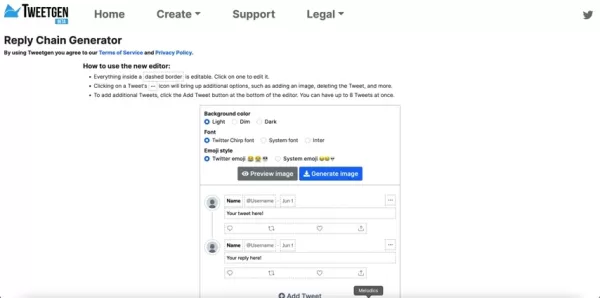
The homepage layout may differ slightly from the reply chain generator page. On the generator page, you’ll find customization options for backgrounds, fonts, and emojis, plus tweet input fields. Tweetgen’s intuitive interface makes creating realistic Twitter conversations easy. Click the 'Create' button in the top navigation bar to access all generators, including the reply chain tool.
Ensure you’re on the correct page to access Tweetgen’s powerful customization features for social media mockups. This makes the process smooth. Now, explore Tweetgen’s customization options.
Customizing Backgrounds, Fonts, and Emojis
Tweetgen’s platform lets you tailor the look of your Twitter reply chain.
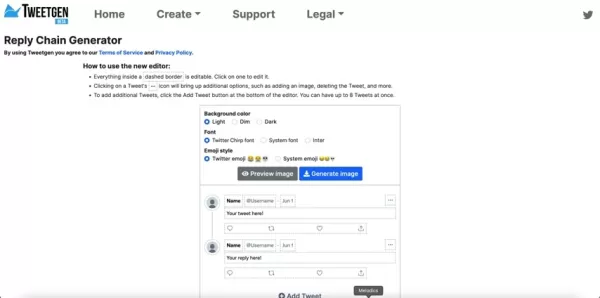
Adjust background color, font style, and emoji style to match your brand or preferences. Here’s a breakdown:
Background Color: Choose from Light, Dim, or Dark. Light offers a clean look, Dim provides a darker tone, and Dark mimics night mode. Select the best fit for your aesthetic or scenario.
Font Style: Pick from Twitter Chirp Font, System Font, or Inter. Twitter Chirp Font mirrors the official Twitter style, while System Font and Inter offer standard looks for flexibility.
Emoji Style: Toggle between Twitter Emoji and System Emoji styles to customize the look of your tweets based on the system used.
These options ensure your Twitter reply chain looks authentic. Experiment with combinations to perfect your visual content.
Advanced Customization: Avatars, Usernames, and Tweets
Uploading and Managing Avatars
Enhance realism by uploading custom avatars for each account in your Twitter reply chain.
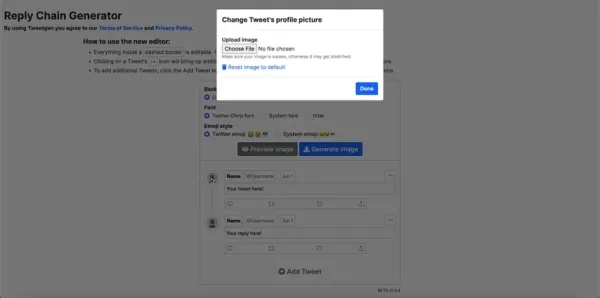
This feature is ideal for mimicking real accounts or creating fictional characters. Click the default image placeholder next to the username to open a file selector and choose an image from your computer.
Selecting an Image: Choose a square image to avoid stretching. Tweetgen auto-resizes it to fit the avatar frame.
Replacing the Default Avatar: After selecting and confirming your image, it replaces the default, adding authenticity. Use brand logos or product shots for extra realism.
Custom avatars make your Twitter reply chains more engaging and believable. Next, customize usernames and tweet content.
Customizing Usernames, Dates, and Tweet Content
Tweetgen offers control over usernames and dates for authentic content.
Modifying Usernames: Click the username field to enter a custom handle, ensuring consistency with your theme.
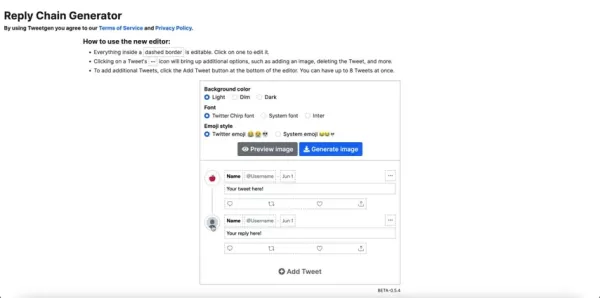
Modifying Dates: Adjust dates to match your timeline, ensuring correct formatting for user recognition.
Crafting Tweets: Write messages in the tweet text areas. Create engaging conversations, stories, or product showcases. Be creative for realistic tweets.
Tips for Realistic Tweets:
- Use natural language, avoiding formal jargon.
- Add relevant hashtags for visibility.
- Incorporate emojis for personality.
- Keep tweets concise, like real Twitter posts.
- Engage with questions or replies for dynamic content.
Craft tweets carefully for authentic, standout content, making Tweetgen a powerful tool for Twitter images.
Adding More Tweets and Building the Conversation
Create engaging reply chains by adding multiple tweets with Tweetgen’s 'Add Tweet' button, supporting up to eight tweets.
Adding Tweets: Click 'Add Tweet' to add a new input field. Customize its avatar, username, date, and content like previous tweets.
Structuring the Conversation: Mimic real Twitter flow with an initial tweet followed by replies. Include questions or varied perspectives for dynamic exchanges.
Deleting Tweets: Remove unwanted tweets using the trashcan icon for flexibility in refining your conversation.
The 'Add Tweet' feature helps create compelling reply chains for storytelling or marketing.
Previewing and Generating the Image
Preview your Twitter reply chain to ensure perfection before generating.
Previewing the Image: Click 'Preview image' to view the chain in a modal window. Check avatars, usernames, and formatting.
Generating the Image: If satisfied, click 'Generate image' to create and download the final product for social media, blogs, or presentations.
Previewing prevents errors, ensuring professional Twitter reply chain images with ease.
Step-by-Step Guide to Using Tweetgen
Step 1: Visit Tweetgen
Open your browser and go to the Tweetgen website, ensuring you’re on the reply chain generator page.
Step 2: Customize Appearance
Select background color, font style, and emoji style to match your preferences.
Step 3: Upload Avatars
Click the default image placeholder to upload square avatars for each account.
Step 4: Edit Usernames and Dates
Modify usernames and dates to align with your scenario.
Step 5: Write Tweets
Craft concise, natural tweets with hashtags and emojis for realism.
Step 6: Add More Tweets (Optional)
Click 'Add Tweet' to expand the conversation, repeating steps 3-5.
Step 7: Preview and Generate
Preview the image, then generate and download the final Twitter reply chain.
Tweetgen Pricing
Tweetgen is Free
Tweetgen is entirely free, with no hidden fees or subscriptions, perfect for budget-conscious creators.
Tweetgen: Pros and Cons
Pros
Free to use
User-friendly interface
Customizable backgrounds, fonts, and emojis
Avatar upload support
Multiple tweet support
Preview before generating
Fast image generation
Cons
Limited to Twitter images
No advanced editing features
May not reflect the latest Twitter design updates
Tweetgen’s Core Features
Feature Overview
Tweetgen’s features make creating realistic Twitter reply chains simple:
- Customizable Background: Light, Dim, or Dark options.
- Font Styles: Twitter Chirp Font, System Font, or Inter.
- Emoji Options: Twitter or System Emoji styles.
- Avatar Uploads: Add custom avatars for each account.
- Username and Date Customization: Enhance realism.
- Multiple Tweets: Support for up to eight tweets.
- Preview Option: Check before generating.
- Free to Use: No costs or subscriptions.
Use Cases for Tweetgen
Creative Uses
Tweetgen suits various applications:
- Content Creation: Showcase fictional or product-focused conversations.
- Marketing: Promote products with unique reply chains.
- Social Media Mockups: Create designs for presentations.
- Storytelling: Craft narratives through tweets.
- Education: Illustrate Twitter interactions.
- Entertainment: Generate humorous Twitter exchanges.
Frequently Asked Questions about Tweetgen
Is Tweetgen free?
Yes, Tweetgen is completely free with no hidden costs.
How many tweets can I add?
Up to eight tweets per reply chain.
Can I upload custom avatars?
Yes, upload avatars for each account.
What font styles are available?
Twitter Chirp Font, System Font, and Inter.
Can I preview before generating?
Yes, preview ensures everything looks perfect.
Related Questions
Tips for Realistic Twitter Reply Chains
Use natural language, hashtags, and emojis. Keep tweets concise and engaging. Ensure high-quality, square avatars. Compare Twitter Chirp Font and System Font to choose the best fit. Focus on realistic, compelling content.
Alternatives to Tweetgen?
Alternatives include FakeTweets.com for customizable tweets, Tweet It! for quote images, and Canva for custom Twitter designs. Tweetgen’s ease and customization make it a top choice.
Related article
 Slackbot Becomes an AI Agent
Slackbot, the automated assistant embedded in Salesforce’s corporate messaging platform Slack, is evolving into an AI agent. Salesforce CTO Parker Harris envisions it achieving viral status comparable to OpenAI’s ChatGPT.The cloud software giant laun
ByteDance Boosts Core AI Incentives as Doubao Surges 14.6%
ByteDance recently convened a DouBao equity briefing to unveil fresh incentive policies for staff involved in the DouBao division. The strike price for DouBao shares has been lifted from $14.85 in June 2026 to $17.02, marking an approximate 14.6% inc
MiniMax Unveils 10x Team Program to Incentivize Global AI Experts
MiniMax (Xiyu Technology), the General Artificial Intelligence Lab, has officially launched "10x Team," a global talent collaboration initiative. This program aims to recruit top experts across industries to explore the deep application of large mode
Related Special Topic Recommendations
Education and Learning
Slackbot Becomes an AI Agent
Slackbot, the automated assistant embedded in Salesforce’s corporate messaging platform Slack, is evolving into an AI agent. Salesforce CTO Parker Harris envisions it achieving viral status comparable to OpenAI’s ChatGPT.The cloud software giant laun
ByteDance Boosts Core AI Incentives as Doubao Surges 14.6%
ByteDance recently convened a DouBao equity briefing to unveil fresh incentive policies for staff involved in the DouBao division. The strike price for DouBao shares has been lifted from $14.85 in June 2026 to $17.02, marking an approximate 14.6% inc
MiniMax Unveils 10x Team Program to Incentivize Global AI Experts
MiniMax (Xiyu Technology), the General Artificial Intelligence Lab, has officially launched "10x Team," a global talent collaboration initiative. This program aims to recruit top experts across industries to explore the deep application of large mode
Related Special Topic Recommendations
Education and Learning
 AI Study Tools for Homework and Exam Prep
2026 Latest Best AI Study Tools for Homework and Exam Prep! XIX.AI curates a top-rated list of powerful, game-changing tools that help students boost productivity, streamline homework completion, and ace exams through real-world tests. Get a free vs paid comparison, detailed rankings, and must-try options to unlock your AI edge. Explore now!
 10 tools
 xix.ai
Music composition
AI Vocal Demo Tools for Songwriters, Hooks, Toplines, and Multilingual Draft Sessions
xix.ai
Music composition
AI Vocal Demo Tools for Songwriters, Hooks, Toplines, and Multilingual Draft Sessions
2026 Latest Best AI Vocal Demo Tools for Songwriters, Hook Creators, and Multi-Language Content Teams! XIX.AI has curated a top-rated list of powerful game-changing tools that go through rigorous real-world tests. You’ll find detailed free vs paid comparison data, comprehensive rankings, and must-try options to help you boost writing efficiency and unlock your creative potential. Explore now to discover your perfect tool for all your content needs!
9 tools
xix.ai
Business
Best AI Competitive Research Tools for Small Businesses
2026 Latest Best Top-rated AI Competitive Research Tools for Small Businesses! XIX.AI has curated a highly powerful game-changing collection, updated weekly with rigorous real-world tests and detailed rankings. You can find a comprehensive free vs paid comparison to help you identify the must-try tools that boost your productivity and give you a competitive edge. Explore now to discover your perfect tool!
9 tools
xix.ai
Image editing
Photoshop AI Retouch Tools for Ecommerce Apparel, Skin Cleanup, and Color Consistency
2026 Latest Best Photoshop AI retouch tools for ecommerce apparel, skin cleanup, and color consistency! This top-rated curated list features powerful game-changing solutions that help you boost writing efficiency, streamline content creation, and achieve perfect visual results effortlessly. Each tool has undergone real-world tests through weekly updated rankings, complete with free vs paid comparison details. Backed by XIX.AI, it’s the must-try guide for anyone aiming to unlock your AI edge. Explore now!
10 tools
xix.ai
Prompt
Best AI Prompt Libraries for ChatGPT Workflows
2026 Latest Best Top-Rated AI Prompt Libraries for optimizing all types of ChatGPT workflows. XIX.AI has curated a powerful, game-changing collection that goes through rigorous real-world tests to ensure top performance. You can find detailed free vs paid comparisons and expert rankings to help you choose the must-try tools that boost your productivity and unlock your AI edge. Explore now!
11 tools
xix.ai
Education and Learning
AI Quiz Builder Platforms for Teachers, Tutors, and Cohort-Based Learning Programs
2026 Latest Best AI Quiz Builder Platforms for Teachers, Tutors, and Cohort-Based Learning Programs! XIX.AI has curated a top-rated list of powerful game-changing tools that go through real-world tests to deliver accurate rankings. These must-try platforms help boost writing efficiency, streamline content creation, and simplify quiz design across all learning scenarios. Explore now to discover your perfect tool for unlocking your AI edge in teaching!
13 tools
xix.ai

 Comments (3)
0/500
Comments (3)
0/500
![JoeLewis]()
Als Social Media Manager finde ich solche Tools echt praktisch, aber irgendwie auch beängstigend? 😅 Wenn jeder täuschend echte Reply Chains erstellen kann, wie erkennt man dann noch, was echt ist? Die Grenze zwischen kreativem Content und Manipulation wird immer dünner... Trotzdem, für Kampagnen-Ideen bestimmt super hilfreich!
![WillieHernández]()
すごい!こういうツールがあればSNSの練習にぴったりだね。でも生成されたリプライチェーンが本物と区別つかなくなるのがちょっと怖いかも…🤔
![HarryWilliams]()
Tweetgen sounds like a game-changer for content creators! I can already imagine crafting some hilarious fake reply chains to spice up my marketing posts. 😎 Anyone tried it yet? How realistic are these threads?
Craft compelling social media content with innovative tools. Tweetgen is an intuitive website for generating realistic Twitter reply chain images. Ideal for content creators, marketers, or social media fans, Tweetgen lets you customize backgrounds, fonts, and emojis to create authentic-looking images that grab attention. This guide covers Tweetgen’s basics and key features.
Key Points
Tweetgen creates Twitter reply chain images.
Customize background colors for Twitter images.
Adjust font styles to your liking.
Choose emoji styles for a personal touch.
Upload avatars for each Twitter account in the chain.
Modify usernames and dates to fit your scenario.
Add multiple tweets to form a full conversation.
Preview images before final generation.
Save and use generated images for various purposes.
Simple and user-friendly tool.
Getting Started with Tweetgen
Accessing the Tweetgen Reply Chain Generator
Start by visiting the Tweetgen website.
The homepage layout may differ slightly from the reply chain generator page. On the generator page, you’ll find customization options for backgrounds, fonts, and emojis, plus tweet input fields. Tweetgen’s intuitive interface makes creating realistic Twitter conversations easy. Click the 'Create' button in the top navigation bar to access all generators, including the reply chain tool.
Ensure you’re on the correct page to access Tweetgen’s powerful customization features for social media mockups. This makes the process smooth. Now, explore Tweetgen’s customization options.
Customizing Backgrounds, Fonts, and Emojis
Tweetgen’s platform lets you tailor the look of your Twitter reply chain.
Adjust background color, font style, and emoji style to match your brand or preferences. Here’s a breakdown:
Background Color: Choose from Light, Dim, or Dark. Light offers a clean look, Dim provides a darker tone, and Dark mimics night mode. Select the best fit for your aesthetic or scenario.
Font Style: Pick from Twitter Chirp Font, System Font, or Inter. Twitter Chirp Font mirrors the official Twitter style, while System Font and Inter offer standard looks for flexibility.
Emoji Style: Toggle between Twitter Emoji and System Emoji styles to customize the look of your tweets based on the system used.
These options ensure your Twitter reply chain looks authentic. Experiment with combinations to perfect your visual content.
Advanced Customization: Avatars, Usernames, and Tweets
Uploading and Managing Avatars
Enhance realism by uploading custom avatars for each account in your Twitter reply chain.
This feature is ideal for mimicking real accounts or creating fictional characters. Click the default image placeholder next to the username to open a file selector and choose an image from your computer.
Selecting an Image: Choose a square image to avoid stretching. Tweetgen auto-resizes it to fit the avatar frame.
Replacing the Default Avatar: After selecting and confirming your image, it replaces the default, adding authenticity. Use brand logos or product shots for extra realism.
Custom avatars make your Twitter reply chains more engaging and believable. Next, customize usernames and tweet content.
Customizing Usernames, Dates, and Tweet Content
Tweetgen offers control over usernames and dates for authentic content.
Modifying Usernames: Click the username field to enter a custom handle, ensuring consistency with your theme.
Modifying Dates: Adjust dates to match your timeline, ensuring correct formatting for user recognition.
Crafting Tweets: Write messages in the tweet text areas. Create engaging conversations, stories, or product showcases. Be creative for realistic tweets.
Tips for Realistic Tweets:
- Use natural language, avoiding formal jargon.
- Add relevant hashtags for visibility.
- Incorporate emojis for personality.
- Keep tweets concise, like real Twitter posts.
- Engage with questions or replies for dynamic content.
Craft tweets carefully for authentic, standout content, making Tweetgen a powerful tool for Twitter images.
Adding More Tweets and Building the Conversation
Create engaging reply chains by adding multiple tweets with Tweetgen’s 'Add Tweet' button, supporting up to eight tweets.
Adding Tweets: Click 'Add Tweet' to add a new input field. Customize its avatar, username, date, and content like previous tweets.
Structuring the Conversation: Mimic real Twitter flow with an initial tweet followed by replies. Include questions or varied perspectives for dynamic exchanges.
Deleting Tweets: Remove unwanted tweets using the trashcan icon for flexibility in refining your conversation.
The 'Add Tweet' feature helps create compelling reply chains for storytelling or marketing.
Previewing and Generating the Image
Preview your Twitter reply chain to ensure perfection before generating.
Previewing the Image: Click 'Preview image' to view the chain in a modal window. Check avatars, usernames, and formatting.
Generating the Image: If satisfied, click 'Generate image' to create and download the final product for social media, blogs, or presentations.
Previewing prevents errors, ensuring professional Twitter reply chain images with ease.
Step-by-Step Guide to Using Tweetgen
Step 1: Visit Tweetgen
Open your browser and go to the Tweetgen website, ensuring you’re on the reply chain generator page.
Step 2: Customize Appearance
Select background color, font style, and emoji style to match your preferences.
Step 3: Upload Avatars
Click the default image placeholder to upload square avatars for each account.
Step 4: Edit Usernames and Dates
Modify usernames and dates to align with your scenario.
Step 5: Write Tweets
Craft concise, natural tweets with hashtags and emojis for realism.
Step 6: Add More Tweets (Optional)
Click 'Add Tweet' to expand the conversation, repeating steps 3-5.
Step 7: Preview and Generate
Preview the image, then generate and download the final Twitter reply chain.
Tweetgen Pricing
Tweetgen is Free
Tweetgen is entirely free, with no hidden fees or subscriptions, perfect for budget-conscious creators.
Tweetgen: Pros and Cons
Pros
Free to use
User-friendly interface
Customizable backgrounds, fonts, and emojis
Avatar upload support
Multiple tweet support
Preview before generating
Fast image generation
Cons
Limited to Twitter images
No advanced editing features
May not reflect the latest Twitter design updates
Tweetgen’s Core Features
Feature Overview
Tweetgen’s features make creating realistic Twitter reply chains simple:
- Customizable Background: Light, Dim, or Dark options.
- Font Styles: Twitter Chirp Font, System Font, or Inter.
- Emoji Options: Twitter or System Emoji styles.
- Avatar Uploads: Add custom avatars for each account.
- Username and Date Customization: Enhance realism.
- Multiple Tweets: Support for up to eight tweets.
- Preview Option: Check before generating.
- Free to Use: No costs or subscriptions.
Use Cases for Tweetgen
Creative Uses
Tweetgen suits various applications:
- Content Creation: Showcase fictional or product-focused conversations.
- Marketing: Promote products with unique reply chains.
- Social Media Mockups: Create designs for presentations.
- Storytelling: Craft narratives through tweets.
- Education: Illustrate Twitter interactions.
- Entertainment: Generate humorous Twitter exchanges.
Frequently Asked Questions about Tweetgen
Is Tweetgen free?
Yes, Tweetgen is completely free with no hidden costs.
How many tweets can I add?
Up to eight tweets per reply chain.
Can I upload custom avatars?
Yes, upload avatars for each account.
What font styles are available?
Twitter Chirp Font, System Font, and Inter.
Can I preview before generating?
Yes, preview ensures everything looks perfect.
Related Questions
Tips for Realistic Twitter Reply Chains
Use natural language, hashtags, and emojis. Keep tweets concise and engaging. Ensure high-quality, square avatars. Compare Twitter Chirp Font and System Font to choose the best fit. Focus on realistic, compelling content.
Alternatives to Tweetgen?
Alternatives include FakeTweets.com for customizable tweets, Tweet It! for quote images, and Canva for custom Twitter designs. Tweetgen’s ease and customization make it a top choice.








 Slackbot Becomes an AI Agent
Slackbot, the automated assistant embedded in Salesforce’s corporate messaging platform Slack, is evolving into an AI agent. Salesforce CTO Parker Harris envisions it achieving viral status comparable to OpenAI’s ChatGPT.The cloud software giant laun
Slackbot Becomes an AI Agent
Slackbot, the automated assistant embedded in Salesforce’s corporate messaging platform Slack, is evolving into an AI agent. Salesforce CTO Parker Harris envisions it achieving viral status comparable to OpenAI’s ChatGPT.The cloud software giant laun
 ByteDance Boosts Core AI Incentives as Doubao Surges 14.6%
ByteDance recently convened a DouBao equity briefing to unveil fresh incentive policies for staff involved in the DouBao division. The strike price for DouBao shares has been lifted from $14.85 in June 2026 to $17.02, marking an approximate 14.6% inc
ByteDance Boosts Core AI Incentives as Doubao Surges 14.6%
ByteDance recently convened a DouBao equity briefing to unveil fresh incentive policies for staff involved in the DouBao division. The strike price for DouBao shares has been lifted from $14.85 in June 2026 to $17.02, marking an approximate 14.6% inc
 MiniMax Unveils 10x Team Program to Incentivize Global AI Experts
MiniMax (Xiyu Technology), the General Artificial Intelligence Lab, has officially launched "10x Team," a global talent collaboration initiative. This program aims to recruit top experts across industries to explore the deep application of large mode
MiniMax Unveils 10x Team Program to Incentivize Global AI Experts
MiniMax (Xiyu Technology), the General Artificial Intelligence Lab, has officially launched "10x Team," a global talent collaboration initiative. This program aims to recruit top experts across industries to explore the deep application of large mode

2026 Latest Best AI Study Tools for Homework and Exam Prep! XIX.AI curates a top-rated list of powerful, game-changing tools that help students boost productivity, streamline homework completion, and ace exams through real-world tests. Get a free vs paid comparison, detailed rankings, and must-try options to unlock your AI edge. Explore now!
10 tools
xix.ai

2026 Latest Best AI Vocal Demo Tools for Songwriters, Hook Creators, and Multi-Language Content Teams! XIX.AI has curated a top-rated list of powerful game-changing tools that go through rigorous real-world tests. You’ll find detailed free vs paid comparison data, comprehensive rankings, and must-try options to help you boost writing efficiency and unlock your creative potential. Explore now to discover your perfect tool for all your content needs!
9 tools
xix.ai

2026 Latest Best Top-rated AI Competitive Research Tools for Small Businesses! XIX.AI has curated a highly powerful game-changing collection, updated weekly with rigorous real-world tests and detailed rankings. You can find a comprehensive free vs paid comparison to help you identify the must-try tools that boost your productivity and give you a competitive edge. Explore now to discover your perfect tool!
9 tools
xix.ai

2026 Latest Best Photoshop AI retouch tools for ecommerce apparel, skin cleanup, and color consistency! This top-rated curated list features powerful game-changing solutions that help you boost writing efficiency, streamline content creation, and achieve perfect visual results effortlessly. Each tool has undergone real-world tests through weekly updated rankings, complete with free vs paid comparison details. Backed by XIX.AI, it’s the must-try guide for anyone aiming to unlock your AI edge. Explore now!
10 tools
xix.ai

2026 Latest Best Top-Rated AI Prompt Libraries for optimizing all types of ChatGPT workflows. XIX.AI has curated a powerful, game-changing collection that goes through rigorous real-world tests to ensure top performance. You can find detailed free vs paid comparisons and expert rankings to help you choose the must-try tools that boost your productivity and unlock your AI edge. Explore now!
11 tools
xix.ai

2026 Latest Best AI Quiz Builder Platforms for Teachers, Tutors, and Cohort-Based Learning Programs! XIX.AI has curated a top-rated list of powerful game-changing tools that go through real-world tests to deliver accurate rankings. These must-try platforms help boost writing efficiency, streamline content creation, and simplify quiz design across all learning scenarios. Explore now to discover your perfect tool for unlocking your AI edge in teaching!
13 tools
xix.ai

Als Social Media Manager finde ich solche Tools echt praktisch, aber irgendwie auch beängstigend? 😅 Wenn jeder täuschend echte Reply Chains erstellen kann, wie erkennt man dann noch, was echt ist? Die Grenze zwischen kreativem Content und Manipulation wird immer dünner... Trotzdem, für Kampagnen-Ideen bestimmt super hilfreich!
すごい!こういうツールがあればSNSの練習にぴったりだね。でも生成されたリプライチェーンが本物と区別つかなくなるのがちょっと怖いかも…🤔
Tweetgen sounds like a game-changer for content creators! I can already imagine crafting some hilarious fake reply chains to spice up my marketing posts. 😎 Anyone tried it yet? How realistic are these threads?












