


 Home
HomeTopaz Video AI: Boost Your Videos Using AI Upscaling Technology
Are you looking to revitalize your old video footage or enhance the quality of your current projects? Topaz Video AI might just be the tool you need. This software harnesses the power of artificial intelligence to upscale and enhance videos, bringing new life to your content. In this blog, we'll dive into what Topaz Video AI can do, its standout features, and how it can transform your video projects.
Key Points
- Topaz Video AI can upscale videos to stunning 4K or even 8K resolution.
- It uses sophisticated AI models to minimize noise and enhance video details.
- Perfect for both restoring old footage and enhancing modern videos.
- Customizable settings allow you to fine-tune the software's performance.
- Understanding system and graphics requirements is crucial for optimal use.
Understanding Topaz Video AI
What is Topaz Video AI?
Topaz Video AI is not your average video editing software; it's a powerhouse that uses artificial intelligence to upscale and enhance video footage. What makes it stand out are its advanced algorithms, which not only increase the resolution of your videos but also reduce noise, sharpen details, and even de-interlace old footage. It's like giving your videos a facelift, making them suitable for today's high-definition displays. Whether you're a filmmaker looking to restore your archives or just someone who wants to improve their home videos, Topaz Video AI is your go-to tool. The AI models are trained on extensive datasets, enabling the software to fill in missing details and produce a more realistic, high-quality output.

What's more, Topaz Video AI offers a variety of processing options, allowing you to tailor enhancements to your needs. It supports batch processing, which is a godsend for those looking to enhance multiple videos at once, streamlining your workflow and saving you precious time. In a nutshell, Topaz Video AI is a robust solution for anyone aiming to elevate their video content's quality and resolution.
Key Features That Drive Video Enhancement
Topaz Video AI packs a punch with its core features, each designed to enhance and upscale your videos effectively:
- AI Upscaling: This feature uses AI models trained on vast datasets to intelligently upscale low-resolution videos to 4K or 8K. It fills in missing details, reduces artifacts, and maintains image quality, making your videos look crisp and clear.
- Noise Reduction: With advanced algorithms, Topaz Video AI eliminates noise and grain, improving video clarity and detail. This is a game-changer for restoring old or poorly shot footage, making it look cleaner and more appealing.
- De-interlacing: Perfect for those old VHS tapes, this feature removes interlacing artifacts and jagged edges, converting interlaced video formats into progressive scan formats compatible with modern displays.
- Frame Interpolation: Want smoother motion in your videos? Topaz Video AI can increase the frame rate, reducing motion artifacts and delivering seamless, visually pleasing results.
Step-by-Step Instructions for Using Topaz Video AI
Importing and Preparing Your Video
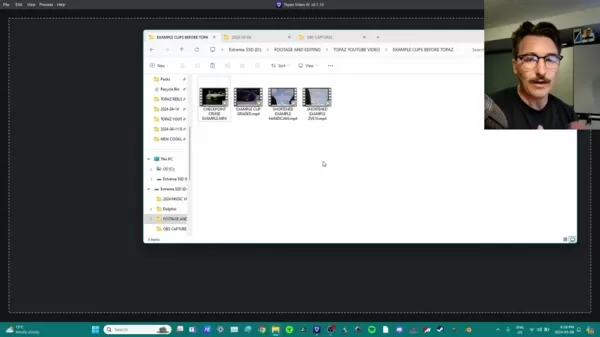
Before you can start enhancing your video, you'll need to import it into Topaz Video AI. Here's how you do it:
- Launch Topaz Video AI: Open the application on your computer.
- Import Video: Click on the "Browse" button or drag and drop your video file into the interface.
- Preview and Trim: Take a look at your video and use the trimming tools to select the segment you want to enhance. This helps save processing time by focusing only on the necessary parts.
- Adjust Basic Settings: Here, you can adjust the video type, choose the AI model, and configure video parameters to suit your needs.
- Select Output Settings: Choose your desired output settings, including resolution (4K, 8K), frame rate, and file format. Options include MOV and MP4, along with various codecs like H.264 and H.265.
Enhancing and Upscaling Your Video
Now that your video is ready, it's time to enhance its visual quality using Topaz Video AI's powerful AI-driven capabilities:
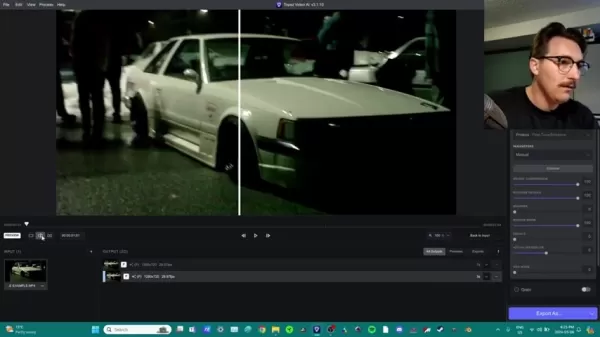
- Select AI Model: Choose the right AI model for your project. For instance, Proteus - Fine-Tune Enhance is great for adjusting ISO and ISO grain in your footage.
- Manual Parameter Configuration: Adjust settings like compression reversion, detail recovery, and noise reduction to get the best results. This is especially important for night-time footage.
- Fine-Tuning and Preview: Experiment with different settings to find the sweet spot. Use the preview window to monitor your enhancements. Topaz Video AI lets you preview a small segment before processing the entire video, which helps optimize settings and reduce processing time.
Exporting Your Enhanced Video
Once you're happy with the enhancements, it's time to export your video:
- Review Output Settings: Confirm the encoder and video container you've chosen.
- Verify Resolution: Double-check the video resolution to ensure it meets your expectations.
- Start Export: Click the Export button to begin rendering. The time it takes will depend on the video's length, resolution, and your computer's hardware.
- Final Touches: With your video now at its best quality, you're ready to share it on social media or archive it for future use.

Tips and Tricks to Maximize Topaz Video AI
Use Preview Windows for Faster Editing
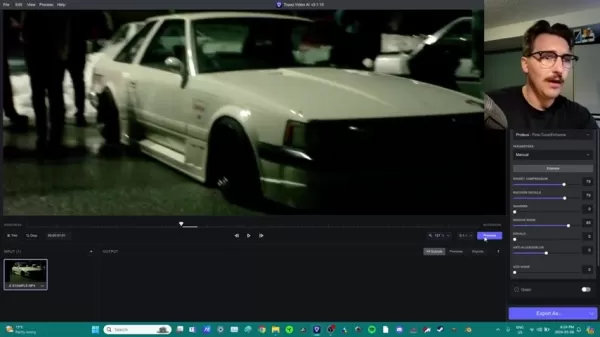
Instead of editing the entire video at once, use the small preview windows to experiment with settings. This can save you a lot of time and help you achieve the best results before applying them to the whole video.
Choose the Correct Camera (if possible)
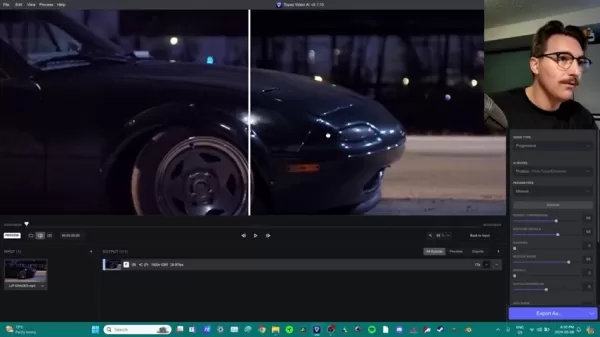
If you have the option, using a higher-quality camera like a Sony can capture more details, making the AI processing more effective. But don't let that discourage you—Topaz Video AI can still work wonders with footage from lower-resolution devices.
Topaz Video AI Pricing
Understanding the Cost
Topaz Video AI comes with a one-time purchase price of around $300. While it's pricier than some other AI upscaling software, its advanced capabilities make it worth the investment. Plus, it's a lifetime purchase, so no recurring subscription fees to worry about.
The Final Word on Topaz Video AI
Pros
- Works well even on low-quality footage.
- Easily reduces color and compression artifacts.
- User-friendly and requires little skill to operate.
Cons
- No free trial available.
- Not all footage can be perfectly restored.
- Some features, like exporting, can take time.
Core Features
Main Functionality
Topaz Video AI is an AI-driven software designed to upscale video quality and reduce noise. The effectiveness of its features depends on your budget and hardware. A high-performance graphics card is recommended for the best results.
Use Cases
Who can use Topaz Video AI?
Anyone looking to improve video quality without extensive editing experience will find Topaz Video AI incredibly useful. It's also a valuable addition to a professional's toolkit, offering advanced AI editing capabilities that can complement other editing software.
Frequently Asked Questions
How Long Does It Take to Process a Video?
The processing time varies based on the video's length, your machine's CPU, and the amount of noise in the footage. Keep this in mind when planning your video editing projects.
Does AI Video Upscaling Really Work?
Topaz Video AI uses AI algorithms to upscale videos, but it can't create resolution out of thin air. The quality of your input footage matters, so be realistic about what AI upscaling can achieve.
What File Formats are Compatible With Topaz Video AI?
The software supports most common video formats, including MP4, MOV, and MKV, making it easy to integrate with your existing media library.
Related Questions
Are There Any Alternatives to Topaz Video AI?
Yes, there are other AI upscaling tools like AVCLabs Video Enhancer AI, DVDFab Video Enhancer AI, and HitPaw Video Enhancer. Each offers different functionalities, such as colorizing old black and white footage. However, Topaz Video AI stands out for its cost-effectiveness, user-friendliness, and powerful capabilities.
Related article
 Swedish AI Startup Lovable Eyes $13.2 Billion Valuation After Major Funding Round
As AI-driven coding tools gain traction, Swedish startup Lovable has secured a major funding round. The company aims to raise $3 billion, potentially boosting its valuation to $13.2 billion—double the $6.6 billion recorded last December. Menlo Ventur
Google Tests Remy AI Agent for Gemini as Focus Shifts to User Control
According to Business Insider, Google is testing Remy, a new AI personal agent for Gemini. This tool aims to execute tasks on behalf of users, streamlining both professional workflows and daily routines.Currently, Remy is undergoing testing in an int
How to fix Core Web Vitals for better SEO rankings
Streamline Report Card Comments with AI ToolsIntroductionAI Tools for Generating Report Card CommentsMagic SchoolAlmanac AIChat GPTUsing Magic School to Generate Report Card CommentsLogging into Magic SchoolSelecting the Report Card Comments ToolCust
Related Special Topic Recommendations
writing
Swedish AI Startup Lovable Eyes $13.2 Billion Valuation After Major Funding Round
As AI-driven coding tools gain traction, Swedish startup Lovable has secured a major funding round. The company aims to raise $3 billion, potentially boosting its valuation to $13.2 billion—double the $6.6 billion recorded last December. Menlo Ventur
Google Tests Remy AI Agent for Gemini as Focus Shifts to User Control
According to Business Insider, Google is testing Remy, a new AI personal agent for Gemini. This tool aims to execute tasks on behalf of users, streamlining both professional workflows and daily routines.Currently, Remy is undergoing testing in an int
How to fix Core Web Vitals for better SEO rankings
Streamline Report Card Comments with AI ToolsIntroductionAI Tools for Generating Report Card CommentsMagic SchoolAlmanac AIChat GPTUsing Magic School to Generate Report Card CommentsLogging into Magic SchoolSelecting the Report Card Comments ToolCust
Related Special Topic Recommendations
writing
 Best AI Outline Generators for Long-Form SEO Articles
2026 Latest Best Top-Rated AI Outline Generators for Long-Form SEO Articles, meticulously curated by XIX.AI. These powerful tools offer game-changing assistance in creating high-quality content quickly, boosting writing efficiency significantly. Get a free vs paid comparison along with real-world tests and detailed rankings to help you find the must-try option that suits your needs. Explore now to unlock your AI edge.
 8 tools
 xix.ai
Education and Learning
AI Study Tools for Homework and Exam Prep
xix.ai
Education and Learning
AI Study Tools for Homework and Exam Prep
2026 Latest Best AI Study Tools for Homework and Exam Prep! XIX.AI curates a top-rated list of powerful, game-changing tools that help students boost productivity, streamline homework completion, and ace exams through real-world tests. Get a free vs paid comparison, detailed rankings, and must-try options to unlock your AI edge. Explore now!
10 tools
xix.ai
Music composition
AI Vocal Demo Tools for Songwriters, Hooks, Toplines, and Multilingual Draft Sessions
2026 Latest Best AI Vocal Demo Tools for Songwriters, Hook Creators, and Multi-Language Content Teams! XIX.AI has curated a top-rated list of powerful game-changing tools that go through rigorous real-world tests. You’ll find detailed free vs paid comparison data, comprehensive rankings, and must-try options to help you boost writing efficiency and unlock your creative potential. Explore now to discover your perfect tool for all your content needs!
9 tools
xix.ai
Business
Best AI Competitive Research Tools for Small Businesses
2026 Latest Best Top-rated AI Competitive Research Tools for Small Businesses! XIX.AI has curated a highly powerful game-changing collection, updated weekly with rigorous real-world tests and detailed rankings. You can find a comprehensive free vs paid comparison to help you identify the must-try tools that boost your productivity and give you a competitive edge. Explore now to discover your perfect tool!
9 tools
xix.ai
Image editing
Photoshop AI Retouch Tools for Ecommerce Apparel, Skin Cleanup, and Color Consistency
2026 Latest Best Photoshop AI retouch tools for ecommerce apparel, skin cleanup, and color consistency! This top-rated curated list features powerful game-changing solutions that help you boost writing efficiency, streamline content creation, and achieve perfect visual results effortlessly. Each tool has undergone real-world tests through weekly updated rankings, complete with free vs paid comparison details. Backed by XIX.AI, it’s the must-try guide for anyone aiming to unlock your AI edge. Explore now!
10 tools
xix.ai
Prompt
Best AI Prompt Libraries for ChatGPT Workflows
2026 Latest Best Top-Rated AI Prompt Libraries for optimizing all types of ChatGPT workflows. XIX.AI has curated a powerful, game-changing collection that goes through rigorous real-world tests to ensure top performance. You can find detailed free vs paid comparisons and expert rankings to help you choose the must-try tools that boost your productivity and unlock your AI edge. Explore now!
11 tools
xix.ai

 Comments (32)
0/500
Comments (32)
0/500
![JasonRoberts]()
¿Es Topaz Video AI realmente tan bueno como dicen? 🤔 Me pregunto si el upscaling con IA podría funcionar bien para restaurar videos familiares antiguos, pero temo que el resultado parezca demasiado artificial. ¿Alguien lo ha probado con material muy degradado?
![MarkScott]()
This AI upscaling sounds like magic! I tried Topaz Video AI on some old family videos, and it’s like they were shot yesterday. Super impressed with the clarity, but I wonder how it handles super low-res clips. Anyone tested it on grainy VHS stuff? 😎
![JeffreyClark]()
This AI upscaling sounds wild! My old vacation videos could use a glow-up. Anyone tried it on super grainy footage? 🤔
![JuanLopez]()
This AI upscaling sounds like magic! 😍 My old home videos could really use this to look crisp again. Anyone tried it on super grainy footage yet?
![BillyGarcía]()
This AI upscaling sounds like a game-changer for old home videos! Can't wait to try it and see my childhood clips in HD. 😍 Anyone else excited about this tech?
![BrianWalker]()
This AI upscaling sounds like magic! My old home videos could use a glow-up. Anyone tried Topaz yet? 🤔
Are you looking to revitalize your old video footage or enhance the quality of your current projects? Topaz Video AI might just be the tool you need. This software harnesses the power of artificial intelligence to upscale and enhance videos, bringing new life to your content. In this blog, we'll dive into what Topaz Video AI can do, its standout features, and how it can transform your video projects.
Key Points
- Topaz Video AI can upscale videos to stunning 4K or even 8K resolution.
- It uses sophisticated AI models to minimize noise and enhance video details.
- Perfect for both restoring old footage and enhancing modern videos.
- Customizable settings allow you to fine-tune the software's performance.
- Understanding system and graphics requirements is crucial for optimal use.
Understanding Topaz Video AI
What is Topaz Video AI?
Topaz Video AI is not your average video editing software; it's a powerhouse that uses artificial intelligence to upscale and enhance video footage. What makes it stand out are its advanced algorithms, which not only increase the resolution of your videos but also reduce noise, sharpen details, and even de-interlace old footage. It's like giving your videos a facelift, making them suitable for today's high-definition displays. Whether you're a filmmaker looking to restore your archives or just someone who wants to improve their home videos, Topaz Video AI is your go-to tool. The AI models are trained on extensive datasets, enabling the software to fill in missing details and produce a more realistic, high-quality output.
What's more, Topaz Video AI offers a variety of processing options, allowing you to tailor enhancements to your needs. It supports batch processing, which is a godsend for those looking to enhance multiple videos at once, streamlining your workflow and saving you precious time. In a nutshell, Topaz Video AI is a robust solution for anyone aiming to elevate their video content's quality and resolution.
Key Features That Drive Video Enhancement
Topaz Video AI packs a punch with its core features, each designed to enhance and upscale your videos effectively:
- AI Upscaling: This feature uses AI models trained on vast datasets to intelligently upscale low-resolution videos to 4K or 8K. It fills in missing details, reduces artifacts, and maintains image quality, making your videos look crisp and clear.
- Noise Reduction: With advanced algorithms, Topaz Video AI eliminates noise and grain, improving video clarity and detail. This is a game-changer for restoring old or poorly shot footage, making it look cleaner and more appealing.
- De-interlacing: Perfect for those old VHS tapes, this feature removes interlacing artifacts and jagged edges, converting interlaced video formats into progressive scan formats compatible with modern displays.
- Frame Interpolation: Want smoother motion in your videos? Topaz Video AI can increase the frame rate, reducing motion artifacts and delivering seamless, visually pleasing results.
Step-by-Step Instructions for Using Topaz Video AI
Importing and Preparing Your Video
Before you can start enhancing your video, you'll need to import it into Topaz Video AI. Here's how you do it:
- Launch Topaz Video AI: Open the application on your computer.
- Import Video: Click on the "Browse" button or drag and drop your video file into the interface.
- Preview and Trim: Take a look at your video and use the trimming tools to select the segment you want to enhance. This helps save processing time by focusing only on the necessary parts.
- Adjust Basic Settings: Here, you can adjust the video type, choose the AI model, and configure video parameters to suit your needs.
- Select Output Settings: Choose your desired output settings, including resolution (4K, 8K), frame rate, and file format. Options include MOV and MP4, along with various codecs like H.264 and H.265.
Enhancing and Upscaling Your Video
Now that your video is ready, it's time to enhance its visual quality using Topaz Video AI's powerful AI-driven capabilities:
- Select AI Model: Choose the right AI model for your project. For instance, Proteus - Fine-Tune Enhance is great for adjusting ISO and ISO grain in your footage.
- Manual Parameter Configuration: Adjust settings like compression reversion, detail recovery, and noise reduction to get the best results. This is especially important for night-time footage.
- Fine-Tuning and Preview: Experiment with different settings to find the sweet spot. Use the preview window to monitor your enhancements. Topaz Video AI lets you preview a small segment before processing the entire video, which helps optimize settings and reduce processing time.
Exporting Your Enhanced Video
Once you're happy with the enhancements, it's time to export your video:
- Review Output Settings: Confirm the encoder and video container you've chosen.
- Verify Resolution: Double-check the video resolution to ensure it meets your expectations.
- Start Export: Click the Export button to begin rendering. The time it takes will depend on the video's length, resolution, and your computer's hardware.
- Final Touches: With your video now at its best quality, you're ready to share it on social media or archive it for future use.
Tips and Tricks to Maximize Topaz Video AI
Use Preview Windows for Faster Editing
Instead of editing the entire video at once, use the small preview windows to experiment with settings. This can save you a lot of time and help you achieve the best results before applying them to the whole video.
Choose the Correct Camera (if possible)
If you have the option, using a higher-quality camera like a Sony can capture more details, making the AI processing more effective. But don't let that discourage you—Topaz Video AI can still work wonders with footage from lower-resolution devices.
Topaz Video AI Pricing
Understanding the Cost
Topaz Video AI comes with a one-time purchase price of around $300. While it's pricier than some other AI upscaling software, its advanced capabilities make it worth the investment. Plus, it's a lifetime purchase, so no recurring subscription fees to worry about.
The Final Word on Topaz Video AI
Pros
- Works well even on low-quality footage.
- Easily reduces color and compression artifacts.
- User-friendly and requires little skill to operate.
Cons
- No free trial available.
- Not all footage can be perfectly restored.
- Some features, like exporting, can take time.
Core Features
Main Functionality
Topaz Video AI is an AI-driven software designed to upscale video quality and reduce noise. The effectiveness of its features depends on your budget and hardware. A high-performance graphics card is recommended for the best results.
Use Cases
Who can use Topaz Video AI?
Anyone looking to improve video quality without extensive editing experience will find Topaz Video AI incredibly useful. It's also a valuable addition to a professional's toolkit, offering advanced AI editing capabilities that can complement other editing software.
Frequently Asked Questions
How Long Does It Take to Process a Video?
The processing time varies based on the video's length, your machine's CPU, and the amount of noise in the footage. Keep this in mind when planning your video editing projects.
Does AI Video Upscaling Really Work?
Topaz Video AI uses AI algorithms to upscale videos, but it can't create resolution out of thin air. The quality of your input footage matters, so be realistic about what AI upscaling can achieve.
What File Formats are Compatible With Topaz Video AI?
The software supports most common video formats, including MP4, MOV, and MKV, making it easy to integrate with your existing media library.
Related Questions
Are There Any Alternatives to Topaz Video AI?
Yes, there are other AI upscaling tools like AVCLabs Video Enhancer AI, DVDFab Video Enhancer AI, and HitPaw Video Enhancer. Each offers different functionalities, such as colorizing old black and white footage. However, Topaz Video AI stands out for its cost-effectiveness, user-friendliness, and powerful capabilities.








 Swedish AI Startup Lovable Eyes $13.2 Billion Valuation After Major Funding Round
As AI-driven coding tools gain traction, Swedish startup Lovable has secured a major funding round. The company aims to raise $3 billion, potentially boosting its valuation to $13.2 billion—double the $6.6 billion recorded last December. Menlo Ventur
Google Tests Remy AI Agent for Gemini as Focus Shifts to User Control
According to Business Insider, Google is testing Remy, a new AI personal agent for Gemini. This tool aims to execute tasks on behalf of users, streamlining both professional workflows and daily routines.Currently, Remy is undergoing testing in an int
Swedish AI Startup Lovable Eyes $13.2 Billion Valuation After Major Funding Round
As AI-driven coding tools gain traction, Swedish startup Lovable has secured a major funding round. The company aims to raise $3 billion, potentially boosting its valuation to $13.2 billion—double the $6.6 billion recorded last December. Menlo Ventur
Google Tests Remy AI Agent for Gemini as Focus Shifts to User Control
According to Business Insider, Google is testing Remy, a new AI personal agent for Gemini. This tool aims to execute tasks on behalf of users, streamlining both professional workflows and daily routines.Currently, Remy is undergoing testing in an int
 How to fix Core Web Vitals for better SEO rankings
Streamline Report Card Comments with AI ToolsIntroductionAI Tools for Generating Report Card CommentsMagic SchoolAlmanac AIChat GPTUsing Magic School to Generate Report Card CommentsLogging into Magic SchoolSelecting the Report Card Comments ToolCust
How to fix Core Web Vitals for better SEO rankings
Streamline Report Card Comments with AI ToolsIntroductionAI Tools for Generating Report Card CommentsMagic SchoolAlmanac AIChat GPTUsing Magic School to Generate Report Card CommentsLogging into Magic SchoolSelecting the Report Card Comments ToolCust

2026 Latest Best Top-Rated AI Outline Generators for Long-Form SEO Articles, meticulously curated by XIX.AI. These powerful tools offer game-changing assistance in creating high-quality content quickly, boosting writing efficiency significantly. Get a free vs paid comparison along with real-world tests and detailed rankings to help you find the must-try option that suits your needs. Explore now to unlock your AI edge.
8 tools
xix.ai

2026 Latest Best AI Study Tools for Homework and Exam Prep! XIX.AI curates a top-rated list of powerful, game-changing tools that help students boost productivity, streamline homework completion, and ace exams through real-world tests. Get a free vs paid comparison, detailed rankings, and must-try options to unlock your AI edge. Explore now!
10 tools
xix.ai

2026 Latest Best AI Vocal Demo Tools for Songwriters, Hook Creators, and Multi-Language Content Teams! XIX.AI has curated a top-rated list of powerful game-changing tools that go through rigorous real-world tests. You’ll find detailed free vs paid comparison data, comprehensive rankings, and must-try options to help you boost writing efficiency and unlock your creative potential. Explore now to discover your perfect tool for all your content needs!
9 tools
xix.ai

2026 Latest Best Top-rated AI Competitive Research Tools for Small Businesses! XIX.AI has curated a highly powerful game-changing collection, updated weekly with rigorous real-world tests and detailed rankings. You can find a comprehensive free vs paid comparison to help you identify the must-try tools that boost your productivity and give you a competitive edge. Explore now to discover your perfect tool!
9 tools
xix.ai

2026 Latest Best Photoshop AI retouch tools for ecommerce apparel, skin cleanup, and color consistency! This top-rated curated list features powerful game-changing solutions that help you boost writing efficiency, streamline content creation, and achieve perfect visual results effortlessly. Each tool has undergone real-world tests through weekly updated rankings, complete with free vs paid comparison details. Backed by XIX.AI, it’s the must-try guide for anyone aiming to unlock your AI edge. Explore now!
10 tools
xix.ai

2026 Latest Best Top-Rated AI Prompt Libraries for optimizing all types of ChatGPT workflows. XIX.AI has curated a powerful, game-changing collection that goes through rigorous real-world tests to ensure top performance. You can find detailed free vs paid comparisons and expert rankings to help you choose the must-try tools that boost your productivity and unlock your AI edge. Explore now!
11 tools
xix.ai

¿Es Topaz Video AI realmente tan bueno como dicen? 🤔 Me pregunto si el upscaling con IA podría funcionar bien para restaurar videos familiares antiguos, pero temo que el resultado parezca demasiado artificial. ¿Alguien lo ha probado con material muy degradado?
This AI upscaling sounds like magic! I tried Topaz Video AI on some old family videos, and it’s like they were shot yesterday. Super impressed with the clarity, but I wonder how it handles super low-res clips. Anyone tested it on grainy VHS stuff? 😎
This AI upscaling sounds wild! My old vacation videos could use a glow-up. Anyone tried it on super grainy footage? 🤔
This AI upscaling sounds like magic! 😍 My old home videos could really use this to look crisp again. Anyone tried it on super grainy footage yet?
This AI upscaling sounds like a game-changer for old home videos! Can't wait to try it and see my childhood clips in HD. 😍 Anyone else excited about this tech?
This AI upscaling sounds like magic! My old home videos could use a glow-up. Anyone tried Topaz yet? 🤔












