


 Home
HomeTopaz Photo AI 3 Review: Are the Issues Resolved?
Topaz Labs has been making waves in the world of AI-powered image enhancement for quite some time now. Their promise to revolutionize photo editing has intrigued both professionals and hobbyists alike. But with the release of Topaz Photo AI 3, the big question on everyone's mind is: does it really meet the high expectations set by its predecessors? Let's dive into a thorough review to see if this latest iteration lives up to the hype, focusing on its features, usability, and whether it's resolved the issues that affected earlier versions.
Key Highlights
- Topaz Photo AI 3 comes with a revamped interface and a more streamlined workflow.
- The software integrates denoising, sharpening, and upscaling into one comprehensive tool.
- There are some challenges with processing RAW files, especially from Fujifilm X-Trans sensors.
- Accuracy in AI-powered masking and color rendition is crucial for user satisfaction.
- The overall experience with the software is a mixed bag.
Topaz Photo AI 3: An In-Depth Look
What Exactly is Topaz Photo AI 3?
Topaz Photo AI 3 is the newest version of Topaz Labs' all-in-one photo enhancement tool. It's designed to make photo editing easier by combining denoising, sharpening, and upscaling into one AI-driven workflow. The goal is to automatically detect and correct image flaws, saving photographers valuable time and effort. For those who've used earlier Topaz Labs products like DeNoise AI, Sharpen AI, and Gigapixel AI, Photo AI 3 merges the best of these into a single, more convenient package. It not only tackles denoising, sharpening, and upscaling but also aims to improve lighting, recover facial details, and even offers a generative removal tool.
Key Features at a Glance
- AI-Powered Denoising: It reduces noise while keeping the image details intact.
- AI-Driven Sharpening: Enhances image sharpness and corrects blur for clearer results.
- Upscaling: Boosts image resolution without the worry of artifacts.
- Automated Workflow: The software assesses images and automatically applies the necessary enhancements.
- RAW File Processing: Compatible with a variety of camera RAW formats.
The Role of AI in Modern Photography
The incorporation of artificial intelligence into photography has been nothing short of revolutionary, offering the promise of automating time-consuming tasks and boosting image quality. AI tools, trained on vast image datasets, can spot and fix imperfections with impressive accuracy. From denoising to sharpening and upscaling, AI has opened up new avenues for photographers to refine their craft. Yet, the true challenge is ensuring these tools perform consistently across different shooting scenarios and camera types. Topaz Photo AI 3 strives to offer this consistency through a streamlined, AI-enhanced workflow, with the claim of turning any photo into a perfect shot.
Getting Started with Topaz Photo AI 3
Exploring the Interface and Help Bar
First things first, you'll need to download and install Topaz Photo AI 3 from the Topaz Labs website. Once you launch the app, you're met with a refreshed interface that includes a handy help and tips bar. This bar is a treasure trove of resources:
- Getting Started Guide: A thorough walkthrough of the software's capabilities and how to use them.
- User Guides: Detailed manuals covering everything you need to know about Topaz Photo AI 3.
- Feature Information: In-depth descriptions of the software's core functions.
- Integration Guide: Step-by-step instructions on integrating Photo AI with your editing workflow.
Importing Your Photos
Topaz Photo AI 3 supports a wide array of RAW and standard image formats. Importing is as simple as dragging and dropping files into the app or selecting 'Browse Images'. Be ready for some initial downloads as the software fetches the latest models to process your images.
Checking Camera Compatibility
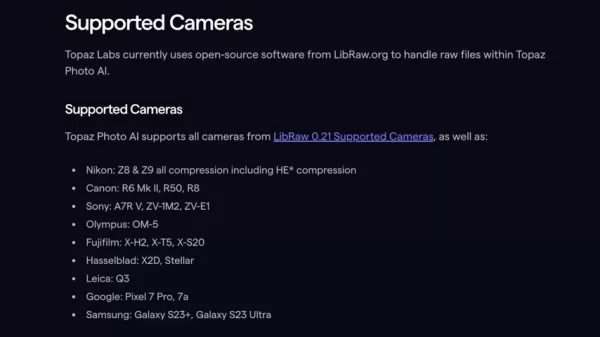
Before you start editing, it's wise to verify if your camera is supported by Topaz Photo AI 3. You can find a full list of compatible cameras on the Topaz Labs website. Fujifilm users, take note: the unique X-Trans sensor may limit your options. The guide specifies that Fujifilm X-Trans cameras can't utilize the RAW Remove Noise models and will instead use the Remove Noise - Linear model.
The Importance of DeNoise, Sharpen, and Upscale
These three functions are at the heart of the Photo AI 3 experience. They work together to enhance your photos, alongside additional features like lighting adjustments, face recovery, and object removal.
Weighing the Pros and Cons
Advantages
- A streamlined workflow that integrates multiple features.
- AI automation that simplifies the editing process.
- An improved user interface and overall experience.
- Effective sharpening and upscaling capabilities.
Drawbacks
- Challenges with denoising Fujifilm RAW files, often resulting in grid patterns.
- Issues with the accuracy of AI-powered masking and color rendition.
- A slow generative removal tool.
- Limited options for adjusting lighting and color.
Exploring the Core Features of Photo AI 3
The Essential DeNoise Feature
The heart of Photo AI 3 lies in its DeNoise, Sharpen, and Upscale tools, familiar to users of the earlier standalone apps. Many have found these tools to be intuitive and user-friendly, enhancing their photo editing experience significantly.
Understanding the Limitations with RAW Support
The guide highlights that Fujifilm X-Trans cameras are a special case, unable to use the RAW Remove Noise models and instead directed to the linear model, which might not yield the best results.
Frequently Asked Questions
Is Topaz Photo AI 3 Suitable for Professional Photographers?
While it offers a range of useful features, its limitations might make it less suitable for professional workflows that demand precise control over image adjustments.
How Well Does Topaz Photo AI 3 Handle Fujifilm X-Trans RAW Files?
Unfortunately, it struggles. The software isn't optimized for Fujifilm X-Trans RAW files, making it a challenging choice for users of these cameras.
Should You Choose the Original Products or Stick with Photo AI 3?
If you're looking for an all-in-one solution, Topaz Photo AI 3 might be appealing, but its current drawbacks could be a deal-breaker for some.
Related Queries
Is Topaz Photo AI 3 an Upgrade from Previous Versions?
It's definitely a step forward from its predecessors, but there's still room for improvement.
What Warnings Come with Using Generated Images?
The developers caution that generating changes might take several minutes, which is something to keep in mind when using the product.
Related article
 Swedish AI Startup Lovable Eyes $13.2 Billion Valuation After Major Funding Round
As AI-driven coding tools gain traction, Swedish startup Lovable has secured a major funding round. The company aims to raise $3 billion, potentially boosting its valuation to $13.2 billion—double the $6.6 billion recorded last December. Menlo Ventur
Google Tests Remy AI Agent for Gemini as Focus Shifts to User Control
According to Business Insider, Google is testing Remy, a new AI personal agent for Gemini. This tool aims to execute tasks on behalf of users, streamlining both professional workflows and daily routines.Currently, Remy is undergoing testing in an int
How to fix Core Web Vitals for better SEO rankings
Streamline Report Card Comments with AI ToolsIntroductionAI Tools for Generating Report Card CommentsMagic SchoolAlmanac AIChat GPTUsing Magic School to Generate Report Card CommentsLogging into Magic SchoolSelecting the Report Card Comments ToolCust
Related Special Topic Recommendations
writing
Swedish AI Startup Lovable Eyes $13.2 Billion Valuation After Major Funding Round
As AI-driven coding tools gain traction, Swedish startup Lovable has secured a major funding round. The company aims to raise $3 billion, potentially boosting its valuation to $13.2 billion—double the $6.6 billion recorded last December. Menlo Ventur
Google Tests Remy AI Agent for Gemini as Focus Shifts to User Control
According to Business Insider, Google is testing Remy, a new AI personal agent for Gemini. This tool aims to execute tasks on behalf of users, streamlining both professional workflows and daily routines.Currently, Remy is undergoing testing in an int
How to fix Core Web Vitals for better SEO rankings
Streamline Report Card Comments with AI ToolsIntroductionAI Tools for Generating Report Card CommentsMagic SchoolAlmanac AIChat GPTUsing Magic School to Generate Report Card CommentsLogging into Magic SchoolSelecting the Report Card Comments ToolCust
Related Special Topic Recommendations
writing
 Best AI Outline Generators for Long-Form SEO Articles
2026 Latest Best Top-Rated AI Outline Generators for Long-Form SEO Articles, meticulously curated by XIX.AI. These powerful tools offer game-changing assistance in creating high-quality content quickly, boosting writing efficiency significantly. Get a free vs paid comparison along with real-world tests and detailed rankings to help you find the must-try option that suits your needs. Explore now to unlock your AI edge.
 8 tools
 xix.ai
Education and Learning
AI Study Tools for Homework and Exam Prep
xix.ai
Education and Learning
AI Study Tools for Homework and Exam Prep
2026 Latest Best AI Study Tools for Homework and Exam Prep! XIX.AI curates a top-rated list of powerful, game-changing tools that help students boost productivity, streamline homework completion, and ace exams through real-world tests. Get a free vs paid comparison, detailed rankings, and must-try options to unlock your AI edge. Explore now!
10 tools
xix.ai
Music composition
AI Vocal Demo Tools for Songwriters, Hooks, Toplines, and Multilingual Draft Sessions
2026 Latest Best AI Vocal Demo Tools for Songwriters, Hook Creators, and Multi-Language Content Teams! XIX.AI has curated a top-rated list of powerful game-changing tools that go through rigorous real-world tests. You’ll find detailed free vs paid comparison data, comprehensive rankings, and must-try options to help you boost writing efficiency and unlock your creative potential. Explore now to discover your perfect tool for all your content needs!
9 tools
xix.ai
Business
Best AI Competitive Research Tools for Small Businesses
2026 Latest Best Top-rated AI Competitive Research Tools for Small Businesses! XIX.AI has curated a highly powerful game-changing collection, updated weekly with rigorous real-world tests and detailed rankings. You can find a comprehensive free vs paid comparison to help you identify the must-try tools that boost your productivity and give you a competitive edge. Explore now to discover your perfect tool!
9 tools
xix.ai
Image editing
Photoshop AI Retouch Tools for Ecommerce Apparel, Skin Cleanup, and Color Consistency
2026 Latest Best Photoshop AI retouch tools for ecommerce apparel, skin cleanup, and color consistency! This top-rated curated list features powerful game-changing solutions that help you boost writing efficiency, streamline content creation, and achieve perfect visual results effortlessly. Each tool has undergone real-world tests through weekly updated rankings, complete with free vs paid comparison details. Backed by XIX.AI, it’s the must-try guide for anyone aiming to unlock your AI edge. Explore now!
10 tools
xix.ai
Prompt
Best AI Prompt Libraries for ChatGPT Workflows
2026 Latest Best Top-Rated AI Prompt Libraries for optimizing all types of ChatGPT workflows. XIX.AI has curated a powerful, game-changing collection that goes through rigorous real-world tests to ensure top performance. You can find detailed free vs paid comparisons and expert rankings to help you choose the must-try tools that boost your productivity and unlock your AI edge. Explore now!
11 tools
xix.ai

 Comments (6)
0/500
Comments (6)
0/500
![JosephGreen]()
I've been using Topaz Photo AI since v2, and v3 finally fixes the weird artifacts in low-light shots. Still wish they'd speed up the processing though. 😅
![BrianBaker]()
Interesting review! I've been considering upgrading to version 3 for my workflow. The noise reduction seems promising, but I still find myself switching back to DxO PureRAW sometimes for certain shots. 🤔 Would love to see a direct comparison with On1's latest AI tools.
![JonathanKing]()
¿Ya probaste la denoise? Mejoró bastante pero a veces sigue 'sobresuavizando' texturas, sobre todo en fondos. A ver si le dan más opciones manuales en el siguiente parche 🤔
![BrianBaker]()
Still waiting for them to finally fix the batch processing lag! The noise reduction is pretty impressive, but honestly, I've lost count of how many versions they've released that claim to 'resolve issues' 😅. Wish they'd focus less on new features and more on core stability for once.
![BruceSmith]()
¿De verdad han solucionado los problemas de las versiones anteriores? 🤔 No estaba muy convencido con la versión 2 después de probarla, así que espero que esta lo haya hecho mejor. ¡Los usuarios merecemos productos que realmente funcionen sin tener que perder tanto tiempo arreglando errores!
![NicholasRoberts]()
Topaz Photo AI 3 sounds like a game-changer for editing! I tried it on some old blurry shots, and the results were mind-blowing. Still, I wonder if it’s worth the price for casual users like me. Anyone else think it’s a bit steep? 😅
Topaz Labs has been making waves in the world of AI-powered image enhancement for quite some time now. Their promise to revolutionize photo editing has intrigued both professionals and hobbyists alike. But with the release of Topaz Photo AI 3, the big question on everyone's mind is: does it really meet the high expectations set by its predecessors? Let's dive into a thorough review to see if this latest iteration lives up to the hype, focusing on its features, usability, and whether it's resolved the issues that affected earlier versions.
Key Highlights
- Topaz Photo AI 3 comes with a revamped interface and a more streamlined workflow.
- The software integrates denoising, sharpening, and upscaling into one comprehensive tool.
- There are some challenges with processing RAW files, especially from Fujifilm X-Trans sensors.
- Accuracy in AI-powered masking and color rendition is crucial for user satisfaction.
- The overall experience with the software is a mixed bag.
Topaz Photo AI 3: An In-Depth Look
What Exactly is Topaz Photo AI 3?
Topaz Photo AI 3 is the newest version of Topaz Labs' all-in-one photo enhancement tool. It's designed to make photo editing easier by combining denoising, sharpening, and upscaling into one AI-driven workflow. The goal is to automatically detect and correct image flaws, saving photographers valuable time and effort. For those who've used earlier Topaz Labs products like DeNoise AI, Sharpen AI, and Gigapixel AI, Photo AI 3 merges the best of these into a single, more convenient package. It not only tackles denoising, sharpening, and upscaling but also aims to improve lighting, recover facial details, and even offers a generative removal tool.
Key Features at a Glance
- AI-Powered Denoising: It reduces noise while keeping the image details intact.
- AI-Driven Sharpening: Enhances image sharpness and corrects blur for clearer results.
- Upscaling: Boosts image resolution without the worry of artifacts.
- Automated Workflow: The software assesses images and automatically applies the necessary enhancements.
- RAW File Processing: Compatible with a variety of camera RAW formats.
The Role of AI in Modern Photography
The incorporation of artificial intelligence into photography has been nothing short of revolutionary, offering the promise of automating time-consuming tasks and boosting image quality. AI tools, trained on vast image datasets, can spot and fix imperfections with impressive accuracy. From denoising to sharpening and upscaling, AI has opened up new avenues for photographers to refine their craft. Yet, the true challenge is ensuring these tools perform consistently across different shooting scenarios and camera types. Topaz Photo AI 3 strives to offer this consistency through a streamlined, AI-enhanced workflow, with the claim of turning any photo into a perfect shot.
Getting Started with Topaz Photo AI 3
Exploring the Interface and Help Bar
First things first, you'll need to download and install Topaz Photo AI 3 from the Topaz Labs website. Once you launch the app, you're met with a refreshed interface that includes a handy help and tips bar. This bar is a treasure trove of resources:
- Getting Started Guide: A thorough walkthrough of the software's capabilities and how to use them.
- User Guides: Detailed manuals covering everything you need to know about Topaz Photo AI 3.
- Feature Information: In-depth descriptions of the software's core functions.
- Integration Guide: Step-by-step instructions on integrating Photo AI with your editing workflow.
Importing Your Photos
Topaz Photo AI 3 supports a wide array of RAW and standard image formats. Importing is as simple as dragging and dropping files into the app or selecting 'Browse Images'. Be ready for some initial downloads as the software fetches the latest models to process your images.
Checking Camera Compatibility
Before you start editing, it's wise to verify if your camera is supported by Topaz Photo AI 3. You can find a full list of compatible cameras on the Topaz Labs website. Fujifilm users, take note: the unique X-Trans sensor may limit your options. The guide specifies that Fujifilm X-Trans cameras can't utilize the RAW Remove Noise models and will instead use the Remove Noise - Linear model.
The Importance of DeNoise, Sharpen, and Upscale
These three functions are at the heart of the Photo AI 3 experience. They work together to enhance your photos, alongside additional features like lighting adjustments, face recovery, and object removal.
Weighing the Pros and Cons
Advantages
- A streamlined workflow that integrates multiple features.
- AI automation that simplifies the editing process.
- An improved user interface and overall experience.
- Effective sharpening and upscaling capabilities.
Drawbacks
- Challenges with denoising Fujifilm RAW files, often resulting in grid patterns.
- Issues with the accuracy of AI-powered masking and color rendition.
- A slow generative removal tool.
- Limited options for adjusting lighting and color.
Exploring the Core Features of Photo AI 3
The Essential DeNoise Feature
The heart of Photo AI 3 lies in its DeNoise, Sharpen, and Upscale tools, familiar to users of the earlier standalone apps. Many have found these tools to be intuitive and user-friendly, enhancing their photo editing experience significantly.
Understanding the Limitations with RAW Support
The guide highlights that Fujifilm X-Trans cameras are a special case, unable to use the RAW Remove Noise models and instead directed to the linear model, which might not yield the best results.
Frequently Asked Questions
Is Topaz Photo AI 3 Suitable for Professional Photographers?
While it offers a range of useful features, its limitations might make it less suitable for professional workflows that demand precise control over image adjustments.
How Well Does Topaz Photo AI 3 Handle Fujifilm X-Trans RAW Files?
Unfortunately, it struggles. The software isn't optimized for Fujifilm X-Trans RAW files, making it a challenging choice for users of these cameras.
Should You Choose the Original Products or Stick with Photo AI 3?
If you're looking for an all-in-one solution, Topaz Photo AI 3 might be appealing, but its current drawbacks could be a deal-breaker for some.
Related Queries
Is Topaz Photo AI 3 an Upgrade from Previous Versions?
It's definitely a step forward from its predecessors, but there's still room for improvement.
What Warnings Come with Using Generated Images?
The developers caution that generating changes might take several minutes, which is something to keep in mind when using the product.








 Swedish AI Startup Lovable Eyes $13.2 Billion Valuation After Major Funding Round
As AI-driven coding tools gain traction, Swedish startup Lovable has secured a major funding round. The company aims to raise $3 billion, potentially boosting its valuation to $13.2 billion—double the $6.6 billion recorded last December. Menlo Ventur
Google Tests Remy AI Agent for Gemini as Focus Shifts to User Control
According to Business Insider, Google is testing Remy, a new AI personal agent for Gemini. This tool aims to execute tasks on behalf of users, streamlining both professional workflows and daily routines.Currently, Remy is undergoing testing in an int
Swedish AI Startup Lovable Eyes $13.2 Billion Valuation After Major Funding Round
As AI-driven coding tools gain traction, Swedish startup Lovable has secured a major funding round. The company aims to raise $3 billion, potentially boosting its valuation to $13.2 billion—double the $6.6 billion recorded last December. Menlo Ventur
Google Tests Remy AI Agent for Gemini as Focus Shifts to User Control
According to Business Insider, Google is testing Remy, a new AI personal agent for Gemini. This tool aims to execute tasks on behalf of users, streamlining both professional workflows and daily routines.Currently, Remy is undergoing testing in an int
 How to fix Core Web Vitals for better SEO rankings
Streamline Report Card Comments with AI ToolsIntroductionAI Tools for Generating Report Card CommentsMagic SchoolAlmanac AIChat GPTUsing Magic School to Generate Report Card CommentsLogging into Magic SchoolSelecting the Report Card Comments ToolCust
How to fix Core Web Vitals for better SEO rankings
Streamline Report Card Comments with AI ToolsIntroductionAI Tools for Generating Report Card CommentsMagic SchoolAlmanac AIChat GPTUsing Magic School to Generate Report Card CommentsLogging into Magic SchoolSelecting the Report Card Comments ToolCust

2026 Latest Best Top-Rated AI Outline Generators for Long-Form SEO Articles, meticulously curated by XIX.AI. These powerful tools offer game-changing assistance in creating high-quality content quickly, boosting writing efficiency significantly. Get a free vs paid comparison along with real-world tests and detailed rankings to help you find the must-try option that suits your needs. Explore now to unlock your AI edge.
8 tools
xix.ai

2026 Latest Best AI Study Tools for Homework and Exam Prep! XIX.AI curates a top-rated list of powerful, game-changing tools that help students boost productivity, streamline homework completion, and ace exams through real-world tests. Get a free vs paid comparison, detailed rankings, and must-try options to unlock your AI edge. Explore now!
10 tools
xix.ai

2026 Latest Best AI Vocal Demo Tools for Songwriters, Hook Creators, and Multi-Language Content Teams! XIX.AI has curated a top-rated list of powerful game-changing tools that go through rigorous real-world tests. You’ll find detailed free vs paid comparison data, comprehensive rankings, and must-try options to help you boost writing efficiency and unlock your creative potential. Explore now to discover your perfect tool for all your content needs!
9 tools
xix.ai

2026 Latest Best Top-rated AI Competitive Research Tools for Small Businesses! XIX.AI has curated a highly powerful game-changing collection, updated weekly with rigorous real-world tests and detailed rankings. You can find a comprehensive free vs paid comparison to help you identify the must-try tools that boost your productivity and give you a competitive edge. Explore now to discover your perfect tool!
9 tools
xix.ai

2026 Latest Best Photoshop AI retouch tools for ecommerce apparel, skin cleanup, and color consistency! This top-rated curated list features powerful game-changing solutions that help you boost writing efficiency, streamline content creation, and achieve perfect visual results effortlessly. Each tool has undergone real-world tests through weekly updated rankings, complete with free vs paid comparison details. Backed by XIX.AI, it’s the must-try guide for anyone aiming to unlock your AI edge. Explore now!
10 tools
xix.ai

2026 Latest Best Top-Rated AI Prompt Libraries for optimizing all types of ChatGPT workflows. XIX.AI has curated a powerful, game-changing collection that goes through rigorous real-world tests to ensure top performance. You can find detailed free vs paid comparisons and expert rankings to help you choose the must-try tools that boost your productivity and unlock your AI edge. Explore now!
11 tools
xix.ai

I've been using Topaz Photo AI since v2, and v3 finally fixes the weird artifacts in low-light shots. Still wish they'd speed up the processing though. 😅
Interesting review! I've been considering upgrading to version 3 for my workflow. The noise reduction seems promising, but I still find myself switching back to DxO PureRAW sometimes for certain shots. 🤔 Would love to see a direct comparison with On1's latest AI tools.
¿Ya probaste la denoise? Mejoró bastante pero a veces sigue 'sobresuavizando' texturas, sobre todo en fondos. A ver si le dan más opciones manuales en el siguiente parche 🤔
Still waiting for them to finally fix the batch processing lag! The noise reduction is pretty impressive, but honestly, I've lost count of how many versions they've released that claim to 'resolve issues' 😅. Wish they'd focus less on new features and more on core stability for once.
¿De verdad han solucionado los problemas de las versiones anteriores? 🤔 No estaba muy convencido con la versión 2 después de probarla, así que espero que esta lo haya hecho mejor. ¡Los usuarios merecemos productos que realmente funcionen sin tener que perder tanto tiempo arreglando errores!
Topaz Photo AI 3 sounds like a game-changer for editing! I tried it on some old blurry shots, and the results were mind-blowing. Still, I wonder if it’s worth the price for casual users like me. Anyone else think it’s a bit steep? 😅












