


 Home
HomeTop Tips and Essential Tools for UX Designers Mastering AI
In the fast-paced world of technology, Artificial Intelligence (AI) has transitioned from a futuristic idea to a vital component of our everyday lives. For UX designers, understanding and integrating AI into their work is becoming more essential by the day. This guide is designed to equip UX designers with practical tips and resources to navigate the world of AI, sharpen their skills, and maintain a competitive edge in the industry.
Key Points
- Get familiar with AI basics and terminology to effectively communicate with AI models.
- Dive into online platforms like Coursera, Udacity, and edX for AI courses tailored for those without a technical background.
- Experiment with AI-driven tools like NotebookLM to boost your productivity and streamline your design processes.
- Adopt a problem-solving mindset that focuses on crafting precise prompts and iteratively assessing AI responses.
- Delve into resources on prompt engineering to enhance your prompt writing skills.
AI Essentials for UX Designers
Why UX Designers Should Learn About AI
With AI increasingly embedded in applications, UX designers must grasp its mechanics to craft interfaces that are not only effective but also user-friendly. While AI won't replace UX designers anytime soon, those who can skillfully use AI tools will become indispensable. Mastering AI can significantly boost a designer's competitiveness in the field.
Key Benefits of AI in UX Design:
- Enhanced User Experience: AI can tailor user experiences to individual preferences and behaviors, making each interaction more personal and engaging.

- Improved Efficiency: By automating routine tasks, AI allows designers to devote more time to strategic and creative endeavors.
- Data-Driven Insights: AI algorithms can sift through user data to uncover insights that drive better design decisions.
- Staying Competitive: Embracing AI technologies keeps UX designers at the forefront of an ever-evolving industry.
Tip 1: Learn AI Basics and Terminology
To make the most of AI, UX designers need to understand its foundational concepts and key terms. This knowledge aids in clear communication with AI systems and understanding what they can and cannot do.
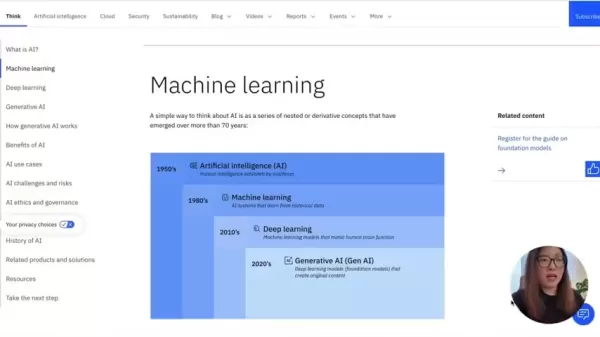
Key AI Concepts to Master:
- Artificial Intelligence (AI): The overarching concept of machines mimicking human intelligence.
- Machine Learning (ML): A branch of AI where systems learn from data, without being explicitly programmed.
- Deep Learning (DL): A subset of ML that uses artificial neural networks to handle data with complex patterns.
- Generative AI (GenAI): AI models capable of creating new content, such as text, images, and audio, built on Machine Learning and Deep Learning foundations.
- Large Language Models (LLMs): AI algorithms that use deep learning and vast datasets to understand, generate, and predict new content.
Recommended Resource: IBM's AI Explanation
IBM provides an in-depth yet accessible explanation of AI concepts, perfect for beginners. Their guide simplifies complex topics like machine learning, deep learning, and generative AI, showing how these layers of AI interact and what each entails.
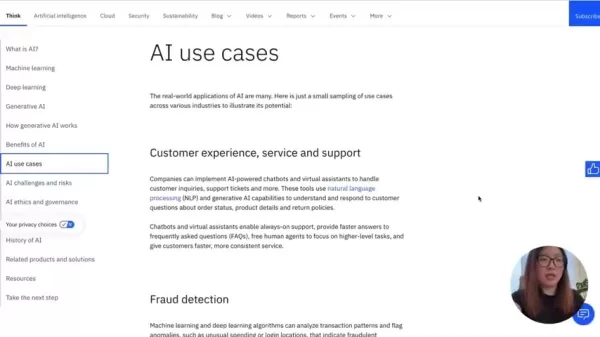
Their website also features real-world AI applications, from customer service chatbots to virtual assistants, offering a comprehensive look at how AI is used today.
Practical Application of AI in Design
Tip 3: Play with AI-Powered Tools
The best way to truly grasp AI is by diving into AI-powered tools and applications. By experimenting with different tools, you can uncover their potential and limitations, and how they can be applied in UX design.
- NotebookLM: This tool acts as a research assistant, helping to summarize and analyze notes for efficient note-taking and summarization.
Don't hesitate to test any AI product that piques your interest; it's the best way to understand what it can offer.
Enhance Skills Through Hands-on Projects
Look for opportunities to apply AI to real-world design challenges. Identify where AI can address user problems or enhance the user experience. Use user research to pinpoint needs, then develop AI-powered prototypes, test them, and gather feedback. Refining these prototypes not only hones your skills but also enriches your portfolio with valuable projects.
How to Use NotebookLM for Research
Step 1: Access NotebookLM
Head over to the NotebookLM website and sign in with your Google account to start.
Step 2: Create a New Notebook
Hit the “Try NotebookLM” button to kick off a new project, which will lead you to a dashboard for your AI research assistant.
Step 3: Select A File or Import from Website
From the dashboard, you can add files from Google Drive, Google Docs, Google Slides, or import from a website or YouTube, paste text, or simply type in your own text.
Step 4: See Summary
Once you've added your source, NotebookLM generates a summary along with suggested questions, making it easy to digest and act on the information.
Step 5: Generate Podcast
You can even create a podcast with two hosts based on your research. The process might take a few minutes, but it offers a comprehensive overview of your topic.
Pros and Cons of Incorporating AI in UX Design
Pros
- Boosts productivity
- Offers UX tips and ideas to designers
- Simplifies project management
Cons
- Overreliance on AI might stifle creativity
- AI can introduce biases
- It may lack the personalized touch of a human designer
- Crafting effective prompts can be time-consuming
FAQ
Will AI replace UX Designers?
While AI can automate certain tasks, it's unlikely to fully replace UX designers. AI enhances the design process, but the human elements of creativity, empathy, and strategic thinking are irreplaceable for creating top-notch user experiences.
What are the benefits of AI in UX design?
AI brings several advantages, including personalized experiences, increased efficiency through automation, data-driven insights for better decision-making, and a competitive edge by keeping up with industry trends.
What tools are best for UX designers to start with AI?
NotebookLM is a fantastic starting point for exploring AI in UX design. Understanding AI basics and mastering prompt writing are crucial steps in effectively using AI in your work.
Related Questions
What other skills should a UX designer learn?
Beyond AI, UX designers should also master skills like user research, usability testing, wireframing, prototyping, and data analysis to ensure they can deliver user-centered solutions effectively.
How can I stay up-to-date with the latest AI trends?
Staying informed involves engaging with online resources, attending industry events, participating in relevant communities, experimenting with the latest AI tools, and following thought-leaders in the field.
Related article
 U.S. Stocks Hit Historic Milestone as AI and Aerospace Giants Prepare for Trillion-Dollar Debut
Elon Musk, Sam Altman, and Dario Amodei, three titans of the technology sector, are advancing toward initial public offerings for their respective ventures. With SpaceX, OpenAI, and Anthropic—three industry behemoths nearing trillion-dollar valuation
Swedish AI Startup Lovable Eyes $13.2 Billion Valuation After Major Funding Round
As AI-driven coding tools gain traction, Swedish startup Lovable has secured a major funding round. The company aims to raise $3 billion, potentially boosting its valuation to $13.2 billion—double the $6.6 billion recorded last December. Menlo Ventur
Google Tests Remy AI Agent for Gemini as Focus Shifts to User Control
According to Business Insider, Google is testing Remy, a new AI personal agent for Gemini. This tool aims to execute tasks on behalf of users, streamlining both professional workflows and daily routines.Currently, Remy is undergoing testing in an int
Related Special Topic Recommendations
writing
U.S. Stocks Hit Historic Milestone as AI and Aerospace Giants Prepare for Trillion-Dollar Debut
Elon Musk, Sam Altman, and Dario Amodei, three titans of the technology sector, are advancing toward initial public offerings for their respective ventures. With SpaceX, OpenAI, and Anthropic—three industry behemoths nearing trillion-dollar valuation
Swedish AI Startup Lovable Eyes $13.2 Billion Valuation After Major Funding Round
As AI-driven coding tools gain traction, Swedish startup Lovable has secured a major funding round. The company aims to raise $3 billion, potentially boosting its valuation to $13.2 billion—double the $6.6 billion recorded last December. Menlo Ventur
Google Tests Remy AI Agent for Gemini as Focus Shifts to User Control
According to Business Insider, Google is testing Remy, a new AI personal agent for Gemini. This tool aims to execute tasks on behalf of users, streamlining both professional workflows and daily routines.Currently, Remy is undergoing testing in an int
Related Special Topic Recommendations
writing
 Best AI Outline Generators for Long-Form SEO Articles
2026 Latest Best Top-Rated AI Outline Generators for Long-Form SEO Articles, meticulously curated by XIX.AI. These powerful tools offer game-changing assistance in creating high-quality content quickly, boosting writing efficiency significantly. Get a free vs paid comparison along with real-world tests and detailed rankings to help you find the must-try option that suits your needs. Explore now to unlock your AI edge.
 8 tools
 xix.ai
Education and Learning
AI Study Tools for Homework and Exam Prep
xix.ai
Education and Learning
AI Study Tools for Homework and Exam Prep
2026 Latest Best AI Study Tools for Homework and Exam Prep! XIX.AI curates a top-rated list of powerful, game-changing tools that help students boost productivity, streamline homework completion, and ace exams through real-world tests. Get a free vs paid comparison, detailed rankings, and must-try options to unlock your AI edge. Explore now!
10 tools
xix.ai
Music composition
AI Vocal Demo Tools for Songwriters, Hooks, Toplines, and Multilingual Draft Sessions
2026 Latest Best AI Vocal Demo Tools for Songwriters, Hook Creators, and Multi-Language Content Teams! XIX.AI has curated a top-rated list of powerful game-changing tools that go through rigorous real-world tests. You’ll find detailed free vs paid comparison data, comprehensive rankings, and must-try options to help you boost writing efficiency and unlock your creative potential. Explore now to discover your perfect tool for all your content needs!
9 tools
xix.ai
Business
Best AI Competitive Research Tools for Small Businesses
2026 Latest Best Top-rated AI Competitive Research Tools for Small Businesses! XIX.AI has curated a highly powerful game-changing collection, updated weekly with rigorous real-world tests and detailed rankings. You can find a comprehensive free vs paid comparison to help you identify the must-try tools that boost your productivity and give you a competitive edge. Explore now to discover your perfect tool!
9 tools
xix.ai
Image editing
Photoshop AI Retouch Tools for Ecommerce Apparel, Skin Cleanup, and Color Consistency
2026 Latest Best Photoshop AI retouch tools for ecommerce apparel, skin cleanup, and color consistency! This top-rated curated list features powerful game-changing solutions that help you boost writing efficiency, streamline content creation, and achieve perfect visual results effortlessly. Each tool has undergone real-world tests through weekly updated rankings, complete with free vs paid comparison details. Backed by XIX.AI, it’s the must-try guide for anyone aiming to unlock your AI edge. Explore now!
10 tools
xix.ai
Prompt
Best AI Prompt Libraries for ChatGPT Workflows
2026 Latest Best Top-Rated AI Prompt Libraries for optimizing all types of ChatGPT workflows. XIX.AI has curated a powerful, game-changing collection that goes through rigorous real-world tests to ensure top performance. You can find detailed free vs paid comparisons and expert rankings to help you choose the must-try tools that boost your productivity and unlock your AI edge. Explore now!
11 tools
xix.ai

 Comments (19)
0/500
Comments (19)
0/500
![PeterMartinez]()
Honestly, I've been a designer for years and AI tools feel like a double-edged sword. On one hand, they can automate the boring stuff, but on the other hand, I'm worried about losing that human touch in design. Great tips though, specially the part about prototyping with AI. 🎨🤖
![RalphJohnson]()
AIを使いこなすためのツールやtipsを紹介する記事はよく見かけるけど、この記事はUXデザイナーに特化しているのが良いね。技術志向ではなく、むしろデザインの質やユーザー体験をどう向上させるかに焦点が当たっている。AIツールってどうしてもUI/UXの文脈だと「自動化して効率化」ばかりが注目されがちだと思う。ただ、倫理的な問題やAIが生み出す偏見については、もっと議論が必要じゃないかな?🤔
![PeterNelson]()
AI in UX design is wild! This article opened my eyes to how much smarter tools are getting. Can't wait to try these tips and make my designs pop! 😎
![JamesWalker]()
AI in UX design sounds like a game-changer! This article’s tips on blending AI tools with user-focused design really got me thinking about how intuitive interfaces could evolve. Excited to try some of these tools in my next project! 🚀
![DouglasPerez]()
¡Este guía es genial para los diseñadores de UX que quieren meterse en el mundo del AI! Tiene muchos consejos prácticos y herramientas que te ayudan a entender cómo integrar la IA en tus diseños. Ojalá tuviera más ejemplos del mundo real, pero aún así, muy útil. 😊
![HarryLewis]()
UXデザイナーにとってAIを理解するためのガイドとして、これは素晴らしいですね!実用的なヒントとツールが満載で、デザインにAIを統合する方法を学ぶのに役立ちます。ただ、もう少し具体的な事例が欲しかったかな。😅
In the fast-paced world of technology, Artificial Intelligence (AI) has transitioned from a futuristic idea to a vital component of our everyday lives. For UX designers, understanding and integrating AI into their work is becoming more essential by the day. This guide is designed to equip UX designers with practical tips and resources to navigate the world of AI, sharpen their skills, and maintain a competitive edge in the industry.
Key Points
- Get familiar with AI basics and terminology to effectively communicate with AI models.
- Dive into online platforms like Coursera, Udacity, and edX for AI courses tailored for those without a technical background.
- Experiment with AI-driven tools like NotebookLM to boost your productivity and streamline your design processes.
- Adopt a problem-solving mindset that focuses on crafting precise prompts and iteratively assessing AI responses.
- Delve into resources on prompt engineering to enhance your prompt writing skills.
AI Essentials for UX Designers
Why UX Designers Should Learn About AI
With AI increasingly embedded in applications, UX designers must grasp its mechanics to craft interfaces that are not only effective but also user-friendly. While AI won't replace UX designers anytime soon, those who can skillfully use AI tools will become indispensable. Mastering AI can significantly boost a designer's competitiveness in the field.
Key Benefits of AI in UX Design:
- Enhanced User Experience: AI can tailor user experiences to individual preferences and behaviors, making each interaction more personal and engaging.
- Improved Efficiency: By automating routine tasks, AI allows designers to devote more time to strategic and creative endeavors.
- Data-Driven Insights: AI algorithms can sift through user data to uncover insights that drive better design decisions.
- Staying Competitive: Embracing AI technologies keeps UX designers at the forefront of an ever-evolving industry.
Tip 1: Learn AI Basics and Terminology
To make the most of AI, UX designers need to understand its foundational concepts and key terms. This knowledge aids in clear communication with AI systems and understanding what they can and cannot do.
Key AI Concepts to Master:
- Artificial Intelligence (AI): The overarching concept of machines mimicking human intelligence.
- Machine Learning (ML): A branch of AI where systems learn from data, without being explicitly programmed.
- Deep Learning (DL): A subset of ML that uses artificial neural networks to handle data with complex patterns.
- Generative AI (GenAI): AI models capable of creating new content, such as text, images, and audio, built on Machine Learning and Deep Learning foundations.
- Large Language Models (LLMs): AI algorithms that use deep learning and vast datasets to understand, generate, and predict new content.
Recommended Resource: IBM's AI Explanation
IBM provides an in-depth yet accessible explanation of AI concepts, perfect for beginners. Their guide simplifies complex topics like machine learning, deep learning, and generative AI, showing how these layers of AI interact and what each entails.
Their website also features real-world AI applications, from customer service chatbots to virtual assistants, offering a comprehensive look at how AI is used today.
Practical Application of AI in Design
Tip 3: Play with AI-Powered Tools
The best way to truly grasp AI is by diving into AI-powered tools and applications. By experimenting with different tools, you can uncover their potential and limitations, and how they can be applied in UX design.
- NotebookLM: This tool acts as a research assistant, helping to summarize and analyze notes for efficient note-taking and summarization.
Don't hesitate to test any AI product that piques your interest; it's the best way to understand what it can offer.
Enhance Skills Through Hands-on Projects
Look for opportunities to apply AI to real-world design challenges. Identify where AI can address user problems or enhance the user experience. Use user research to pinpoint needs, then develop AI-powered prototypes, test them, and gather feedback. Refining these prototypes not only hones your skills but also enriches your portfolio with valuable projects.
How to Use NotebookLM for Research
Step 1: Access NotebookLM
Head over to the NotebookLM website and sign in with your Google account to start.
Step 2: Create a New Notebook
Hit the “Try NotebookLM” button to kick off a new project, which will lead you to a dashboard for your AI research assistant.
Step 3: Select A File or Import from Website
From the dashboard, you can add files from Google Drive, Google Docs, Google Slides, or import from a website or YouTube, paste text, or simply type in your own text.
Step 4: See Summary
Once you've added your source, NotebookLM generates a summary along with suggested questions, making it easy to digest and act on the information.
Step 5: Generate Podcast
You can even create a podcast with two hosts based on your research. The process might take a few minutes, but it offers a comprehensive overview of your topic.
Pros and Cons of Incorporating AI in UX Design
Pros
- Boosts productivity
- Offers UX tips and ideas to designers
- Simplifies project management
Cons
- Overreliance on AI might stifle creativity
- AI can introduce biases
- It may lack the personalized touch of a human designer
- Crafting effective prompts can be time-consuming
FAQ
Will AI replace UX Designers?
While AI can automate certain tasks, it's unlikely to fully replace UX designers. AI enhances the design process, but the human elements of creativity, empathy, and strategic thinking are irreplaceable for creating top-notch user experiences.
What are the benefits of AI in UX design?
AI brings several advantages, including personalized experiences, increased efficiency through automation, data-driven insights for better decision-making, and a competitive edge by keeping up with industry trends.
What tools are best for UX designers to start with AI?
NotebookLM is a fantastic starting point for exploring AI in UX design. Understanding AI basics and mastering prompt writing are crucial steps in effectively using AI in your work.
Related Questions
What other skills should a UX designer learn?
Beyond AI, UX designers should also master skills like user research, usability testing, wireframing, prototyping, and data analysis to ensure they can deliver user-centered solutions effectively.
How can I stay up-to-date with the latest AI trends?
Staying informed involves engaging with online resources, attending industry events, participating in relevant communities, experimenting with the latest AI tools, and following thought-leaders in the field.








 U.S. Stocks Hit Historic Milestone as AI and Aerospace Giants Prepare for Trillion-Dollar Debut
Elon Musk, Sam Altman, and Dario Amodei, three titans of the technology sector, are advancing toward initial public offerings for their respective ventures. With SpaceX, OpenAI, and Anthropic—three industry behemoths nearing trillion-dollar valuation
U.S. Stocks Hit Historic Milestone as AI and Aerospace Giants Prepare for Trillion-Dollar Debut
Elon Musk, Sam Altman, and Dario Amodei, three titans of the technology sector, are advancing toward initial public offerings for their respective ventures. With SpaceX, OpenAI, and Anthropic—three industry behemoths nearing trillion-dollar valuation
 Swedish AI Startup Lovable Eyes $13.2 Billion Valuation After Major Funding Round
As AI-driven coding tools gain traction, Swedish startup Lovable has secured a major funding round. The company aims to raise $3 billion, potentially boosting its valuation to $13.2 billion—double the $6.6 billion recorded last December. Menlo Ventur
Google Tests Remy AI Agent for Gemini as Focus Shifts to User Control
According to Business Insider, Google is testing Remy, a new AI personal agent for Gemini. This tool aims to execute tasks on behalf of users, streamlining both professional workflows and daily routines.Currently, Remy is undergoing testing in an int
Swedish AI Startup Lovable Eyes $13.2 Billion Valuation After Major Funding Round
As AI-driven coding tools gain traction, Swedish startup Lovable has secured a major funding round. The company aims to raise $3 billion, potentially boosting its valuation to $13.2 billion—double the $6.6 billion recorded last December. Menlo Ventur
Google Tests Remy AI Agent for Gemini as Focus Shifts to User Control
According to Business Insider, Google is testing Remy, a new AI personal agent for Gemini. This tool aims to execute tasks on behalf of users, streamlining both professional workflows and daily routines.Currently, Remy is undergoing testing in an int

2026 Latest Best Top-Rated AI Outline Generators for Long-Form SEO Articles, meticulously curated by XIX.AI. These powerful tools offer game-changing assistance in creating high-quality content quickly, boosting writing efficiency significantly. Get a free vs paid comparison along with real-world tests and detailed rankings to help you find the must-try option that suits your needs. Explore now to unlock your AI edge.
8 tools
xix.ai

2026 Latest Best AI Study Tools for Homework and Exam Prep! XIX.AI curates a top-rated list of powerful, game-changing tools that help students boost productivity, streamline homework completion, and ace exams through real-world tests. Get a free vs paid comparison, detailed rankings, and must-try options to unlock your AI edge. Explore now!
10 tools
xix.ai

2026 Latest Best AI Vocal Demo Tools for Songwriters, Hook Creators, and Multi-Language Content Teams! XIX.AI has curated a top-rated list of powerful game-changing tools that go through rigorous real-world tests. You’ll find detailed free vs paid comparison data, comprehensive rankings, and must-try options to help you boost writing efficiency and unlock your creative potential. Explore now to discover your perfect tool for all your content needs!
9 tools
xix.ai

2026 Latest Best Top-rated AI Competitive Research Tools for Small Businesses! XIX.AI has curated a highly powerful game-changing collection, updated weekly with rigorous real-world tests and detailed rankings. You can find a comprehensive free vs paid comparison to help you identify the must-try tools that boost your productivity and give you a competitive edge. Explore now to discover your perfect tool!
9 tools
xix.ai

2026 Latest Best Photoshop AI retouch tools for ecommerce apparel, skin cleanup, and color consistency! This top-rated curated list features powerful game-changing solutions that help you boost writing efficiency, streamline content creation, and achieve perfect visual results effortlessly. Each tool has undergone real-world tests through weekly updated rankings, complete with free vs paid comparison details. Backed by XIX.AI, it’s the must-try guide for anyone aiming to unlock your AI edge. Explore now!
10 tools
xix.ai

2026 Latest Best Top-Rated AI Prompt Libraries for optimizing all types of ChatGPT workflows. XIX.AI has curated a powerful, game-changing collection that goes through rigorous real-world tests to ensure top performance. You can find detailed free vs paid comparisons and expert rankings to help you choose the must-try tools that boost your productivity and unlock your AI edge. Explore now!
11 tools
xix.ai

Honestly, I've been a designer for years and AI tools feel like a double-edged sword. On one hand, they can automate the boring stuff, but on the other hand, I'm worried about losing that human touch in design. Great tips though, specially the part about prototyping with AI. 🎨🤖
AIを使いこなすためのツールやtipsを紹介する記事はよく見かけるけど、この記事はUXデザイナーに特化しているのが良いね。技術志向ではなく、むしろデザインの質やユーザー体験をどう向上させるかに焦点が当たっている。AIツールってどうしてもUI/UXの文脈だと「自動化して効率化」ばかりが注目されがちだと思う。ただ、倫理的な問題やAIが生み出す偏見については、もっと議論が必要じゃないかな?🤔
AI in UX design is wild! This article opened my eyes to how much smarter tools are getting. Can't wait to try these tips and make my designs pop! 😎
AI in UX design sounds like a game-changer! This article’s tips on blending AI tools with user-focused design really got me thinking about how intuitive interfaces could evolve. Excited to try some of these tools in my next project! 🚀
¡Este guía es genial para los diseñadores de UX que quieren meterse en el mundo del AI! Tiene muchos consejos prácticos y herramientas que te ayudan a entender cómo integrar la IA en tus diseños. Ojalá tuviera más ejemplos del mundo real, pero aún así, muy útil. 😊
UXデザイナーにとってAIを理解するためのガイドとして、これは素晴らしいですね!実用的なヒントとツールが満載で、デザインにAIを統合する方法を学ぶのに役立ちます。ただ、もう少し具体的な事例が欲しかったかな。😅












