


 Home
HomeI switched to a color E Ink tablet for months, and it beats the ReMarkable in key ways
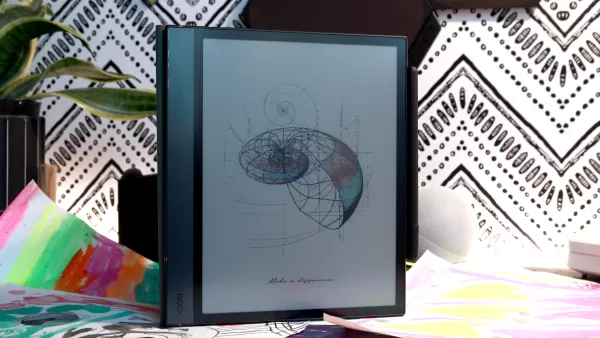
When you get up close with the Boox Note Air 4C, you might notice that photos can appear a bit fuzzy. And yes, some users find the denim-like texture on certain color images a bit off-putting. The color range on this device isn't as broad as what you'd find on a traditional tablet; it's more muted and limited. This isn't just a quirk of the Boox Note Air 4C; other color ePaper devices like the Kindle Colorsoft and reMarkable Paper Pro share these traits.
Personally, I've grown to appreciate the Boox Note Air 4C's colors. They add a consistent aesthetic to my work, and since I use it primarily as a note-taking device, the color limitations don't really bother me.
I recently tested an E Ink tablet running Android, and it made my Kindle seem a bit underwhelming in comparison.
Performance of the Boox Note Air 4C
The Boox Note Air 4C runs on Android 13, powered by an octa-core processor and 6GB of RAM. With up to 64GB of internal storage, expandable to 2TB via microSD, it's quite robust for an E Ink tablet. However, don't expect it to match the speed of an iPad. You can tweak the settings to speed up the refresh rate, but it's still slower than a traditional tablet, though not as sluggish as a Kindle.
Pressure-Sensitive Pen Test
Maria Diaz/ZDNET: Ghosting issues when flipping pages are common with E Ink tablets, including the Note Air 4C. But honestly, it didn't bother me much.
My main gripes with the Boox Note Air 4C are quite specific. Depending on what you're viewing, pages can take up to 30 seconds to render, which can be frustrating. Also, when I zoom in for detailed work, the palm recognition fails, causing the image to shift and the tablet to pause and re-render.
I recently got a productivity boost from a 14-inch Samsung tablet, and it's even better for entertainment.
AI Features on the Boox Note Air 4C
The AI features on the Boox Note Air 4C have a lot of room for growth, which seems to be a trend across the board with AI tech. I tried them all out, and they were so hit-or-miss that I ended up keeping them turned off. The worst was when the tablet tried to "correct" my drawings and ended up deleting parts of my work.
I wish handwriting OCR was a standard feature, but on the Boox Note Air 4C, it's part of the AI suite and not very reliable. Handwriting conversion typically demands more processing power than what tablets usually have, which might explain why it's not a default feature on the Boox Note Air 4C or the reMarkable Paper Pro.
The pen magnetically attaches to the side of the tablet, but because the tablet is only 5.8 mm thick, it tends to fall off. I'd recommend getting a case to keep the pen secure when you're on the move. The pen uses electromagnetic resonance (EMR) technology, so no need to charge it; it's just there for convenience.
I recently tested an E Ink tablet that could replace my Remarkable, and in some ways, it's even better.
Using the Boox Note Air 4C as a Bullet Journal
The Boox Note Air 4C is fantastic as a bullet journal. The pen is both accurate and responsive, making it easy to draw or color with precision. It's great to have all my pages saved in one lightweight device, without the hassle of carrying around a bunch of pens and markers. Plus, I can add external files like photos to my journal without needing to print them.
ZDNET's Buying Advice
Maria Diaz/ZDNET: After weeks of use, my pen nib is ready for a replacement.
The Boox Note Air 4C is a solid choice for professionals and creatives. It's not meant to be a productivity powerhouse or a laptop replacement, but it's perfect for those who enjoy handwriting notes, journaling, reading, or even designing.
Among other color ePaper tablets, the main competitor to the Boox Note Air 4C is the reMarkable Paper Pro, which costs $629. While both have similar limitations, I'd go with the Boox Note Air 4C. It's $100 cheaper and runs on Android, meaning no need for a subscription like reMarkable's Connect membership to access extra features.
The best iPad stylus of 2025: Expert tested
Being an Android tablet, the Boox Note Air 4C allows you to download any app from the Google Play Store, including games and social media. But if you're looking for a device focused on writing and reading, you can keep it distraction-free. I've added the Kindle app for reading, Google Docs for work, and OneDrive for transferring files and adding photos to my notes, making the Boox Note Air 4C a versatile tool.
Related article
 Google Tests Remy AI Agent for Gemini as Focus Shifts to User Control
According to Business Insider, Google is testing Remy, a new AI personal agent for Gemini. This tool aims to execute tasks on behalf of users, streamlining both professional workflows and daily routines.Currently, Remy is undergoing testing in an int
How to fix Core Web Vitals for better SEO rankings
Streamline Report Card Comments with AI ToolsIntroductionAI Tools for Generating Report Card CommentsMagic SchoolAlmanac AIChat GPTUsing Magic School to Generate Report Card CommentsLogging into Magic SchoolSelecting the Report Card Comments ToolCust
Slackbot Becomes an AI Agent
Slackbot, the automated assistant embedded in Salesforce’s corporate messaging platform Slack, is evolving into an AI agent. Salesforce CTO Parker Harris envisions it achieving viral status comparable to OpenAI’s ChatGPT.The cloud software giant laun
Related Special Topic Recommendations
writing
Google Tests Remy AI Agent for Gemini as Focus Shifts to User Control
According to Business Insider, Google is testing Remy, a new AI personal agent for Gemini. This tool aims to execute tasks on behalf of users, streamlining both professional workflows and daily routines.Currently, Remy is undergoing testing in an int
How to fix Core Web Vitals for better SEO rankings
Streamline Report Card Comments with AI ToolsIntroductionAI Tools for Generating Report Card CommentsMagic SchoolAlmanac AIChat GPTUsing Magic School to Generate Report Card CommentsLogging into Magic SchoolSelecting the Report Card Comments ToolCust
Slackbot Becomes an AI Agent
Slackbot, the automated assistant embedded in Salesforce’s corporate messaging platform Slack, is evolving into an AI agent. Salesforce CTO Parker Harris envisions it achieving viral status comparable to OpenAI’s ChatGPT.The cloud software giant laun
Related Special Topic Recommendations
writing
 Best AI Outline Generators for Long-Form SEO Articles
2026 Latest Best Top-Rated AI Outline Generators for Long-Form SEO Articles, meticulously curated by XIX.AI. These powerful tools offer game-changing assistance in creating high-quality content quickly, boosting writing efficiency significantly. Get a free vs paid comparison along with real-world tests and detailed rankings to help you find the must-try option that suits your needs. Explore now to unlock your AI edge.
 8 tools
 xix.ai
Education and Learning
AI Study Tools for Homework and Exam Prep
xix.ai
Education and Learning
AI Study Tools for Homework and Exam Prep
2026 Latest Best AI Study Tools for Homework and Exam Prep! XIX.AI curates a top-rated list of powerful, game-changing tools that help students boost productivity, streamline homework completion, and ace exams through real-world tests. Get a free vs paid comparison, detailed rankings, and must-try options to unlock your AI edge. Explore now!
10 tools
xix.ai
Music composition
AI Vocal Demo Tools for Songwriters, Hooks, Toplines, and Multilingual Draft Sessions
2026 Latest Best AI Vocal Demo Tools for Songwriters, Hook Creators, and Multi-Language Content Teams! XIX.AI has curated a top-rated list of powerful game-changing tools that go through rigorous real-world tests. You’ll find detailed free vs paid comparison data, comprehensive rankings, and must-try options to help you boost writing efficiency and unlock your creative potential. Explore now to discover your perfect tool for all your content needs!
9 tools
xix.ai
Business
Best AI Competitive Research Tools for Small Businesses
2026 Latest Best Top-rated AI Competitive Research Tools for Small Businesses! XIX.AI has curated a highly powerful game-changing collection, updated weekly with rigorous real-world tests and detailed rankings. You can find a comprehensive free vs paid comparison to help you identify the must-try tools that boost your productivity and give you a competitive edge. Explore now to discover your perfect tool!
9 tools
xix.ai
Image editing
Photoshop AI Retouch Tools for Ecommerce Apparel, Skin Cleanup, and Color Consistency
2026 Latest Best Photoshop AI retouch tools for ecommerce apparel, skin cleanup, and color consistency! This top-rated curated list features powerful game-changing solutions that help you boost writing efficiency, streamline content creation, and achieve perfect visual results effortlessly. Each tool has undergone real-world tests through weekly updated rankings, complete with free vs paid comparison details. Backed by XIX.AI, it’s the must-try guide for anyone aiming to unlock your AI edge. Explore now!
10 tools
xix.ai
Prompt
Best AI Prompt Libraries for ChatGPT Workflows
2026 Latest Best Top-Rated AI Prompt Libraries for optimizing all types of ChatGPT workflows. XIX.AI has curated a powerful, game-changing collection that goes through rigorous real-world tests to ensure top performance. You can find detailed free vs paid comparisons and expert rankings to help you choose the must-try tools that boost your productivity and unlock your AI edge. Explore now!
11 tools
xix.ai

 Comments (10)
0/500
Comments (10)
0/500
![KevinMartínez]()
Wenn mir jemand vor einem Jahr gesagt hätte, dass ich mein Tablet gegen ein Farb-E-Ink-Gerät tauschen würde, hätte ich ihn ausgelacht. Aber nachdem ich den Artikel gelesen habe... ich kann die Vorteile wirklich sehen! Die etwas schwächeren Farben? Tja, solange ich darauf lesen und Notizen machen kann, ohne Augenschmerzen nach einem langen Tag, ist das ein fairer Kompromiss. Ich frage mich nur, wie sich das in der Praxis für Skizzen oder das Durchsehen von Layouts macht. Der 'Denim'-Effekt klingt etwas seltsam, aber vielleicht gewöhnt man sich dran. E-Ink schreitet auf jeden Fall voran! 📓
![MarkLopez]()
J'ai lu l'article sur cette tablette E Ink couleur. Honnêtement, j'étais sceptique sur l'usage des couleurs sur ces écrans, mais l'idée qu'elle surpasse le ReMarkable sur certains points est intrigante. Pour la lecture de BD ou de documents illustrés, ça pourrait être un vrai game-changer, même avec des couleurs moins vives. La batterie dure longtemps ? C'est le point clé pour moi. 😊
![KevinMartínez]()
Das klingt nach einem soliden E-Ink-Tablet, aber die eingeschränkte Farbpalette wäre für mich ein Dealbreaker. Ich arbeite viel mit Grafiken, da wären die gedeckten Farben echt problematisch. Interessant, dass es den ReMarkable in manchen Bereichen schlägt - würde gerne wissen, welche das genau sind! 🤔
![WilliamYoung]()
Farb-E-Reader, die das ReMarkable schlagen? Hmm... das klingt fast zu gut, um wahr zu sein. Ich liebe mein ReMarkable, aber die Farbfunktion wäre für meine Arbeitsnotizen wirklich praktisch. Auch wenn die Bildqualität nicht perfekt ist, könnte das ein Game-Changer sein. Weiß jemand, wie es mit der Akkulaufzeit aussieht? 🔍
![FrankJackson]()
Wow, a color E Ink tablet that actually beats the ReMarkable? That's huge! I wonder how the muted colors hold up for reading comics or technical diagrams. Still, if it's better for reading and note-taking overall, those trade-offs might be totally worth it for my workflow 🤔. Exciting to see real competition in this space!
![AlbertThomas]()
Mudei para o Boox Note Air 4C e, sinceramente, é uma mudança incrível! A tinta E Ink colorida é bem legal, embora as fotos possam parecer um pouco embaçadas. Não gosto muito da textura de jeans em algumas imagens, mas, ei, é muito melhor que o meu antigo ReMarkable de várias maneiras! Vale a pena experimentar se você gosta de tablets E Ink! 😎
When you get up close with the Boox Note Air 4C, you might notice that photos can appear a bit fuzzy. And yes, some users find the denim-like texture on certain color images a bit off-putting. The color range on this device isn't as broad as what you'd find on a traditional tablet; it's more muted and limited. This isn't just a quirk of the Boox Note Air 4C; other color ePaper devices like the Kindle Colorsoft and reMarkable Paper Pro share these traits.
Personally, I've grown to appreciate the Boox Note Air 4C's colors. They add a consistent aesthetic to my work, and since I use it primarily as a note-taking device, the color limitations don't really bother me.
I recently tested an E Ink tablet running Android, and it made my Kindle seem a bit underwhelming in comparison.
Performance of the Boox Note Air 4C
The Boox Note Air 4C runs on Android 13, powered by an octa-core processor and 6GB of RAM. With up to 64GB of internal storage, expandable to 2TB via microSD, it's quite robust for an E Ink tablet. However, don't expect it to match the speed of an iPad. You can tweak the settings to speed up the refresh rate, but it's still slower than a traditional tablet, though not as sluggish as a Kindle.
Pressure-Sensitive Pen Test
Maria Diaz/ZDNET: Ghosting issues when flipping pages are common with E Ink tablets, including the Note Air 4C. But honestly, it didn't bother me much.
My main gripes with the Boox Note Air 4C are quite specific. Depending on what you're viewing, pages can take up to 30 seconds to render, which can be frustrating. Also, when I zoom in for detailed work, the palm recognition fails, causing the image to shift and the tablet to pause and re-render.
I recently got a productivity boost from a 14-inch Samsung tablet, and it's even better for entertainment.
AI Features on the Boox Note Air 4C
The AI features on the Boox Note Air 4C have a lot of room for growth, which seems to be a trend across the board with AI tech. I tried them all out, and they were so hit-or-miss that I ended up keeping them turned off. The worst was when the tablet tried to "correct" my drawings and ended up deleting parts of my work.
I wish handwriting OCR was a standard feature, but on the Boox Note Air 4C, it's part of the AI suite and not very reliable. Handwriting conversion typically demands more processing power than what tablets usually have, which might explain why it's not a default feature on the Boox Note Air 4C or the reMarkable Paper Pro.
The pen magnetically attaches to the side of the tablet, but because the tablet is only 5.8 mm thick, it tends to fall off. I'd recommend getting a case to keep the pen secure when you're on the move. The pen uses electromagnetic resonance (EMR) technology, so no need to charge it; it's just there for convenience.
I recently tested an E Ink tablet that could replace my Remarkable, and in some ways, it's even better.
Using the Boox Note Air 4C as a Bullet Journal
The Boox Note Air 4C is fantastic as a bullet journal. The pen is both accurate and responsive, making it easy to draw or color with precision. It's great to have all my pages saved in one lightweight device, without the hassle of carrying around a bunch of pens and markers. Plus, I can add external files like photos to my journal without needing to print them.
ZDNET's Buying Advice
Maria Diaz/ZDNET: After weeks of use, my pen nib is ready for a replacement.
The Boox Note Air 4C is a solid choice for professionals and creatives. It's not meant to be a productivity powerhouse or a laptop replacement, but it's perfect for those who enjoy handwriting notes, journaling, reading, or even designing.
Among other color ePaper tablets, the main competitor to the Boox Note Air 4C is the reMarkable Paper Pro, which costs $629. While both have similar limitations, I'd go with the Boox Note Air 4C. It's $100 cheaper and runs on Android, meaning no need for a subscription like reMarkable's Connect membership to access extra features.
The best iPad stylus of 2025: Expert tested
Being an Android tablet, the Boox Note Air 4C allows you to download any app from the Google Play Store, including games and social media. But if you're looking for a device focused on writing and reading, you can keep it distraction-free. I've added the Kindle app for reading, Google Docs for work, and OneDrive for transferring files and adding photos to my notes, making the Boox Note Air 4C a versatile tool.







 Google Tests Remy AI Agent for Gemini as Focus Shifts to User Control
According to Business Insider, Google is testing Remy, a new AI personal agent for Gemini. This tool aims to execute tasks on behalf of users, streamlining both professional workflows and daily routines.Currently, Remy is undergoing testing in an int
Google Tests Remy AI Agent for Gemini as Focus Shifts to User Control
According to Business Insider, Google is testing Remy, a new AI personal agent for Gemini. This tool aims to execute tasks on behalf of users, streamlining both professional workflows and daily routines.Currently, Remy is undergoing testing in an int
 How to fix Core Web Vitals for better SEO rankings
Streamline Report Card Comments with AI ToolsIntroductionAI Tools for Generating Report Card CommentsMagic SchoolAlmanac AIChat GPTUsing Magic School to Generate Report Card CommentsLogging into Magic SchoolSelecting the Report Card Comments ToolCust
How to fix Core Web Vitals for better SEO rankings
Streamline Report Card Comments with AI ToolsIntroductionAI Tools for Generating Report Card CommentsMagic SchoolAlmanac AIChat GPTUsing Magic School to Generate Report Card CommentsLogging into Magic SchoolSelecting the Report Card Comments ToolCust
 Slackbot Becomes an AI Agent
Slackbot, the automated assistant embedded in Salesforce’s corporate messaging platform Slack, is evolving into an AI agent. Salesforce CTO Parker Harris envisions it achieving viral status comparable to OpenAI’s ChatGPT.The cloud software giant laun
Slackbot Becomes an AI Agent
Slackbot, the automated assistant embedded in Salesforce’s corporate messaging platform Slack, is evolving into an AI agent. Salesforce CTO Parker Harris envisions it achieving viral status comparable to OpenAI’s ChatGPT.The cloud software giant laun

2026 Latest Best Top-Rated AI Outline Generators for Long-Form SEO Articles, meticulously curated by XIX.AI. These powerful tools offer game-changing assistance in creating high-quality content quickly, boosting writing efficiency significantly. Get a free vs paid comparison along with real-world tests and detailed rankings to help you find the must-try option that suits your needs. Explore now to unlock your AI edge.
8 tools
xix.ai

2026 Latest Best AI Study Tools for Homework and Exam Prep! XIX.AI curates a top-rated list of powerful, game-changing tools that help students boost productivity, streamline homework completion, and ace exams through real-world tests. Get a free vs paid comparison, detailed rankings, and must-try options to unlock your AI edge. Explore now!
10 tools
xix.ai

2026 Latest Best AI Vocal Demo Tools for Songwriters, Hook Creators, and Multi-Language Content Teams! XIX.AI has curated a top-rated list of powerful game-changing tools that go through rigorous real-world tests. You’ll find detailed free vs paid comparison data, comprehensive rankings, and must-try options to help you boost writing efficiency and unlock your creative potential. Explore now to discover your perfect tool for all your content needs!
9 tools
xix.ai

2026 Latest Best Top-rated AI Competitive Research Tools for Small Businesses! XIX.AI has curated a highly powerful game-changing collection, updated weekly with rigorous real-world tests and detailed rankings. You can find a comprehensive free vs paid comparison to help you identify the must-try tools that boost your productivity and give you a competitive edge. Explore now to discover your perfect tool!
9 tools
xix.ai

2026 Latest Best Photoshop AI retouch tools for ecommerce apparel, skin cleanup, and color consistency! This top-rated curated list features powerful game-changing solutions that help you boost writing efficiency, streamline content creation, and achieve perfect visual results effortlessly. Each tool has undergone real-world tests through weekly updated rankings, complete with free vs paid comparison details. Backed by XIX.AI, it’s the must-try guide for anyone aiming to unlock your AI edge. Explore now!
10 tools
xix.ai

2026 Latest Best Top-Rated AI Prompt Libraries for optimizing all types of ChatGPT workflows. XIX.AI has curated a powerful, game-changing collection that goes through rigorous real-world tests to ensure top performance. You can find detailed free vs paid comparisons and expert rankings to help you choose the must-try tools that boost your productivity and unlock your AI edge. Explore now!
11 tools
xix.ai

Wenn mir jemand vor einem Jahr gesagt hätte, dass ich mein Tablet gegen ein Farb-E-Ink-Gerät tauschen würde, hätte ich ihn ausgelacht. Aber nachdem ich den Artikel gelesen habe... ich kann die Vorteile wirklich sehen! Die etwas schwächeren Farben? Tja, solange ich darauf lesen und Notizen machen kann, ohne Augenschmerzen nach einem langen Tag, ist das ein fairer Kompromiss. Ich frage mich nur, wie sich das in der Praxis für Skizzen oder das Durchsehen von Layouts macht. Der 'Denim'-Effekt klingt etwas seltsam, aber vielleicht gewöhnt man sich dran. E-Ink schreitet auf jeden Fall voran! 📓
J'ai lu l'article sur cette tablette E Ink couleur. Honnêtement, j'étais sceptique sur l'usage des couleurs sur ces écrans, mais l'idée qu'elle surpasse le ReMarkable sur certains points est intrigante. Pour la lecture de BD ou de documents illustrés, ça pourrait être un vrai game-changer, même avec des couleurs moins vives. La batterie dure longtemps ? C'est le point clé pour moi. 😊
Das klingt nach einem soliden E-Ink-Tablet, aber die eingeschränkte Farbpalette wäre für mich ein Dealbreaker. Ich arbeite viel mit Grafiken, da wären die gedeckten Farben echt problematisch. Interessant, dass es den ReMarkable in manchen Bereichen schlägt - würde gerne wissen, welche das genau sind! 🤔
Farb-E-Reader, die das ReMarkable schlagen? Hmm... das klingt fast zu gut, um wahr zu sein. Ich liebe mein ReMarkable, aber die Farbfunktion wäre für meine Arbeitsnotizen wirklich praktisch. Auch wenn die Bildqualität nicht perfekt ist, könnte das ein Game-Changer sein. Weiß jemand, wie es mit der Akkulaufzeit aussieht? 🔍
Wow, a color E Ink tablet that actually beats the ReMarkable? That's huge! I wonder how the muted colors hold up for reading comics or technical diagrams. Still, if it's better for reading and note-taking overall, those trade-offs might be totally worth it for my workflow 🤔. Exciting to see real competition in this space!
Mudei para o Boox Note Air 4C e, sinceramente, é uma mudança incrível! A tinta E Ink colorida é bem legal, embora as fotos possam parecer um pouco embaçadas. Não gosto muito da textura de jeans em algumas imagens, mas, ei, é muito melhor que o meu antigo ReMarkable de várias maneiras! Vale a pena experimentar se você gosta de tablets E Ink! 😎












