


 Home
HomeSuno AI Unveils Pro-Level Music Editing Features!
Exploring Suno AI's Innovative Editing Tools
Suno AI is pushing the boundaries of music creation with its latest update, introducing powerful new editing features to its platform. These tools, including Replace Section, Fade Out, and Crop, are designed to give users unprecedented control over their AI-generated music, making the creative process more refined and enjoyable.
What is Suno AI?
Suno AI is a groundbreaking platform that uses artificial intelligence to help users create original music. By simply entering a text prompt, users can generate complete songs with lyrics and instrumentation, making music creation accessible to everyone, regardless of their musical background. The latest update brings advanced editing tools to the table, bridging the gap between AI-generated music and professional-quality tracks.
Replace Section: Fine-Tuning Your Song
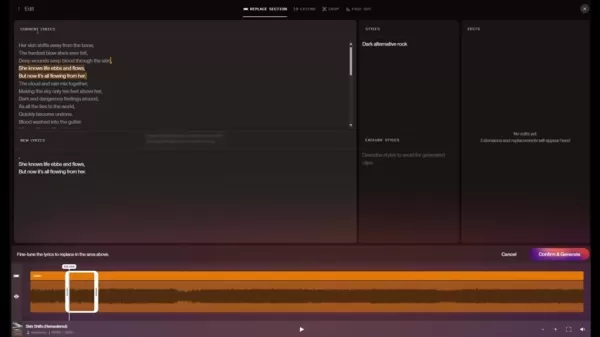
Ever had a song that was almost perfect, but one part just didn't fit? That's where Suno AI's Replace Section feature comes in. It's a game-changer, allowing you to regenerate specific sections of your song without touching the rest. Whether it's tweaking a verse, chorus, or bridge, this tool saves you time and lets you experiment until you get it just right. It's perfect for fixing lyrical errors, enhancing instrumental arrangements, or trying out new melodies.
To use the Replace Section feature:
- Go to your song in the library.
- Open the editing interface.
- Drag the edges of the selection over the lyrics to choose the section you want to replace.
- Adjust your selection with the "manual lyrics replacement" option if needed.
- Generate and review different versions.
- Select the best one to integrate into your song.
Fade Out: Crafting Professional Endings
Nothing says professional like a well-executed fade-out. With Suno AI's Fade Out feature, you can add those polished endings to your songs. It allows you to gradually decrease the volume, creating a natural and satisfying conclusion. You can customize the length and curve of the fade to match your song's mood and style, ensuring a seamless listening experience.
To use the Fade Out feature:
- Open your song in the editing interface.
- Select 'Fade Out' from the top menu.
- Drag the start point to where you want the fade to begin.
- Click 'Fade Out' to apply.

Crop: Tailoring Song Length
Sometimes, trimming a song can make it more impactful. Suno AI's Crop feature gives you the precision to cut down your tracks, whether it's shortening an intro, removing unwanted parts, or creating a concise version for specific uses. This tool helps keep your song focused and engaging.
To use the Crop feature:
- Open your song in the editing interface.
- Select 'Crop' from the top menu.
- Drag the edges to select the part of the song you want to keep.
- Click 'Crop' to finalize.
Navigating Suno AI's New Interface
A Streamlined Workflow
Suno AI's updated interface is designed to make editing your music easier than ever. With a clean layout and intuitive controls, you can quickly navigate through the editing tools and focus on refining your creative vision. The interface visually represents your song's structure, helping you identify and modify specific sections with ease.
Workspace and Version Control
Suno AI organizes your projects in workspaces, keeping all your songs and edits in one place. It's worth noting that features like Replace Section are not available for older V2 songs. To use these new tools, you'll need to create V4 versions or remastered tracks. Each version is kept, giving you ultimate control over your music.
Tips for Maximizing Editing Tools
The new features from Suno AI open up a world of creative possibilities, especially for beginners. Here are some tips to make the most of them:
- Experiment: Don't hesitate to try out different options with the Replace Section feature. Generate multiple versions and compare them to find the perfect fit for your song.
- Subtlety: Use the Fade Out feature to create smooth, natural-sounding endings. Avoid abrupt fades that can sound jarring.
- Precision: Utilize the Crop tool to create concise versions of your songs, perfect for social media or promotional purposes.
- Iterative Approach: Treat AI-generated music as a starting point and use the editing tools to refine and personalize your tracks, bringing your artistic vision to life.
- Compatibility: Remember that older V2 songs may not be compatible with all the new editing features. Upgrade your tracks to the latest version to unlock their full potential.
Suno AI Pricing Plans
Subscription Tiers
Suno AI offers various subscription plans to suit different user needs and budgets:
- Free Plan: Offers a limited number of songs per day, giving you a taste of what Suno AI can do. Credits are limited on this plan.
- Pro Plan: A mid-tier plan that provides more credits for song generation and includes commercial use rights, allowing you to monetize your music.
- Premier Plan: The top-tier plan with the most credits, server time, and tools available on the market.
Plan Credits per Month Commercial Use Cost Free Limited No Free Pro Increased Yes $8/month Premier Substantially Increased Yes $24/month
These credits are essential for creating and recreating songs on the Suno platform.
Assessing Suno AI's Strengths and Weaknesses
Pros
- User-friendly interface
- High-quality music generation
- Commercial use rights on paid plans
- Rapid music creation
- New editing tools
Cons
- Credit limitations on free plan
- Dependency on AI algorithms
- Compatibility issues with older songs
- Lack of granular control over individual instruments
Frequently Asked Questions About Suno AI
Are the new editing features available to all Suno AI users?
The new Replace Section, Fade Out, and Crop features are available to users with a paid subscription plan. Some functionalities may be limited on the free plan.
Can I use the Replace Section feature on older songs I generated with Suno AI?
The Replace Section feature is not compatible with older V2 songs. You'll need to upgrade your tracks to the latest version to use this functionality.
How do I ensure that the AI-generated replacements match the style and quality of the original song?
Suno AI's algorithms are designed to maintain consistency in style and quality. You can further refine the results by providing detailed text prompts and experimenting with different settings.
Is it possible to extend the duration of a song using the new editing tools?
Yes, the Extend feature allows you to add new sections to your songs, increasing their overall length. Note that this functionality requires the use of credits.
Related Questions
What other AI music generation platforms exist, and how do they compare to Suno AI?
Suno AI stands out with its user-friendly interface and focus on complete song generation, but there are other platforms that offer different approaches to AI-assisted music creation. These platforms often cater to more technically skilled users and provide more granular control over individual musical elements. Here are some notable competitors:
- Amper Music: Geared toward marketers and content creators, Amper Music offers customizable royalty-free music for video projects. While it allows for adjustments in tempo, key, and instrumentation, some users feel it lacks the human touch in its production.
- Jukebox: Jukebox generates original music with lyrics, using a different AI model that results in a unique sonic aesthetic. However, it may not always provide consistent lyrical or structural output.
- Boomy: Boomy enables users to create and submit songs to streaming platforms, offering monetization options. Some critics find the music it generates to be repetitive.
- Stable Audio: Developed by Stability AI, Stable Audio is known for its advanced, professional-focused features. It allows users to create high-fidelity tracks using text prompts or sound files, providing a valuable toolkit for both beginners and experienced users.
Each of these platforms caters to different needs and preferences. Suno AI's strength lies in its accessibility and ability to create complete, radio-ready songs, while other platforms may be better suited for users who need more control over individual musical parameters or are focused on creating background music for video projects.
Related article
 U.S. Stocks Hit Historic Milestone as AI and Aerospace Giants Prepare for Trillion-Dollar Debut
Elon Musk, Sam Altman, and Dario Amodei, three titans of the technology sector, are advancing toward initial public offerings for their respective ventures. With SpaceX, OpenAI, and Anthropic—three industry behemoths nearing trillion-dollar valuation
Swedish AI Startup Lovable Eyes $13.2 Billion Valuation After Major Funding Round
As AI-driven coding tools gain traction, Swedish startup Lovable has secured a major funding round. The company aims to raise $3 billion, potentially boosting its valuation to $13.2 billion—double the $6.6 billion recorded last December. Menlo Ventur
Google Tests Remy AI Agent for Gemini as Focus Shifts to User Control
According to Business Insider, Google is testing Remy, a new AI personal agent for Gemini. This tool aims to execute tasks on behalf of users, streamlining both professional workflows and daily routines.Currently, Remy is undergoing testing in an int
Related Special Topic Recommendations
Data Analysis
U.S. Stocks Hit Historic Milestone as AI and Aerospace Giants Prepare for Trillion-Dollar Debut
Elon Musk, Sam Altman, and Dario Amodei, three titans of the technology sector, are advancing toward initial public offerings for their respective ventures. With SpaceX, OpenAI, and Anthropic—three industry behemoths nearing trillion-dollar valuation
Swedish AI Startup Lovable Eyes $13.2 Billion Valuation After Major Funding Round
As AI-driven coding tools gain traction, Swedish startup Lovable has secured a major funding round. The company aims to raise $3 billion, potentially boosting its valuation to $13.2 billion—double the $6.6 billion recorded last December. Menlo Ventur
Google Tests Remy AI Agent for Gemini as Focus Shifts to User Control
According to Business Insider, Google is testing Remy, a new AI personal agent for Gemini. This tool aims to execute tasks on behalf of users, streamlining both professional workflows and daily routines.Currently, Remy is undergoing testing in an int
Related Special Topic Recommendations
Data Analysis
 Best AI Anomaly Detection Tools for KPI Monitoring across SaaS and Ecommerce Teams
2026 Latest Best Top-rated AI Anomaly Detection Tools for KPI Monitoring in SaaS and Ecommerce teams! XIX.AI has curated a powerful, game-changing collection based on rigorous real-world tests and weekly updated rankings. You’ll find detailed free vs paid comparison insights to help you identify the must-try solution that boosts productivity and unlocks your AI edge. Explore now!
 10 tools
 xix.ai
writing
Best AI Outline Generators for Long-Form SEO Articles
xix.ai
writing
Best AI Outline Generators for Long-Form SEO Articles
2026 Latest Best Top-Rated AI Outline Generators for Long-Form SEO Articles, meticulously curated by XIX.AI. These powerful tools offer game-changing assistance in creating high-quality content quickly, boosting writing efficiency significantly. Get a free vs paid comparison along with real-world tests and detailed rankings to help you find the must-try option that suits your needs. Explore now to unlock your AI edge.
8 tools
xix.ai
Education and Learning
AI Study Tools for Homework and Exam Prep
2026 Latest Best AI Study Tools for Homework and Exam Prep! XIX.AI curates a top-rated list of powerful, game-changing tools that help students boost productivity, streamline homework completion, and ace exams through real-world tests. Get a free vs paid comparison, detailed rankings, and must-try options to unlock your AI edge. Explore now!
10 tools
xix.ai
Music composition
AI Vocal Demo Tools for Songwriters, Hooks, Toplines, and Multilingual Draft Sessions
2026 Latest Best AI Vocal Demo Tools for Songwriters, Hook Creators, and Multi-Language Content Teams! XIX.AI has curated a top-rated list of powerful game-changing tools that go through rigorous real-world tests. You’ll find detailed free vs paid comparison data, comprehensive rankings, and must-try options to help you boost writing efficiency and unlock your creative potential. Explore now to discover your perfect tool for all your content needs!
9 tools
xix.ai
Business
Best AI Competitive Research Tools for Small Businesses
2026 Latest Best Top-rated AI Competitive Research Tools for Small Businesses! XIX.AI has curated a highly powerful game-changing collection, updated weekly with rigorous real-world tests and detailed rankings. You can find a comprehensive free vs paid comparison to help you identify the must-try tools that boost your productivity and give you a competitive edge. Explore now to discover your perfect tool!
9 tools
xix.ai
Image editing
Photoshop AI Retouch Tools for Ecommerce Apparel, Skin Cleanup, and Color Consistency
2026 Latest Best Photoshop AI retouch tools for ecommerce apparel, skin cleanup, and color consistency! This top-rated curated list features powerful game-changing solutions that help you boost writing efficiency, streamline content creation, and achieve perfect visual results effortlessly. Each tool has undergone real-world tests through weekly updated rankings, complete with free vs paid comparison details. Backed by XIX.AI, it’s the must-try guide for anyone aiming to unlock your AI edge. Explore now!
10 tools
xix.ai

 Comments (3)
0/500
Comments (3)
0/500
![KennethJones]()
Suno AI's new tools are a game-changer! Replacing sections and fading out tracks feels so smooth, like editing a painting with a magic brush. Can't wait to mess around with these and make some killer tracks! 🎶
![RogerGonzalez]()
¡Qué pasada las nuevas herramientas de Suno AI! El Replace Section me flipa, es como tener un estudio profesional en casa. ¿Alguien ha probado el Fade Out? Me muero por ver cómo queda en mis pistas. 🎶
![FredCarter]()
Suno AI's new tools are a game-changer! Replacing sections and fading out tracks feels so intuitive, like sculpting a song with my bare hands. Excited to mess around with these and see how far I can push my beats! 🎵
Exploring Suno AI's Innovative Editing Tools
Suno AI is pushing the boundaries of music creation with its latest update, introducing powerful new editing features to its platform. These tools, including Replace Section, Fade Out, and Crop, are designed to give users unprecedented control over their AI-generated music, making the creative process more refined and enjoyable.
What is Suno AI?
Suno AI is a groundbreaking platform that uses artificial intelligence to help users create original music. By simply entering a text prompt, users can generate complete songs with lyrics and instrumentation, making music creation accessible to everyone, regardless of their musical background. The latest update brings advanced editing tools to the table, bridging the gap between AI-generated music and professional-quality tracks.
Replace Section: Fine-Tuning Your Song
Ever had a song that was almost perfect, but one part just didn't fit? That's where Suno AI's Replace Section feature comes in. It's a game-changer, allowing you to regenerate specific sections of your song without touching the rest. Whether it's tweaking a verse, chorus, or bridge, this tool saves you time and lets you experiment until you get it just right. It's perfect for fixing lyrical errors, enhancing instrumental arrangements, or trying out new melodies.
To use the Replace Section feature:
- Go to your song in the library.
- Open the editing interface.
- Drag the edges of the selection over the lyrics to choose the section you want to replace.
- Adjust your selection with the "manual lyrics replacement" option if needed.
- Generate and review different versions.
- Select the best one to integrate into your song.
Fade Out: Crafting Professional Endings
Nothing says professional like a well-executed fade-out. With Suno AI's Fade Out feature, you can add those polished endings to your songs. It allows you to gradually decrease the volume, creating a natural and satisfying conclusion. You can customize the length and curve of the fade to match your song's mood and style, ensuring a seamless listening experience.
To use the Fade Out feature:
- Open your song in the editing interface.
- Select 'Fade Out' from the top menu.
- Drag the start point to where you want the fade to begin.
- Click 'Fade Out' to apply.
Crop: Tailoring Song Length
Sometimes, trimming a song can make it more impactful. Suno AI's Crop feature gives you the precision to cut down your tracks, whether it's shortening an intro, removing unwanted parts, or creating a concise version for specific uses. This tool helps keep your song focused and engaging.
To use the Crop feature:
- Open your song in the editing interface.
- Select 'Crop' from the top menu.
- Drag the edges to select the part of the song you want to keep.
- Click 'Crop' to finalize.
Navigating Suno AI's New Interface
A Streamlined Workflow
Suno AI's updated interface is designed to make editing your music easier than ever. With a clean layout and intuitive controls, you can quickly navigate through the editing tools and focus on refining your creative vision. The interface visually represents your song's structure, helping you identify and modify specific sections with ease.
Workspace and Version Control
Suno AI organizes your projects in workspaces, keeping all your songs and edits in one place. It's worth noting that features like Replace Section are not available for older V2 songs. To use these new tools, you'll need to create V4 versions or remastered tracks. Each version is kept, giving you ultimate control over your music.
Tips for Maximizing Editing Tools
The new features from Suno AI open up a world of creative possibilities, especially for beginners. Here are some tips to make the most of them:
- Experiment: Don't hesitate to try out different options with the Replace Section feature. Generate multiple versions and compare them to find the perfect fit for your song.
- Subtlety: Use the Fade Out feature to create smooth, natural-sounding endings. Avoid abrupt fades that can sound jarring.
- Precision: Utilize the Crop tool to create concise versions of your songs, perfect for social media or promotional purposes.
- Iterative Approach: Treat AI-generated music as a starting point and use the editing tools to refine and personalize your tracks, bringing your artistic vision to life.
- Compatibility: Remember that older V2 songs may not be compatible with all the new editing features. Upgrade your tracks to the latest version to unlock their full potential.
Suno AI Pricing Plans
Subscription Tiers
Suno AI offers various subscription plans to suit different user needs and budgets:
- Free Plan: Offers a limited number of songs per day, giving you a taste of what Suno AI can do. Credits are limited on this plan.
- Pro Plan: A mid-tier plan that provides more credits for song generation and includes commercial use rights, allowing you to monetize your music.
- Premier Plan: The top-tier plan with the most credits, server time, and tools available on the market.
| Plan | Credits per Month | Commercial Use | Cost |
|---|---|---|---|
| Free | Limited | No | Free |
| Pro | Increased | Yes | $8/month |
| Premier | Substantially Increased | Yes | $24/month |
These credits are essential for creating and recreating songs on the Suno platform.
Assessing Suno AI's Strengths and Weaknesses
Pros
- User-friendly interface
- High-quality music generation
- Commercial use rights on paid plans
- Rapid music creation
- New editing tools
Cons
- Credit limitations on free plan
- Dependency on AI algorithms
- Compatibility issues with older songs
- Lack of granular control over individual instruments
Frequently Asked Questions About Suno AI
Are the new editing features available to all Suno AI users?
The new Replace Section, Fade Out, and Crop features are available to users with a paid subscription plan. Some functionalities may be limited on the free plan.
Can I use the Replace Section feature on older songs I generated with Suno AI?
The Replace Section feature is not compatible with older V2 songs. You'll need to upgrade your tracks to the latest version to use this functionality.
How do I ensure that the AI-generated replacements match the style and quality of the original song?
Suno AI's algorithms are designed to maintain consistency in style and quality. You can further refine the results by providing detailed text prompts and experimenting with different settings.
Is it possible to extend the duration of a song using the new editing tools?
Yes, the Extend feature allows you to add new sections to your songs, increasing their overall length. Note that this functionality requires the use of credits.
Related Questions
What other AI music generation platforms exist, and how do they compare to Suno AI?
Suno AI stands out with its user-friendly interface and focus on complete song generation, but there are other platforms that offer different approaches to AI-assisted music creation. These platforms often cater to more technically skilled users and provide more granular control over individual musical elements. Here are some notable competitors:
- Amper Music: Geared toward marketers and content creators, Amper Music offers customizable royalty-free music for video projects. While it allows for adjustments in tempo, key, and instrumentation, some users feel it lacks the human touch in its production.
- Jukebox: Jukebox generates original music with lyrics, using a different AI model that results in a unique sonic aesthetic. However, it may not always provide consistent lyrical or structural output.
- Boomy: Boomy enables users to create and submit songs to streaming platforms, offering monetization options. Some critics find the music it generates to be repetitive.
- Stable Audio: Developed by Stability AI, Stable Audio is known for its advanced, professional-focused features. It allows users to create high-fidelity tracks using text prompts or sound files, providing a valuable toolkit for both beginners and experienced users.
Each of these platforms caters to different needs and preferences. Suno AI's strength lies in its accessibility and ability to create complete, radio-ready songs, while other platforms may be better suited for users who need more control over individual musical parameters or are focused on creating background music for video projects.








 U.S. Stocks Hit Historic Milestone as AI and Aerospace Giants Prepare for Trillion-Dollar Debut
Elon Musk, Sam Altman, and Dario Amodei, three titans of the technology sector, are advancing toward initial public offerings for their respective ventures. With SpaceX, OpenAI, and Anthropic—three industry behemoths nearing trillion-dollar valuation
U.S. Stocks Hit Historic Milestone as AI and Aerospace Giants Prepare for Trillion-Dollar Debut
Elon Musk, Sam Altman, and Dario Amodei, three titans of the technology sector, are advancing toward initial public offerings for their respective ventures. With SpaceX, OpenAI, and Anthropic—three industry behemoths nearing trillion-dollar valuation
 Swedish AI Startup Lovable Eyes $13.2 Billion Valuation After Major Funding Round
As AI-driven coding tools gain traction, Swedish startup Lovable has secured a major funding round. The company aims to raise $3 billion, potentially boosting its valuation to $13.2 billion—double the $6.6 billion recorded last December. Menlo Ventur
Google Tests Remy AI Agent for Gemini as Focus Shifts to User Control
According to Business Insider, Google is testing Remy, a new AI personal agent for Gemini. This tool aims to execute tasks on behalf of users, streamlining both professional workflows and daily routines.Currently, Remy is undergoing testing in an int
Swedish AI Startup Lovable Eyes $13.2 Billion Valuation After Major Funding Round
As AI-driven coding tools gain traction, Swedish startup Lovable has secured a major funding round. The company aims to raise $3 billion, potentially boosting its valuation to $13.2 billion—double the $6.6 billion recorded last December. Menlo Ventur
Google Tests Remy AI Agent for Gemini as Focus Shifts to User Control
According to Business Insider, Google is testing Remy, a new AI personal agent for Gemini. This tool aims to execute tasks on behalf of users, streamlining both professional workflows and daily routines.Currently, Remy is undergoing testing in an int

2026 Latest Best Top-rated AI Anomaly Detection Tools for KPI Monitoring in SaaS and Ecommerce teams! XIX.AI has curated a powerful, game-changing collection based on rigorous real-world tests and weekly updated rankings. You’ll find detailed free vs paid comparison insights to help you identify the must-try solution that boosts productivity and unlocks your AI edge. Explore now!
10 tools
xix.ai

2026 Latest Best Top-Rated AI Outline Generators for Long-Form SEO Articles, meticulously curated by XIX.AI. These powerful tools offer game-changing assistance in creating high-quality content quickly, boosting writing efficiency significantly. Get a free vs paid comparison along with real-world tests and detailed rankings to help you find the must-try option that suits your needs. Explore now to unlock your AI edge.
8 tools
xix.ai

2026 Latest Best AI Study Tools for Homework and Exam Prep! XIX.AI curates a top-rated list of powerful, game-changing tools that help students boost productivity, streamline homework completion, and ace exams through real-world tests. Get a free vs paid comparison, detailed rankings, and must-try options to unlock your AI edge. Explore now!
10 tools
xix.ai

2026 Latest Best AI Vocal Demo Tools for Songwriters, Hook Creators, and Multi-Language Content Teams! XIX.AI has curated a top-rated list of powerful game-changing tools that go through rigorous real-world tests. You’ll find detailed free vs paid comparison data, comprehensive rankings, and must-try options to help you boost writing efficiency and unlock your creative potential. Explore now to discover your perfect tool for all your content needs!
9 tools
xix.ai

2026 Latest Best Top-rated AI Competitive Research Tools for Small Businesses! XIX.AI has curated a highly powerful game-changing collection, updated weekly with rigorous real-world tests and detailed rankings. You can find a comprehensive free vs paid comparison to help you identify the must-try tools that boost your productivity and give you a competitive edge. Explore now to discover your perfect tool!
9 tools
xix.ai

2026 Latest Best Photoshop AI retouch tools for ecommerce apparel, skin cleanup, and color consistency! This top-rated curated list features powerful game-changing solutions that help you boost writing efficiency, streamline content creation, and achieve perfect visual results effortlessly. Each tool has undergone real-world tests through weekly updated rankings, complete with free vs paid comparison details. Backed by XIX.AI, it’s the must-try guide for anyone aiming to unlock your AI edge. Explore now!
10 tools
xix.ai

Suno AI's new tools are a game-changer! Replacing sections and fading out tracks feels so smooth, like editing a painting with a magic brush. Can't wait to mess around with these and make some killer tracks! 🎶
¡Qué pasada las nuevas herramientas de Suno AI! El Replace Section me flipa, es como tener un estudio profesional en casa. ¿Alguien ha probado el Fade Out? Me muero por ver cómo queda en mis pistas. 🎶
Suno AI's new tools are a game-changer! Replacing sections and fading out tracks feels so intuitive, like sculpting a song with my bare hands. Excited to mess around with these and see how far I can push my beats! 🎵












