


 Home
HomeStable Diffusion 3.5: Your Guide to Advanced AI Image Creation
Artificial intelligence is revolutionizing creative expression, and Stable Diffusion 3.5 emerges as a leading AI image generation model. This tool empowers users to craft stunning visuals from text prompts at no cost. Whether you're a digital artist, marketer, or AI enthusiast, mastering Stable Diffusion 3.5 unlocks new possibilities for creating compelling visual content. This guide explores its features, variants, and how to get started today.
Key Highlights
Stable Diffusion 3.5, launched by Stability AI, is a cutting-edge AI image generation model.
It transforms text prompts into high-quality images for free.
Available in three variants: Large, Large Turbo, and Medium.
The Large variant delivers top-tier image quality, while Large Turbo prioritizes speed.
Access the model via the official Hugging Face platform.
Creating images is as easy as entering a prompt and hitting 'Run'.
Advanced settings enable tailored image customization.
AI-driven image creation is transforming creative industries with endless possibilities.
Exploring Stable Diffusion 3.5
What is Stable Diffusion 3.5?
Stable Diffusion 3.5 is an advanced AI model that generates images from text descriptions. Developed by Stability AI, it marks a significant advancement in visual creation technology, offering enhanced quality, flexibility, and user-friendliness. Unlike traditional methods requiring artistic expertise, this model allows anyone to produce striking visuals by simply describing their vision.
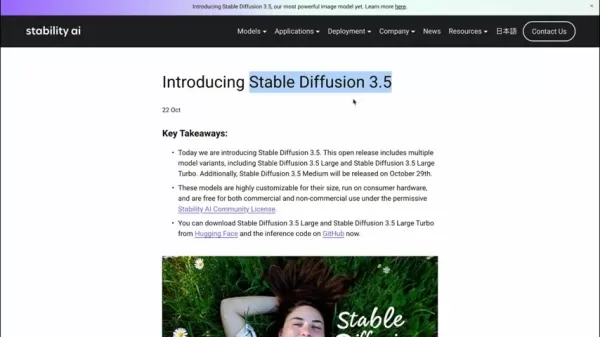
Built on a sophisticated deep learning framework, the model is trained on extensive image and text datasets, enabling it to interpret intricate prompts and create cohesive, detailed visuals. Its applications span digital art, marketing, education, and scientific visualization, transforming how visual content is produced.
A standout feature is its accessibility. Stability AI offers the model for free, allowing users to experiment without costly tools or hardware. This open access fosters global creativity, enabling individuals and businesses to produce high-quality visuals with minimal investment. As AI evolves, Stable Diffusion 3.5 is set to shape the future of visual storytelling, making advanced image creation available to a broad audience and driving innovation across creative fields.
Variants of Stable Diffusion 3.5: Large, Large Turbo, and Medium
Stable Diffusion 3.5 comes in multiple variants, each tailored to specific needs and performance levels. The three main variants are:
Stable Diffusion 3.5 Large: With 8 billion parameters, this variant delivers exceptional image quality and precise prompt alignment, making it perfect for professional applications where visual excellence is critical.
Stable Diffusion 3.5 Large Turbo: A streamlined version of Large, this variant prioritizes speed while maintaining high-quality outputs, ideal for real-time content creation or rapid design iterations.
Stable Diffusion 3.5 Medium: Designed for consumer hardware, this variant balances quality and accessibility. Though not yet released, it offers an entry point for users with limited computational resources.

Choosing a variant depends on your priorities. The Large variant excels for top-quality visuals, Large Turbo suits fast-paced workflows, and Medium caters to users with standard hardware, ensuring broad accessibility.
SEO and Keyword Optimization
Enhancing Search Engine Visibility
To boost this article’s search engine ranking, naturally integrate relevant keywords like 'Stable Diffusion 3.5,' 'AI image generation,' 'free AI image creator,' 'text-to-image AI,' and 'Stability AI.' Avoid overusing keywords, which can harm rankings, and focus on delivering valuable content that aligns with user intent. Address common questions, provide clear instructions, and highlight the model’s benefits and limitations to engage readers effectively.
Incorporating latent semantic indexing (LSI) keywords, such as 'image synthesis,' 'neural networks,' 'AI art,' 'machine learning,' and 'Hugging Face,' enhances content depth and relevance. This approach broadens appeal, capturing diverse user queries and improving organic search performance.
Getting Started with Stable Diffusion 3.5
Using Stable Diffusion 3.5 on Hugging Face
The simplest way to begin is through Stability AI’s official Hugging Face space, a user-friendly platform for hosting AI models. Follow these steps to start creating:
Visit the Hugging Face Space: Find the Stable Diffusion 3.5 Large (8B) space on Hugging Face, linked in the description.
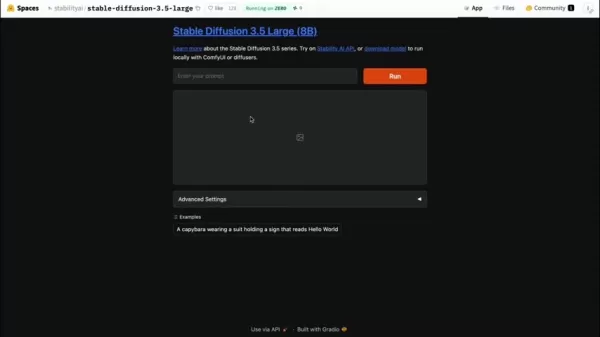
Sign Up or Log In: Create a Hugging Face account if needed, or log in with existing credentials.
Input Your Prompt: Enter a detailed text prompt describing the desired image for optimal results.
Click 'Run': Submit your prompt to generate the image, which may take a few minutes based on prompt complexity and server demand.
View and Save: Once generated, view the image below the 'Run' button. Download it or tweak the prompt for variations.
Customizing Images with Advanced Settings
Stable Diffusion 3.5 offers advanced settings under the Hugging Face 'Advanced Settings' tab for fine-tuning outputs. Key options include:
Seed: Set a specific seed for consistent image generation, ideal for replicating results or creating variations.
Randomize Seed: Enable this for varied outputs with each run, adding creative diversity.
Width and Height: Adjust image dimensions to suit specific aspect ratios or display needs.
Guidance Scale: Control how closely the model adheres to your prompt. Higher values ensure fidelity, while lower ones allow creative freedom.
Number of Inference Steps: Increase steps for sharper images, though this extends generation time.
Experimenting with these settings lets you tailor images to your vision, balancing creativity and precision for optimal results.
Pros and Cons of Stable Diffusion 3.5
Pros
Free access via Hugging Face
Exceptional image quality
Multiple variants for diverse needs
Flexible customization options
Strong community support
Cons
Limited image generation per hour on free plan
Requires a Hugging Face account
Advanced settings may overwhelm new users
Core Features of Stable Diffusion 3.5
Feature Highlights
Stable Diffusion 3.5 offers powerful capabilities to elevate image creation:
- Superior Image Quality: Produces vivid, detailed visuals with exceptional clarity.
- Text-to-Image Conversion: Seamlessly transforms text prompts into accurate visuals.
- Multiple Variants: Choose Large, Large Turbo, or Medium to match your needs.
- Customizable Controls: Adjust seed, dimensions, guidance scale, and inference steps for precise outputs.
- Free Access: Available at no cost via Hugging Face, broadening its reach.
- Versatile Outputs: Supports diverse styles, skin tones, and aesthetics effortlessly.
Creative Applications of Stable Diffusion 3.5
Versatile Use Cases Across Sectors
Stable Diffusion 3.5’s flexibility makes it valuable across industries:
- Digital Art: Artists can spark inspiration, create unique works, or explore new styles.
- Marketing: Generate captivating visuals for campaigns, social media, or websites.
- Education: Create engaging visual aids for teaching and presentations.
- Scientific Visualization: Illustrate complex data or concepts for research.
- Game Development: Produce textures, concept art, or game assets.
- Content Creation: Enhance blogs or posts with custom images.
- Personal Projects: Craft personalized artwork, wallpapers, or social media visuals.
Frequently Asked Questions
Is Stable Diffusion 3.5 truly free?
Yes, Stable Diffusion 3.5 is free to use via Hugging Face, though hourly image generation limits apply. Stability AI’s commitment to accessibility ensures broad access, but restrictions like image quotas or commercial use limitations may exist. Check Hugging Face’s terms for current details on usage and licensing.
What are the free version’s limitations?
The free version caps the number of images generated per hour to ensure equitable access. The exact limit varies based on server load. Some advanced features may also be reserved for paid plans, but the free version still offers robust tools for most users to create impressive visuals.
Which Stable Diffusion 3.5 variant should I choose?
Your choice depends on your goals. Opt for the Large variant for unmatched image quality with sufficient hardware. Choose Large Turbo for faster generation in time-sensitive tasks. The Medium variant, once available, suits users with limited hardware, offering a balanced entry point.
Related Questions
How does Stable Diffusion 3.5 stack up against other AI image models?
Stable Diffusion 3.5 advances AI image generation with superior quality, better prompt accuracy, and extensive customization options. Compared to DALL-E 2, which excels in creative outputs, or Midjourney, known for artistic visuals, Stable Diffusion 3.5 balances quality, flexibility, and free access via Hugging Face. Experiment with each to find the best fit for your needs.
Related article
 Enovis acquires eCential Robotics for $180M
eCential’s open, modular architecture enables partnerships with technology firms and implant makers. | Source: eCential RoboticsMedical technology firm Enovis Corp. announced a binding offer to acquire eCential Robotics for €155 million (over $180 mi
OpenAI Unveils Codex Cloud Environments for Seamless Cross-Device Use
OpenAI has expanded its software engineering agent, Codex, with new capabilities that extend its utility beyond individual laptops. These updates introduce reusable cloud development environments, enabling access from any device.Announced during Open
Tencent WorkBuddy Launches on HarmonyOS PC App Market
On July 27, Zhang Jun, Tencent’s public relations director, announced the official launch of the company’s AI office assistant, WorkBuddy, on the HarmonyOS PC app market. This marks the debut of the first desktop AI agent within the HarmonyOS ecosyst
Related Special Topic Recommendations
code
Enovis acquires eCential Robotics for $180M
eCential’s open, modular architecture enables partnerships with technology firms and implant makers. | Source: eCential RoboticsMedical technology firm Enovis Corp. announced a binding offer to acquire eCential Robotics for €155 million (over $180 mi
OpenAI Unveils Codex Cloud Environments for Seamless Cross-Device Use
OpenAI has expanded its software engineering agent, Codex, with new capabilities that extend its utility beyond individual laptops. These updates introduce reusable cloud development environments, enabling access from any device.Announced during Open
Tencent WorkBuddy Launches on HarmonyOS PC App Market
On July 27, Zhang Jun, Tencent’s public relations director, announced the official launch of the company’s AI office assistant, WorkBuddy, on the HarmonyOS PC app market. This marks the debut of the first desktop AI agent within the HarmonyOS ecosyst
Related Special Topic Recommendations
code
 Best AI Coding Tools for Python and JavaScript
2026 Latest Best Top-Rated AI Coding Tools for Python and JavaScript are here on XIX.AI’s curated list. These powerful game-changing tools have undergone rigorous real-world tests to deliver exceptional results for writing efficient code, fixing bugs, and boosting productivity. Get a free vs paid comparison and see which options suit your needs. Explore now to Discover your perfect coding tool and Unlock your AI edge.
 10 tools
 xix.ai
Academic Research
Best AI Citation Mapping Tools for Research Discovery
xix.ai
Academic Research
Best AI Citation Mapping Tools for Research Discovery
2026 Latest Best Top-Rated AI Citation Mapping Tools for Research Discovery! XIX.AI has curated a powerful, game-changing collection of must-try tools that go through rigorous real-world tests to deliver accurate results. You’ll find detailed free vs paid comparisons, weekly updated rankings, and insights to help you boost your research efficiency and uncover valuable data faster. Explore now to discover your perfect tool for academic work! 238 characters
11 tools
xix.ai
SEO
AI Meta Tag Tools for Faster On Page SEO
2026 Latest Best Top-rated AI Meta Tag Tools for Faster On Page SEO! XIX.AI has curated a powerful, game-changing collection of highly reliable tools that undergo rigorous real-world tests. You’ll find a free vs paid comparison along with detailed rankings to help you choose the perfect option for boosting your content’s search visibility and improving writing efficiency. Explore now to Unlock your AI edge!
9 tools
xix.ai
Health & Wellness
AI Habit Tracking Tools for Personal Health Goals
2026 Latest Best AI Habit Tracking Tools for Personal Health Goals are here on XIX.AI! Our curated top-rated list includes powerful, game-changing solutions that help you stay consistent with your goals through real-world tests and strict rankings. We also offer a free vs paid comparison to help you choose the perfect fit. Explore now to Unlock your AI edge in achieving better health outcomes.
10 tools
xix.ai
Data Analysis
Best AI Anomaly Detection Tools for Dashboard Monitoring
2026 Latest Best Top-rated AI Anomaly Detection Tools for Dashboard Monitoring are here on XIX.AI! This curated list features powerful, game-changing solutions that deliver accurate real-world tests through weekly updated rankings. You’ll find a free vs paid comparison and insights into how these tools boost productivity by helping users spot issues fast, streamlining workflow efficiency. Discover your perfect tool to unlock your AI edge today. Explore now!
9 tools
xix.ai
Animation Creation
AI Lip-Sync Generators for Dialogue-Driven Character Animation and Motion Scenes
2026 Latest Best AI Lip-Sync Generators for Dialogue-Driven Character Animation and Motion Scenes! XIX.AI has curated a top-rated list of powerful, game-changing tools that deliver flawless synchronized lip movements for animated characters. Each option undergoes rigorous real-world tests to ensure reliability, and our weekly updated rankings help you find the must-try solution that boosts your animation workflow efficiency. Explore now to discover your perfect tool!
9 tools
xix.ai

 Comments (3)
0/500
Comments (3)
0/500
![JasonAnderson]()
Stable Diffusion 3.5 klingt echt krass! 🎨 Ich frage mich, wie sich das auf den Jobmarkt für Grafiker auswirken wird. Einerseits total spannend, andererseits auch ein bisschen beängstigend. Hat jemand schon Erfahrungen damit gemacht?
![GaryJones]()
Stable Diffusion keeps getting better! The jump to 3.5 seems huge. I'm especially curious about the practical side – how much longer does a complex render actually take compared to 3? The quality looks insane in the examples, but I hope the hardware requirements haven't gone through the roof for us hobbyists. Fingers crossed for more efficient training! 🤞
![RobertGonzalez]()
This AI image tool sounds wild! I tried Stable Diffusion before, but 3.5 seems next-level. Can it really turn my random ideas into art? Gotta test it! 😎
Artificial intelligence is revolutionizing creative expression, and Stable Diffusion 3.5 emerges as a leading AI image generation model. This tool empowers users to craft stunning visuals from text prompts at no cost. Whether you're a digital artist, marketer, or AI enthusiast, mastering Stable Diffusion 3.5 unlocks new possibilities for creating compelling visual content. This guide explores its features, variants, and how to get started today.
Key Highlights
Stable Diffusion 3.5, launched by Stability AI, is a cutting-edge AI image generation model.
It transforms text prompts into high-quality images for free.
Available in three variants: Large, Large Turbo, and Medium.
The Large variant delivers top-tier image quality, while Large Turbo prioritizes speed.
Access the model via the official Hugging Face platform.
Creating images is as easy as entering a prompt and hitting 'Run'.
Advanced settings enable tailored image customization.
AI-driven image creation is transforming creative industries with endless possibilities.
Exploring Stable Diffusion 3.5
What is Stable Diffusion 3.5?
Stable Diffusion 3.5 is an advanced AI model that generates images from text descriptions. Developed by Stability AI, it marks a significant advancement in visual creation technology, offering enhanced quality, flexibility, and user-friendliness. Unlike traditional methods requiring artistic expertise, this model allows anyone to produce striking visuals by simply describing their vision.
Built on a sophisticated deep learning framework, the model is trained on extensive image and text datasets, enabling it to interpret intricate prompts and create cohesive, detailed visuals. Its applications span digital art, marketing, education, and scientific visualization, transforming how visual content is produced.
A standout feature is its accessibility. Stability AI offers the model for free, allowing users to experiment without costly tools or hardware. This open access fosters global creativity, enabling individuals and businesses to produce high-quality visuals with minimal investment. As AI evolves, Stable Diffusion 3.5 is set to shape the future of visual storytelling, making advanced image creation available to a broad audience and driving innovation across creative fields.
Variants of Stable Diffusion 3.5: Large, Large Turbo, and Medium
Stable Diffusion 3.5 comes in multiple variants, each tailored to specific needs and performance levels. The three main variants are:
Stable Diffusion 3.5 Large: With 8 billion parameters, this variant delivers exceptional image quality and precise prompt alignment, making it perfect for professional applications where visual excellence is critical.
Stable Diffusion 3.5 Large Turbo: A streamlined version of Large, this variant prioritizes speed while maintaining high-quality outputs, ideal for real-time content creation or rapid design iterations.
Stable Diffusion 3.5 Medium: Designed for consumer hardware, this variant balances quality and accessibility. Though not yet released, it offers an entry point for users with limited computational resources.
Choosing a variant depends on your priorities. The Large variant excels for top-quality visuals, Large Turbo suits fast-paced workflows, and Medium caters to users with standard hardware, ensuring broad accessibility.
SEO and Keyword Optimization
Enhancing Search Engine Visibility
To boost this article’s search engine ranking, naturally integrate relevant keywords like 'Stable Diffusion 3.5,' 'AI image generation,' 'free AI image creator,' 'text-to-image AI,' and 'Stability AI.' Avoid overusing keywords, which can harm rankings, and focus on delivering valuable content that aligns with user intent. Address common questions, provide clear instructions, and highlight the model’s benefits and limitations to engage readers effectively.
Incorporating latent semantic indexing (LSI) keywords, such as 'image synthesis,' 'neural networks,' 'AI art,' 'machine learning,' and 'Hugging Face,' enhances content depth and relevance. This approach broadens appeal, capturing diverse user queries and improving organic search performance.
Getting Started with Stable Diffusion 3.5
Using Stable Diffusion 3.5 on Hugging Face
The simplest way to begin is through Stability AI’s official Hugging Face space, a user-friendly platform for hosting AI models. Follow these steps to start creating:
Visit the Hugging Face Space: Find the Stable Diffusion 3.5 Large (8B) space on Hugging Face, linked in the description.
Sign Up or Log In: Create a Hugging Face account if needed, or log in with existing credentials.
Input Your Prompt: Enter a detailed text prompt describing the desired image for optimal results.
Click 'Run': Submit your prompt to generate the image, which may take a few minutes based on prompt complexity and server demand.
View and Save: Once generated, view the image below the 'Run' button. Download it or tweak the prompt for variations.
Customizing Images with Advanced Settings
Stable Diffusion 3.5 offers advanced settings under the Hugging Face 'Advanced Settings' tab for fine-tuning outputs. Key options include:
Seed: Set a specific seed for consistent image generation, ideal for replicating results or creating variations.
Randomize Seed: Enable this for varied outputs with each run, adding creative diversity.
Width and Height: Adjust image dimensions to suit specific aspect ratios or display needs.
Guidance Scale: Control how closely the model adheres to your prompt. Higher values ensure fidelity, while lower ones allow creative freedom.
Number of Inference Steps: Increase steps for sharper images, though this extends generation time.
Experimenting with these settings lets you tailor images to your vision, balancing creativity and precision for optimal results.
Pros and Cons of Stable Diffusion 3.5
Pros
Free access via Hugging Face
Exceptional image quality
Multiple variants for diverse needs
Flexible customization options
Strong community support
Cons
Limited image generation per hour on free plan
Requires a Hugging Face account
Advanced settings may overwhelm new users
Core Features of Stable Diffusion 3.5
Feature Highlights
Stable Diffusion 3.5 offers powerful capabilities to elevate image creation:
- Superior Image Quality: Produces vivid, detailed visuals with exceptional clarity.
- Text-to-Image Conversion: Seamlessly transforms text prompts into accurate visuals.
- Multiple Variants: Choose Large, Large Turbo, or Medium to match your needs.
- Customizable Controls: Adjust seed, dimensions, guidance scale, and inference steps for precise outputs.
- Free Access: Available at no cost via Hugging Face, broadening its reach.
- Versatile Outputs: Supports diverse styles, skin tones, and aesthetics effortlessly.
Creative Applications of Stable Diffusion 3.5
Versatile Use Cases Across Sectors
Stable Diffusion 3.5’s flexibility makes it valuable across industries:
- Digital Art: Artists can spark inspiration, create unique works, or explore new styles.
- Marketing: Generate captivating visuals for campaigns, social media, or websites.
- Education: Create engaging visual aids for teaching and presentations.
- Scientific Visualization: Illustrate complex data or concepts for research.
- Game Development: Produce textures, concept art, or game assets.
- Content Creation: Enhance blogs or posts with custom images.
- Personal Projects: Craft personalized artwork, wallpapers, or social media visuals.
Frequently Asked Questions
Is Stable Diffusion 3.5 truly free?
Yes, Stable Diffusion 3.5 is free to use via Hugging Face, though hourly image generation limits apply. Stability AI’s commitment to accessibility ensures broad access, but restrictions like image quotas or commercial use limitations may exist. Check Hugging Face’s terms for current details on usage and licensing.
What are the free version’s limitations?
The free version caps the number of images generated per hour to ensure equitable access. The exact limit varies based on server load. Some advanced features may also be reserved for paid plans, but the free version still offers robust tools for most users to create impressive visuals.
Which Stable Diffusion 3.5 variant should I choose?
Your choice depends on your goals. Opt for the Large variant for unmatched image quality with sufficient hardware. Choose Large Turbo for faster generation in time-sensitive tasks. The Medium variant, once available, suits users with limited hardware, offering a balanced entry point.
Related Questions
How does Stable Diffusion 3.5 stack up against other AI image models?
Stable Diffusion 3.5 advances AI image generation with superior quality, better prompt accuracy, and extensive customization options. Compared to DALL-E 2, which excels in creative outputs, or Midjourney, known for artistic visuals, Stable Diffusion 3.5 balances quality, flexibility, and free access via Hugging Face. Experiment with each to find the best fit for your needs.








 Enovis acquires eCential Robotics for $180M
eCential’s open, modular architecture enables partnerships with technology firms and implant makers. | Source: eCential RoboticsMedical technology firm Enovis Corp. announced a binding offer to acquire eCential Robotics for €155 million (over $180 mi
Enovis acquires eCential Robotics for $180M
eCential’s open, modular architecture enables partnerships with technology firms and implant makers. | Source: eCential RoboticsMedical technology firm Enovis Corp. announced a binding offer to acquire eCential Robotics for €155 million (over $180 mi
 OpenAI Unveils Codex Cloud Environments for Seamless Cross-Device Use
OpenAI has expanded its software engineering agent, Codex, with new capabilities that extend its utility beyond individual laptops. These updates introduce reusable cloud development environments, enabling access from any device.Announced during Open
OpenAI Unveils Codex Cloud Environments for Seamless Cross-Device Use
OpenAI has expanded its software engineering agent, Codex, with new capabilities that extend its utility beyond individual laptops. These updates introduce reusable cloud development environments, enabling access from any device.Announced during Open
 Tencent WorkBuddy Launches on HarmonyOS PC App Market
On July 27, Zhang Jun, Tencent’s public relations director, announced the official launch of the company’s AI office assistant, WorkBuddy, on the HarmonyOS PC app market. This marks the debut of the first desktop AI agent within the HarmonyOS ecosyst
Tencent WorkBuddy Launches on HarmonyOS PC App Market
On July 27, Zhang Jun, Tencent’s public relations director, announced the official launch of the company’s AI office assistant, WorkBuddy, on the HarmonyOS PC app market. This marks the debut of the first desktop AI agent within the HarmonyOS ecosyst

2026 Latest Best Top-Rated AI Coding Tools for Python and JavaScript are here on XIX.AI’s curated list. These powerful game-changing tools have undergone rigorous real-world tests to deliver exceptional results for writing efficient code, fixing bugs, and boosting productivity. Get a free vs paid comparison and see which options suit your needs. Explore now to Discover your perfect coding tool and Unlock your AI edge.
10 tools
xix.ai

2026 Latest Best Top-Rated AI Citation Mapping Tools for Research Discovery! XIX.AI has curated a powerful, game-changing collection of must-try tools that go through rigorous real-world tests to deliver accurate results. You’ll find detailed free vs paid comparisons, weekly updated rankings, and insights to help you boost your research efficiency and uncover valuable data faster. Explore now to discover your perfect tool for academic work! 238 characters
11 tools
xix.ai

2026 Latest Best Top-rated AI Meta Tag Tools for Faster On Page SEO! XIX.AI has curated a powerful, game-changing collection of highly reliable tools that undergo rigorous real-world tests. You’ll find a free vs paid comparison along with detailed rankings to help you choose the perfect option for boosting your content’s search visibility and improving writing efficiency. Explore now to Unlock your AI edge!
9 tools
xix.ai

2026 Latest Best AI Habit Tracking Tools for Personal Health Goals are here on XIX.AI! Our curated top-rated list includes powerful, game-changing solutions that help you stay consistent with your goals through real-world tests and strict rankings. We also offer a free vs paid comparison to help you choose the perfect fit. Explore now to Unlock your AI edge in achieving better health outcomes.
10 tools
xix.ai

2026 Latest Best Top-rated AI Anomaly Detection Tools for Dashboard Monitoring are here on XIX.AI! This curated list features powerful, game-changing solutions that deliver accurate real-world tests through weekly updated rankings. You’ll find a free vs paid comparison and insights into how these tools boost productivity by helping users spot issues fast, streamlining workflow efficiency. Discover your perfect tool to unlock your AI edge today. Explore now!
9 tools
xix.ai

2026 Latest Best AI Lip-Sync Generators for Dialogue-Driven Character Animation and Motion Scenes! XIX.AI has curated a top-rated list of powerful, game-changing tools that deliver flawless synchronized lip movements for animated characters. Each option undergoes rigorous real-world tests to ensure reliability, and our weekly updated rankings help you find the must-try solution that boosts your animation workflow efficiency. Explore now to discover your perfect tool!
9 tools
xix.ai

Stable Diffusion 3.5 klingt echt krass! 🎨 Ich frage mich, wie sich das auf den Jobmarkt für Grafiker auswirken wird. Einerseits total spannend, andererseits auch ein bisschen beängstigend. Hat jemand schon Erfahrungen damit gemacht?
Stable Diffusion keeps getting better! The jump to 3.5 seems huge. I'm especially curious about the practical side – how much longer does a complex render actually take compared to 3? The quality looks insane in the examples, but I hope the hardware requirements haven't gone through the roof for us hobbyists. Fingers crossed for more efficient training! 🤞
This AI image tool sounds wild! I tried Stable Diffusion before, but 3.5 seems next-level. Can it really turn my random ideas into art? Gotta test it! 😎












