


 Home
HomeAI-Powered Contract Assistant Spellbook Tested, Reviewed
In today's fast-paced business world, having efficient and accurate legal documents is more important than ever. Spellbook, an AI contract drafting assistant, is set to transform how legal teams and businesses create and manage their agreements. By integrating directly with Microsoft Word and powered by GPT-3, it provides smart drafting suggestions and insights. This review explores Spellbook's features, benefits, and its potential to reshape legal workflows.
Key Points
Spellbook is an AI contract drafting tool powered by GPT-3.
It integrates directly with Microsoft Word for a smooth workflow.
The AI suggests relevant clauses and provides analysis on contract terms.
It explains complex legal language in simpler terms.
The tool helps ensure data protection and compliance with AI-driven insights.
Spellbook supports various agreement types, from NDAs to data processing agreements.
It is currently in an early access phase, with a waitlist for new users.
Understanding Spellbook: The AI-Powered Contract Assistant
What is Spellbook?
Spellbook is an AI assistant designed to make drafting and managing legal documents faster and more accurate. Built on GPT-3 technology, it offers intelligent suggestions directly within Microsoft Word, reducing time spent on contracts and minimizing errors. This represents a major step in using artificial intelligence to handle complex legal work, empowering professionals to draft with greater confidence and efficiency.
The GPT-3 language model from OpenAI is trained on vast datasets, enabling it to understand context and generate natural text. This allows Spellbook to provide highly relevant drafting ideas and insights, becoming an indispensable partner in contract creation.
At its heart, Spellbook integrates seamlessly with Microsoft Word, the standard word processor in the legal field. This direct connection lets users access AI help within their familiar workflow, without switching applications. The goal is to make drafting more intuitive by providing smart assistance where you already work, saving time and boosting precision.
The AI has been trained on a wide array of contracts, legal texts, and online resources to build a broad understanding of the world, which informs its smart drafting capabilities. Within Word, it performs two key functions: suggesting optimal language and providing analytical insights on your contracts.
The Power of GPT-3 in Legal Drafting
GPT-3 (Generative Pre-trained Transformer 3), developed by OpenAI, is the advanced language model that drives Spellbook's intelligence.

Trained on a massive corpus of text, it can understand context, infer meaning, and produce coherent, relevant content. This capability translates into several key benefits for legal drafting:
- Intelligent Suggestions: Spellbook recommends relevant clauses, phrases, and language based on the contract type and specific provisions.
- Contextual Understanding: The AI grasps the context of the agreement, ensuring suggestions align with the overall intent.
- Error Detection: It can spot potential inconsistencies, omissions, and errors in the contract language.
- Simplified Terminology: Spellbook can break down complex legal jargon into clearer language for all parties.
By leveraging GPT-3, Spellbook acts as an intelligent co-pilot, providing guidance throughout the drafting process. It helps legal professionals work more effectively while reducing the risk of mistakes, ultimately making contract creation more accessible and streamlined.
Comprehensive List of Agreement Types Supported by Spellbook
Versatile Legal Document Support
Spellbook's AI is equipped to assist with drafting a wide range of legal agreements. Here are some of the key types it supports:

- Contractor Agreements: For establishing secure terms with independent contractors.
- Term Sheets: To summarize the key conditions of potential deals.
- NDAs (Non-Disclosure Agreements): For protecting confidential information.
- Data Processing Agreements: To ensure compliance with data protection regulations.
- Employment Agreements: For structuring relationships between employers and employees.
As Spellbook develops, it is expected to support even more agreement types, becoming an essential tool for legal professionals in various fields. Since it can work with any agreement it has been trained on, its utility will only grow over time.
Step-by-Step Guide: How to Use Spellbook in Microsoft Word
Suggesting Language for Key Contract Sections
A core feature of Spellbook is suggesting relevant language for different parts of your contract. Here’s how to use it effectively:
Identify the Section: Open your contract in Microsoft Word and go to the section you want to improve or expand.
Activate Spellbook: Ensure the Spellbook add-in is installed and visible in your Word interface.
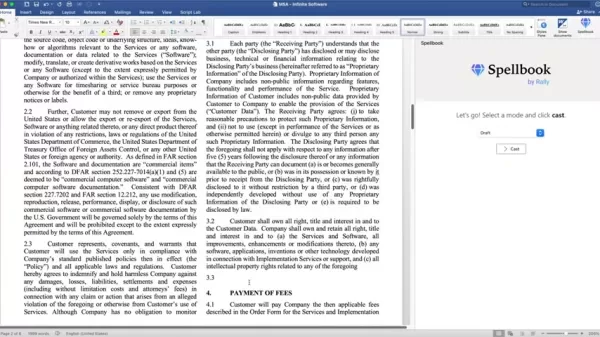
Select Draft Mode: In the Spellbook pane, confirm that the "Draft" mode is selected.
Highlight Text: Select the specific area you want to modify, whether it's a blank line or existing text.
Click 'Cast': With the text highlighted and mode set, click the "Cast" button.
Evaluate Suggestions: Spellbook will generate a list of language options in its pane. Review each one to find the best fit.
Insert the Language: Click on your chosen suggestion to automatically insert it into your document.
Iterate and Refine: If the first suggestion isn't perfect, you can undo and 'cast' again to generate new ideas. Continue refining until you're satisfied.
Multiple Drafts: Spellbook helps overcome writer's block by offering multiple iterations and fresh ideas, generating complete sections and adding supplementary language where needed.
Following these steps allows you to quickly generate well-drafted language for critical contract sections.
Generating Multiple Sections Simultaneously
Spellbook can draft several sections at once when given clear instructions. This is ideal when you have a structured vision for the content. Here's the process:
Open Microsoft Word: Launch your contract document.
Engage Spellbook Interface: Make sure the Spellbook add-in is active.
Provide Instructions: Type clear, specific instructions in the document telling Spellbook what to draft. Outline the key points to address.
Add a Section Number: To create new headings, type the section number followed by your request.
Initiate Draft: Click the "Draft" button to activate the AI.
Review and Refine: Spellbook will generate content addressing your instructions, often including additional useful suggestions.
Iterate as Necessary: Revise and polish the sections to meet your document's standards.
Using Insight Modes for Enhanced Contract Review
Spellbook's insight modes provide powerful tools for reviewing and analyzing contracts. Here’s how to use them:
Access Insight Modes: In the Spellbook pane, find the dropdown menu containing the various insight modes.
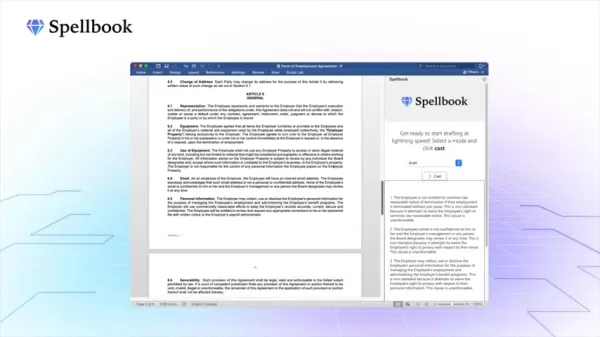
Generate a Term Summary: To see a contract's highlights, select "Term Summary" from the dropdown and click “Cast”. The AI will identify and list the key terms.
Understand for a 5-year Old: To get a simple explanation of a contract's core items, select "Explain to a 5 year old" and click 'Cast'. This is useful for quick client summaries.
Points to Negotiate: Let Spellbook identify the most negotiable terms. In moments, it will suggest key points for discussion, saving significant time.
Extract Key Information: The AI can pull out what it determines are the most important terms in the agreement.
Analyze Non-Standard Terms: Use this setting to check if any contract terms deviate from standard practices.
Using these insights modes helps you quickly understand contracts, spot potential issues, and make informed decisions.
Pricing Details for Spellbook
Early Access and Waitlist
Spellbook is currently in an early access phase
, meaning it is not yet publicly available. To get access, you need to join the waitlist on their official website: www.spellbook.legal.
Joining the waitlist places you in line to be among the first to try Spellbook. Watch your email for updates and invitations to join the platform.
Weighing the Options: Pros and Cons of Using Spellbook
Pros
Streamlines contract drafting with AI-powered suggestions.
Integrates seamlessly with Microsoft Word.
Simplifies complex legal terminology.
Supports various agreement types.
Offers valuable insights for contract review.
Reduces the risk of errors and omissions.
Saves time and effort in legal document creation.
Cons
Currently in early access, requiring waitlist signup.
AI suggestions may require human review and refinement.
Effectiveness depends on the quality of the training data.
May not be suitable for highly specialized or novel contracts.
Reliance on AI could reduce the development of traditional drafting skills.
Frequently Asked Questions About Spellbook
What types of contracts does Spellbook support?
Spellbook supports a variety of legal agreements, including contractor agreements, term sheets, NDAs (Non-Disclosure Agreements), data processing agreements, and more. The platform is continuously expanding its support to cover additional agreement types.
Is Spellbook a replacement for human legal expertise?
No, Spellbook is designed to assist legal professionals, not replace them. While it offers intelligent suggestions and insights, human oversight and judgment remain crucial to ensure contracts are accurate, complete, and legally sound.
How can I get access to Spellbook?
Spellbook is currently in early access. You can join the waitlist on their website: www.spellbook.legal. Monitor your email for updates and invitations to join the platform.
Related Questions
What other AI-powered tools can help with legal tasks?
Beyond Spellbook, several other AI-powered tools assist with legal tasks. These include:ROSS Intelligence: An AI legal research platform for finding relevant case law quickly.Kira Systems: An AI tool for contract review and analysis, identifying key provisions and risks.CaseText CARA: A legal research assistant that analyzes your briefs to find relevant cases and authorities.Lex Machina: A legal analytics platform providing data-driven insights on litigation, judges, and law firms.eBrevia: A contract analytics platform that extracts key data and highlights legal obligations and risks.These tools enhance efficiency in research, contract review, due diligence, and litigation analytics. However, they are assistants meant to augment, not replace, the expertise and judgment of qualified legal professionals.
Related article
 Purdue Robotics Unveils PuduFM 1.0 and PuduAgent, Marking a New Era of Embodied Intelligence
In an era defined by the rapid advancement of AI and robotics, Pudu Robotics—a global leader in commercial service robots—has unveiled two groundbreaking advancements in embodied intelligence: PuduFM 1.0 and PuduAgent. These innovations highlight Pud
Baidu Kunlun Chip Set for Hong Kong Public Listing With $50 Billion Valuation Target
On June 29, the capital markets were shaken by significant news: Baidu’s AI chip subsidiary, Kunlun Tech, is fast-tracking its Hong Kong IPO, targeting a valuation of up to $50 billion. This move by Kunlun Tech—a cornerstone of Baidu’s AI hardware st
Instinct launches AI agent in group chats, including those with non-users
Instinct, the AI agent now valued at $10 billion following its latest funding round, is expanding into group chats. The startup announced on Monday that users can add the agent to conversations with friends, offering assistance in scenarios such as t
Related Special Topic Recommendations
Design & Art
Purdue Robotics Unveils PuduFM 1.0 and PuduAgent, Marking a New Era of Embodied Intelligence
In an era defined by the rapid advancement of AI and robotics, Pudu Robotics—a global leader in commercial service robots—has unveiled two groundbreaking advancements in embodied intelligence: PuduFM 1.0 and PuduAgent. These innovations highlight Pud
Baidu Kunlun Chip Set for Hong Kong Public Listing With $50 Billion Valuation Target
On June 29, the capital markets were shaken by significant news: Baidu’s AI chip subsidiary, Kunlun Tech, is fast-tracking its Hong Kong IPO, targeting a valuation of up to $50 billion. This move by Kunlun Tech—a cornerstone of Baidu’s AI hardware st
Instinct launches AI agent in group chats, including those with non-users
Instinct, the AI agent now valued at $10 billion following its latest funding round, is expanding into group chats. The startup announced on Monday that users can add the agent to conversations with friends, offering assistance in scenarios such as t
Related Special Topic Recommendations
Design & Art
 Top AI Illustration Tools: Create Editorial Scenes and Cover Art Faster
2026 Latest Top-rated AI Illustration Tools: Our curated list features the best powerfully designed tools for creating stunning editorial scenes and eye-catching cover art quickly. Each option has gone through rigorous real-world tests, offering a free vs paid comparison to help you find the perfect match for your workflow. Try these must-try solutions today to unlock your AI edge and boost your creative productivity. Explore now at XIX.AI.
 10 tools
 xix.ai
Education and Learning
Top AI Tutors for Exam Prep: Practice Math, Science, and English
xix.ai
Education and Learning
Top AI Tutors for Exam Prep: Practice Math, Science, and English
2026 Latest Top-Rated Best AI Tutors for Exam Prep are here on XIX.AI! Our curated list features powerful game-changing tools that offer free vs paid comparison, real-world tests, and weekly updated rankings. They help boost your writing efficiency, simplify complex topic learning, and unlock your academic potential. Explore now to Discover your perfect exam prep tool and Start creating today to Unlock your AI edge!
10 tools
xix.ai
Finance
AI Budget Planning Tools for Personal Money Management
2026 Latest Best Top-Rated AI Budget Planning Tools for Personal Money Management are here on XIX.AI! This curated collection features powerful, game-changing solutions that help you conduct real-world tests, understand spending habits, and create personalized plans to boost productivity. Enjoy a free vs paid comparison along with detailed rankings. Must-try tools designed to simplify money management and unlock your AI edge. Explore now!
11 tools
xix.ai
Health & Wellness
AI Sleep Tracking Assistants: Improve Recovery with Better Bedtime Habits
2026 Latest Best Top-Rated AI Sleep Tracking Assistants curated for ultimate recovery. This fully updated weekly guide features powerful tools that deliver real-world tests, free vs paid comparison, and detailed rankings to help you find the must-try solution that boosts sleep quality and supports better bedtime habits. Explore now at XIX.AI to Unlock your AI edge.
10 tools
xix.ai
Data Analysis
AI SQL Copilots for Product and Revenue Analytics
2026 Latest Best Top-Rated AI SQL Copilots for Product and Revenue Analytics! XIX.AI has curated a powerful, game-changing collection of must-try tools that undergo real-world tests through weekly updated rankings. These tools help users boost productivity significantly by accelerating data analysis, streamlining complex queries, and generating accurate insights to drive smarter business decisions. Explore now to Discover your perfect tool for unlocking your AI edge!
14 tools
xix.ai
Education and Learning
Best AI Homework Helpers That Teach: Learn Concepts, Not Just Answers
2026 Latest Best Top-Rated AI Homework Helpers That Teach Core Concepts Not Just Answers Powerful Tools for Students Must-Try Curated List Weekly Updated Free vs Paid Comparison Real-World Tests Accurate Rankings to Help You Unlock Your Full Learning Potential Explore now to Discover your perfect tool for smarter studying.
10 tools
xix.ai

 Comments (0)
0/500
Comments (0)
0/500
In today's fast-paced business world, having efficient and accurate legal documents is more important than ever. Spellbook, an AI contract drafting assistant, is set to transform how legal teams and businesses create and manage their agreements. By integrating directly with Microsoft Word and powered by GPT-3, it provides smart drafting suggestions and insights. This review explores Spellbook's features, benefits, and its potential to reshape legal workflows.
Key Points
Spellbook is an AI contract drafting tool powered by GPT-3.
It integrates directly with Microsoft Word for a smooth workflow.
The AI suggests relevant clauses and provides analysis on contract terms.
It explains complex legal language in simpler terms.
The tool helps ensure data protection and compliance with AI-driven insights.
Spellbook supports various agreement types, from NDAs to data processing agreements.
It is currently in an early access phase, with a waitlist for new users.
Understanding Spellbook: The AI-Powered Contract Assistant
What is Spellbook?
Spellbook is an AI assistant designed to make drafting and managing legal documents faster and more accurate. Built on GPT-3 technology, it offers intelligent suggestions directly within Microsoft Word, reducing time spent on contracts and minimizing errors. This represents a major step in using artificial intelligence to handle complex legal work, empowering professionals to draft with greater confidence and efficiency.
The GPT-3 language model from OpenAI is trained on vast datasets, enabling it to understand context and generate natural text. This allows Spellbook to provide highly relevant drafting ideas and insights, becoming an indispensable partner in contract creation.
At its heart, Spellbook integrates seamlessly with Microsoft Word, the standard word processor in the legal field. This direct connection lets users access AI help within their familiar workflow, without switching applications. The goal is to make drafting more intuitive by providing smart assistance where you already work, saving time and boosting precision.
The AI has been trained on a wide array of contracts, legal texts, and online resources to build a broad understanding of the world, which informs its smart drafting capabilities. Within Word, it performs two key functions: suggesting optimal language and providing analytical insights on your contracts.
The Power of GPT-3 in Legal Drafting
GPT-3 (Generative Pre-trained Transformer 3), developed by OpenAI, is the advanced language model that drives Spellbook's intelligence.
Trained on a massive corpus of text, it can understand context, infer meaning, and produce coherent, relevant content. This capability translates into several key benefits for legal drafting:
- Intelligent Suggestions: Spellbook recommends relevant clauses, phrases, and language based on the contract type and specific provisions.
- Contextual Understanding: The AI grasps the context of the agreement, ensuring suggestions align with the overall intent.
- Error Detection: It can spot potential inconsistencies, omissions, and errors in the contract language.
- Simplified Terminology: Spellbook can break down complex legal jargon into clearer language for all parties.
By leveraging GPT-3, Spellbook acts as an intelligent co-pilot, providing guidance throughout the drafting process. It helps legal professionals work more effectively while reducing the risk of mistakes, ultimately making contract creation more accessible and streamlined.
Comprehensive List of Agreement Types Supported by Spellbook
Versatile Legal Document Support
Spellbook's AI is equipped to assist with drafting a wide range of legal agreements. Here are some of the key types it supports:
- Contractor Agreements: For establishing secure terms with independent contractors.
- Term Sheets: To summarize the key conditions of potential deals.
- NDAs (Non-Disclosure Agreements): For protecting confidential information.
- Data Processing Agreements: To ensure compliance with data protection regulations.
- Employment Agreements: For structuring relationships between employers and employees.
As Spellbook develops, it is expected to support even more agreement types, becoming an essential tool for legal professionals in various fields. Since it can work with any agreement it has been trained on, its utility will only grow over time.
Step-by-Step Guide: How to Use Spellbook in Microsoft Word
Suggesting Language for Key Contract Sections
A core feature of Spellbook is suggesting relevant language for different parts of your contract. Here’s how to use it effectively:
Identify the Section: Open your contract in Microsoft Word and go to the section you want to improve or expand.
Activate Spellbook: Ensure the Spellbook add-in is installed and visible in your Word interface.
Select Draft Mode: In the Spellbook pane, confirm that the "Draft" mode is selected.
Highlight Text: Select the specific area you want to modify, whether it's a blank line or existing text.
Click 'Cast': With the text highlighted and mode set, click the "Cast" button.
Evaluate Suggestions: Spellbook will generate a list of language options in its pane. Review each one to find the best fit.
Insert the Language: Click on your chosen suggestion to automatically insert it into your document.
Iterate and Refine: If the first suggestion isn't perfect, you can undo and 'cast' again to generate new ideas. Continue refining until you're satisfied.
Multiple Drafts: Spellbook helps overcome writer's block by offering multiple iterations and fresh ideas, generating complete sections and adding supplementary language where needed.
Following these steps allows you to quickly generate well-drafted language for critical contract sections.
Generating Multiple Sections Simultaneously
Spellbook can draft several sections at once when given clear instructions. This is ideal when you have a structured vision for the content. Here's the process:
Open Microsoft Word: Launch your contract document.
Engage Spellbook Interface: Make sure the Spellbook add-in is active.
Provide Instructions: Type clear, specific instructions in the document telling Spellbook what to draft. Outline the key points to address.
Add a Section Number: To create new headings, type the section number followed by your request.
Initiate Draft: Click the "Draft" button to activate the AI.
Review and Refine: Spellbook will generate content addressing your instructions, often including additional useful suggestions.
Iterate as Necessary: Revise and polish the sections to meet your document's standards.
Using Insight Modes for Enhanced Contract Review
Spellbook's insight modes provide powerful tools for reviewing and analyzing contracts. Here’s how to use them:
Access Insight Modes: In the Spellbook pane, find the dropdown menu containing the various insight modes.
Generate a Term Summary: To see a contract's highlights, select "Term Summary" from the dropdown and click “Cast”. The AI will identify and list the key terms.
Understand for a 5-year Old: To get a simple explanation of a contract's core items, select "Explain to a 5 year old" and click 'Cast'. This is useful for quick client summaries.
Points to Negotiate: Let Spellbook identify the most negotiable terms. In moments, it will suggest key points for discussion, saving significant time.
Extract Key Information: The AI can pull out what it determines are the most important terms in the agreement.
Analyze Non-Standard Terms: Use this setting to check if any contract terms deviate from standard practices.
Using these insights modes helps you quickly understand contracts, spot potential issues, and make informed decisions.
Pricing Details for Spellbook
Early Access and Waitlist
Spellbook is currently in an early access phase
, meaning it is not yet publicly available. To get access, you need to join the waitlist on their official website: www.spellbook.legal.
Joining the waitlist places you in line to be among the first to try Spellbook. Watch your email for updates and invitations to join the platform.
Weighing the Options: Pros and Cons of Using Spellbook
Pros
Streamlines contract drafting with AI-powered suggestions.
Integrates seamlessly with Microsoft Word.
Simplifies complex legal terminology.
Supports various agreement types.
Offers valuable insights for contract review.
Reduces the risk of errors and omissions.
Saves time and effort in legal document creation.
Cons
Currently in early access, requiring waitlist signup.
AI suggestions may require human review and refinement.
Effectiveness depends on the quality of the training data.
May not be suitable for highly specialized or novel contracts.
Reliance on AI could reduce the development of traditional drafting skills.
Frequently Asked Questions About Spellbook
What types of contracts does Spellbook support?
Spellbook supports a variety of legal agreements, including contractor agreements, term sheets, NDAs (Non-Disclosure Agreements), data processing agreements, and more. The platform is continuously expanding its support to cover additional agreement types.
Is Spellbook a replacement for human legal expertise?
No, Spellbook is designed to assist legal professionals, not replace them. While it offers intelligent suggestions and insights, human oversight and judgment remain crucial to ensure contracts are accurate, complete, and legally sound.
How can I get access to Spellbook?
Spellbook is currently in early access. You can join the waitlist on their website: www.spellbook.legal. Monitor your email for updates and invitations to join the platform.
Related Questions
What other AI-powered tools can help with legal tasks?
Beyond Spellbook, several other AI-powered tools assist with legal tasks. These include:ROSS Intelligence: An AI legal research platform for finding relevant case law quickly.Kira Systems: An AI tool for contract review and analysis, identifying key provisions and risks.CaseText CARA: A legal research assistant that analyzes your briefs to find relevant cases and authorities.Lex Machina: A legal analytics platform providing data-driven insights on litigation, judges, and law firms.eBrevia: A contract analytics platform that extracts key data and highlights legal obligations and risks.These tools enhance efficiency in research, contract review, due diligence, and litigation analytics. However, they are assistants meant to augment, not replace, the expertise and judgment of qualified legal professionals.








 Purdue Robotics Unveils PuduFM 1.0 and PuduAgent, Marking a New Era of Embodied Intelligence
In an era defined by the rapid advancement of AI and robotics, Pudu Robotics—a global leader in commercial service robots—has unveiled two groundbreaking advancements in embodied intelligence: PuduFM 1.0 and PuduAgent. These innovations highlight Pud
Purdue Robotics Unveils PuduFM 1.0 and PuduAgent, Marking a New Era of Embodied Intelligence
In an era defined by the rapid advancement of AI and robotics, Pudu Robotics—a global leader in commercial service robots—has unveiled two groundbreaking advancements in embodied intelligence: PuduFM 1.0 and PuduAgent. These innovations highlight Pud
 Baidu Kunlun Chip Set for Hong Kong Public Listing With $50 Billion Valuation Target
On June 29, the capital markets were shaken by significant news: Baidu’s AI chip subsidiary, Kunlun Tech, is fast-tracking its Hong Kong IPO, targeting a valuation of up to $50 billion. This move by Kunlun Tech—a cornerstone of Baidu’s AI hardware st
Baidu Kunlun Chip Set for Hong Kong Public Listing With $50 Billion Valuation Target
On June 29, the capital markets were shaken by significant news: Baidu’s AI chip subsidiary, Kunlun Tech, is fast-tracking its Hong Kong IPO, targeting a valuation of up to $50 billion. This move by Kunlun Tech—a cornerstone of Baidu’s AI hardware st
 Instinct launches AI agent in group chats, including those with non-users
Instinct, the AI agent now valued at $10 billion following its latest funding round, is expanding into group chats. The startup announced on Monday that users can add the agent to conversations with friends, offering assistance in scenarios such as t
Instinct launches AI agent in group chats, including those with non-users
Instinct, the AI agent now valued at $10 billion following its latest funding round, is expanding into group chats. The startup announced on Monday that users can add the agent to conversations with friends, offering assistance in scenarios such as t

2026 Latest Top-rated AI Illustration Tools: Our curated list features the best powerfully designed tools for creating stunning editorial scenes and eye-catching cover art quickly. Each option has gone through rigorous real-world tests, offering a free vs paid comparison to help you find the perfect match for your workflow. Try these must-try solutions today to unlock your AI edge and boost your creative productivity. Explore now at XIX.AI.
10 tools
xix.ai

2026 Latest Top-Rated Best AI Tutors for Exam Prep are here on XIX.AI! Our curated list features powerful game-changing tools that offer free vs paid comparison, real-world tests, and weekly updated rankings. They help boost your writing efficiency, simplify complex topic learning, and unlock your academic potential. Explore now to Discover your perfect exam prep tool and Start creating today to Unlock your AI edge!
10 tools
xix.ai

2026 Latest Best Top-Rated AI Budget Planning Tools for Personal Money Management are here on XIX.AI! This curated collection features powerful, game-changing solutions that help you conduct real-world tests, understand spending habits, and create personalized plans to boost productivity. Enjoy a free vs paid comparison along with detailed rankings. Must-try tools designed to simplify money management and unlock your AI edge. Explore now!
11 tools
xix.ai

2026 Latest Best Top-Rated AI Sleep Tracking Assistants curated for ultimate recovery. This fully updated weekly guide features powerful tools that deliver real-world tests, free vs paid comparison, and detailed rankings to help you find the must-try solution that boosts sleep quality and supports better bedtime habits. Explore now at XIX.AI to Unlock your AI edge.
10 tools
xix.ai

2026 Latest Best Top-Rated AI SQL Copilots for Product and Revenue Analytics! XIX.AI has curated a powerful, game-changing collection of must-try tools that undergo real-world tests through weekly updated rankings. These tools help users boost productivity significantly by accelerating data analysis, streamlining complex queries, and generating accurate insights to drive smarter business decisions. Explore now to Discover your perfect tool for unlocking your AI edge!
14 tools
xix.ai

2026 Latest Best Top-Rated AI Homework Helpers That Teach Core Concepts Not Just Answers Powerful Tools for Students Must-Try Curated List Weekly Updated Free vs Paid Comparison Real-World Tests Accurate Rankings to Help You Unlock Your Full Learning Potential Explore now to Discover your perfect tool for smarter studying.
10 tools
xix.ai












