


 Home
HomeRoblox Unveils AI Texture Generator for Stunning Game Assets
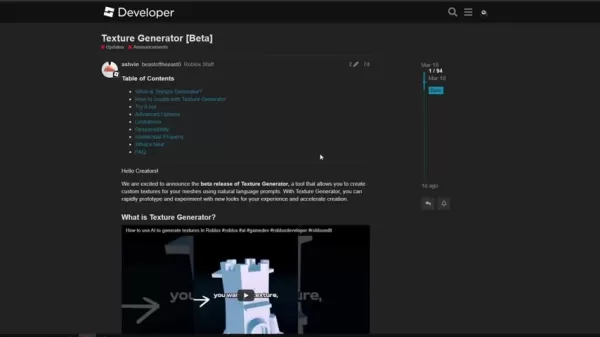
Roblox is always pushing the envelope, and their latest innovation, the AI Texture Generator, is a real game-changer for creators. This tool, integrated right into Roblox Studio, makes it easier and faster to craft custom textures for your game's meshes. It's a boon for both budding developers looking to break into the scene and seasoned pros who want to experiment with new looks without the hassle. With this guide, you'll dive deep into the world of AI-assisted game asset design and see how it can transform your projects.
Key Points
- The Roblox AI Texture Generator (Beta) lets you create custom textures using simple text prompts.
- It supports high-resolution 1024x1024 textures for MeshParts, perfect for detailed surface designs.
- There's a daily limit of 5 full textures and 25 previews, so plan your creations wisely.
- You can tweak the texture generation with options like angle, view, and seed randomization.
- This tool is especially handy for solo developers or those working on fun projects.
Unlocking AI Texture Generation in Roblox Studio
What is the AI Texture Generator?
The AI Texture Generator is a nifty tool within Roblox Studio that lets you whip up custom textures for your game assets using nothing but text prompts. Gone are the days of painstakingly designing textures in external software. Now, you can simply describe what you want—like a 'worn wooden plank'—and watch as the AI brings your vision to life on your game's treasure chest in no time. This is a huge time-saver, allowing you to focus on other aspects of game design. It's particularly useful for solo developers or small teams who might not have access to dedicated texture artists. With AI texture generation, you can quickly prototype and experiment with different aesthetics, speeding up your overall development process.
Enabling the Beta Feature
To get started with the AI Texture Generator, you'll need to enable it in Roblox Studio. Here's how you do it:
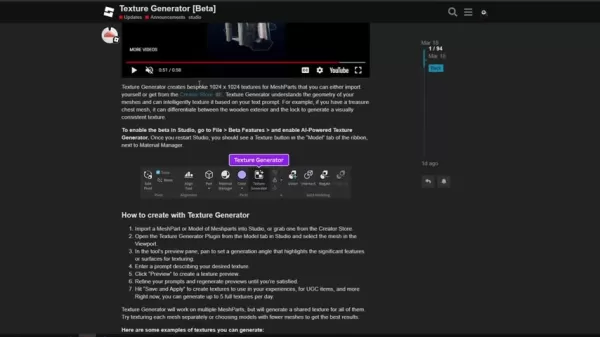
- Head over to File > Beta Features in Roblox Studio.
- Scroll through the list until you find 'AI-Powered Texture Generator'.
- Check the box to turn it on.
- Don't forget to restart Roblox Studio for the changes to kick in.
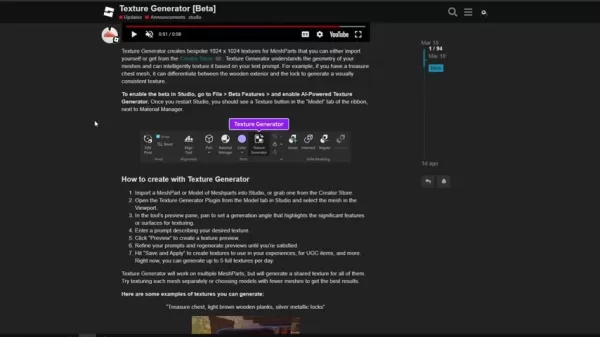
Once you're back in, you'll spot the Texture Generator button in the 'Model' tab of the ribbon, right next to the Material Manager. Now you're all set to start generating!
Diving Deeper: AI Texture Generator Capabilities and Limitations
Texture Quality and Specifications
The AI Texture Generator churns out textures at a crisp 1024x1024 resolution. While this is great for many uses, you might need to tweak or upscale them for super detailed close-ups. These textures are tailored for MeshParts, ensuring they blend seamlessly into Roblox's mesh-based world. Right now, it's all about ColorMaps within a SurfaceAppearance, but keep an eye out for future updates that'll bring Metalness, Roughness, and Normal Map generation into the mix. The generator works best on multiple MeshParts, sharing textures across them. And remember, simpler models often yield the best results.
Navigating Limitations and Optimizing Usage
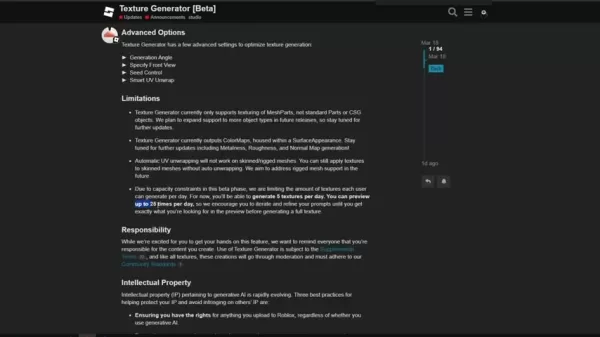
Since the AI Texture Generator is still in its Beta phase, there are a few things to keep in mind. You're limited to 5 full textures and 25 previews per day. Also, automatic UV unwrapping doesn't work on skinned or rigged meshes, though you can still apply textures manually. The AI works best with MeshParts and isn't fully compatible with standard Parts or CSG objects. To get the most out of it, refine your prompts and use the previews to test before you commit to a final texture. The Advanced Options Tab has some handy parameters to help you optimize your textures.
Here's a quick rundown of the key limitations:
Limitation Description Texture Resolution 1024x1024 pixels Object Support Primarily MeshParts, limited support for other object types Texture Types ColorMaps within SurfaceAppearance only (future updates to include Metalness, Roughness, etc.) UV Unwrapping Automatic UV unwrapping not functional on skinned/rigged meshes Generation Limits 5 full textures and 25 previews per day
Advanced Features and Intellectual Property
Roblox gives you a bunch of advanced options to fine-tune your texture generation. You can adjust the Generation Angle, specify the Front View, control the Seed, and use Smart UV Unwrap. These controls let you get the texture just right. But don't forget about intellectual property—make sure you have the rights to anything you upload, steer clear of brand names or logos in your prompts, and tweak the AI's output to make it more unique. This way, you can really make the most of the AI's capabilities.
Step-by-Step Guide: Creating Textures with AI
Importing and Selecting Your Mesh
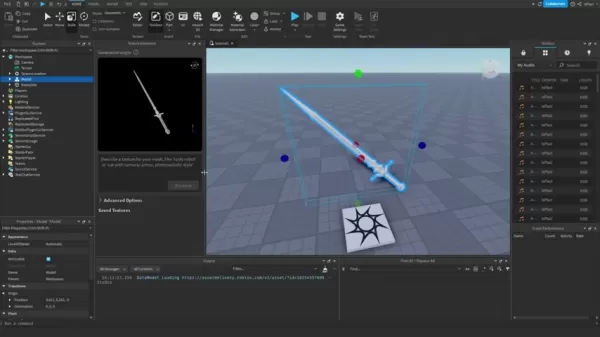
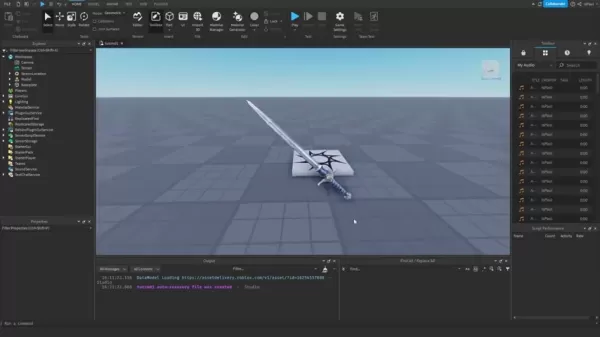
First things first, you'll need a MeshPart in your Roblox Studio environment. You can either import your own mesh or grab one from the Creator Store. Once it's in, select your mesh in the Viewport. This loads it into the Texture Generator preview pane, where you can see how your texture prompts will look.
Crafting and Refining Your Texture Prompt
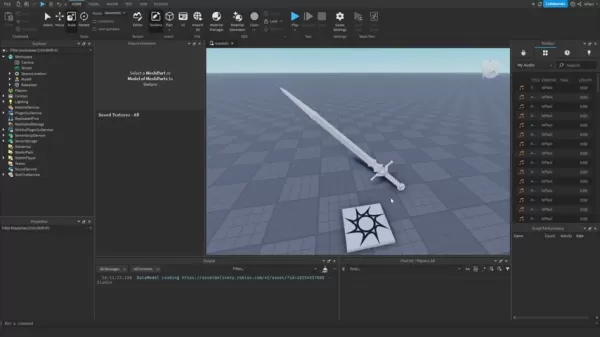
In the Texture Generator pane, you'll see a text input field where you can describe your desired texture. Get as detailed as you can—mention materials, patterns, wear, and any specifics you want the AI to capture. The AI will interpret your mesh's geometry and texture it based on your prompt. Don't be afraid to experiment with different descriptions to nail the look you're after.
Previewing, Generating, and Applying Textures
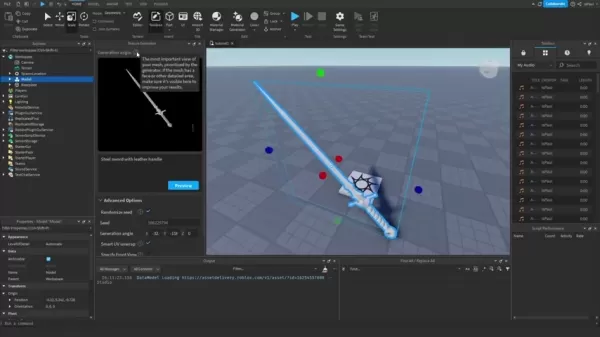
Once you've entered your prompt, hit 'Preview' to see what the AI comes up with. Remember, you've got a limited number of previews each day, so use them wisely. Tweak your prompts based on the previews until you're happy with the result. When you're ready, click 'Save and Apply' to use your new textures in your game, for UGC items, and more. Mastering these tools will really boost your AI texture generation skills.
Understanding the Usage Limits
Free Tier Limitations
The AI Texture Generator is still in Beta, so there are some usage limits in place. You can generate up to 5 full textures and 25 previews per day. These limits help manage server load during the Beta phase, but Roblox plans to bump them up as the feature matures.
Evaluating the AI Texture Generator
Pros
- It speeds up texture creation like you wouldn't believe.
- Makes it easier for new developers to get started.
- Lets you prototype and experiment with different styles quickly.
- A cost-effective way to create custom textures.
- Seamlessly integrates into Roblox Studio.
Cons
- Limited to 5 full textures and 25 previews per day.
- Currently only supports ColorMaps, with PBR support on the horizon.
- Automatic UV unwrapping doesn't work on skinned/rigged meshes.
- Texture quality might not always match manual designs.
- Requires some finesse with your prompts to get the best results.
Unleashing Creativity: Practical Applications
Enhancing Game Environments
Use the AI Texture Generator to bring your game worlds to life. Imagine rough stone walls for your medieval castles, intricate wooden floors in Victorian mansions, or weathered metal textures for your sci-fi landscapes. The possibilities are endless!
Customizing Character Appearances
Give your game characters a unique flair with custom clothing and accessories. Think leather jackets, tattered jeans, or futuristic armor with intricate patterns and details. Make every character stand out and be memorable.
Prototyping Game Assets
Quickly prototype game assets with placeholder textures before finalizing your designs. This speeds up the development process and lets you experiment freely. It's also a great way to get familiar with what AI can do.
Frequently Asked Questions
How many textures can I generate per day?
During the Beta phase, you're limited to 5 full textures and 25 previews per day. But don't worry, Roblox plans to increase these limits in the future.
What types of objects can I texture?
Right now, you can only texture MeshParts with the Texture Generator. But keep an eye out for future updates that'll add support for more object types.
Can I generate PBR textures?
Not yet—the Texture Generator currently only does ColorMaps. But PBR texture generation is on the roadmap, so stay tuned for updates on Roblox's AI tech.
Related Questions
How does the AI Texture Generator improve the development process on Roblox?
The AI Texture Generator is a real time-saver, automating the texture creation process. Instead of spending hours in external software, you can describe what you want and get it in seconds. This lets you prototype quickly, experiment with different looks, and refine your game's aesthetic without needing specialized skills. It's a game-changer for solo developers and small teams, making high-quality asset creation more efficient and opening up new creative avenues.
Related article
 Swedish AI Startup Lovable Eyes $13.2 Billion Valuation After Major Funding Round
As AI-driven coding tools gain traction, Swedish startup Lovable has secured a major funding round. The company aims to raise $3 billion, potentially boosting its valuation to $13.2 billion—double the $6.6 billion recorded last December. Menlo Ventur
Google Tests Remy AI Agent for Gemini as Focus Shifts to User Control
According to Business Insider, Google is testing Remy, a new AI personal agent for Gemini. This tool aims to execute tasks on behalf of users, streamlining both professional workflows and daily routines.Currently, Remy is undergoing testing in an int
How to fix Core Web Vitals for better SEO rankings
Streamline Report Card Comments with AI ToolsIntroductionAI Tools for Generating Report Card CommentsMagic SchoolAlmanac AIChat GPTUsing Magic School to Generate Report Card CommentsLogging into Magic SchoolSelecting the Report Card Comments ToolCust
Related Special Topic Recommendations
writing
Swedish AI Startup Lovable Eyes $13.2 Billion Valuation After Major Funding Round
As AI-driven coding tools gain traction, Swedish startup Lovable has secured a major funding round. The company aims to raise $3 billion, potentially boosting its valuation to $13.2 billion—double the $6.6 billion recorded last December. Menlo Ventur
Google Tests Remy AI Agent for Gemini as Focus Shifts to User Control
According to Business Insider, Google is testing Remy, a new AI personal agent for Gemini. This tool aims to execute tasks on behalf of users, streamlining both professional workflows and daily routines.Currently, Remy is undergoing testing in an int
How to fix Core Web Vitals for better SEO rankings
Streamline Report Card Comments with AI ToolsIntroductionAI Tools for Generating Report Card CommentsMagic SchoolAlmanac AIChat GPTUsing Magic School to Generate Report Card CommentsLogging into Magic SchoolSelecting the Report Card Comments ToolCust
Related Special Topic Recommendations
writing
 Best AI Outline Generators for Long-Form SEO Articles
2026 Latest Best Top-Rated AI Outline Generators for Long-Form SEO Articles, meticulously curated by XIX.AI. These powerful tools offer game-changing assistance in creating high-quality content quickly, boosting writing efficiency significantly. Get a free vs paid comparison along with real-world tests and detailed rankings to help you find the must-try option that suits your needs. Explore now to unlock your AI edge.
 8 tools
 xix.ai
Education and Learning
AI Study Tools for Homework and Exam Prep
xix.ai
Education and Learning
AI Study Tools for Homework and Exam Prep
2026 Latest Best AI Study Tools for Homework and Exam Prep! XIX.AI curates a top-rated list of powerful, game-changing tools that help students boost productivity, streamline homework completion, and ace exams through real-world tests. Get a free vs paid comparison, detailed rankings, and must-try options to unlock your AI edge. Explore now!
10 tools
xix.ai
Music composition
AI Vocal Demo Tools for Songwriters, Hooks, Toplines, and Multilingual Draft Sessions
2026 Latest Best AI Vocal Demo Tools for Songwriters, Hook Creators, and Multi-Language Content Teams! XIX.AI has curated a top-rated list of powerful game-changing tools that go through rigorous real-world tests. You’ll find detailed free vs paid comparison data, comprehensive rankings, and must-try options to help you boost writing efficiency and unlock your creative potential. Explore now to discover your perfect tool for all your content needs!
9 tools
xix.ai
Business
Best AI Competitive Research Tools for Small Businesses
2026 Latest Best Top-rated AI Competitive Research Tools for Small Businesses! XIX.AI has curated a highly powerful game-changing collection, updated weekly with rigorous real-world tests and detailed rankings. You can find a comprehensive free vs paid comparison to help you identify the must-try tools that boost your productivity and give you a competitive edge. Explore now to discover your perfect tool!
9 tools
xix.ai
Image editing
Photoshop AI Retouch Tools for Ecommerce Apparel, Skin Cleanup, and Color Consistency
2026 Latest Best Photoshop AI retouch tools for ecommerce apparel, skin cleanup, and color consistency! This top-rated curated list features powerful game-changing solutions that help you boost writing efficiency, streamline content creation, and achieve perfect visual results effortlessly. Each tool has undergone real-world tests through weekly updated rankings, complete with free vs paid comparison details. Backed by XIX.AI, it’s the must-try guide for anyone aiming to unlock your AI edge. Explore now!
10 tools
xix.ai
Prompt
Best AI Prompt Libraries for ChatGPT Workflows
2026 Latest Best Top-Rated AI Prompt Libraries for optimizing all types of ChatGPT workflows. XIX.AI has curated a powerful, game-changing collection that goes through rigorous real-world tests to ensure top performance. You can find detailed free vs paid comparisons and expert rankings to help you choose the must-try tools that boost your productivity and unlock your AI edge. Explore now!
11 tools
xix.ai

 Comments (25)
0/500
Comments (25)
0/500
![JasonHill]()
這個AI材質生成器真的讓遊戲創作門檻降低好多!以前光搞個貼圖就要花半天,現在點幾下就有不錯的效果,對我們這種美術苦手來說簡直是救星。不過有點擔心,以後大家做出來的東西會不會越來越像啊?🤔
![MarkWilson]()
This is exactly what Roblox needs to make game creation more accessible! The AI Texture Generator sounds like a huge time-saver for creators. I'm curious, though—will this lead to a flood of games with similar-looking assets? 🤔 Still, lowering the barrier to entry is always a good thing.
![HarryLewis]()
テクスチャ自動生成、すごいアイデアだね!Robloxがアーティストの敷居を下げるのはいつも好きだけど、これは特に。これで時間節約して、もっとゲーム設計やストーリー作りに集中できる。🤖ただ、みんながAI素材を使いすぎると、今後のゲームが画一的になりそうな気がして少し不安。手作り感はどうなるのかな?
![BruceClark]()
すごい!RobloxのAIテクスチャジェネレーター、ゲーム作成がもっと手軽になりそう。AIがここまで進化するとは思わなかったけど、将来的にクリエイターの仕事が奪われないかちょっと心配…🤔 でもツールを使いこなせば、もっとクオリティの高いゲームが作れそうで楽しみ!
![EdwardYoung]()
This AI Texture Generator sounds like a total win for Roblox creators! I’m no pro, but being able to whip up custom textures in seconds is wild. Can’t wait to see what crazy designs people come up with—hope it doesn’t crash my potato PC though! 😅
![NicholasRoberts]()
This AI Texture Generator sounds like a total win for Roblox creators! I'm no pro, but being able to whip up custom textures in Studio without being an art wizard is super exciting. Can't wait to see what wild designs people come up with! 😎
Roblox is always pushing the envelope, and their latest innovation, the AI Texture Generator, is a real game-changer for creators. This tool, integrated right into Roblox Studio, makes it easier and faster to craft custom textures for your game's meshes. It's a boon for both budding developers looking to break into the scene and seasoned pros who want to experiment with new looks without the hassle. With this guide, you'll dive deep into the world of AI-assisted game asset design and see how it can transform your projects.
Key Points
- The Roblox AI Texture Generator (Beta) lets you create custom textures using simple text prompts.
- It supports high-resolution 1024x1024 textures for MeshParts, perfect for detailed surface designs.
- There's a daily limit of 5 full textures and 25 previews, so plan your creations wisely.
- You can tweak the texture generation with options like angle, view, and seed randomization.
- This tool is especially handy for solo developers or those working on fun projects.
Unlocking AI Texture Generation in Roblox Studio
What is the AI Texture Generator?
The AI Texture Generator is a nifty tool within Roblox Studio that lets you whip up custom textures for your game assets using nothing but text prompts. Gone are the days of painstakingly designing textures in external software. Now, you can simply describe what you want—like a 'worn wooden plank'—and watch as the AI brings your vision to life on your game's treasure chest in no time. This is a huge time-saver, allowing you to focus on other aspects of game design. It's particularly useful for solo developers or small teams who might not have access to dedicated texture artists. With AI texture generation, you can quickly prototype and experiment with different aesthetics, speeding up your overall development process.
Enabling the Beta Feature
To get started with the AI Texture Generator, you'll need to enable it in Roblox Studio. Here's how you do it:
- Head over to File > Beta Features in Roblox Studio.
- Scroll through the list until you find 'AI-Powered Texture Generator'.
- Check the box to turn it on.
- Don't forget to restart Roblox Studio for the changes to kick in.
Once you're back in, you'll spot the Texture Generator button in the 'Model' tab of the ribbon, right next to the Material Manager. Now you're all set to start generating!
Diving Deeper: AI Texture Generator Capabilities and Limitations
Texture Quality and Specifications
The AI Texture Generator churns out textures at a crisp 1024x1024 resolution. While this is great for many uses, you might need to tweak or upscale them for super detailed close-ups. These textures are tailored for MeshParts, ensuring they blend seamlessly into Roblox's mesh-based world. Right now, it's all about ColorMaps within a SurfaceAppearance, but keep an eye out for future updates that'll bring Metalness, Roughness, and Normal Map generation into the mix. The generator works best on multiple MeshParts, sharing textures across them. And remember, simpler models often yield the best results.
Navigating Limitations and Optimizing Usage
Since the AI Texture Generator is still in its Beta phase, there are a few things to keep in mind. You're limited to 5 full textures and 25 previews per day. Also, automatic UV unwrapping doesn't work on skinned or rigged meshes, though you can still apply textures manually. The AI works best with MeshParts and isn't fully compatible with standard Parts or CSG objects. To get the most out of it, refine your prompts and use the previews to test before you commit to a final texture. The Advanced Options Tab has some handy parameters to help you optimize your textures.
Here's a quick rundown of the key limitations:
| Limitation | Description |
|---|---|
| Texture Resolution | 1024x1024 pixels |
| Object Support | Primarily MeshParts, limited support for other object types |
| Texture Types | ColorMaps within SurfaceAppearance only (future updates to include Metalness, Roughness, etc.) |
| UV Unwrapping | Automatic UV unwrapping not functional on skinned/rigged meshes |
| Generation Limits | 5 full textures and 25 previews per day |
Advanced Features and Intellectual Property
Roblox gives you a bunch of advanced options to fine-tune your texture generation. You can adjust the Generation Angle, specify the Front View, control the Seed, and use Smart UV Unwrap. These controls let you get the texture just right. But don't forget about intellectual property—make sure you have the rights to anything you upload, steer clear of brand names or logos in your prompts, and tweak the AI's output to make it more unique. This way, you can really make the most of the AI's capabilities.
Step-by-Step Guide: Creating Textures with AI
Importing and Selecting Your Mesh
First things first, you'll need a MeshPart in your Roblox Studio environment. You can either import your own mesh or grab one from the Creator Store. Once it's in, select your mesh in the Viewport. This loads it into the Texture Generator preview pane, where you can see how your texture prompts will look.
Crafting and Refining Your Texture Prompt
In the Texture Generator pane, you'll see a text input field where you can describe your desired texture. Get as detailed as you can—mention materials, patterns, wear, and any specifics you want the AI to capture. The AI will interpret your mesh's geometry and texture it based on your prompt. Don't be afraid to experiment with different descriptions to nail the look you're after.
Previewing, Generating, and Applying Textures
Once you've entered your prompt, hit 'Preview' to see what the AI comes up with. Remember, you've got a limited number of previews each day, so use them wisely. Tweak your prompts based on the previews until you're happy with the result. When you're ready, click 'Save and Apply' to use your new textures in your game, for UGC items, and more. Mastering these tools will really boost your AI texture generation skills.
Understanding the Usage Limits
Free Tier Limitations
The AI Texture Generator is still in Beta, so there are some usage limits in place. You can generate up to 5 full textures and 25 previews per day. These limits help manage server load during the Beta phase, but Roblox plans to bump them up as the feature matures.
Evaluating the AI Texture Generator
Pros
- It speeds up texture creation like you wouldn't believe.
- Makes it easier for new developers to get started.
- Lets you prototype and experiment with different styles quickly.
- A cost-effective way to create custom textures.
- Seamlessly integrates into Roblox Studio.
Cons
- Limited to 5 full textures and 25 previews per day.
- Currently only supports ColorMaps, with PBR support on the horizon.
- Automatic UV unwrapping doesn't work on skinned/rigged meshes.
- Texture quality might not always match manual designs.
- Requires some finesse with your prompts to get the best results.
Unleashing Creativity: Practical Applications
Enhancing Game Environments
Use the AI Texture Generator to bring your game worlds to life. Imagine rough stone walls for your medieval castles, intricate wooden floors in Victorian mansions, or weathered metal textures for your sci-fi landscapes. The possibilities are endless!
Customizing Character Appearances
Give your game characters a unique flair with custom clothing and accessories. Think leather jackets, tattered jeans, or futuristic armor with intricate patterns and details. Make every character stand out and be memorable.
Prototyping Game Assets
Quickly prototype game assets with placeholder textures before finalizing your designs. This speeds up the development process and lets you experiment freely. It's also a great way to get familiar with what AI can do.
Frequently Asked Questions
How many textures can I generate per day?
During the Beta phase, you're limited to 5 full textures and 25 previews per day. But don't worry, Roblox plans to increase these limits in the future.
What types of objects can I texture?
Right now, you can only texture MeshParts with the Texture Generator. But keep an eye out for future updates that'll add support for more object types.
Can I generate PBR textures?
Not yet—the Texture Generator currently only does ColorMaps. But PBR texture generation is on the roadmap, so stay tuned for updates on Roblox's AI tech.
Related Questions
How does the AI Texture Generator improve the development process on Roblox?
The AI Texture Generator is a real time-saver, automating the texture creation process. Instead of spending hours in external software, you can describe what you want and get it in seconds. This lets you prototype quickly, experiment with different looks, and refine your game's aesthetic without needing specialized skills. It's a game-changer for solo developers and small teams, making high-quality asset creation more efficient and opening up new creative avenues.








 Swedish AI Startup Lovable Eyes $13.2 Billion Valuation After Major Funding Round
As AI-driven coding tools gain traction, Swedish startup Lovable has secured a major funding round. The company aims to raise $3 billion, potentially boosting its valuation to $13.2 billion—double the $6.6 billion recorded last December. Menlo Ventur
Google Tests Remy AI Agent for Gemini as Focus Shifts to User Control
According to Business Insider, Google is testing Remy, a new AI personal agent for Gemini. This tool aims to execute tasks on behalf of users, streamlining both professional workflows and daily routines.Currently, Remy is undergoing testing in an int
Swedish AI Startup Lovable Eyes $13.2 Billion Valuation After Major Funding Round
As AI-driven coding tools gain traction, Swedish startup Lovable has secured a major funding round. The company aims to raise $3 billion, potentially boosting its valuation to $13.2 billion—double the $6.6 billion recorded last December. Menlo Ventur
Google Tests Remy AI Agent for Gemini as Focus Shifts to User Control
According to Business Insider, Google is testing Remy, a new AI personal agent for Gemini. This tool aims to execute tasks on behalf of users, streamlining both professional workflows and daily routines.Currently, Remy is undergoing testing in an int
 How to fix Core Web Vitals for better SEO rankings
Streamline Report Card Comments with AI ToolsIntroductionAI Tools for Generating Report Card CommentsMagic SchoolAlmanac AIChat GPTUsing Magic School to Generate Report Card CommentsLogging into Magic SchoolSelecting the Report Card Comments ToolCust
How to fix Core Web Vitals for better SEO rankings
Streamline Report Card Comments with AI ToolsIntroductionAI Tools for Generating Report Card CommentsMagic SchoolAlmanac AIChat GPTUsing Magic School to Generate Report Card CommentsLogging into Magic SchoolSelecting the Report Card Comments ToolCust

2026 Latest Best Top-Rated AI Outline Generators for Long-Form SEO Articles, meticulously curated by XIX.AI. These powerful tools offer game-changing assistance in creating high-quality content quickly, boosting writing efficiency significantly. Get a free vs paid comparison along with real-world tests and detailed rankings to help you find the must-try option that suits your needs. Explore now to unlock your AI edge.
8 tools
xix.ai

2026 Latest Best AI Study Tools for Homework and Exam Prep! XIX.AI curates a top-rated list of powerful, game-changing tools that help students boost productivity, streamline homework completion, and ace exams through real-world tests. Get a free vs paid comparison, detailed rankings, and must-try options to unlock your AI edge. Explore now!
10 tools
xix.ai

2026 Latest Best AI Vocal Demo Tools for Songwriters, Hook Creators, and Multi-Language Content Teams! XIX.AI has curated a top-rated list of powerful game-changing tools that go through rigorous real-world tests. You’ll find detailed free vs paid comparison data, comprehensive rankings, and must-try options to help you boost writing efficiency and unlock your creative potential. Explore now to discover your perfect tool for all your content needs!
9 tools
xix.ai

2026 Latest Best Top-rated AI Competitive Research Tools for Small Businesses! XIX.AI has curated a highly powerful game-changing collection, updated weekly with rigorous real-world tests and detailed rankings. You can find a comprehensive free vs paid comparison to help you identify the must-try tools that boost your productivity and give you a competitive edge. Explore now to discover your perfect tool!
9 tools
xix.ai

2026 Latest Best Photoshop AI retouch tools for ecommerce apparel, skin cleanup, and color consistency! This top-rated curated list features powerful game-changing solutions that help you boost writing efficiency, streamline content creation, and achieve perfect visual results effortlessly. Each tool has undergone real-world tests through weekly updated rankings, complete with free vs paid comparison details. Backed by XIX.AI, it’s the must-try guide for anyone aiming to unlock your AI edge. Explore now!
10 tools
xix.ai

2026 Latest Best Top-Rated AI Prompt Libraries for optimizing all types of ChatGPT workflows. XIX.AI has curated a powerful, game-changing collection that goes through rigorous real-world tests to ensure top performance. You can find detailed free vs paid comparisons and expert rankings to help you choose the must-try tools that boost your productivity and unlock your AI edge. Explore now!
11 tools
xix.ai

這個AI材質生成器真的讓遊戲創作門檻降低好多!以前光搞個貼圖就要花半天,現在點幾下就有不錯的效果,對我們這種美術苦手來說簡直是救星。不過有點擔心,以後大家做出來的東西會不會越來越像啊?🤔
This is exactly what Roblox needs to make game creation more accessible! The AI Texture Generator sounds like a huge time-saver for creators. I'm curious, though—will this lead to a flood of games with similar-looking assets? 🤔 Still, lowering the barrier to entry is always a good thing.
テクスチャ自動生成、すごいアイデアだね!Robloxがアーティストの敷居を下げるのはいつも好きだけど、これは特に。これで時間節約して、もっとゲーム設計やストーリー作りに集中できる。🤖ただ、みんながAI素材を使いすぎると、今後のゲームが画一的になりそうな気がして少し不安。手作り感はどうなるのかな?
すごい!RobloxのAIテクスチャジェネレーター、ゲーム作成がもっと手軽になりそう。AIがここまで進化するとは思わなかったけど、将来的にクリエイターの仕事が奪われないかちょっと心配…🤔 でもツールを使いこなせば、もっとクオリティの高いゲームが作れそうで楽しみ!
This AI Texture Generator sounds like a total win for Roblox creators! I’m no pro, but being able to whip up custom textures in seconds is wild. Can’t wait to see what crazy designs people come up with—hope it doesn’t crash my potato PC though! 😅
This AI Texture Generator sounds like a total win for Roblox creators! I'm no pro, but being able to whip up custom textures in Studio without being an art wizard is super exciting. Can't wait to see what wild designs people come up with! 😎












