


 Home
HomePopPop.ai Review: A Free Online Tool for AI-Generated Sound Effects
In today's digital world, sound effects play a vital role in video editing, game development, and various multimedia projects. Manually creating these audio elements is often time-consuming and demands specialized equipment. Fortunately, AI sound effect generators provide a fast and efficient alternative. This article takes a closer look at PopPop.ai, a free web-based AI sound effect generator, exploring its features and how it can be used for different creative projects. Learn how to produce distinctive and realistic audio landscapes for your work without spending a fortune.
Key Points
PopPop.ai provides a free tool for AI-generated sound effects.
This tool converts text prompts into varied and lifelike audio effects.
It also features an AI vocal remover, karaoke creator, and instrumental tools.
PopPop.ai delivers high-fidelity audio in WAV format.
It works with multiple languages, including English, French, Japanese, and Korean.
The resulting sounds are suitable for video production, game development, music creation, and virtual reality applications.
Introduction to PopPop.ai
What is PopPop.ai?
PopPop.ai is a website that offers a collection of free, AI-powered online audio tools.
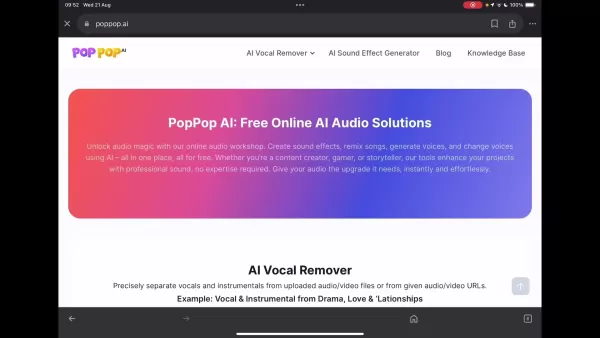
These utilities let users produce sound effects, remix tracks, synthesize voices, and alter vocal characteristics. This article centers on its AI Sound Effect Generator—a feature that turns text prompts into one-of-a-kind, realistic soundscapes for diverse video and audio projects. Created by Nabia Mind, an AI tool developer, PopPop.ai aims to deliver accessible audio enhancement solutions for creators at every skill level. In this detailed overview, we explore the platform's features, benefits, and possible limitations to help you decide if it fits your sound design needs.
Features and Tools Offered
Beyond sound effect generation, PopPop.ai includes several other utilities.
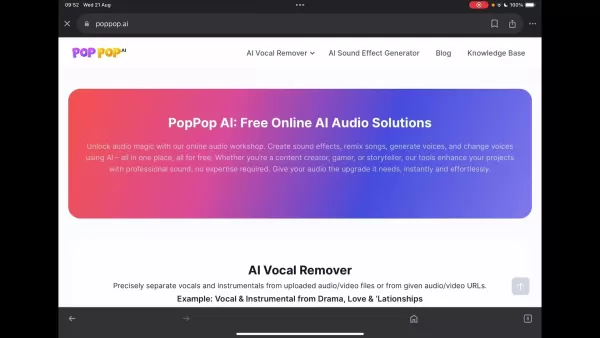
Here’s a brief overview of some additional features:
- AI Vocal Remover: Accurately separates vocals and instrumentals from uploaded audio or video files, or from provided URLs.
- Karaoke Maker: Produces karaoke tracks by removing vocals from songs, letting users sing along to the backing music.
- Acapella Extractor: Isolates vocal tracks from songs for acapella arrangements or remixing.
- Instrumental Maker: Creates instrumental versions of tracks by eliminating the vocal parts.
- Instrumental Remover: Strips away the instrumental components, preserving the vocals for other creative uses. These features address a broad spectrum of audio editing requirements, establishing PopPop.ai as a flexible platform for audio manipulation. The AI Sound Effect Generator stands out for its ability to produce custom audio environments from written descriptions.
Getting Started with the AI Sound Effect Generator
To begin using the AI Sound Effect Generator, navigate to the PopPop.AI website.
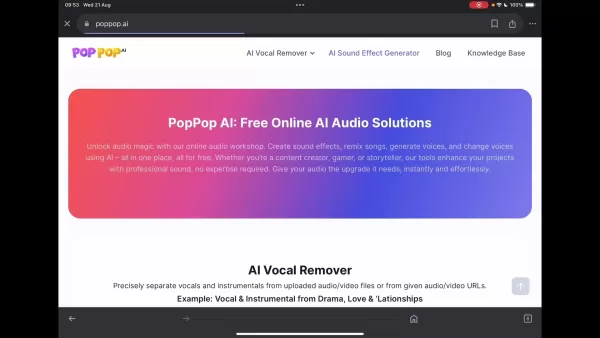
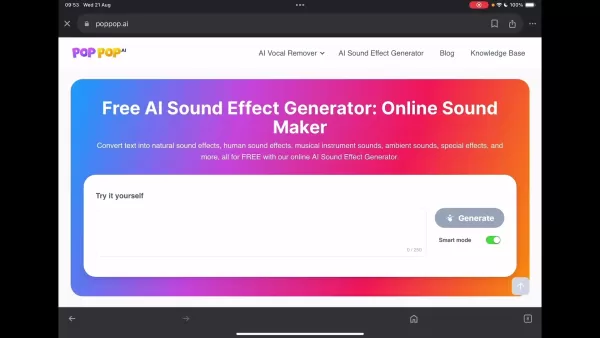
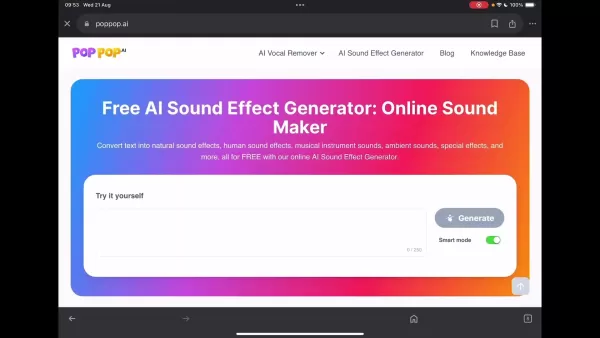
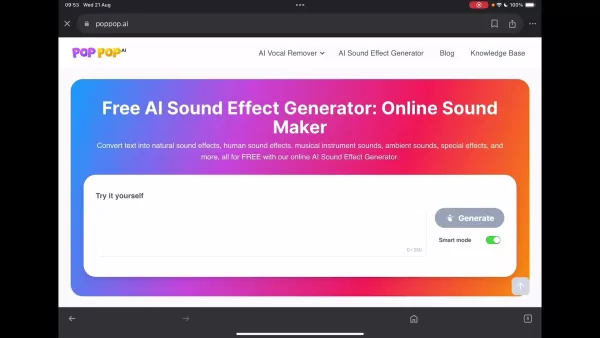
The tool is free and doesn't require registration or software installation, ensuring quick and easy access. The generator’s interface includes a text input box where you can describe your desired sound effect, with a 250-character limit. An optional "Smart mode" enhances and refines your sound descriptions automatically. Below the prompt area, the site shows available sound categories and selected examples. A download icon appears once the generation is finished, letting you save the audio as a WAV file.
Using PopPop.ai is simple, but crafting effective prompts and refining sound outputs is key to success. The AI sound generator aims to produce realistic audio from simple text inputs.
A Hands-on Experience: Testing the AI Sound Effect Generator
Experimenting with Text Prompts
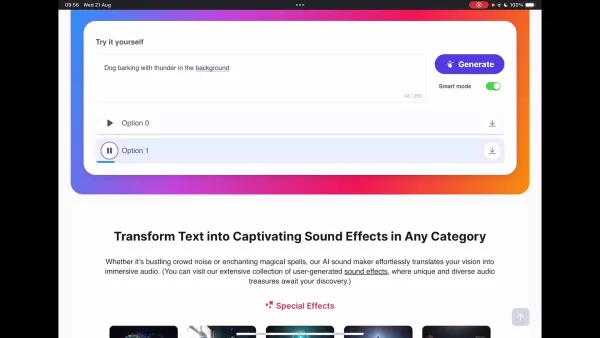
To evaluate the AI sound effect generator, we experimented with several text prompts. One example was 'Dog barking with thunder in the background.'
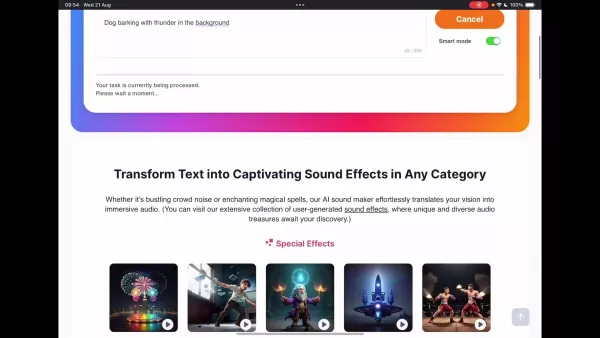
Although the tool generated thunder sounds, the dog barking was missing. This suggests the system may have difficulty handling multiple complex audio elements at once. Another test using '80s video Game' resulted in typical synth music from that era, but it couldn't produce more intricate audio layers, indicating it works better for single subjects. However, entering ‘water in the bath’ produced the sound of running tap water, showing the tool's effectiveness with certain types of prompts.
You can share the created sounds on social media or download them. The smart mode option is designed to enhance and elaborate on sound descriptions for improved results, though it doesn't always guarantee accurate soundscapes.
Examining Pre-Made Examples
PopPop.ai also presents a range of special effects and audio categories. Reviewing these helps identify the types of sounds it handles best. Categories include fireworks, glass breaking, magic, spaceship, action, gunshot, typing, bustling restaurant, doorbell, television audio, cooking sounds, street ambiance, rain, ocean waves and birds, flowing water, insect chirps, thunder and lightning, and dog barking. By clicking the corresponding images on the website, you can preview the quality of the free AI-generated sound effects.
How to Generate Sound Effects with PopPop.ai
Step-by-Step Guide
Follow these steps to create sound effects using PopPop.ai:
- Visit the PopPop.ai Website: Go to the AI Sound Effect Generator page on the PopPop.ai site.
- Enter a Text Prompt: Type a clear and concise description of your desired sound into the text box. You have up to 250 characters
.
- Engage Smart Mode (Optional): Activate Smart Mode to automatically enrich your description. You can also test without it to compare results.
- Generate the Sound: Click “Generate” and wait for the AI to process your request. The site shows a processing status.
- Listen to the Options: Once finished, the tool presents two audio options for you to review.
- Download the Audio File: If you like one of the options, download the .wav file and share it.
Pricing Structure of PopPop.ai
Completely Free Access
A major benefit of PopPop.ai is that it’s completely free.
There are no subscription fees, hidden charges, or mandatory account creation, making it available to everyone. Plus, the site is ad-free, offering a clean and focused user experience. You can create and download sound effects without financial concerns or distracting ads. This free approach is especially appealing for hobbyists and those on a tight budget.
Evaluating the Pros and Cons of PopPop.ai
Pros
Completely free to use, making it available to all users.
No registration or software installation needed for easy access.
Includes a range of AI audio tools such as a vocal remover, karaoke maker, and instrumental creator.
Supports multiple languages like English, French, Japanese, Chinese, and Korean.
Produces high-quality audio output in WAV format.
Cons
Effectiveness varies, and some prompts yield better outcomes than others.
The AI may find it challenging to process complex or multiple sounds in a single request.
Smart mode does not clarify what specific enhancements it applies.
There are no adjustable settings for parameters such as sound duration or intensity.
Highlighting the Core Features of PopPop.ai
Key Functionalities
Here are the primary features that make PopPop.ai an attractive option for audio creation:
Text-to-Sound Conversion: The main feature, transforming written descriptions into realistic and unique soundscapes.
Diverse Sound Library: Capable of producing ambient noises, human sounds, instrumental audio, natural soundscapes, special effects, and more.
High-Quality Output: Using WAV format ensures premium audio quality, ideal for professional use.
User-Friendly Interface: Designed for simplicity, allowing users to generate audio without complicated steps.
Illustrative Use Cases
Practical Applications
PopPop.ai serves a wide array of practical purposes
:
- Video Production: Elevates video content with custom sound effects, improving the overall auditory experience.
- Game Development: Gives game developers the ability to create unique sounds without recording or licensing external files.
- Music Production: Enhances musical works with custom sounds, introducing fresh and original elements.
- Virtual Reality: Builds immersive VR settings with realistic, context-appropriate audio.
Frequently Asked Questions about PopPop.ai
Which platforms does PopPop.ai support?
PopPop.ai works smoothly on all major platforms, including Windows, macOS, Android, and iOS, so you can use it on your computer, tablet, or smartphone through a web browser.
What does the Smart Mode mean?
Smart Mode automatically improves your text prompts, helping the AI generate more detailed and rich audio based on your input.
What is the audio output format?
PopPop.ai exports sound effects in WAV format, delivering high-fidelity audio, though file sizes may be larger than formats like MP3.
Related Questions
Are there any AI sound effects generators that are similar to PopPop.ai?
Yes, several AI sound effect generators offer comparable features with their own unique strengths:Boomy: This AI platform enables users to compose music and generate sound effects for different media. It emphasizes intuitive tools for music creation and sound design.Amper Music: Prior to its acquisition by Shutterstock, Amper Music offered AI-based music creation tools, including sound effect generation. Users could define attributes like genre, mood, and duration, and the AI would create original sounds and audio landscapes.Soundful: Soundful focuses on AI music generation and also allows users to create custom sound effects for videos. By entering preferences and details, users receive tailored audio elements.Loudly: Loudly is a platform that uses AI to produce royalty-free music and sound effects for different uses. It’s recognized for its extensive library of customizable audio assets.Aiva: Aiva creates music and sound effects by learning from existing compositions. Users can guide the AI’s output by providing style references and specific requirements.Murf.ai: Although Murf.ai mainly specializes in AI voice synthesis, it also offers features to add sound effects to audio projects. It’s notable for its voice cloning and modification functions.Each of these AI sound effect generators brings distinct capabilities, from full-scale music composition to targeted sound design. Content creators are encouraged to try different options to find the one that best matches their project requirements.
Related article
 Suno to Watermark Songs Amid Legal Battles
Suno, the platform enabling users to generate AI-created music, has unveiled new features to label platform-produced tracks, restrict downloads, and update community standards to curb unauthorized replicas. These updates arrive as Suno confronts mult
Musk Admits Grok Build Leaked User Code, Promises to Erase All Historical Data
Elon Musk directly addressed the privacy controversy surrounding Grok Build, beginning with a simple "True" to confirm the incident's validity. He pledged that all user data previously uploaded to SpaceXAI would be permanently erased, stating, "not a
U.S. Stocks Hit Historic Milestone as AI and Aerospace Giants Prepare for Trillion-Dollar Debut
Elon Musk, Sam Altman, and Dario Amodei, three titans of the technology sector, are advancing toward initial public offerings for their respective ventures. With SpaceX, OpenAI, and Anthropic—three industry behemoths nearing trillion-dollar valuation
Related Special Topic Recommendations
SEO
Suno to Watermark Songs Amid Legal Battles
Suno, the platform enabling users to generate AI-created music, has unveiled new features to label platform-produced tracks, restrict downloads, and update community standards to curb unauthorized replicas. These updates arrive as Suno confronts mult
Musk Admits Grok Build Leaked User Code, Promises to Erase All Historical Data
Elon Musk directly addressed the privacy controversy surrounding Grok Build, beginning with a simple "True" to confirm the incident's validity. He pledged that all user data previously uploaded to SpaceXAI would be permanently erased, stating, "not a
U.S. Stocks Hit Historic Milestone as AI and Aerospace Giants Prepare for Trillion-Dollar Debut
Elon Musk, Sam Altman, and Dario Amodei, three titans of the technology sector, are advancing toward initial public offerings for their respective ventures. With SpaceX, OpenAI, and Anthropic—three industry behemoths nearing trillion-dollar valuation
Related Special Topic Recommendations
SEO
 Best AI SERP Analysis Tools for Search Strategy
2026 Latest Best Top-rated AI SERP Analysis Tools for Search Strategy are curated by XIX.AI through rigorous real-world tests and weekly updated rankings. These powerful tools help you unlock hidden optimization opportunities, boost content performance, and gain a competitive edge in search. Discover your perfect tool to elevate your search strategy today. Explore now!
 13 tools
 xix.ai
Data Analysis
Best AI Anomaly Detection Tools for KPI Monitoring across SaaS and Ecommerce Teams
xix.ai
Data Analysis
Best AI Anomaly Detection Tools for KPI Monitoring across SaaS and Ecommerce Teams
2026 Latest Best Top-rated AI Anomaly Detection Tools for KPI Monitoring in SaaS and Ecommerce teams! XIX.AI has curated a powerful, game-changing collection based on rigorous real-world tests and weekly updated rankings. You’ll find detailed free vs paid comparison insights to help you identify the must-try solution that boosts productivity and unlocks your AI edge. Explore now!
10 tools
xix.ai
writing
Best AI Outline Generators for Long-Form SEO Articles
2026 Latest Best Top-Rated AI Outline Generators for Long-Form SEO Articles, meticulously curated by XIX.AI. These powerful tools offer game-changing assistance in creating high-quality content quickly, boosting writing efficiency significantly. Get a free vs paid comparison along with real-world tests and detailed rankings to help you find the must-try option that suits your needs. Explore now to unlock your AI edge.
8 tools
xix.ai
Education and Learning
AI Study Tools for Homework and Exam Prep
2026 Latest Best AI Study Tools for Homework and Exam Prep! XIX.AI curates a top-rated list of powerful, game-changing tools that help students boost productivity, streamline homework completion, and ace exams through real-world tests. Get a free vs paid comparison, detailed rankings, and must-try options to unlock your AI edge. Explore now!
10 tools
xix.ai
Music composition
AI Vocal Demo Tools for Songwriters, Hooks, Toplines, and Multilingual Draft Sessions
2026 Latest Best AI Vocal Demo Tools for Songwriters, Hook Creators, and Multi-Language Content Teams! XIX.AI has curated a top-rated list of powerful game-changing tools that go through rigorous real-world tests. You’ll find detailed free vs paid comparison data, comprehensive rankings, and must-try options to help you boost writing efficiency and unlock your creative potential. Explore now to discover your perfect tool for all your content needs!
9 tools
xix.ai
Business
Best AI Competitive Research Tools for Small Businesses
2026 Latest Best Top-rated AI Competitive Research Tools for Small Businesses! XIX.AI has curated a highly powerful game-changing collection, updated weekly with rigorous real-world tests and detailed rankings. You can find a comprehensive free vs paid comparison to help you identify the must-try tools that boost your productivity and give you a competitive edge. Explore now to discover your perfect tool!
9 tools
xix.ai

 Comments (0)
0/500
Comments (0)
0/500
In today's digital world, sound effects play a vital role in video editing, game development, and various multimedia projects. Manually creating these audio elements is often time-consuming and demands specialized equipment. Fortunately, AI sound effect generators provide a fast and efficient alternative. This article takes a closer look at PopPop.ai, a free web-based AI sound effect generator, exploring its features and how it can be used for different creative projects. Learn how to produce distinctive and realistic audio landscapes for your work without spending a fortune.
Key Points
PopPop.ai provides a free tool for AI-generated sound effects.
This tool converts text prompts into varied and lifelike audio effects.
It also features an AI vocal remover, karaoke creator, and instrumental tools.
PopPop.ai delivers high-fidelity audio in WAV format.
It works with multiple languages, including English, French, Japanese, and Korean.
The resulting sounds are suitable for video production, game development, music creation, and virtual reality applications.
Introduction to PopPop.ai
What is PopPop.ai?
PopPop.ai is a website that offers a collection of free, AI-powered online audio tools.
These utilities let users produce sound effects, remix tracks, synthesize voices, and alter vocal characteristics. This article centers on its AI Sound Effect Generator—a feature that turns text prompts into one-of-a-kind, realistic soundscapes for diverse video and audio projects. Created by Nabia Mind, an AI tool developer, PopPop.ai aims to deliver accessible audio enhancement solutions for creators at every skill level. In this detailed overview, we explore the platform's features, benefits, and possible limitations to help you decide if it fits your sound design needs.
Features and Tools Offered
Beyond sound effect generation, PopPop.ai includes several other utilities.
Here’s a brief overview of some additional features:
- AI Vocal Remover: Accurately separates vocals and instrumentals from uploaded audio or video files, or from provided URLs.
- Karaoke Maker: Produces karaoke tracks by removing vocals from songs, letting users sing along to the backing music.
- Acapella Extractor: Isolates vocal tracks from songs for acapella arrangements or remixing.
- Instrumental Maker: Creates instrumental versions of tracks by eliminating the vocal parts.
- Instrumental Remover: Strips away the instrumental components, preserving the vocals for other creative uses. These features address a broad spectrum of audio editing requirements, establishing PopPop.ai as a flexible platform for audio manipulation. The AI Sound Effect Generator stands out for its ability to produce custom audio environments from written descriptions.
Getting Started with the AI Sound Effect Generator
To begin using the AI Sound Effect Generator, navigate to the PopPop.AI website.
The tool is free and doesn't require registration or software installation, ensuring quick and easy access. The generator’s interface includes a text input box where you can describe your desired sound effect, with a 250-character limit. An optional "Smart mode" enhances and refines your sound descriptions automatically. Below the prompt area, the site shows available sound categories and selected examples. A download icon appears once the generation is finished, letting you save the audio as a WAV file.
Using PopPop.ai is simple, but crafting effective prompts and refining sound outputs is key to success. The AI sound generator aims to produce realistic audio from simple text inputs.
A Hands-on Experience: Testing the AI Sound Effect Generator
Experimenting with Text Prompts
To evaluate the AI sound effect generator, we experimented with several text prompts. One example was 'Dog barking with thunder in the background.'
Although the tool generated thunder sounds, the dog barking was missing. This suggests the system may have difficulty handling multiple complex audio elements at once. Another test using '80s video Game' resulted in typical synth music from that era, but it couldn't produce more intricate audio layers, indicating it works better for single subjects. However, entering ‘water in the bath’ produced the sound of running tap water, showing the tool's effectiveness with certain types of prompts.
You can share the created sounds on social media or download them. The smart mode option is designed to enhance and elaborate on sound descriptions for improved results, though it doesn't always guarantee accurate soundscapes.
Examining Pre-Made Examples
PopPop.ai also presents a range of special effects and audio categories. Reviewing these helps identify the types of sounds it handles best. Categories include fireworks, glass breaking, magic, spaceship, action, gunshot, typing, bustling restaurant, doorbell, television audio, cooking sounds, street ambiance, rain, ocean waves and birds, flowing water, insect chirps, thunder and lightning, and dog barking. By clicking the corresponding images on the website, you can preview the quality of the free AI-generated sound effects.
How to Generate Sound Effects with PopPop.ai
Step-by-Step Guide
Follow these steps to create sound effects using PopPop.ai:
- Visit the PopPop.ai Website: Go to the AI Sound Effect Generator page on the PopPop.ai site.
- Enter a Text Prompt: Type a clear and concise description of your desired sound into the text box. You have up to 250 characters
.
- Engage Smart Mode (Optional): Activate Smart Mode to automatically enrich your description. You can also test without it to compare results.
- Generate the Sound: Click “Generate” and wait for the AI to process your request. The site shows a processing status.
- Listen to the Options: Once finished, the tool presents two audio options for you to review.
- Download the Audio File: If you like one of the options, download the .wav file and share it.
Pricing Structure of PopPop.ai
Completely Free Access
A major benefit of PopPop.ai is that it’s completely free.
There are no subscription fees, hidden charges, or mandatory account creation, making it available to everyone. Plus, the site is ad-free, offering a clean and focused user experience. You can create and download sound effects without financial concerns or distracting ads. This free approach is especially appealing for hobbyists and those on a tight budget.
Evaluating the Pros and Cons of PopPop.ai
Pros
Completely free to use, making it available to all users.
No registration or software installation needed for easy access.
Includes a range of AI audio tools such as a vocal remover, karaoke maker, and instrumental creator.
Supports multiple languages like English, French, Japanese, Chinese, and Korean.
Produces high-quality audio output in WAV format.
Cons
Effectiveness varies, and some prompts yield better outcomes than others.
The AI may find it challenging to process complex or multiple sounds in a single request.
Smart mode does not clarify what specific enhancements it applies.
There are no adjustable settings for parameters such as sound duration or intensity.
Highlighting the Core Features of PopPop.ai
Key Functionalities
Here are the primary features that make PopPop.ai an attractive option for audio creation:
Text-to-Sound Conversion: The main feature, transforming written descriptions into realistic and unique soundscapes.
Diverse Sound Library: Capable of producing ambient noises, human sounds, instrumental audio, natural soundscapes, special effects, and more.
High-Quality Output: Using WAV format ensures premium audio quality, ideal for professional use.
User-Friendly Interface: Designed for simplicity, allowing users to generate audio without complicated steps.
Illustrative Use Cases
Practical Applications
PopPop.ai serves a wide array of practical purposes
:
- Video Production: Elevates video content with custom sound effects, improving the overall auditory experience.
- Game Development: Gives game developers the ability to create unique sounds without recording or licensing external files.
- Music Production: Enhances musical works with custom sounds, introducing fresh and original elements.
- Virtual Reality: Builds immersive VR settings with realistic, context-appropriate audio.
Frequently Asked Questions about PopPop.ai
Which platforms does PopPop.ai support?
PopPop.ai works smoothly on all major platforms, including Windows, macOS, Android, and iOS, so you can use it on your computer, tablet, or smartphone through a web browser.
What does the Smart Mode mean?
Smart Mode automatically improves your text prompts, helping the AI generate more detailed and rich audio based on your input.
What is the audio output format?
PopPop.ai exports sound effects in WAV format, delivering high-fidelity audio, though file sizes may be larger than formats like MP3.
Related Questions
Are there any AI sound effects generators that are similar to PopPop.ai?
Yes, several AI sound effect generators offer comparable features with their own unique strengths:Boomy: This AI platform enables users to compose music and generate sound effects for different media. It emphasizes intuitive tools for music creation and sound design.Amper Music: Prior to its acquisition by Shutterstock, Amper Music offered AI-based music creation tools, including sound effect generation. Users could define attributes like genre, mood, and duration, and the AI would create original sounds and audio landscapes.Soundful: Soundful focuses on AI music generation and also allows users to create custom sound effects for videos. By entering preferences and details, users receive tailored audio elements.Loudly: Loudly is a platform that uses AI to produce royalty-free music and sound effects for different uses. It’s recognized for its extensive library of customizable audio assets.Aiva: Aiva creates music and sound effects by learning from existing compositions. Users can guide the AI’s output by providing style references and specific requirements.Murf.ai: Although Murf.ai mainly specializes in AI voice synthesis, it also offers features to add sound effects to audio projects. It’s notable for its voice cloning and modification functions.Each of these AI sound effect generators brings distinct capabilities, from full-scale music composition to targeted sound design. Content creators are encouraged to try different options to find the one that best matches their project requirements.








 Suno to Watermark Songs Amid Legal Battles
Suno, the platform enabling users to generate AI-created music, has unveiled new features to label platform-produced tracks, restrict downloads, and update community standards to curb unauthorized replicas. These updates arrive as Suno confronts mult
Suno to Watermark Songs Amid Legal Battles
Suno, the platform enabling users to generate AI-created music, has unveiled new features to label platform-produced tracks, restrict downloads, and update community standards to curb unauthorized replicas. These updates arrive as Suno confronts mult
 Musk Admits Grok Build Leaked User Code, Promises to Erase All Historical Data
Elon Musk directly addressed the privacy controversy surrounding Grok Build, beginning with a simple "True" to confirm the incident's validity. He pledged that all user data previously uploaded to SpaceXAI would be permanently erased, stating, "not a
Musk Admits Grok Build Leaked User Code, Promises to Erase All Historical Data
Elon Musk directly addressed the privacy controversy surrounding Grok Build, beginning with a simple "True" to confirm the incident's validity. He pledged that all user data previously uploaded to SpaceXAI would be permanently erased, stating, "not a
 U.S. Stocks Hit Historic Milestone as AI and Aerospace Giants Prepare for Trillion-Dollar Debut
Elon Musk, Sam Altman, and Dario Amodei, three titans of the technology sector, are advancing toward initial public offerings for their respective ventures. With SpaceX, OpenAI, and Anthropic—three industry behemoths nearing trillion-dollar valuation
U.S. Stocks Hit Historic Milestone as AI and Aerospace Giants Prepare for Trillion-Dollar Debut
Elon Musk, Sam Altman, and Dario Amodei, three titans of the technology sector, are advancing toward initial public offerings for their respective ventures. With SpaceX, OpenAI, and Anthropic—three industry behemoths nearing trillion-dollar valuation

2026 Latest Best Top-rated AI SERP Analysis Tools for Search Strategy are curated by XIX.AI through rigorous real-world tests and weekly updated rankings. These powerful tools help you unlock hidden optimization opportunities, boost content performance, and gain a competitive edge in search. Discover your perfect tool to elevate your search strategy today. Explore now!
13 tools
xix.ai

2026 Latest Best Top-rated AI Anomaly Detection Tools for KPI Monitoring in SaaS and Ecommerce teams! XIX.AI has curated a powerful, game-changing collection based on rigorous real-world tests and weekly updated rankings. You’ll find detailed free vs paid comparison insights to help you identify the must-try solution that boosts productivity and unlocks your AI edge. Explore now!
10 tools
xix.ai

2026 Latest Best Top-Rated AI Outline Generators for Long-Form SEO Articles, meticulously curated by XIX.AI. These powerful tools offer game-changing assistance in creating high-quality content quickly, boosting writing efficiency significantly. Get a free vs paid comparison along with real-world tests and detailed rankings to help you find the must-try option that suits your needs. Explore now to unlock your AI edge.
8 tools
xix.ai

2026 Latest Best AI Study Tools for Homework and Exam Prep! XIX.AI curates a top-rated list of powerful, game-changing tools that help students boost productivity, streamline homework completion, and ace exams through real-world tests. Get a free vs paid comparison, detailed rankings, and must-try options to unlock your AI edge. Explore now!
10 tools
xix.ai

2026 Latest Best AI Vocal Demo Tools for Songwriters, Hook Creators, and Multi-Language Content Teams! XIX.AI has curated a top-rated list of powerful game-changing tools that go through rigorous real-world tests. You’ll find detailed free vs paid comparison data, comprehensive rankings, and must-try options to help you boost writing efficiency and unlock your creative potential. Explore now to discover your perfect tool for all your content needs!
9 tools
xix.ai

2026 Latest Best Top-rated AI Competitive Research Tools for Small Businesses! XIX.AI has curated a highly powerful game-changing collection, updated weekly with rigorous real-world tests and detailed rankings. You can find a comprehensive free vs paid comparison to help you identify the must-try tools that boost your productivity and give you a competitive edge. Explore now to discover your perfect tool!
9 tools
xix.ai












