


 Home
HomeAI-Powered Photo-to-Video Conversion for Viral Bodybuilding Reels
In the fast-paced world of social media, creating standout content is essential. PixVerse AI revolutionizes the process by turning static images into vibrant, attention-grabbing videos, especially viral bodybuilding transformation reels. Whether you're a fitness enthusiast or aiming to craft compelling content, PixVerse AI equips you with tools to produce striking visuals effortlessly. This guide explores how to leverage PixVerse AI to create bodybuilding reels that captivate audiences and elevate your online presence. Discover the platform's features, benefits, and a step-by-step approach to using this cutting-edge technology.
Key Points
PixVerse AI converts images into captivating bodybuilding reels.
Effortlessly produce viral content for Instagram and other platforms.
Follow simple steps to create dynamic video content.
Sign up and log in to PixVerse AI to begin creating.
Upload any photo or video you wish to transform.
Introduction to PixVerse AI
What is PixVerse AI?
PixVerse AI
is a cutting-edge AI platform that transforms static photos into dynamic videos and other content. Its popularity is surging, especially for users crafting engaging posts for platforms like Instagram. PixVerse AI simplifies video creation, enabling anyone to turn ordinary images into compelling short videos. This technology excels at producing trending bodybuilding transformation reels that grab attention with minimal effort. By harnessing artificial intelligence, PixVerse AI automates complex video editing tasks, making it accessible to users without prior editing experience. With a few clicks, you can convert a single photo into a dynamic reel, enhanced with visual effects and seamless transitions. The platform’s intuitive design ensures a streamlined process, from image upload to final video sharing.
Key advantages of PixVerse AI include:
- User-friendly: The intuitive interface simplifies video creation for all.
- Fast: Transforms photos into videos in minutes.
- Budget-friendly: Eliminates the need for costly editing software or services.
- Versatile: Ideal for promotional content, personal stories, or educational videos.
Why Use PixVerse AI for Bodybuilding Reels?
Bodybuilding reels are a powerful way for fitness enthusiasts to showcase progress, inspire others, and grow their audience. Manual video creation can be time-intensive and demand advanced editing skills. PixVerse AI simplifies this, enabling users to produce high-quality transformation videos quickly. With PixVerse AI, you can create engaging reels that highlight your fitness journey, attract followers, and boost social media engagement. The platform offers customization options to align videos with specific themes or messages, ensuring your content resonates with viewers. By using PixVerse AI, you save time and focus on your fitness goals and content strategy.
Benefits of using PixVerse AI for bodybuilding reels:
- Saves time compared to traditional video editing.
- No advanced editing skills required.
- Offers customization for personalized content.
- Enhances videos with AI-powered effects and transitions.
- Boosts follower growth and social media engagement.
Tips for Maximizing Your Reels' Impact
Using Trending Audio
Increase your bodybuilding reels’ appeal by adding trending audio tracks. Platforms like Instagram and TikTok prioritize content with popular audio, boosting visibility. Explore the platform’s audio library to select trending tracks that complement your video’s visuals and theme. Aligning audio with your reel’s message enhances its impact and increases its potential to go viral.
Adding Relevant Hashtags
Hashtags make your content discoverable to users interested in specific topics. For bodybuilding reels, use a mix of broad and niche hashtags to reach diverse audiences. Popular fitness hashtags include #bodybuilding, #fitnessjourney, #transformationtuesday, #gymlife, and #fitspiration. Research trending hashtags in your niche for maximum reach. Avoid irrelevant hashtags to maintain credibility and optimize visibility.
Engaging with Your Audience
Building a loyal audience is key to social media success. Respond to comments, answer questions, and join discussions about your bodybuilding reels. Engaging with followers fosters community and encourages content sharing. Host Q&A sessions, polls, or challenges to boost interaction. Regular engagement enhances visibility and provides insights to improve future videos.
Step-by-Step Guide to Creating Bodybuilding Reels with PixVerse AI
Accessing PixVerse AI
Start by visiting the PixVerse AI website
. Open your browser on your smartphone or computer and type ‘pixverse.ai’ into the address bar. This takes you to the platform’s homepage, where you can begin creating an account. Alternatively, search “pixverse.ai” on Google.
Creating an Account and Logging In
Visit the PixVerse AI Website: Open your browser and enter ‘pixverse.ai’ in the address bar.
Find the Login Option: On the homepage, locate the ‘Login’ button, typically in the top-right corner
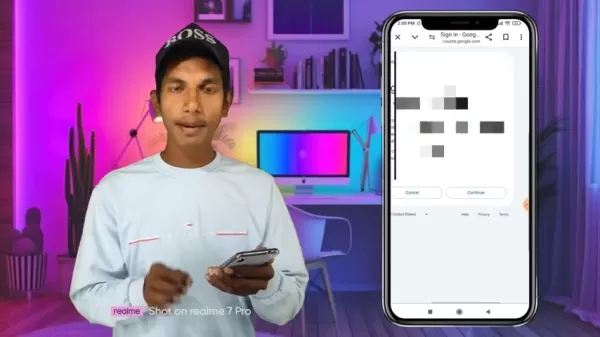
. Click it to start the login or account creation process.
Select a Login Method: After clicking ‘Login,’ choose from options like:
- Google Login: Use your Google account.
- Apple Login: Use your Apple ID.
Sign In with Google: Select ‘Sign in with Google’ for the fastest method.
Choose Your Google Account: Pick the Google account you want to use from the list displayed. If it’s not listed, add it via your device settings.
Grant Permissions: Review and approve permissions requested by PixVerse AI to access basic Google account information. Click ‘Continue’ or ‘Allow’ to proceed.
Account Creation: After approving permissions, PixVerse AI will create your account and log you in, typically within seconds.
Explore the Dashboard: Once logged in, you’ll see the PixVerse AI dashboard. Familiarize yourself with its layout and tools to start creating videos.
Selecting the Bodybuilding Effect
Go to the Effect Section: After logging in, find the ‘Effect’ option at the bottom of the screen
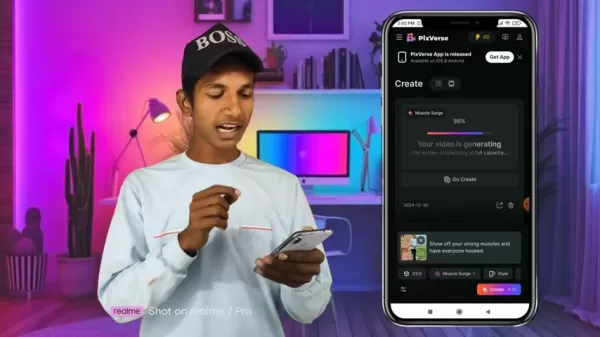
. This section lists effects and templates for your images.
Locate the Bodybuilding Effect: Scroll to find the ‘Muscle Surge’ effect or a similar body transformation option, often marked with a ‘HOT’ label for popularity.
Choose the Effect: Click the bodybuilding effect to select it, preparing the platform for image upload.
Uploading Your Image
Locate the Upload Option: After selecting the effect, find the ‘Image/Video’ button with an upload icon
. This lets you choose an image from your device’s gallery.
Select an Image: Click the upload button, browse your gallery, and pick a photo for your bodybuilding reel. Choose a clear image of yourself against a plain background for optimal results.
Confirm Selection: After choosing your image, click ‘Done’ in the top-right corner to upload it for transformation.
Creating the Reel
Start the Creation Process: With the image uploaded, click the ‘Create’ button to begin transforming it into a bodybuilding reel.
Track Progress: After clicking ‘Create,’ a progress bar will show the video generation status. This may take a few minutes, depending on the effect’s complexity.
Preview the Reel: Once generated, PixVerse AI will show a preview of your reel. Review it to ensure it meets your expectations.
Downloading and Sharing Your Viral Content
Download the Video: If satisfied with the preview, click ‘Download’ to save the video to your device. Ensure sufficient storage space.
Locate the Video: Find the downloaded video in your device’s gallery or file manager, ready for sharing.
Share on Social Media: Upload the video to platforms like Instagram, TikTok, or Facebook. Add a captivating caption, relevant hashtags, and tag accounts to boost visibility.
Benefits and Drawbacks of PixVerse AI for Content Creation
Pros
Intuitive interface for easy use.
Rapid video creation process.
Affordable alternative to professional editing tools.
Effective for marketing campaigns.
Cons
Fewer customization options than professional editing software.
Reliance on AI algorithms may limit control.
Risk of generic videos without effective customization.
FAQ
Is PixVerse AI free to use?
PixVerse AI provides initial credits for new users. Additional credits can be purchased, with each creation costing 30 credits.
Can I use PixVerse AI on my mobile device?
Yes, PixVerse AI works on both desktop and mobile devices. Its responsive design ensures a seamless experience across different screen sizes, allowing video creation and sharing directly from your smartphone or tablet.
How long does it take to create a video with PixVerse AI?
Video creation time varies based on effect complexity and platform processing power, typically taking a few minutes. A stable internet connection ensures a smooth experience.
Related Questions
What other AI tools can help with content creation?
Several AI tools aid content creation, including ChatGPT, Bard, and Midjourney, each offering unique features for generating engaging content.
Related article
 U.S. Stocks Hit Historic Milestone as AI and Aerospace Giants Prepare for Trillion-Dollar Debut
Elon Musk, Sam Altman, and Dario Amodei, three titans of the technology sector, are advancing toward initial public offerings for their respective ventures. With SpaceX, OpenAI, and Anthropic—three industry behemoths nearing trillion-dollar valuation
Swedish AI Startup Lovable Eyes $13.2 Billion Valuation After Major Funding Round
As AI-driven coding tools gain traction, Swedish startup Lovable has secured a major funding round. The company aims to raise $3 billion, potentially boosting its valuation to $13.2 billion—double the $6.6 billion recorded last December. Menlo Ventur
Google Tests Remy AI Agent for Gemini as Focus Shifts to User Control
According to Business Insider, Google is testing Remy, a new AI personal agent for Gemini. This tool aims to execute tasks on behalf of users, streamlining both professional workflows and daily routines.Currently, Remy is undergoing testing in an int
Related Special Topic Recommendations
Data Analysis
U.S. Stocks Hit Historic Milestone as AI and Aerospace Giants Prepare for Trillion-Dollar Debut
Elon Musk, Sam Altman, and Dario Amodei, three titans of the technology sector, are advancing toward initial public offerings for their respective ventures. With SpaceX, OpenAI, and Anthropic—three industry behemoths nearing trillion-dollar valuation
Swedish AI Startup Lovable Eyes $13.2 Billion Valuation After Major Funding Round
As AI-driven coding tools gain traction, Swedish startup Lovable has secured a major funding round. The company aims to raise $3 billion, potentially boosting its valuation to $13.2 billion—double the $6.6 billion recorded last December. Menlo Ventur
Google Tests Remy AI Agent for Gemini as Focus Shifts to User Control
According to Business Insider, Google is testing Remy, a new AI personal agent for Gemini. This tool aims to execute tasks on behalf of users, streamlining both professional workflows and daily routines.Currently, Remy is undergoing testing in an int
Related Special Topic Recommendations
Data Analysis
 Best AI Anomaly Detection Tools for KPI Monitoring across SaaS and Ecommerce Teams
2026 Latest Best Top-rated AI Anomaly Detection Tools for KPI Monitoring in SaaS and Ecommerce teams! XIX.AI has curated a powerful, game-changing collection based on rigorous real-world tests and weekly updated rankings. You’ll find detailed free vs paid comparison insights to help you identify the must-try solution that boosts productivity and unlocks your AI edge. Explore now!
 10 tools
 xix.ai
writing
Best AI Outline Generators for Long-Form SEO Articles
xix.ai
writing
Best AI Outline Generators for Long-Form SEO Articles
2026 Latest Best Top-Rated AI Outline Generators for Long-Form SEO Articles, meticulously curated by XIX.AI. These powerful tools offer game-changing assistance in creating high-quality content quickly, boosting writing efficiency significantly. Get a free vs paid comparison along with real-world tests and detailed rankings to help you find the must-try option that suits your needs. Explore now to unlock your AI edge.
8 tools
xix.ai
Education and Learning
AI Study Tools for Homework and Exam Prep
2026 Latest Best AI Study Tools for Homework and Exam Prep! XIX.AI curates a top-rated list of powerful, game-changing tools that help students boost productivity, streamline homework completion, and ace exams through real-world tests. Get a free vs paid comparison, detailed rankings, and must-try options to unlock your AI edge. Explore now!
10 tools
xix.ai
Music composition
AI Vocal Demo Tools for Songwriters, Hooks, Toplines, and Multilingual Draft Sessions
2026 Latest Best AI Vocal Demo Tools for Songwriters, Hook Creators, and Multi-Language Content Teams! XIX.AI has curated a top-rated list of powerful game-changing tools that go through rigorous real-world tests. You’ll find detailed free vs paid comparison data, comprehensive rankings, and must-try options to help you boost writing efficiency and unlock your creative potential. Explore now to discover your perfect tool for all your content needs!
9 tools
xix.ai
Business
Best AI Competitive Research Tools for Small Businesses
2026 Latest Best Top-rated AI Competitive Research Tools for Small Businesses! XIX.AI has curated a highly powerful game-changing collection, updated weekly with rigorous real-world tests and detailed rankings. You can find a comprehensive free vs paid comparison to help you identify the must-try tools that boost your productivity and give you a competitive edge. Explore now to discover your perfect tool!
9 tools
xix.ai
Image editing
Photoshop AI Retouch Tools for Ecommerce Apparel, Skin Cleanup, and Color Consistency
2026 Latest Best Photoshop AI retouch tools for ecommerce apparel, skin cleanup, and color consistency! This top-rated curated list features powerful game-changing solutions that help you boost writing efficiency, streamline content creation, and achieve perfect visual results effortlessly. Each tool has undergone real-world tests through weekly updated rankings, complete with free vs paid comparison details. Backed by XIX.AI, it’s the must-try guide for anyone aiming to unlock your AI edge. Explore now!
10 tools
xix.ai

 Comments (1)
0/500
Comments (1)
0/500
![JonathanKing]()
¡Alucinante lo que puede hacer la IA! 🤯 Convertir una foto fija en un video dinámico... ¡perfecto para mis entrenamientos! Aunque siempre me pregunto, ¿cómo manejarán la cuestión de los derechos de autor? Lo comparto directamente en Instagram. 💪📸
In the fast-paced world of social media, creating standout content is essential. PixVerse AI revolutionizes the process by turning static images into vibrant, attention-grabbing videos, especially viral bodybuilding transformation reels. Whether you're a fitness enthusiast or aiming to craft compelling content, PixVerse AI equips you with tools to produce striking visuals effortlessly. This guide explores how to leverage PixVerse AI to create bodybuilding reels that captivate audiences and elevate your online presence. Discover the platform's features, benefits, and a step-by-step approach to using this cutting-edge technology.
Key Points
PixVerse AI converts images into captivating bodybuilding reels.
Effortlessly produce viral content for Instagram and other platforms.
Follow simple steps to create dynamic video content.
Sign up and log in to PixVerse AI to begin creating.
Upload any photo or video you wish to transform.
Introduction to PixVerse AI
What is PixVerse AI?
PixVerse AI
is a cutting-edge AI platform that transforms static photos into dynamic videos and other content. Its popularity is surging, especially for users crafting engaging posts for platforms like Instagram. PixVerse AI simplifies video creation, enabling anyone to turn ordinary images into compelling short videos. This technology excels at producing trending bodybuilding transformation reels that grab attention with minimal effort. By harnessing artificial intelligence, PixVerse AI automates complex video editing tasks, making it accessible to users without prior editing experience. With a few clicks, you can convert a single photo into a dynamic reel, enhanced with visual effects and seamless transitions. The platform’s intuitive design ensures a streamlined process, from image upload to final video sharing.
Key advantages of PixVerse AI include:
- User-friendly: The intuitive interface simplifies video creation for all.
- Fast: Transforms photos into videos in minutes.
- Budget-friendly: Eliminates the need for costly editing software or services.
- Versatile: Ideal for promotional content, personal stories, or educational videos.
Why Use PixVerse AI for Bodybuilding Reels?
Bodybuilding reels are a powerful way for fitness enthusiasts to showcase progress, inspire others, and grow their audience. Manual video creation can be time-intensive and demand advanced editing skills. PixVerse AI simplifies this, enabling users to produce high-quality transformation videos quickly. With PixVerse AI, you can create engaging reels that highlight your fitness journey, attract followers, and boost social media engagement. The platform offers customization options to align videos with specific themes or messages, ensuring your content resonates with viewers. By using PixVerse AI, you save time and focus on your fitness goals and content strategy.
Benefits of using PixVerse AI for bodybuilding reels:
- Saves time compared to traditional video editing.
- No advanced editing skills required.
- Offers customization for personalized content.
- Enhances videos with AI-powered effects and transitions.
- Boosts follower growth and social media engagement.
Tips for Maximizing Your Reels' Impact
Using Trending Audio
Increase your bodybuilding reels’ appeal by adding trending audio tracks. Platforms like Instagram and TikTok prioritize content with popular audio, boosting visibility. Explore the platform’s audio library to select trending tracks that complement your video’s visuals and theme. Aligning audio with your reel’s message enhances its impact and increases its potential to go viral.
Adding Relevant Hashtags
Hashtags make your content discoverable to users interested in specific topics. For bodybuilding reels, use a mix of broad and niche hashtags to reach diverse audiences. Popular fitness hashtags include #bodybuilding, #fitnessjourney, #transformationtuesday, #gymlife, and #fitspiration. Research trending hashtags in your niche for maximum reach. Avoid irrelevant hashtags to maintain credibility and optimize visibility.
Engaging with Your Audience
Building a loyal audience is key to social media success. Respond to comments, answer questions, and join discussions about your bodybuilding reels. Engaging with followers fosters community and encourages content sharing. Host Q&A sessions, polls, or challenges to boost interaction. Regular engagement enhances visibility and provides insights to improve future videos.
Step-by-Step Guide to Creating Bodybuilding Reels with PixVerse AI
Accessing PixVerse AI
Start by visiting the PixVerse AI website
. Open your browser on your smartphone or computer and type ‘pixverse.ai’ into the address bar. This takes you to the platform’s homepage, where you can begin creating an account. Alternatively, search “pixverse.ai” on Google.
Creating an Account and Logging In
Visit the PixVerse AI Website: Open your browser and enter ‘pixverse.ai’ in the address bar.
Find the Login Option: On the homepage, locate the ‘Login’ button, typically in the top-right corner
. Click it to start the login or account creation process.
Select a Login Method: After clicking ‘Login,’ choose from options like:
- Google Login: Use your Google account.
- Apple Login: Use your Apple ID.
Sign In with Google: Select ‘Sign in with Google’ for the fastest method.
Choose Your Google Account: Pick the Google account you want to use from the list displayed. If it’s not listed, add it via your device settings.
Grant Permissions: Review and approve permissions requested by PixVerse AI to access basic Google account information. Click ‘Continue’ or ‘Allow’ to proceed.
Account Creation: After approving permissions, PixVerse AI will create your account and log you in, typically within seconds.
Explore the Dashboard: Once logged in, you’ll see the PixVerse AI dashboard. Familiarize yourself with its layout and tools to start creating videos.
Selecting the Bodybuilding Effect
Go to the Effect Section: After logging in, find the ‘Effect’ option at the bottom of the screen
. This section lists effects and templates for your images.
Locate the Bodybuilding Effect: Scroll to find the ‘Muscle Surge’ effect or a similar body transformation option, often marked with a ‘HOT’ label for popularity.
Choose the Effect: Click the bodybuilding effect to select it, preparing the platform for image upload.
Uploading Your Image
Locate the Upload Option: After selecting the effect, find the ‘Image/Video’ button with an upload icon
. This lets you choose an image from your device’s gallery.
Select an Image: Click the upload button, browse your gallery, and pick a photo for your bodybuilding reel. Choose a clear image of yourself against a plain background for optimal results.
Confirm Selection: After choosing your image, click ‘Done’ in the top-right corner to upload it for transformation.
Creating the Reel
Start the Creation Process: With the image uploaded, click the ‘Create’ button to begin transforming it into a bodybuilding reel.
Track Progress: After clicking ‘Create,’ a progress bar will show the video generation status. This may take a few minutes, depending on the effect’s complexity.
Preview the Reel: Once generated, PixVerse AI will show a preview of your reel. Review it to ensure it meets your expectations.
Downloading and Sharing Your Viral Content
Download the Video: If satisfied with the preview, click ‘Download’ to save the video to your device. Ensure sufficient storage space.
Locate the Video: Find the downloaded video in your device’s gallery or file manager, ready for sharing.
Share on Social Media: Upload the video to platforms like Instagram, TikTok, or Facebook. Add a captivating caption, relevant hashtags, and tag accounts to boost visibility.
Benefits and Drawbacks of PixVerse AI for Content Creation
Pros
Intuitive interface for easy use.
Rapid video creation process.
Affordable alternative to professional editing tools.
Effective for marketing campaigns.
Cons
Fewer customization options than professional editing software.
Reliance on AI algorithms may limit control.
Risk of generic videos without effective customization.
FAQ
Is PixVerse AI free to use?
PixVerse AI provides initial credits for new users. Additional credits can be purchased, with each creation costing 30 credits.
Can I use PixVerse AI on my mobile device?
Yes, PixVerse AI works on both desktop and mobile devices. Its responsive design ensures a seamless experience across different screen sizes, allowing video creation and sharing directly from your smartphone or tablet.
How long does it take to create a video with PixVerse AI?
Video creation time varies based on effect complexity and platform processing power, typically taking a few minutes. A stable internet connection ensures a smooth experience.
Related Questions
What other AI tools can help with content creation?
Several AI tools aid content creation, including ChatGPT, Bard, and Midjourney, each offering unique features for generating engaging content.








 U.S. Stocks Hit Historic Milestone as AI and Aerospace Giants Prepare for Trillion-Dollar Debut
Elon Musk, Sam Altman, and Dario Amodei, three titans of the technology sector, are advancing toward initial public offerings for their respective ventures. With SpaceX, OpenAI, and Anthropic—three industry behemoths nearing trillion-dollar valuation
U.S. Stocks Hit Historic Milestone as AI and Aerospace Giants Prepare for Trillion-Dollar Debut
Elon Musk, Sam Altman, and Dario Amodei, three titans of the technology sector, are advancing toward initial public offerings for their respective ventures. With SpaceX, OpenAI, and Anthropic—three industry behemoths nearing trillion-dollar valuation
 Swedish AI Startup Lovable Eyes $13.2 Billion Valuation After Major Funding Round
As AI-driven coding tools gain traction, Swedish startup Lovable has secured a major funding round. The company aims to raise $3 billion, potentially boosting its valuation to $13.2 billion—double the $6.6 billion recorded last December. Menlo Ventur
Google Tests Remy AI Agent for Gemini as Focus Shifts to User Control
According to Business Insider, Google is testing Remy, a new AI personal agent for Gemini. This tool aims to execute tasks on behalf of users, streamlining both professional workflows and daily routines.Currently, Remy is undergoing testing in an int
Swedish AI Startup Lovable Eyes $13.2 Billion Valuation After Major Funding Round
As AI-driven coding tools gain traction, Swedish startup Lovable has secured a major funding round. The company aims to raise $3 billion, potentially boosting its valuation to $13.2 billion—double the $6.6 billion recorded last December. Menlo Ventur
Google Tests Remy AI Agent for Gemini as Focus Shifts to User Control
According to Business Insider, Google is testing Remy, a new AI personal agent for Gemini. This tool aims to execute tasks on behalf of users, streamlining both professional workflows and daily routines.Currently, Remy is undergoing testing in an int

2026 Latest Best Top-rated AI Anomaly Detection Tools for KPI Monitoring in SaaS and Ecommerce teams! XIX.AI has curated a powerful, game-changing collection based on rigorous real-world tests and weekly updated rankings. You’ll find detailed free vs paid comparison insights to help you identify the must-try solution that boosts productivity and unlocks your AI edge. Explore now!
10 tools
xix.ai

2026 Latest Best Top-Rated AI Outline Generators for Long-Form SEO Articles, meticulously curated by XIX.AI. These powerful tools offer game-changing assistance in creating high-quality content quickly, boosting writing efficiency significantly. Get a free vs paid comparison along with real-world tests and detailed rankings to help you find the must-try option that suits your needs. Explore now to unlock your AI edge.
8 tools
xix.ai

2026 Latest Best AI Study Tools for Homework and Exam Prep! XIX.AI curates a top-rated list of powerful, game-changing tools that help students boost productivity, streamline homework completion, and ace exams through real-world tests. Get a free vs paid comparison, detailed rankings, and must-try options to unlock your AI edge. Explore now!
10 tools
xix.ai

2026 Latest Best AI Vocal Demo Tools for Songwriters, Hook Creators, and Multi-Language Content Teams! XIX.AI has curated a top-rated list of powerful game-changing tools that go through rigorous real-world tests. You’ll find detailed free vs paid comparison data, comprehensive rankings, and must-try options to help you boost writing efficiency and unlock your creative potential. Explore now to discover your perfect tool for all your content needs!
9 tools
xix.ai

2026 Latest Best Top-rated AI Competitive Research Tools for Small Businesses! XIX.AI has curated a highly powerful game-changing collection, updated weekly with rigorous real-world tests and detailed rankings. You can find a comprehensive free vs paid comparison to help you identify the must-try tools that boost your productivity and give you a competitive edge. Explore now to discover your perfect tool!
9 tools
xix.ai

2026 Latest Best Photoshop AI retouch tools for ecommerce apparel, skin cleanup, and color consistency! This top-rated curated list features powerful game-changing solutions that help you boost writing efficiency, streamline content creation, and achieve perfect visual results effortlessly. Each tool has undergone real-world tests through weekly updated rankings, complete with free vs paid comparison details. Backed by XIX.AI, it’s the must-try guide for anyone aiming to unlock your AI edge. Explore now!
10 tools
xix.ai

¡Alucinante lo que puede hacer la IA! 🤯 Convertir una foto fija en un video dinámico... ¡perfecto para mis entrenamientos! Aunque siempre me pregunto, ¿cómo manejarán la cuestión de los derechos de autor? Lo comparto directamente en Instagram. 💪📸












