


 Home
HomeAI-Powered Thumbnail and Title Creation with Pikzels: A Review
In the fast-paced digital world, captivating thumbnails and titles are critical for grabbing attention on platforms like YouTube. Content creators need efficient tools to boost visibility and streamline workflows. Pikzels.com offers an AI-driven solution, generating eye-catching thumbnails and titles in moments. This review dives into Pikzels’ features, pricing, use cases, and its impact on elevating video performance, showing how it can transform your video marketing strategy and help you shine in a competitive online space.
Key Highlights
Pikzels.com harnesses AI to create viral thumbnails and titles swiftly.
It offers an intuitive interface for brainstorming and refining video content.
Features include AI-generated thumbnails, title suggestions, and face swap tools.
Pricing options suit various needs, with flexible monthly and yearly plans.
Trusted by many creators, Pikzels has enhanced countless videos.
A Discord account is required to access the platform’s tools.
It prioritizes simplicity, especially for those new to thumbnail design.
Pikzels Unveiled: AI-Driven Thumbnail and Title Creation
What is Pikzels?
Pikzels.com is an AI-powered platform that enables creators to craft viral thumbnails and titles for videos in seconds.
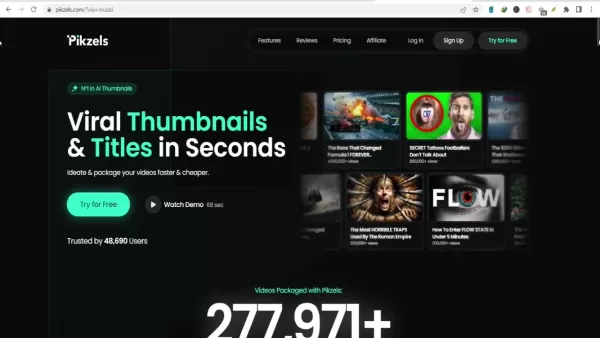
It simplifies the creative process by automating thumbnail design and title creation, saving time for YouTube creators. Using advanced AI, Pikzels analyzes trends to produce engaging, click-worthy content. Creators can ideate and package videos quickly and cost-effectively, making it a vital tool for growing an online audience.
Key advantages of Pikzels include:
- Time Efficiency: Create thumbnails and titles in moments, freeing up time for content creation.
- Boosted Engagement: AI-optimized designs drive higher click-through rates.
- Budget-Friendly: Affordable plans cater to diverse financial needs.
- Accessible Interface: Easy to use for both novices and seasoned creators.
With Pikzels, creators can focus on producing quality content while the platform handles elements that boost visibility and engagement. Its blend of AI innovation and ease of use makes it a standout in the crowded video content landscape.
Pikzels’ Core Features Explored
AI Thumbnail Creation
A standout feature of Pikzels is its AI thumbnail generator.
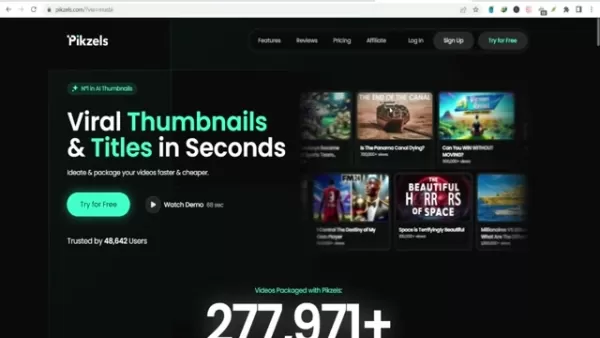
This tool crafts visually striking thumbnails designed to capture attention. AI algorithms evaluate video content and propose designs aligned with trending styles. Users can tweak these to reflect their brand’s identity. The thumbnail generator eliminates hours of manual design, speeding up the creative process.
Advantages of AI Thumbnail Creation:
- Fast and Effective: Thumbnails generated in seconds.
- Engagement-Optimized: Designs crafted to maximize clicks.
- Customizable: Adapt designs to suit your brand’s look.
This feature is ideal for creators without design expertise, offering a quick way to produce professional thumbnails that attract viewers.
AI Title Suggestions
Pikzels also provides an AI-powered title creation tool. Compelling titles are key to drawing viewers and boosting search rankings. The tool analyzes video content to suggest optimized titles that enhance discoverability and engagement. Creators can refine these to match their content’s tone.
Benefits of AI Title Suggestions:
- Engaging Titles: AI crafts titles tailored for search and clicks.
- Beat Writer’s Block: Instant title ideas for any video.
- Customizable: Adjust suggestions to fit your style.
This tool ensures videos are visually appealing and paired with titles that resonate, improving performance and reaching broader audiences.
Face Swap Tool
Pikzels’ face swap feature adds a creative twist to thumbnails.

It allows creators to swap faces seamlessly, injecting fun and intrigue into visuals. The user-friendly tool delivers professional results with smooth transitions, perfect for creating standout thumbnails in competitive spaces.
Benefits of Face Swap:
- Captivating Visuals: Adds a playful, eye-catching element.
- Easy to Use: Accessible for beginners.
- Polished Output: Ensures a professional look.
The face swap feature makes thumbnails memorable, encouraging clicks and boosting engagement.
How to Use Pikzels: A Step-by-Step Guide
Step 1: Brainstorm Content Ideas
Start by generating content ideas with Pikzels. The platform suggests trending topics to spark inspiration.
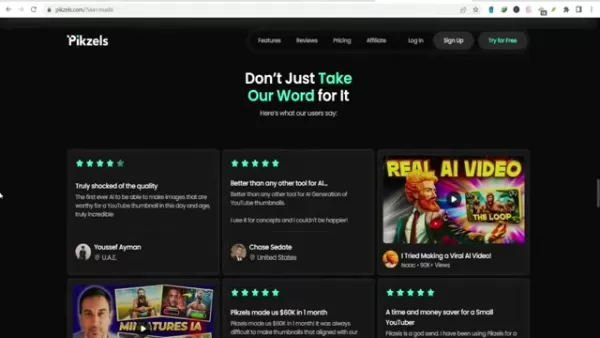
It provides category-based suggestions, helping creators craft engaging video concepts. The AI-powered idea generator cuts research time and keeps creators competitive.
How to Brainstorm Ideas:
- Explore Categories: Browse suggestions for inspiration.
- Use AI Idea Generator: Get tailored content ideas.
- Track Trends: Identify topics with viral potential.
Pikzels’ idea tools help creators align with audience interests, increasing the chances of viral success.
Step 2: Craft Thumbnails from Prompts
Next, create thumbnails using Pikzels’ AI. Enter a prompt about your video, and the AI generates multiple thumbnail options in under 30 seconds.

How to Create Thumbnails:
- Input a Prompt: Describe your video’s content.
- Generate Options: AI produces varied thumbnail designs.
- Customize: Refine designs to align with your brand.
This feature simplifies thumbnail creation, delivering professional visuals quickly.
Step 3: Boost Thumbnails with Face Swap
Enhance thumbnails using the face swap tool. Upload a photo, and the AI integrates your face into the thumbnail, boosting recognition and engagement.
How to Use Face Swap:
- Upload a Photo: Select a high-quality image.
- AI Face Swap: Watch the seamless integration.
- Adjust Results: Fine-tune for a professional finish.
This feature strengthens audience connection, driving clicks through personalized visuals.
Step 4: Generate Compelling Titles
Finally, create video titles with Pikzels’ AI.
Input your video topic, and the AI suggests attention-grabbing titles tailored for engagement.
How to Generate Titles:
- Enter Topic: Describe your video’s focus.
- Generate Options: AI provides multiple title ideas.
- Customize: Refine to match your brand’s voice.
Pikzels ensures titles captivate viewers, enhancing video performance.
Pikzels Pricing: Choose Your Plan
Pricing Overview
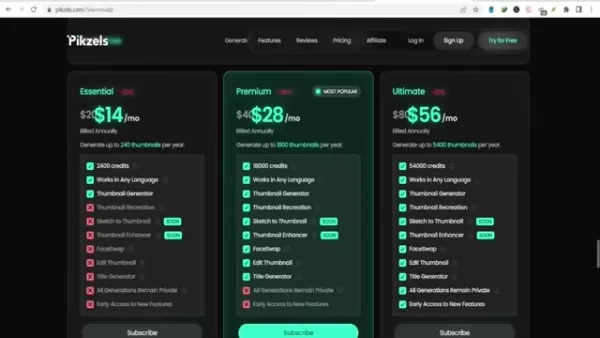
Pikzels offers flexible pricing plans for creators, from solo YouTubers to teams.
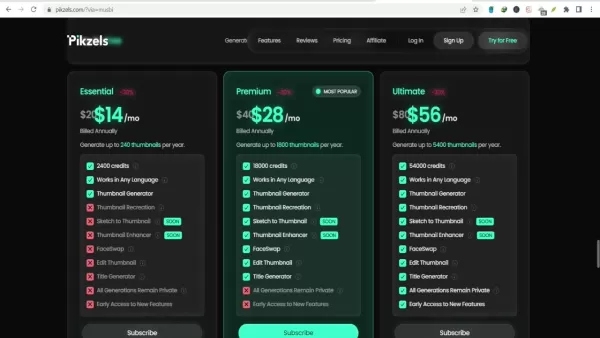
Plans vary by features, credits, and cost, with monthly and annual options. Annual plans provide discounts, and a free trial lets users test five thumbnails without a credit card.
Pricing Summary:
- Essential: Ideal for individuals, with basic features and limited credits.
- Premium: Balances features and credits for growing channels.
- Ultimate: Suits professionals with full access and ample credits.
Below is a detailed pricing table.
Pricing Details
Compare plans to find the best fit:
Feature Essential Premium Ultimate Monthly Cost $14/month $28/month $56/month Annual Cost $168/year $336/year $672/year Credits 2400 credits/year 18000 credits/year 54000 credits/year Thumbnail Generator ✓ ✓ ✓ Works in Any Language ✓ ✓ ✓ Thumbnail Recreation ✓ ✓ ✓ Sketch to Thumbnail ✗ Soon Soon Thumbnail Enhancer ✗ Soon Soon FaceSwap ✗ ✓ ✓ Edit Thumbnail ✗ ✓ ✓ Title Generator ✗ ✓ ✓ All Generations Private ✓ ✓ ✓ Early Access ✗ ✓ ✓
These plans ensure Pikzels fits every creator’s budget and goals.
Pikzels: Pros and Cons
Pros
AI-driven thumbnail and title tools save time and effort.
Intuitive interface simplifies professional content creation.
Affordable plans suit various budgets.
Face swap adds a creative edge to thumbnails.
Free trial lets users test the platform risk-free.
Cons
Discord login requirement may inconvenience some users.
Features like sketch to thumbnail are still in development.
Essential plan credits may fall short for heavy users.
AI reliance might limit creative control for some.
Lack of advanced editing tools may require external software.
Core Features: In-Depth Look
Breaking Down Pikzels’ Tools
Pikzels blends AI automation with user-friendly design to streamline video creation.
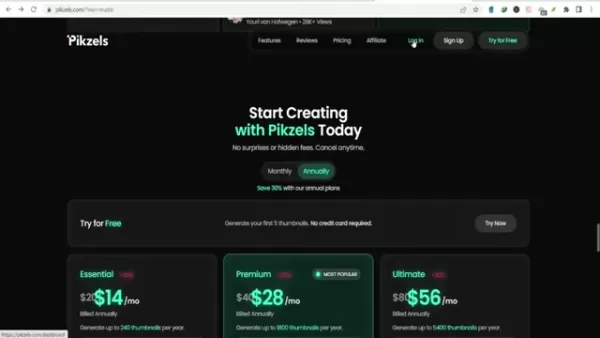
Its features enhance video appeal, boost viewership, and save time.
Core Features:
- Thumbnail Generator: AI creates engaging thumbnails based on video content.
- Title Generator: Suggests optimized titles for better search rankings.
- Thumbnail Recreation: Replicates designs for brand consistency.
- Sketch to Thumbnail (Coming Soon): Turn sketches into thumbnails.
- Thumbnail Enhancer (Coming Soon): Automatically improves thumbnail quality.
- FaceSwap: Adds fun, professional face swaps to thumbnails.
- Edit Thumbnail: Allows manual tweaks for perfect results.
- Private Generations: Keeps all content secure.
- Multilingual Support: Creates content in various languages.
- Early Access: Premium users get new features first.
Pikzels empowers creators to produce standout videos with ease.
Use Cases: Pikzels in Action
Practical Applications
Pikzels serves creators from solo YouTubers to large media firms, streamlining workflows and boosting online presence.
Use Cases:
- YouTube Creators: Generate thumbnails and titles to boost clicks and views.
- Social Media Marketers: Create engaging visuals for ads and posts.
- Educational Institutions: Craft appealing thumbnails for online courses.
- Small Businesses: Produce professional video marketing content.
- E-commerce: Enhance product videos for better visibility and sales.
Pikzels’ versatile tools benefit creators across industries.
Pikzels FAQs
What is Pikzels?
Pikzels is an AI platform that generates viral thumbnails and titles for videos in seconds, simplifying content creation.
How does Pikzels use AI?
It uses AI to analyze content, suggest designs, and create optimized thumbnails and titles for engagement and search.
What features does Pikzels offer?
Features include AI thumbnail and title creation, thumbnail recreation, face swap, and upcoming sketch-to-thumbnail tools.
How much does Pikzels cost?
Pricing varies by plan. Visit Pikzels.com for details.
Is there a free trial?
Yes, users can try five thumbnails free, no credit card needed.
Do I need a Discord account?
Yes, a Discord account is required to log in.
What is thumbnail recreation?
It recreates thumbnails from existing designs for brand consistency.
Does Pikzels support multiple languages?
Yes, it creates content in various languages.
What do premium users get?
Premium users gain early access to new features.
Related Questions
How does AI improve video creation?
AI streamlines thumbnail design, title creation, and editing, saving time while optimizing engagement and search rankings. Tools like Pikzels make high-quality, audience-focused video production efficient and accessible.
Related article
 ByteDance’s Seed launches global campus drive, offering virtual shares to win top large model talent
In the competitive landscape of large language models, securing top-tier talent remains the most critical strategic asset.On April 1st, ByteDance announced the launch of its Seed global campus recruitment initiative, part of its large model talent de
Suno to Watermark Songs Amid Legal Battles
Suno, the platform enabling users to generate AI-created music, has unveiled new features to label platform-produced tracks, restrict downloads, and update community standards to curb unauthorized replicas. These updates arrive as Suno confronts mult
Musk Admits Grok Build Leaked User Code, Promises to Erase All Historical Data
Elon Musk directly addressed the privacy controversy surrounding Grok Build, beginning with a simple "True" to confirm the incident's validity. He pledged that all user data previously uploaded to SpaceXAI would be permanently erased, stating, "not a
Related Special Topic Recommendations
Design & Art
ByteDance’s Seed launches global campus drive, offering virtual shares to win top large model talent
In the competitive landscape of large language models, securing top-tier talent remains the most critical strategic asset.On April 1st, ByteDance announced the launch of its Seed global campus recruitment initiative, part of its large model talent de
Suno to Watermark Songs Amid Legal Battles
Suno, the platform enabling users to generate AI-created music, has unveiled new features to label platform-produced tracks, restrict downloads, and update community standards to curb unauthorized replicas. These updates arrive as Suno confronts mult
Musk Admits Grok Build Leaked User Code, Promises to Erase All Historical Data
Elon Musk directly addressed the privacy controversy surrounding Grok Build, beginning with a simple "True" to confirm the incident's validity. He pledged that all user data previously uploaded to SpaceXAI would be permanently erased, stating, "not a
Related Special Topic Recommendations
Design & Art
 AI Visual Style Reference Tools for Character Sheets, Moodboards, and Pitch Decks
2026 Latest Best AI Visual Style Reference Tools for Character Sheets, Moodboards, and Pitch Decks are here on XIX.AI! This curated top-rated list features powerful game-changing tools that go through rigorous real-world tests. You’ll find a free vs paid comparison, detailed rankings, and must-try options to help you boost creativity and streamline your workflow. Explore now to discover your perfect tool for boosting productivity!
 11 tools
 xix.ai
SEO
Best AI SERP Analysis Tools for Search Strategy
xix.ai
SEO
Best AI SERP Analysis Tools for Search Strategy
2026 Latest Best Top-rated AI SERP Analysis Tools for Search Strategy are curated by XIX.AI through rigorous real-world tests and weekly updated rankings. These powerful tools help you unlock hidden optimization opportunities, boost content performance, and gain a competitive edge in search. Discover your perfect tool to elevate your search strategy today. Explore now!
13 tools
xix.ai
Data Analysis
Best AI Anomaly Detection Tools for KPI Monitoring across SaaS and Ecommerce Teams
2026 Latest Best Top-rated AI Anomaly Detection Tools for KPI Monitoring in SaaS and Ecommerce teams! XIX.AI has curated a powerful, game-changing collection based on rigorous real-world tests and weekly updated rankings. You’ll find detailed free vs paid comparison insights to help you identify the must-try solution that boosts productivity and unlocks your AI edge. Explore now!
10 tools
xix.ai
writing
Best AI Outline Generators for Long-Form SEO Articles
2026 Latest Best Top-Rated AI Outline Generators for Long-Form SEO Articles, meticulously curated by XIX.AI. These powerful tools offer game-changing assistance in creating high-quality content quickly, boosting writing efficiency significantly. Get a free vs paid comparison along with real-world tests and detailed rankings to help you find the must-try option that suits your needs. Explore now to unlock your AI edge.
8 tools
xix.ai
Education and Learning
AI Study Tools for Homework and Exam Prep
2026 Latest Best AI Study Tools for Homework and Exam Prep! XIX.AI curates a top-rated list of powerful, game-changing tools that help students boost productivity, streamline homework completion, and ace exams through real-world tests. Get a free vs paid comparison, detailed rankings, and must-try options to unlock your AI edge. Explore now!
10 tools
xix.ai
Music composition
AI Vocal Demo Tools for Songwriters, Hooks, Toplines, and Multilingual Draft Sessions
2026 Latest Best AI Vocal Demo Tools for Songwriters, Hook Creators, and Multi-Language Content Teams! XIX.AI has curated a top-rated list of powerful game-changing tools that go through rigorous real-world tests. You’ll find detailed free vs paid comparison data, comprehensive rankings, and must-try options to help you boost writing efficiency and unlock your creative potential. Explore now to discover your perfect tool for all your content needs!
9 tools
xix.ai

 Comments (2)
0/500
Comments (2)
0/500
![JamesGreen]()
Pikzels scheint echt praktisch zu sein, um Thumbnails und Titel zu erstellen. Ich frage mich aber, ob solche KI-Tools langfristig nicht dazu führen, dass alles irgendwie gleich aussieht? 🤔 Die Vielfalt könnte verloren gehen, auch wenn es die Arbeit erleichtert.
![RogerKing]()
Just tried Pikzels and honestly, it's a game-changer for my small channel. The auto-suggested titles feel surprisingly relevant, though I wish there was a bit more customization for niche topics like retro gaming. Still, cuts my editing time in half! Anyone else find AI thumbnails sometimes feel 'too perfect' though? 😅
In the fast-paced digital world, captivating thumbnails and titles are critical for grabbing attention on platforms like YouTube. Content creators need efficient tools to boost visibility and streamline workflows. Pikzels.com offers an AI-driven solution, generating eye-catching thumbnails and titles in moments. This review dives into Pikzels’ features, pricing, use cases, and its impact on elevating video performance, showing how it can transform your video marketing strategy and help you shine in a competitive online space.
Key Highlights
Pikzels.com harnesses AI to create viral thumbnails and titles swiftly.
It offers an intuitive interface for brainstorming and refining video content.
Features include AI-generated thumbnails, title suggestions, and face swap tools.
Pricing options suit various needs, with flexible monthly and yearly plans.
Trusted by many creators, Pikzels has enhanced countless videos.
A Discord account is required to access the platform’s tools.
It prioritizes simplicity, especially for those new to thumbnail design.
Pikzels Unveiled: AI-Driven Thumbnail and Title Creation
What is Pikzels?
Pikzels.com is an AI-powered platform that enables creators to craft viral thumbnails and titles for videos in seconds.
It simplifies the creative process by automating thumbnail design and title creation, saving time for YouTube creators. Using advanced AI, Pikzels analyzes trends to produce engaging, click-worthy content. Creators can ideate and package videos quickly and cost-effectively, making it a vital tool for growing an online audience.
Key advantages of Pikzels include:
- Time Efficiency: Create thumbnails and titles in moments, freeing up time for content creation.
- Boosted Engagement: AI-optimized designs drive higher click-through rates.
- Budget-Friendly: Affordable plans cater to diverse financial needs.
- Accessible Interface: Easy to use for both novices and seasoned creators.
With Pikzels, creators can focus on producing quality content while the platform handles elements that boost visibility and engagement. Its blend of AI innovation and ease of use makes it a standout in the crowded video content landscape.
Pikzels’ Core Features Explored
AI Thumbnail Creation
A standout feature of Pikzels is its AI thumbnail generator.
This tool crafts visually striking thumbnails designed to capture attention. AI algorithms evaluate video content and propose designs aligned with trending styles. Users can tweak these to reflect their brand’s identity. The thumbnail generator eliminates hours of manual design, speeding up the creative process.
Advantages of AI Thumbnail Creation:
- Fast and Effective: Thumbnails generated in seconds.
- Engagement-Optimized: Designs crafted to maximize clicks.
- Customizable: Adapt designs to suit your brand’s look.
This feature is ideal for creators without design expertise, offering a quick way to produce professional thumbnails that attract viewers.
AI Title Suggestions
Pikzels also provides an AI-powered title creation tool. Compelling titles are key to drawing viewers and boosting search rankings. The tool analyzes video content to suggest optimized titles that enhance discoverability and engagement. Creators can refine these to match their content’s tone.
Benefits of AI Title Suggestions:
- Engaging Titles: AI crafts titles tailored for search and clicks.
- Beat Writer’s Block: Instant title ideas for any video.
- Customizable: Adjust suggestions to fit your style.
This tool ensures videos are visually appealing and paired with titles that resonate, improving performance and reaching broader audiences.
Face Swap Tool
Pikzels’ face swap feature adds a creative twist to thumbnails.
It allows creators to swap faces seamlessly, injecting fun and intrigue into visuals. The user-friendly tool delivers professional results with smooth transitions, perfect for creating standout thumbnails in competitive spaces.
Benefits of Face Swap:
- Captivating Visuals: Adds a playful, eye-catching element.
- Easy to Use: Accessible for beginners.
- Polished Output: Ensures a professional look.
The face swap feature makes thumbnails memorable, encouraging clicks and boosting engagement.
How to Use Pikzels: A Step-by-Step Guide
Step 1: Brainstorm Content Ideas
Start by generating content ideas with Pikzels. The platform suggests trending topics to spark inspiration.
It provides category-based suggestions, helping creators craft engaging video concepts. The AI-powered idea generator cuts research time and keeps creators competitive.
How to Brainstorm Ideas:
- Explore Categories: Browse suggestions for inspiration.
- Use AI Idea Generator: Get tailored content ideas.
- Track Trends: Identify topics with viral potential.
Pikzels’ idea tools help creators align with audience interests, increasing the chances of viral success.
Step 2: Craft Thumbnails from Prompts
Next, create thumbnails using Pikzels’ AI. Enter a prompt about your video, and the AI generates multiple thumbnail options in under 30 seconds.
How to Create Thumbnails:
- Input a Prompt: Describe your video’s content.
- Generate Options: AI produces varied thumbnail designs.
- Customize: Refine designs to align with your brand.
This feature simplifies thumbnail creation, delivering professional visuals quickly.
Step 3: Boost Thumbnails with Face Swap
Enhance thumbnails using the face swap tool. Upload a photo, and the AI integrates your face into the thumbnail, boosting recognition and engagement.
How to Use Face Swap:
- Upload a Photo: Select a high-quality image.
- AI Face Swap: Watch the seamless integration.
- Adjust Results: Fine-tune for a professional finish.
This feature strengthens audience connection, driving clicks through personalized visuals.
Step 4: Generate Compelling Titles
Finally, create video titles with Pikzels’ AI.
Input your video topic, and the AI suggests attention-grabbing titles tailored for engagement.
How to Generate Titles:
- Enter Topic: Describe your video’s focus.
- Generate Options: AI provides multiple title ideas.
- Customize: Refine to match your brand’s voice.
Pikzels ensures titles captivate viewers, enhancing video performance.
Pikzels Pricing: Choose Your Plan
Pricing Overview
Pikzels offers flexible pricing plans for creators, from solo YouTubers to teams.
Plans vary by features, credits, and cost, with monthly and annual options. Annual plans provide discounts, and a free trial lets users test five thumbnails without a credit card.
Pricing Summary:
- Essential: Ideal for individuals, with basic features and limited credits.
- Premium: Balances features and credits for growing channels.
- Ultimate: Suits professionals with full access and ample credits.
Below is a detailed pricing table.
Pricing Details
Compare plans to find the best fit:
| Feature | Essential | Premium | Ultimate |
|---|---|---|---|
| Monthly Cost | $14/month | $28/month | $56/month |
| Annual Cost | $168/year | $336/year | $672/year |
| Credits | 2400 credits/year | 18000 credits/year | 54000 credits/year |
| Thumbnail Generator | ✓ | ✓ | ✓ |
| Works in Any Language | ✓ | ✓ | ✓ |
| Thumbnail Recreation | ✓ | ✓ | ✓ |
| Sketch to Thumbnail | ✗ | Soon | Soon |
| Thumbnail Enhancer | ✗ | Soon | Soon |
| FaceSwap | ✗ | ✓ | ✓ |
| Edit Thumbnail | ✗ | ✓ | ✓ |
| Title Generator | ✗ | ✓ | ✓ |
| All Generations Private | ✓ | ✓ | ✓ |
| Early Access | ✗ | ✓ | ✓ |
These plans ensure Pikzels fits every creator’s budget and goals.
Pikzels: Pros and Cons
Pros
AI-driven thumbnail and title tools save time and effort.
Intuitive interface simplifies professional content creation.
Affordable plans suit various budgets.
Face swap adds a creative edge to thumbnails.
Free trial lets users test the platform risk-free.
Cons
Discord login requirement may inconvenience some users.
Features like sketch to thumbnail are still in development.
Essential plan credits may fall short for heavy users.
AI reliance might limit creative control for some.
Lack of advanced editing tools may require external software.
Core Features: In-Depth Look
Breaking Down Pikzels’ Tools
Pikzels blends AI automation with user-friendly design to streamline video creation.
Its features enhance video appeal, boost viewership, and save time.
Core Features:
- Thumbnail Generator: AI creates engaging thumbnails based on video content.
- Title Generator: Suggests optimized titles for better search rankings.
- Thumbnail Recreation: Replicates designs for brand consistency.
- Sketch to Thumbnail (Coming Soon): Turn sketches into thumbnails.
- Thumbnail Enhancer (Coming Soon): Automatically improves thumbnail quality.
- FaceSwap: Adds fun, professional face swaps to thumbnails.
- Edit Thumbnail: Allows manual tweaks for perfect results.
- Private Generations: Keeps all content secure.
- Multilingual Support: Creates content in various languages.
- Early Access: Premium users get new features first.
Pikzels empowers creators to produce standout videos with ease.
Use Cases: Pikzels in Action
Practical Applications
Pikzels serves creators from solo YouTubers to large media firms, streamlining workflows and boosting online presence.
Use Cases:
- YouTube Creators: Generate thumbnails and titles to boost clicks and views.
- Social Media Marketers: Create engaging visuals for ads and posts.
- Educational Institutions: Craft appealing thumbnails for online courses.
- Small Businesses: Produce professional video marketing content.
- E-commerce: Enhance product videos for better visibility and sales.
Pikzels’ versatile tools benefit creators across industries.
Pikzels FAQs
What is Pikzels?
Pikzels is an AI platform that generates viral thumbnails and titles for videos in seconds, simplifying content creation.
How does Pikzels use AI?
It uses AI to analyze content, suggest designs, and create optimized thumbnails and titles for engagement and search.
What features does Pikzels offer?
Features include AI thumbnail and title creation, thumbnail recreation, face swap, and upcoming sketch-to-thumbnail tools.
How much does Pikzels cost?
Pricing varies by plan. Visit Pikzels.com for details.
Is there a free trial?
Yes, users can try five thumbnails free, no credit card needed.
Do I need a Discord account?
Yes, a Discord account is required to log in.
What is thumbnail recreation?
It recreates thumbnails from existing designs for brand consistency.
Does Pikzels support multiple languages?
Yes, it creates content in various languages.
What do premium users get?
Premium users gain early access to new features.
Related Questions
How does AI improve video creation?
AI streamlines thumbnail design, title creation, and editing, saving time while optimizing engagement and search rankings. Tools like Pikzels make high-quality, audience-focused video production efficient and accessible.








 ByteDance’s Seed launches global campus drive, offering virtual shares to win top large model talent
In the competitive landscape of large language models, securing top-tier talent remains the most critical strategic asset.On April 1st, ByteDance announced the launch of its Seed global campus recruitment initiative, part of its large model talent de
ByteDance’s Seed launches global campus drive, offering virtual shares to win top large model talent
In the competitive landscape of large language models, securing top-tier talent remains the most critical strategic asset.On April 1st, ByteDance announced the launch of its Seed global campus recruitment initiative, part of its large model talent de
 Suno to Watermark Songs Amid Legal Battles
Suno, the platform enabling users to generate AI-created music, has unveiled new features to label platform-produced tracks, restrict downloads, and update community standards to curb unauthorized replicas. These updates arrive as Suno confronts mult
Suno to Watermark Songs Amid Legal Battles
Suno, the platform enabling users to generate AI-created music, has unveiled new features to label platform-produced tracks, restrict downloads, and update community standards to curb unauthorized replicas. These updates arrive as Suno confronts mult
 Musk Admits Grok Build Leaked User Code, Promises to Erase All Historical Data
Elon Musk directly addressed the privacy controversy surrounding Grok Build, beginning with a simple "True" to confirm the incident's validity. He pledged that all user data previously uploaded to SpaceXAI would be permanently erased, stating, "not a
Musk Admits Grok Build Leaked User Code, Promises to Erase All Historical Data
Elon Musk directly addressed the privacy controversy surrounding Grok Build, beginning with a simple "True" to confirm the incident's validity. He pledged that all user data previously uploaded to SpaceXAI would be permanently erased, stating, "not a
2026 Latest Best AI Visual Style Reference Tools for Character Sheets, Moodboards, and Pitch Decks are here on XIX.AI! This curated top-rated list features powerful game-changing tools that go through rigorous real-world tests. You’ll find a free vs paid comparison, detailed rankings, and must-try options to help you boost creativity and streamline your workflow. Explore now to discover your perfect tool for boosting productivity!
11 tools
xix.ai

2026 Latest Best Top-rated AI SERP Analysis Tools for Search Strategy are curated by XIX.AI through rigorous real-world tests and weekly updated rankings. These powerful tools help you unlock hidden optimization opportunities, boost content performance, and gain a competitive edge in search. Discover your perfect tool to elevate your search strategy today. Explore now!
13 tools
xix.ai

2026 Latest Best Top-rated AI Anomaly Detection Tools for KPI Monitoring in SaaS and Ecommerce teams! XIX.AI has curated a powerful, game-changing collection based on rigorous real-world tests and weekly updated rankings. You’ll find detailed free vs paid comparison insights to help you identify the must-try solution that boosts productivity and unlocks your AI edge. Explore now!
10 tools
xix.ai

2026 Latest Best Top-Rated AI Outline Generators for Long-Form SEO Articles, meticulously curated by XIX.AI. These powerful tools offer game-changing assistance in creating high-quality content quickly, boosting writing efficiency significantly. Get a free vs paid comparison along with real-world tests and detailed rankings to help you find the must-try option that suits your needs. Explore now to unlock your AI edge.
8 tools
xix.ai

2026 Latest Best AI Study Tools for Homework and Exam Prep! XIX.AI curates a top-rated list of powerful, game-changing tools that help students boost productivity, streamline homework completion, and ace exams through real-world tests. Get a free vs paid comparison, detailed rankings, and must-try options to unlock your AI edge. Explore now!
10 tools
xix.ai

2026 Latest Best AI Vocal Demo Tools for Songwriters, Hook Creators, and Multi-Language Content Teams! XIX.AI has curated a top-rated list of powerful game-changing tools that go through rigorous real-world tests. You’ll find detailed free vs paid comparison data, comprehensive rankings, and must-try options to help you boost writing efficiency and unlock your creative potential. Explore now to discover your perfect tool for all your content needs!
9 tools
xix.ai

Pikzels scheint echt praktisch zu sein, um Thumbnails und Titel zu erstellen. Ich frage mich aber, ob solche KI-Tools langfristig nicht dazu führen, dass alles irgendwie gleich aussieht? 🤔 Die Vielfalt könnte verloren gehen, auch wenn es die Arbeit erleichtert.
Just tried Pikzels and honestly, it's a game-changer for my small channel. The auto-suggested titles feel surprisingly relevant, though I wish there was a bit more customization for niche topics like retro gaming. Still, cuts my editing time in half! Anyone else find AI thumbnails sometimes feel 'too perfect' though? 😅












