


 Home
HomeAI-Powered Parallax Maker: Craft Dynamic 2.5D Animations
Turn static images into captivating 2.5D animations with Parallax Maker. This open-source tool empowers artists and game developers to infuse depth and motion into their work. By leveraging the Stability AI API, Parallax Maker ensures a smooth workflow, even on modest hardware. Explore how this tool functions and how it can elevate your creative projects.
Key Highlights
Parallax Maker is an open-source solution for crafting 2.5D animations.
It transforms images into animations compatible with Blender and Unreal Engine.
Integration with Stability AI API accelerates inpainting on less powerful devices.
The tool uses the Segment Anything Model for precise image segmentation.
It supports depth-based and instance-based segmentation methods.
While Parallax Maker is free, Stability AI API usage may involve costs.
Exploring Parallax Maker
What is Parallax Maker?
Parallax Maker is an open-source tool designed to convert static images into vibrant 2.5D animations. This innovative software enables artists, game developers, and animators to add depth and movement, enhancing visual storytelling. Its strength lies in transforming simple images into dynamic scenes that engage viewers.
Parallax Maker simplifies the creation of parallax effects, a process that traditionally demanded extensive manual work and expertise in 3D software. The tool makes this accessible to users of all skill levels by breaking images into layers and allowing control over their movement to create a sense of depth.
It’s especially valuable for game developers aiming to enrich 2D games with depth without the complexity of full 3D environments. Compatible with Blender and Unreal Engine, Parallax Maker integrates seamlessly into existing workflows, enhancing game immersion and visual appeal.
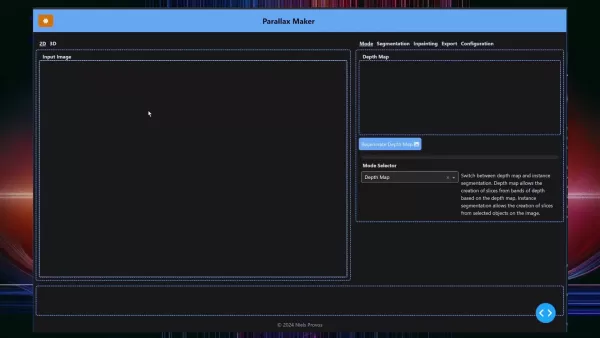
Originally built for personal game development, Parallax Maker was later shared with the creative community to empower artists. Its user-friendly design and accessibility make it a go-to tool for both professionals and hobbyists looking to create striking 2.5D animations.
Core Features and Capabilities
Parallax Maker offers a robust set of tools to streamline 2.5D animation creation. Here’s a look at its key functionalities:
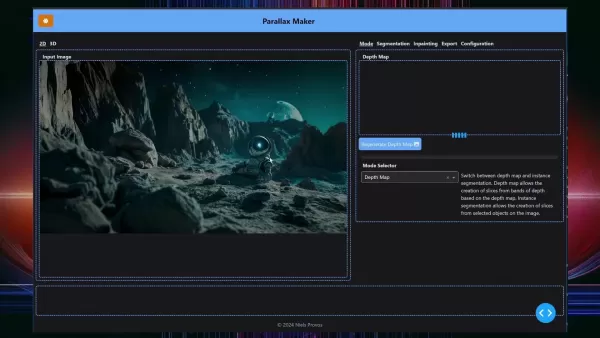
Depth Map Creation: Automatically generates depth maps to define distances within a scene, simplifying the separation of foreground, midground, and background elements.
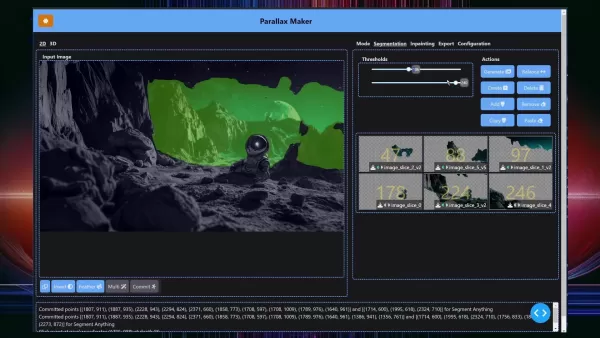
Segmentation Tools: Features advanced tools to isolate specific objects or areas in an image, enhanced by the Segment Anything Model for precise segmentation in complex scenes.
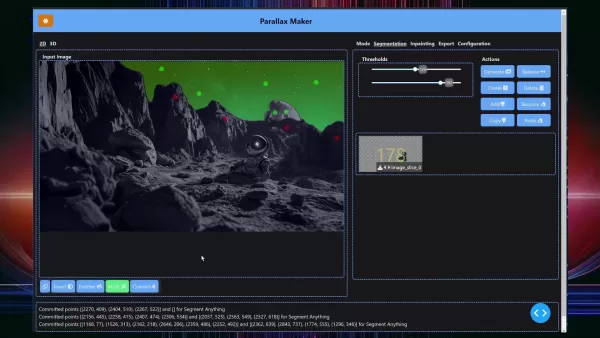
Inpainting Features: Extends image slice edges to prevent gaps during camera movement, powered by Stability AI for seamless results.
Stability AI API Integration: Enhances inpainting performance on lower-end systems by leveraging cloud-based AI processing for faster, high-quality outcomes.
Compatibility with Blender and Unreal Engine: Easily exports animations to these platforms for further refinement and integration into larger projects.
Intuitive Interface: Offers a clear, user-friendly layout for a smooth workflow, accessible to beginners and experts alike.
Customizable Options: Allows fine-tuning of layer depth, movement speed, and visual effects to meet specific project needs.
These features make Parallax Maker a versatile tool for creating visually impressive 2.5D animations across various creative projects.
Deep Dive: Stability AI Integration
Boosting Efficiency with Stability AI API
Parallax Maker’s integration with the Stability AI API significantly enhances performance, particularly for users with less powerful hardware. By utilizing cloud-based AI processing, it reduces inpainting time and delivers superior results.
Inpainting, critical for extending image layer edges to avoid gaps during camera movement, can be resource-intensive. On lower-end systems, this process can slow workflows. The Stability AI API offloads inpainting to the cloud, enabling faster processing and freeing up local resources.
Beyond speed, the API ensures higher-quality inpainting with refined AI algorithms, producing seamless and natural results. This is ideal for projects prioritizing visual excellence. While the API incurs costs, its efficiency and quality often justify the investment for professional or frequent use.
Configuring Stability AI API in Parallax Maker
To use the Stability AI API, proper setup is required. Follow these steps to integrate it:
- Sign Up for Stability AI: Create an account on the Stability AI Developer Platform.
- Generate an API Key: Navigate to the API Keys section and create a new key for authentication.
- Copy the Key: Securely copy the API key to your clipboard.
- Launch Parallax Maker: Open the software on your device.
- Access Configuration: Go to the Configuration tab in Parallax Maker.
- Select Stability AI: Choose “StabilityAI” from the “Inpainting Model” dropdown.
- Input API Key: Paste the key into the designated field, ensuring no extra spaces.
- Test the Connection: Click “Test API Key” to verify connectivity with Stability AI’s servers.
- Check Credits: Confirm available credits for your account.
This setup enables faster, high-quality inpainting, streamlining your 2.5D animation workflow.
Step-by-Step Guide to Creating 2.5D Animations
Step 1: Loading Your Image
Begin by importing a high-quality image into Parallax Maker, as image quality impacts the final animation. Follow these steps:
- Open Parallax Maker: Launch the application on your computer.
- Go to 2D Tab: Ensure you’re in the 2D view.
- Locate Input Image Area: Find the “Input Image” section.
- Add Image: Drag and drop or copy-paste your image (PNG or JPG formats supported).
- Verify Display: Confirm the image loads correctly without distortion.
Step 2: Segmenting the Image
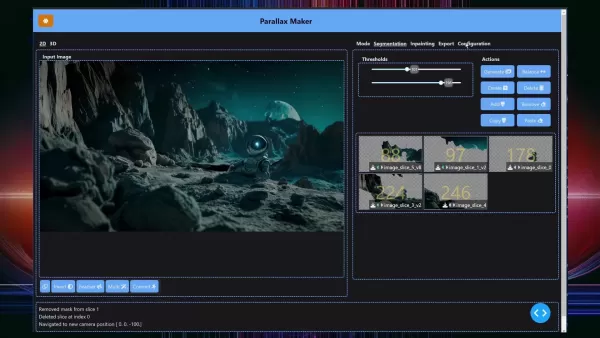
Segmentation divides the image into layers for independent manipulation. Here’s how to do it:
Select Segmentation Mode: Choose “Depth Map” or “Instance Segmentation” in the Mode Selector. Depth Map creates slices based on depth, while Instance Segmentation targets specific objects.
Adjust Thresholds: Use sliders to fine-tune segmentation for optimal layer separation.
Refine with Tools: Manually adjust segments to ensure accuracy.
Use Segment Anything Model (SAM): Leverage SAM for automatic object isolation in complex images.
Create Slices: Click the image to generate layers for parallax effects.
Step 3: Inpainting Slices
Inpainting extends slice edges to ensure seamless camera movement. Follow these steps:
- Go to Inpainting Tab: Access the Inpainting section in Parallax Maker.
- Choose a Slice: Select a segmented slice to inpaint.
- Set Prompt: Opt for “generate” or “fill” mode (fill requires no prompt).
- Generate Options: Parallax Maker creates three inpainting options.
- Select Best Fit: Choose the option that blends best with the scene.
- Apply Inpainting: Extend the slice edges with the selected image.
- Inpaint All Slices: Repeat for all slices to ensure a cohesive scene.
Step 4: Exporting the Animation
Export your animation for use in Blender or Unreal Engine with these steps:
- Access Export Tab: Navigate to the Export section.
- Configure Settings: Select file format, resolution, and other parameters (e.g., PNG series or layered PSD).
- Choose Destination: Pick a folder to save the files.
- Export Files: Click Export to generate animation files.
- Import to Platforms: Bring files into Blender or Unreal Engine for further refinement.
- Finalize Animation: Adjust camera movement, effects, and performance as needed.
Pricing Overview
Parallax Maker and Stability AI Costs
Parallax Maker is free and open-source, ideal for budget-conscious creators. However, consider these cost factors:
- Parallax Maker: No licensing fees, making it accessible for hobbyists and professionals.
- Stability AI API: Charges based on usage, with pay-as-you-go or subscription plans available.
Evaluate your project needs to choose an API plan. For occasional use, pay-as-you-go may suffice; for frequent use, a subscription could be more cost-effective.
Pros and Cons of Parallax Maker
Advantages
Free and open-source
Intuitive interface
Enhanced performance via Stability AI API
Compatible with Blender and Unreal Engine
Simplifies 2.5D animation creation
Drawbacks
Stability AI API usage may incur costs
Primarily Windows-based
Requires some image editing and animation knowledge
Core Features of Parallax Maker
Empowering Creativity with Robust Tools
Parallax Maker offers tools to streamline 2.5D animation creation:
- Depth Map Creation: Simulates depth for layered animations.
- Segmentation Capabilities: Isolates image elements for precise manipulation.
- Inpainting Functionality: Extends slices seamlessly with AI-driven inpainting.
- Stability AI API Integration: Enhances performance on modest hardware.
- Cross-Platform Compatibility: Integrates with Blender and Unreal Engine.
- User-Friendly Interface: Simplifies navigation for all skill levels.
- Customizable Options: Fine-tunes animations for unique creative visions.
These tools enable creators to craft dynamic, engaging animations.
Applications of Parallax Maker
Revolutionizing Industries with 2.5D Animation
Parallax Maker’s versatility supports diverse applications:
- Game Development: Enhances 2D games with immersive backgrounds and effects.
- Animation and Filmmaking: Creates dynamic scenes for films and videos.
- Graphic Design: Adds motion to static graphics for marketing.
- Education: Develops engaging, interactive learning experiences.
- Architectural Visualization: Adds realism to renderings with parallax effects.
- Marketing: Creates compelling campaigns with dynamic visuals.
- Museum Exhibits: Brings historical images to life for immersive displays.
Frequently Asked Questions About Parallax Maker
Is Parallax Maker truly free?
Yes, Parallax Maker is open-source and free to use, though Stability AI API usage may involve costs.
Is it compatible with Windows and Mac?
It’s primarily designed for Windows, but community efforts may expand compatibility. Check the GitHub repository for updates.
Do I need technical expertise?
No, its intuitive interface suits beginners, though some image editing knowledge helps.
Can I use it for commercial projects?
Yes, Parallax Maker supports commercial use with no royalties.
How can I contribute?
Contribute via the GitHub repository by reporting bugs, suggesting features, or submitting code.
Related Questions About 2.5D Animation
What is 2.5D animation, and how does it differ from 2D and 3D?
2.5D animation blends 2D and 3D techniques, creating depth in a 2D environment through layered elements moving at different speeds. Unlike flat 2D animation, it adds perceived depth, and compared to 3D, it’s less resource-intensive, ideal for budget-conscious projects.
What software supports 2.5D animation?
Options include Parallax Maker for ease and API integration, Spine for bone-based animation, Live2D for character animations, Adobe After Effects for cinematic effects, and Unity or Unreal Engine for interactive experiences.
Related article
 Suno to Watermark Songs Amid Legal Battles
Suno, the platform enabling users to generate AI-created music, has unveiled new features to label platform-produced tracks, restrict downloads, and update community standards to curb unauthorized replicas. These updates arrive as Suno confronts mult
Musk Admits Grok Build Leaked User Code, Promises to Erase All Historical Data
Elon Musk directly addressed the privacy controversy surrounding Grok Build, beginning with a simple "True" to confirm the incident's validity. He pledged that all user data previously uploaded to SpaceXAI would be permanently erased, stating, "not a
U.S. Stocks Hit Historic Milestone as AI and Aerospace Giants Prepare for Trillion-Dollar Debut
Elon Musk, Sam Altman, and Dario Amodei, three titans of the technology sector, are advancing toward initial public offerings for their respective ventures. With SpaceX, OpenAI, and Anthropic—three industry behemoths nearing trillion-dollar valuation
Related Special Topic Recommendations
SEO
Suno to Watermark Songs Amid Legal Battles
Suno, the platform enabling users to generate AI-created music, has unveiled new features to label platform-produced tracks, restrict downloads, and update community standards to curb unauthorized replicas. These updates arrive as Suno confronts mult
Musk Admits Grok Build Leaked User Code, Promises to Erase All Historical Data
Elon Musk directly addressed the privacy controversy surrounding Grok Build, beginning with a simple "True" to confirm the incident's validity. He pledged that all user data previously uploaded to SpaceXAI would be permanently erased, stating, "not a
U.S. Stocks Hit Historic Milestone as AI and Aerospace Giants Prepare for Trillion-Dollar Debut
Elon Musk, Sam Altman, and Dario Amodei, three titans of the technology sector, are advancing toward initial public offerings for their respective ventures. With SpaceX, OpenAI, and Anthropic—three industry behemoths nearing trillion-dollar valuation
Related Special Topic Recommendations
SEO
 Best AI SERP Analysis Tools for Search Strategy
2026 Latest Best Top-rated AI SERP Analysis Tools for Search Strategy are curated by XIX.AI through rigorous real-world tests and weekly updated rankings. These powerful tools help you unlock hidden optimization opportunities, boost content performance, and gain a competitive edge in search. Discover your perfect tool to elevate your search strategy today. Explore now!
 13 tools
 xix.ai
Data Analysis
Best AI Anomaly Detection Tools for KPI Monitoring across SaaS and Ecommerce Teams
xix.ai
Data Analysis
Best AI Anomaly Detection Tools for KPI Monitoring across SaaS and Ecommerce Teams
2026 Latest Best Top-rated AI Anomaly Detection Tools for KPI Monitoring in SaaS and Ecommerce teams! XIX.AI has curated a powerful, game-changing collection based on rigorous real-world tests and weekly updated rankings. You’ll find detailed free vs paid comparison insights to help you identify the must-try solution that boosts productivity and unlocks your AI edge. Explore now!
10 tools
xix.ai
writing
Best AI Outline Generators for Long-Form SEO Articles
2026 Latest Best Top-Rated AI Outline Generators for Long-Form SEO Articles, meticulously curated by XIX.AI. These powerful tools offer game-changing assistance in creating high-quality content quickly, boosting writing efficiency significantly. Get a free vs paid comparison along with real-world tests and detailed rankings to help you find the must-try option that suits your needs. Explore now to unlock your AI edge.
8 tools
xix.ai
Education and Learning
AI Study Tools for Homework and Exam Prep
2026 Latest Best AI Study Tools for Homework and Exam Prep! XIX.AI curates a top-rated list of powerful, game-changing tools that help students boost productivity, streamline homework completion, and ace exams through real-world tests. Get a free vs paid comparison, detailed rankings, and must-try options to unlock your AI edge. Explore now!
10 tools
xix.ai
Music composition
AI Vocal Demo Tools for Songwriters, Hooks, Toplines, and Multilingual Draft Sessions
2026 Latest Best AI Vocal Demo Tools for Songwriters, Hook Creators, and Multi-Language Content Teams! XIX.AI has curated a top-rated list of powerful game-changing tools that go through rigorous real-world tests. You’ll find detailed free vs paid comparison data, comprehensive rankings, and must-try options to help you boost writing efficiency and unlock your creative potential. Explore now to discover your perfect tool for all your content needs!
9 tools
xix.ai
Business
Best AI Competitive Research Tools for Small Businesses
2026 Latest Best Top-rated AI Competitive Research Tools for Small Businesses! XIX.AI has curated a highly powerful game-changing collection, updated weekly with rigorous real-world tests and detailed rankings. You can find a comprehensive free vs paid comparison to help you identify the must-try tools that boost your productivity and give you a competitive edge. Explore now to discover your perfect tool!
9 tools
xix.ai

 Comments (2)
0/500
Comments (2)
0/500
![DouglasAnderson]()
Als Hobby-Gamedev finde ich solche Tools super! Endlich muss man nicht mehr stundenlang selbst an Parallax-Effekten tüfteln. Die Open-Source-Entscheidung ist der Knackpunkt – das fördert echt die Community und treibt die Technik schneller voran, als es jedes kommerzielle Produkt könnte. Hoffentlich bleibt es auch langfristig so zugänglich. 😊
![KevinMartínez]()
Coole Sache! Als Hobbydesigner finde ich solche Tools richtig praktisch 👍 Die Idee, statische Bilder zum Leben zu erwecken, könnte total nützlich für Indie-Spiele sein. Frage mich nur, wie rechenintensiv das Ganze ist... Mein Laptop ist schon etwas älter 😅
Turn static images into captivating 2.5D animations with Parallax Maker. This open-source tool empowers artists and game developers to infuse depth and motion into their work. By leveraging the Stability AI API, Parallax Maker ensures a smooth workflow, even on modest hardware. Explore how this tool functions and how it can elevate your creative projects.
Key Highlights
Parallax Maker is an open-source solution for crafting 2.5D animations.
It transforms images into animations compatible with Blender and Unreal Engine.
Integration with Stability AI API accelerates inpainting on less powerful devices.
The tool uses the Segment Anything Model for precise image segmentation.
It supports depth-based and instance-based segmentation methods.
While Parallax Maker is free, Stability AI API usage may involve costs.
Exploring Parallax Maker
What is Parallax Maker?
Parallax Maker is an open-source tool designed to convert static images into vibrant 2.5D animations. This innovative software enables artists, game developers, and animators to add depth and movement, enhancing visual storytelling. Its strength lies in transforming simple images into dynamic scenes that engage viewers.
Parallax Maker simplifies the creation of parallax effects, a process that traditionally demanded extensive manual work and expertise in 3D software. The tool makes this accessible to users of all skill levels by breaking images into layers and allowing control over their movement to create a sense of depth.
It’s especially valuable for game developers aiming to enrich 2D games with depth without the complexity of full 3D environments. Compatible with Blender and Unreal Engine, Parallax Maker integrates seamlessly into existing workflows, enhancing game immersion and visual appeal.
Originally built for personal game development, Parallax Maker was later shared with the creative community to empower artists. Its user-friendly design and accessibility make it a go-to tool for both professionals and hobbyists looking to create striking 2.5D animations.
Core Features and Capabilities
Parallax Maker offers a robust set of tools to streamline 2.5D animation creation. Here’s a look at its key functionalities:
Depth Map Creation: Automatically generates depth maps to define distances within a scene, simplifying the separation of foreground, midground, and background elements.
Segmentation Tools: Features advanced tools to isolate specific objects or areas in an image, enhanced by the Segment Anything Model for precise segmentation in complex scenes.
Inpainting Features: Extends image slice edges to prevent gaps during camera movement, powered by Stability AI for seamless results.
Stability AI API Integration: Enhances inpainting performance on lower-end systems by leveraging cloud-based AI processing for faster, high-quality outcomes.
Compatibility with Blender and Unreal Engine: Easily exports animations to these platforms for further refinement and integration into larger projects.
Intuitive Interface: Offers a clear, user-friendly layout for a smooth workflow, accessible to beginners and experts alike.
Customizable Options: Allows fine-tuning of layer depth, movement speed, and visual effects to meet specific project needs.
These features make Parallax Maker a versatile tool for creating visually impressive 2.5D animations across various creative projects.
Deep Dive: Stability AI Integration
Boosting Efficiency with Stability AI API
Parallax Maker’s integration with the Stability AI API significantly enhances performance, particularly for users with less powerful hardware. By utilizing cloud-based AI processing, it reduces inpainting time and delivers superior results.
Inpainting, critical for extending image layer edges to avoid gaps during camera movement, can be resource-intensive. On lower-end systems, this process can slow workflows. The Stability AI API offloads inpainting to the cloud, enabling faster processing and freeing up local resources.
Beyond speed, the API ensures higher-quality inpainting with refined AI algorithms, producing seamless and natural results. This is ideal for projects prioritizing visual excellence. While the API incurs costs, its efficiency and quality often justify the investment for professional or frequent use.
Configuring Stability AI API in Parallax Maker
To use the Stability AI API, proper setup is required. Follow these steps to integrate it:
- Sign Up for Stability AI: Create an account on the Stability AI Developer Platform.
- Generate an API Key: Navigate to the API Keys section and create a new key for authentication.
- Copy the Key: Securely copy the API key to your clipboard.
- Launch Parallax Maker: Open the software on your device.
- Access Configuration: Go to the Configuration tab in Parallax Maker.
- Select Stability AI: Choose “StabilityAI” from the “Inpainting Model” dropdown.
- Input API Key: Paste the key into the designated field, ensuring no extra spaces.
- Test the Connection: Click “Test API Key” to verify connectivity with Stability AI’s servers.
- Check Credits: Confirm available credits for your account.
This setup enables faster, high-quality inpainting, streamlining your 2.5D animation workflow.
Step-by-Step Guide to Creating 2.5D Animations
Step 1: Loading Your Image
Begin by importing a high-quality image into Parallax Maker, as image quality impacts the final animation. Follow these steps:
- Open Parallax Maker: Launch the application on your computer.
- Go to 2D Tab: Ensure you’re in the 2D view.
- Locate Input Image Area: Find the “Input Image” section.
- Add Image: Drag and drop or copy-paste your image (PNG or JPG formats supported).
- Verify Display: Confirm the image loads correctly without distortion.
Step 2: Segmenting the Image
Segmentation divides the image into layers for independent manipulation. Here’s how to do it:
Select Segmentation Mode: Choose “Depth Map” or “Instance Segmentation” in the Mode Selector. Depth Map creates slices based on depth, while Instance Segmentation targets specific objects.
Adjust Thresholds: Use sliders to fine-tune segmentation for optimal layer separation.
Refine with Tools: Manually adjust segments to ensure accuracy.
Use Segment Anything Model (SAM): Leverage SAM for automatic object isolation in complex images.
Create Slices: Click the image to generate layers for parallax effects.
Step 3: Inpainting Slices
Inpainting extends slice edges to ensure seamless camera movement. Follow these steps:
- Go to Inpainting Tab: Access the Inpainting section in Parallax Maker.
- Choose a Slice: Select a segmented slice to inpaint.
- Set Prompt: Opt for “generate” or “fill” mode (fill requires no prompt).
- Generate Options: Parallax Maker creates three inpainting options.
- Select Best Fit: Choose the option that blends best with the scene.
- Apply Inpainting: Extend the slice edges with the selected image.
- Inpaint All Slices: Repeat for all slices to ensure a cohesive scene.
Step 4: Exporting the Animation
Export your animation for use in Blender or Unreal Engine with these steps:
- Access Export Tab: Navigate to the Export section.
- Configure Settings: Select file format, resolution, and other parameters (e.g., PNG series or layered PSD).
- Choose Destination: Pick a folder to save the files.
- Export Files: Click Export to generate animation files.
- Import to Platforms: Bring files into Blender or Unreal Engine for further refinement.
- Finalize Animation: Adjust camera movement, effects, and performance as needed.
Pricing Overview
Parallax Maker and Stability AI Costs
Parallax Maker is free and open-source, ideal for budget-conscious creators. However, consider these cost factors:
- Parallax Maker: No licensing fees, making it accessible for hobbyists and professionals.
- Stability AI API: Charges based on usage, with pay-as-you-go or subscription plans available.
Evaluate your project needs to choose an API plan. For occasional use, pay-as-you-go may suffice; for frequent use, a subscription could be more cost-effective.
Pros and Cons of Parallax Maker
Advantages
Free and open-source
Intuitive interface
Enhanced performance via Stability AI API
Compatible with Blender and Unreal Engine
Simplifies 2.5D animation creation
Drawbacks
Stability AI API usage may incur costs
Primarily Windows-based
Requires some image editing and animation knowledge
Core Features of Parallax Maker
Empowering Creativity with Robust Tools
Parallax Maker offers tools to streamline 2.5D animation creation:
- Depth Map Creation: Simulates depth for layered animations.
- Segmentation Capabilities: Isolates image elements for precise manipulation.
- Inpainting Functionality: Extends slices seamlessly with AI-driven inpainting.
- Stability AI API Integration: Enhances performance on modest hardware.
- Cross-Platform Compatibility: Integrates with Blender and Unreal Engine.
- User-Friendly Interface: Simplifies navigation for all skill levels.
- Customizable Options: Fine-tunes animations for unique creative visions.
These tools enable creators to craft dynamic, engaging animations.
Applications of Parallax Maker
Revolutionizing Industries with 2.5D Animation
Parallax Maker’s versatility supports diverse applications:
- Game Development: Enhances 2D games with immersive backgrounds and effects.
- Animation and Filmmaking: Creates dynamic scenes for films and videos.
- Graphic Design: Adds motion to static graphics for marketing.
- Education: Develops engaging, interactive learning experiences.
- Architectural Visualization: Adds realism to renderings with parallax effects.
- Marketing: Creates compelling campaigns with dynamic visuals.
- Museum Exhibits: Brings historical images to life for immersive displays.
Frequently Asked Questions About Parallax Maker
Is Parallax Maker truly free?
Yes, Parallax Maker is open-source and free to use, though Stability AI API usage may involve costs.
Is it compatible with Windows and Mac?
It’s primarily designed for Windows, but community efforts may expand compatibility. Check the GitHub repository for updates.
Do I need technical expertise?
No, its intuitive interface suits beginners, though some image editing knowledge helps.
Can I use it for commercial projects?
Yes, Parallax Maker supports commercial use with no royalties.
How can I contribute?
Contribute via the GitHub repository by reporting bugs, suggesting features, or submitting code.
Related Questions About 2.5D Animation
What is 2.5D animation, and how does it differ from 2D and 3D?
2.5D animation blends 2D and 3D techniques, creating depth in a 2D environment through layered elements moving at different speeds. Unlike flat 2D animation, it adds perceived depth, and compared to 3D, it’s less resource-intensive, ideal for budget-conscious projects.
What software supports 2.5D animation?
Options include Parallax Maker for ease and API integration, Spine for bone-based animation, Live2D for character animations, Adobe After Effects for cinematic effects, and Unity or Unreal Engine for interactive experiences.








 Suno to Watermark Songs Amid Legal Battles
Suno, the platform enabling users to generate AI-created music, has unveiled new features to label platform-produced tracks, restrict downloads, and update community standards to curb unauthorized replicas. These updates arrive as Suno confronts mult
Suno to Watermark Songs Amid Legal Battles
Suno, the platform enabling users to generate AI-created music, has unveiled new features to label platform-produced tracks, restrict downloads, and update community standards to curb unauthorized replicas. These updates arrive as Suno confronts mult
 Musk Admits Grok Build Leaked User Code, Promises to Erase All Historical Data
Elon Musk directly addressed the privacy controversy surrounding Grok Build, beginning with a simple "True" to confirm the incident's validity. He pledged that all user data previously uploaded to SpaceXAI would be permanently erased, stating, "not a
Musk Admits Grok Build Leaked User Code, Promises to Erase All Historical Data
Elon Musk directly addressed the privacy controversy surrounding Grok Build, beginning with a simple "True" to confirm the incident's validity. He pledged that all user data previously uploaded to SpaceXAI would be permanently erased, stating, "not a
 U.S. Stocks Hit Historic Milestone as AI and Aerospace Giants Prepare for Trillion-Dollar Debut
Elon Musk, Sam Altman, and Dario Amodei, three titans of the technology sector, are advancing toward initial public offerings for their respective ventures. With SpaceX, OpenAI, and Anthropic—three industry behemoths nearing trillion-dollar valuation
U.S. Stocks Hit Historic Milestone as AI and Aerospace Giants Prepare for Trillion-Dollar Debut
Elon Musk, Sam Altman, and Dario Amodei, three titans of the technology sector, are advancing toward initial public offerings for their respective ventures. With SpaceX, OpenAI, and Anthropic—three industry behemoths nearing trillion-dollar valuation

2026 Latest Best Top-rated AI SERP Analysis Tools for Search Strategy are curated by XIX.AI through rigorous real-world tests and weekly updated rankings. These powerful tools help you unlock hidden optimization opportunities, boost content performance, and gain a competitive edge in search. Discover your perfect tool to elevate your search strategy today. Explore now!
13 tools
xix.ai

2026 Latest Best Top-rated AI Anomaly Detection Tools for KPI Monitoring in SaaS and Ecommerce teams! XIX.AI has curated a powerful, game-changing collection based on rigorous real-world tests and weekly updated rankings. You’ll find detailed free vs paid comparison insights to help you identify the must-try solution that boosts productivity and unlocks your AI edge. Explore now!
10 tools
xix.ai

2026 Latest Best Top-Rated AI Outline Generators for Long-Form SEO Articles, meticulously curated by XIX.AI. These powerful tools offer game-changing assistance in creating high-quality content quickly, boosting writing efficiency significantly. Get a free vs paid comparison along with real-world tests and detailed rankings to help you find the must-try option that suits your needs. Explore now to unlock your AI edge.
8 tools
xix.ai

2026 Latest Best AI Study Tools for Homework and Exam Prep! XIX.AI curates a top-rated list of powerful, game-changing tools that help students boost productivity, streamline homework completion, and ace exams through real-world tests. Get a free vs paid comparison, detailed rankings, and must-try options to unlock your AI edge. Explore now!
10 tools
xix.ai

2026 Latest Best AI Vocal Demo Tools for Songwriters, Hook Creators, and Multi-Language Content Teams! XIX.AI has curated a top-rated list of powerful game-changing tools that go through rigorous real-world tests. You’ll find detailed free vs paid comparison data, comprehensive rankings, and must-try options to help you boost writing efficiency and unlock your creative potential. Explore now to discover your perfect tool for all your content needs!
9 tools
xix.ai

2026 Latest Best Top-rated AI Competitive Research Tools for Small Businesses! XIX.AI has curated a highly powerful game-changing collection, updated weekly with rigorous real-world tests and detailed rankings. You can find a comprehensive free vs paid comparison to help you identify the must-try tools that boost your productivity and give you a competitive edge. Explore now to discover your perfect tool!
9 tools
xix.ai

Als Hobby-Gamedev finde ich solche Tools super! Endlich muss man nicht mehr stundenlang selbst an Parallax-Effekten tüfteln. Die Open-Source-Entscheidung ist der Knackpunkt – das fördert echt die Community und treibt die Technik schneller voran, als es jedes kommerzielle Produkt könnte. Hoffentlich bleibt es auch langfristig so zugänglich. 😊
Coole Sache! Als Hobbydesigner finde ich solche Tools richtig praktisch 👍 Die Idee, statische Bilder zum Leben zu erwecken, könnte total nützlich für Indie-Spiele sein. Frage mich nur, wie rechenintensiv das Ganze ist... Mein Laptop ist schon etwas älter 😅












