


 Home
HomeOpus Clip: The Top AI Video Editing Tool for Marketers
In the ever-evolving digital world, video content reigns supreme. Yet, crafting engaging video clips often feels like a daunting task, both time-consuming and intricate. This is where Opus Clip steps in—a revolutionary AI-powered video editing tool that's changing the game for marketers looking to repurpose their content. With Opus Clip, you can effortlessly turn lengthy videos into multiple, viral-ready snippets, streamlining video marketing and making it more accessible than ever. Whether you're a seasoned video editor or just starting out, Opus Clip simplifies the process, saving you time and helping you connect with a broader audience.
Key Points
- Opus Clip uses AI to convert long videos into short, captivating clips.
- The tool automatically detects key moments and crafts content ready to go viral.
- It makes video editing easier, suitable for everyone regardless of skill level.
- By automating the editing process, Opus Clip conserves time and resources.
- The clips it generates are optimized for various social media platforms, enhancing reach.
Unlocking the Power of AI in Video Editing
What is Opus Clip?
Opus Clip is at the forefront of video editing technology, using AI to make the creation of engaging video content simpler and faster. It's tailored to transform long-form videos—think webinars, podcasts, or presentations—into short, viral-ready clips. The idea behind Opus Clip is to bypass the need for hands-on video editing, which can be both time-intensive and require specialized skills. With just a few clicks, users can turn a single long video into numerous clips optimized for social media platforms, maximizing the value of their video assets with minimal effort. This tool democratizes video content creation, making it accessible to everyone, from marketing pros to small business owners. Plus, with Opus Clip constantly learning and upgrading, you're always working with the latest in AI video editing technology.
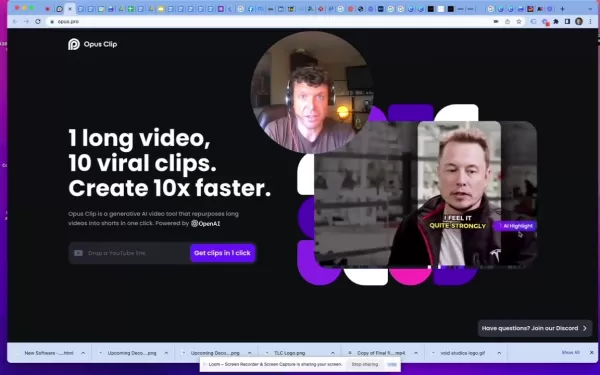
Opus Clip lets users concentrate on what they do best—creating compelling content—while the AI takes care of the tedious editing part.
The AI Advantage: How Opus Clip Identifies Viral Moments
The magic of Opus Clip lies in its sophisticated AI algorithm, trained to spot the moments in a long video that are most likely to engage viewers and become viral hits on social media. Unlike traditional methods that depend on manual review and personal judgment, Opus Clip's AI considers various factors:
- Visual elements: It picks out scenes and transitions that visually grab attention.
- Audio cues: It detects compelling sound bites, memorable quotes, and impactful music.
- Facial expressions: It recognizes moments of genuine emotion and engagement.
- Textual analysis: It understands the context and meaning of spoken words to pinpoint key takeaways.
By analyzing these elements, Opus Clip's AI forms a comprehensive view of the video and identifies moments that are primed to capture viewer attention and encourage shares. This means you can produce high-quality video clips optimized for engagement without the hassle of manual editing. The AI keeps learning and improving, ensuring the quality of the generated clips only gets better over time, making Opus Clip an invaluable tool for video marketing.
Understanding Cathiex's: The Core Business
The Surprising Story Behind the Name
It's always intriguing to learn the origins of a business name, and Cathiex's is no different. It adds a layer of fascination to the brand. Discovering how they named it takes just a minute with Opus Clip.
Getting Started with Opus Clip: A Step-by-Step Guide
Effortless Video Transformation: Step-by-Step Guide
Turning long videos into viral clips with Opus Clip is straightforward, even if you've never edited a video before. Here's how you can get started:
- Create an Account:
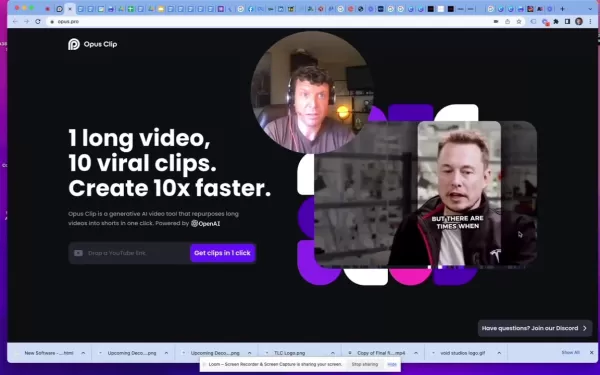 Head over to the Opus Clip website (opus.pro) and sign up for a free account. This lets you test the features and create a limited number of clips.
 - Upload or Link Your Video: Once you're logged in, you can upload your video or link one from YouTube or another platform. Opus Clip supports a variety of video formats, ensuring your content is compatible.
- Let the AI Work Its Magic: After uploading or linking your video, the AI will analyze it to find the most compelling moments. This might take a few minutes, depending on the video's length.
- Customize Your Clips: Once the AI generates the initial clips, you can tweak them. Adjust start and end points, add text overlays, and choose different aspect ratios. Opus Clip offers various editing tools to perfect your clips for your target platform.
- Download and Share: Once you're happy with your clips, download them in various resolutions and formats. Opus Clip also integrates directly with social media, making sharing easy. You can also join the Opus Clip Discord server for additional help and community support.
With Opus Clip, creating engaging video clips is as simple as upload, customize, and share.
Editing and Refining Your AI-Generated Video Clips
While Opus Clip's AI does an excellent job identifying viral moments, you might want to fine-tune the clips to better fit your brand and audience. Fortunately, Opus Clip provides various editing tools:
- Timeline Trimming: Use the user-friendly timeline to adjust the start and end points of your clips, focusing on the most impactful moments.
- Text Overlays: Add text to highlight key points, brand your content, or provide context. Choose from various fonts, colors, and styles to match your brand.
- Aspect Ratio Optimization: Select different aspect ratios to optimize your clips for platforms like TikTok, Instagram, or YouTube.
- Auto Emoji: Enhance your videos with emojis.
- AI Highlight: Let AI pick out highlights.
- Auto Cropping: Let AI crop sections of the video.
These tools allow you to turn Opus Clip's AI-generated clips into unique and engaging video content that resonates with your target audience.
Opus Clip Pricing: Choose the Plan That Fits Your Needs
Exploring Opus Clip's Subscription Options
Opus Clip offers different pricing plans to suit various users, from individual creators to large marketing teams:
- Free Plan: Perfect for testing the waters. It includes a limited number of processing minutes per month and basic editing tools.
- Starter Plan: Ideal for individual content creators needing more processing time and advanced features. It offers a higher monthly allowance and more customization options.
- Pro Plan: Geared towards marketing professionals and small businesses needing a robust solution. It provides unlimited processing minutes, priority support, and access to all features.
The best plan depends on your needs and budget. The free plan is a great starting point to explore Opus Clip's capabilities.
Weighing the Options: The Pros and Cons of Using Opus Clip
Pros
- Saves time and resources by automating video editing.
- Identifies viral moments with AI-powered scene detection.
- Offers customizable editing tools for refining clips.
- Provides direct social media integration for easy sharing.
- Features a user-friendly interface accessible to all skill levels.
Cons
- AI scene detection might not always be perfect, requiring manual adjustments.
- The free plan limits the number of processing minutes per month.
- Some advanced features are exclusive to paid plans.
Unveiling the Core Features of Opus Clip
AI-Powered Video Editing: A Feature-Rich Solution
Opus Clip is loaded with features that simplify and speed up video content creation:
- AI Scene Detection: Automatically finds the most compelling moments in your video.
- Smart Clip Generation: Creates viral-ready clips optimized for social media.
- Customizable Editing Tools: Fine-tune your clips with timeline trimming, text overlays, and aspect ratio optimization.
- Direct Social Media Integration: Easily share your clips across various platforms.
- User-Friendly Interface: An intuitive experience for users of all skill levels.
- Auto Emoji: Enhance your videos with emojis.
- AI Highlight: Let AI pick out highlights.
- Auto Cropping: Let AI crop sections of the video.
These features make Opus Clip a versatile and powerful video editing tool, enabling users to create engaging content effortlessly.
Opus Clip in Action: Real-World Use Cases
Maximizing Video Content with Opus Clip
Opus Clip can be used in various scenarios to enhance the value of video content:
- Repurposing Webinars: Transform long webinars into short, engaging clips for social media promotion.
- Creating Podcast Highlights: Generate attention-grabbing clips from podcasts to attract new listeners.
- Promoting Presentations: Highlight key takeaways from presentations to share on LinkedIn and other platforms.
- Generating Social Media Content: Create a steady stream of engaging video clips to keep your audience engaged.
By applying Opus Clip to these use cases, content creators and marketers can unlock new opportunities for video marketing success.
Frequently Asked Questions About Opus Clip
What video formats does Opus Clip support?
Opus Clip supports a wide range of video formats, including MP4, MOV, AVI, and more, ensuring compatibility with virtually any video file.
How long does it take for Opus Clip to analyze a video?
The analysis time varies with the length of the video, but Opus Clip is designed to be efficient, typically completing the process in a few minutes.
Can I customize the clips generated by Opus Clip?
Yes, Opus Clip offers various editing tools that allow you to customize the clips, including adjusting start and end points, adding text overlays, and choosing different aspect ratios.
Is Opus Clip easy to use for beginners?
Yes, Opus Clip is designed with a user-friendly interface that's accessible to users of all skill levels, making it easy for beginners to create engaging video clips.
Related Questions
What are the best practices for creating viral video clips?
Creating viral video clips involves creativity, strategy, and understanding your audience. Here are some best practices:
- Focus on Compelling Moments: Identify the moments most likely to capture viewer attention and generate shares.
- Keep It Short and Sweet: Aim for clips no longer than 60 seconds, as shorter videos perform better on social media.
- Add Text Overlays: Use text to highlight key takeaways, brand your content, and provide context.
- Optimize for Different Platforms: Choose aspect ratios and editing styles optimized for each social media platform.
- Use Compelling Visuals: Employ appealing visuals and transitions to boost viewer engagement.
- Use Auto Emoji: Enhance your videos with emojis.
- AI Highlight: Let AI pick out highlights.
- Auto Cropping: Let AI crop sections of the video.
By following these practices, you can increase the likelihood of your video clips going viral and reaching a wider audience.
Related article
 U.S. Stocks Hit Historic Milestone as AI and Aerospace Giants Prepare for Trillion-Dollar Debut
Elon Musk, Sam Altman, and Dario Amodei, three titans of the technology sector, are advancing toward initial public offerings for their respective ventures. With SpaceX, OpenAI, and Anthropic—three industry behemoths nearing trillion-dollar valuation
Swedish AI Startup Lovable Eyes $13.2 Billion Valuation After Major Funding Round
As AI-driven coding tools gain traction, Swedish startup Lovable has secured a major funding round. The company aims to raise $3 billion, potentially boosting its valuation to $13.2 billion—double the $6.6 billion recorded last December. Menlo Ventur
Google Tests Remy AI Agent for Gemini as Focus Shifts to User Control
According to Business Insider, Google is testing Remy, a new AI personal agent for Gemini. This tool aims to execute tasks on behalf of users, streamlining both professional workflows and daily routines.Currently, Remy is undergoing testing in an int
Related Special Topic Recommendations
Data Analysis
U.S. Stocks Hit Historic Milestone as AI and Aerospace Giants Prepare for Trillion-Dollar Debut
Elon Musk, Sam Altman, and Dario Amodei, three titans of the technology sector, are advancing toward initial public offerings for their respective ventures. With SpaceX, OpenAI, and Anthropic—three industry behemoths nearing trillion-dollar valuation
Swedish AI Startup Lovable Eyes $13.2 Billion Valuation After Major Funding Round
As AI-driven coding tools gain traction, Swedish startup Lovable has secured a major funding round. The company aims to raise $3 billion, potentially boosting its valuation to $13.2 billion—double the $6.6 billion recorded last December. Menlo Ventur
Google Tests Remy AI Agent for Gemini as Focus Shifts to User Control
According to Business Insider, Google is testing Remy, a new AI personal agent for Gemini. This tool aims to execute tasks on behalf of users, streamlining both professional workflows and daily routines.Currently, Remy is undergoing testing in an int
Related Special Topic Recommendations
Data Analysis
 Best AI Anomaly Detection Tools for KPI Monitoring across SaaS and Ecommerce Teams
2026 Latest Best Top-rated AI Anomaly Detection Tools for KPI Monitoring in SaaS and Ecommerce teams! XIX.AI has curated a powerful, game-changing collection based on rigorous real-world tests and weekly updated rankings. You’ll find detailed free vs paid comparison insights to help you identify the must-try solution that boosts productivity and unlocks your AI edge. Explore now!
 10 tools
 xix.ai
writing
Best AI Outline Generators for Long-Form SEO Articles
xix.ai
writing
Best AI Outline Generators for Long-Form SEO Articles
2026 Latest Best Top-Rated AI Outline Generators for Long-Form SEO Articles, meticulously curated by XIX.AI. These powerful tools offer game-changing assistance in creating high-quality content quickly, boosting writing efficiency significantly. Get a free vs paid comparison along with real-world tests and detailed rankings to help you find the must-try option that suits your needs. Explore now to unlock your AI edge.
8 tools
xix.ai
Education and Learning
AI Study Tools for Homework and Exam Prep
2026 Latest Best AI Study Tools for Homework and Exam Prep! XIX.AI curates a top-rated list of powerful, game-changing tools that help students boost productivity, streamline homework completion, and ace exams through real-world tests. Get a free vs paid comparison, detailed rankings, and must-try options to unlock your AI edge. Explore now!
10 tools
xix.ai
Music composition
AI Vocal Demo Tools for Songwriters, Hooks, Toplines, and Multilingual Draft Sessions
2026 Latest Best AI Vocal Demo Tools for Songwriters, Hook Creators, and Multi-Language Content Teams! XIX.AI has curated a top-rated list of powerful game-changing tools that go through rigorous real-world tests. You’ll find detailed free vs paid comparison data, comprehensive rankings, and must-try options to help you boost writing efficiency and unlock your creative potential. Explore now to discover your perfect tool for all your content needs!
9 tools
xix.ai
Business
Best AI Competitive Research Tools for Small Businesses
2026 Latest Best Top-rated AI Competitive Research Tools for Small Businesses! XIX.AI has curated a highly powerful game-changing collection, updated weekly with rigorous real-world tests and detailed rankings. You can find a comprehensive free vs paid comparison to help you identify the must-try tools that boost your productivity and give you a competitive edge. Explore now to discover your perfect tool!
9 tools
xix.ai
Image editing
Photoshop AI Retouch Tools for Ecommerce Apparel, Skin Cleanup, and Color Consistency
2026 Latest Best Photoshop AI retouch tools for ecommerce apparel, skin cleanup, and color consistency! This top-rated curated list features powerful game-changing solutions that help you boost writing efficiency, streamline content creation, and achieve perfect visual results effortlessly. Each tool has undergone real-world tests through weekly updated rankings, complete with free vs paid comparison details. Backed by XIX.AI, it’s the must-try guide for anyone aiming to unlock your AI edge. Explore now!
10 tools
xix.ai

 Comments (14)
0/500
Comments (14)
0/500
![AlbertEvans]()
Also das klingt ja echt praktisch! Als jemand, der selbst ab und zu Content für Social Media macht, weiß ich, wie viel Zeit das Schneiden frisst. Ob so ein KI-Tool aber wirklich den 'kreativen Blick' ersetzen kann? Die Automatisierung ist verlockend, aber ich hoffe, die Ergebnisse wirken nicht zu generisch und langweilig. Mal sehen, was die Konkurrenz von InVideo oder Pictory dazu sagt. 🤔
![KennethMartin]()
Ну наконец-то нормальный инструмент для маркетологов! 😄 Я уже устал часами монтировать ролики в Adobe. Интересно, справится ли этот AI с русской речью? Надо бы протестировать на наших кейсах.
![DouglasCarter]()
Ну наконец-то нормальный инструмент для маркетологов! 😄 А то эти видеоредакторы вечно такие сложные, что полдня уходит на разбор функций. Интересно, справится ли он с нашими роликами про стройматериалы? Хватило бы ему нашего 'творческого хаоса'
![JoseDavis]()
Intéressant, mais j'ai remarqué que beaucoup d'outils d'IA comme celui-ci finissent par produire des vidéos au même style très reconnaissable... Peut-être que le réel défi ce n'est plus la facilité d'édition, mais comment rester authentique et original quand on utilise ces solutions. C'est à creuser ! 😅
![KeithMoore]()
This AI tool sounds like a marketer's dream! Turning long videos into snappy clips in minutes? Count me in! 🚀 I wonder how it handles super niche content though—any quirks?
![RonaldMitchell]()
Opus Clip sounds like a game-changer for marketers! Turning long videos into snappy clips with AI is super cool, but I wonder how it handles super niche content. Anyone tried it with obscure topics? 🤔
In the ever-evolving digital world, video content reigns supreme. Yet, crafting engaging video clips often feels like a daunting task, both time-consuming and intricate. This is where Opus Clip steps in—a revolutionary AI-powered video editing tool that's changing the game for marketers looking to repurpose their content. With Opus Clip, you can effortlessly turn lengthy videos into multiple, viral-ready snippets, streamlining video marketing and making it more accessible than ever. Whether you're a seasoned video editor or just starting out, Opus Clip simplifies the process, saving you time and helping you connect with a broader audience.
Key Points
- Opus Clip uses AI to convert long videos into short, captivating clips.
- The tool automatically detects key moments and crafts content ready to go viral.
- It makes video editing easier, suitable for everyone regardless of skill level.
- By automating the editing process, Opus Clip conserves time and resources.
- The clips it generates are optimized for various social media platforms, enhancing reach.
Unlocking the Power of AI in Video Editing
What is Opus Clip?
Opus Clip is at the forefront of video editing technology, using AI to make the creation of engaging video content simpler and faster. It's tailored to transform long-form videos—think webinars, podcasts, or presentations—into short, viral-ready clips. The idea behind Opus Clip is to bypass the need for hands-on video editing, which can be both time-intensive and require specialized skills. With just a few clicks, users can turn a single long video into numerous clips optimized for social media platforms, maximizing the value of their video assets with minimal effort. This tool democratizes video content creation, making it accessible to everyone, from marketing pros to small business owners. Plus, with Opus Clip constantly learning and upgrading, you're always working with the latest in AI video editing technology.
Opus Clip lets users concentrate on what they do best—creating compelling content—while the AI takes care of the tedious editing part.
The AI Advantage: How Opus Clip Identifies Viral Moments
The magic of Opus Clip lies in its sophisticated AI algorithm, trained to spot the moments in a long video that are most likely to engage viewers and become viral hits on social media. Unlike traditional methods that depend on manual review and personal judgment, Opus Clip's AI considers various factors:
- Visual elements: It picks out scenes and transitions that visually grab attention.
- Audio cues: It detects compelling sound bites, memorable quotes, and impactful music.
- Facial expressions: It recognizes moments of genuine emotion and engagement.
- Textual analysis: It understands the context and meaning of spoken words to pinpoint key takeaways.
By analyzing these elements, Opus Clip's AI forms a comprehensive view of the video and identifies moments that are primed to capture viewer attention and encourage shares. This means you can produce high-quality video clips optimized for engagement without the hassle of manual editing. The AI keeps learning and improving, ensuring the quality of the generated clips only gets better over time, making Opus Clip an invaluable tool for video marketing.
Understanding Cathiex's: The Core Business
The Surprising Story Behind the Name
It's always intriguing to learn the origins of a business name, and Cathiex's is no different. It adds a layer of fascination to the brand. Discovering how they named it takes just a minute with Opus Clip.
Getting Started with Opus Clip: A Step-by-Step Guide
Effortless Video Transformation: Step-by-Step Guide
Turning long videos into viral clips with Opus Clip is straightforward, even if you've never edited a video before. Here's how you can get started:
- Create an Account: Head over to the Opus Clip website (opus.pro) and sign up for a free account. This lets you test the features and create a limited number of clips.
- Upload or Link Your Video: Once you're logged in, you can upload your video or link one from YouTube or another platform. Opus Clip supports a variety of video formats, ensuring your content is compatible.
- Let the AI Work Its Magic: After uploading or linking your video, the AI will analyze it to find the most compelling moments. This might take a few minutes, depending on the video's length.
- Customize Your Clips: Once the AI generates the initial clips, you can tweak them. Adjust start and end points, add text overlays, and choose different aspect ratios. Opus Clip offers various editing tools to perfect your clips for your target platform.
- Download and Share: Once you're happy with your clips, download them in various resolutions and formats. Opus Clip also integrates directly with social media, making sharing easy. You can also join the Opus Clip Discord server for additional help and community support.
With Opus Clip, creating engaging video clips is as simple as upload, customize, and share.
Editing and Refining Your AI-Generated Video Clips
While Opus Clip's AI does an excellent job identifying viral moments, you might want to fine-tune the clips to better fit your brand and audience. Fortunately, Opus Clip provides various editing tools:
- Timeline Trimming: Use the user-friendly timeline to adjust the start and end points of your clips, focusing on the most impactful moments.
- Text Overlays: Add text to highlight key points, brand your content, or provide context. Choose from various fonts, colors, and styles to match your brand.
- Aspect Ratio Optimization: Select different aspect ratios to optimize your clips for platforms like TikTok, Instagram, or YouTube.
- Auto Emoji: Enhance your videos with emojis.
- AI Highlight: Let AI pick out highlights.
- Auto Cropping: Let AI crop sections of the video.
These tools allow you to turn Opus Clip's AI-generated clips into unique and engaging video content that resonates with your target audience.
Opus Clip Pricing: Choose the Plan That Fits Your Needs
Exploring Opus Clip's Subscription Options
Opus Clip offers different pricing plans to suit various users, from individual creators to large marketing teams:
- Free Plan: Perfect for testing the waters. It includes a limited number of processing minutes per month and basic editing tools.
- Starter Plan: Ideal for individual content creators needing more processing time and advanced features. It offers a higher monthly allowance and more customization options.
- Pro Plan: Geared towards marketing professionals and small businesses needing a robust solution. It provides unlimited processing minutes, priority support, and access to all features.
The best plan depends on your needs and budget. The free plan is a great starting point to explore Opus Clip's capabilities.
Weighing the Options: The Pros and Cons of Using Opus Clip
Pros
- Saves time and resources by automating video editing.
- Identifies viral moments with AI-powered scene detection.
- Offers customizable editing tools for refining clips.
- Provides direct social media integration for easy sharing.
- Features a user-friendly interface accessible to all skill levels.
Cons
- AI scene detection might not always be perfect, requiring manual adjustments.
- The free plan limits the number of processing minutes per month.
- Some advanced features are exclusive to paid plans.
Unveiling the Core Features of Opus Clip
AI-Powered Video Editing: A Feature-Rich Solution
Opus Clip is loaded with features that simplify and speed up video content creation:
- AI Scene Detection: Automatically finds the most compelling moments in your video.
- Smart Clip Generation: Creates viral-ready clips optimized for social media.
- Customizable Editing Tools: Fine-tune your clips with timeline trimming, text overlays, and aspect ratio optimization.
- Direct Social Media Integration: Easily share your clips across various platforms.
- User-Friendly Interface: An intuitive experience for users of all skill levels.
- Auto Emoji: Enhance your videos with emojis.
- AI Highlight: Let AI pick out highlights.
- Auto Cropping: Let AI crop sections of the video.
These features make Opus Clip a versatile and powerful video editing tool, enabling users to create engaging content effortlessly.
Opus Clip in Action: Real-World Use Cases
Maximizing Video Content with Opus Clip
Opus Clip can be used in various scenarios to enhance the value of video content:
- Repurposing Webinars: Transform long webinars into short, engaging clips for social media promotion.
- Creating Podcast Highlights: Generate attention-grabbing clips from podcasts to attract new listeners.
- Promoting Presentations: Highlight key takeaways from presentations to share on LinkedIn and other platforms.
- Generating Social Media Content: Create a steady stream of engaging video clips to keep your audience engaged.
By applying Opus Clip to these use cases, content creators and marketers can unlock new opportunities for video marketing success.
Frequently Asked Questions About Opus Clip
What video formats does Opus Clip support?
Opus Clip supports a wide range of video formats, including MP4, MOV, AVI, and more, ensuring compatibility with virtually any video file.
How long does it take for Opus Clip to analyze a video?
The analysis time varies with the length of the video, but Opus Clip is designed to be efficient, typically completing the process in a few minutes.
Can I customize the clips generated by Opus Clip?
Yes, Opus Clip offers various editing tools that allow you to customize the clips, including adjusting start and end points, adding text overlays, and choosing different aspect ratios.
Is Opus Clip easy to use for beginners?
Yes, Opus Clip is designed with a user-friendly interface that's accessible to users of all skill levels, making it easy for beginners to create engaging video clips.
Related Questions
What are the best practices for creating viral video clips?
Creating viral video clips involves creativity, strategy, and understanding your audience. Here are some best practices:
- Focus on Compelling Moments: Identify the moments most likely to capture viewer attention and generate shares.
- Keep It Short and Sweet: Aim for clips no longer than 60 seconds, as shorter videos perform better on social media.
- Add Text Overlays: Use text to highlight key takeaways, brand your content, and provide context.
- Optimize for Different Platforms: Choose aspect ratios and editing styles optimized for each social media platform.
- Use Compelling Visuals: Employ appealing visuals and transitions to boost viewer engagement.
- Use Auto Emoji: Enhance your videos with emojis.
- AI Highlight: Let AI pick out highlights.
- Auto Cropping: Let AI crop sections of the video.
By following these practices, you can increase the likelihood of your video clips going viral and reaching a wider audience.








 U.S. Stocks Hit Historic Milestone as AI and Aerospace Giants Prepare for Trillion-Dollar Debut
Elon Musk, Sam Altman, and Dario Amodei, three titans of the technology sector, are advancing toward initial public offerings for their respective ventures. With SpaceX, OpenAI, and Anthropic—three industry behemoths nearing trillion-dollar valuation
U.S. Stocks Hit Historic Milestone as AI and Aerospace Giants Prepare for Trillion-Dollar Debut
Elon Musk, Sam Altman, and Dario Amodei, three titans of the technology sector, are advancing toward initial public offerings for their respective ventures. With SpaceX, OpenAI, and Anthropic—three industry behemoths nearing trillion-dollar valuation
 Swedish AI Startup Lovable Eyes $13.2 Billion Valuation After Major Funding Round
As AI-driven coding tools gain traction, Swedish startup Lovable has secured a major funding round. The company aims to raise $3 billion, potentially boosting its valuation to $13.2 billion—double the $6.6 billion recorded last December. Menlo Ventur
Google Tests Remy AI Agent for Gemini as Focus Shifts to User Control
According to Business Insider, Google is testing Remy, a new AI personal agent for Gemini. This tool aims to execute tasks on behalf of users, streamlining both professional workflows and daily routines.Currently, Remy is undergoing testing in an int
Swedish AI Startup Lovable Eyes $13.2 Billion Valuation After Major Funding Round
As AI-driven coding tools gain traction, Swedish startup Lovable has secured a major funding round. The company aims to raise $3 billion, potentially boosting its valuation to $13.2 billion—double the $6.6 billion recorded last December. Menlo Ventur
Google Tests Remy AI Agent for Gemini as Focus Shifts to User Control
According to Business Insider, Google is testing Remy, a new AI personal agent for Gemini. This tool aims to execute tasks on behalf of users, streamlining both professional workflows and daily routines.Currently, Remy is undergoing testing in an int

2026 Latest Best Top-rated AI Anomaly Detection Tools for KPI Monitoring in SaaS and Ecommerce teams! XIX.AI has curated a powerful, game-changing collection based on rigorous real-world tests and weekly updated rankings. You’ll find detailed free vs paid comparison insights to help you identify the must-try solution that boosts productivity and unlocks your AI edge. Explore now!
10 tools
xix.ai

2026 Latest Best Top-Rated AI Outline Generators for Long-Form SEO Articles, meticulously curated by XIX.AI. These powerful tools offer game-changing assistance in creating high-quality content quickly, boosting writing efficiency significantly. Get a free vs paid comparison along with real-world tests and detailed rankings to help you find the must-try option that suits your needs. Explore now to unlock your AI edge.
8 tools
xix.ai

2026 Latest Best AI Study Tools for Homework and Exam Prep! XIX.AI curates a top-rated list of powerful, game-changing tools that help students boost productivity, streamline homework completion, and ace exams through real-world tests. Get a free vs paid comparison, detailed rankings, and must-try options to unlock your AI edge. Explore now!
10 tools
xix.ai

2026 Latest Best AI Vocal Demo Tools for Songwriters, Hook Creators, and Multi-Language Content Teams! XIX.AI has curated a top-rated list of powerful game-changing tools that go through rigorous real-world tests. You’ll find detailed free vs paid comparison data, comprehensive rankings, and must-try options to help you boost writing efficiency and unlock your creative potential. Explore now to discover your perfect tool for all your content needs!
9 tools
xix.ai

2026 Latest Best Top-rated AI Competitive Research Tools for Small Businesses! XIX.AI has curated a highly powerful game-changing collection, updated weekly with rigorous real-world tests and detailed rankings. You can find a comprehensive free vs paid comparison to help you identify the must-try tools that boost your productivity and give you a competitive edge. Explore now to discover your perfect tool!
9 tools
xix.ai

2026 Latest Best Photoshop AI retouch tools for ecommerce apparel, skin cleanup, and color consistency! This top-rated curated list features powerful game-changing solutions that help you boost writing efficiency, streamline content creation, and achieve perfect visual results effortlessly. Each tool has undergone real-world tests through weekly updated rankings, complete with free vs paid comparison details. Backed by XIX.AI, it’s the must-try guide for anyone aiming to unlock your AI edge. Explore now!
10 tools
xix.ai

Also das klingt ja echt praktisch! Als jemand, der selbst ab und zu Content für Social Media macht, weiß ich, wie viel Zeit das Schneiden frisst. Ob so ein KI-Tool aber wirklich den 'kreativen Blick' ersetzen kann? Die Automatisierung ist verlockend, aber ich hoffe, die Ergebnisse wirken nicht zu generisch und langweilig. Mal sehen, was die Konkurrenz von InVideo oder Pictory dazu sagt. 🤔
Ну наконец-то нормальный инструмент для маркетологов! 😄 Я уже устал часами монтировать ролики в Adobe. Интересно, справится ли этот AI с русской речью? Надо бы протестировать на наших кейсах.
Ну наконец-то нормальный инструмент для маркетологов! 😄 А то эти видеоредакторы вечно такие сложные, что полдня уходит на разбор функций. Интересно, справится ли он с нашими роликами про стройматериалы? Хватило бы ему нашего 'творческого хаоса'
Intéressant, mais j'ai remarqué que beaucoup d'outils d'IA comme celui-ci finissent par produire des vidéos au même style très reconnaissable... Peut-être que le réel défi ce n'est plus la facilité d'édition, mais comment rester authentique et original quand on utilise ces solutions. C'est à creuser ! 😅
This AI tool sounds like a marketer's dream! Turning long videos into snappy clips in minutes? Count me in! 🚀 I wonder how it handles super niche content though—any quirks?
Opus Clip sounds like a game-changer for marketers! Turning long videos into snappy clips with AI is super cool, but I wonder how it handles super niche content. Anyone tried it with obscure topics? 🤔












