


 Home
Home
OpenAI Unveils ChatGPT for PowerPoint, Enabling One-Click Slide Creation and Proactive Bug Detection
The "PPT struggle" facing professionals worldwide may soon be a thing of the past. On May 22, OpenAI delivered a major surprise to the developer community by officially releasing the ChatGPT for PowerPoint plugin (Beta).
ChatGPT is no longer just a browser-based chatbot for casual conversation. It has been integrated directly into Microsoft PowerPoint’s core architecture, acting as your "invisible assistant" throughout the slide creation process.
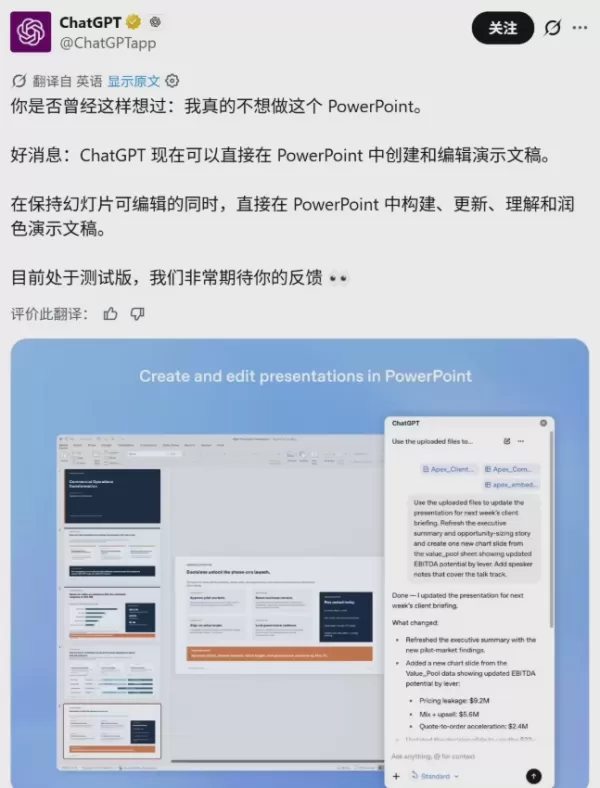
Key Highlights:
Accessible to Everyone: Whether you subscribe to ChatGPT Plus or use a free account, users globally can now install the plugin and start using it immediately.
Comprehensive Support: It supports creating presentations from scratch, one-click refinement of slides, and even "auditing" your proposals with expert-level insights.
Secure and Controlled: Key operations require user confirmation, preventing "AI overreach" and ensuring you maintain full control over every change.
From "Chat" to "Creation": Three Scenarios That Transform Workflows
Traditional PPT creation often suffers from AI-generated content that is rigid, illogical, and difficult to insert directly into slides. ChatGPT for PowerPoint eliminates this "middleman" friction:
1. Create from Scratch with a Single Prompt
Simply provide instructions, such as: "Create a 10-slide presentation on AI development trends in 2026, featuring a clean and professional design." ChatGPT will automatically structure the outline, select appropriate layouts, and generate a logically sound draft.
2. "Editor": Precise, Point-to-Point Adjustments
For existing slides, you can issue direct commands: "Rewrite the text on page three to sound more persuasive and professional" or "Update the color scheme to a modern aesthetic." The AI responds in real-time, applying changes directly within the document and saving you from tedious formatting tasks.
3. "Hidden Expert": Proactive Issue Identification
This is the plugin’s most powerful feature. ChatGPT deeply analyzes your presentation to identify content gaps. For instance, it might alert you: "Your market research section lacks competitor analysis, which weakens your proposal," and even anticipate tough questions from your boss, providing suggested answers.
Safety First: Implementing "Manual Confirmation"
The primary concern with AI-generated content is "hallucination" or errors. To address this, OpenAI prioritized controllability in this plugin. For critical operations involving major structural changes or significant text additions/deletions, the plugin triggers a confirmation popup. The AI only executes the "surgery" after your explicit approval. This "Human-in-the-loop" design significantly reduces risks in professional settings.
Industry Reaction: The PPT Sector Enters the "Intelligent Collaboration" Era
OpenAI’s move has profound implications for the office automation industry. Previously, many "AI + PPT" tools were standalone apps, forcing users to "copy-paste-adjust formats," leading to a disjointed experience.
With ChatGPT natively integrated into PowerPoint, the fundamental logic of productivity tools has shifted: In the future, creating PPTs won't be "people drawing with a mouse," but rather "people directing, while AI handles outlining, data integration, and logic polishing."
For professionals, ChatGPT for PowerPoint is more than a tool; it’s an on-demand senior planning expert. To get started, open the PowerPoint add-ins store, search for ChatGPT, log in to your OpenAI account, and activate it with one click.
What’s next? Are you ready to delegate this task to AI, or will you start preparing your presentations at ten times the speed with AI assistance?
Related article
 How to fix Core Web Vitals for better SEO rankings
Streamline Report Card Comments with AI ToolsIntroductionAI Tools for Generating Report Card CommentsMagic SchoolAlmanac AIChat GPTUsing Magic School to Generate Report Card CommentsLogging into Magic SchoolSelecting the Report Card Comments ToolCust
Slackbot Becomes an AI Agent
Slackbot, the automated assistant embedded in Salesforce’s corporate messaging platform Slack, is evolving into an AI agent. Salesforce CTO Parker Harris envisions it achieving viral status comparable to OpenAI’s ChatGPT.The cloud software giant laun
ByteDance Boosts Core AI Incentives as Doubao Surges 14.6%
ByteDance recently convened a DouBao equity briefing to unveil fresh incentive policies for staff involved in the DouBao division. The strike price for DouBao shares has been lifted from $14.85 in June 2026 to $17.02, marking an approximate 14.6% inc
Related Special Topic Recommendations
Education and Learning
How to fix Core Web Vitals for better SEO rankings
Streamline Report Card Comments with AI ToolsIntroductionAI Tools for Generating Report Card CommentsMagic SchoolAlmanac AIChat GPTUsing Magic School to Generate Report Card CommentsLogging into Magic SchoolSelecting the Report Card Comments ToolCust
Slackbot Becomes an AI Agent
Slackbot, the automated assistant embedded in Salesforce’s corporate messaging platform Slack, is evolving into an AI agent. Salesforce CTO Parker Harris envisions it achieving viral status comparable to OpenAI’s ChatGPT.The cloud software giant laun
ByteDance Boosts Core AI Incentives as Doubao Surges 14.6%
ByteDance recently convened a DouBao equity briefing to unveil fresh incentive policies for staff involved in the DouBao division. The strike price for DouBao shares has been lifted from $14.85 in June 2026 to $17.02, marking an approximate 14.6% inc
Related Special Topic Recommendations
Education and Learning
 AI Study Tools for Homework and Exam Prep
2026 Latest Best AI Study Tools for Homework and Exam Prep! XIX.AI curates a top-rated list of powerful, game-changing tools that help students boost productivity, streamline homework completion, and ace exams through real-world tests. Get a free vs paid comparison, detailed rankings, and must-try options to unlock your AI edge. Explore now!
 10 tools
 xix.ai
Music composition
AI Vocal Demo Tools for Songwriters, Hooks, Toplines, and Multilingual Draft Sessions
xix.ai
Music composition
AI Vocal Demo Tools for Songwriters, Hooks, Toplines, and Multilingual Draft Sessions
2026 Latest Best AI Vocal Demo Tools for Songwriters, Hook Creators, and Multi-Language Content Teams! XIX.AI has curated a top-rated list of powerful game-changing tools that go through rigorous real-world tests. You’ll find detailed free vs paid comparison data, comprehensive rankings, and must-try options to help you boost writing efficiency and unlock your creative potential. Explore now to discover your perfect tool for all your content needs!
9 tools
xix.ai
Business
Best AI Competitive Research Tools for Small Businesses
2026 Latest Best Top-rated AI Competitive Research Tools for Small Businesses! XIX.AI has curated a highly powerful game-changing collection, updated weekly with rigorous real-world tests and detailed rankings. You can find a comprehensive free vs paid comparison to help you identify the must-try tools that boost your productivity and give you a competitive edge. Explore now to discover your perfect tool!
9 tools
xix.ai
Image editing
Photoshop AI Retouch Tools for Ecommerce Apparel, Skin Cleanup, and Color Consistency
2026 Latest Best Photoshop AI retouch tools for ecommerce apparel, skin cleanup, and color consistency! This top-rated curated list features powerful game-changing solutions that help you boost writing efficiency, streamline content creation, and achieve perfect visual results effortlessly. Each tool has undergone real-world tests through weekly updated rankings, complete with free vs paid comparison details. Backed by XIX.AI, it’s the must-try guide for anyone aiming to unlock your AI edge. Explore now!
10 tools
xix.ai
Prompt
Best AI Prompt Libraries for ChatGPT Workflows
2026 Latest Best Top-Rated AI Prompt Libraries for optimizing all types of ChatGPT workflows. XIX.AI has curated a powerful, game-changing collection that goes through rigorous real-world tests to ensure top performance. You can find detailed free vs paid comparisons and expert rankings to help you choose the must-try tools that boost your productivity and unlock your AI edge. Explore now!
11 tools
xix.ai
Education and Learning
AI Quiz Builder Platforms for Teachers, Tutors, and Cohort-Based Learning Programs
2026 Latest Best AI Quiz Builder Platforms for Teachers, Tutors, and Cohort-Based Learning Programs! XIX.AI has curated a top-rated list of powerful game-changing tools that go through real-world tests to deliver accurate rankings. These must-try platforms help boost writing efficiency, streamline content creation, and simplify quiz design across all learning scenarios. Explore now to discover your perfect tool for unlocking your AI edge in teaching!
13 tools
xix.ai

 Comments (0)
0/500
Comments (0)
0/500
The "PPT struggle" facing professionals worldwide may soon be a thing of the past. On May 22, OpenAI delivered a major surprise to the developer community by officially releasing the ChatGPT for PowerPoint plugin (Beta).
ChatGPT is no longer just a browser-based chatbot for casual conversation. It has been integrated directly into Microsoft PowerPoint’s core architecture, acting as your "invisible assistant" throughout the slide creation process.
Key Highlights:
Accessible to Everyone: Whether you subscribe to ChatGPT Plus or use a free account, users globally can now install the plugin and start using it immediately.
Comprehensive Support: It supports creating presentations from scratch, one-click refinement of slides, and even "auditing" your proposals with expert-level insights.
Secure and Controlled: Key operations require user confirmation, preventing "AI overreach" and ensuring you maintain full control over every change.
From "Chat" to "Creation": Three Scenarios That Transform Workflows
Traditional PPT creation often suffers from AI-generated content that is rigid, illogical, and difficult to insert directly into slides. ChatGPT for PowerPoint eliminates this "middleman" friction:
1. Create from Scratch with a Single Prompt
Simply provide instructions, such as: "Create a 10-slide presentation on AI development trends in 2026, featuring a clean and professional design." ChatGPT will automatically structure the outline, select appropriate layouts, and generate a logically sound draft.
2. "Editor": Precise, Point-to-Point Adjustments
For existing slides, you can issue direct commands: "Rewrite the text on page three to sound more persuasive and professional" or "Update the color scheme to a modern aesthetic." The AI responds in real-time, applying changes directly within the document and saving you from tedious formatting tasks.
3. "Hidden Expert": Proactive Issue Identification
This is the plugin’s most powerful feature. ChatGPT deeply analyzes your presentation to identify content gaps. For instance, it might alert you: "Your market research section lacks competitor analysis, which weakens your proposal," and even anticipate tough questions from your boss, providing suggested answers.
Safety First: Implementing "Manual Confirmation"
The primary concern with AI-generated content is "hallucination" or errors. To address this, OpenAI prioritized controllability in this plugin. For critical operations involving major structural changes or significant text additions/deletions, the plugin triggers a confirmation popup. The AI only executes the "surgery" after your explicit approval. This "Human-in-the-loop" design significantly reduces risks in professional settings.
Industry Reaction: The PPT Sector Enters the "Intelligent Collaboration" Era
OpenAI’s move has profound implications for the office automation industry. Previously, many "AI + PPT" tools were standalone apps, forcing users to "copy-paste-adjust formats," leading to a disjointed experience.
With ChatGPT natively integrated into PowerPoint, the fundamental logic of productivity tools has shifted: In the future, creating PPTs won't be "people drawing with a mouse," but rather "people directing, while AI handles outlining, data integration, and logic polishing."
For professionals, ChatGPT for PowerPoint is more than a tool; it’s an on-demand senior planning expert. To get started, open the PowerPoint add-ins store, search for ChatGPT, log in to your OpenAI account, and activate it with one click.
What’s next? Are you ready to delegate this task to AI, or will you start preparing your presentations at ten times the speed with AI assistance?








 How to fix Core Web Vitals for better SEO rankings
Streamline Report Card Comments with AI ToolsIntroductionAI Tools for Generating Report Card CommentsMagic SchoolAlmanac AIChat GPTUsing Magic School to Generate Report Card CommentsLogging into Magic SchoolSelecting the Report Card Comments ToolCust
How to fix Core Web Vitals for better SEO rankings
Streamline Report Card Comments with AI ToolsIntroductionAI Tools for Generating Report Card CommentsMagic SchoolAlmanac AIChat GPTUsing Magic School to Generate Report Card CommentsLogging into Magic SchoolSelecting the Report Card Comments ToolCust
 Slackbot Becomes an AI Agent
Slackbot, the automated assistant embedded in Salesforce’s corporate messaging platform Slack, is evolving into an AI agent. Salesforce CTO Parker Harris envisions it achieving viral status comparable to OpenAI’s ChatGPT.The cloud software giant laun
Slackbot Becomes an AI Agent
Slackbot, the automated assistant embedded in Salesforce’s corporate messaging platform Slack, is evolving into an AI agent. Salesforce CTO Parker Harris envisions it achieving viral status comparable to OpenAI’s ChatGPT.The cloud software giant laun
 ByteDance Boosts Core AI Incentives as Doubao Surges 14.6%
ByteDance recently convened a DouBao equity briefing to unveil fresh incentive policies for staff involved in the DouBao division. The strike price for DouBao shares has been lifted from $14.85 in June 2026 to $17.02, marking an approximate 14.6% inc
ByteDance Boosts Core AI Incentives as Doubao Surges 14.6%
ByteDance recently convened a DouBao equity briefing to unveil fresh incentive policies for staff involved in the DouBao division. The strike price for DouBao shares has been lifted from $14.85 in June 2026 to $17.02, marking an approximate 14.6% inc

2026 Latest Best AI Study Tools for Homework and Exam Prep! XIX.AI curates a top-rated list of powerful, game-changing tools that help students boost productivity, streamline homework completion, and ace exams through real-world tests. Get a free vs paid comparison, detailed rankings, and must-try options to unlock your AI edge. Explore now!
10 tools
xix.ai

2026 Latest Best AI Vocal Demo Tools for Songwriters, Hook Creators, and Multi-Language Content Teams! XIX.AI has curated a top-rated list of powerful game-changing tools that go through rigorous real-world tests. You’ll find detailed free vs paid comparison data, comprehensive rankings, and must-try options to help you boost writing efficiency and unlock your creative potential. Explore now to discover your perfect tool for all your content needs!
9 tools
xix.ai

2026 Latest Best Top-rated AI Competitive Research Tools for Small Businesses! XIX.AI has curated a highly powerful game-changing collection, updated weekly with rigorous real-world tests and detailed rankings. You can find a comprehensive free vs paid comparison to help you identify the must-try tools that boost your productivity and give you a competitive edge. Explore now to discover your perfect tool!
9 tools
xix.ai

2026 Latest Best Photoshop AI retouch tools for ecommerce apparel, skin cleanup, and color consistency! This top-rated curated list features powerful game-changing solutions that help you boost writing efficiency, streamline content creation, and achieve perfect visual results effortlessly. Each tool has undergone real-world tests through weekly updated rankings, complete with free vs paid comparison details. Backed by XIX.AI, it’s the must-try guide for anyone aiming to unlock your AI edge. Explore now!
10 tools
xix.ai

2026 Latest Best Top-Rated AI Prompt Libraries for optimizing all types of ChatGPT workflows. XIX.AI has curated a powerful, game-changing collection that goes through rigorous real-world tests to ensure top performance. You can find detailed free vs paid comparisons and expert rankings to help you choose the must-try tools that boost your productivity and unlock your AI edge. Explore now!
11 tools
xix.ai

2026 Latest Best AI Quiz Builder Platforms for Teachers, Tutors, and Cohort-Based Learning Programs! XIX.AI has curated a top-rated list of powerful game-changing tools that go through real-world tests to deliver accurate rankings. These must-try platforms help boost writing efficiency, streamline content creation, and simplify quiz design across all learning scenarios. Explore now to discover your perfect tool for unlocking your AI edge in teaching!
13 tools
xix.ai












