


 Home
HomeAI-Powered NoteGPT Transforms YouTube Learning Experience
In today’s fast-moving world, effective learning is essential. NoteGPT is a dynamic Chrome extension that revolutionizes how you engage with YouTube content. By harnessing AI, it offers concise summaries, accurate transcriptions, and intuitive note-taking tools, enabling users to grasp and retain information effortlessly. Ideal for students, researchers, or lifelong learners, NoteGPT turns YouTube into a tailored educational hub, enhancing study efficiency and productivity.
Key Highlights
NoteGPT is a Chrome extension that elevates YouTube learning with AI-driven features.
It delivers transcriptions, summaries, and seamless note-taking capabilities.
The tool boosts learning speed and efficiency by up to 10X.
NoteGPT supports transcriptions and summaries in multiple languages.
Users can save notes, summaries, and insights directly to their NoteGPT account.
AI-driven chat enables deeper understanding through interactive Q&A.
Introduction to NoteGPT: Redefining YouTube Learning
What is NoteGPT?
NoteGPT is an innovative Chrome extension crafted to enhance learning from YouTube videos. Powered by advanced AI, it integrates seamlessly with YouTube, offering tools to improve comprehension and retention. Features like real-time transcriptions, concise summaries, and intuitive note-taking empower users to extract key insights, organize thoughts, and master complex topics, making YouTube a powerful educational resource.
Key functionalities include AI-generated video summaries, real-time transcriptions, multi-language support, and an efficient note-taking system. NoteGPT simplifies and personalizes the learning process, making it engaging and effective for students, researchers, and anyone eager to learn from online videos.
Why Choose NoteGPT for Better Learning?
YouTube is a treasure trove of educational content, from tutorials to in-depth discussions. Yet, navigating its vast information can be daunting. NoteGPT addresses this by offering tools to streamline learning, increasing efficiency by up to 10X. It helps users focus on critical insights and overcome information overload.
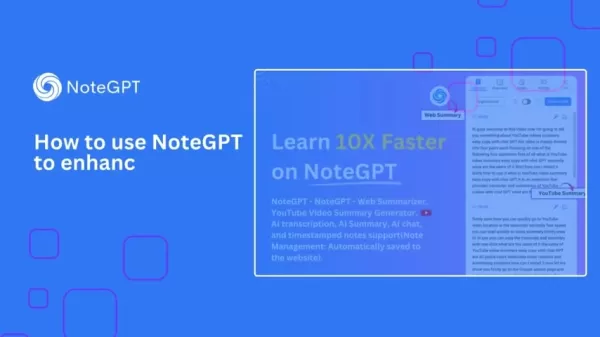
Here’s why NoteGPT is a game-changer for your learning routine:
- Concise Summaries: AI condenses long videos into essential points, saving time.
- Real-Time Transcriptions: Accurate transcriptions help follow content in any environment.
- Multi-Language Support: Translate summaries and transcriptions for global accessibility.
- Integrated Note-Taking: Take notes within YouTube, linked to specific video moments.
- AI-Powered Chat: Ask questions to deepen understanding of complex material.
- Organized Insights: Save notes and summaries to your NoteGPT account for easy access.
Advanced NoteGPT Features for Power Users
Summarizing Web Content with NoteGPT
Beyond YouTube, NoteGPT summarizes web content like articles and blogs, enabling quick extraction of key insights. Here’s how to use it:
Open the Webpage: Visit the article or blog you want to summarize.
Click the NoteGPT Icon: Use the floating icon on the screen’s right side.
View the Summary: NoteGPT generates a concise summary with key takeaways and FAQs.
Save the Summary: Store summaries in your NoteGPT account to build a knowledge base.
This feature streamlines research by gathering insights from diverse sources, generating FAQs, and boosting efficiency.
Managing Your Notes and Knowledge Base
NoteGPT offers a centralized platform to organize notes, summaries, and insights for easy access. Here’s how to manage them:
Visit NoteGPT’s Website: Log in to your account on NoteGPT’s site.
Access Your Notes: View all saved notes, summaries, and web content under “My Notes.”
Organize Notes: Use tags and categories to create a tailored knowledge system.
Edit and Update: Modify notes to add insights or correct details, with changes saved automatically.
Share Notes: Collaborate by sharing notes with peers, fostering teamwork.
This system creates a robust resource for ongoing learning and research.
Getting Started with NoteGPT: A Step-by-Step Guide
Installing the NoteGPT Chrome Extension
Start enhancing your YouTube learning by installing the NoteGPT Chrome extension. Here’s how:
Open Chrome Web Store: Visit the store in your Chrome browser.
Search for NoteGPT: Type “NoteGPT” in the search bar and hit Enter.
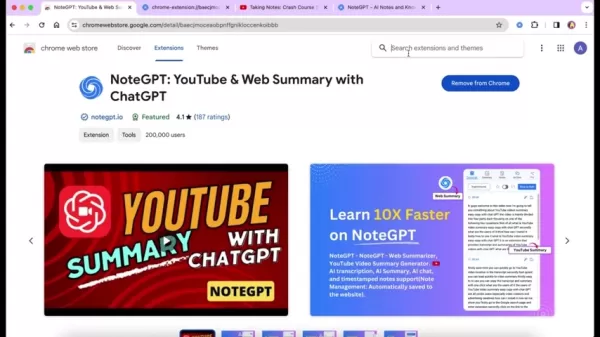
Install the Extension: Select NoteGPT and click “Add to Chrome.”
Confirm Installation: Click “Add extension” in the pop-up window.
Verify Installation: The NoteGPT icon will appear in your Chrome toolbar, ready for use.
With NoteGPT installed, you’re set to transform your YouTube learning experience.
Configuring Your NoteGPT Settings
Customize NoteGPT to match your learning needs. Here’s how to set it up:
Access Settings: Click the NoteGPT icon in your Chrome toolbar.
Select Default Language: Choose your preferred language for transcriptions and summaries.
Customize Summary Prompt: Adjust settings to focus on key points or detailed insights.
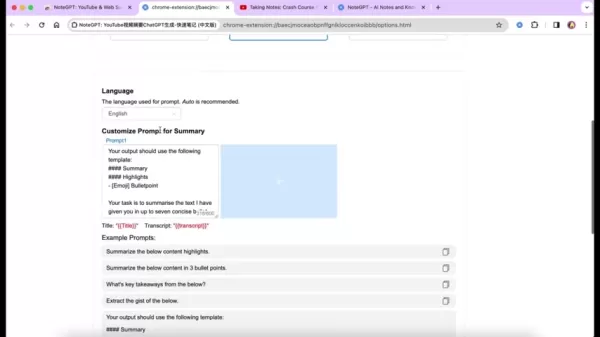
Save Changes: NoteGPT applies your settings automatically for future sessions.
Accessing Transcriptions and Summaries on YouTube
With NoteGPT set up, access transcriptions and summaries directly on YouTube:
Open a YouTube Video: Choose the video you want to learn from.
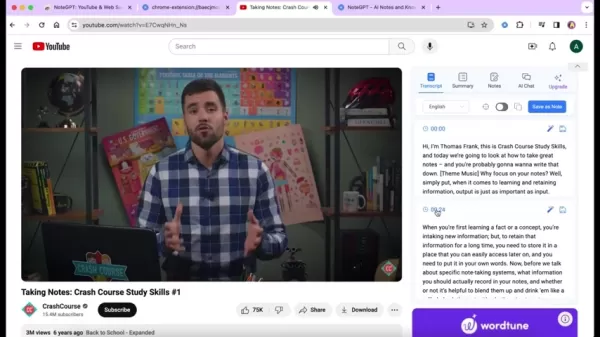
Find the NoteGPT Toolbar: Locate it on the right side of the video details page.
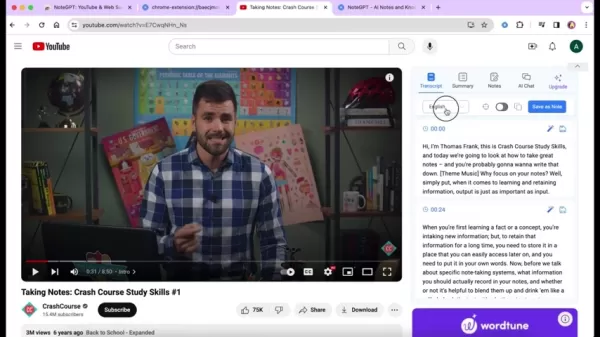
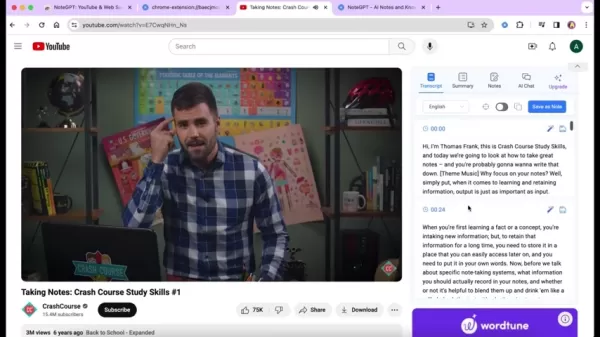
View Transcriptions: Click “Transcript” for a segmented, easy-to-read transcript.
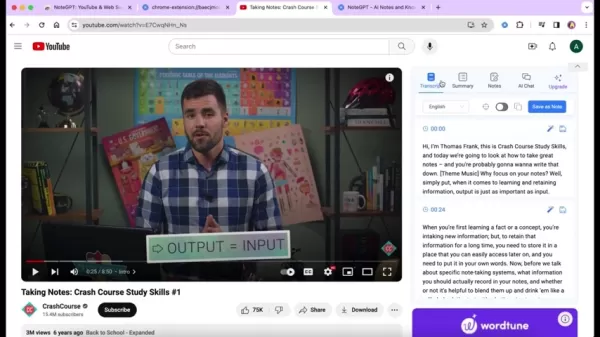
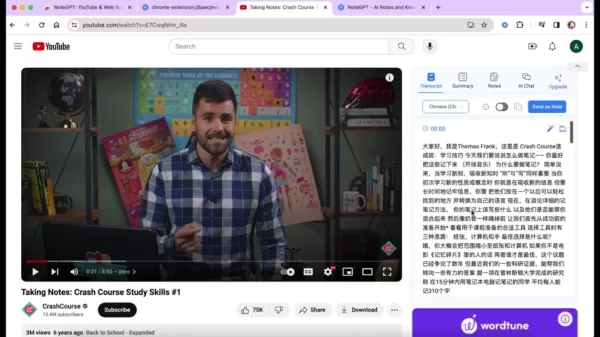
Customize Subtitles: Select different languages from the Transcript toolbar.
Access Summaries: Click “Summary” for a concise overview, with options to regenerate or adjust.
These steps turn YouTube into a personalized learning platform.
Taking and Managing Notes with NoteGPT
NoteGPT’s note-taking feature lets you capture and organize insights within YouTube. Here’s how:
Open Notes Section: Click “Notes” in the NoteGPT toolbar.
Add Notes: Type notes, linking them to specific video timestamps.
Take Screenshots: Capture key video frames for visual references.
Tag Notes: Categorize notes with tags for easy retrieval.
Save Notes: Store notes in your NoteGPT account, synced across devices.
Manage Notes: View, edit, and organize notes on NoteGPT’s website.
Using AI Chat for Deeper Insights
NoteGPT’s AI chat feature enables interactive learning. Here’s how to use it:
Access AI Chat: Click “AI Chat” in the NoteGPT toolbar.
Ask Questions: Type questions about the video content for AI responses.
Explore Suggested Questions: Click suggested questions for instant answers.
Save Insights: Store valuable chat insights in your notes.
Engage Freely: Discuss content to deepen understanding.
This feature enhances comprehension and offers fresh perspectives on complex topics.
NoteGPT Pricing: Free and Premium Plans
Free Tier Benefits
NoteGPT’s free tier offers essential tools, ideal for casual learners:
- Limited Summaries: A set number of AI-generated summaries monthly.
- Real-Time Transcriptions: Accurate transcriptions for YouTube videos.
- Basic Note-Taking: Note-taking with limited storage.
- Web Content Summaries: Limited summarization of web content.
- AI Chat: Limited access to the AI chat feature.
The free tier lets you explore AI-enhanced learning at no cost.
Premium Tier Advantages
The premium tier unlocks advanced features for dedicated learners:
- Unlimited Summaries: Full access to summaries for videos and web content.
- Advanced Note-Taking: Unlimited storage and tagging options.
- Priority AI Chat: Faster responses with enhanced access.
- Multi-Language Support: Broader language options for transcriptions and summaries.
- Collaborative Sharing: Share notes with peers for teamwork.
- Priority Support: Faster customer support for premium users.
This tier caters to researchers, professionals, and serious learners.
NoteGPT Pros and Cons: A Balanced View
Pros
AI Summarization: Condenses videos into key points, saving time.
Real-Time Transcriptions: Accurate transcriptions for YouTube videos.
Multi-Language Support: Accessible summaries and transcriptions globally.
Integrated Note-Taking: Seamless note-taking within YouTube.
AI Chat: Interactive discussions for deeper insights.
Web Content Summaries: Efficient summarization of articles and blogs.
Organized Knowledge: Centralized storage for notes and insights.
Collaborative Sharing: Promotes teamwork and knowledge exchange.
Free Tier: Access to core features at no cost.
Cons
Limited Free Tier Summaries: Restricted number of summaries monthly.
AI Chat Accuracy: Responses may vary with complex content.
Potential Distraction: Note-taking features may divert focus for some users.
NoteGPT Use Cases: Practical Applications
Students and Academic Research
NoteGPT is a vital tool for students and researchers, streamlining study and research processes. Students can summarize lectures, take detailed notes, and use AI chat to reinforce understanding, aiding exam preparation. Researchers benefit from quick summarization of videos, articles, and blogs, with organized notes enhancing information synthesis.
Professionals and Continuous Learning
Professionals can stay current with industry trends using NoteGPT. Summarizing webinars and courses helps them acquire new skills quickly. Note-taking and AI chat reinforce learning, while collaborative sharing fosters teamwork and a culture of continuous learning in organizations.
Lifelong Learners and Personal Growth
For lifelong learners, NoteGPT simplifies learning new skills or hobbies. Summarizing tutorials and discussions helps acquire knowledge efficiently, while note-taking and AI chat deepen understanding, supporting personal development goals like language learning or exploring new subjects.
Frequently Asked Questions about NoteGPT
Is NoteGPT free to use?
NoteGPT offers a robust free tier with core features. A premium tier is available for unlimited access to advanced tools.
What languages does NoteGPT support?
NoteGPT supports multiple languages for transcriptions and summaries, serving a global audience.
How do I access my notes and summaries?
Log in to NoteGPT’s website to view, edit, and organize your notes and summaries in a centralized learning record.
Can I share my notes with others?
Yes, NoteGPT enables sharing notes and summaries with peers, promoting collaborative learning.
How accurate is the AI chat feature?
AI chat accuracy varies by content complexity, but NoteGPT continuously refines its algorithms for better responses.
Does NoteGPT save data to the cloud?
Yes, notes, summaries, and insights are saved to the cloud, synced across devices for easy access.
Related Questions About Note-Taking and Learning Efficiency
What are the best note-taking methods for retaining information?
Effective note-taking boosts retention. Popular methods include:
Cornell Method: Divide notes into sections for notes, cues, and summaries to organize and review key points.
Mind Mapping: Create visual diagrams starting with a central idea, ideal for brainstorming complex topics.
Linear Note-Taking: Follow the lecture’s flow, though less effective for organization.
Sketchnoting: Combine text and visuals, great for visual learners.
Choose a method based on your learning style and content type.
How can I improve my learning efficiency?
Boost learning efficiency with these strategies:
Active Learning: Engage by questioning, summarizing, and applying knowledge.
Spaced Repetition: Review material periodically to enhance retention.
Interleaving: Study mixed topics to improve differentiation.
Sleep and Nutrition: Prioritize rest and healthy eating for optimal brain function.
Minimize Distractions: Create a focused, distraction-free study environment.
Related article
 Google Tests Remy AI Agent for Gemini as Focus Shifts to User Control
According to Business Insider, Google is testing Remy, a new AI personal agent for Gemini. This tool aims to execute tasks on behalf of users, streamlining both professional workflows and daily routines.Currently, Remy is undergoing testing in an int
How to fix Core Web Vitals for better SEO rankings
Streamline Report Card Comments with AI ToolsIntroductionAI Tools for Generating Report Card CommentsMagic SchoolAlmanac AIChat GPTUsing Magic School to Generate Report Card CommentsLogging into Magic SchoolSelecting the Report Card Comments ToolCust
Slackbot Becomes an AI Agent
Slackbot, the automated assistant embedded in Salesforce’s corporate messaging platform Slack, is evolving into an AI agent. Salesforce CTO Parker Harris envisions it achieving viral status comparable to OpenAI’s ChatGPT.The cloud software giant laun
Related Special Topic Recommendations
writing
Google Tests Remy AI Agent for Gemini as Focus Shifts to User Control
According to Business Insider, Google is testing Remy, a new AI personal agent for Gemini. This tool aims to execute tasks on behalf of users, streamlining both professional workflows and daily routines.Currently, Remy is undergoing testing in an int
How to fix Core Web Vitals for better SEO rankings
Streamline Report Card Comments with AI ToolsIntroductionAI Tools for Generating Report Card CommentsMagic SchoolAlmanac AIChat GPTUsing Magic School to Generate Report Card CommentsLogging into Magic SchoolSelecting the Report Card Comments ToolCust
Slackbot Becomes an AI Agent
Slackbot, the automated assistant embedded in Salesforce’s corporate messaging platform Slack, is evolving into an AI agent. Salesforce CTO Parker Harris envisions it achieving viral status comparable to OpenAI’s ChatGPT.The cloud software giant laun
Related Special Topic Recommendations
writing
 Best AI Outline Generators for Long-Form SEO Articles
2026 Latest Best Top-Rated AI Outline Generators for Long-Form SEO Articles, meticulously curated by XIX.AI. These powerful tools offer game-changing assistance in creating high-quality content quickly, boosting writing efficiency significantly. Get a free vs paid comparison along with real-world tests and detailed rankings to help you find the must-try option that suits your needs. Explore now to unlock your AI edge.
 8 tools
 xix.ai
Education and Learning
AI Study Tools for Homework and Exam Prep
xix.ai
Education and Learning
AI Study Tools for Homework and Exam Prep
2026 Latest Best AI Study Tools for Homework and Exam Prep! XIX.AI curates a top-rated list of powerful, game-changing tools that help students boost productivity, streamline homework completion, and ace exams through real-world tests. Get a free vs paid comparison, detailed rankings, and must-try options to unlock your AI edge. Explore now!
10 tools
xix.ai
Music composition
AI Vocal Demo Tools for Songwriters, Hooks, Toplines, and Multilingual Draft Sessions
2026 Latest Best AI Vocal Demo Tools for Songwriters, Hook Creators, and Multi-Language Content Teams! XIX.AI has curated a top-rated list of powerful game-changing tools that go through rigorous real-world tests. You’ll find detailed free vs paid comparison data, comprehensive rankings, and must-try options to help you boost writing efficiency and unlock your creative potential. Explore now to discover your perfect tool for all your content needs!
9 tools
xix.ai
Business
Best AI Competitive Research Tools for Small Businesses
2026 Latest Best Top-rated AI Competitive Research Tools for Small Businesses! XIX.AI has curated a highly powerful game-changing collection, updated weekly with rigorous real-world tests and detailed rankings. You can find a comprehensive free vs paid comparison to help you identify the must-try tools that boost your productivity and give you a competitive edge. Explore now to discover your perfect tool!
9 tools
xix.ai
Image editing
Photoshop AI Retouch Tools for Ecommerce Apparel, Skin Cleanup, and Color Consistency
2026 Latest Best Photoshop AI retouch tools for ecommerce apparel, skin cleanup, and color consistency! This top-rated curated list features powerful game-changing solutions that help you boost writing efficiency, streamline content creation, and achieve perfect visual results effortlessly. Each tool has undergone real-world tests through weekly updated rankings, complete with free vs paid comparison details. Backed by XIX.AI, it’s the must-try guide for anyone aiming to unlock your AI edge. Explore now!
10 tools
xix.ai
Prompt
Best AI Prompt Libraries for ChatGPT Workflows
2026 Latest Best Top-Rated AI Prompt Libraries for optimizing all types of ChatGPT workflows. XIX.AI has curated a powerful, game-changing collection that goes through rigorous real-world tests to ensure top performance. You can find detailed free vs paid comparisons and expert rankings to help you choose the must-try tools that boost your productivity and unlock your AI edge. Explore now!
11 tools
xix.ai

 Comments (3)
0/500
Comments (3)
0/500
![PeterThomas]()
I've been using NoteGPT for a while and it's a game changer for catching up on long educational videos. But honestly, sometimes the summaries miss the nuance—like when the speaker tells a joke, the AI just skips it. Still, beats watching 2 hours of rambling. 😅
![HenryBrown]()
Enfin une extension qui rend l'apprentissage sur YouTube moins passif ! 🎯 J'ai testé NoteGPT sur des cours en ligne et les résumés sont étonnamment précis. Par contre, ça marche aussi bien avec les vidéos en anglais qu'en français ?
![CharlesYoung]()
C'est fascinant de voir comment l'IA peut transformer l'apprentissage ! NoteGPT semble être un outil puissant pour les étudiants comme moi. 😊 Mais je me demande, est-ce que cela fonctionne aussi bien avec des vidéos techniques ou scientifiques complexes ?
In today’s fast-moving world, effective learning is essential. NoteGPT is a dynamic Chrome extension that revolutionizes how you engage with YouTube content. By harnessing AI, it offers concise summaries, accurate transcriptions, and intuitive note-taking tools, enabling users to grasp and retain information effortlessly. Ideal for students, researchers, or lifelong learners, NoteGPT turns YouTube into a tailored educational hub, enhancing study efficiency and productivity.
Key Highlights
NoteGPT is a Chrome extension that elevates YouTube learning with AI-driven features.
It delivers transcriptions, summaries, and seamless note-taking capabilities.
The tool boosts learning speed and efficiency by up to 10X.
NoteGPT supports transcriptions and summaries in multiple languages.
Users can save notes, summaries, and insights directly to their NoteGPT account.
AI-driven chat enables deeper understanding through interactive Q&A.
Introduction to NoteGPT: Redefining YouTube Learning
What is NoteGPT?
NoteGPT is an innovative Chrome extension crafted to enhance learning from YouTube videos. Powered by advanced AI, it integrates seamlessly with YouTube, offering tools to improve comprehension and retention. Features like real-time transcriptions, concise summaries, and intuitive note-taking empower users to extract key insights, organize thoughts, and master complex topics, making YouTube a powerful educational resource.
Key functionalities include AI-generated video summaries, real-time transcriptions, multi-language support, and an efficient note-taking system. NoteGPT simplifies and personalizes the learning process, making it engaging and effective for students, researchers, and anyone eager to learn from online videos.
Why Choose NoteGPT for Better Learning?
YouTube is a treasure trove of educational content, from tutorials to in-depth discussions. Yet, navigating its vast information can be daunting. NoteGPT addresses this by offering tools to streamline learning, increasing efficiency by up to 10X. It helps users focus on critical insights and overcome information overload.
Here’s why NoteGPT is a game-changer for your learning routine:
- Concise Summaries: AI condenses long videos into essential points, saving time.
- Real-Time Transcriptions: Accurate transcriptions help follow content in any environment.
- Multi-Language Support: Translate summaries and transcriptions for global accessibility.
- Integrated Note-Taking: Take notes within YouTube, linked to specific video moments.
- AI-Powered Chat: Ask questions to deepen understanding of complex material.
- Organized Insights: Save notes and summaries to your NoteGPT account for easy access.
Advanced NoteGPT Features for Power Users
Summarizing Web Content with NoteGPT
Beyond YouTube, NoteGPT summarizes web content like articles and blogs, enabling quick extraction of key insights. Here’s how to use it:
Open the Webpage: Visit the article or blog you want to summarize.
Click the NoteGPT Icon: Use the floating icon on the screen’s right side.
View the Summary: NoteGPT generates a concise summary with key takeaways and FAQs.
Save the Summary: Store summaries in your NoteGPT account to build a knowledge base.
This feature streamlines research by gathering insights from diverse sources, generating FAQs, and boosting efficiency.
Managing Your Notes and Knowledge Base
NoteGPT offers a centralized platform to organize notes, summaries, and insights for easy access. Here’s how to manage them:
Visit NoteGPT’s Website: Log in to your account on NoteGPT’s site.
Access Your Notes: View all saved notes, summaries, and web content under “My Notes.”
Organize Notes: Use tags and categories to create a tailored knowledge system.
Edit and Update: Modify notes to add insights or correct details, with changes saved automatically.
Share Notes: Collaborate by sharing notes with peers, fostering teamwork.
This system creates a robust resource for ongoing learning and research.
Getting Started with NoteGPT: A Step-by-Step Guide
Installing the NoteGPT Chrome Extension
Start enhancing your YouTube learning by installing the NoteGPT Chrome extension. Here’s how:
Open Chrome Web Store: Visit the store in your Chrome browser.
Search for NoteGPT: Type “NoteGPT” in the search bar and hit Enter.
Install the Extension: Select NoteGPT and click “Add to Chrome.”
Confirm Installation: Click “Add extension” in the pop-up window.
Verify Installation: The NoteGPT icon will appear in your Chrome toolbar, ready for use.
With NoteGPT installed, you’re set to transform your YouTube learning experience.
Configuring Your NoteGPT Settings
Customize NoteGPT to match your learning needs. Here’s how to set it up:
Access Settings: Click the NoteGPT icon in your Chrome toolbar.
Select Default Language: Choose your preferred language for transcriptions and summaries.
Customize Summary Prompt: Adjust settings to focus on key points or detailed insights.
Save Changes: NoteGPT applies your settings automatically for future sessions.
Accessing Transcriptions and Summaries on YouTube
With NoteGPT set up, access transcriptions and summaries directly on YouTube:
Open a YouTube Video: Choose the video you want to learn from.
Find the NoteGPT Toolbar: Locate it on the right side of the video details page.
View Transcriptions: Click “Transcript” for a segmented, easy-to-read transcript.
Customize Subtitles: Select different languages from the Transcript toolbar.
Access Summaries: Click “Summary” for a concise overview, with options to regenerate or adjust.
These steps turn YouTube into a personalized learning platform.
Taking and Managing Notes with NoteGPT
NoteGPT’s note-taking feature lets you capture and organize insights within YouTube. Here’s how:
Open Notes Section: Click “Notes” in the NoteGPT toolbar.
Add Notes: Type notes, linking them to specific video timestamps.
Take Screenshots: Capture key video frames for visual references.
Tag Notes: Categorize notes with tags for easy retrieval.
Save Notes: Store notes in your NoteGPT account, synced across devices.
Manage Notes: View, edit, and organize notes on NoteGPT’s website.
Using AI Chat for Deeper Insights
NoteGPT’s AI chat feature enables interactive learning. Here’s how to use it:
Access AI Chat: Click “AI Chat” in the NoteGPT toolbar.
Ask Questions: Type questions about the video content for AI responses.
Explore Suggested Questions: Click suggested questions for instant answers.
Save Insights: Store valuable chat insights in your notes.
Engage Freely: Discuss content to deepen understanding.
This feature enhances comprehension and offers fresh perspectives on complex topics.
NoteGPT Pricing: Free and Premium Plans
Free Tier Benefits
NoteGPT’s free tier offers essential tools, ideal for casual learners:
- Limited Summaries: A set number of AI-generated summaries monthly.
- Real-Time Transcriptions: Accurate transcriptions for YouTube videos.
- Basic Note-Taking: Note-taking with limited storage.
- Web Content Summaries: Limited summarization of web content.
- AI Chat: Limited access to the AI chat feature.
The free tier lets you explore AI-enhanced learning at no cost.
Premium Tier Advantages
The premium tier unlocks advanced features for dedicated learners:
- Unlimited Summaries: Full access to summaries for videos and web content.
- Advanced Note-Taking: Unlimited storage and tagging options.
- Priority AI Chat: Faster responses with enhanced access.
- Multi-Language Support: Broader language options for transcriptions and summaries.
- Collaborative Sharing: Share notes with peers for teamwork.
- Priority Support: Faster customer support for premium users.
This tier caters to researchers, professionals, and serious learners.
NoteGPT Pros and Cons: A Balanced View
Pros
AI Summarization: Condenses videos into key points, saving time.
Real-Time Transcriptions: Accurate transcriptions for YouTube videos.
Multi-Language Support: Accessible summaries and transcriptions globally.
Integrated Note-Taking: Seamless note-taking within YouTube.
AI Chat: Interactive discussions for deeper insights.
Web Content Summaries: Efficient summarization of articles and blogs.
Organized Knowledge: Centralized storage for notes and insights.
Collaborative Sharing: Promotes teamwork and knowledge exchange.
Free Tier: Access to core features at no cost.
Cons
Limited Free Tier Summaries: Restricted number of summaries monthly.
AI Chat Accuracy: Responses may vary with complex content.
Potential Distraction: Note-taking features may divert focus for some users.
NoteGPT Use Cases: Practical Applications
Students and Academic Research
NoteGPT is a vital tool for students and researchers, streamlining study and research processes. Students can summarize lectures, take detailed notes, and use AI chat to reinforce understanding, aiding exam preparation. Researchers benefit from quick summarization of videos, articles, and blogs, with organized notes enhancing information synthesis.
Professionals and Continuous Learning
Professionals can stay current with industry trends using NoteGPT. Summarizing webinars and courses helps them acquire new skills quickly. Note-taking and AI chat reinforce learning, while collaborative sharing fosters teamwork and a culture of continuous learning in organizations.
Lifelong Learners and Personal Growth
For lifelong learners, NoteGPT simplifies learning new skills or hobbies. Summarizing tutorials and discussions helps acquire knowledge efficiently, while note-taking and AI chat deepen understanding, supporting personal development goals like language learning or exploring new subjects.
Frequently Asked Questions about NoteGPT
Is NoteGPT free to use?
NoteGPT offers a robust free tier with core features. A premium tier is available for unlimited access to advanced tools.
What languages does NoteGPT support?
NoteGPT supports multiple languages for transcriptions and summaries, serving a global audience.
How do I access my notes and summaries?
Log in to NoteGPT’s website to view, edit, and organize your notes and summaries in a centralized learning record.
Can I share my notes with others?
Yes, NoteGPT enables sharing notes and summaries with peers, promoting collaborative learning.
How accurate is the AI chat feature?
AI chat accuracy varies by content complexity, but NoteGPT continuously refines its algorithms for better responses.
Does NoteGPT save data to the cloud?
Yes, notes, summaries, and insights are saved to the cloud, synced across devices for easy access.
Related Questions About Note-Taking and Learning Efficiency
What are the best note-taking methods for retaining information?
Effective note-taking boosts retention. Popular methods include:
Cornell Method: Divide notes into sections for notes, cues, and summaries to organize and review key points.
Mind Mapping: Create visual diagrams starting with a central idea, ideal for brainstorming complex topics.
Linear Note-Taking: Follow the lecture’s flow, though less effective for organization.
Sketchnoting: Combine text and visuals, great for visual learners.
Choose a method based on your learning style and content type.
How can I improve my learning efficiency?
Boost learning efficiency with these strategies:
Active Learning: Engage by questioning, summarizing, and applying knowledge.
Spaced Repetition: Review material periodically to enhance retention.
Interleaving: Study mixed topics to improve differentiation.
Sleep and Nutrition: Prioritize rest and healthy eating for optimal brain function.
Minimize Distractions: Create a focused, distraction-free study environment.







 Google Tests Remy AI Agent for Gemini as Focus Shifts to User Control
According to Business Insider, Google is testing Remy, a new AI personal agent for Gemini. This tool aims to execute tasks on behalf of users, streamlining both professional workflows and daily routines.Currently, Remy is undergoing testing in an int
Google Tests Remy AI Agent for Gemini as Focus Shifts to User Control
According to Business Insider, Google is testing Remy, a new AI personal agent for Gemini. This tool aims to execute tasks on behalf of users, streamlining both professional workflows and daily routines.Currently, Remy is undergoing testing in an int
 How to fix Core Web Vitals for better SEO rankings
Streamline Report Card Comments with AI ToolsIntroductionAI Tools for Generating Report Card CommentsMagic SchoolAlmanac AIChat GPTUsing Magic School to Generate Report Card CommentsLogging into Magic SchoolSelecting the Report Card Comments ToolCust
How to fix Core Web Vitals for better SEO rankings
Streamline Report Card Comments with AI ToolsIntroductionAI Tools for Generating Report Card CommentsMagic SchoolAlmanac AIChat GPTUsing Magic School to Generate Report Card CommentsLogging into Magic SchoolSelecting the Report Card Comments ToolCust
 Slackbot Becomes an AI Agent
Slackbot, the automated assistant embedded in Salesforce’s corporate messaging platform Slack, is evolving into an AI agent. Salesforce CTO Parker Harris envisions it achieving viral status comparable to OpenAI’s ChatGPT.The cloud software giant laun
Slackbot Becomes an AI Agent
Slackbot, the automated assistant embedded in Salesforce’s corporate messaging platform Slack, is evolving into an AI agent. Salesforce CTO Parker Harris envisions it achieving viral status comparable to OpenAI’s ChatGPT.The cloud software giant laun

2026 Latest Best Top-Rated AI Outline Generators for Long-Form SEO Articles, meticulously curated by XIX.AI. These powerful tools offer game-changing assistance in creating high-quality content quickly, boosting writing efficiency significantly. Get a free vs paid comparison along with real-world tests and detailed rankings to help you find the must-try option that suits your needs. Explore now to unlock your AI edge.
8 tools
xix.ai

2026 Latest Best AI Study Tools for Homework and Exam Prep! XIX.AI curates a top-rated list of powerful, game-changing tools that help students boost productivity, streamline homework completion, and ace exams through real-world tests. Get a free vs paid comparison, detailed rankings, and must-try options to unlock your AI edge. Explore now!
10 tools
xix.ai

2026 Latest Best AI Vocal Demo Tools for Songwriters, Hook Creators, and Multi-Language Content Teams! XIX.AI has curated a top-rated list of powerful game-changing tools that go through rigorous real-world tests. You’ll find detailed free vs paid comparison data, comprehensive rankings, and must-try options to help you boost writing efficiency and unlock your creative potential. Explore now to discover your perfect tool for all your content needs!
9 tools
xix.ai

2026 Latest Best Top-rated AI Competitive Research Tools for Small Businesses! XIX.AI has curated a highly powerful game-changing collection, updated weekly with rigorous real-world tests and detailed rankings. You can find a comprehensive free vs paid comparison to help you identify the must-try tools that boost your productivity and give you a competitive edge. Explore now to discover your perfect tool!
9 tools
xix.ai

2026 Latest Best Photoshop AI retouch tools for ecommerce apparel, skin cleanup, and color consistency! This top-rated curated list features powerful game-changing solutions that help you boost writing efficiency, streamline content creation, and achieve perfect visual results effortlessly. Each tool has undergone real-world tests through weekly updated rankings, complete with free vs paid comparison details. Backed by XIX.AI, it’s the must-try guide for anyone aiming to unlock your AI edge. Explore now!
10 tools
xix.ai

2026 Latest Best Top-Rated AI Prompt Libraries for optimizing all types of ChatGPT workflows. XIX.AI has curated a powerful, game-changing collection that goes through rigorous real-world tests to ensure top performance. You can find detailed free vs paid comparisons and expert rankings to help you choose the must-try tools that boost your productivity and unlock your AI edge. Explore now!
11 tools
xix.ai

I've been using NoteGPT for a while and it's a game changer for catching up on long educational videos. But honestly, sometimes the summaries miss the nuance—like when the speaker tells a joke, the AI just skips it. Still, beats watching 2 hours of rambling. 😅
Enfin une extension qui rend l'apprentissage sur YouTube moins passif ! 🎯 J'ai testé NoteGPT sur des cours en ligne et les résumés sont étonnamment précis. Par contre, ça marche aussi bien avec les vidéos en anglais qu'en français ?
C'est fascinant de voir comment l'IA peut transformer l'apprentissage ! NoteGPT semble être un outil puissant pour les étudiants comme moi. 😊 Mais je me demande, est-ce que cela fonctionne aussi bien avec des vidéos techniques ou scientifiques complexes ?












