


 Home
HomeNapkin AI Converts Text to Visuals Instantly
In today's fast-paced digital landscape, compelling visuals are essential for effective communication. Whether you're developing engaging social media posts, designing persuasive business presentations, or producing eye-catching video content, the right imagery can significantly impact your message. Napkin AI stands out as a transformative solution, enabling users to effortlessly convert plain text into stunning infographics, diagrams, and illustrations. This innovative platform streamlines visual content creation, allowing marketers, educators, and creators to convey complex ideas with clarity and powerful visual impact.
Key Points
Napkin AI transforms text into infographics, mind maps, and flowcharts.
Users can log in using a Google account or email address.
The platform supports both AI-generated content and manual text input.
Napkin AI provides diverse infographic styles and color schemes.
Generated visuals can be customized with various fonts, sizes, and alignment settings.
Users can easily modify icons and adjust graphic element thickness.
Napkin AI simplifies producing professional-quality visuals for multiple applications.
Unleashing the Power of Visual Communication with Napkin AI
What is Napkin AI?
Napkin AI is an advanced AI-powered platform that simplifies creating visually appealing and informative content.
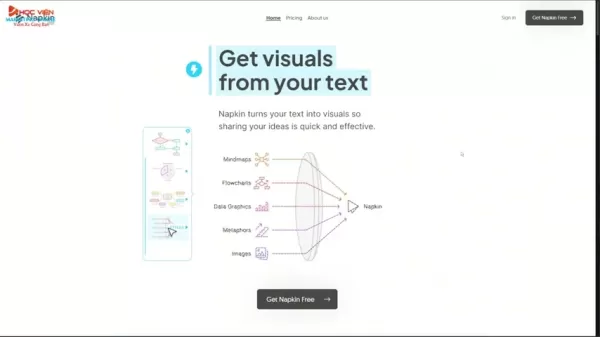
It enables users to convert textual information into various visual formats, including infographics, mind maps, flowcharts, and diagrams. This technology proves particularly valuable for individuals and businesses aiming to strengthen their communication approaches, making complex data more accessible and engaging for their intended audience. It holds special relevance in marketing and education sectors, where compelling visuals can substantially boost engagement and understanding. Consider transforming an extensive blog article into a series of shareable infographics or converting a intricate business strategy into an easily comprehensible flowchart. The creative possibilities with Napkin AI are virtually limitless. This tool empowers users to produce professional-grade visuals without requiring extensive design expertise or costly software. By simply inputting text, Napkin AI automatically generates visual representations that capture the core message and present it in an attractive format. The AI not only conserves time but also guarantees that the final output is both informative and aesthetically pleasing, establishing it as a valuable resource for content creators across various industries. The intuitive interface and automated features make it accessible to users of all experience levels, encouraging creativity and innovation in visual content development. The capacity to customize generated visuals further enhances the tool's adaptability, enabling users to align designs with their brand identity and communication objectives. The platform excels at distilling complex information into visually digestible formats, improving audience comprehension and retention. As visual content continues to dominate digital spaces, tools like Napkin AI are becoming increasingly crucial for businesses and individuals seeking to distinguish themselves and create lasting impressions. It offers a seamless integration of AI capabilities and creative control, making it an essential tool for anyone looking to elevate their visual communication strategies.
Getting Started with Napkin AI
Beginning your visual content creation journey with Napkin AI is straightforward and intuitive. The initial step involves accessing the Napkin AI website, your portal to effortless visual transformation. Upon arriving at the site, users encounter a user-friendly interface designed to guide them through the creation process. The first action is signing in. Napkin AI provides multiple convenient login options, including the ability to use a Google account or email address. This flexibility ensures users can quickly and easily access the platform, regardless of their preferred authentication method. Choosing the Google account option streamlines the process, enabling instant access with minimal clicks. Alternatively, users can opt to sign in with their email address, providing a secure and personalized login experience. After signing in, Napkin AI presents users with a clean, organized dashboard where they can start creating visual masterpieces. The dashboard serves as a central hub, offering access to various features and functionalities, including options to either paste existing text or generate new content using AI. This dual approach accommodates different user needs and preferences, allowing both pre-existing content to be visually enhanced and new ideas to be realized through AI-driven generation. This versatility ensures Napkin AI can seamlessly integrate into any content creation workflow, empowering users to transform their ideas into visually engaging formats with remarkable ease and efficiency. As you explore the Napkin AI platform, you'll discover numerous tools and options designed to simplify the visual content creation process, enabling you to produce professional-quality graphics without needing extensive design knowledge.
Creating Visuals with AI-Generated Content
One of Napkin AI's standout features is its capacity to generate content using artificial intelligence.
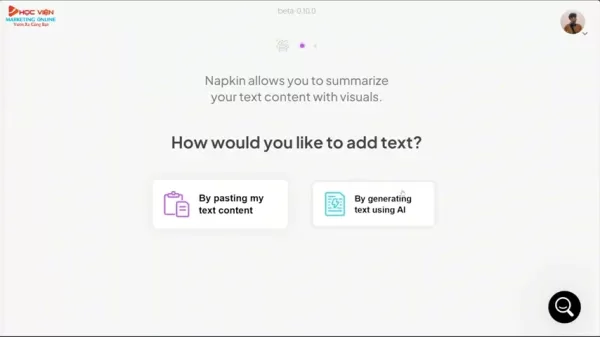
This functionality allows users to create visuals even without pre-existing text. To use this feature, simply select the option to generate text using AI. The platform will then prompt you to enter a topic or brief description of the content you wish to create. For instance, you might input "ways to make money online with AI in 2025." After submitting your prompt, Napkin AI's sophisticated algorithms will produce relevant and engaging content based on your input. The AI considers keywords and themes present in your prompt, ensuring the generated content aligns with your intended message. Once the content is generated, Napkin AI enables you to edit and refine the text to meet your specific requirements. It's crucial to carefully review the generated content and make necessary adjustments to ensure accuracy and clarity. After finalizing the content, you can proceed to create visuals. The platform will automatically analyze the text and suggest various visual formats that best represent the information. These formats include infographics, mind maps, flowcharts, and diagrams, each designed to present data in visually appealing and easily understandable ways. Users can select the visual format that best suits their needs and proceed to customize the design. Napkin AI allows you to choose from multiple styles, color palettes, and layouts, enabling you to create visuals that match your brand identity and communication goals. This AI-driven content generation feature is particularly valuable for content creators, marketers, and educators who want to quickly and easily produce engaging visuals without requiring extensive writing skills.
Transforming Existing Text into Stunning Visuals
Napkin AI excels at converting existing text into visually engaging formats.
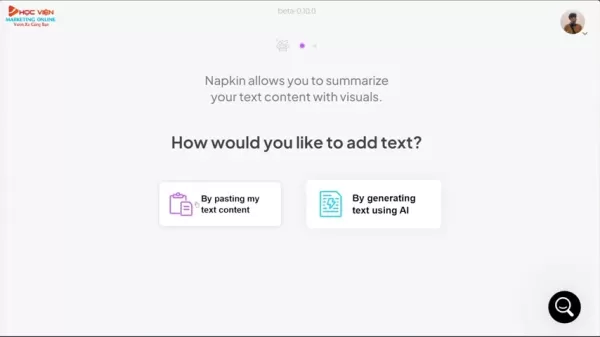
This feature is ideal for users who already possess content such as blog posts, articles, or presentations that they want to enhance with visuals. To transform existing text, simply select the option to paste your content. The platform will then prompt you to upload or paste your text into the designated area. Once the text is uploaded, Napkin AI will automatically analyze the content and identify key themes, data points, and relationships. Based on this analysis, the platform will suggest various visual formats that best represent the information. These formats include infographics, mind maps, flowcharts, and diagrams, each designed to present data in visually appealing and easily understandable ways. Users can select the visual format that best suits their needs and proceed to customize the design. Napkin AI offers extensive customization options, including the ability to modify styles, color palettes, and layouts. You can also adjust fonts, sizes, and alignment to ensure the visuals align with your brand identity and communication goals. The platform simplifies creating professional-quality graphics, allowing you to convert lengthy and complex text into visually digestible formats. By using Napkin AI to transform existing text, you can enhance audience engagement, improve comprehension, and create more memorable and impactful experiences. This feature proves particularly useful for marketers, educators, and content creators who want to repurpose their content and reach broader audiences.
Customizing Your Infographics with Napkin AI
Once you've generated a visual from either AI-driven content or existing text, Napkin AI provides extensive customization options to make it truly unique.
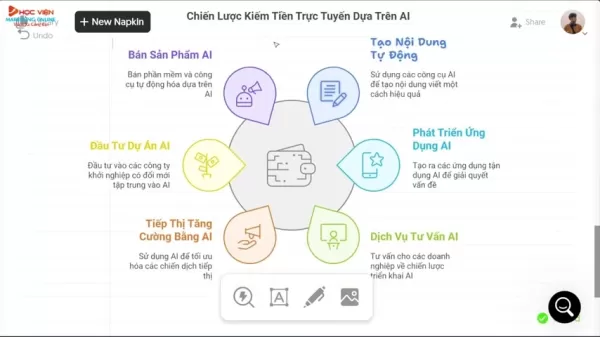
The platform offers diverse styles, color palettes, and layouts, allowing you to tailor the design to match your brand identity and communication objectives. With just a few clicks, you can transform the appearance of your infographic, creating a visually appealing and engaging experience for your audience. Napkin AI enables you to select different infographic designs to accommodate various aesthetic preferences. For example, you can switch between styles emphasizing simplicity and minimalism to those incorporating vibrant colors and intricate details. The platform allows you to create visuals that capture the essence of your information and present it in attractive formats. Beyond styles, Napkin AI provides multiple color palettes. These palettes enable you to modify the overall color scheme of your infographic. Napkin AI simplifies selecting visually harmonious color combinations. With font customization capabilities, you can ensure the presentation aligns with your brand and remains easily readable for your audience. Finally, Napkin AI offers advanced options to adjust the placement and size of icons and graphics. This functionality provides precise control over your infographic's presentation, creating visually balanced and effective communication mediums. With Napkin AI, customizing your infographics is a seamless and intuitive process, empowering you to create professional-quality visuals that capture your audience's attention and leave lasting impressions.
Advanced Customization: Fonts, Icons, and More
Napkin AI extends beyond basic customization by empowering users with advanced options to fine-tune their visuals.
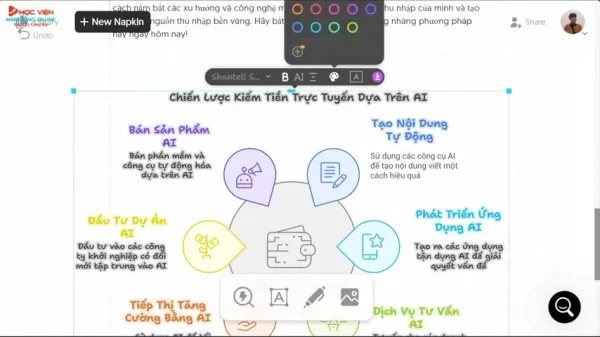
One key customization feature is the ability to modify your text fonts. Napkin AI offers various font options, allowing you to choose those that best suit your brand identity and communication style. Another advanced customization option is the capability to change icons used in your visuals. Napkin AI provides an extensive icon library covering numerous topics and themes. You can easily replace default icons with ones more relevant to your content. Beyond font and icon modifications, Napkin AI also allows you to adjust the thickness of graphic elements like lines and borders. This feature enables you to fine-tune your infographic's visual balance. You can also modify text and element alignment to create more organized and visually appealing layouts. The ability to customize your infographics using advanced options ensures you can produce professional-quality visuals tailored to your brand. These advanced customization features empower users to create visuals that capture audience attention and leave lasting impressions. Whether adjusting fonts, replacing icons, or fine-tuning graphic elements, Napkin AI gives you complete control over visual design.
Key Benefits of Using Napkin AI for Visual Content Creation
Napkin AI offers numerous advantages for individuals and businesses seeking to enhance their visual content creation strategies. A primary benefit is its user-friendly nature. The platform provides an intuitive interface and automated features, making it accessible to users of all skill levels. You can create professional-quality graphics without needing extensive design expertise. Another advantage is its time-saving capability. Napkin AI streamlines and accelerates the visual content creation process. The AI-driven content generation and automated visual formatting help you produce compelling graphics within minutes. Napkin AI also offers cost-effectiveness. The platform provides access to multiple visual formats and customization options without requiring expensive design software or agencies. This enables you to reduce content creation costs while maintaining high-quality standards. Napkin AI ensures your content remains visually engaging and easily understandable. The platform transforms complex information into readily digestible formats. Napkin AI enhances audience engagement and knowledge retention. The tool demonstrates remarkable versatility. It can create visuals for marketing, education, presentations, and social media. The platform serves as a comprehensive solution for enhancing visual content creation strategies. The combination of user-friendliness, time-saving capabilities, cost-effectiveness, improved engagement, and versatile applications makes it a valuable asset for creating compelling content.
Napkin AI: Examples and Inspiration for Effective Visuals
Social Media Marketing Campaign
For social media marketing campaigns, Napkin AI can create visually engaging infographics that summarize key points from blog posts or articles.
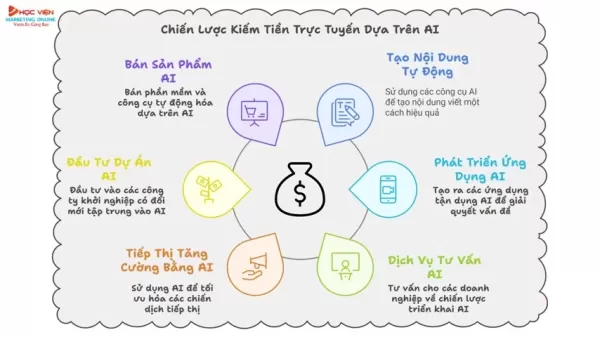
These infographics can be easily shared across various social media platforms, helping drive traffic and engagement. Consider an example where a business wants to promote a new product launch. They could use Napkin AI to create an infographic highlighting the product's key features, benefits, and pricing. The infographic could then be shared on platforms like Facebook, Instagram, and Twitter, attracting potential customers and generating leads. The advantage of using Napkin AI for social media marketing is that it simplifies creating visually appealing content. The platform offers multiple templates and customization options, allowing users to create graphics that align with their brand identity. Furthermore, Napkin AI's AI-driven content generation feature can produce compelling captions and descriptions for social media posts, saving time and effort. The result is a cohesive and engaging social media marketing campaign that effectively communicates the product's value proposition and encourages user interaction. Napkin AI's capabilities in creating infographics and eye-catching visuals make it an excellent choice for boosting brand awareness on social media platforms.
Business Presentations for Enhanced Communication
In the business realm, presentations serve as crucial mediums for conveying ideas, strategies, and results to stakeholders. Napkin AI can transform dense reports and data sets into visually engaging slides. For instance, if a company presents its annual financial results, Napkin AI can create charts, graphs, and diagrams illustrating key financial metrics. This simplifies complex financial data and enhances audience understanding. The advantage of using Napkin AI for business presentations is that it helps distill complex information into digestible formats. The platform enables presenters to create visually appealing slides that capture audience attention and make presentations more memorable. This simplifies the communication process. Moreover, Napkin AI's customization options allow users to align the presentation's visual style with their company's branding, projecting a professional image. An effective presentation created with Napkin AI can help businesses communicate their key messages more clearly and persuasively.
Educational Content Creation for Enhanced Learning
Napkin AI also serves as an excellent tool for creating educational content. Teachers and educators can use the platform to develop visually appealing learning materials that enhance student engagement and knowledge retention. For example, a history teacher could use Napkin AI to create a timeline infographic illustrating key events in a historical period. This timeline could then serve as a visual aid during lectures or be shared with students for independent study. This simplifies complex historical data and enhances student understanding. The advantage of using Napkin AI for educational content creation is that it makes learning more engaging and accessible. The platform enables educators to create visually appealing materials that capture students' attention and help them retain information. The AI-driven content generation feature can also produce quizzes and assessments that test students' knowledge in interactive and engaging ways. The result is an enriched learning experience that promotes student success. Educational institutions can significantly enhance their curriculum and student outcomes through Napkin AI's visual and educational capabilities.
Step-by-Step Guide: How to Use Napkin AI Effectively
Step 1: Accessing the Napkin AI Website and Signing In
Begin by navigating to the Napkin AI website. Once there, locate the sign-in button, typically found in the upper-right corner of the homepage. Click the sign-in button to proceed. You'll be presented with options to sign in using a Google account or your email address. Choose your preferred method and follow the on-screen instructions to authenticate your account. Upon successful sign-in, you'll be redirected to the Napkin AI dashboard, where you can start creating visual content.
Step 2: Selecting Your Content Creation Method
On the Napkin AI dashboard, you'll find two primary options for creating visuals: 'By pasting my text content' and 'By generating text using AI'. If you have existing text to transform into visuals, select the first option. If you want Napkin AI to generate content based on a prompt, choose the second option. Selecting 'By pasting my text content' will prompt you to upload or paste your text into the designated area. Choosing 'By generating text using AI' will prompt you to enter a topic or brief description of the content you want to create.
Step 3: Generating and Customizing Your Visual
After selecting your content creation method and providing your text or prompt, Napkin AI will automatically generate a visual representation of your content.
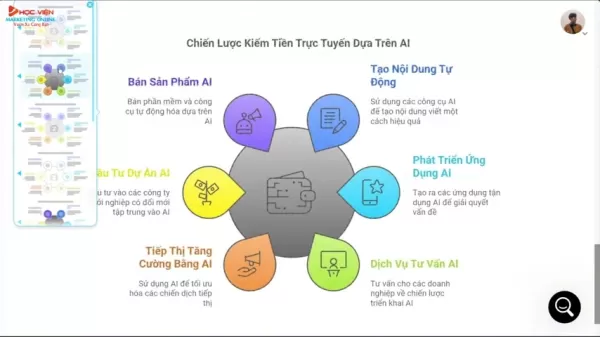
The platform will suggest various visual formats, such as infographics, mind maps, flowcharts, and diagrams, based on your content. Select the visual format that best suits your needs. Napkin AI will then provide multiple customization options to tailor the design to your preferences. These options include modifying styles, color palettes, layouts, fonts, and icons. Utilize these customization features to create visuals that align with your brand identity and communication objectives.
Step 4: Exporting and Sharing Your Visual
Once satisfied with your visual, Napkin AI provides options to export and share it. You can export your visual in various formats, such as PNG, JPG, or PDF. These formats can be easily shared across multiple channels, including social media, email, or presentations. Select your preferred format and click the export button to download your visual. Napkin AI also offers options to directly share visuals on social media platforms or embed them on websites. These features simplify content distribution. You can share it with broader audiences to promote your message and drive engagement. By following these steps, you can effectively use Napkin AI to transform text into visually appealing and informative graphics that capture audience attention.
Napkin AI Pricing Plans
Understanding Napkin AI's Value Proposition
Since the YouTube video doesn't specify costs and pricing tiers for each offering, consulting the official Napkin AI website for current pricing information is recommended. However, the general concept involves different pricing tiers designed to serve diverse users, from freelancers to small businesses to large corporations. Pricing typically depends on required features and platform usage intensity. Napkin AI offers competitive rates. Depending on your business needs and required functions, you can customize your plan. This approach helps you save money while maximizing the Napkin AI platform's benefits.
Pros and Cons of Using Napkin AI
Pros
User-Friendly Interface: Offers intuitive navigation and automated features, making it accessible to users of all skill levels.
Time Efficiency: Streamlines and accelerates visual content creation, enabling graphic production within minutes.
Cost-Effective Solution: Provides access to multiple visual formats and customization options without expensive design software.
Enhanced Engagement: Transforms complex information into easily digestible formats, improving audience engagement and knowledge retention.
Versatile Applications: Suitable for creating visuals for marketing, education, presentations, and social media.
Cons
Content Accuracy: The AI may occasionally produce errors, requiring editing or customization.
Template Limitations: Some templates may have restricted customization options.
AI Dependency: Heavy reliance on AI might potentially limit creative expression.
Exploring the Core Features of Napkin AI
AI-Powered Content Generation
Napkin AI utilizes artificial intelligence to generate relevant and engaging content based on user prompts. This feature simplifies visual creation, even when users lack pre-existing text. The AI considers keywords and themes within the prompt, ensuring generated content aligns with the user's intended message. This streamlines content creation and enhances overall quality.
Visual Transformation of Existing Text
Napkin AI excels at converting existing text into visually appealing formats. The platform analyzes content and identifies key themes, data points, and relationships. It suggests various visual formats, including infographics, mind maps, flowcharts, and diagrams. These visual formats boost audience engagement, improve comprehension, and create more memorable experiences. Lengthy and complex text becomes easily digestible visual content.
Versatile Export and Sharing Options
Napkin AI provides multiple options to export and share visuals. You can export them in various formats (PNG, JPG, PDF). This flexibility supports use across multiple channels. These formats can be easily shared across platforms like social media, email, or presentations. The ability to directly share visuals on social media or embed them on websites streamlines distribution and promotes engagement with broader audiences.
Customization and Icon libraries
Napkin AI demonstrates versatility while providing complete customization control. Various layouts, styles, font choices, and icons contribute to establishing your visual brand identity. The platform also includes an extensive icon library matching different topics and themes. You can adjust thickness of graphic elements like borders. These features provide users opportunities to create custom and original graphics for marketing and educational purposes.
Unlocking the Power of Napkin AI: Real-World Use Cases
Marketing Campaigns
Napkin AI excels at creating visually appealing marketing campaigns. It produces shareable infographics for social media that drive traffic and engagement, helping businesses promote their products. Companies can effectively communicate value through marketing materials by distilling complex sales reports into straightforward charts using AI.
Educational Content Creation
Educational institutions can enhance knowledge retention. The platform creates excellent timelines serving as visual aids during lectures. It can also generate engaging quizzes and assessments.
Business presentations
Napkin AI has streamlined business presentation processes. Companies can translate sales reports into visually appealing formats using charts. The customization options help align presentations with business branding.
Frequently Asked Questions about Napkin AI
What types of visuals can I create with Napkin AI?
Napkin AI enables creation of various visuals, including infographics, mind maps, flowcharts, and diagrams. These formats present data in visually appealing and easily understandable ways. With comprehensive customization options, it helps maintain brand identity through unique designs and graphics. Napkin AI demonstrates versatility across different industries to achieve various objectives. As an AI platform, it also learns your intentions and preferences over time.
Can I use Napkin AI if I don't have any design skills?
Absolutely! Napkin AI is designed for user-friendliness and accessibility for individuals of all skill levels. The platform offers intuitive navigation and automated features that simplify visual content creation. You don't need design expertise to produce professional-quality graphics with Napkin AI. Minimal experimentation with settings allows the AI to learn and generate content with minimal effort. Unlike alternative tools, no prior design experience or knowledge is required to begin using this platform. This capability saves significant time and financial resources.
Does Napkin AI offer customization options?
Yes, indeed! Napkin AI provides extensive customization options to tailor designs to your preferences. You can modify styles, color palettes, layouts, fonts, and icons to ensure visuals align with your brand identity and communication goals. If uncertain where to begin, it also offers style, palette, layout, font, and icon suggestions based on your brand. Long-term, this contributes to stronger brand identity development.
Can I use Napkin AI for commercial purposes?
Yes, you can! Napkin AI offers different pricing plans to accommodate various needs, including commercial use. Check the official Napkin AI website for current pricing and commercial licensing information. Generally, multiple tiers provide considerable choice regarding which version suits your commercial requirements. Numerous opportunities exist for scaling your plan should you require additional features. The platform offers many customizable options tailored to your business needs, preventing payment for unused features.
Related Questions
What are the best AI tools for marketing?
In 2025, several AI tools are revolutionizing the marketing landscape. Napkin AI leads in visual content creation, automating text transformation into infographics. Jasper.ai dominates content generation, crafting blog posts and ad copy with remarkable speed and quality. For SEO, Surfer SEO leverages AI to optimize content for higher search engine rankings. Customer service benefits from chatbots like Intercom, providing instant support and personalized experiences. Finally, Persado employs AI-driven language to enhance ad and email copy, maximizing engagement and conversions. These tools enable marketers to boost efficiency and achieve greater campaign impact. While numerous AI tools exist, these represent some of the best currently used across various industries. This trend is expected to continue, particularly as AI continues learning and evolving.
What is AI in graphic design?
AI in graphic design refers to using artificial intelligence technologies to automate and enhance the design process. AI tools can generate design concepts, create layouts, select color palettes, and even produce complete visual assets. For example, platforms like Adobe Sensei incorporate AI to streamline tasks such as image recognition and content-aware fill. AI algorithms also analyze design trends and user preferences to provide data-driven insights, enabling designers to make informed decisions. This technology transforms graphic design by improving efficiency, fostering creativity, and enabling personalized design experiences. By 2025, AI has continued evolving and can process more customization through your prompts while learning your personal preferences. As AI tools keep improving, graphic design will evolve beneficially for both business and creative purposes. We'll see more AI tools making graphic design increasingly accessible for everyone.
How can I enhance visual content creation?
To enhance visual content creation, begin by defining clear objectives and target audiences. Use high-quality, relevant, and engaging images and videos. Implement consistent visual styles aligning with your brand identity. Employ tools like Napkin AI to automate infographic and diagram creation. Utilize AI-driven platforms to optimize images and videos for different channels. Conduct A/B testing to identify which visuals resonate best with your audience. Finally, ensure your visuals remain accessible and mobile-optimized. Combining strategic planning with innovative tools enables creation of visual content that drives engagement and achieves desired outcomes. Planning represents the most crucial component, with implementation following. Many mistakes originate from insufficient planning and immediate action using AI and tools. Conducting preliminary research saves both time and financial resources for your brand!
Related article
 U.S. Stocks Hit Historic Milestone as AI and Aerospace Giants Prepare for Trillion-Dollar Debut
Elon Musk, Sam Altman, and Dario Amodei, three titans of the technology sector, are advancing toward initial public offerings for their respective ventures. With SpaceX, OpenAI, and Anthropic—three industry behemoths nearing trillion-dollar valuation
Swedish AI Startup Lovable Eyes $13.2 Billion Valuation After Major Funding Round
As AI-driven coding tools gain traction, Swedish startup Lovable has secured a major funding round. The company aims to raise $3 billion, potentially boosting its valuation to $13.2 billion—double the $6.6 billion recorded last December. Menlo Ventur
Google Tests Remy AI Agent for Gemini as Focus Shifts to User Control
According to Business Insider, Google is testing Remy, a new AI personal agent for Gemini. This tool aims to execute tasks on behalf of users, streamlining both professional workflows and daily routines.Currently, Remy is undergoing testing in an int
Related Special Topic Recommendations
SEO
U.S. Stocks Hit Historic Milestone as AI and Aerospace Giants Prepare for Trillion-Dollar Debut
Elon Musk, Sam Altman, and Dario Amodei, three titans of the technology sector, are advancing toward initial public offerings for their respective ventures. With SpaceX, OpenAI, and Anthropic—three industry behemoths nearing trillion-dollar valuation
Swedish AI Startup Lovable Eyes $13.2 Billion Valuation After Major Funding Round
As AI-driven coding tools gain traction, Swedish startup Lovable has secured a major funding round. The company aims to raise $3 billion, potentially boosting its valuation to $13.2 billion—double the $6.6 billion recorded last December. Menlo Ventur
Google Tests Remy AI Agent for Gemini as Focus Shifts to User Control
According to Business Insider, Google is testing Remy, a new AI personal agent for Gemini. This tool aims to execute tasks on behalf of users, streamlining both professional workflows and daily routines.Currently, Remy is undergoing testing in an int
Related Special Topic Recommendations
SEO
 Best AI SERP Analysis Tools for Search Strategy
2026 Latest Best Top-rated AI SERP Analysis Tools for Search Strategy are curated by XIX.AI through rigorous real-world tests and weekly updated rankings. These powerful tools help you unlock hidden optimization opportunities, boost content performance, and gain a competitive edge in search. Discover your perfect tool to elevate your search strategy today. Explore now!
 13 tools
 xix.ai
Data Analysis
Best AI Anomaly Detection Tools for KPI Monitoring across SaaS and Ecommerce Teams
xix.ai
Data Analysis
Best AI Anomaly Detection Tools for KPI Monitoring across SaaS and Ecommerce Teams
2026 Latest Best Top-rated AI Anomaly Detection Tools for KPI Monitoring in SaaS and Ecommerce teams! XIX.AI has curated a powerful, game-changing collection based on rigorous real-world tests and weekly updated rankings. You’ll find detailed free vs paid comparison insights to help you identify the must-try solution that boosts productivity and unlocks your AI edge. Explore now!
10 tools
xix.ai
writing
Best AI Outline Generators for Long-Form SEO Articles
2026 Latest Best Top-Rated AI Outline Generators for Long-Form SEO Articles, meticulously curated by XIX.AI. These powerful tools offer game-changing assistance in creating high-quality content quickly, boosting writing efficiency significantly. Get a free vs paid comparison along with real-world tests and detailed rankings to help you find the must-try option that suits your needs. Explore now to unlock your AI edge.
8 tools
xix.ai
Education and Learning
AI Study Tools for Homework and Exam Prep
2026 Latest Best AI Study Tools for Homework and Exam Prep! XIX.AI curates a top-rated list of powerful, game-changing tools that help students boost productivity, streamline homework completion, and ace exams through real-world tests. Get a free vs paid comparison, detailed rankings, and must-try options to unlock your AI edge. Explore now!
10 tools
xix.ai
Music composition
AI Vocal Demo Tools for Songwriters, Hooks, Toplines, and Multilingual Draft Sessions
2026 Latest Best AI Vocal Demo Tools for Songwriters, Hook Creators, and Multi-Language Content Teams! XIX.AI has curated a top-rated list of powerful game-changing tools that go through rigorous real-world tests. You’ll find detailed free vs paid comparison data, comprehensive rankings, and must-try options to help you boost writing efficiency and unlock your creative potential. Explore now to discover your perfect tool for all your content needs!
9 tools
xix.ai
Business
Best AI Competitive Research Tools for Small Businesses
2026 Latest Best Top-rated AI Competitive Research Tools for Small Businesses! XIX.AI has curated a highly powerful game-changing collection, updated weekly with rigorous real-world tests and detailed rankings. You can find a comprehensive free vs paid comparison to help you identify the must-try tools that boost your productivity and give you a competitive edge. Explore now to discover your perfect tool!
9 tools
xix.ai

 Comments (2)
0/500
Comments (2)
0/500
![JonathanGreen]()
L'idée de transformer du texte en visuels en quelques secondes m'a toujours fait rêver! Napkin AI a l'air d'un super outil pour faire ça. En vrai, ça va être utile à plein de monde pour le boulot. Mais je me demande si ça peut bien fonctionner avec des concepts compliqués... L'IA a parfois du mal avec les subtilités. 🤔
![DonaldBrown]()
Любопытная штука этот Napkin AI! 🤔 Но не приведёт ли автоматизация создания визуалов к тому, что дизайнеры останутся без работы? Хотя для срочных проектов - просто находка. Интересно, как он справляется с русскими идиомами?
In today's fast-paced digital landscape, compelling visuals are essential for effective communication. Whether you're developing engaging social media posts, designing persuasive business presentations, or producing eye-catching video content, the right imagery can significantly impact your message. Napkin AI stands out as a transformative solution, enabling users to effortlessly convert plain text into stunning infographics, diagrams, and illustrations. This innovative platform streamlines visual content creation, allowing marketers, educators, and creators to convey complex ideas with clarity and powerful visual impact.
Key Points
Napkin AI transforms text into infographics, mind maps, and flowcharts.
Users can log in using a Google account or email address.
The platform supports both AI-generated content and manual text input.
Napkin AI provides diverse infographic styles and color schemes.
Generated visuals can be customized with various fonts, sizes, and alignment settings.
Users can easily modify icons and adjust graphic element thickness.
Napkin AI simplifies producing professional-quality visuals for multiple applications.
Unleashing the Power of Visual Communication with Napkin AI
What is Napkin AI?
Napkin AI is an advanced AI-powered platform that simplifies creating visually appealing and informative content.
It enables users to convert textual information into various visual formats, including infographics, mind maps, flowcharts, and diagrams. This technology proves particularly valuable for individuals and businesses aiming to strengthen their communication approaches, making complex data more accessible and engaging for their intended audience. It holds special relevance in marketing and education sectors, where compelling visuals can substantially boost engagement and understanding. Consider transforming an extensive blog article into a series of shareable infographics or converting a intricate business strategy into an easily comprehensible flowchart. The creative possibilities with Napkin AI are virtually limitless. This tool empowers users to produce professional-grade visuals without requiring extensive design expertise or costly software. By simply inputting text, Napkin AI automatically generates visual representations that capture the core message and present it in an attractive format. The AI not only conserves time but also guarantees that the final output is both informative and aesthetically pleasing, establishing it as a valuable resource for content creators across various industries. The intuitive interface and automated features make it accessible to users of all experience levels, encouraging creativity and innovation in visual content development. The capacity to customize generated visuals further enhances the tool's adaptability, enabling users to align designs with their brand identity and communication objectives. The platform excels at distilling complex information into visually digestible formats, improving audience comprehension and retention. As visual content continues to dominate digital spaces, tools like Napkin AI are becoming increasingly crucial for businesses and individuals seeking to distinguish themselves and create lasting impressions. It offers a seamless integration of AI capabilities and creative control, making it an essential tool for anyone looking to elevate their visual communication strategies.
Getting Started with Napkin AI
Beginning your visual content creation journey with Napkin AI is straightforward and intuitive. The initial step involves accessing the Napkin AI website, your portal to effortless visual transformation. Upon arriving at the site, users encounter a user-friendly interface designed to guide them through the creation process. The first action is signing in. Napkin AI provides multiple convenient login options, including the ability to use a Google account or email address. This flexibility ensures users can quickly and easily access the platform, regardless of their preferred authentication method. Choosing the Google account option streamlines the process, enabling instant access with minimal clicks. Alternatively, users can opt to sign in with their email address, providing a secure and personalized login experience. After signing in, Napkin AI presents users with a clean, organized dashboard where they can start creating visual masterpieces. The dashboard serves as a central hub, offering access to various features and functionalities, including options to either paste existing text or generate new content using AI. This dual approach accommodates different user needs and preferences, allowing both pre-existing content to be visually enhanced and new ideas to be realized through AI-driven generation. This versatility ensures Napkin AI can seamlessly integrate into any content creation workflow, empowering users to transform their ideas into visually engaging formats with remarkable ease and efficiency. As you explore the Napkin AI platform, you'll discover numerous tools and options designed to simplify the visual content creation process, enabling you to produce professional-quality graphics without needing extensive design knowledge.
Creating Visuals with AI-Generated Content
One of Napkin AI's standout features is its capacity to generate content using artificial intelligence.
This functionality allows users to create visuals even without pre-existing text. To use this feature, simply select the option to generate text using AI. The platform will then prompt you to enter a topic or brief description of the content you wish to create. For instance, you might input "ways to make money online with AI in 2025." After submitting your prompt, Napkin AI's sophisticated algorithms will produce relevant and engaging content based on your input. The AI considers keywords and themes present in your prompt, ensuring the generated content aligns with your intended message. Once the content is generated, Napkin AI enables you to edit and refine the text to meet your specific requirements. It's crucial to carefully review the generated content and make necessary adjustments to ensure accuracy and clarity. After finalizing the content, you can proceed to create visuals. The platform will automatically analyze the text and suggest various visual formats that best represent the information. These formats include infographics, mind maps, flowcharts, and diagrams, each designed to present data in visually appealing and easily understandable ways. Users can select the visual format that best suits their needs and proceed to customize the design. Napkin AI allows you to choose from multiple styles, color palettes, and layouts, enabling you to create visuals that match your brand identity and communication goals. This AI-driven content generation feature is particularly valuable for content creators, marketers, and educators who want to quickly and easily produce engaging visuals without requiring extensive writing skills.
Transforming Existing Text into Stunning Visuals
Napkin AI excels at converting existing text into visually engaging formats.
This feature is ideal for users who already possess content such as blog posts, articles, or presentations that they want to enhance with visuals. To transform existing text, simply select the option to paste your content. The platform will then prompt you to upload or paste your text into the designated area. Once the text is uploaded, Napkin AI will automatically analyze the content and identify key themes, data points, and relationships. Based on this analysis, the platform will suggest various visual formats that best represent the information. These formats include infographics, mind maps, flowcharts, and diagrams, each designed to present data in visually appealing and easily understandable ways. Users can select the visual format that best suits their needs and proceed to customize the design. Napkin AI offers extensive customization options, including the ability to modify styles, color palettes, and layouts. You can also adjust fonts, sizes, and alignment to ensure the visuals align with your brand identity and communication goals. The platform simplifies creating professional-quality graphics, allowing you to convert lengthy and complex text into visually digestible formats. By using Napkin AI to transform existing text, you can enhance audience engagement, improve comprehension, and create more memorable and impactful experiences. This feature proves particularly useful for marketers, educators, and content creators who want to repurpose their content and reach broader audiences.
Customizing Your Infographics with Napkin AI
Once you've generated a visual from either AI-driven content or existing text, Napkin AI provides extensive customization options to make it truly unique.
The platform offers diverse styles, color palettes, and layouts, allowing you to tailor the design to match your brand identity and communication objectives. With just a few clicks, you can transform the appearance of your infographic, creating a visually appealing and engaging experience for your audience. Napkin AI enables you to select different infographic designs to accommodate various aesthetic preferences. For example, you can switch between styles emphasizing simplicity and minimalism to those incorporating vibrant colors and intricate details. The platform allows you to create visuals that capture the essence of your information and present it in attractive formats. Beyond styles, Napkin AI provides multiple color palettes. These palettes enable you to modify the overall color scheme of your infographic. Napkin AI simplifies selecting visually harmonious color combinations. With font customization capabilities, you can ensure the presentation aligns with your brand and remains easily readable for your audience. Finally, Napkin AI offers advanced options to adjust the placement and size of icons and graphics. This functionality provides precise control over your infographic's presentation, creating visually balanced and effective communication mediums. With Napkin AI, customizing your infographics is a seamless and intuitive process, empowering you to create professional-quality visuals that capture your audience's attention and leave lasting impressions.
Advanced Customization: Fonts, Icons, and More
Napkin AI extends beyond basic customization by empowering users with advanced options to fine-tune their visuals.
One key customization feature is the ability to modify your text fonts. Napkin AI offers various font options, allowing you to choose those that best suit your brand identity and communication style. Another advanced customization option is the capability to change icons used in your visuals. Napkin AI provides an extensive icon library covering numerous topics and themes. You can easily replace default icons with ones more relevant to your content. Beyond font and icon modifications, Napkin AI also allows you to adjust the thickness of graphic elements like lines and borders. This feature enables you to fine-tune your infographic's visual balance. You can also modify text and element alignment to create more organized and visually appealing layouts. The ability to customize your infographics using advanced options ensures you can produce professional-quality visuals tailored to your brand. These advanced customization features empower users to create visuals that capture audience attention and leave lasting impressions. Whether adjusting fonts, replacing icons, or fine-tuning graphic elements, Napkin AI gives you complete control over visual design.
Key Benefits of Using Napkin AI for Visual Content Creation
Napkin AI offers numerous advantages for individuals and businesses seeking to enhance their visual content creation strategies. A primary benefit is its user-friendly nature. The platform provides an intuitive interface and automated features, making it accessible to users of all skill levels. You can create professional-quality graphics without needing extensive design expertise. Another advantage is its time-saving capability. Napkin AI streamlines and accelerates the visual content creation process. The AI-driven content generation and automated visual formatting help you produce compelling graphics within minutes. Napkin AI also offers cost-effectiveness. The platform provides access to multiple visual formats and customization options without requiring expensive design software or agencies. This enables you to reduce content creation costs while maintaining high-quality standards. Napkin AI ensures your content remains visually engaging and easily understandable. The platform transforms complex information into readily digestible formats. Napkin AI enhances audience engagement and knowledge retention. The tool demonstrates remarkable versatility. It can create visuals for marketing, education, presentations, and social media. The platform serves as a comprehensive solution for enhancing visual content creation strategies. The combination of user-friendliness, time-saving capabilities, cost-effectiveness, improved engagement, and versatile applications makes it a valuable asset for creating compelling content.
Napkin AI: Examples and Inspiration for Effective Visuals
Social Media Marketing Campaign
For social media marketing campaigns, Napkin AI can create visually engaging infographics that summarize key points from blog posts or articles.
These infographics can be easily shared across various social media platforms, helping drive traffic and engagement. Consider an example where a business wants to promote a new product launch. They could use Napkin AI to create an infographic highlighting the product's key features, benefits, and pricing. The infographic could then be shared on platforms like Facebook, Instagram, and Twitter, attracting potential customers and generating leads. The advantage of using Napkin AI for social media marketing is that it simplifies creating visually appealing content. The platform offers multiple templates and customization options, allowing users to create graphics that align with their brand identity. Furthermore, Napkin AI's AI-driven content generation feature can produce compelling captions and descriptions for social media posts, saving time and effort. The result is a cohesive and engaging social media marketing campaign that effectively communicates the product's value proposition and encourages user interaction. Napkin AI's capabilities in creating infographics and eye-catching visuals make it an excellent choice for boosting brand awareness on social media platforms.
Business Presentations for Enhanced Communication
In the business realm, presentations serve as crucial mediums for conveying ideas, strategies, and results to stakeholders. Napkin AI can transform dense reports and data sets into visually engaging slides. For instance, if a company presents its annual financial results, Napkin AI can create charts, graphs, and diagrams illustrating key financial metrics. This simplifies complex financial data and enhances audience understanding. The advantage of using Napkin AI for business presentations is that it helps distill complex information into digestible formats. The platform enables presenters to create visually appealing slides that capture audience attention and make presentations more memorable. This simplifies the communication process. Moreover, Napkin AI's customization options allow users to align the presentation's visual style with their company's branding, projecting a professional image. An effective presentation created with Napkin AI can help businesses communicate their key messages more clearly and persuasively.
Educational Content Creation for Enhanced Learning
Napkin AI also serves as an excellent tool for creating educational content. Teachers and educators can use the platform to develop visually appealing learning materials that enhance student engagement and knowledge retention. For example, a history teacher could use Napkin AI to create a timeline infographic illustrating key events in a historical period. This timeline could then serve as a visual aid during lectures or be shared with students for independent study. This simplifies complex historical data and enhances student understanding. The advantage of using Napkin AI for educational content creation is that it makes learning more engaging and accessible. The platform enables educators to create visually appealing materials that capture students' attention and help them retain information. The AI-driven content generation feature can also produce quizzes and assessments that test students' knowledge in interactive and engaging ways. The result is an enriched learning experience that promotes student success. Educational institutions can significantly enhance their curriculum and student outcomes through Napkin AI's visual and educational capabilities.
Step-by-Step Guide: How to Use Napkin AI Effectively
Step 1: Accessing the Napkin AI Website and Signing In
Begin by navigating to the Napkin AI website. Once there, locate the sign-in button, typically found in the upper-right corner of the homepage. Click the sign-in button to proceed. You'll be presented with options to sign in using a Google account or your email address. Choose your preferred method and follow the on-screen instructions to authenticate your account. Upon successful sign-in, you'll be redirected to the Napkin AI dashboard, where you can start creating visual content.
Step 2: Selecting Your Content Creation Method
On the Napkin AI dashboard, you'll find two primary options for creating visuals: 'By pasting my text content' and 'By generating text using AI'. If you have existing text to transform into visuals, select the first option. If you want Napkin AI to generate content based on a prompt, choose the second option. Selecting 'By pasting my text content' will prompt you to upload or paste your text into the designated area. Choosing 'By generating text using AI' will prompt you to enter a topic or brief description of the content you want to create.
Step 3: Generating and Customizing Your Visual
After selecting your content creation method and providing your text or prompt, Napkin AI will automatically generate a visual representation of your content.
The platform will suggest various visual formats, such as infographics, mind maps, flowcharts, and diagrams, based on your content. Select the visual format that best suits your needs. Napkin AI will then provide multiple customization options to tailor the design to your preferences. These options include modifying styles, color palettes, layouts, fonts, and icons. Utilize these customization features to create visuals that align with your brand identity and communication objectives.
Step 4: Exporting and Sharing Your Visual
Once satisfied with your visual, Napkin AI provides options to export and share it. You can export your visual in various formats, such as PNG, JPG, or PDF. These formats can be easily shared across multiple channels, including social media, email, or presentations. Select your preferred format and click the export button to download your visual. Napkin AI also offers options to directly share visuals on social media platforms or embed them on websites. These features simplify content distribution. You can share it with broader audiences to promote your message and drive engagement. By following these steps, you can effectively use Napkin AI to transform text into visually appealing and informative graphics that capture audience attention.
Napkin AI Pricing Plans
Understanding Napkin AI's Value Proposition
Since the YouTube video doesn't specify costs and pricing tiers for each offering, consulting the official Napkin AI website for current pricing information is recommended. However, the general concept involves different pricing tiers designed to serve diverse users, from freelancers to small businesses to large corporations. Pricing typically depends on required features and platform usage intensity. Napkin AI offers competitive rates. Depending on your business needs and required functions, you can customize your plan. This approach helps you save money while maximizing the Napkin AI platform's benefits.
Pros and Cons of Using Napkin AI
Pros
User-Friendly Interface: Offers intuitive navigation and automated features, making it accessible to users of all skill levels.
Time Efficiency: Streamlines and accelerates visual content creation, enabling graphic production within minutes.
Cost-Effective Solution: Provides access to multiple visual formats and customization options without expensive design software.
Enhanced Engagement: Transforms complex information into easily digestible formats, improving audience engagement and knowledge retention.
Versatile Applications: Suitable for creating visuals for marketing, education, presentations, and social media.
Cons
Content Accuracy: The AI may occasionally produce errors, requiring editing or customization.
Template Limitations: Some templates may have restricted customization options.
AI Dependency: Heavy reliance on AI might potentially limit creative expression.
Exploring the Core Features of Napkin AI
AI-Powered Content Generation
Napkin AI utilizes artificial intelligence to generate relevant and engaging content based on user prompts. This feature simplifies visual creation, even when users lack pre-existing text. The AI considers keywords and themes within the prompt, ensuring generated content aligns with the user's intended message. This streamlines content creation and enhances overall quality.
Visual Transformation of Existing Text
Napkin AI excels at converting existing text into visually appealing formats. The platform analyzes content and identifies key themes, data points, and relationships. It suggests various visual formats, including infographics, mind maps, flowcharts, and diagrams. These visual formats boost audience engagement, improve comprehension, and create more memorable experiences. Lengthy and complex text becomes easily digestible visual content.
Versatile Export and Sharing Options
Napkin AI provides multiple options to export and share visuals. You can export them in various formats (PNG, JPG, PDF). This flexibility supports use across multiple channels. These formats can be easily shared across platforms like social media, email, or presentations. The ability to directly share visuals on social media or embed them on websites streamlines distribution and promotes engagement with broader audiences.
Customization and Icon libraries
Napkin AI demonstrates versatility while providing complete customization control. Various layouts, styles, font choices, and icons contribute to establishing your visual brand identity. The platform also includes an extensive icon library matching different topics and themes. You can adjust thickness of graphic elements like borders. These features provide users opportunities to create custom and original graphics for marketing and educational purposes.
Unlocking the Power of Napkin AI: Real-World Use Cases
Marketing Campaigns
Napkin AI excels at creating visually appealing marketing campaigns. It produces shareable infographics for social media that drive traffic and engagement, helping businesses promote their products. Companies can effectively communicate value through marketing materials by distilling complex sales reports into straightforward charts using AI.
Educational Content Creation
Educational institutions can enhance knowledge retention. The platform creates excellent timelines serving as visual aids during lectures. It can also generate engaging quizzes and assessments.
Business presentations
Napkin AI has streamlined business presentation processes. Companies can translate sales reports into visually appealing formats using charts. The customization options help align presentations with business branding.
Frequently Asked Questions about Napkin AI
What types of visuals can I create with Napkin AI?
Napkin AI enables creation of various visuals, including infographics, mind maps, flowcharts, and diagrams. These formats present data in visually appealing and easily understandable ways. With comprehensive customization options, it helps maintain brand identity through unique designs and graphics. Napkin AI demonstrates versatility across different industries to achieve various objectives. As an AI platform, it also learns your intentions and preferences over time.
Can I use Napkin AI if I don't have any design skills?
Absolutely! Napkin AI is designed for user-friendliness and accessibility for individuals of all skill levels. The platform offers intuitive navigation and automated features that simplify visual content creation. You don't need design expertise to produce professional-quality graphics with Napkin AI. Minimal experimentation with settings allows the AI to learn and generate content with minimal effort. Unlike alternative tools, no prior design experience or knowledge is required to begin using this platform. This capability saves significant time and financial resources.
Does Napkin AI offer customization options?
Yes, indeed! Napkin AI provides extensive customization options to tailor designs to your preferences. You can modify styles, color palettes, layouts, fonts, and icons to ensure visuals align with your brand identity and communication goals. If uncertain where to begin, it also offers style, palette, layout, font, and icon suggestions based on your brand. Long-term, this contributes to stronger brand identity development.
Can I use Napkin AI for commercial purposes?
Yes, you can! Napkin AI offers different pricing plans to accommodate various needs, including commercial use. Check the official Napkin AI website for current pricing and commercial licensing information. Generally, multiple tiers provide considerable choice regarding which version suits your commercial requirements. Numerous opportunities exist for scaling your plan should you require additional features. The platform offers many customizable options tailored to your business needs, preventing payment for unused features.
Related Questions
What are the best AI tools for marketing?
In 2025, several AI tools are revolutionizing the marketing landscape. Napkin AI leads in visual content creation, automating text transformation into infographics. Jasper.ai dominates content generation, crafting blog posts and ad copy with remarkable speed and quality. For SEO, Surfer SEO leverages AI to optimize content for higher search engine rankings. Customer service benefits from chatbots like Intercom, providing instant support and personalized experiences. Finally, Persado employs AI-driven language to enhance ad and email copy, maximizing engagement and conversions. These tools enable marketers to boost efficiency and achieve greater campaign impact. While numerous AI tools exist, these represent some of the best currently used across various industries. This trend is expected to continue, particularly as AI continues learning and evolving.
What is AI in graphic design?
AI in graphic design refers to using artificial intelligence technologies to automate and enhance the design process. AI tools can generate design concepts, create layouts, select color palettes, and even produce complete visual assets. For example, platforms like Adobe Sensei incorporate AI to streamline tasks such as image recognition and content-aware fill. AI algorithms also analyze design trends and user preferences to provide data-driven insights, enabling designers to make informed decisions. This technology transforms graphic design by improving efficiency, fostering creativity, and enabling personalized design experiences. By 2025, AI has continued evolving and can process more customization through your prompts while learning your personal preferences. As AI tools keep improving, graphic design will evolve beneficially for both business and creative purposes. We'll see more AI tools making graphic design increasingly accessible for everyone.
How can I enhance visual content creation?
To enhance visual content creation, begin by defining clear objectives and target audiences. Use high-quality, relevant, and engaging images and videos. Implement consistent visual styles aligning with your brand identity. Employ tools like Napkin AI to automate infographic and diagram creation. Utilize AI-driven platforms to optimize images and videos for different channels. Conduct A/B testing to identify which visuals resonate best with your audience. Finally, ensure your visuals remain accessible and mobile-optimized. Combining strategic planning with innovative tools enables creation of visual content that drives engagement and achieves desired outcomes. Planning represents the most crucial component, with implementation following. Many mistakes originate from insufficient planning and immediate action using AI and tools. Conducting preliminary research saves both time and financial resources for your brand!








 U.S. Stocks Hit Historic Milestone as AI and Aerospace Giants Prepare for Trillion-Dollar Debut
Elon Musk, Sam Altman, and Dario Amodei, three titans of the technology sector, are advancing toward initial public offerings for their respective ventures. With SpaceX, OpenAI, and Anthropic—three industry behemoths nearing trillion-dollar valuation
U.S. Stocks Hit Historic Milestone as AI and Aerospace Giants Prepare for Trillion-Dollar Debut
Elon Musk, Sam Altman, and Dario Amodei, three titans of the technology sector, are advancing toward initial public offerings for their respective ventures. With SpaceX, OpenAI, and Anthropic—three industry behemoths nearing trillion-dollar valuation
 Swedish AI Startup Lovable Eyes $13.2 Billion Valuation After Major Funding Round
As AI-driven coding tools gain traction, Swedish startup Lovable has secured a major funding round. The company aims to raise $3 billion, potentially boosting its valuation to $13.2 billion—double the $6.6 billion recorded last December. Menlo Ventur
Google Tests Remy AI Agent for Gemini as Focus Shifts to User Control
According to Business Insider, Google is testing Remy, a new AI personal agent for Gemini. This tool aims to execute tasks on behalf of users, streamlining both professional workflows and daily routines.Currently, Remy is undergoing testing in an int
Swedish AI Startup Lovable Eyes $13.2 Billion Valuation After Major Funding Round
As AI-driven coding tools gain traction, Swedish startup Lovable has secured a major funding round. The company aims to raise $3 billion, potentially boosting its valuation to $13.2 billion—double the $6.6 billion recorded last December. Menlo Ventur
Google Tests Remy AI Agent for Gemini as Focus Shifts to User Control
According to Business Insider, Google is testing Remy, a new AI personal agent for Gemini. This tool aims to execute tasks on behalf of users, streamlining both professional workflows and daily routines.Currently, Remy is undergoing testing in an int

2026 Latest Best Top-rated AI SERP Analysis Tools for Search Strategy are curated by XIX.AI through rigorous real-world tests and weekly updated rankings. These powerful tools help you unlock hidden optimization opportunities, boost content performance, and gain a competitive edge in search. Discover your perfect tool to elevate your search strategy today. Explore now!
13 tools
xix.ai

2026 Latest Best Top-rated AI Anomaly Detection Tools for KPI Monitoring in SaaS and Ecommerce teams! XIX.AI has curated a powerful, game-changing collection based on rigorous real-world tests and weekly updated rankings. You’ll find detailed free vs paid comparison insights to help you identify the must-try solution that boosts productivity and unlocks your AI edge. Explore now!
10 tools
xix.ai

2026 Latest Best Top-Rated AI Outline Generators for Long-Form SEO Articles, meticulously curated by XIX.AI. These powerful tools offer game-changing assistance in creating high-quality content quickly, boosting writing efficiency significantly. Get a free vs paid comparison along with real-world tests and detailed rankings to help you find the must-try option that suits your needs. Explore now to unlock your AI edge.
8 tools
xix.ai

2026 Latest Best AI Study Tools for Homework and Exam Prep! XIX.AI curates a top-rated list of powerful, game-changing tools that help students boost productivity, streamline homework completion, and ace exams through real-world tests. Get a free vs paid comparison, detailed rankings, and must-try options to unlock your AI edge. Explore now!
10 tools
xix.ai

2026 Latest Best AI Vocal Demo Tools for Songwriters, Hook Creators, and Multi-Language Content Teams! XIX.AI has curated a top-rated list of powerful game-changing tools that go through rigorous real-world tests. You’ll find detailed free vs paid comparison data, comprehensive rankings, and must-try options to help you boost writing efficiency and unlock your creative potential. Explore now to discover your perfect tool for all your content needs!
9 tools
xix.ai

2026 Latest Best Top-rated AI Competitive Research Tools for Small Businesses! XIX.AI has curated a highly powerful game-changing collection, updated weekly with rigorous real-world tests and detailed rankings. You can find a comprehensive free vs paid comparison to help you identify the must-try tools that boost your productivity and give you a competitive edge. Explore now to discover your perfect tool!
9 tools
xix.ai

L'idée de transformer du texte en visuels en quelques secondes m'a toujours fait rêver! Napkin AI a l'air d'un super outil pour faire ça. En vrai, ça va être utile à plein de monde pour le boulot. Mais je me demande si ça peut bien fonctionner avec des concepts compliqués... L'IA a parfois du mal avec les subtilités. 🤔
Любопытная штука этот Napkin AI! 🤔 Но не приведёт ли автоматизация создания визуалов к тому, что дизайнеры останутся без работы? Хотя для срочных проектов - просто находка. Интересно, как он справляется с русскими идиомами?












