


 Home
HomeMyVocal AI Launches Free Tool to Clone Your Voice for Text-to-Speech
Voice cloning technology is advancing quickly in today's digital landscape, opening up exciting opportunities for personalized content creation and improved accessibility. MyVocal AI stands out as a powerful free tool, allowing users to easily clone their own voice and apply it across a range of creative projects. This platform offers a unique approach to generating AI-powered voiceovers with your personal vocal identity—this guide walks you through how it works.
Key Points
MyVocal AI is a free platform for cloning your voice.
You can produce text-to-speech content using your cloned voice.
The tool can even generate singing with your AI voice.
It is currently available for free during its beta phase.
Features include instant cloning, cross-language support, emotion recognition, and an AI voice blender.
Introduction to MyVocal AI
What is MyVocal AI?
MyVocal AI is an innovative artificial intelligence tool that lets users clone their voice in just minutes

. This free platform lets you generate text-to-speech audio with your own AI-generated voice. Where MyVocal AI really excels is its ability to produce singing using your cloned voice.
MyVocal AI aims to make voice cloning accessible to everyone, helping creators, educators, and marketers add a personal touch to audio content. The ability to clone your voice for speech and singing unlocks numerous creative applications.
Currently in its beta phase, MyVocal AI is completely free—offering a chance to explore its tools without any cost. This is a limited-time opportunity, as the platform will eventually transition to a subscription model. Now is the ideal time to experience everything MyVocal AI has to offer.
Understanding Limitations and Future Enhancements
Acknowledging Current Limitations
Because MyVocal AI is still in beta, users may notice certain limitations. The quality of the cloned voice can vary depending on the clarity and quality of the original recording. In some cases, the AI might not capture subtle vocal nuances or emotional tones perfectly. That said, the development team is continuously refining the AI to improve voice clone quality.
Although the text-to-speech output is impressive, the AI may occasionally mispronounce complex terms or foreign words. Users may need to adjust text inputs for optimal results. Ongoing enhancements are expected as the system evolves.
Anticipating Future Enhancements
MyVocal AI has an exciting roadmap ahead. The team is focused on expanding the range of emotions the AI can reproduce, creating more expressive and natural-sounding voice clones. This will help users produce content that better conveys genuine emotion and engagement.
Cross-language cloning is also being expanded, with plans to include more languages to help content creators reach broader audiences. Future updates may also introduce more voice customization features, such as tone, pitch, and pacing controls.
MyVocal AI will eventually adopt a paid subscription model to support continued research, infrastructure, and feature development, ensuring long-term platform sustainability.
Getting Started with MyVocal AI: A Step-by-Step Guide
Registration
- Go to the MyVocal AI website.
- Click 'Sign In' in the navigation menu.
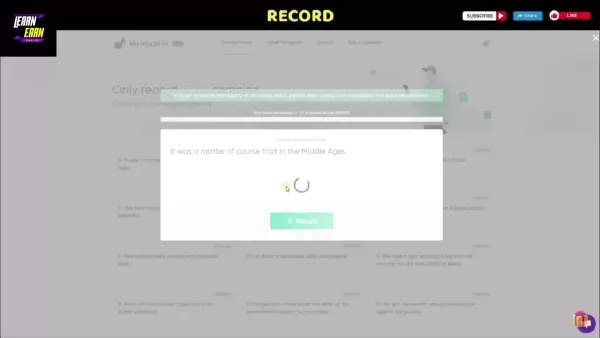
- Register using Google, Facebook, or your email and select 'Free to use'
.
- A confirmation link will be sent to your email.
Recording Your Voice Samples
- After signing up, click 'Record Voice' in the menu.
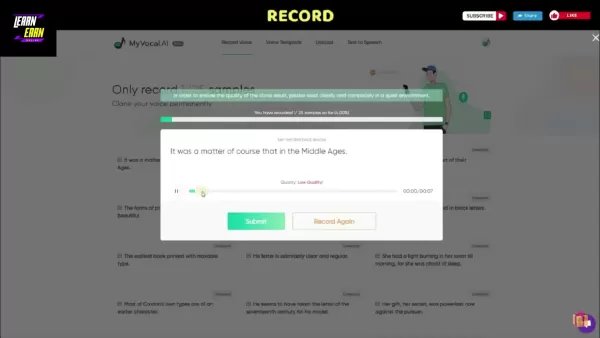
- You'll see a list of 25 sentences to record
.
- Click the record button next to each sentence and allow microphone access.
- Speak clearly in a quiet setting.
- Review each recording and click 'Submit' to proceed or 'Record Again' to redo it.
- Continue until all 25 recordings are complete.
Checking Your Clone Progress
- After submitting your samples, click 'Check my clone progress.'
- Voice processing typically takes around 30 minutes
.
- You’ll receive an email once your voice clone is ready.
Using Text-to-Speech with Your AI Voice
- After receiving the confirmation email, go to the 'Text to Speech' section.
- Click the plus icon to open the text input box.
- Enter your text (up to 500 characters per day for free) and click 'Submit' to generate audio

.
Making Your AI Voice Sing
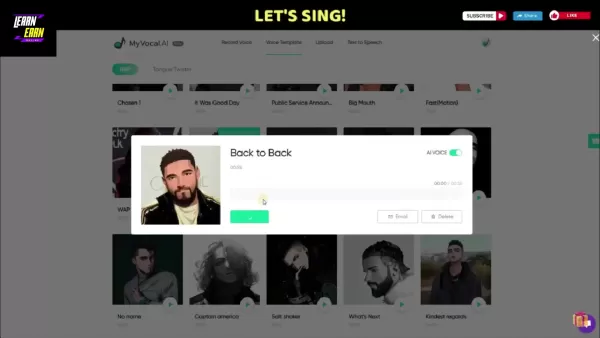
- Visit the 'Voice Template' page and choose a song template.
- Click 'Sync My AI Voice' to apply your cloned voice to the song.
- Select 'Email' to receive a download link. Due to copyright, preview may be restricted, but the final file will be sent to your inbox.
Experimenting with Tongue Twisters
- Go to 'Voice Template' and choose 'Tongue Twister.'
- Select a phrase to test your AI voice’s clarity and accuracy.
- Click 'Sync My AI Voice.' To improve quality, consider uploading a higher-quality voice sample.
Understanding MyVocal AI's Pricing
Currently Free in Beta
During the beta period, MyVocal AI is completely free. All features are accessible without any subscription fees.
Future Subscription Model
Once MyVocal AI exits beta, it will shift to a paid plan. Exact pricing details have not yet been announced.
Weighing the Options: Pros and Cons of Using MyVocal AI
Pros
Free during beta testing
Simple voice cloning process
Text-to-speech using your cloned voice
Ability to sing with AI voice
Varied and useful features
Cons
Voice quality depends on original recording
Occasional pronunciation issues
Will become a paid service in the future
Exploring MyVocal AI's Core Features
Instant Voice Clone
A key feature of MyVocal AI is instant voice cloning, letting users create a voice replica from just a one-minute recording or uploaded audio. This enables fast, personalized voiceover generation for various projects.
Cross Language Voice Cloning (Beta)
MyVocal AI supports cross-language voice cloning in beta. You can input speech in your native language and output content in American English, UK English, or Spanish.
Emotion Recognition
The emotion recognition feature detects emotional context in text and applies appropriate intonation to the AI voice, including expressions like anger, excitement, or fear.
AI Voice Blender (Beta)
In beta, the voice blender tool allows blending up to 25 different voice inputs to create truly unique vocal outputs.
Unlocking the Potential: Use Cases for MyVocal AI
Content Creation
MyVocal AI lets creators produce voiceovers for videos, podcasts, and other audiovisual content

. Using your own voice adds a personal touch that can strengthen audience connection. From educational explainers to audiobook narration, the creative uses are wide-ranging.
Accessibility
The platform helps make content accessible to people with visual impairments or reading difficulties by converting text to speech in a natural-sounding voice.
Movie Narration
Filmmakers and actors can use cloned voices for narration—whether their own or a celebrity voice—adding a unique element to film projects.
Audio Book
With the voice blender and TTS features, you can create audiobook-ready audio and distribute content through platforms like Amazon and Google.
Frequently Asked Questions (FAQ)
Is MyVocal AI really free?
Yes, it is free during the beta phase, though a subscription model will be introduced later.
How long does it take to clone my voice?
The process usually takes about 30 minutes. You’ll need to provide 25 voice samples, either via recording or upload, to train the AI effectively.
What languages are supported?
MyVocal AI currently supports American English, UK English, and Spanish, with more languages planned for future updates.
Can I use my AI voice for commercial purposes?
As with any AI voice tool, commercial use involves considerations around ethics, copyright, and potential misuse such as deepfakes. Always use responsibly and check applicable laws.
Related Questions
What are the ethical considerations of voice cloning?
Voice cloning raises important ethical questions, particularly around consent, misinformation, and privacy. Cloned voices could be used maliciously to create deepfakes or commit fraud. Transparency is critical—listeners should know when they’re hearing an AI-generated voice. Individuals should also have control over how their voice is used. Privacy protections for voice data are essential, and the impact on voice actors and audio professionals should be considered as AI voices become more common. Copyright and authorization for AI-generated content also remain complex legal areas.
What are the benefits of text-to-speech technology?
Text-to-speech (TTS) technology offers broad benefits in accessibility, education, productivity, and entertainment. It helps visually impaired individuals access written content, supports students with reading difficulties, and allows professionals to listen to documents while multitasking. TTS also enhances customer service through voice assistants and improves engagement with audio content. In entertainment, it enables personalized experiences like audiobooks and navigation prompts.
Related article
 How to fix Core Web Vitals for better SEO rankings
Streamline Report Card Comments with AI ToolsIntroductionAI Tools for Generating Report Card CommentsMagic SchoolAlmanac AIChat GPTUsing Magic School to Generate Report Card CommentsLogging into Magic SchoolSelecting the Report Card Comments ToolCust
Slackbot Becomes an AI Agent
Slackbot, the automated assistant embedded in Salesforce’s corporate messaging platform Slack, is evolving into an AI agent. Salesforce CTO Parker Harris envisions it achieving viral status comparable to OpenAI’s ChatGPT.The cloud software giant laun
ByteDance Boosts Core AI Incentives as Doubao Surges 14.6%
ByteDance recently convened a DouBao equity briefing to unveil fresh incentive policies for staff involved in the DouBao division. The strike price for DouBao shares has been lifted from $14.85 in June 2026 to $17.02, marking an approximate 14.6% inc
Related Special Topic Recommendations
Education and Learning
How to fix Core Web Vitals for better SEO rankings
Streamline Report Card Comments with AI ToolsIntroductionAI Tools for Generating Report Card CommentsMagic SchoolAlmanac AIChat GPTUsing Magic School to Generate Report Card CommentsLogging into Magic SchoolSelecting the Report Card Comments ToolCust
Slackbot Becomes an AI Agent
Slackbot, the automated assistant embedded in Salesforce’s corporate messaging platform Slack, is evolving into an AI agent. Salesforce CTO Parker Harris envisions it achieving viral status comparable to OpenAI’s ChatGPT.The cloud software giant laun
ByteDance Boosts Core AI Incentives as Doubao Surges 14.6%
ByteDance recently convened a DouBao equity briefing to unveil fresh incentive policies for staff involved in the DouBao division. The strike price for DouBao shares has been lifted from $14.85 in June 2026 to $17.02, marking an approximate 14.6% inc
Related Special Topic Recommendations
Education and Learning
 AI Study Tools for Homework and Exam Prep
2026 Latest Best AI Study Tools for Homework and Exam Prep! XIX.AI curates a top-rated list of powerful, game-changing tools that help students boost productivity, streamline homework completion, and ace exams through real-world tests. Get a free vs paid comparison, detailed rankings, and must-try options to unlock your AI edge. Explore now!
 10 tools
 xix.ai
Music composition
AI Vocal Demo Tools for Songwriters, Hooks, Toplines, and Multilingual Draft Sessions
xix.ai
Music composition
AI Vocal Demo Tools for Songwriters, Hooks, Toplines, and Multilingual Draft Sessions
2026 Latest Best AI Vocal Demo Tools for Songwriters, Hook Creators, and Multi-Language Content Teams! XIX.AI has curated a top-rated list of powerful game-changing tools that go through rigorous real-world tests. You’ll find detailed free vs paid comparison data, comprehensive rankings, and must-try options to help you boost writing efficiency and unlock your creative potential. Explore now to discover your perfect tool for all your content needs!
9 tools
xix.ai
Business
Best AI Competitive Research Tools for Small Businesses
2026 Latest Best Top-rated AI Competitive Research Tools for Small Businesses! XIX.AI has curated a highly powerful game-changing collection, updated weekly with rigorous real-world tests and detailed rankings. You can find a comprehensive free vs paid comparison to help you identify the must-try tools that boost your productivity and give you a competitive edge. Explore now to discover your perfect tool!
9 tools
xix.ai
Image editing
Photoshop AI Retouch Tools for Ecommerce Apparel, Skin Cleanup, and Color Consistency
2026 Latest Best Photoshop AI retouch tools for ecommerce apparel, skin cleanup, and color consistency! This top-rated curated list features powerful game-changing solutions that help you boost writing efficiency, streamline content creation, and achieve perfect visual results effortlessly. Each tool has undergone real-world tests through weekly updated rankings, complete with free vs paid comparison details. Backed by XIX.AI, it’s the must-try guide for anyone aiming to unlock your AI edge. Explore now!
10 tools
xix.ai
Prompt
Best AI Prompt Libraries for ChatGPT Workflows
2026 Latest Best Top-Rated AI Prompt Libraries for optimizing all types of ChatGPT workflows. XIX.AI has curated a powerful, game-changing collection that goes through rigorous real-world tests to ensure top performance. You can find detailed free vs paid comparisons and expert rankings to help you choose the must-try tools that boost your productivity and unlock your AI edge. Explore now!
11 tools
xix.ai
Education and Learning
AI Quiz Builder Platforms for Teachers, Tutors, and Cohort-Based Learning Programs
2026 Latest Best AI Quiz Builder Platforms for Teachers, Tutors, and Cohort-Based Learning Programs! XIX.AI has curated a top-rated list of powerful game-changing tools that go through real-world tests to deliver accurate rankings. These must-try platforms help boost writing efficiency, streamline content creation, and simplify quiz design across all learning scenarios. Explore now to discover your perfect tool for unlocking your AI edge in teaching!
13 tools
xix.ai

 Comments (0)
0/500
Comments (0)
0/500
Voice cloning technology is advancing quickly in today's digital landscape, opening up exciting opportunities for personalized content creation and improved accessibility. MyVocal AI stands out as a powerful free tool, allowing users to easily clone their own voice and apply it across a range of creative projects. This platform offers a unique approach to generating AI-powered voiceovers with your personal vocal identity—this guide walks you through how it works.
Key Points
MyVocal AI is a free platform for cloning your voice.
You can produce text-to-speech content using your cloned voice.
The tool can even generate singing with your AI voice.
It is currently available for free during its beta phase.
Features include instant cloning, cross-language support, emotion recognition, and an AI voice blender.
Introduction to MyVocal AI
What is MyVocal AI?
MyVocal AI is an innovative artificial intelligence tool that lets users clone their voice in just minutes
. This free platform lets you generate text-to-speech audio with your own AI-generated voice. Where MyVocal AI really excels is its ability to produce singing using your cloned voice.
MyVocal AI aims to make voice cloning accessible to everyone, helping creators, educators, and marketers add a personal touch to audio content. The ability to clone your voice for speech and singing unlocks numerous creative applications.
Currently in its beta phase, MyVocal AI is completely free—offering a chance to explore its tools without any cost. This is a limited-time opportunity, as the platform will eventually transition to a subscription model. Now is the ideal time to experience everything MyVocal AI has to offer.
Understanding Limitations and Future Enhancements
Acknowledging Current Limitations
Because MyVocal AI is still in beta, users may notice certain limitations. The quality of the cloned voice can vary depending on the clarity and quality of the original recording. In some cases, the AI might not capture subtle vocal nuances or emotional tones perfectly. That said, the development team is continuously refining the AI to improve voice clone quality.
Although the text-to-speech output is impressive, the AI may occasionally mispronounce complex terms or foreign words. Users may need to adjust text inputs for optimal results. Ongoing enhancements are expected as the system evolves.
Anticipating Future Enhancements
MyVocal AI has an exciting roadmap ahead. The team is focused on expanding the range of emotions the AI can reproduce, creating more expressive and natural-sounding voice clones. This will help users produce content that better conveys genuine emotion and engagement.
Cross-language cloning is also being expanded, with plans to include more languages to help content creators reach broader audiences. Future updates may also introduce more voice customization features, such as tone, pitch, and pacing controls.
MyVocal AI will eventually adopt a paid subscription model to support continued research, infrastructure, and feature development, ensuring long-term platform sustainability.
Getting Started with MyVocal AI: A Step-by-Step Guide
Registration
- Go to the MyVocal AI website.
- Click 'Sign In' in the navigation menu.
- Register using Google, Facebook, or your email and select 'Free to use'
.
- A confirmation link will be sent to your email.
Recording Your Voice Samples
- After signing up, click 'Record Voice' in the menu.
- You'll see a list of 25 sentences to record
.
- Click the record button next to each sentence and allow microphone access.
- Speak clearly in a quiet setting.
- Review each recording and click 'Submit' to proceed or 'Record Again' to redo it.
- Continue until all 25 recordings are complete.
Checking Your Clone Progress
- After submitting your samples, click 'Check my clone progress.'
- Voice processing typically takes around 30 minutes
.
- You’ll receive an email once your voice clone is ready.
Using Text-to-Speech with Your AI Voice
- After receiving the confirmation email, go to the 'Text to Speech' section.
- Click the plus icon to open the text input box.
- Enter your text (up to 500 characters per day for free) and click 'Submit' to generate audio
.
Making Your AI Voice Sing
- Visit the 'Voice Template' page and choose a song template.
- Click 'Sync My AI Voice' to apply your cloned voice to the song.
- Select 'Email' to receive a download link. Due to copyright, preview may be restricted, but the final file will be sent to your inbox.
Experimenting with Tongue Twisters
- Go to 'Voice Template' and choose 'Tongue Twister.'
- Select a phrase to test your AI voice’s clarity and accuracy.
- Click 'Sync My AI Voice.' To improve quality, consider uploading a higher-quality voice sample.
Understanding MyVocal AI's Pricing
Currently Free in Beta
During the beta period, MyVocal AI is completely free. All features are accessible without any subscription fees.
Future Subscription Model
Once MyVocal AI exits beta, it will shift to a paid plan. Exact pricing details have not yet been announced.
Weighing the Options: Pros and Cons of Using MyVocal AI
Pros
Free during beta testing
Simple voice cloning process
Text-to-speech using your cloned voice
Ability to sing with AI voice
Varied and useful features
Cons
Voice quality depends on original recording
Occasional pronunciation issues
Will become a paid service in the future
Exploring MyVocal AI's Core Features
Instant Voice Clone
A key feature of MyVocal AI is instant voice cloning, letting users create a voice replica from just a one-minute recording or uploaded audio. This enables fast, personalized voiceover generation for various projects.
Cross Language Voice Cloning (Beta)
MyVocal AI supports cross-language voice cloning in beta. You can input speech in your native language and output content in American English, UK English, or Spanish.
Emotion Recognition
The emotion recognition feature detects emotional context in text and applies appropriate intonation to the AI voice, including expressions like anger, excitement, or fear.
AI Voice Blender (Beta)
In beta, the voice blender tool allows blending up to 25 different voice inputs to create truly unique vocal outputs.
Unlocking the Potential: Use Cases for MyVocal AI
Content Creation
MyVocal AI lets creators produce voiceovers for videos, podcasts, and other audiovisual content
. Using your own voice adds a personal touch that can strengthen audience connection. From educational explainers to audiobook narration, the creative uses are wide-ranging.
Accessibility
The platform helps make content accessible to people with visual impairments or reading difficulties by converting text to speech in a natural-sounding voice.
Movie Narration
Filmmakers and actors can use cloned voices for narration—whether their own or a celebrity voice—adding a unique element to film projects.
Audio Book
With the voice blender and TTS features, you can create audiobook-ready audio and distribute content through platforms like Amazon and Google.
Frequently Asked Questions (FAQ)
Is MyVocal AI really free?
Yes, it is free during the beta phase, though a subscription model will be introduced later.
How long does it take to clone my voice?
The process usually takes about 30 minutes. You’ll need to provide 25 voice samples, either via recording or upload, to train the AI effectively.
What languages are supported?
MyVocal AI currently supports American English, UK English, and Spanish, with more languages planned for future updates.
Can I use my AI voice for commercial purposes?
As with any AI voice tool, commercial use involves considerations around ethics, copyright, and potential misuse such as deepfakes. Always use responsibly and check applicable laws.
Related Questions
What are the ethical considerations of voice cloning?
Voice cloning raises important ethical questions, particularly around consent, misinformation, and privacy. Cloned voices could be used maliciously to create deepfakes or commit fraud. Transparency is critical—listeners should know when they’re hearing an AI-generated voice. Individuals should also have control over how their voice is used. Privacy protections for voice data are essential, and the impact on voice actors and audio professionals should be considered as AI voices become more common. Copyright and authorization for AI-generated content also remain complex legal areas.
What are the benefits of text-to-speech technology?
Text-to-speech (TTS) technology offers broad benefits in accessibility, education, productivity, and entertainment. It helps visually impaired individuals access written content, supports students with reading difficulties, and allows professionals to listen to documents while multitasking. TTS also enhances customer service through voice assistants and improves engagement with audio content. In entertainment, it enables personalized experiences like audiobooks and navigation prompts.








 How to fix Core Web Vitals for better SEO rankings
Streamline Report Card Comments with AI ToolsIntroductionAI Tools for Generating Report Card CommentsMagic SchoolAlmanac AIChat GPTUsing Magic School to Generate Report Card CommentsLogging into Magic SchoolSelecting the Report Card Comments ToolCust
How to fix Core Web Vitals for better SEO rankings
Streamline Report Card Comments with AI ToolsIntroductionAI Tools for Generating Report Card CommentsMagic SchoolAlmanac AIChat GPTUsing Magic School to Generate Report Card CommentsLogging into Magic SchoolSelecting the Report Card Comments ToolCust
 Slackbot Becomes an AI Agent
Slackbot, the automated assistant embedded in Salesforce’s corporate messaging platform Slack, is evolving into an AI agent. Salesforce CTO Parker Harris envisions it achieving viral status comparable to OpenAI’s ChatGPT.The cloud software giant laun
Slackbot Becomes an AI Agent
Slackbot, the automated assistant embedded in Salesforce’s corporate messaging platform Slack, is evolving into an AI agent. Salesforce CTO Parker Harris envisions it achieving viral status comparable to OpenAI’s ChatGPT.The cloud software giant laun
 ByteDance Boosts Core AI Incentives as Doubao Surges 14.6%
ByteDance recently convened a DouBao equity briefing to unveil fresh incentive policies for staff involved in the DouBao division. The strike price for DouBao shares has been lifted from $14.85 in June 2026 to $17.02, marking an approximate 14.6% inc
ByteDance Boosts Core AI Incentives as Doubao Surges 14.6%
ByteDance recently convened a DouBao equity briefing to unveil fresh incentive policies for staff involved in the DouBao division. The strike price for DouBao shares has been lifted from $14.85 in June 2026 to $17.02, marking an approximate 14.6% inc

2026 Latest Best AI Study Tools for Homework and Exam Prep! XIX.AI curates a top-rated list of powerful, game-changing tools that help students boost productivity, streamline homework completion, and ace exams through real-world tests. Get a free vs paid comparison, detailed rankings, and must-try options to unlock your AI edge. Explore now!
10 tools
xix.ai

2026 Latest Best AI Vocal Demo Tools for Songwriters, Hook Creators, and Multi-Language Content Teams! XIX.AI has curated a top-rated list of powerful game-changing tools that go through rigorous real-world tests. You’ll find detailed free vs paid comparison data, comprehensive rankings, and must-try options to help you boost writing efficiency and unlock your creative potential. Explore now to discover your perfect tool for all your content needs!
9 tools
xix.ai

2026 Latest Best Top-rated AI Competitive Research Tools for Small Businesses! XIX.AI has curated a highly powerful game-changing collection, updated weekly with rigorous real-world tests and detailed rankings. You can find a comprehensive free vs paid comparison to help you identify the must-try tools that boost your productivity and give you a competitive edge. Explore now to discover your perfect tool!
9 tools
xix.ai

2026 Latest Best Photoshop AI retouch tools for ecommerce apparel, skin cleanup, and color consistency! This top-rated curated list features powerful game-changing solutions that help you boost writing efficiency, streamline content creation, and achieve perfect visual results effortlessly. Each tool has undergone real-world tests through weekly updated rankings, complete with free vs paid comparison details. Backed by XIX.AI, it’s the must-try guide for anyone aiming to unlock your AI edge. Explore now!
10 tools
xix.ai

2026 Latest Best Top-Rated AI Prompt Libraries for optimizing all types of ChatGPT workflows. XIX.AI has curated a powerful, game-changing collection that goes through rigorous real-world tests to ensure top performance. You can find detailed free vs paid comparisons and expert rankings to help you choose the must-try tools that boost your productivity and unlock your AI edge. Explore now!
11 tools
xix.ai

2026 Latest Best AI Quiz Builder Platforms for Teachers, Tutors, and Cohort-Based Learning Programs! XIX.AI has curated a top-rated list of powerful game-changing tools that go through real-world tests to deliver accurate rankings. These must-try platforms help boost writing efficiency, streamline content creation, and simplify quiz design across all learning scenarios. Explore now to discover your perfect tool for unlocking your AI edge in teaching!
13 tools
xix.ai












