


 Home
HomeMURF AI vs. Descript: Comparing Top Text-to-Speech Tools
In the digital age, high-quality text-to-speech (TTS) solutions are vital for content creators, marketers, and educators. MURF AI Voices and Descript’s Overdub stand out as leading platforms, each offering distinct features and strengths. This guide provides an in-depth comparison of their voice quality, customization, language support, and pricing to help you choose the best TTS tool for your needs. Whether producing captivating videos, professional audio narrations, or accessible educational content, understanding the differences between MURF AI and Descript will guide your decision-making and enhance your projects.
Key Highlights
MURF AI Voices delivers a diverse array of AI voices with robust customization options.
Descript’s Overdub specializes in creating lifelike, editable voice clones.
Both platforms support multiple languages for global content creation.
MURF AI shines in pronunciation control and voice variety, while Descript integrates seamlessly with its audio and video editing tools.
Pricing structures differ: MURF AI offers usage-based subscriptions, while Descript includes Overdub in its editing suite.
Your choice depends on specific project needs, budget, and workflow preferences.
MURF AI Voices vs. Descript Overdub: In-Depth Comparison
Overview of MURF AI Voices
MURF AI Voices is a top-tier text-to-speech platform renowned for its extensive AI voice library and intuitive interface. It serves marketers, educators, and creators by providing tools to produce realistic, engaging audio. Its strength lies in converting text into natural-sounding speech, boosting accessibility and engagement across various applications.
Key advantages of MURF AI Voices include:
- A broad range of AI voices covering diverse accents, ages, and styles.
- Advanced customization for pitch, speed, and emphasis.
- Support for multiple languages, ideal for global audiences.
- Integration with popular content creation platforms.
- An easy-to-use interface suitable for beginners and experts alike.
MURF AI enables users to craft professional voiceovers for videos, podcasts, and e-learning, streamlining workflows and enhancing audience connection. Its advanced AI technology makes it a versatile, reliable choice for text-to-speech needs.
Overview of Descript Overdub
Descript Overdub is a cutting-edge text-to-speech feature within Descript’s audio and video editing platform. Unlike standard TTS tools, Overdub focuses on creating realistic voice clones that mimic a specific speaker’s voice. This innovative approach transforms content editing and creation possibilities.
Key features of Descript Overdub include:
- Voice cloning technology that captures a speaker’s unique tone and nuances.
- Seamless integration with Descript’s editing suite for precise audio and video control.
- Ability to edit or add spoken words without re-recording.
- Collaboration tools for team-based projects.
- Applications in podcasting, video production, and e-learning.
Descript Overdub redefines audio editing by enabling precise adjustments with remarkable realism. Whether correcting errors, adding lines, or creating new dialogue, Overdub delivers professional results with a consistent, natural voice, making it ideal for creators prioritizing authenticity and efficient workflows.
Voice Quality and Realism
Both MURF AI Voices and Descript Overdub offer exceptional voice quality, but their approaches differ. MURF AI provides a wide selection of meticulously designed AI voices with smooth intonation, natural pacing, and varied accents. Users can adjust pitch, speed, and emphasis for tailored results.
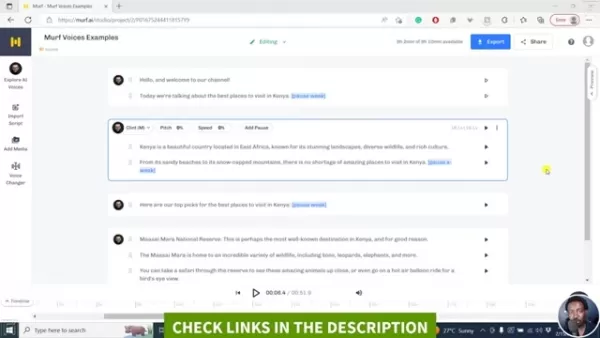
While MURF AI delivers high-quality voices, subtle AI artifacts may occasionally be detectable to keen listeners.
Descript Overdub, by contrast, uses voice cloning to replicate a real speaker’s nuances, producing highly authentic speech that’s nearly indistinguishable from the original. However, the clone’s quality depends on the training data’s quality and quantity—poor or limited data may yield less convincing results.
Your choice depends on project goals: MURF AI excels for diverse, customizable AI voices, while Descript Overdub offers unmatched realism for personalized speech with sufficient training data.
Customization and Control
MURF AI Voices and Descript Overdub provide distinct customization options. MURF AI offers granular control over AI voice characteristics, including:
- Pitch: Adjust voice tone for the desired effect.
- Speed: Modify speech pace for clarity and engagement.
- Emphasis: Highlight key words or phrases.
- Pauses: Add strategic breaks for better rhythm and understanding.
MURF AI also allows pronunciation customization for precise word delivery.
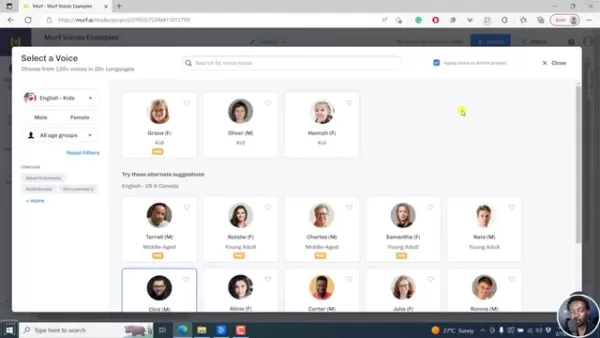
This flexibility ensures tailored voice output. Descript Overdub, however, focuses on editing voice clones, allowing users to correct errors, add lines, or rewrite speech without re-recording. Its advanced processing ensures seamless transitions and consistent voice quality, though it offers less control over pitch, speed, or emphasis. MURF AI excels in voice tweaking, while Overdub shines in precise audio editing.
Language Support
Multilingual support is critical for global content. MURF AI Voices supports over 20 languages, including English, Spanish, French, German, and Mandarin, with tailored AI voices for accurate, natural pronunciation. Descript Overdub supports multiple languages but relies on training data availability for voice cloning. Limited or low-quality data may restrict its effectiveness for less common languages. MURF AI offers a more comprehensive solution for multilingual needs, while Overdub suits projects with high-quality training data and a focus on voice cloning.
Pronunciation and Emphasis Control
MURF AI’s Pronunciation Tools
MURF AI Voices excels with advanced pronunciation control, allowing users to fine-tune word or phrase delivery for accuracy. Its editor offers phonetic transcriptions, alternative pronunciations, and custom recording options, ideal for brand names, technical terms, or foreign words.
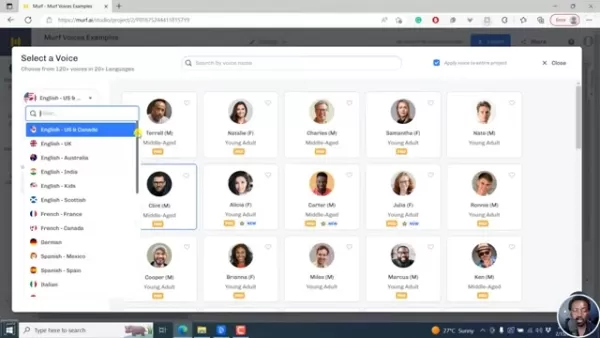
Users can also adjust regional accents for localized content, perfect for marketing, e-learning, or audiobooks targeting specific regions.
Descript’s Emphasis Tools
Descript Overdub provides tools for adjusting emphasis and intonation, enabling users to highlight key points or convey emotions like excitement or authority. While less extensive than MURF AI’s pronunciation controls, these tools enhance dynamic audio for videos, podcasts, or audio dramas.
Getting Started with MURF AI and Descript
Creating a Voiceover with MURF AI Voices
Producing a voiceover with MURF AI Voices is simple:
- Sign up: Create a MURF AI account and explore with a free trial.
- Start a project: Click “Create Project” and name it.
- Input text: Paste or type your text in the editor.
- Choose a voice: Select from a library of voices by gender, age, accent, or style.
- Customize: Adjust pitch, speed, emphasis, or pronunciation.
- Generate: Convert text to speech with the “Generate” button.
- Refine: Review and tweak the voiceover as needed.
- Download: Save the audio in formats like MP3 or WAV for use in projects.
Cloning a Voice with Descript Overdub
Voice cloning with Descript Overdub involves:
- Subscribe: Choose a Descript plan with Overdub.
- Create a project: Start a new project in Descript.
- Record a sample: Capture a clear, 30-minute voice sample without background noise.
- Train the AI: Upload the sample for Descript to create a voice clone.
- Verify: Review the clone for accuracy.
- Edit: Use Overdub to insert, correct, or modify speech seamlessly.
Pricing and Plans
MURF AI’s Subscription Options
MURF AI Voices offers flexible plans based on voiceover minutes, user access, and advanced features. A free plan provides limited functionality, while paid plans include premium voices and customization. Enterprise options allow tailored plans for specific needs.
Descript’s Bundled Pricing
Descript Overdub is part of Descript’s editing platform, included in higher-tier plans with features like unlimited projects and collaboration tools. While potentially costlier than MURF AI’s TTS plans, it offers a full editing suite. A free version allows testing.
Cost-Effectiveness
MURF AI suits users focused on text-to-speech, offering competitive pricing. Descript is ideal for those needing both TTS and editing tools, providing value through its comprehensive suite. Evaluate usage and needs to determine the best option.
Feature Comparison
Voice Variety
MURF AI Voices offers a wide range of AI voices across accents, ages, and styles. Descript Overdub focuses on realistic voice clones, limited by available training data.
Customization
MURF AI provides extensive voice tweaking options like pitch, speed, and pronunciation. Descript Overdub prioritizes editing cloned voices for seamless corrections or additions.
Integration
MURF AI integrates with content creation tools, while Descript Overdub works within its editing suite for unified audio and video workflows.
Collaboration
Both platforms support teamwork, enabling multiple users to collaborate on projects.
Ideal Use Cases
MURF AI Voices: Versatile Applications
MURF AI excels in:
- Video voiceovers for marketing or tutorials.
- E-learning audio narrations.
- Podcast production.
- Audiobook narration.
- Accessibility for visually impaired users.
Descript Overdub: Precision Editing
Descript Overdub is ideal for:
- Podcast error correction.
- Video dialogue editing.
- Audio restoration.
- Voice acting for animations or assistants.
- Localized audio content.
Frequently Asked Questions
Is MURF AI Voices beginner-friendly?
Yes, its intuitive interface and clear guides make it accessible for creating professional voiceovers.
How long does voice cloning take with Descript Overdub?
Training typically takes hours, requiring at least 30 minutes of high-quality audio.
Can MURF AI Voices be used commercially?
Yes, depending on the subscription plan. Review terms for compliance.
What audio formats does Descript Overdub support?
It supports MP3, WAV, AIFF, and AAC for import and export.
Related Questions
Best practices for recording a voice sample for Descript Overdub?
Use a quality microphone in a quiet space, speak naturally, avoid noise, follow Descript’s guidelines, and review the sample for accuracy.
How do MURF AI Voices and Descript Overdub compare to traditional voice recording?
They offer cost savings, speed, flexibility, and accessibility compared to traditional recording, though human recordings may provide more emotional depth for certain projects.
Related article
 How to fix Core Web Vitals for better SEO rankings
Streamline Report Card Comments with AI ToolsIntroductionAI Tools for Generating Report Card CommentsMagic SchoolAlmanac AIChat GPTUsing Magic School to Generate Report Card CommentsLogging into Magic SchoolSelecting the Report Card Comments ToolCust
Slackbot Becomes an AI Agent
Slackbot, the automated assistant embedded in Salesforce’s corporate messaging platform Slack, is evolving into an AI agent. Salesforce CTO Parker Harris envisions it achieving viral status comparable to OpenAI’s ChatGPT.The cloud software giant laun
ByteDance Boosts Core AI Incentives as Doubao Surges 14.6%
ByteDance recently convened a DouBao equity briefing to unveil fresh incentive policies for staff involved in the DouBao division. The strike price for DouBao shares has been lifted from $14.85 in June 2026 to $17.02, marking an approximate 14.6% inc
Related Special Topic Recommendations
Education and Learning
How to fix Core Web Vitals for better SEO rankings
Streamline Report Card Comments with AI ToolsIntroductionAI Tools for Generating Report Card CommentsMagic SchoolAlmanac AIChat GPTUsing Magic School to Generate Report Card CommentsLogging into Magic SchoolSelecting the Report Card Comments ToolCust
Slackbot Becomes an AI Agent
Slackbot, the automated assistant embedded in Salesforce’s corporate messaging platform Slack, is evolving into an AI agent. Salesforce CTO Parker Harris envisions it achieving viral status comparable to OpenAI’s ChatGPT.The cloud software giant laun
ByteDance Boosts Core AI Incentives as Doubao Surges 14.6%
ByteDance recently convened a DouBao equity briefing to unveil fresh incentive policies for staff involved in the DouBao division. The strike price for DouBao shares has been lifted from $14.85 in June 2026 to $17.02, marking an approximate 14.6% inc
Related Special Topic Recommendations
Education and Learning
 AI Study Tools for Homework and Exam Prep
2026 Latest Best AI Study Tools for Homework and Exam Prep! XIX.AI curates a top-rated list of powerful, game-changing tools that help students boost productivity, streamline homework completion, and ace exams through real-world tests. Get a free vs paid comparison, detailed rankings, and must-try options to unlock your AI edge. Explore now!
 10 tools
 xix.ai
Music composition
AI Vocal Demo Tools for Songwriters, Hooks, Toplines, and Multilingual Draft Sessions
xix.ai
Music composition
AI Vocal Demo Tools for Songwriters, Hooks, Toplines, and Multilingual Draft Sessions
2026 Latest Best AI Vocal Demo Tools for Songwriters, Hook Creators, and Multi-Language Content Teams! XIX.AI has curated a top-rated list of powerful game-changing tools that go through rigorous real-world tests. You’ll find detailed free vs paid comparison data, comprehensive rankings, and must-try options to help you boost writing efficiency and unlock your creative potential. Explore now to discover your perfect tool for all your content needs!
9 tools
xix.ai
Business
Best AI Competitive Research Tools for Small Businesses
2026 Latest Best Top-rated AI Competitive Research Tools for Small Businesses! XIX.AI has curated a highly powerful game-changing collection, updated weekly with rigorous real-world tests and detailed rankings. You can find a comprehensive free vs paid comparison to help you identify the must-try tools that boost your productivity and give you a competitive edge. Explore now to discover your perfect tool!
9 tools
xix.ai
Image editing
Photoshop AI Retouch Tools for Ecommerce Apparel, Skin Cleanup, and Color Consistency
2026 Latest Best Photoshop AI retouch tools for ecommerce apparel, skin cleanup, and color consistency! This top-rated curated list features powerful game-changing solutions that help you boost writing efficiency, streamline content creation, and achieve perfect visual results effortlessly. Each tool has undergone real-world tests through weekly updated rankings, complete with free vs paid comparison details. Backed by XIX.AI, it’s the must-try guide for anyone aiming to unlock your AI edge. Explore now!
10 tools
xix.ai
Prompt
Best AI Prompt Libraries for ChatGPT Workflows
2026 Latest Best Top-Rated AI Prompt Libraries for optimizing all types of ChatGPT workflows. XIX.AI has curated a powerful, game-changing collection that goes through rigorous real-world tests to ensure top performance. You can find detailed free vs paid comparisons and expert rankings to help you choose the must-try tools that boost your productivity and unlock your AI edge. Explore now!
11 tools
xix.ai
Education and Learning
AI Quiz Builder Platforms for Teachers, Tutors, and Cohort-Based Learning Programs
2026 Latest Best AI Quiz Builder Platforms for Teachers, Tutors, and Cohort-Based Learning Programs! XIX.AI has curated a top-rated list of powerful game-changing tools that go through real-world tests to deliver accurate rankings. These must-try platforms help boost writing efficiency, streamline content creation, and simplify quiz design across all learning scenarios. Explore now to discover your perfect tool for unlocking your AI edge in teaching!
13 tools
xix.ai

 Comments (3)
0/500
Comments (3)
0/500
![JasonSmith]()
MURF AI's voices sound so real, it’s almost creepy! 😮 Descript’s editing is cool, but I’m blown away by how natural MURF’s output is. Perfect for my podcast intros!
![JustinWilson]()
Murf AI's voice customization blows my mind! So many accents and tones to play with, perfect for my YouTube intros. Descript’s editing is cool, but I wish it had more voice variety. 😎
![PeterSanchez]()
C'est impressionnant comment MURF AI et Descript rendent les voix si naturelles ! 😮 J'adore l'idée de créer des podcasts sans engager de vrais acteurs, mais je me demande si ça va trop standardiser les voix à l'avenir.
In the digital age, high-quality text-to-speech (TTS) solutions are vital for content creators, marketers, and educators. MURF AI Voices and Descript’s Overdub stand out as leading platforms, each offering distinct features and strengths. This guide provides an in-depth comparison of their voice quality, customization, language support, and pricing to help you choose the best TTS tool for your needs. Whether producing captivating videos, professional audio narrations, or accessible educational content, understanding the differences between MURF AI and Descript will guide your decision-making and enhance your projects.
Key Highlights
MURF AI Voices delivers a diverse array of AI voices with robust customization options.
Descript’s Overdub specializes in creating lifelike, editable voice clones.
Both platforms support multiple languages for global content creation.
MURF AI shines in pronunciation control and voice variety, while Descript integrates seamlessly with its audio and video editing tools.
Pricing structures differ: MURF AI offers usage-based subscriptions, while Descript includes Overdub in its editing suite.
Your choice depends on specific project needs, budget, and workflow preferences.
MURF AI Voices vs. Descript Overdub: In-Depth Comparison
Overview of MURF AI Voices
MURF AI Voices is a top-tier text-to-speech platform renowned for its extensive AI voice library and intuitive interface. It serves marketers, educators, and creators by providing tools to produce realistic, engaging audio. Its strength lies in converting text into natural-sounding speech, boosting accessibility and engagement across various applications.
Key advantages of MURF AI Voices include:
- A broad range of AI voices covering diverse accents, ages, and styles.
- Advanced customization for pitch, speed, and emphasis.
- Support for multiple languages, ideal for global audiences.
- Integration with popular content creation platforms.
- An easy-to-use interface suitable for beginners and experts alike.
MURF AI enables users to craft professional voiceovers for videos, podcasts, and e-learning, streamlining workflows and enhancing audience connection. Its advanced AI technology makes it a versatile, reliable choice for text-to-speech needs.
Overview of Descript Overdub
Descript Overdub is a cutting-edge text-to-speech feature within Descript’s audio and video editing platform. Unlike standard TTS tools, Overdub focuses on creating realistic voice clones that mimic a specific speaker’s voice. This innovative approach transforms content editing and creation possibilities.
Key features of Descript Overdub include:
- Voice cloning technology that captures a speaker’s unique tone and nuances.
- Seamless integration with Descript’s editing suite for precise audio and video control.
- Ability to edit or add spoken words without re-recording.
- Collaboration tools for team-based projects.
- Applications in podcasting, video production, and e-learning.
Descript Overdub redefines audio editing by enabling precise adjustments with remarkable realism. Whether correcting errors, adding lines, or creating new dialogue, Overdub delivers professional results with a consistent, natural voice, making it ideal for creators prioritizing authenticity and efficient workflows.
Voice Quality and Realism
Both MURF AI Voices and Descript Overdub offer exceptional voice quality, but their approaches differ. MURF AI provides a wide selection of meticulously designed AI voices with smooth intonation, natural pacing, and varied accents. Users can adjust pitch, speed, and emphasis for tailored results.
While MURF AI delivers high-quality voices, subtle AI artifacts may occasionally be detectable to keen listeners.
Descript Overdub, by contrast, uses voice cloning to replicate a real speaker’s nuances, producing highly authentic speech that’s nearly indistinguishable from the original. However, the clone’s quality depends on the training data’s quality and quantity—poor or limited data may yield less convincing results.
Your choice depends on project goals: MURF AI excels for diverse, customizable AI voices, while Descript Overdub offers unmatched realism for personalized speech with sufficient training data.
Customization and Control
MURF AI Voices and Descript Overdub provide distinct customization options. MURF AI offers granular control over AI voice characteristics, including:
- Pitch: Adjust voice tone for the desired effect.
- Speed: Modify speech pace for clarity and engagement.
- Emphasis: Highlight key words or phrases.
- Pauses: Add strategic breaks for better rhythm and understanding.
MURF AI also allows pronunciation customization for precise word delivery.
This flexibility ensures tailored voice output. Descript Overdub, however, focuses on editing voice clones, allowing users to correct errors, add lines, or rewrite speech without re-recording. Its advanced processing ensures seamless transitions and consistent voice quality, though it offers less control over pitch, speed, or emphasis. MURF AI excels in voice tweaking, while Overdub shines in precise audio editing.
Language Support
Multilingual support is critical for global content. MURF AI Voices supports over 20 languages, including English, Spanish, French, German, and Mandarin, with tailored AI voices for accurate, natural pronunciation. Descript Overdub supports multiple languages but relies on training data availability for voice cloning. Limited or low-quality data may restrict its effectiveness for less common languages. MURF AI offers a more comprehensive solution for multilingual needs, while Overdub suits projects with high-quality training data and a focus on voice cloning.
Pronunciation and Emphasis Control
MURF AI’s Pronunciation Tools
MURF AI Voices excels with advanced pronunciation control, allowing users to fine-tune word or phrase delivery for accuracy. Its editor offers phonetic transcriptions, alternative pronunciations, and custom recording options, ideal for brand names, technical terms, or foreign words.
Users can also adjust regional accents for localized content, perfect for marketing, e-learning, or audiobooks targeting specific regions.
Descript’s Emphasis Tools
Descript Overdub provides tools for adjusting emphasis and intonation, enabling users to highlight key points or convey emotions like excitement or authority. While less extensive than MURF AI’s pronunciation controls, these tools enhance dynamic audio for videos, podcasts, or audio dramas.
Getting Started with MURF AI and Descript
Creating a Voiceover with MURF AI Voices
Producing a voiceover with MURF AI Voices is simple:
- Sign up: Create a MURF AI account and explore with a free trial.
- Start a project: Click “Create Project” and name it.
- Input text: Paste or type your text in the editor.
- Choose a voice: Select from a library of voices by gender, age, accent, or style.
- Customize: Adjust pitch, speed, emphasis, or pronunciation.
- Generate: Convert text to speech with the “Generate” button.
- Refine: Review and tweak the voiceover as needed.
- Download: Save the audio in formats like MP3 or WAV for use in projects.
Cloning a Voice with Descript Overdub
Voice cloning with Descript Overdub involves:
- Subscribe: Choose a Descript plan with Overdub.
- Create a project: Start a new project in Descript.
- Record a sample: Capture a clear, 30-minute voice sample without background noise.
- Train the AI: Upload the sample for Descript to create a voice clone.
- Verify: Review the clone for accuracy.
- Edit: Use Overdub to insert, correct, or modify speech seamlessly.
Pricing and Plans
MURF AI’s Subscription Options
MURF AI Voices offers flexible plans based on voiceover minutes, user access, and advanced features. A free plan provides limited functionality, while paid plans include premium voices and customization. Enterprise options allow tailored plans for specific needs.
Descript’s Bundled Pricing
Descript Overdub is part of Descript’s editing platform, included in higher-tier plans with features like unlimited projects and collaboration tools. While potentially costlier than MURF AI’s TTS plans, it offers a full editing suite. A free version allows testing.
Cost-Effectiveness
MURF AI suits users focused on text-to-speech, offering competitive pricing. Descript is ideal for those needing both TTS and editing tools, providing value through its comprehensive suite. Evaluate usage and needs to determine the best option.
Feature Comparison
Voice Variety
MURF AI Voices offers a wide range of AI voices across accents, ages, and styles. Descript Overdub focuses on realistic voice clones, limited by available training data.
Customization
MURF AI provides extensive voice tweaking options like pitch, speed, and pronunciation. Descript Overdub prioritizes editing cloned voices for seamless corrections or additions.
Integration
MURF AI integrates with content creation tools, while Descript Overdub works within its editing suite for unified audio and video workflows.
Collaboration
Both platforms support teamwork, enabling multiple users to collaborate on projects.
Ideal Use Cases
MURF AI Voices: Versatile Applications
MURF AI excels in:
- Video voiceovers for marketing or tutorials.
- E-learning audio narrations.
- Podcast production.
- Audiobook narration.
- Accessibility for visually impaired users.
Descript Overdub: Precision Editing
Descript Overdub is ideal for:
- Podcast error correction.
- Video dialogue editing.
- Audio restoration.
- Voice acting for animations or assistants.
- Localized audio content.
Frequently Asked Questions
Is MURF AI Voices beginner-friendly?
Yes, its intuitive interface and clear guides make it accessible for creating professional voiceovers.
How long does voice cloning take with Descript Overdub?
Training typically takes hours, requiring at least 30 minutes of high-quality audio.
Can MURF AI Voices be used commercially?
Yes, depending on the subscription plan. Review terms for compliance.
What audio formats does Descript Overdub support?
It supports MP3, WAV, AIFF, and AAC for import and export.
Related Questions
Best practices for recording a voice sample for Descript Overdub?
Use a quality microphone in a quiet space, speak naturally, avoid noise, follow Descript’s guidelines, and review the sample for accuracy.
How do MURF AI Voices and Descript Overdub compare to traditional voice recording?
They offer cost savings, speed, flexibility, and accessibility compared to traditional recording, though human recordings may provide more emotional depth for certain projects.








 How to fix Core Web Vitals for better SEO rankings
Streamline Report Card Comments with AI ToolsIntroductionAI Tools for Generating Report Card CommentsMagic SchoolAlmanac AIChat GPTUsing Magic School to Generate Report Card CommentsLogging into Magic SchoolSelecting the Report Card Comments ToolCust
How to fix Core Web Vitals for better SEO rankings
Streamline Report Card Comments with AI ToolsIntroductionAI Tools for Generating Report Card CommentsMagic SchoolAlmanac AIChat GPTUsing Magic School to Generate Report Card CommentsLogging into Magic SchoolSelecting the Report Card Comments ToolCust
 Slackbot Becomes an AI Agent
Slackbot, the automated assistant embedded in Salesforce’s corporate messaging platform Slack, is evolving into an AI agent. Salesforce CTO Parker Harris envisions it achieving viral status comparable to OpenAI’s ChatGPT.The cloud software giant laun
Slackbot Becomes an AI Agent
Slackbot, the automated assistant embedded in Salesforce’s corporate messaging platform Slack, is evolving into an AI agent. Salesforce CTO Parker Harris envisions it achieving viral status comparable to OpenAI’s ChatGPT.The cloud software giant laun
 ByteDance Boosts Core AI Incentives as Doubao Surges 14.6%
ByteDance recently convened a DouBao equity briefing to unveil fresh incentive policies for staff involved in the DouBao division. The strike price for DouBao shares has been lifted from $14.85 in June 2026 to $17.02, marking an approximate 14.6% inc
ByteDance Boosts Core AI Incentives as Doubao Surges 14.6%
ByteDance recently convened a DouBao equity briefing to unveil fresh incentive policies for staff involved in the DouBao division. The strike price for DouBao shares has been lifted from $14.85 in June 2026 to $17.02, marking an approximate 14.6% inc

2026 Latest Best AI Study Tools for Homework and Exam Prep! XIX.AI curates a top-rated list of powerful, game-changing tools that help students boost productivity, streamline homework completion, and ace exams through real-world tests. Get a free vs paid comparison, detailed rankings, and must-try options to unlock your AI edge. Explore now!
10 tools
xix.ai

2026 Latest Best AI Vocal Demo Tools for Songwriters, Hook Creators, and Multi-Language Content Teams! XIX.AI has curated a top-rated list of powerful game-changing tools that go through rigorous real-world tests. You’ll find detailed free vs paid comparison data, comprehensive rankings, and must-try options to help you boost writing efficiency and unlock your creative potential. Explore now to discover your perfect tool for all your content needs!
9 tools
xix.ai

2026 Latest Best Top-rated AI Competitive Research Tools for Small Businesses! XIX.AI has curated a highly powerful game-changing collection, updated weekly with rigorous real-world tests and detailed rankings. You can find a comprehensive free vs paid comparison to help you identify the must-try tools that boost your productivity and give you a competitive edge. Explore now to discover your perfect tool!
9 tools
xix.ai

2026 Latest Best Photoshop AI retouch tools for ecommerce apparel, skin cleanup, and color consistency! This top-rated curated list features powerful game-changing solutions that help you boost writing efficiency, streamline content creation, and achieve perfect visual results effortlessly. Each tool has undergone real-world tests through weekly updated rankings, complete with free vs paid comparison details. Backed by XIX.AI, it’s the must-try guide for anyone aiming to unlock your AI edge. Explore now!
10 tools
xix.ai

2026 Latest Best Top-Rated AI Prompt Libraries for optimizing all types of ChatGPT workflows. XIX.AI has curated a powerful, game-changing collection that goes through rigorous real-world tests to ensure top performance. You can find detailed free vs paid comparisons and expert rankings to help you choose the must-try tools that boost your productivity and unlock your AI edge. Explore now!
11 tools
xix.ai

2026 Latest Best AI Quiz Builder Platforms for Teachers, Tutors, and Cohort-Based Learning Programs! XIX.AI has curated a top-rated list of powerful game-changing tools that go through real-world tests to deliver accurate rankings. These must-try platforms help boost writing efficiency, streamline content creation, and simplify quiz design across all learning scenarios. Explore now to discover your perfect tool for unlocking your AI edge in teaching!
13 tools
xix.ai

MURF AI's voices sound so real, it’s almost creepy! 😮 Descript’s editing is cool, but I’m blown away by how natural MURF’s output is. Perfect for my podcast intros!
Murf AI's voice customization blows my mind! So many accents and tones to play with, perfect for my YouTube intros. Descript’s editing is cool, but I wish it had more voice variety. 😎
C'est impressionnant comment MURF AI et Descript rendent les voix si naturelles ! 😮 J'adore l'idée de créer des podcasts sans engager de vrais acteurs, mais je me demande si ça va trop standardiser les voix à l'avenir.












