


 Home
HomeMimicPC's RVC AI Simplifies Voice Cloning with Advanced Conversion Tech
AI Voice Conversion Made Easy: How MimicPC Democratizes RVC Technology
Ever wished you could transform your voice into someone else's—maybe a celebrity, a cartoon character, or even a completely synthetic persona? Thanks to AI-powered voice conversion, this futuristic idea is now a reality. But here's the catch: most voice cloning tools demand powerful GPUs and technical know-how... until now.
Enter MimicPC—a game-changing platform that lets you run advanced AI tools like Retrieval-Based Voice Conversion (RVC) directly in your browser. No expensive hardware. No complicated installations. Just seamless, professional-grade voice transformations at your fingertips.
Why Traditional Voice Conversion is a Pain (And How MimicPC Fixes It)
The Problem: High-End Hardware & Steep Learning Curve
Voice cloning and conversion have traditionally required:
- A beefy GPU (think gaming PCs or workstations)
- Complex software setups (Python environments, dependencies, troubleshooting)
- Technical expertise (understanding models, training parameters, etc.)
For casual users or content creators, this is a major roadblock.

The Solution: Cloud-Powered AI Without the Hassle
MimicPC eliminates these barriers by:
✔ Running AI models entirely in the cloud
✔ Providing a user-friendly browser interface
✔ Offering pre-configured tools (no setup required)
Now, anyone—regardless of their hardware—can experiment with AI voice conversion.
What Can You Do With MimicPC’s RVC?
- Clone voices (turn your speech into another person’s)
- Modify singing voices (ideal for music producers)
- Create unique character voices (perfect for content creators)
- Experiment with AI vocals (without needing a recording studio)

Getting Started: How to Use RVC on MimicPC
Step 1: Sign Up & Access the Platform
- Visit MimicPC’s website.
- Click "Free Launch" and register (Google or email works).
- Log in to your dashboard.

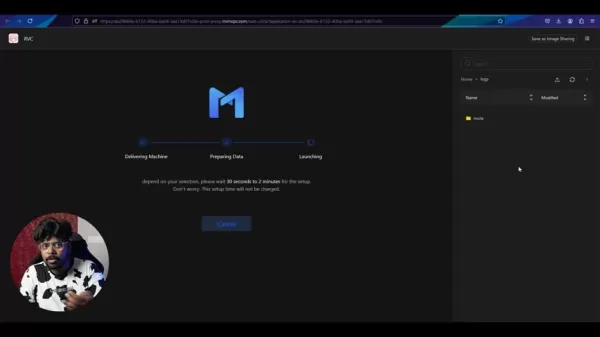
Step 2: Launch RVC
- From the dashboard, find and click the "RVC" icon.
- Select your preferred server version and hardware settings.
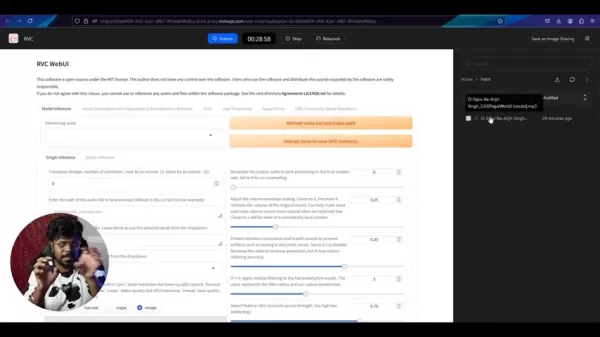
Step 3: Upload & Process Your Voice
- Upload voice files (WAV format works best).
- Configure settings (pitch, tone, speed).
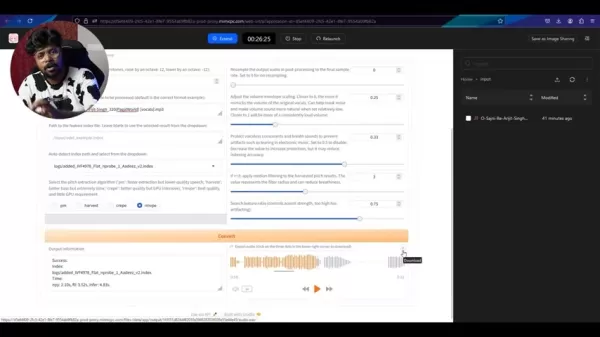
- Click "Convert" and let the AI work its magic.
Step 4: Download & Enjoy
Once processed, your transformed voice will be ready to download.
MimicPC’s Pricing: Free Trial & Paid Options
- Free Tier: 30-minute trial (great for testing).
- Paid Plans: More power, longer sessions (check their site for details).
Final Verdict: Should You Use MimicPC?
👍 Pros
- No hardware limitations (runs in the cloud)
- Beginner-friendly (no coding needed)
- Multiple AI tools (FaceFusion, Stable Diffusion, etc.)
- Free trial available
👎 Cons
- Free tier is limited (need multiple accounts for extended use)
- Paid plans required for heavy usage
FAQ
Q: Is MimicPC really free?
A: Yes, but with limitations. The free trial gives you 30 minutes—enough to test RVC. For serious work, paid plans are needed.
Q: Can I use RVC for commercial projects?
A: Check MimicPC’s terms, but generally, yes—as long as you comply with their policies.
Q: What audio formats work best?
A: .WAV files are ideal for high-quality conversions.
Ready to Try AI Voice Conversion?
MimicPC makes it effortless. Sign up now and start transforming voices in minutes—no tech headaches required! 🚀
Related article
 U.S. Stocks Hit Historic Milestone as AI and Aerospace Giants Prepare for Trillion-Dollar Debut
Elon Musk, Sam Altman, and Dario Amodei, three titans of the technology sector, are advancing toward initial public offerings for their respective ventures. With SpaceX, OpenAI, and Anthropic—three industry behemoths nearing trillion-dollar valuation
Swedish AI Startup Lovable Eyes $13.2 Billion Valuation After Major Funding Round
As AI-driven coding tools gain traction, Swedish startup Lovable has secured a major funding round. The company aims to raise $3 billion, potentially boosting its valuation to $13.2 billion—double the $6.6 billion recorded last December. Menlo Ventur
Google Tests Remy AI Agent for Gemini as Focus Shifts to User Control
According to Business Insider, Google is testing Remy, a new AI personal agent for Gemini. This tool aims to execute tasks on behalf of users, streamlining both professional workflows and daily routines.Currently, Remy is undergoing testing in an int
Related Special Topic Recommendations
writing
U.S. Stocks Hit Historic Milestone as AI and Aerospace Giants Prepare for Trillion-Dollar Debut
Elon Musk, Sam Altman, and Dario Amodei, three titans of the technology sector, are advancing toward initial public offerings for their respective ventures. With SpaceX, OpenAI, and Anthropic—three industry behemoths nearing trillion-dollar valuation
Swedish AI Startup Lovable Eyes $13.2 Billion Valuation After Major Funding Round
As AI-driven coding tools gain traction, Swedish startup Lovable has secured a major funding round. The company aims to raise $3 billion, potentially boosting its valuation to $13.2 billion—double the $6.6 billion recorded last December. Menlo Ventur
Google Tests Remy AI Agent for Gemini as Focus Shifts to User Control
According to Business Insider, Google is testing Remy, a new AI personal agent for Gemini. This tool aims to execute tasks on behalf of users, streamlining both professional workflows and daily routines.Currently, Remy is undergoing testing in an int
Related Special Topic Recommendations
writing
 Best AI Outline Generators for Long-Form SEO Articles
2026 Latest Best Top-Rated AI Outline Generators for Long-Form SEO Articles, meticulously curated by XIX.AI. These powerful tools offer game-changing assistance in creating high-quality content quickly, boosting writing efficiency significantly. Get a free vs paid comparison along with real-world tests and detailed rankings to help you find the must-try option that suits your needs. Explore now to unlock your AI edge.
 8 tools
 xix.ai
Education and Learning
AI Study Tools for Homework and Exam Prep
xix.ai
Education and Learning
AI Study Tools for Homework and Exam Prep
2026 Latest Best AI Study Tools for Homework and Exam Prep! XIX.AI curates a top-rated list of powerful, game-changing tools that help students boost productivity, streamline homework completion, and ace exams through real-world tests. Get a free vs paid comparison, detailed rankings, and must-try options to unlock your AI edge. Explore now!
10 tools
xix.ai
Music composition
AI Vocal Demo Tools for Songwriters, Hooks, Toplines, and Multilingual Draft Sessions
2026 Latest Best AI Vocal Demo Tools for Songwriters, Hook Creators, and Multi-Language Content Teams! XIX.AI has curated a top-rated list of powerful game-changing tools that go through rigorous real-world tests. You’ll find detailed free vs paid comparison data, comprehensive rankings, and must-try options to help you boost writing efficiency and unlock your creative potential. Explore now to discover your perfect tool for all your content needs!
9 tools
xix.ai
Business
Best AI Competitive Research Tools for Small Businesses
2026 Latest Best Top-rated AI Competitive Research Tools for Small Businesses! XIX.AI has curated a highly powerful game-changing collection, updated weekly with rigorous real-world tests and detailed rankings. You can find a comprehensive free vs paid comparison to help you identify the must-try tools that boost your productivity and give you a competitive edge. Explore now to discover your perfect tool!
9 tools
xix.ai
Image editing
Photoshop AI Retouch Tools for Ecommerce Apparel, Skin Cleanup, and Color Consistency
2026 Latest Best Photoshop AI retouch tools for ecommerce apparel, skin cleanup, and color consistency! This top-rated curated list features powerful game-changing solutions that help you boost writing efficiency, streamline content creation, and achieve perfect visual results effortlessly. Each tool has undergone real-world tests through weekly updated rankings, complete with free vs paid comparison details. Backed by XIX.AI, it’s the must-try guide for anyone aiming to unlock your AI edge. Explore now!
10 tools
xix.ai
Prompt
Best AI Prompt Libraries for ChatGPT Workflows
2026 Latest Best Top-Rated AI Prompt Libraries for optimizing all types of ChatGPT workflows. XIX.AI has curated a powerful, game-changing collection that goes through rigorous real-world tests to ensure top performance. You can find detailed free vs paid comparisons and expert rankings to help you choose the must-try tools that boost your productivity and unlock your AI edge. Explore now!
11 tools
xix.ai

 Comments (5)
0/500
Comments (5)
0/500
![FredWhite]()
Honestly, the ease of voice cloning is both impressive and a bit scary. I can see so many creative uses for content creators, but the potential for misuse in scams or deepfakes is a huge concern. Hope the platform has strong safeguards in place. 🤔
![EricMartinez]()
Okay, this is actually pretty exciting and a little scary at the same time. Making RVC this accessible is gonna open a Pandora's box of creative AND not-so-creative content. I can already hear the flood of weird YouTube videos coming. But seriously, the tech's moving so fast, where do we even draw the ethical line? 😅 Anyone else thinking about identity theft but, like, for your voice?
![HarrySmith]()
Hmm, using AI to clone any voice so easily is impressive, but also kinda unsettling for anyone who values privacy. Hope there are strong safeguards against misuse or deepfakes. The tech itself is cool though! 😅
![LarryMitchell]()
This voice cloning tech is wild! I tried MimicPC's RVC and turned my voice into a cartoon character—my kids loved it! 😄 But honestly, it’s a bit creepy how real it sounds. Excited to see where this goes!
![PeterThomas]()
Whoa, turning my voice into a cartoon character sounds wild! MimicPC’s tech is super cool, but I wonder how they keep it from being misused. Ethics in AI is always a tricky spot! 😅
AI Voice Conversion Made Easy: How MimicPC Democratizes RVC Technology
Ever wished you could transform your voice into someone else's—maybe a celebrity, a cartoon character, or even a completely synthetic persona? Thanks to AI-powered voice conversion, this futuristic idea is now a reality. But here's the catch: most voice cloning tools demand powerful GPUs and technical know-how... until now.
Enter MimicPC—a game-changing platform that lets you run advanced AI tools like Retrieval-Based Voice Conversion (RVC) directly in your browser. No expensive hardware. No complicated installations. Just seamless, professional-grade voice transformations at your fingertips.
Why Traditional Voice Conversion is a Pain (And How MimicPC Fixes It)
The Problem: High-End Hardware & Steep Learning Curve
Voice cloning and conversion have traditionally required:
- A beefy GPU (think gaming PCs or workstations)
- Complex software setups (Python environments, dependencies, troubleshooting)
- Technical expertise (understanding models, training parameters, etc.)
For casual users or content creators, this is a major roadblock.
The Solution: Cloud-Powered AI Without the Hassle
MimicPC eliminates these barriers by:
✔ Running AI models entirely in the cloud
✔ Providing a user-friendly browser interface
✔ Offering pre-configured tools (no setup required)
Now, anyone—regardless of their hardware—can experiment with AI voice conversion.
What Can You Do With MimicPC’s RVC?
- Clone voices (turn your speech into another person’s)
- Modify singing voices (ideal for music producers)
- Create unique character voices (perfect for content creators)
- Experiment with AI vocals (without needing a recording studio)
Getting Started: How to Use RVC on MimicPC
Step 1: Sign Up & Access the Platform
- Visit MimicPC’s website.
- Click "Free Launch" and register (Google or email works).
- Log in to your dashboard.
Step 2: Launch RVC
- From the dashboard, find and click the "RVC" icon.
- Select your preferred server version and hardware settings.
Step 3: Upload & Process Your Voice
- Upload voice files (WAV format works best).
- Configure settings (pitch, tone, speed).
- Click "Convert" and let the AI work its magic.
Step 4: Download & Enjoy
Once processed, your transformed voice will be ready to download.
MimicPC’s Pricing: Free Trial & Paid Options
- Free Tier: 30-minute trial (great for testing).
- Paid Plans: More power, longer sessions (check their site for details).
Final Verdict: Should You Use MimicPC?
👍 Pros
- No hardware limitations (runs in the cloud)
- Beginner-friendly (no coding needed)
- Multiple AI tools (FaceFusion, Stable Diffusion, etc.)
- Free trial available
👎 Cons
- Free tier is limited (need multiple accounts for extended use)
- Paid plans required for heavy usage
FAQ
Q: Is MimicPC really free?
A: Yes, but with limitations. The free trial gives you 30 minutes—enough to test RVC. For serious work, paid plans are needed.
Q: Can I use RVC for commercial projects?
A: Check MimicPC’s terms, but generally, yes—as long as you comply with their policies.
Q: What audio formats work best?
A: .WAV files are ideal for high-quality conversions.
Ready to Try AI Voice Conversion?
MimicPC makes it effortless. Sign up now and start transforming voices in minutes—no tech headaches required! 🚀








 U.S. Stocks Hit Historic Milestone as AI and Aerospace Giants Prepare for Trillion-Dollar Debut
Elon Musk, Sam Altman, and Dario Amodei, three titans of the technology sector, are advancing toward initial public offerings for their respective ventures. With SpaceX, OpenAI, and Anthropic—three industry behemoths nearing trillion-dollar valuation
U.S. Stocks Hit Historic Milestone as AI and Aerospace Giants Prepare for Trillion-Dollar Debut
Elon Musk, Sam Altman, and Dario Amodei, three titans of the technology sector, are advancing toward initial public offerings for their respective ventures. With SpaceX, OpenAI, and Anthropic—three industry behemoths nearing trillion-dollar valuation
 Swedish AI Startup Lovable Eyes $13.2 Billion Valuation After Major Funding Round
As AI-driven coding tools gain traction, Swedish startup Lovable has secured a major funding round. The company aims to raise $3 billion, potentially boosting its valuation to $13.2 billion—double the $6.6 billion recorded last December. Menlo Ventur
Google Tests Remy AI Agent for Gemini as Focus Shifts to User Control
According to Business Insider, Google is testing Remy, a new AI personal agent for Gemini. This tool aims to execute tasks on behalf of users, streamlining both professional workflows and daily routines.Currently, Remy is undergoing testing in an int
Swedish AI Startup Lovable Eyes $13.2 Billion Valuation After Major Funding Round
As AI-driven coding tools gain traction, Swedish startup Lovable has secured a major funding round. The company aims to raise $3 billion, potentially boosting its valuation to $13.2 billion—double the $6.6 billion recorded last December. Menlo Ventur
Google Tests Remy AI Agent for Gemini as Focus Shifts to User Control
According to Business Insider, Google is testing Remy, a new AI personal agent for Gemini. This tool aims to execute tasks on behalf of users, streamlining both professional workflows and daily routines.Currently, Remy is undergoing testing in an int

2026 Latest Best Top-Rated AI Outline Generators for Long-Form SEO Articles, meticulously curated by XIX.AI. These powerful tools offer game-changing assistance in creating high-quality content quickly, boosting writing efficiency significantly. Get a free vs paid comparison along with real-world tests and detailed rankings to help you find the must-try option that suits your needs. Explore now to unlock your AI edge.
8 tools
xix.ai

2026 Latest Best AI Study Tools for Homework and Exam Prep! XIX.AI curates a top-rated list of powerful, game-changing tools that help students boost productivity, streamline homework completion, and ace exams through real-world tests. Get a free vs paid comparison, detailed rankings, and must-try options to unlock your AI edge. Explore now!
10 tools
xix.ai

2026 Latest Best AI Vocal Demo Tools for Songwriters, Hook Creators, and Multi-Language Content Teams! XIX.AI has curated a top-rated list of powerful game-changing tools that go through rigorous real-world tests. You’ll find detailed free vs paid comparison data, comprehensive rankings, and must-try options to help you boost writing efficiency and unlock your creative potential. Explore now to discover your perfect tool for all your content needs!
9 tools
xix.ai

2026 Latest Best Top-rated AI Competitive Research Tools for Small Businesses! XIX.AI has curated a highly powerful game-changing collection, updated weekly with rigorous real-world tests and detailed rankings. You can find a comprehensive free vs paid comparison to help you identify the must-try tools that boost your productivity and give you a competitive edge. Explore now to discover your perfect tool!
9 tools
xix.ai

2026 Latest Best Photoshop AI retouch tools for ecommerce apparel, skin cleanup, and color consistency! This top-rated curated list features powerful game-changing solutions that help you boost writing efficiency, streamline content creation, and achieve perfect visual results effortlessly. Each tool has undergone real-world tests through weekly updated rankings, complete with free vs paid comparison details. Backed by XIX.AI, it’s the must-try guide for anyone aiming to unlock your AI edge. Explore now!
10 tools
xix.ai

2026 Latest Best Top-Rated AI Prompt Libraries for optimizing all types of ChatGPT workflows. XIX.AI has curated a powerful, game-changing collection that goes through rigorous real-world tests to ensure top performance. You can find detailed free vs paid comparisons and expert rankings to help you choose the must-try tools that boost your productivity and unlock your AI edge. Explore now!
11 tools
xix.ai

Honestly, the ease of voice cloning is both impressive and a bit scary. I can see so many creative uses for content creators, but the potential for misuse in scams or deepfakes is a huge concern. Hope the platform has strong safeguards in place. 🤔
Okay, this is actually pretty exciting and a little scary at the same time. Making RVC this accessible is gonna open a Pandora's box of creative AND not-so-creative content. I can already hear the flood of weird YouTube videos coming. But seriously, the tech's moving so fast, where do we even draw the ethical line? 😅 Anyone else thinking about identity theft but, like, for your voice?
Hmm, using AI to clone any voice so easily is impressive, but also kinda unsettling for anyone who values privacy. Hope there are strong safeguards against misuse or deepfakes. The tech itself is cool though! 😅
This voice cloning tech is wild! I tried MimicPC's RVC and turned my voice into a cartoon character—my kids loved it! 😄 But honestly, it’s a bit creepy how real it sounds. Excited to see where this goes!
Whoa, turning my voice into a cartoon character sounds wild! MimicPC’s tech is super cool, but I wonder how they keep it from being misused. Ethics in AI is always a tricky spot! 😅












