


 Home
HomeMidjourney AI Unveils Unique Print on Demand Design Creations
If you're diving into the world of print-on-demand, Midjourney is a game-changer. This AI platform turns your text prompts into stunning artwork, making it easier than ever for entrepreneurs and designers to create unique designs. This guide will show you how to harness Midjourney AI for crafting eye-catching designs and getting them ready for various print-on-demand platforms, which can significantly boost your sales and enhance your brand's visibility.
Key Points
- Midjourney transforms text prompts into artwork, perfect for print-on-demand businesses.
- It's best used on Discord, where you can create designs in a private setting for a smoother process.
- A subscription is necessary for commercial use of the images you generate.
- Refining your prompts is crucial for getting the best results from the AI.
- You'll need image upscaling tools to ensure your designs are print-ready.
- Image editing software can help in cleaning up designs by removing backgrounds and making other adjustments.
- Online resources and the Midjourney manual offer detailed guidance on using the platform.
- Once your designs are polished, you can upload them to your chosen print-on-demand platform.
Getting Started with Midjourney AI
What is Midjourney?
Midjourney is an AI-powered tool that lets you create unique artwork just by describing what you want. It's a lifesaver for anyone in the print-on-demand business, allowing you to prototype designs quickly and explore creative ideas without needing traditional design skills. Whether you're after specific styles, themes, or compositions, Midjourney brings your vision to life. To get started, you'll need to join the beta through their website, but the real magic happens on Discord.
Joining the Midjourney Beta
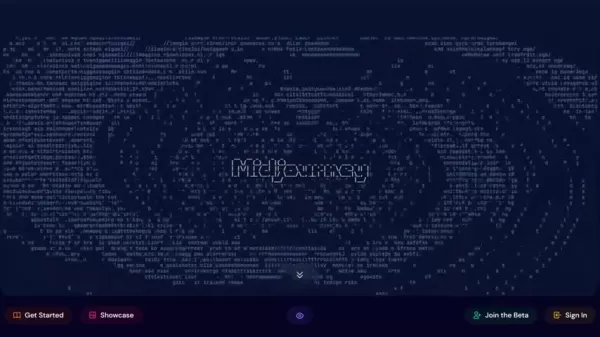
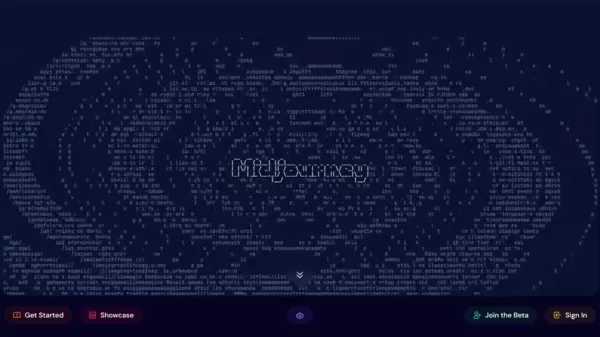
To start using Midjourney, head to their website and hit the 'Join the Beta' button. You'll need a Discord account since Midjourney operates within it. Here's how you can get set up:
- Sign up for a Discord account if you don't have one yet.
- Accept the Midjourney beta invite you receive.
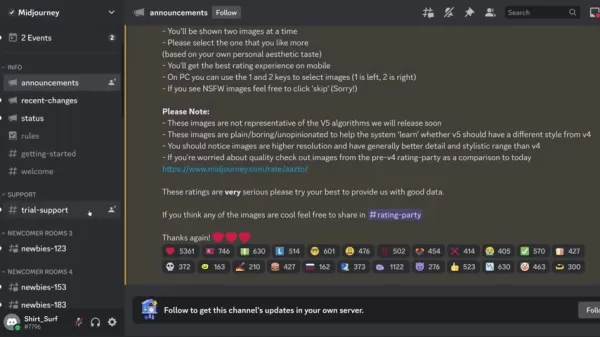
- Find the 'Newbie Rooms' on the Discord server to start experimenting and learning.
Take some time to explore the interface and see how others are using the platform. It's a great way to get inspired and understand what Midjourney can do.
Navigating Discord and Finding Your Creative Space
The 'Newbie Rooms' can get a bit hectic, so for a more focused design experience, consider setting up a private direct message with the Midjourney bot. This requires a subscription, but it gives you a clutter-free space to work. Here's how to do it:
- Go to your Discord home screen.
- Find the Midjourney Bot in the direct messages section.
- Start a conversation with the bot to create your private workspace.
Crafting Designs with Text Prompts
Using the /imagine Command
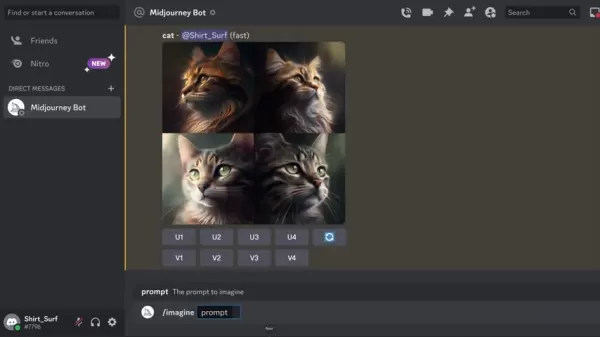
The heart of Midjourney's magic lies in the /imagine command. Here's how to use it:
- Type /imagine in the message box.
- A prompt field will pop up.
- Enter your text prompt describing the image you want to create.
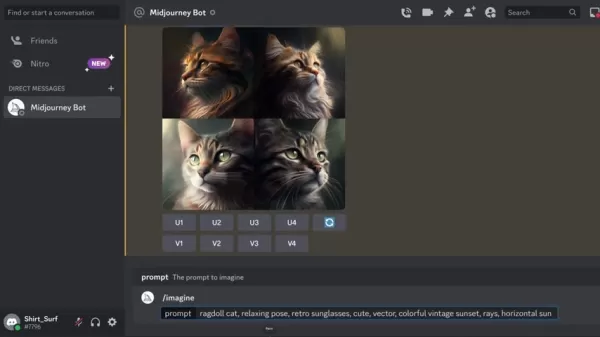
For instance, typing 'cat' will generate cat images. The more detailed your prompt, the more tailored the results will be. Midjourney can handle complex instructions with the right keywords.
Refining Your Prompts for Better Results
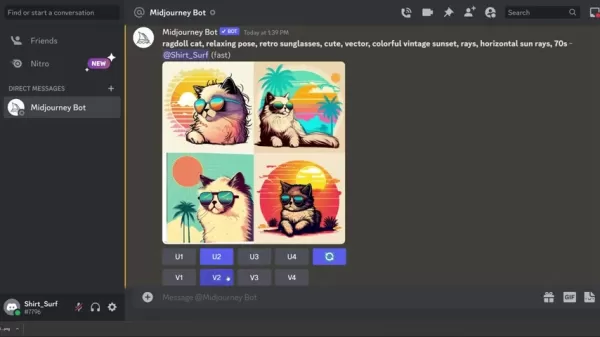
Your initial results might not perfectly match your vision, but refining your prompts can work wonders. Focus on adding details related to the object, style, composition, and atmosphere. For example, a prompt like 'ragdoll cat, relaxing pose, retro sunglasses, cute, vector, colorful vintage sunset, rays, horizontal sun rays, 70s' can yield very specific results. Experimentation is key here.
Iterating and Upscaling Your Designs
After Midjourney generates your initial images, you can refine them further. You have options to upscale the images for higher resolution or create variations of a design. Use the U and V buttons below the images to upscale or create variations, respectively. Iterating through these options helps you fine-tune your artwork until it's just right.
How to Prepare Your Designs for Print on Demand
Upscaling Image Resolution
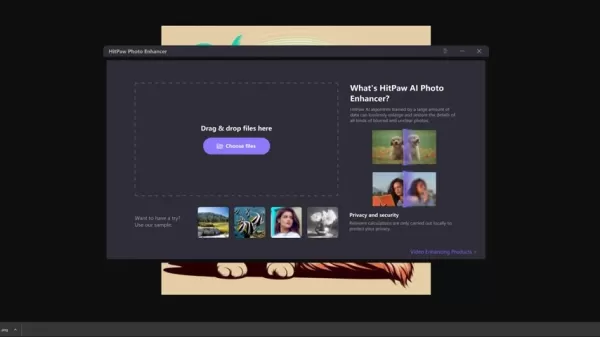
While Midjourney's upscaling feature enhances image quality, it might not be enough for high-quality printing. To ensure your designs are print-ready, use image upscaling software like HitPaw Photo Enhancer. This step is crucial for maintaining sharpness and detail on products like t-shirts or posters.
Removing the Background for a Clean Design
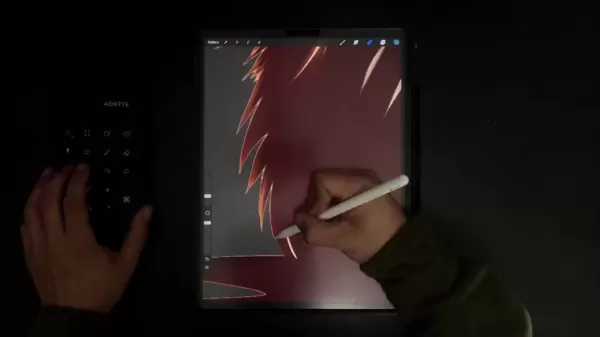
To isolate the main design element, you'll often need to remove the background. Use tools like Adobe Photoshop or an AI background removal service to achieve a clean look. For precise edge refinement, consider using Procreate on an iPad.
Midjourney Subscription Plans
Overview of Subscription Options and Usage Rights
Midjourney offers various subscription plans to fit different needs:
Plan Monthly Cost Commercial Usage Direct Messaging Basic Plan $10 Yes Yes Standard Plan $30 Yes Yes Pro Plan $60 Yes Yes
Remember, a subscription is required for commercial use of the images you generate. The free version is no longer available for trial.
Midjourney: Benefits and Drawbacks
Pros
- Streamlines the design process with AI-generated images.
- Enables quick creation of unique and custom designs.
- Supports an iterative design process through refinement and upscaling.
- Versatile for a wide range of print-on-demand applications.
Cons
- Requires a subscription for commercial use, which can be costly.
- Additional image editing is often needed for high-quality prints.
- Image quality may not match professionally edited designs.
- Subscription plans can be expensive.
Key Features of Midjourney AI
Unlocking the Power of AI-Driven Design
- Transforms text prompts into visual masterpieces.
- Seamlessly integrates with Discord for a user-friendly experience.
- Supports iterative design through refinement and upscaling.
- Offers a wide range of artistic styles and compositions.
- Provides subscription plans for commercial use of generated images.
These features make Midjourney a powerful tool for quick and efficient design creation, and it's continually evolving with new enhancements.
Midjourney Use Cases: For Print on Demand
Applications in the Print-on-Demand World
- Create eye-catching graphics for t-shirts.
- Generate unique and trendy poster designs.
- Design custom artwork for mugs, pillows, and other home decor items.
- Develop attractive and original phone case designs.
- Offer customers the ability to create personalized designs.
Leveraging Midjourney's capabilities can help expand your product catalog and appeal to a broader audience.
Frequently Asked Questions
What is Midjourney?
Midjourney is an AI platform that generates images from text prompts, ideal for creating designs for print-on-demand businesses.
Do I need to pay for Midjourney?
Yes, a subscription plan is required for commercial use of the images you generate. The free version is no longer available.
What software is used for upscaling images?
HitPaw Photo Enhancer is recommended, but there are other free and paid options available, along with manual image editing tools.
Where does Midjourney operate?
Midjourney operates within the Discord messaging app, with the website used for basic information and joining the beta.
Are there free AI photo upscale products?
Yes, there are free AI products available for upscaling photos, suitable for most print-on-demand products.
Related Questions
How can I improve my Midjourney prompts?
To enhance your prompts, experiment with detailed descriptions and keywords related to the object, style, composition, and atmosphere. The official Midjourney manual provides additional tips.
What file format should I use for print-on-demand uploads?
PNG format is recommended for print-on-demand uploads due to its support for transparency and high-quality image maintenance. Ensure your images are upscaled and backgrounds removed using editing tools like Photoshop.
Is Midjourney the only AI art generator available?
No, other AI art generators like DALL-E 2, Stable Diffusion, and Jasper Art exist, each with unique features. Midjourney is popular, but platforms like Adobe and Canva also offer AI upscaling and editing integrations.
Related article
 Swedish AI Startup Lovable Eyes $13.2 Billion Valuation After Major Funding Round
As AI-driven coding tools gain traction, Swedish startup Lovable has secured a major funding round. The company aims to raise $3 billion, potentially boosting its valuation to $13.2 billion—double the $6.6 billion recorded last December. Menlo Ventur
Google Tests Remy AI Agent for Gemini as Focus Shifts to User Control
According to Business Insider, Google is testing Remy, a new AI personal agent for Gemini. This tool aims to execute tasks on behalf of users, streamlining both professional workflows and daily routines.Currently, Remy is undergoing testing in an int
How to fix Core Web Vitals for better SEO rankings
Streamline Report Card Comments with AI ToolsIntroductionAI Tools for Generating Report Card CommentsMagic SchoolAlmanac AIChat GPTUsing Magic School to Generate Report Card CommentsLogging into Magic SchoolSelecting the Report Card Comments ToolCust
Related Special Topic Recommendations
writing
Swedish AI Startup Lovable Eyes $13.2 Billion Valuation After Major Funding Round
As AI-driven coding tools gain traction, Swedish startup Lovable has secured a major funding round. The company aims to raise $3 billion, potentially boosting its valuation to $13.2 billion—double the $6.6 billion recorded last December. Menlo Ventur
Google Tests Remy AI Agent for Gemini as Focus Shifts to User Control
According to Business Insider, Google is testing Remy, a new AI personal agent for Gemini. This tool aims to execute tasks on behalf of users, streamlining both professional workflows and daily routines.Currently, Remy is undergoing testing in an int
How to fix Core Web Vitals for better SEO rankings
Streamline Report Card Comments with AI ToolsIntroductionAI Tools for Generating Report Card CommentsMagic SchoolAlmanac AIChat GPTUsing Magic School to Generate Report Card CommentsLogging into Magic SchoolSelecting the Report Card Comments ToolCust
Related Special Topic Recommendations
writing
 Best AI Outline Generators for Long-Form SEO Articles
2026 Latest Best Top-Rated AI Outline Generators for Long-Form SEO Articles, meticulously curated by XIX.AI. These powerful tools offer game-changing assistance in creating high-quality content quickly, boosting writing efficiency significantly. Get a free vs paid comparison along with real-world tests and detailed rankings to help you find the must-try option that suits your needs. Explore now to unlock your AI edge.
 8 tools
 xix.ai
Education and Learning
AI Study Tools for Homework and Exam Prep
xix.ai
Education and Learning
AI Study Tools for Homework and Exam Prep
2026 Latest Best AI Study Tools for Homework and Exam Prep! XIX.AI curates a top-rated list of powerful, game-changing tools that help students boost productivity, streamline homework completion, and ace exams through real-world tests. Get a free vs paid comparison, detailed rankings, and must-try options to unlock your AI edge. Explore now!
10 tools
xix.ai
Music composition
AI Vocal Demo Tools for Songwriters, Hooks, Toplines, and Multilingual Draft Sessions
2026 Latest Best AI Vocal Demo Tools for Songwriters, Hook Creators, and Multi-Language Content Teams! XIX.AI has curated a top-rated list of powerful game-changing tools that go through rigorous real-world tests. You’ll find detailed free vs paid comparison data, comprehensive rankings, and must-try options to help you boost writing efficiency and unlock your creative potential. Explore now to discover your perfect tool for all your content needs!
9 tools
xix.ai
Business
Best AI Competitive Research Tools for Small Businesses
2026 Latest Best Top-rated AI Competitive Research Tools for Small Businesses! XIX.AI has curated a highly powerful game-changing collection, updated weekly with rigorous real-world tests and detailed rankings. You can find a comprehensive free vs paid comparison to help you identify the must-try tools that boost your productivity and give you a competitive edge. Explore now to discover your perfect tool!
9 tools
xix.ai
Image editing
Photoshop AI Retouch Tools for Ecommerce Apparel, Skin Cleanup, and Color Consistency
2026 Latest Best Photoshop AI retouch tools for ecommerce apparel, skin cleanup, and color consistency! This top-rated curated list features powerful game-changing solutions that help you boost writing efficiency, streamline content creation, and achieve perfect visual results effortlessly. Each tool has undergone real-world tests through weekly updated rankings, complete with free vs paid comparison details. Backed by XIX.AI, it’s the must-try guide for anyone aiming to unlock your AI edge. Explore now!
10 tools
xix.ai
Prompt
Best AI Prompt Libraries for ChatGPT Workflows
2026 Latest Best Top-Rated AI Prompt Libraries for optimizing all types of ChatGPT workflows. XIX.AI has curated a powerful, game-changing collection that goes through rigorous real-world tests to ensure top performance. You can find detailed free vs paid comparisons and expert rankings to help you choose the must-try tools that boost your productivity and unlock your AI edge. Explore now!
11 tools
xix.ai

 Comments (34)
0/500
Comments (34)
0/500
![KennethKing]()
Midjourney revoluciona o POD! Gerar imagens a partir de texto é incrível. Só não esqueça de verificar os direitos autorais antes de vender.
![MatthewScott]()
¡Midjourney cambia el juego en POD! Convertir texto en arte es increíble. Solo asegúrate de revisar los derechos de autor antes de vender.
![KennethRoberts]()
Midjourney ist ein Game-Changer für POD. Text zu Bild ist fantastisch. Aber Urheberrechte müssen geprüft werden, bevor man verkauft.
![LarryMartin]()
Midjourney는 POD 디자인에 혁신적이에요. 텍스트로 이미지를 만드는 게 정말 빠르죠. 하지만 상업적 사용 시 저작권 확인은 필수입니다.
![ThomasMitchell]()
Midjourney меняет правила игры в POD. Быстрое создание арта из текста — это круто. Но нужно проверять авторские права.
![KevinBrown]()
Midjourney révolutionne le POD ! Générer des images depuis du texte est incroyable. Attention juste aux droits d'auteur avant de vendre.
If you're diving into the world of print-on-demand, Midjourney is a game-changer. This AI platform turns your text prompts into stunning artwork, making it easier than ever for entrepreneurs and designers to create unique designs. This guide will show you how to harness Midjourney AI for crafting eye-catching designs and getting them ready for various print-on-demand platforms, which can significantly boost your sales and enhance your brand's visibility.
Key Points
- Midjourney transforms text prompts into artwork, perfect for print-on-demand businesses.
- It's best used on Discord, where you can create designs in a private setting for a smoother process.
- A subscription is necessary for commercial use of the images you generate.
- Refining your prompts is crucial for getting the best results from the AI.
- You'll need image upscaling tools to ensure your designs are print-ready.
- Image editing software can help in cleaning up designs by removing backgrounds and making other adjustments.
- Online resources and the Midjourney manual offer detailed guidance on using the platform.
- Once your designs are polished, you can upload them to your chosen print-on-demand platform.
Getting Started with Midjourney AI
What is Midjourney?
Midjourney is an AI-powered tool that lets you create unique artwork just by describing what you want. It's a lifesaver for anyone in the print-on-demand business, allowing you to prototype designs quickly and explore creative ideas without needing traditional design skills. Whether you're after specific styles, themes, or compositions, Midjourney brings your vision to life. To get started, you'll need to join the beta through their website, but the real magic happens on Discord.
Joining the Midjourney Beta
To start using Midjourney, head to their website and hit the 'Join the Beta' button. You'll need a Discord account since Midjourney operates within it. Here's how you can get set up:
- Sign up for a Discord account if you don't have one yet.
- Accept the Midjourney beta invite you receive.
- Find the 'Newbie Rooms' on the Discord server to start experimenting and learning.
Take some time to explore the interface and see how others are using the platform. It's a great way to get inspired and understand what Midjourney can do.
Navigating Discord and Finding Your Creative Space
The 'Newbie Rooms' can get a bit hectic, so for a more focused design experience, consider setting up a private direct message with the Midjourney bot. This requires a subscription, but it gives you a clutter-free space to work. Here's how to do it:
- Go to your Discord home screen.
- Find the Midjourney Bot in the direct messages section.
- Start a conversation with the bot to create your private workspace.
Crafting Designs with Text Prompts
Using the /imagine Command
The heart of Midjourney's magic lies in the /imagine command. Here's how to use it:
- Type /imagine in the message box.
- A prompt field will pop up.
- Enter your text prompt describing the image you want to create.
For instance, typing 'cat' will generate cat images. The more detailed your prompt, the more tailored the results will be. Midjourney can handle complex instructions with the right keywords.
Refining Your Prompts for Better Results
Your initial results might not perfectly match your vision, but refining your prompts can work wonders. Focus on adding details related to the object, style, composition, and atmosphere. For example, a prompt like 'ragdoll cat, relaxing pose, retro sunglasses, cute, vector, colorful vintage sunset, rays, horizontal sun rays, 70s' can yield very specific results. Experimentation is key here.
Iterating and Upscaling Your Designs
After Midjourney generates your initial images, you can refine them further. You have options to upscale the images for higher resolution or create variations of a design. Use the U and V buttons below the images to upscale or create variations, respectively. Iterating through these options helps you fine-tune your artwork until it's just right.
How to Prepare Your Designs for Print on Demand
Upscaling Image Resolution
While Midjourney's upscaling feature enhances image quality, it might not be enough for high-quality printing. To ensure your designs are print-ready, use image upscaling software like HitPaw Photo Enhancer. This step is crucial for maintaining sharpness and detail on products like t-shirts or posters.
Removing the Background for a Clean Design
To isolate the main design element, you'll often need to remove the background. Use tools like Adobe Photoshop or an AI background removal service to achieve a clean look. For precise edge refinement, consider using Procreate on an iPad.
Midjourney Subscription Plans
Overview of Subscription Options and Usage Rights
Midjourney offers various subscription plans to fit different needs:
| Plan | Monthly Cost | Commercial Usage | Direct Messaging |
|---|---|---|---|
| Basic Plan | $10 | Yes | Yes |
| Standard Plan | $30 | Yes | Yes |
| Pro Plan | $60 | Yes | Yes |
Remember, a subscription is required for commercial use of the images you generate. The free version is no longer available for trial.
Midjourney: Benefits and Drawbacks
Pros
- Streamlines the design process with AI-generated images.
- Enables quick creation of unique and custom designs.
- Supports an iterative design process through refinement and upscaling.
- Versatile for a wide range of print-on-demand applications.
Cons
- Requires a subscription for commercial use, which can be costly.
- Additional image editing is often needed for high-quality prints.
- Image quality may not match professionally edited designs.
- Subscription plans can be expensive.
Key Features of Midjourney AI
Unlocking the Power of AI-Driven Design
- Transforms text prompts into visual masterpieces.
- Seamlessly integrates with Discord for a user-friendly experience.
- Supports iterative design through refinement and upscaling.
- Offers a wide range of artistic styles and compositions.
- Provides subscription plans for commercial use of generated images.
These features make Midjourney a powerful tool for quick and efficient design creation, and it's continually evolving with new enhancements.
Midjourney Use Cases: For Print on Demand
Applications in the Print-on-Demand World
- Create eye-catching graphics for t-shirts.
- Generate unique and trendy poster designs.
- Design custom artwork for mugs, pillows, and other home decor items.
- Develop attractive and original phone case designs.
- Offer customers the ability to create personalized designs.
Leveraging Midjourney's capabilities can help expand your product catalog and appeal to a broader audience.
Frequently Asked Questions
What is Midjourney?
Midjourney is an AI platform that generates images from text prompts, ideal for creating designs for print-on-demand businesses.
Do I need to pay for Midjourney?
Yes, a subscription plan is required for commercial use of the images you generate. The free version is no longer available.
What software is used for upscaling images?
HitPaw Photo Enhancer is recommended, but there are other free and paid options available, along with manual image editing tools.
Where does Midjourney operate?
Midjourney operates within the Discord messaging app, with the website used for basic information and joining the beta.
Are there free AI photo upscale products?
Yes, there are free AI products available for upscaling photos, suitable for most print-on-demand products.
Related Questions
How can I improve my Midjourney prompts?
To enhance your prompts, experiment with detailed descriptions and keywords related to the object, style, composition, and atmosphere. The official Midjourney manual provides additional tips.
What file format should I use for print-on-demand uploads?
PNG format is recommended for print-on-demand uploads due to its support for transparency and high-quality image maintenance. Ensure your images are upscaled and backgrounds removed using editing tools like Photoshop.
Is Midjourney the only AI art generator available?
No, other AI art generators like DALL-E 2, Stable Diffusion, and Jasper Art exist, each with unique features. Midjourney is popular, but platforms like Adobe and Canva also offer AI upscaling and editing integrations.








 Swedish AI Startup Lovable Eyes $13.2 Billion Valuation After Major Funding Round
As AI-driven coding tools gain traction, Swedish startup Lovable has secured a major funding round. The company aims to raise $3 billion, potentially boosting its valuation to $13.2 billion—double the $6.6 billion recorded last December. Menlo Ventur
Google Tests Remy AI Agent for Gemini as Focus Shifts to User Control
According to Business Insider, Google is testing Remy, a new AI personal agent for Gemini. This tool aims to execute tasks on behalf of users, streamlining both professional workflows and daily routines.Currently, Remy is undergoing testing in an int
Swedish AI Startup Lovable Eyes $13.2 Billion Valuation After Major Funding Round
As AI-driven coding tools gain traction, Swedish startup Lovable has secured a major funding round. The company aims to raise $3 billion, potentially boosting its valuation to $13.2 billion—double the $6.6 billion recorded last December. Menlo Ventur
Google Tests Remy AI Agent for Gemini as Focus Shifts to User Control
According to Business Insider, Google is testing Remy, a new AI personal agent for Gemini. This tool aims to execute tasks on behalf of users, streamlining both professional workflows and daily routines.Currently, Remy is undergoing testing in an int
 How to fix Core Web Vitals for better SEO rankings
Streamline Report Card Comments with AI ToolsIntroductionAI Tools for Generating Report Card CommentsMagic SchoolAlmanac AIChat GPTUsing Magic School to Generate Report Card CommentsLogging into Magic SchoolSelecting the Report Card Comments ToolCust
How to fix Core Web Vitals for better SEO rankings
Streamline Report Card Comments with AI ToolsIntroductionAI Tools for Generating Report Card CommentsMagic SchoolAlmanac AIChat GPTUsing Magic School to Generate Report Card CommentsLogging into Magic SchoolSelecting the Report Card Comments ToolCust

2026 Latest Best Top-Rated AI Outline Generators for Long-Form SEO Articles, meticulously curated by XIX.AI. These powerful tools offer game-changing assistance in creating high-quality content quickly, boosting writing efficiency significantly. Get a free vs paid comparison along with real-world tests and detailed rankings to help you find the must-try option that suits your needs. Explore now to unlock your AI edge.
8 tools
xix.ai

2026 Latest Best AI Study Tools for Homework and Exam Prep! XIX.AI curates a top-rated list of powerful, game-changing tools that help students boost productivity, streamline homework completion, and ace exams through real-world tests. Get a free vs paid comparison, detailed rankings, and must-try options to unlock your AI edge. Explore now!
10 tools
xix.ai

2026 Latest Best AI Vocal Demo Tools for Songwriters, Hook Creators, and Multi-Language Content Teams! XIX.AI has curated a top-rated list of powerful game-changing tools that go through rigorous real-world tests. You’ll find detailed free vs paid comparison data, comprehensive rankings, and must-try options to help you boost writing efficiency and unlock your creative potential. Explore now to discover your perfect tool for all your content needs!
9 tools
xix.ai

2026 Latest Best Top-rated AI Competitive Research Tools for Small Businesses! XIX.AI has curated a highly powerful game-changing collection, updated weekly with rigorous real-world tests and detailed rankings. You can find a comprehensive free vs paid comparison to help you identify the must-try tools that boost your productivity and give you a competitive edge. Explore now to discover your perfect tool!
9 tools
xix.ai

2026 Latest Best Photoshop AI retouch tools for ecommerce apparel, skin cleanup, and color consistency! This top-rated curated list features powerful game-changing solutions that help you boost writing efficiency, streamline content creation, and achieve perfect visual results effortlessly. Each tool has undergone real-world tests through weekly updated rankings, complete with free vs paid comparison details. Backed by XIX.AI, it’s the must-try guide for anyone aiming to unlock your AI edge. Explore now!
10 tools
xix.ai

2026 Latest Best Top-Rated AI Prompt Libraries for optimizing all types of ChatGPT workflows. XIX.AI has curated a powerful, game-changing collection that goes through rigorous real-world tests to ensure top performance. You can find detailed free vs paid comparisons and expert rankings to help you choose the must-try tools that boost your productivity and unlock your AI edge. Explore now!
11 tools
xix.ai

Midjourney revoluciona o POD! Gerar imagens a partir de texto é incrível. Só não esqueça de verificar os direitos autorais antes de vender.
¡Midjourney cambia el juego en POD! Convertir texto en arte es increíble. Solo asegúrate de revisar los derechos de autor antes de vender.
Midjourney ist ein Game-Changer für POD. Text zu Bild ist fantastisch. Aber Urheberrechte müssen geprüft werden, bevor man verkauft.
Midjourney는 POD 디자인에 혁신적이에요. 텍스트로 이미지를 만드는 게 정말 빠르죠. 하지만 상업적 사용 시 저작권 확인은 필수입니다.
Midjourney меняет правила игры в POD. Быстрое создание арта из текста — это круто. Но нужно проверять авторские права.
Midjourney révolutionne le POD ! Générer des images depuis du texte est incroyable. Attention juste aux droits d'auteur avant de vendre.












