


 Home
HomeChatGPT and AI Tools Enhance Productivity Through Document Summarization
In today's fast-paced world, the ability to quickly process and summarize information is essential for staying productive. This guide explores how to use ChatGPT and PowerPoint to efficiently condense documents, presentations, and videos. By applying AI-driven methods, you can save valuable time and extract critical insights from large volumes of content, helping you stay informed and effective in your professional and academic life. Learn how to transform pages of notes into concise overviews, convert lengthy presentations into key takeaways, and distill hours of video into essential points. This step-by-step approach shows you how to boost your productivity using modern AI tools.
Key Points
Quickly summarize long documents using ChatGPT.
Turn extended presentations into actionable insights.
Condense hours of video content into brief summaries.
Generate VBA code for PowerPoint presentations with ChatGPT.
Improve PowerPoint slides using AI-powered design recommendations.
Efficiently pull key information from research papers and reports.
Use ChatGPT to develop talking points for your presentations.
Share formatted summaries via email or LinkedIn using ChatGPT's capabilities.
Transforming Information into Concise Summaries
The Power of Summarization in a Data-Rich World
Living in an age of information overload, the skill to condense and summarize large amounts of text, presentations, and videos is transformative. Whether you are a student dealing with complex academic materials, a professional reviewing market analysis, or someone trying to keep up with current affairs, effective summarization techniques are indispensable. AI tools like ChatGPT are changing the game by providing fast, precise, and adaptable summarization. By using these technologies, you can save numerous hours, reduce mental fatigue, and concentrate on high-level tasks that demand critical thinking and decision-making. This article shows you how to use ChatGPT to turn raw data into practical insights, thereby increasing productivity and improving understanding.
Summarizing Documents with ChatGPT
ChatGPT is excellent at summarizing long documents, offering a fast and effective way to pull out essential information without missing critical details. Here’s how to use ChatGPT to summarize a document:
- Access ChatGPT:
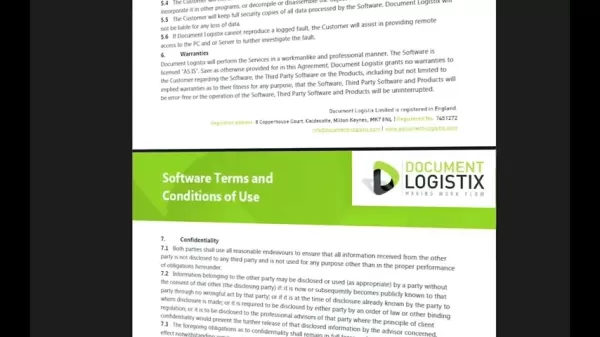
Go to the ChatGPT website.
- Enter the Prompt: Type a command such as, 'I'm going to upload a document—please summarize it for me.'
- Upload the Document:
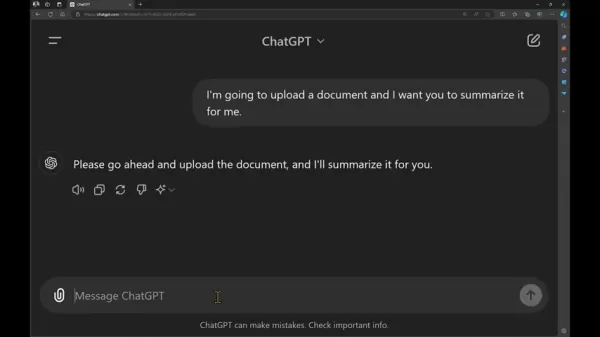
Click the attachment icon and upload your document, such as a PDF or Word file. Common examples include software terms and conditions. ChatGPT will review the document and produce a summary that highlights the main points. For instance, it can pull out the agreement's scope, liability clauses, and general terms.
- Request VBA Code for PowerPoint:
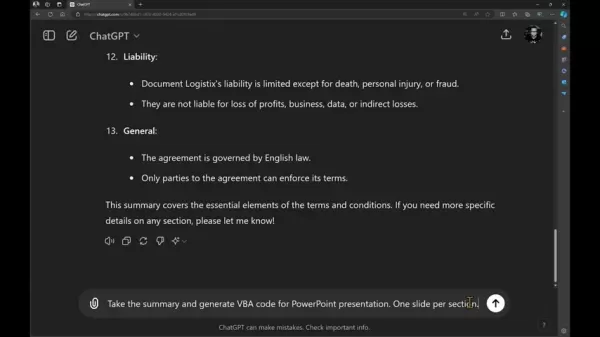
Enter a prompt to create VBA code for a PowerPoint presentation based on the summary. Type something like, 'Using this summary, generate VBA code for a PowerPoint presentation with one slide per section.'
This method helps you quickly understand the core elements of any document, saving time and boosting comprehension. Utilizing the ChatGPT tool will prove extremely useful.
Step-by-Step Guide: From Summary to Engaging PowerPoint Presentation
Generating VBA Code in ChatGPT
After ChatGPT creates a summary of your document, presentation, or video, the next step is to convert that summary into a visually attractive and informative PowerPoint presentation. This is done by generating VBA (Visual Basic for Applications) code directly in ChatGPT. This code automates the creation of a PowerPoint deck where each summary section becomes a separate slide. Follow these instructions:
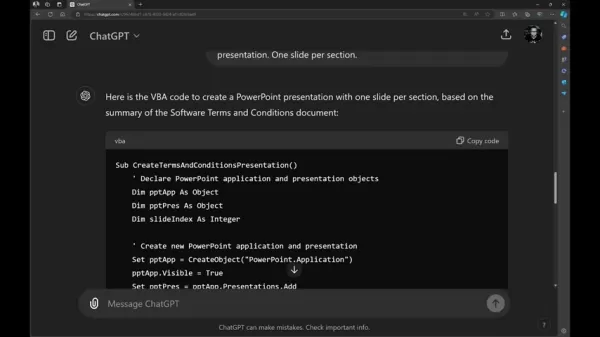
- Request VBA Code: Once ChatGPT provides the summary, enter a prompt like, 'Based on this summary, generate VBA code for a PowerPoint presentation. Use one slide per section.' This tells ChatGPT to produce the required code.
- Copy the Code: When the VBA code appears, click the 'Copy code' button to copy the full code block to your clipboard.
Importing VBA Code into PowerPoint
With the VBA code copied, you can now bring it into PowerPoint. This requires enabling the Developer tab and pasting the code into the VBA editor. Here’s the procedure:
- Enable Developer Tab:
In PowerPoint, select 'File' > 'Options' > 'Customize Ribbon'. Check the 'Developer' option in the right-hand list and click 'OK'. This adds the Developer tab to your PowerPoint ribbon.
- Open VBA Editor: Click the 'Developer' tab in the ribbon, then select 'Visual Basic'. This opens the Microsoft Visual Basic for Applications window.
- Insert a Module: In the VBA editor, choose 'Insert' > 'Module'. This creates a new module for your code.
- Paste the Code: Paste the VBA code you copied from ChatGPT into the module.
Running the VBA Code and Designing the Presentation
Once the VBA code is in PowerPoint, executing it will automatically generate slides from your summary. After the slides are created, you can use PowerPoint's Designer tool to improve the visual quality of your presentation.
- Run the Code: In the VBA editor, click the 'Run' button (or press F5). This runs the VBA code, and PowerPoint will create a new presentation with slides corresponding to each summary section.
- Use PowerPoint Designer:
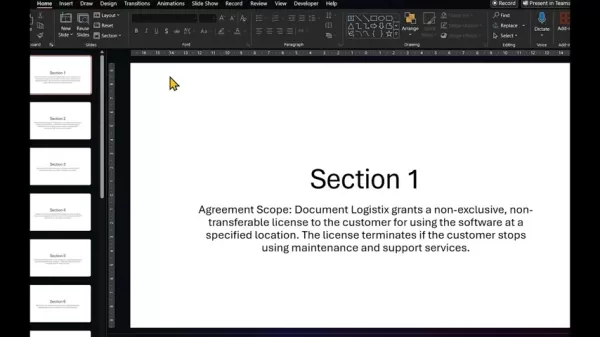
After the slides are generated, go to the 'Design' tab in PowerPoint and select 'Designer'. You will see multiple design ideas for each slide. Pick a design that suits your content and apply it across all slides for a unified appearance.
Benefits and Drawbacks of Using ChatGPT for Summarization
Pros
Saves time: Rapidly summarizes documents, presentations, and videos.
Enhances understanding: Extracts key details for better comprehension.
Boosts productivity: Automates the creation of PowerPoint slides.
Customizable summaries: Lets users adjust summaries to their specific requirements.
Cons
Risk of inaccuracies: Summaries might not always reflect the full context or subtleties of the source material.
Over-reliance on AI: Depending too much on AI tools might weaken critical thinking and analytical abilities.
Cost: Advanced features might need a paid subscription.
ChatGPT's Core Features for Efficient Summarization
Key Features of ChatGPT for Content Summarization
ChatGPT includes several core features that make it a highly useful tool for efficient content summarization. These features are designed to help users swiftly extract vital information from various documents, presentations, and videos. By applying these capabilities, you can greatly increase your productivity and understanding.
- Natural Language Processing (NLP): Fundamentally, ChatGPT uses sophisticated NLP to interpret and process human language. This allows it to accurately pinpoint the most important parts of a text, no matter how complex. NLP helps ChatGPT grasp context, nuances, and connections within the content, ensuring summaries are coherent and meaningful.
- Document Upload and Analysis: ChatGPT supports direct document uploads, making it simple to summarize PDFs, Word files, and other formats. Once uploaded, ChatGPT examines the content to determine key themes, arguments, and evidence. This feature removes the need for manual text entry, saving time and minimizing errors.
- Customizable Prompts: ChatGPT lets users customize prompts to steer the summarization process. By giving clear instructions, such as 'Summarize the main arguments' or 'Pull out the key findings,' you can shape the summary to fit your exact needs. This customization ensures the final summary is relevant and concentrates on what matters most to you.
- VBA Code Generation: ChatGPT can produce VBA code for PowerPoint presentations, automating the creation of professional-looking slides. This is especially helpful for professionals who need to present summarized information clearly and compellingly. The generated code is easy to import into PowerPoint, reducing the time and work needed for slide design.
Real-World Applications: Use Cases for AI-Powered Summarization
Use Cases for Content Summarization
AI-powered summarization tools like ChatGPT have broad applications across many industries and roles. These tools can dramatically improve productivity, enhance comprehension, and support better decision-making. Here are several practical examples:
- Academic Research: Students and researchers can use ChatGPT to quickly condense research papers, literature reviews, and academic articles. This helps them grasp core concepts and findings without reading entire texts. The tool can also assist in finding relevant sources and combining information from multiple documents.
- Legal Profession: Lawyers and paralegals can use ChatGPT to summarize legal documents, contracts, and case files. This enables them to quickly grasp key terms, conditions, and legal arguments, saving time and improving case preparation. The tool can also help identify relevant precedents and legal principles.
- Business Analysis: Business analysts and consultants can use ChatGPT to summarize market research, financial reports, and business strategies. This allows them to quickly spot major trends, opportunities, and risks, supporting data-informed decisions. The tool can also help in preparing client and stakeholder presentations and reports.
- Media Monitoring: Journalists and media professionals can use ChatGPT to summarize news stories, press releases, and social media updates. This keeps them updated on current events and helps identify emerging trends. The tool can also support the creation of news reports and articles.
- E-learning: The possibilities are endless
Frequently Asked Questions about Summarizing with ChatGPT
Can ChatGPT summarize different types of documents?
Yes, ChatGPT can summarize various document types, including PDFs, Word documents, text files, and even PowerPoint presentations. It employs natural language processing to understand the content and pull out the most critical information.
Is it possible to include timestamps in the summaries for videos?
Yes, you can ask ChatGPT to add timestamps in video summaries. This lets you quickly jump to specific segments for more detail. By using a prompt like 'Please include timestamps in the summary,' ChatGPT can create a detailed summary with timestamps that link directly to relevant parts of the video.
Can I use ChatGPT to create talking points for a presentation?
Yes, ChatGPT can convert summaries into structured talking points for presentations. This helps you stay organized and focused, ensuring you cover all essential information. You can then turn these into speaking notes with an appropriate prompt.
Related Questions
How does AI-powered summarization enhance productivity?
AI-powered summarization boosts productivity by automating the extraction of key information from large amounts of text, presentations, and videos. This saves time and reduces the mental effort of manual summarization. AI tools like ChatGPT can rapidly analyze content, identify primary themes, and generate brief summaries that let people understand the essentials without reading long documents. AI-powered summarization tools can be a great asset for your company.
What are the benefits of using ChatGPT for PowerPoint presentations?
Using ChatGPT for PowerPoint presentations provides multiple advantages, such as automated slide creation, attractive designs, and better content delivery. ChatGPT can generate VBA code that automatically builds slides from summary sections, saving time and effort in slide design. PowerPoint's Designer tool then offers various design options, making sure your presentation is visually appealing and professional. AI-driven tools can significantly improve your presentations.
Related article
 Florida sues OpenAI, Sam Altman over violent incidents
Florida’s Attorney General filed a first-of-its-kind state lawsuit against OpenAI and CEO Sam Altman on Monday, alleging the company’s ChatGPT is linked to multiple violent incidents.The complaint argues that OpenAI prioritized winning “the AI arms r
OpenAI unveils advanced voice models for more natural real-time conversations
OpenAI has launched new conversational models, GPT-Live-1 and GPT-Live-1 mini, designed to sound more natural and manage turn-taking more effectively. These full-duplex models can speak and listen simultaneously, allowing users to interrupt naturally
OpenAI unveils GPT-5.6, the newest addition to its model family
OpenAI launched its latest model family on Thursday, introducing powerful new options into an increasingly competitive AI landscape.GPT-5.6 comes in three variants: Sol (designed as the primary workhorse), Terra (a mid-range option), and Luna (the bu
Related Special Topic Recommendations
Health & Wellness
Florida sues OpenAI, Sam Altman over violent incidents
Florida’s Attorney General filed a first-of-its-kind state lawsuit against OpenAI and CEO Sam Altman on Monday, alleging the company’s ChatGPT is linked to multiple violent incidents.The complaint argues that OpenAI prioritized winning “the AI arms r
OpenAI unveils advanced voice models for more natural real-time conversations
OpenAI has launched new conversational models, GPT-Live-1 and GPT-Live-1 mini, designed to sound more natural and manage turn-taking more effectively. These full-duplex models can speak and listen simultaneously, allowing users to interrupt naturally
OpenAI unveils GPT-5.6, the newest addition to its model family
OpenAI launched its latest model family on Thursday, introducing powerful new options into an increasingly competitive AI landscape.GPT-5.6 comes in three variants: Sol (designed as the primary workhorse), Terra (a mid-range option), and Luna (the bu
Related Special Topic Recommendations
Health & Wellness
 Best AI Sleep Coaching Tools for Shift Workers, Jet Lag Recovery, and Better Routines
2026 Latest Best AI Sleep Coaching Tools for Shift Workers, Jet Lag Recovery, and Better Routines! XIX.AI has curated a top-rated list of powerful game-changing tools that go through real-world tests to deliver accurate guidance. You can find detailed free vs paid comparison info and see how these must-try solutions help boost sleep quality, speed up jet lag recovery, and build healthier routines. Explore now to discover your perfect tool!
 7 tools
 xix.ai
code
ChatGPT Debugging Tools for Python Errors, API Logs, and Stack Trace Triage
xix.ai
code
ChatGPT Debugging Tools for Python Errors, API Logs, and Stack Trace Triage
2026 Latest Best ChatGPT debugging tools for Python errors, API logs, and stack trace triage are here on XIX.AI. This curated list of top-rated solutions offers a free vs paid comparison, real-world tests, and detailed rankings to help you find the most powerful tool that can significantly boost your productivity and help you solve complex technical issues faster. Explore now to discover your perfect solution!
9 tools
xix.ai
Text-to-speech
AI Voiceover Tools for Product Demo Videos
2026 Latest Best Top-Rated AI Voiceover Tools for Product Demo Videos are here on XIX.AI! This curated list features powerful, game-changing options that help you create professional-quality audio content fast, boosting your demo efficiency significantly. We conduct real-world tests and provide a free vs paid comparison along with weekly updated rankings to help you find the perfect fit. Explore now to Unlock your AI edge!
10 tools
xix.ai
Business
AI Business Plan Tools for Startup Validation
2026 Latest Best AI Business Plan Tools for Startup Validation! XIX.AI has curated a top-rated list of powerful game-changing tools that go through real-world tests to deliver accurate results. You’ll find a free vs paid comparison, detailed rankings, and easy-to-understand insights to help you choose the perfect solution and boost your startup’s success rate. Explore now to Unlock your AI edge!
9 tools
xix.ai
chatbot
AI Chat Apps for Roleplay and Conversation Practice
2026 Latest Best AI Chat Apps for Roleplay and Conversation Practice! XIX.AI curates a top-rated list of powerful must-try tools that go through rigorous real-world tests to deliver exceptional results. You’ll find detailed free vs paid comparison, comprehensive rankings, and insights into how these apps can boost your language skills and communication confidence effectively. Explore now to discover your perfect tool for practice!
10 tools
xix.ai
design
Best AI Wireframe Tools for Product Teams
2026 Latest Best Top-rated AI Wireframe Tools for Product Teams! This curated list showcases powerful, game-changing solutions that significantly boost productivity through real-world tests and rigorous rankings. It includes a detailed free vs paid comparison to help you find the perfect fit. XIX.AI provides expert insights to guide your decision. Explore now to Discover your perfect tool and Unlock your AI edge in product development!
8 tools
xix.ai

 Comments (2)
0/500
Comments (2)
0/500
![DonaldAdams]()
這篇文章提到的AI文檔總結功能真的很實用!我每天要處理大量報告,如果能用ChatGPT快速抓重點,應該能省下不少時間。不過有時候AI會不會漏掉關鍵細節啊?畢竟有些行業術語它可能不熟悉...大家有遇到類似問題嗎?🤔
![HarperGreen]()
Perso, j'aime bien utiliser ce genre d'outils pour résumer des rapports 🔍. C'est pratique, mais je me demande toujours si on perd pas des nuances importantes avec l'IA. L'article donne des conseils concrets pour PowerPoint, ça a l'air utile pour le boulot !
In today's fast-paced world, the ability to quickly process and summarize information is essential for staying productive. This guide explores how to use ChatGPT and PowerPoint to efficiently condense documents, presentations, and videos. By applying AI-driven methods, you can save valuable time and extract critical insights from large volumes of content, helping you stay informed and effective in your professional and academic life. Learn how to transform pages of notes into concise overviews, convert lengthy presentations into key takeaways, and distill hours of video into essential points. This step-by-step approach shows you how to boost your productivity using modern AI tools.
Key Points
Quickly summarize long documents using ChatGPT.
Turn extended presentations into actionable insights.
Condense hours of video content into brief summaries.
Generate VBA code for PowerPoint presentations with ChatGPT.
Improve PowerPoint slides using AI-powered design recommendations.
Efficiently pull key information from research papers and reports.
Use ChatGPT to develop talking points for your presentations.
Share formatted summaries via email or LinkedIn using ChatGPT's capabilities.
Transforming Information into Concise Summaries
The Power of Summarization in a Data-Rich World
Living in an age of information overload, the skill to condense and summarize large amounts of text, presentations, and videos is transformative. Whether you are a student dealing with complex academic materials, a professional reviewing market analysis, or someone trying to keep up with current affairs, effective summarization techniques are indispensable. AI tools like ChatGPT are changing the game by providing fast, precise, and adaptable summarization. By using these technologies, you can save numerous hours, reduce mental fatigue, and concentrate on high-level tasks that demand critical thinking and decision-making. This article shows you how to use ChatGPT to turn raw data into practical insights, thereby increasing productivity and improving understanding.
Summarizing Documents with ChatGPT
ChatGPT is excellent at summarizing long documents, offering a fast and effective way to pull out essential information without missing critical details. Here’s how to use ChatGPT to summarize a document:
- Access ChatGPT:
Go to the ChatGPT website.
- Enter the Prompt: Type a command such as, 'I'm going to upload a document—please summarize it for me.'
- Upload the Document:
Click the attachment icon and upload your document, such as a PDF or Word file. Common examples include software terms and conditions. ChatGPT will review the document and produce a summary that highlights the main points. For instance, it can pull out the agreement's scope, liability clauses, and general terms.
- Request VBA Code for PowerPoint:
Enter a prompt to create VBA code for a PowerPoint presentation based on the summary. Type something like, 'Using this summary, generate VBA code for a PowerPoint presentation with one slide per section.'
This method helps you quickly understand the core elements of any document, saving time and boosting comprehension. Utilizing the ChatGPT tool will prove extremely useful.
Step-by-Step Guide: From Summary to Engaging PowerPoint Presentation
Generating VBA Code in ChatGPT
After ChatGPT creates a summary of your document, presentation, or video, the next step is to convert that summary into a visually attractive and informative PowerPoint presentation. This is done by generating VBA (Visual Basic for Applications) code directly in ChatGPT. This code automates the creation of a PowerPoint deck where each summary section becomes a separate slide. Follow these instructions:
- Request VBA Code: Once ChatGPT provides the summary, enter a prompt like, 'Based on this summary, generate VBA code for a PowerPoint presentation. Use one slide per section.' This tells ChatGPT to produce the required code.
- Copy the Code: When the VBA code appears, click the 'Copy code' button to copy the full code block to your clipboard.
Importing VBA Code into PowerPoint
With the VBA code copied, you can now bring it into PowerPoint. This requires enabling the Developer tab and pasting the code into the VBA editor. Here’s the procedure:
- Enable Developer Tab:
In PowerPoint, select 'File' > 'Options' > 'Customize Ribbon'. Check the 'Developer' option in the right-hand list and click 'OK'. This adds the Developer tab to your PowerPoint ribbon.
- Open VBA Editor: Click the 'Developer' tab in the ribbon, then select 'Visual Basic'. This opens the Microsoft Visual Basic for Applications window.
- Insert a Module: In the VBA editor, choose 'Insert' > 'Module'. This creates a new module for your code.
- Paste the Code: Paste the VBA code you copied from ChatGPT into the module.
Running the VBA Code and Designing the Presentation
Once the VBA code is in PowerPoint, executing it will automatically generate slides from your summary. After the slides are created, you can use PowerPoint's Designer tool to improve the visual quality of your presentation.
- Run the Code: In the VBA editor, click the 'Run' button (or press F5). This runs the VBA code, and PowerPoint will create a new presentation with slides corresponding to each summary section.
- Use PowerPoint Designer:
After the slides are generated, go to the 'Design' tab in PowerPoint and select 'Designer'. You will see multiple design ideas for each slide. Pick a design that suits your content and apply it across all slides for a unified appearance.
Benefits and Drawbacks of Using ChatGPT for Summarization
Pros
Saves time: Rapidly summarizes documents, presentations, and videos.
Enhances understanding: Extracts key details for better comprehension.
Boosts productivity: Automates the creation of PowerPoint slides.
Customizable summaries: Lets users adjust summaries to their specific requirements.
Cons
Risk of inaccuracies: Summaries might not always reflect the full context or subtleties of the source material.
Over-reliance on AI: Depending too much on AI tools might weaken critical thinking and analytical abilities.
Cost: Advanced features might need a paid subscription.
ChatGPT's Core Features for Efficient Summarization
Key Features of ChatGPT for Content Summarization
ChatGPT includes several core features that make it a highly useful tool for efficient content summarization. These features are designed to help users swiftly extract vital information from various documents, presentations, and videos. By applying these capabilities, you can greatly increase your productivity and understanding.
- Natural Language Processing (NLP): Fundamentally, ChatGPT uses sophisticated NLP to interpret and process human language. This allows it to accurately pinpoint the most important parts of a text, no matter how complex. NLP helps ChatGPT grasp context, nuances, and connections within the content, ensuring summaries are coherent and meaningful.
- Document Upload and Analysis: ChatGPT supports direct document uploads, making it simple to summarize PDFs, Word files, and other formats. Once uploaded, ChatGPT examines the content to determine key themes, arguments, and evidence. This feature removes the need for manual text entry, saving time and minimizing errors.
- Customizable Prompts: ChatGPT lets users customize prompts to steer the summarization process. By giving clear instructions, such as 'Summarize the main arguments' or 'Pull out the key findings,' you can shape the summary to fit your exact needs. This customization ensures the final summary is relevant and concentrates on what matters most to you.
- VBA Code Generation: ChatGPT can produce VBA code for PowerPoint presentations, automating the creation of professional-looking slides. This is especially helpful for professionals who need to present summarized information clearly and compellingly. The generated code is easy to import into PowerPoint, reducing the time and work needed for slide design.
Real-World Applications: Use Cases for AI-Powered Summarization
Use Cases for Content Summarization
AI-powered summarization tools like ChatGPT have broad applications across many industries and roles. These tools can dramatically improve productivity, enhance comprehension, and support better decision-making. Here are several practical examples:
- Academic Research: Students and researchers can use ChatGPT to quickly condense research papers, literature reviews, and academic articles. This helps them grasp core concepts and findings without reading entire texts. The tool can also assist in finding relevant sources and combining information from multiple documents.
- Legal Profession: Lawyers and paralegals can use ChatGPT to summarize legal documents, contracts, and case files. This enables them to quickly grasp key terms, conditions, and legal arguments, saving time and improving case preparation. The tool can also help identify relevant precedents and legal principles.
- Business Analysis: Business analysts and consultants can use ChatGPT to summarize market research, financial reports, and business strategies. This allows them to quickly spot major trends, opportunities, and risks, supporting data-informed decisions. The tool can also help in preparing client and stakeholder presentations and reports.
- Media Monitoring: Journalists and media professionals can use ChatGPT to summarize news stories, press releases, and social media updates. This keeps them updated on current events and helps identify emerging trends. The tool can also support the creation of news reports and articles.
- E-learning: The possibilities are endless
Frequently Asked Questions about Summarizing with ChatGPT
Can ChatGPT summarize different types of documents?
Yes, ChatGPT can summarize various document types, including PDFs, Word documents, text files, and even PowerPoint presentations. It employs natural language processing to understand the content and pull out the most critical information.
Is it possible to include timestamps in the summaries for videos?
Yes, you can ask ChatGPT to add timestamps in video summaries. This lets you quickly jump to specific segments for more detail. By using a prompt like 'Please include timestamps in the summary,' ChatGPT can create a detailed summary with timestamps that link directly to relevant parts of the video.
Can I use ChatGPT to create talking points for a presentation?
Yes, ChatGPT can convert summaries into structured talking points for presentations. This helps you stay organized and focused, ensuring you cover all essential information. You can then turn these into speaking notes with an appropriate prompt.
Related Questions
How does AI-powered summarization enhance productivity?
AI-powered summarization boosts productivity by automating the extraction of key information from large amounts of text, presentations, and videos. This saves time and reduces the mental effort of manual summarization. AI tools like ChatGPT can rapidly analyze content, identify primary themes, and generate brief summaries that let people understand the essentials without reading long documents. AI-powered summarization tools can be a great asset for your company.
What are the benefits of using ChatGPT for PowerPoint presentations?
Using ChatGPT for PowerPoint presentations provides multiple advantages, such as automated slide creation, attractive designs, and better content delivery. ChatGPT can generate VBA code that automatically builds slides from summary sections, saving time and effort in slide design. PowerPoint's Designer tool then offers various design options, making sure your presentation is visually appealing and professional. AI-driven tools can significantly improve your presentations.








 Florida sues OpenAI, Sam Altman over violent incidents
Florida’s Attorney General filed a first-of-its-kind state lawsuit against OpenAI and CEO Sam Altman on Monday, alleging the company’s ChatGPT is linked to multiple violent incidents.The complaint argues that OpenAI prioritized winning “the AI arms r
Florida sues OpenAI, Sam Altman over violent incidents
Florida’s Attorney General filed a first-of-its-kind state lawsuit against OpenAI and CEO Sam Altman on Monday, alleging the company’s ChatGPT is linked to multiple violent incidents.The complaint argues that OpenAI prioritized winning “the AI arms r
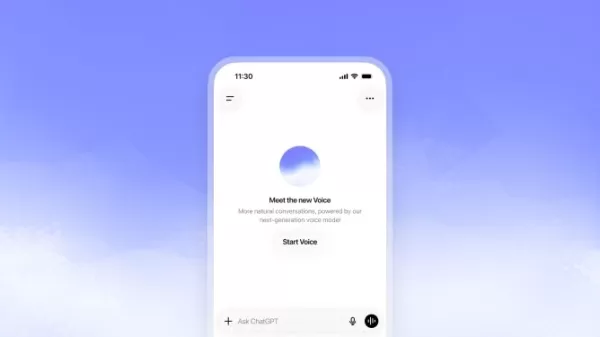 OpenAI unveils advanced voice models for more natural real-time conversations
OpenAI has launched new conversational models, GPT-Live-1 and GPT-Live-1 mini, designed to sound more natural and manage turn-taking more effectively. These full-duplex models can speak and listen simultaneously, allowing users to interrupt naturally
OpenAI unveils advanced voice models for more natural real-time conversations
OpenAI has launched new conversational models, GPT-Live-1 and GPT-Live-1 mini, designed to sound more natural and manage turn-taking more effectively. These full-duplex models can speak and listen simultaneously, allowing users to interrupt naturally
 OpenAI unveils GPT-5.6, the newest addition to its model family
OpenAI launched its latest model family on Thursday, introducing powerful new options into an increasingly competitive AI landscape.GPT-5.6 comes in three variants: Sol (designed as the primary workhorse), Terra (a mid-range option), and Luna (the bu
OpenAI unveils GPT-5.6, the newest addition to its model family
OpenAI launched its latest model family on Thursday, introducing powerful new options into an increasingly competitive AI landscape.GPT-5.6 comes in three variants: Sol (designed as the primary workhorse), Terra (a mid-range option), and Luna (the bu
2026 Latest Best AI Sleep Coaching Tools for Shift Workers, Jet Lag Recovery, and Better Routines! XIX.AI has curated a top-rated list of powerful game-changing tools that go through real-world tests to deliver accurate guidance. You can find detailed free vs paid comparison info and see how these must-try solutions help boost sleep quality, speed up jet lag recovery, and build healthier routines. Explore now to discover your perfect tool!
7 tools
xix.ai

2026 Latest Best ChatGPT debugging tools for Python errors, API logs, and stack trace triage are here on XIX.AI. This curated list of top-rated solutions offers a free vs paid comparison, real-world tests, and detailed rankings to help you find the most powerful tool that can significantly boost your productivity and help you solve complex technical issues faster. Explore now to discover your perfect solution!
9 tools
xix.ai
2026 Latest Best Top-Rated AI Voiceover Tools for Product Demo Videos are here on XIX.AI! This curated list features powerful, game-changing options that help you create professional-quality audio content fast, boosting your demo efficiency significantly. We conduct real-world tests and provide a free vs paid comparison along with weekly updated rankings to help you find the perfect fit. Explore now to Unlock your AI edge!
10 tools
xix.ai
2026 Latest Best AI Business Plan Tools for Startup Validation! XIX.AI has curated a top-rated list of powerful game-changing tools that go through real-world tests to deliver accurate results. You’ll find a free vs paid comparison, detailed rankings, and easy-to-understand insights to help you choose the perfect solution and boost your startup’s success rate. Explore now to Unlock your AI edge!
9 tools
xix.ai
2026 Latest Best AI Chat Apps for Roleplay and Conversation Practice! XIX.AI curates a top-rated list of powerful must-try tools that go through rigorous real-world tests to deliver exceptional results. You’ll find detailed free vs paid comparison, comprehensive rankings, and insights into how these apps can boost your language skills and communication confidence effectively. Explore now to discover your perfect tool for practice!
10 tools
xix.ai

2026 Latest Best Top-rated AI Wireframe Tools for Product Teams! This curated list showcases powerful, game-changing solutions that significantly boost productivity through real-world tests and rigorous rankings. It includes a detailed free vs paid comparison to help you find the perfect fit. XIX.AI provides expert insights to guide your decision. Explore now to Discover your perfect tool and Unlock your AI edge in product development!
8 tools
xix.ai

這篇文章提到的AI文檔總結功能真的很實用!我每天要處理大量報告,如果能用ChatGPT快速抓重點,應該能省下不少時間。不過有時候AI會不會漏掉關鍵細節啊?畢竟有些行業術語它可能不熟悉...大家有遇到類似問題嗎?🤔
Perso, j'aime bien utiliser ce genre d'outils pour résumer des rapports 🔍. C'est pratique, mais je me demande toujours si on perd pas des nuances importantes avec l'IA. L'article donne des conseils concrets pour PowerPoint, ça a l'air utile pour le boulot !












