


 Home
HomeAiforsheet: The AI-Powered Guide to Optimizing Microsoft Excel
In today's fast-paced business world, efficiency is everything. Manually creating complex spreadsheet formulas can consume hours of valuable time, significantly hampering productivity. Aiforsheet provides a modern solution, using artificial intelligence to simplify your work in both Excel and Google Sheets. This guide will show you how Aiforsheet can generate formulas in seconds, so you can dedicate your attention to what really counts: analyzing data and making strategic decisions.
Key Points
Aiforsheet makes creating Excel and Google Sheets formulas faster and easier.
It uses AI to effortlessly produce complex formulas.
Focus on interpreting your data, not on building formulas.
Aiforsheet is intuitive and requires no complicated setup.
It saves time and boosts overall efficiency.
Works across different platforms for a smooth workflow.
Explains how each generated formula works for better comprehension.
Introduction to Aiforsheet
What is Aiforsheet?
Aiforsheet is an AI-driven tool that makes it easy to build complex formulas in Excel and Google Sheets.

Think of it as your personal spreadsheet assistant. It understands descriptions of the calculations you need, written in plain English, and turns them into precise, working formulas. This means no more spending hours manually writing formulas, fixing mistakes, or searching through help documents. With Aiforsheet, you just describe your goal, and the AI delivers the right formula.
Aiforsheet is built for busy professionals. The platform is designed to save you time and increase productivity, allowing you to focus on growth and creating lasting value. Stop struggling with formulas and start enjoying a simpler, more intuitive way to work with spreadsheets using Aiforsheet.
Key benefits of using Aiforsheet include:
- Saving Time: Automates formula creation, freeing up valuable time for other tasks.
- Reducing Errors: Minimizes the risk of manual formula errors, ensuring data accuracy.
- Increasing Productivity: Streamlines spreadsheet workflows, boosting overall productivity.
- Enhancing Collaboration: Simplifies formula sharing and understanding among team members.
- Improving Data Analysis: Allows users to focus on interpreting data and generating insights, rather than struggling with formulas.
Why Use AI for Spreadsheet Formulas?
Traditional spreadsheet programs are powerful, but mastering their formula language takes considerable time. This can be a major hurdle for many users, especially those unfamiliar with advanced math functions and logical operators. AI transforms this process by offering a more natural way to work with your data.
AI formula generators like Aiforsheet connect everyday language with spreadsheet code. Instead of needing to recall the exact syntax for a VLOOKUP or INDEX/MATCH, you can simply state what you want to accomplish. The AI does the translation, providing the correct formula for your situation.
This method offers several key benefits:
- Accessibility: Opens up advanced spreadsheet functions to more users, no matter their technical skill level.
- Speed: Dramatically speeds up the formula creation process, cutting down the time needed to build and manage complex spreadsheets.
- Innovation: Encourages trying out new and advanced spreadsheet methods, as users aren't limited by their knowledge of formula syntax.
- Reduces mental load: Takes away the burden of memorizing or looking up complicated Excel formulas. Aiforsheet's straightforward platform helps you find the right formula fast.
Cross-Platform Compatibility and Ease of Use
Seamless Integration Across Platforms
Aiforsheet works across different systems. It recognizes the importance of a smooth workflow, offering cross-platform compatibility so your work is consistent, whether you use Microsoft Excel or Google Sheets. You can apply the same tool and methods no matter which spreadsheet software you or your team prefers, ensuring reliable results across all projects.
The tool generates formulas that work in both Excel and Google Sheets, making it easy to switch between platforms or collaborate with people using different programs.
Aiforsheet helps users
- Work seamlessly: Easily use Aiforsheet with Microsoft Excel or Google Sheets.
- Ensure consistency: Maintain the same level of efficiency across different platforms.
- Collaborate effortlessly: Work with team members regardless of their preferred spreadsheet software.
Cross-platform compatibility means your productivity isn't limited to one type of software, giving you more flexibility in your work process.
Simplicity and Intuitive Design
Aiforsheet is designed for simplicity, recognizing that complicated tools don't always lead to better results. The platform features a clean, intuitive design and requires no complex installations or configuration. Just sign in and begin improving your workflow.
Key aspects of its user-friendliness include:
- No complex installations: Start using Aiforsheet Instantly without the hassle of downloads or installations.
- Intuitive interface: Navigate the platform with ease, thanks to its straightforward and user-centric design.
- Quick optimization: Immediately begin optimizing your spreadsheet tasks, with no learning curve.
The simplicity of Aiforsheet is a major advantage, making it practical and accessible for everyone. It removes common technical barriers, letting you use AI-powered formula generation without feeling overwhelmed.
With Aiforsheet you can experience the simplicity of a tool. No complex installations or setup required - just log in and start optimizing your processes.
Step-by-Step Guide to Using Aiforsheet
Signing Up and Logging In
To begin using Aiforsheet, first create an account.

Go to the Aiforsheet website and select the "Get Started" or "Sign Up" option. You will need to provide your name, email address, and create a password. After filling out the required fields, accept the Terms of Service and Privacy Policy, and then click "Register."
If you already have an account, just click "Log In" and enter your registered email and password to access the platform.
Step-by-step Guide:
- Go to the Aiforsheet website.
- Click on "Sign up".
- Fill in the registration form with your details (Name, Email, Password, Confirm Password).
- Agree to the Terms of Service and Privacy Policy.
- Click the "Register" button.
- To log in, enter your registered email and password.
- Click the "Sign In" button.
Generating Formulas with AI
After logging in, you can start creating formulas with Aiforsheet's AI.
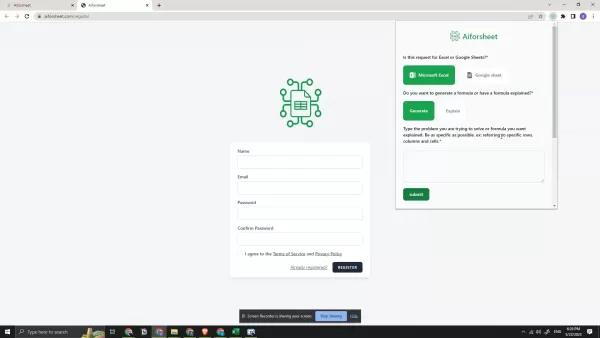
Here's how:
- Select Your Spreadsheet Software: Choose whether you're working with Microsoft Excel or Google Sheets.
- Choose Generation or Explanation: Select "Generate" if you want Aiforsheet to create a formula for you, or "Explain" if you want to understand an existing formula.
- Describe Your Problem: In the text box, type a clear and concise description of the calculation you want to perform. Be as specific as possible, referencing specific rows, columns, and cells.
- Submit Your Request: Click the "Submit" button. Aiforsheet will process your request and generate the formula.
- Review the Results: The generated formula will be displayed in the "Output" box. Review it carefully to ensure it meets your needs.
- Copy the Formula: Click the "Copy" button to copy the formula to your clipboard. You can then paste it into your Excel or Google Sheets spreadsheet.
Example:
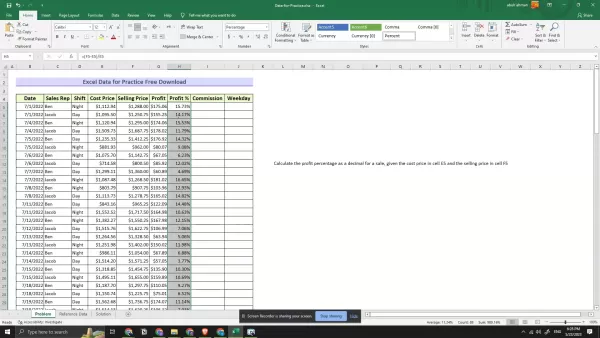
Let's say you want to calculate the profit percentage for a sale, given the cost price in cell E5 and the selling price in cell F5. You would type the following description into the text box:
Calculate the profit percentage as a decimal for a sale, given the cost price in cell E5 and the selling price in cell F5.
When you submit this request, Aiforsheet will generate the following formula:
=(F5-E5)/E5
Tips for Effective Formula Generation:
- Be Specific: The more specific you are in your description, the more accurate the generated formula will be.
- Use Cell References: Refer to specific cells and ranges in your description to provide context for the AI.
- Break Down Complex Problems: If you're struggling to describe a complex calculation in one sentence, break it down into smaller, more manageable steps.
- Use the Explanation Feature: To understand an existing formula better, use the “Explain” option.
- Combine with Copy and Paste: Easily copy the generated formula with the “Copy” button and paste it into your spreadsheet.
Copying the output
Aiforsheet has a Copy button which can be used to directly copy the output generated to use in excel or google sheets. To copy the formula or the explanation of the formula , click the copy button and it will be copied to your clipboard.
Logging out
Once you are done using Aiforsheet, it is ideal to logout of the website. To logout , click on the Logout button. If you don't log out, then it might be a potential security risk to your account.
Aiforsheet Pricing
Free requests
Aiforsheet allows users to generate a limited number of free requests.
Based on the request history, the user has used 5/10 free requests. To continue using the platform, users need to subscribe to a premium plan.
Advantages and Disadvantages of Using Aiforsheet
Pros
Uses AI to simplify creating Excel formulas.
Cuts down time spent writing formulas by hand.
Works across different platforms.
Explains how formulas work.
Easy-to-use interface.
Cons
May require a paid subscription for unlimited access.
Accuracy depends on how clearly you describe your needs.
Might not handle every highly specialized or unique formula requirement.
Core Features of Aiforsheet
AI-Powered Formula Generation
Aiforsheet's main feature is its AI-powered formula generator. This lets users describe the calculations they need in everyday language, and the AI creates the matching Excel or Google Sheets formula. This feature greatly reduces the time and effort needed to build complex formulas manually.
Formula Explanation
Aiforsheet can also break down existing formulas into plain English. This is incredibly useful for understanding complicated formulas you might get from coworkers or find online. The explanation feature deconstructs the formula, clarifying the purpose and logic of each part.
Cross-Platform Compatibility
Aiforsheet is compatible with both Microsoft Excel and Google Sheets, so you can use it no matter which spreadsheet program you prefer. This cross-platform support makes collaboration with colleagues using different software straightforward.
User-Friendly Interface
Aiforsheet features a clean and intuitive interface that is easy for anyone to use, regardless of their skill level. The platform requires no complicated installation or setup, so you can start improving your spreadsheet tasks right away.
Use Cases for Aiforsheet
Financial Modeling
Aiforsheet can create complex financial formulas for tasks like calculating loan payments, projecting future revenue, and analyzing investment returns. By describing the calculation in simple terms, users can quickly get the formulas they need without being finance experts.
Data Analysis
Aiforsheet simplifies data analysis by generating formulas for calculating averages, standard deviations, and correlations. This lets users quickly gain insights from their data without spending hours manually constructing formulas.
Reporting
Aiforsheet can automate report creation by producing formulas for summarizing data, calculating percentages, and building charts. This saves significant time, allowing users to concentrate on interpreting results and making data-driven decisions.
Sales and Marketing
Aiforsheet can be used in sales and marketing to develop formulas for figuring out sales commissions, monitoring marketing campaign success, and analyzing customer information. The platform's AI-driven method makes these complex tasks simpler, helping to refine sales tactics and marketing efforts.
Frequently Asked Questions About Aiforsheet
Is Aiforsheet difficult to learn and use?
No, Aiforsheet has a user-friendly interface that makes it easy to learn and use, even for users with limited spreadsheet experience. The platform requires no complex installations or setup, allowing you to start generating formulas immediately.
Can Aiforsheet handle complex formulas?
Yes, Aiforsheet is designed to handle complex formulas. The AI-powered engine can understand natural language descriptions of your desired calculations and translate them into accurate and functional formulas, even for advanced spreadsheet techniques.
Does Aiforsheet work with both Excel and Google Sheets?
Yes, Aiforsheet is cross-platform compatible and works with both Microsoft Excel and Google Sheets. This ensures that you can use the tool regardless of your preferred spreadsheet software.
What if the generated formula is not exactly what I need?
Aiforsheet's generated formulas are a great starting point. You can easily modify the output by describing the problem you are trying to solve with greater clarity.
How does the 'Explain' feature work?
The 'Explain' feature breaks down complex formulas into component parts, making it easier to understand the logic and purpose of each element. This is useful for understanding formulas from colleagues or found online.
Related Questions
How do I calculate the compound annual growth rate (CAGR) in Excel?
Calculating the Compound Annual Growth Rate (CAGR) in Excel is a common task in financial analysis. CAGR represents the average annual growth rate of an investment over a specified period, assuming profits are reinvested during the term of the investment. Here’s how to calculate it:Gather Your Data: Collect the beginning value and the ending value of the investment, along with the number of years in the period.Use the Formula: The CAGR formula is:CAGR = (Ending Value / Beginning Value)^(1 / Number of Years) - 1Input the Formula in Excel:Open Excel and enter the beginning value in cell A1, the ending value in cell B1, and the number of years in cell C1.In another cell (e.g., D1), enter the following formula:=(B1/A1)^(1/C1)-1Press Enter to calculate the CAGR.Format as Percentage:Select the cell containing the CAGR (D1 in our example).Click on the “Percentage” button in the “Number” group on the “Home” tab.Adjust the decimal places as needed.Example:Suppose you invested $10,000 at the beginning of 2020 (A1 = 10000) and the investment was worth $16,105.10 at the end of 2024 (B1 = 16105.10). The investment period is 5 years (C1 = 5). The formula in Excel would be:=(16105.10/10000)^(1/5)-1The calculated CAGR would be approximately 0.10, or 10% per year.Explanation:B1/A1 calculates the total return over the entire period.^(1/C1) raises the total return to the power of 1/Number of Years, which annualizes the return.-1 subtracts 1 from the annualized return to express the result as a growth rate rather than a total factor.Tips for Accuracy:Ensure that the values for the beginning and ending values are accurate.Double-check the number of years to avoid calculation errors.Adjust the decimal places to provide a clear and meaningful result.By following these steps, you can easily calculate CAGR in Excel, providing a useful metric for evaluating investment performance.
Related article
 U.S. Stocks Hit Historic Milestone as AI and Aerospace Giants Prepare for Trillion-Dollar Debut
Elon Musk, Sam Altman, and Dario Amodei, three titans of the technology sector, are advancing toward initial public offerings for their respective ventures. With SpaceX, OpenAI, and Anthropic—three industry behemoths nearing trillion-dollar valuation
Swedish AI Startup Lovable Eyes $13.2 Billion Valuation After Major Funding Round
As AI-driven coding tools gain traction, Swedish startup Lovable has secured a major funding round. The company aims to raise $3 billion, potentially boosting its valuation to $13.2 billion—double the $6.6 billion recorded last December. Menlo Ventur
Google Tests Remy AI Agent for Gemini as Focus Shifts to User Control
According to Business Insider, Google is testing Remy, a new AI personal agent for Gemini. This tool aims to execute tasks on behalf of users, streamlining both professional workflows and daily routines.Currently, Remy is undergoing testing in an int
Related Special Topic Recommendations
SEO
U.S. Stocks Hit Historic Milestone as AI and Aerospace Giants Prepare for Trillion-Dollar Debut
Elon Musk, Sam Altman, and Dario Amodei, three titans of the technology sector, are advancing toward initial public offerings for their respective ventures. With SpaceX, OpenAI, and Anthropic—three industry behemoths nearing trillion-dollar valuation
Swedish AI Startup Lovable Eyes $13.2 Billion Valuation After Major Funding Round
As AI-driven coding tools gain traction, Swedish startup Lovable has secured a major funding round. The company aims to raise $3 billion, potentially boosting its valuation to $13.2 billion—double the $6.6 billion recorded last December. Menlo Ventur
Google Tests Remy AI Agent for Gemini as Focus Shifts to User Control
According to Business Insider, Google is testing Remy, a new AI personal agent for Gemini. This tool aims to execute tasks on behalf of users, streamlining both professional workflows and daily routines.Currently, Remy is undergoing testing in an int
Related Special Topic Recommendations
SEO
 Best AI SERP Analysis Tools for Search Strategy
2026 Latest Best Top-rated AI SERP Analysis Tools for Search Strategy are curated by XIX.AI through rigorous real-world tests and weekly updated rankings. These powerful tools help you unlock hidden optimization opportunities, boost content performance, and gain a competitive edge in search. Discover your perfect tool to elevate your search strategy today. Explore now!
 13 tools
 xix.ai
Data Analysis
Best AI Anomaly Detection Tools for KPI Monitoring across SaaS and Ecommerce Teams
xix.ai
Data Analysis
Best AI Anomaly Detection Tools for KPI Monitoring across SaaS and Ecommerce Teams
2026 Latest Best Top-rated AI Anomaly Detection Tools for KPI Monitoring in SaaS and Ecommerce teams! XIX.AI has curated a powerful, game-changing collection based on rigorous real-world tests and weekly updated rankings. You’ll find detailed free vs paid comparison insights to help you identify the must-try solution that boosts productivity and unlocks your AI edge. Explore now!
10 tools
xix.ai
writing
Best AI Outline Generators for Long-Form SEO Articles
2026 Latest Best Top-Rated AI Outline Generators for Long-Form SEO Articles, meticulously curated by XIX.AI. These powerful tools offer game-changing assistance in creating high-quality content quickly, boosting writing efficiency significantly. Get a free vs paid comparison along with real-world tests and detailed rankings to help you find the must-try option that suits your needs. Explore now to unlock your AI edge.
8 tools
xix.ai
Education and Learning
AI Study Tools for Homework and Exam Prep
2026 Latest Best AI Study Tools for Homework and Exam Prep! XIX.AI curates a top-rated list of powerful, game-changing tools that help students boost productivity, streamline homework completion, and ace exams through real-world tests. Get a free vs paid comparison, detailed rankings, and must-try options to unlock your AI edge. Explore now!
10 tools
xix.ai
Music composition
AI Vocal Demo Tools for Songwriters, Hooks, Toplines, and Multilingual Draft Sessions
2026 Latest Best AI Vocal Demo Tools for Songwriters, Hook Creators, and Multi-Language Content Teams! XIX.AI has curated a top-rated list of powerful game-changing tools that go through rigorous real-world tests. You’ll find detailed free vs paid comparison data, comprehensive rankings, and must-try options to help you boost writing efficiency and unlock your creative potential. Explore now to discover your perfect tool for all your content needs!
9 tools
xix.ai
Business
Best AI Competitive Research Tools for Small Businesses
2026 Latest Best Top-rated AI Competitive Research Tools for Small Businesses! XIX.AI has curated a highly powerful game-changing collection, updated weekly with rigorous real-world tests and detailed rankings. You can find a comprehensive free vs paid comparison to help you identify the must-try tools that boost your productivity and give you a competitive edge. Explore now to discover your perfect tool!
9 tools
xix.ai

 Comments (1)
0/500
Comments (1)
0/500
![RoyLopez]()
엑셀에서 AI 도움을 받을 수 있다니요! 오늘도 VLOOKUP 때문에 골머리 앓는데, 정말 필요한 기능 같네요😂 기술 발전 덕분에 우리 같은 직장인의 삶이 점점 편해지는 것 같아서 기뻐요. 근데 이런 AI 도구가 너무 발전하면, 데이터 분석가 같은 직업은 점점 줄어들지 않을까 걱정도 되네요.
In today's fast-paced business world, efficiency is everything. Manually creating complex spreadsheet formulas can consume hours of valuable time, significantly hampering productivity. Aiforsheet provides a modern solution, using artificial intelligence to simplify your work in both Excel and Google Sheets. This guide will show you how Aiforsheet can generate formulas in seconds, so you can dedicate your attention to what really counts: analyzing data and making strategic decisions.
Key Points
Aiforsheet makes creating Excel and Google Sheets formulas faster and easier.
It uses AI to effortlessly produce complex formulas.
Focus on interpreting your data, not on building formulas.
Aiforsheet is intuitive and requires no complicated setup.
It saves time and boosts overall efficiency.
Works across different platforms for a smooth workflow.
Explains how each generated formula works for better comprehension.
Introduction to Aiforsheet
What is Aiforsheet?
Aiforsheet is an AI-driven tool that makes it easy to build complex formulas in Excel and Google Sheets.
Think of it as your personal spreadsheet assistant. It understands descriptions of the calculations you need, written in plain English, and turns them into precise, working formulas. This means no more spending hours manually writing formulas, fixing mistakes, or searching through help documents. With Aiforsheet, you just describe your goal, and the AI delivers the right formula.
Aiforsheet is built for busy professionals. The platform is designed to save you time and increase productivity, allowing you to focus on growth and creating lasting value. Stop struggling with formulas and start enjoying a simpler, more intuitive way to work with spreadsheets using Aiforsheet.
Key benefits of using Aiforsheet include:
- Saving Time: Automates formula creation, freeing up valuable time for other tasks.
- Reducing Errors: Minimizes the risk of manual formula errors, ensuring data accuracy.
- Increasing Productivity: Streamlines spreadsheet workflows, boosting overall productivity.
- Enhancing Collaboration: Simplifies formula sharing and understanding among team members.
- Improving Data Analysis: Allows users to focus on interpreting data and generating insights, rather than struggling with formulas.
Why Use AI for Spreadsheet Formulas?
Traditional spreadsheet programs are powerful, but mastering their formula language takes considerable time. This can be a major hurdle for many users, especially those unfamiliar with advanced math functions and logical operators. AI transforms this process by offering a more natural way to work with your data.
AI formula generators like Aiforsheet connect everyday language with spreadsheet code. Instead of needing to recall the exact syntax for a VLOOKUP or INDEX/MATCH, you can simply state what you want to accomplish. The AI does the translation, providing the correct formula for your situation.
This method offers several key benefits:
- Accessibility: Opens up advanced spreadsheet functions to more users, no matter their technical skill level.
- Speed: Dramatically speeds up the formula creation process, cutting down the time needed to build and manage complex spreadsheets.
- Innovation: Encourages trying out new and advanced spreadsheet methods, as users aren't limited by their knowledge of formula syntax.
- Reduces mental load: Takes away the burden of memorizing or looking up complicated Excel formulas. Aiforsheet's straightforward platform helps you find the right formula fast.
Cross-Platform Compatibility and Ease of Use
Seamless Integration Across Platforms
Aiforsheet works across different systems. It recognizes the importance of a smooth workflow, offering cross-platform compatibility so your work is consistent, whether you use Microsoft Excel or Google Sheets. You can apply the same tool and methods no matter which spreadsheet software you or your team prefers, ensuring reliable results across all projects.
The tool generates formulas that work in both Excel and Google Sheets, making it easy to switch between platforms or collaborate with people using different programs.
Aiforsheet helps users
- Work seamlessly: Easily use Aiforsheet with Microsoft Excel or Google Sheets.
- Ensure consistency: Maintain the same level of efficiency across different platforms.
- Collaborate effortlessly: Work with team members regardless of their preferred spreadsheet software.
Cross-platform compatibility means your productivity isn't limited to one type of software, giving you more flexibility in your work process.
Simplicity and Intuitive Design
Aiforsheet is designed for simplicity, recognizing that complicated tools don't always lead to better results. The platform features a clean, intuitive design and requires no complex installations or configuration. Just sign in and begin improving your workflow.
Key aspects of its user-friendliness include:
- No complex installations: Start using Aiforsheet Instantly without the hassle of downloads or installations.
- Intuitive interface: Navigate the platform with ease, thanks to its straightforward and user-centric design.
- Quick optimization: Immediately begin optimizing your spreadsheet tasks, with no learning curve.
The simplicity of Aiforsheet is a major advantage, making it practical and accessible for everyone. It removes common technical barriers, letting you use AI-powered formula generation without feeling overwhelmed.
With Aiforsheet you can experience the simplicity of a tool. No complex installations or setup required - just log in and start optimizing your processes.
Step-by-Step Guide to Using Aiforsheet
Signing Up and Logging In
To begin using Aiforsheet, first create an account.
Go to the Aiforsheet website and select the "Get Started" or "Sign Up" option. You will need to provide your name, email address, and create a password. After filling out the required fields, accept the Terms of Service and Privacy Policy, and then click "Register."
If you already have an account, just click "Log In" and enter your registered email and password to access the platform.
Step-by-step Guide:
- Go to the Aiforsheet website.
- Click on "Sign up".
- Fill in the registration form with your details (Name, Email, Password, Confirm Password).
- Agree to the Terms of Service and Privacy Policy.
- Click the "Register" button.
- To log in, enter your registered email and password.
- Click the "Sign In" button.
Generating Formulas with AI
After logging in, you can start creating formulas with Aiforsheet's AI.
Here's how:
- Select Your Spreadsheet Software: Choose whether you're working with Microsoft Excel or Google Sheets.
- Choose Generation or Explanation: Select "Generate" if you want Aiforsheet to create a formula for you, or "Explain" if you want to understand an existing formula.
- Describe Your Problem: In the text box, type a clear and concise description of the calculation you want to perform. Be as specific as possible, referencing specific rows, columns, and cells.
- Submit Your Request: Click the "Submit" button. Aiforsheet will process your request and generate the formula.
- Review the Results: The generated formula will be displayed in the "Output" box. Review it carefully to ensure it meets your needs.
- Copy the Formula: Click the "Copy" button to copy the formula to your clipboard. You can then paste it into your Excel or Google Sheets spreadsheet.
Example:
Let's say you want to calculate the profit percentage for a sale, given the cost price in cell E5 and the selling price in cell F5. You would type the following description into the text box:
Calculate the profit percentage as a decimal for a sale, given the cost price in cell E5 and the selling price in cell F5.
When you submit this request, Aiforsheet will generate the following formula:
=(F5-E5)/E5
Tips for Effective Formula Generation:
- Be Specific: The more specific you are in your description, the more accurate the generated formula will be.
- Use Cell References: Refer to specific cells and ranges in your description to provide context for the AI.
- Break Down Complex Problems: If you're struggling to describe a complex calculation in one sentence, break it down into smaller, more manageable steps.
- Use the Explanation Feature: To understand an existing formula better, use the “Explain” option.
- Combine with Copy and Paste: Easily copy the generated formula with the “Copy” button and paste it into your spreadsheet.
Copying the output
Aiforsheet has a Copy button which can be used to directly copy the output generated to use in excel or google sheets. To copy the formula or the explanation of the formula , click the copy button and it will be copied to your clipboard.
Logging out
Once you are done using Aiforsheet, it is ideal to logout of the website. To logout , click on the Logout button. If you don't log out, then it might be a potential security risk to your account.
Aiforsheet Pricing
Free requests
Aiforsheet allows users to generate a limited number of free requests.
Based on the request history, the user has used 5/10 free requests. To continue using the platform, users need to subscribe to a premium plan.
Advantages and Disadvantages of Using Aiforsheet
Pros
Uses AI to simplify creating Excel formulas.
Cuts down time spent writing formulas by hand.
Works across different platforms.
Explains how formulas work.
Easy-to-use interface.
Cons
May require a paid subscription for unlimited access.
Accuracy depends on how clearly you describe your needs.
Might not handle every highly specialized or unique formula requirement.
Core Features of Aiforsheet
AI-Powered Formula Generation
Aiforsheet's main feature is its AI-powered formula generator. This lets users describe the calculations they need in everyday language, and the AI creates the matching Excel or Google Sheets formula. This feature greatly reduces the time and effort needed to build complex formulas manually.
Formula Explanation
Aiforsheet can also break down existing formulas into plain English. This is incredibly useful for understanding complicated formulas you might get from coworkers or find online. The explanation feature deconstructs the formula, clarifying the purpose and logic of each part.
Cross-Platform Compatibility
Aiforsheet is compatible with both Microsoft Excel and Google Sheets, so you can use it no matter which spreadsheet program you prefer. This cross-platform support makes collaboration with colleagues using different software straightforward.
User-Friendly Interface
Aiforsheet features a clean and intuitive interface that is easy for anyone to use, regardless of their skill level. The platform requires no complicated installation or setup, so you can start improving your spreadsheet tasks right away.
Use Cases for Aiforsheet
Financial Modeling
Aiforsheet can create complex financial formulas for tasks like calculating loan payments, projecting future revenue, and analyzing investment returns. By describing the calculation in simple terms, users can quickly get the formulas they need without being finance experts.
Data Analysis
Aiforsheet simplifies data analysis by generating formulas for calculating averages, standard deviations, and correlations. This lets users quickly gain insights from their data without spending hours manually constructing formulas.
Reporting
Aiforsheet can automate report creation by producing formulas for summarizing data, calculating percentages, and building charts. This saves significant time, allowing users to concentrate on interpreting results and making data-driven decisions.
Sales and Marketing
Aiforsheet can be used in sales and marketing to develop formulas for figuring out sales commissions, monitoring marketing campaign success, and analyzing customer information. The platform's AI-driven method makes these complex tasks simpler, helping to refine sales tactics and marketing efforts.
Frequently Asked Questions About Aiforsheet
Is Aiforsheet difficult to learn and use?
No, Aiforsheet has a user-friendly interface that makes it easy to learn and use, even for users with limited spreadsheet experience. The platform requires no complex installations or setup, allowing you to start generating formulas immediately.
Can Aiforsheet handle complex formulas?
Yes, Aiforsheet is designed to handle complex formulas. The AI-powered engine can understand natural language descriptions of your desired calculations and translate them into accurate and functional formulas, even for advanced spreadsheet techniques.
Does Aiforsheet work with both Excel and Google Sheets?
Yes, Aiforsheet is cross-platform compatible and works with both Microsoft Excel and Google Sheets. This ensures that you can use the tool regardless of your preferred spreadsheet software.
What if the generated formula is not exactly what I need?
Aiforsheet's generated formulas are a great starting point. You can easily modify the output by describing the problem you are trying to solve with greater clarity.
How does the 'Explain' feature work?
The 'Explain' feature breaks down complex formulas into component parts, making it easier to understand the logic and purpose of each element. This is useful for understanding formulas from colleagues or found online.
Related Questions
How do I calculate the compound annual growth rate (CAGR) in Excel?
Calculating the Compound Annual Growth Rate (CAGR) in Excel is a common task in financial analysis. CAGR represents the average annual growth rate of an investment over a specified period, assuming profits are reinvested during the term of the investment. Here’s how to calculate it:Gather Your Data: Collect the beginning value and the ending value of the investment, along with the number of years in the period.Use the Formula: The CAGR formula is:CAGR = (Ending Value / Beginning Value)^(1 / Number of Years) - 1Input the Formula in Excel:Open Excel and enter the beginning value in cell A1, the ending value in cell B1, and the number of years in cell C1.In another cell (e.g., D1), enter the following formula:=(B1/A1)^(1/C1)-1Press Enter to calculate the CAGR.Format as Percentage:Select the cell containing the CAGR (D1 in our example).Click on the “Percentage” button in the “Number” group on the “Home” tab.Adjust the decimal places as needed.Example:Suppose you invested $10,000 at the beginning of 2020 (A1 = 10000) and the investment was worth $16,105.10 at the end of 2024 (B1 = 16105.10). The investment period is 5 years (C1 = 5). The formula in Excel would be:=(16105.10/10000)^(1/5)-1The calculated CAGR would be approximately 0.10, or 10% per year.Explanation:B1/A1 calculates the total return over the entire period.^(1/C1) raises the total return to the power of 1/Number of Years, which annualizes the return.-1 subtracts 1 from the annualized return to express the result as a growth rate rather than a total factor.Tips for Accuracy:Ensure that the values for the beginning and ending values are accurate.Double-check the number of years to avoid calculation errors.Adjust the decimal places to provide a clear and meaningful result.By following these steps, you can easily calculate CAGR in Excel, providing a useful metric for evaluating investment performance.








 U.S. Stocks Hit Historic Milestone as AI and Aerospace Giants Prepare for Trillion-Dollar Debut
Elon Musk, Sam Altman, and Dario Amodei, three titans of the technology sector, are advancing toward initial public offerings for their respective ventures. With SpaceX, OpenAI, and Anthropic—three industry behemoths nearing trillion-dollar valuation
U.S. Stocks Hit Historic Milestone as AI and Aerospace Giants Prepare for Trillion-Dollar Debut
Elon Musk, Sam Altman, and Dario Amodei, three titans of the technology sector, are advancing toward initial public offerings for their respective ventures. With SpaceX, OpenAI, and Anthropic—three industry behemoths nearing trillion-dollar valuation
 Swedish AI Startup Lovable Eyes $13.2 Billion Valuation After Major Funding Round
As AI-driven coding tools gain traction, Swedish startup Lovable has secured a major funding round. The company aims to raise $3 billion, potentially boosting its valuation to $13.2 billion—double the $6.6 billion recorded last December. Menlo Ventur
Google Tests Remy AI Agent for Gemini as Focus Shifts to User Control
According to Business Insider, Google is testing Remy, a new AI personal agent for Gemini. This tool aims to execute tasks on behalf of users, streamlining both professional workflows and daily routines.Currently, Remy is undergoing testing in an int
Swedish AI Startup Lovable Eyes $13.2 Billion Valuation After Major Funding Round
As AI-driven coding tools gain traction, Swedish startup Lovable has secured a major funding round. The company aims to raise $3 billion, potentially boosting its valuation to $13.2 billion—double the $6.6 billion recorded last December. Menlo Ventur
Google Tests Remy AI Agent for Gemini as Focus Shifts to User Control
According to Business Insider, Google is testing Remy, a new AI personal agent for Gemini. This tool aims to execute tasks on behalf of users, streamlining both professional workflows and daily routines.Currently, Remy is undergoing testing in an int

2026 Latest Best Top-rated AI SERP Analysis Tools for Search Strategy are curated by XIX.AI through rigorous real-world tests and weekly updated rankings. These powerful tools help you unlock hidden optimization opportunities, boost content performance, and gain a competitive edge in search. Discover your perfect tool to elevate your search strategy today. Explore now!
13 tools
xix.ai

2026 Latest Best Top-rated AI Anomaly Detection Tools for KPI Monitoring in SaaS and Ecommerce teams! XIX.AI has curated a powerful, game-changing collection based on rigorous real-world tests and weekly updated rankings. You’ll find detailed free vs paid comparison insights to help you identify the must-try solution that boosts productivity and unlocks your AI edge. Explore now!
10 tools
xix.ai

2026 Latest Best Top-Rated AI Outline Generators for Long-Form SEO Articles, meticulously curated by XIX.AI. These powerful tools offer game-changing assistance in creating high-quality content quickly, boosting writing efficiency significantly. Get a free vs paid comparison along with real-world tests and detailed rankings to help you find the must-try option that suits your needs. Explore now to unlock your AI edge.
8 tools
xix.ai

2026 Latest Best AI Study Tools for Homework and Exam Prep! XIX.AI curates a top-rated list of powerful, game-changing tools that help students boost productivity, streamline homework completion, and ace exams through real-world tests. Get a free vs paid comparison, detailed rankings, and must-try options to unlock your AI edge. Explore now!
10 tools
xix.ai

2026 Latest Best AI Vocal Demo Tools for Songwriters, Hook Creators, and Multi-Language Content Teams! XIX.AI has curated a top-rated list of powerful game-changing tools that go through rigorous real-world tests. You’ll find detailed free vs paid comparison data, comprehensive rankings, and must-try options to help you boost writing efficiency and unlock your creative potential. Explore now to discover your perfect tool for all your content needs!
9 tools
xix.ai

2026 Latest Best Top-rated AI Competitive Research Tools for Small Businesses! XIX.AI has curated a highly powerful game-changing collection, updated weekly with rigorous real-world tests and detailed rankings. You can find a comprehensive free vs paid comparison to help you identify the must-try tools that boost your productivity and give you a competitive edge. Explore now to discover your perfect tool!
9 tools
xix.ai

엑셀에서 AI 도움을 받을 수 있다니요! 오늘도 VLOOKUP 때문에 골머리 앓는데, 정말 필요한 기능 같네요😂 기술 발전 덕분에 우리 같은 직장인의 삶이 점점 편해지는 것 같아서 기뻐요. 근데 이런 AI 도구가 너무 발전하면, 데이터 분석가 같은 직업은 점점 줄어들지 않을까 걱정도 되네요.












