


 Home
HomeDaily English Mastery: Key Phrases and Video Recap Simplified
In today's fast-paced digital landscape, strong English communication skills and efficient content consumption have become indispensable. This guide equips you with practical everyday English phrases while introducing cutting-edge video summarization technology to maximize your productivity. Elevate both your conversational abilities and time management with these actionable insights.
Key Points
Master fundamental English expressions for daily interactions
Learn polite phrases for requesting assistance and showing appreciation
Develop techniques to enhance spoken English fluency
Discover how video summarizers optimize information absorption
Implement effective strategies for language acquisition and productivity
Essential English Sentences for Daily Use
Asking for Assistance and Offering Help
Effective communication often involves requesting and providing support. Having the right expressions at your fingertips facilitates smoother, more productive exchanges.
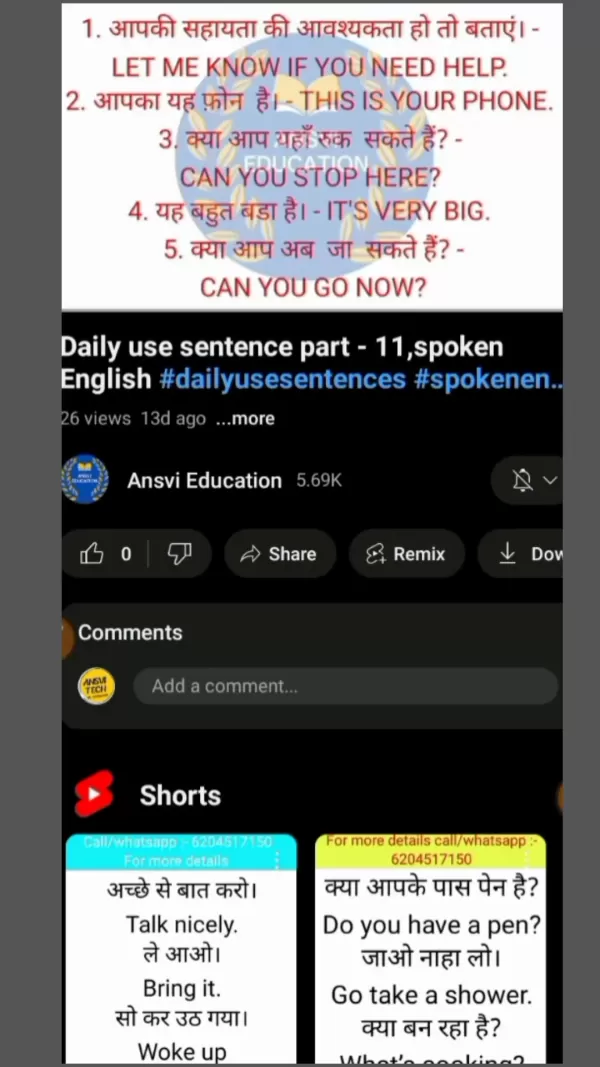
"Let me know if you need help" serves as an excellent opening when offering support. This versatile phrase works equally well in professional and casual situations.
"Could you help me with this?" exemplifies the courteous approach when requesting assistance - straightforward yet considerate.
Common helpful phrases:
- Could we stop here?
- What's your current address?
- Could you clarify that?
- How did you arrive here?
- Would you like to sit?
Expressing Gratitude and Politeness
Cultivating positive relationships requires consistent politeness and appreciation. Simple expressions like "Thank you for your help" demonstrate considered acknowledgment.
- This is quite substantial
- Are you able to leave now?
- Is this accurate?
- Does this seem straightforward?
- I genuinely appreciate this
Incorporating "please" and "excuse me" fosters respectful communication essential for workplace and social environments. These fundamental courtesy markers enhance interactions through mutual consideration.
Practical examples:
- Gift reception: "This is wonderful - thank you so much!"
- Requesting repetition: "Would you mind repeating that?"
- Hospitality gestures: "Please have a seat"
Daily Conversation Starters and Basic Phrases
Initiating discussions becomes effortless with reliable introductory phrases. "It's lovely to meet you" strikes the perfect balance between warmth and professionalism.
Common icebreakers:
- "How's your day progressing?"
- "What's occupying your time today?"
- "Were you aware that...?"
Foundational expressions like "pardon me," "my apologies," and "I require this" navigate daily scenarios while demonstrating respect and clear communication.
Everyday expressions:
- The temperature has dropped
- Is this mobile device yours?
- What are the health implications?
Benefits of Using a Video Summarizer
Time-Saving Efficiency
Video summarization tools revolutionize content consumption by extracting key insights from extended footage. Professionals and students alike benefit from accessing crucial information within minutes rather than hours, dramatically improving productivity and enabling quicker decision-making.
Enhanced Learning and Retention
Condensed summaries highlight core concepts while eliminating tangential content, creating focused learning opportunities. This targeted approach proves particularly valuable for training materials and educational content where fundamental takeaways matter most.
Improved Accessibility
Text-based summaries facilitate multilingual translations while audio versions accommodate visually impaired users. These inclusive features democratize information access regardless of linguistic background or physical ability.
Step-by-Step Guide to Using Video Summarizer
Installing Video Summarizer
Begin by downloading the Video Summarizer application from Google Play Store. This powerful tool condenses video content remarkably fast.
Step 1: Access Play Store on your Android device
Step 2: Search "Video Summarizer"
Step 3: Locate the Remote Mouse-developed application
Step 4: Complete installation (~18MB download)
Setting Up and Logging In
Step 1: Launch the installed application
Step 2: Navigate introductory tutorials
Step 3: Authenticate via preferred method
Step 4: Finalize account verification
Summarizing a Video
Step 1: Access main dashboard
Step 2: Grant necessary permissions
Step 3: Input video URL or select from gallery
Step 4: Automatic processing (typically 10-30 seconds)
Step 5: Review generated summary
Changing Summarization Language
Step 1: Locate options menu
Step 2: Initiate re-summarization
Step 3: Select preferred language
Step 4: Confirm selection
Step 5: Evaluate translated summary
Video Summarizer Pricing Plans
Overview of Available Plans
The application offers tiered solutions accommodating casual users through enterprise clients.
Plan Price Features Free $0/month Basic functionality with advertising Premium $9.99/month Unlimited usage, language options Enterprise Custom Bespoke solutions with API integration
Weighing the Video Summarizer: Pros and Cons
Pros
Dramatically reduces content review time
Enhances information retention
Supports multilingual accessibility
Boosts professional efficiency
Facilitates quick content review
Cons
Potential contextual oversimplification
Algorithm-dependent accuracy
Possible reduced engagement with source material
Missed supporting details
Service availability constraints
Key Features of the Video Summarizer
Automatic Summarization
The intelligent algorithm identifies and extracts crucial content, delivering comprehensive overviews seconds after processing.
Multi-Language Support
Global accessibility through comprehensive language options enables seamless cross-cultural information sharing.
Text-Based and Audio Summaries
Flexible output formats accommodate diverse user preferences and accessibility requirements.
Frequently Asked Questions (FAQ)
How accurate is the video summarization?
Accuracy depends on source clarity and algorithmic effectiveness. While remarkably precise, important nuances sometimes require original content review.
Is the Video Summarizer app available on iOS?
Current iOS availability remains unconfirmed - consult official sources for platform compatibility updates.
Can I use the summarized content for commercial purposes?
Usage rights vary by source material copyrights and service terms - legal consultation recommended for commercial applications.
Related Questions
What other tools can help improve English language skills?
Comprehensive language development benefits from structured platforms (Coursera, edX), interactive apps (Duolingo, Babbel), immersive techniques (media consumption), and writing assistants (Grammarly). Consistent practice across these modalities cultivates well-rounded proficiency.
Related article
 Slackbot Becomes an AI Agent
Slackbot, the automated assistant embedded in Salesforce’s corporate messaging platform Slack, is evolving into an AI agent. Salesforce CTO Parker Harris envisions it achieving viral status comparable to OpenAI’s ChatGPT.The cloud software giant laun
ByteDance Boosts Core AI Incentives as Doubao Surges 14.6%
ByteDance recently convened a DouBao equity briefing to unveil fresh incentive policies for staff involved in the DouBao division. The strike price for DouBao shares has been lifted from $14.85 in June 2026 to $17.02, marking an approximate 14.6% inc
MiniMax Unveils 10x Team Program to Incentivize Global AI Experts
MiniMax (Xiyu Technology), the General Artificial Intelligence Lab, has officially launched "10x Team," a global talent collaboration initiative. This program aims to recruit top experts across industries to explore the deep application of large mode
Related Special Topic Recommendations
Education and Learning
Slackbot Becomes an AI Agent
Slackbot, the automated assistant embedded in Salesforce’s corporate messaging platform Slack, is evolving into an AI agent. Salesforce CTO Parker Harris envisions it achieving viral status comparable to OpenAI’s ChatGPT.The cloud software giant laun
ByteDance Boosts Core AI Incentives as Doubao Surges 14.6%
ByteDance recently convened a DouBao equity briefing to unveil fresh incentive policies for staff involved in the DouBao division. The strike price for DouBao shares has been lifted from $14.85 in June 2026 to $17.02, marking an approximate 14.6% inc
MiniMax Unveils 10x Team Program to Incentivize Global AI Experts
MiniMax (Xiyu Technology), the General Artificial Intelligence Lab, has officially launched "10x Team," a global talent collaboration initiative. This program aims to recruit top experts across industries to explore the deep application of large mode
Related Special Topic Recommendations
Education and Learning
 AI Study Tools for Homework and Exam Prep
2026 Latest Best AI Study Tools for Homework and Exam Prep! XIX.AI curates a top-rated list of powerful, game-changing tools that help students boost productivity, streamline homework completion, and ace exams through real-world tests. Get a free vs paid comparison, detailed rankings, and must-try options to unlock your AI edge. Explore now!
 10 tools
 xix.ai
Music composition
AI Vocal Demo Tools for Songwriters, Hooks, Toplines, and Multilingual Draft Sessions
xix.ai
Music composition
AI Vocal Demo Tools for Songwriters, Hooks, Toplines, and Multilingual Draft Sessions
2026 Latest Best AI Vocal Demo Tools for Songwriters, Hook Creators, and Multi-Language Content Teams! XIX.AI has curated a top-rated list of powerful game-changing tools that go through rigorous real-world tests. You’ll find detailed free vs paid comparison data, comprehensive rankings, and must-try options to help you boost writing efficiency and unlock your creative potential. Explore now to discover your perfect tool for all your content needs!
9 tools
xix.ai
Business
Best AI Competitive Research Tools for Small Businesses
2026 Latest Best Top-rated AI Competitive Research Tools for Small Businesses! XIX.AI has curated a highly powerful game-changing collection, updated weekly with rigorous real-world tests and detailed rankings. You can find a comprehensive free vs paid comparison to help you identify the must-try tools that boost your productivity and give you a competitive edge. Explore now to discover your perfect tool!
9 tools
xix.ai
Image editing
Photoshop AI Retouch Tools for Ecommerce Apparel, Skin Cleanup, and Color Consistency
2026 Latest Best Photoshop AI retouch tools for ecommerce apparel, skin cleanup, and color consistency! This top-rated curated list features powerful game-changing solutions that help you boost writing efficiency, streamline content creation, and achieve perfect visual results effortlessly. Each tool has undergone real-world tests through weekly updated rankings, complete with free vs paid comparison details. Backed by XIX.AI, it’s the must-try guide for anyone aiming to unlock your AI edge. Explore now!
10 tools
xix.ai
Prompt
Best AI Prompt Libraries for ChatGPT Workflows
2026 Latest Best Top-Rated AI Prompt Libraries for optimizing all types of ChatGPT workflows. XIX.AI has curated a powerful, game-changing collection that goes through rigorous real-world tests to ensure top performance. You can find detailed free vs paid comparisons and expert rankings to help you choose the must-try tools that boost your productivity and unlock your AI edge. Explore now!
11 tools
xix.ai
Education and Learning
AI Quiz Builder Platforms for Teachers, Tutors, and Cohort-Based Learning Programs
2026 Latest Best AI Quiz Builder Platforms for Teachers, Tutors, and Cohort-Based Learning Programs! XIX.AI has curated a top-rated list of powerful game-changing tools that go through real-world tests to deliver accurate rankings. These must-try platforms help boost writing efficiency, streamline content creation, and simplify quiz design across all learning scenarios. Explore now to discover your perfect tool for unlocking your AI edge in teaching!
13 tools
xix.ai

 Comments (1)
0/500
Comments (1)
0/500
![JoseJackson]()
Honestly, I've been looking for a way to summarize long videos quickly. This guide seems practical but I wish it included more advanced phrases. 😅
In today's fast-paced digital landscape, strong English communication skills and efficient content consumption have become indispensable. This guide equips you with practical everyday English phrases while introducing cutting-edge video summarization technology to maximize your productivity. Elevate both your conversational abilities and time management with these actionable insights.
Key Points
Master fundamental English expressions for daily interactions
Learn polite phrases for requesting assistance and showing appreciation
Develop techniques to enhance spoken English fluency
Discover how video summarizers optimize information absorption
Implement effective strategies for language acquisition and productivity
Essential English Sentences for Daily Use
Asking for Assistance and Offering Help
Effective communication often involves requesting and providing support. Having the right expressions at your fingertips facilitates smoother, more productive exchanges.
"Let me know if you need help" serves as an excellent opening when offering support. This versatile phrase works equally well in professional and casual situations.
"Could you help me with this?" exemplifies the courteous approach when requesting assistance - straightforward yet considerate.
Common helpful phrases:
- Could we stop here?
- What's your current address?
- Could you clarify that?
- How did you arrive here?
- Would you like to sit?
Expressing Gratitude and Politeness
Cultivating positive relationships requires consistent politeness and appreciation. Simple expressions like "Thank you for your help" demonstrate considered acknowledgment.
- This is quite substantial
- Are you able to leave now?
- Is this accurate?
- Does this seem straightforward?
- I genuinely appreciate this
Incorporating "please" and "excuse me" fosters respectful communication essential for workplace and social environments. These fundamental courtesy markers enhance interactions through mutual consideration.
Practical examples:
- Gift reception: "This is wonderful - thank you so much!"
- Requesting repetition: "Would you mind repeating that?"
- Hospitality gestures: "Please have a seat"
Daily Conversation Starters and Basic Phrases
Initiating discussions becomes effortless with reliable introductory phrases. "It's lovely to meet you" strikes the perfect balance between warmth and professionalism.
Common icebreakers:
- "How's your day progressing?"
- "What's occupying your time today?"
- "Were you aware that...?"
Foundational expressions like "pardon me," "my apologies," and "I require this" navigate daily scenarios while demonstrating respect and clear communication.
Everyday expressions:
- The temperature has dropped
- Is this mobile device yours?
- What are the health implications?
Benefits of Using a Video Summarizer
Time-Saving Efficiency
Video summarization tools revolutionize content consumption by extracting key insights from extended footage. Professionals and students alike benefit from accessing crucial information within minutes rather than hours, dramatically improving productivity and enabling quicker decision-making.
Enhanced Learning and Retention
Condensed summaries highlight core concepts while eliminating tangential content, creating focused learning opportunities. This targeted approach proves particularly valuable for training materials and educational content where fundamental takeaways matter most.
Improved Accessibility
Text-based summaries facilitate multilingual translations while audio versions accommodate visually impaired users. These inclusive features democratize information access regardless of linguistic background or physical ability.
Step-by-Step Guide to Using Video Summarizer
Installing Video Summarizer
Begin by downloading the Video Summarizer application from Google Play Store. This powerful tool condenses video content remarkably fast.
Step 1: Access Play Store on your Android device
Step 2: Search "Video Summarizer"
Step 3: Locate the Remote Mouse-developed application
Step 4: Complete installation (~18MB download)
Setting Up and Logging In
Step 1: Launch the installed application
Step 2: Navigate introductory tutorials
Step 3: Authenticate via preferred method
Step 4: Finalize account verification
Summarizing a Video
Step 1: Access main dashboard
Step 2: Grant necessary permissions
Step 3: Input video URL or select from gallery
Step 4: Automatic processing (typically 10-30 seconds)
Step 5: Review generated summary
Changing Summarization Language
Step 1: Locate options menu
Step 2: Initiate re-summarization
Step 3: Select preferred language
Step 4: Confirm selection
Step 5: Evaluate translated summary
Video Summarizer Pricing Plans
Overview of Available Plans
The application offers tiered solutions accommodating casual users through enterprise clients.
| Plan | Price | Features |
|---|---|---|
| Free | $0/month | Basic functionality with advertising |
| Premium | $9.99/month | Unlimited usage, language options |
| Enterprise | Custom | Bespoke solutions with API integration |
Weighing the Video Summarizer: Pros and Cons
Pros
Dramatically reduces content review time
Enhances information retention
Supports multilingual accessibility
Boosts professional efficiency
Facilitates quick content review
Cons
Potential contextual oversimplification
Algorithm-dependent accuracy
Possible reduced engagement with source material
Missed supporting details
Service availability constraints
Key Features of the Video Summarizer
Automatic Summarization
The intelligent algorithm identifies and extracts crucial content, delivering comprehensive overviews seconds after processing.
Multi-Language Support
Global accessibility through comprehensive language options enables seamless cross-cultural information sharing.
Text-Based and Audio Summaries
Flexible output formats accommodate diverse user preferences and accessibility requirements.
Frequently Asked Questions (FAQ)
How accurate is the video summarization?
Accuracy depends on source clarity and algorithmic effectiveness. While remarkably precise, important nuances sometimes require original content review.
Is the Video Summarizer app available on iOS?
Current iOS availability remains unconfirmed - consult official sources for platform compatibility updates.
Can I use the summarized content for commercial purposes?
Usage rights vary by source material copyrights and service terms - legal consultation recommended for commercial applications.
Related Questions
What other tools can help improve English language skills?
Comprehensive language development benefits from structured platforms (Coursera, edX), interactive apps (Duolingo, Babbel), immersive techniques (media consumption), and writing assistants (Grammarly). Consistent practice across these modalities cultivates well-rounded proficiency.








 Slackbot Becomes an AI Agent
Slackbot, the automated assistant embedded in Salesforce’s corporate messaging platform Slack, is evolving into an AI agent. Salesforce CTO Parker Harris envisions it achieving viral status comparable to OpenAI’s ChatGPT.The cloud software giant laun
Slackbot Becomes an AI Agent
Slackbot, the automated assistant embedded in Salesforce’s corporate messaging platform Slack, is evolving into an AI agent. Salesforce CTO Parker Harris envisions it achieving viral status comparable to OpenAI’s ChatGPT.The cloud software giant laun
 ByteDance Boosts Core AI Incentives as Doubao Surges 14.6%
ByteDance recently convened a DouBao equity briefing to unveil fresh incentive policies for staff involved in the DouBao division. The strike price for DouBao shares has been lifted from $14.85 in June 2026 to $17.02, marking an approximate 14.6% inc
ByteDance Boosts Core AI Incentives as Doubao Surges 14.6%
ByteDance recently convened a DouBao equity briefing to unveil fresh incentive policies for staff involved in the DouBao division. The strike price for DouBao shares has been lifted from $14.85 in June 2026 to $17.02, marking an approximate 14.6% inc
 MiniMax Unveils 10x Team Program to Incentivize Global AI Experts
MiniMax (Xiyu Technology), the General Artificial Intelligence Lab, has officially launched "10x Team," a global talent collaboration initiative. This program aims to recruit top experts across industries to explore the deep application of large mode
MiniMax Unveils 10x Team Program to Incentivize Global AI Experts
MiniMax (Xiyu Technology), the General Artificial Intelligence Lab, has officially launched "10x Team," a global talent collaboration initiative. This program aims to recruit top experts across industries to explore the deep application of large mode

2026 Latest Best AI Study Tools for Homework and Exam Prep! XIX.AI curates a top-rated list of powerful, game-changing tools that help students boost productivity, streamline homework completion, and ace exams through real-world tests. Get a free vs paid comparison, detailed rankings, and must-try options to unlock your AI edge. Explore now!
10 tools
xix.ai

2026 Latest Best AI Vocal Demo Tools for Songwriters, Hook Creators, and Multi-Language Content Teams! XIX.AI has curated a top-rated list of powerful game-changing tools that go through rigorous real-world tests. You’ll find detailed free vs paid comparison data, comprehensive rankings, and must-try options to help you boost writing efficiency and unlock your creative potential. Explore now to discover your perfect tool for all your content needs!
9 tools
xix.ai

2026 Latest Best Top-rated AI Competitive Research Tools for Small Businesses! XIX.AI has curated a highly powerful game-changing collection, updated weekly with rigorous real-world tests and detailed rankings. You can find a comprehensive free vs paid comparison to help you identify the must-try tools that boost your productivity and give you a competitive edge. Explore now to discover your perfect tool!
9 tools
xix.ai

2026 Latest Best Photoshop AI retouch tools for ecommerce apparel, skin cleanup, and color consistency! This top-rated curated list features powerful game-changing solutions that help you boost writing efficiency, streamline content creation, and achieve perfect visual results effortlessly. Each tool has undergone real-world tests through weekly updated rankings, complete with free vs paid comparison details. Backed by XIX.AI, it’s the must-try guide for anyone aiming to unlock your AI edge. Explore now!
10 tools
xix.ai

2026 Latest Best Top-Rated AI Prompt Libraries for optimizing all types of ChatGPT workflows. XIX.AI has curated a powerful, game-changing collection that goes through rigorous real-world tests to ensure top performance. You can find detailed free vs paid comparisons and expert rankings to help you choose the must-try tools that boost your productivity and unlock your AI edge. Explore now!
11 tools
xix.ai

2026 Latest Best AI Quiz Builder Platforms for Teachers, Tutors, and Cohort-Based Learning Programs! XIX.AI has curated a top-rated list of powerful game-changing tools that go through real-world tests to deliver accurate rankings. These must-try platforms help boost writing efficiency, streamline content creation, and simplify quiz design across all learning scenarios. Explore now to discover your perfect tool for unlocking your AI edge in teaching!
13 tools
xix.ai

Honestly, I've been looking for a way to summarize long videos quickly. This guide seems practical but I wish it included more advanced phrases. 😅












