


 Home
HomeStreamVocal: Offline AI Transcription for OBS Streaming
In the fast-paced world of content creation, real-time, secure, and accurate transcription is a game-changer. StreamVocal, a robust plugin for Open Broadcaster Software (OBS), delivers offline speech-to-text transcription without cloud dependency. This article explores StreamVocal’s features, setup process, and advantages, empowering streamers and creators to elevate their broadcasts with privacy-focused, localized AI processing.
Key Highlights
StreamVocal is an OBS plugin enabling offline speech-to-text transcription.
It processes audio locally, safeguarding data privacy.
The plugin supports transcription into 100 languages.
It operates without a GPU or cloud resources, reducing costs.
Installation requires downloading the appropriate installer from GitHub.
It integrates as a filter within OBS audio sources.
Exploring StreamVocal: Your Offline AI Solution
What is StreamVocal?
StreamVocal is a transformative OBS Studio plugin designed for real-time, offline speech-to-text transcription.
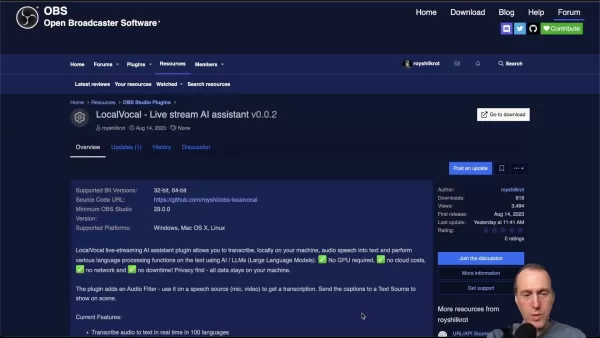
Running entirely on your device, it converts audio to text without relying on external servers, making it ideal for creators and professionals prioritizing data security. By harnessing AI locally, StreamVocal ensures privacy, eliminates network dependency, and avoids cloud costs. It supports real-time transcription across 100 languages, enabling seamless captioning for OBS scenes.
Why Opt for Local Transcription?
StreamVocal’s local transcription offers multiple benefits. It keeps your audio data secure, reducing risks of breaches, which is vital for sensitive content or strict compliance needs. It functions without internet access, ensuring reliability in offline settings. Additionally, it requires no GPU or cloud subscriptions, making it a budget-friendly choice. By processing AI models locally, StreamVocal minimizes latency for near-instant transcription, delivering privacy, efficiency, and savings—all at no cost.
System Compatibility
StreamVocal supports 32-bit and 64-bit systems across Windows, macOS, and Linux, requiring OBS Studio version 29.0 or higher. Download the correct installer from GitHub based on your OS: Windows users select the appropriate .exe (x64 or x86), macOS users use the universal .pkg, and Linux users choose .deb or source code. Always download from the official StreamVocal GitHub repository for safety.
Enhancing OBS with StreamVocal
Integrating StreamVocal into OBS
StreamVocal maximizes impact when seamlessly integrated into OBS scenes and sources, creating professional, accessible streams. Practical tips include:
- Scene Setup: Create dedicated scenes for transcription-heavy content, like interviews, pre-configuring StreamVocal filters.
- Audio Source Clarity: Apply StreamVocal to your primary audio source, typically a microphone, for consistent results.
- Text Placement: Adjust font, size, color, and background in OBS text source settings for readable subtitles, ideally at the screen’s bottom.
- Accessibility: Add a semi-transparent text background for better contrast.
- Hotkey Control: Use hotkeys to toggle subtitle visibility for flexible stream management.
- Custom Styling: Advanced users can apply custom CSS for branded subtitles.
Monitor CPU usage during streams, tweaking settings to balance performance and transcription accuracy for your setup.
The Future of Offline Transcription
With growing privacy concerns and demand for cost-effective tools, offline AI processing is gaining traction. StreamVocal leads this shift, offering creators a secure, budget-friendly transcription solution. Future enhancements may include:
- Enhanced Accuracy: Improved AI models for better transcription in challenging audio environments.
- Broader Language Support: Expanded options for global audiences.
- Custom Models: Tailored vocabulary training for niche content.
- Real-Time Translation: Simultaneous transcription and translation into multiple languages.
- Optimized Performance: Improved CPU efficiency and potential GPU support.
- Tool Integration: Seamless connections with editing and sharing platforms.
StreamVocal sets a new benchmark for AI-driven streaming tools, prioritizing privacy and affordability.
Getting Started with StreamVocal
Step 1: Download and Install
Visit the StreamVocal page on the OBS Studio plugins directory for details and reviews. Click “Go to download” to access the GitHub releases page.
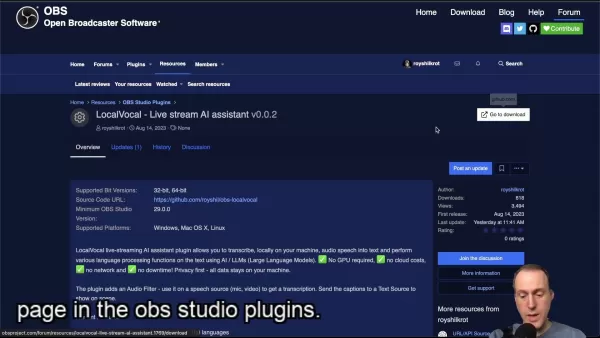
Select the latest version’s installer for your OS (Windows, macOS, or Linux), download, and follow the installation prompts.
Step 2: Adding StreamVocal to OBS
In OBS Studio, select your audio source (e.g., microphone) in the “Sources” panel, right-click, and choose “Filters.”
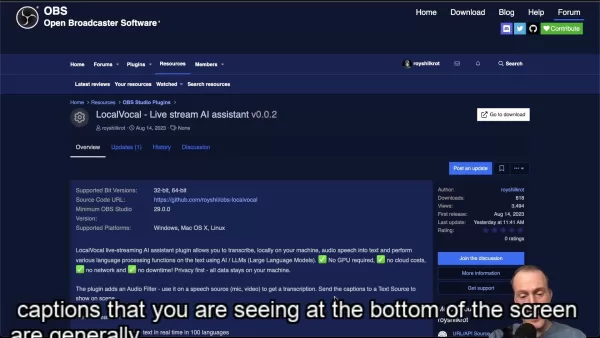
Click the “+” button, select “StreamVocal Transcription” from the filter list, and add it to your source for instant subtitle creation.
Step 3: Configuring StreamVocal
Adjust settings like transcription language, model size, and output options in the StreamVocal filter panel. Fine-tune buffer settings to optimize latency and performance based on your system and content needs.
StreamVocal Pricing
Free and Open Source
StreamVocal is a free, open-source plugin with no subscription fees or hidden costs. Simply download and use it.
Pros and Cons of StreamVocal
Pros
Data Security: Local processing keeps audio private.
Offline Operation: Functions without internet connectivity.
Cost Savings: No cloud or subscription fees.
Multilingual Support: Transcribes into 100 languages.
Accessibility: Real-time subtitles broaden audience reach.
Cons
Resource Demand: May strain older systems.
Setup Effort: Requires installation and configuration.
Accuracy Variability: Depends on audio quality and model settings.
System Compatibility: Needs specific OS and OBS versions.
Key Features of StreamVocal
Offline AI Transcription
StreamVocal provides offline speech-to-text transcription, processing audio locally for privacy. It supports 100 languages without requiring a GPU or cloud resources, ensuring cost efficiency.
Use Cases
Live Streaming Subtitles
StreamVocal enables streamers to add real-time subtitles, enhancing accessibility for deaf or multilingual audiences.
Content Creation
Ideal for tutorials, lectures, and interviews, StreamVocal’s live subtitles make content more engaging and inclusive.
Frequently Asked Questions
Is StreamVocal secure?
Yes, StreamVocal processes audio locally, ensuring no data is sent to external servers. Ignore any antivirus warnings during installation.
Which operating systems are supported?
StreamVocal supports Windows, macOS, and Linux. Download the correct installer from GitHub.
Does StreamVocal need an internet connection?
No, it operates entirely offline.
Is a GPU required?
No, StreamVocal runs efficiently on CPUs.
What is the minimum OBS Studio version?
Version 29.0 is required.
Related Questions
What other OBS plugins boost streaming?
OBS Studio supports plugins like StreamFX for visual effects, NDI Plugin for network transmission, Move Transition for dynamic animations, and Tuna for displaying song information. Paired with StreamVocal, these tools enhance professional streaming.
Related article
 U.S. Stocks Hit Historic Milestone as AI and Aerospace Giants Prepare for Trillion-Dollar Debut
Elon Musk, Sam Altman, and Dario Amodei, three titans of the technology sector, are advancing toward initial public offerings for their respective ventures. With SpaceX, OpenAI, and Anthropic—three industry behemoths nearing trillion-dollar valuation
Swedish AI Startup Lovable Eyes $13.2 Billion Valuation After Major Funding Round
As AI-driven coding tools gain traction, Swedish startup Lovable has secured a major funding round. The company aims to raise $3 billion, potentially boosting its valuation to $13.2 billion—double the $6.6 billion recorded last December. Menlo Ventur
Google Tests Remy AI Agent for Gemini as Focus Shifts to User Control
According to Business Insider, Google is testing Remy, a new AI personal agent for Gemini. This tool aims to execute tasks on behalf of users, streamlining both professional workflows and daily routines.Currently, Remy is undergoing testing in an int
Related Special Topic Recommendations
writing
U.S. Stocks Hit Historic Milestone as AI and Aerospace Giants Prepare for Trillion-Dollar Debut
Elon Musk, Sam Altman, and Dario Amodei, three titans of the technology sector, are advancing toward initial public offerings for their respective ventures. With SpaceX, OpenAI, and Anthropic—three industry behemoths nearing trillion-dollar valuation
Swedish AI Startup Lovable Eyes $13.2 Billion Valuation After Major Funding Round
As AI-driven coding tools gain traction, Swedish startup Lovable has secured a major funding round. The company aims to raise $3 billion, potentially boosting its valuation to $13.2 billion—double the $6.6 billion recorded last December. Menlo Ventur
Google Tests Remy AI Agent for Gemini as Focus Shifts to User Control
According to Business Insider, Google is testing Remy, a new AI personal agent for Gemini. This tool aims to execute tasks on behalf of users, streamlining both professional workflows and daily routines.Currently, Remy is undergoing testing in an int
Related Special Topic Recommendations
writing
 Best AI Outline Generators for Long-Form SEO Articles
2026 Latest Best Top-Rated AI Outline Generators for Long-Form SEO Articles, meticulously curated by XIX.AI. These powerful tools offer game-changing assistance in creating high-quality content quickly, boosting writing efficiency significantly. Get a free vs paid comparison along with real-world tests and detailed rankings to help you find the must-try option that suits your needs. Explore now to unlock your AI edge.
 8 tools
 xix.ai
Education and Learning
AI Study Tools for Homework and Exam Prep
xix.ai
Education and Learning
AI Study Tools for Homework and Exam Prep
2026 Latest Best AI Study Tools for Homework and Exam Prep! XIX.AI curates a top-rated list of powerful, game-changing tools that help students boost productivity, streamline homework completion, and ace exams through real-world tests. Get a free vs paid comparison, detailed rankings, and must-try options to unlock your AI edge. Explore now!
10 tools
xix.ai
Music composition
AI Vocal Demo Tools for Songwriters, Hooks, Toplines, and Multilingual Draft Sessions
2026 Latest Best AI Vocal Demo Tools for Songwriters, Hook Creators, and Multi-Language Content Teams! XIX.AI has curated a top-rated list of powerful game-changing tools that go through rigorous real-world tests. You’ll find detailed free vs paid comparison data, comprehensive rankings, and must-try options to help you boost writing efficiency and unlock your creative potential. Explore now to discover your perfect tool for all your content needs!
9 tools
xix.ai
Business
Best AI Competitive Research Tools for Small Businesses
2026 Latest Best Top-rated AI Competitive Research Tools for Small Businesses! XIX.AI has curated a highly powerful game-changing collection, updated weekly with rigorous real-world tests and detailed rankings. You can find a comprehensive free vs paid comparison to help you identify the must-try tools that boost your productivity and give you a competitive edge. Explore now to discover your perfect tool!
9 tools
xix.ai
Image editing
Photoshop AI Retouch Tools for Ecommerce Apparel, Skin Cleanup, and Color Consistency
2026 Latest Best Photoshop AI retouch tools for ecommerce apparel, skin cleanup, and color consistency! This top-rated curated list features powerful game-changing solutions that help you boost writing efficiency, streamline content creation, and achieve perfect visual results effortlessly. Each tool has undergone real-world tests through weekly updated rankings, complete with free vs paid comparison details. Backed by XIX.AI, it’s the must-try guide for anyone aiming to unlock your AI edge. Explore now!
10 tools
xix.ai
Prompt
Best AI Prompt Libraries for ChatGPT Workflows
2026 Latest Best Top-Rated AI Prompt Libraries for optimizing all types of ChatGPT workflows. XIX.AI has curated a powerful, game-changing collection that goes through rigorous real-world tests to ensure top performance. You can find detailed free vs paid comparisons and expert rankings to help you choose the must-try tools that boost your productivity and unlock your AI edge. Explore now!
11 tools
xix.ai

 Comments (1)
0/500
Comments (1)
0/500
![JonathanKing]()
¿Pero esto funciona completamente offline? 😮 Es increíble para streamers que se preocupan por la privacidad de sus conversaciones, aunque me da un poco de miedo que la IA pueda malinterpretar jerga local jaja
In the fast-paced world of content creation, real-time, secure, and accurate transcription is a game-changer. StreamVocal, a robust plugin for Open Broadcaster Software (OBS), delivers offline speech-to-text transcription without cloud dependency. This article explores StreamVocal’s features, setup process, and advantages, empowering streamers and creators to elevate their broadcasts with privacy-focused, localized AI processing.
Key Highlights
StreamVocal is an OBS plugin enabling offline speech-to-text transcription.
It processes audio locally, safeguarding data privacy.
The plugin supports transcription into 100 languages.
It operates without a GPU or cloud resources, reducing costs.
Installation requires downloading the appropriate installer from GitHub.
It integrates as a filter within OBS audio sources.
Exploring StreamVocal: Your Offline AI Solution
What is StreamVocal?
StreamVocal is a transformative OBS Studio plugin designed for real-time, offline speech-to-text transcription.
Running entirely on your device, it converts audio to text without relying on external servers, making it ideal for creators and professionals prioritizing data security. By harnessing AI locally, StreamVocal ensures privacy, eliminates network dependency, and avoids cloud costs. It supports real-time transcription across 100 languages, enabling seamless captioning for OBS scenes.
Why Opt for Local Transcription?
StreamVocal’s local transcription offers multiple benefits. It keeps your audio data secure, reducing risks of breaches, which is vital for sensitive content or strict compliance needs. It functions without internet access, ensuring reliability in offline settings. Additionally, it requires no GPU or cloud subscriptions, making it a budget-friendly choice. By processing AI models locally, StreamVocal minimizes latency for near-instant transcription, delivering privacy, efficiency, and savings—all at no cost.
System Compatibility
StreamVocal supports 32-bit and 64-bit systems across Windows, macOS, and Linux, requiring OBS Studio version 29.0 or higher. Download the correct installer from GitHub based on your OS: Windows users select the appropriate .exe (x64 or x86), macOS users use the universal .pkg, and Linux users choose .deb or source code. Always download from the official StreamVocal GitHub repository for safety.
Enhancing OBS with StreamVocal
Integrating StreamVocal into OBS
StreamVocal maximizes impact when seamlessly integrated into OBS scenes and sources, creating professional, accessible streams. Practical tips include:
- Scene Setup: Create dedicated scenes for transcription-heavy content, like interviews, pre-configuring StreamVocal filters.
- Audio Source Clarity: Apply StreamVocal to your primary audio source, typically a microphone, for consistent results.
- Text Placement: Adjust font, size, color, and background in OBS text source settings for readable subtitles, ideally at the screen’s bottom.
- Accessibility: Add a semi-transparent text background for better contrast.
- Hotkey Control: Use hotkeys to toggle subtitle visibility for flexible stream management.
- Custom Styling: Advanced users can apply custom CSS for branded subtitles.
Monitor CPU usage during streams, tweaking settings to balance performance and transcription accuracy for your setup.
The Future of Offline Transcription
With growing privacy concerns and demand for cost-effective tools, offline AI processing is gaining traction. StreamVocal leads this shift, offering creators a secure, budget-friendly transcription solution. Future enhancements may include:
- Enhanced Accuracy: Improved AI models for better transcription in challenging audio environments.
- Broader Language Support: Expanded options for global audiences.
- Custom Models: Tailored vocabulary training for niche content.
- Real-Time Translation: Simultaneous transcription and translation into multiple languages.
- Optimized Performance: Improved CPU efficiency and potential GPU support.
- Tool Integration: Seamless connections with editing and sharing platforms.
StreamVocal sets a new benchmark for AI-driven streaming tools, prioritizing privacy and affordability.
Getting Started with StreamVocal
Step 1: Download and Install
Visit the StreamVocal page on the OBS Studio plugins directory for details and reviews. Click “Go to download” to access the GitHub releases page.
Select the latest version’s installer for your OS (Windows, macOS, or Linux), download, and follow the installation prompts.
Step 2: Adding StreamVocal to OBS
In OBS Studio, select your audio source (e.g., microphone) in the “Sources” panel, right-click, and choose “Filters.”
Click the “+” button, select “StreamVocal Transcription” from the filter list, and add it to your source for instant subtitle creation.
Step 3: Configuring StreamVocal
Adjust settings like transcription language, model size, and output options in the StreamVocal filter panel. Fine-tune buffer settings to optimize latency and performance based on your system and content needs.
StreamVocal Pricing
Free and Open Source
StreamVocal is a free, open-source plugin with no subscription fees or hidden costs. Simply download and use it.
Pros and Cons of StreamVocal
Pros
Data Security: Local processing keeps audio private.
Offline Operation: Functions without internet connectivity.
Cost Savings: No cloud or subscription fees.
Multilingual Support: Transcribes into 100 languages.
Accessibility: Real-time subtitles broaden audience reach.
Cons
Resource Demand: May strain older systems.
Setup Effort: Requires installation and configuration.
Accuracy Variability: Depends on audio quality and model settings.
System Compatibility: Needs specific OS and OBS versions.
Key Features of StreamVocal
Offline AI Transcription
StreamVocal provides offline speech-to-text transcription, processing audio locally for privacy. It supports 100 languages without requiring a GPU or cloud resources, ensuring cost efficiency.
Use Cases
Live Streaming Subtitles
StreamVocal enables streamers to add real-time subtitles, enhancing accessibility for deaf or multilingual audiences.
Content Creation
Ideal for tutorials, lectures, and interviews, StreamVocal’s live subtitles make content more engaging and inclusive.
Frequently Asked Questions
Is StreamVocal secure?
Yes, StreamVocal processes audio locally, ensuring no data is sent to external servers. Ignore any antivirus warnings during installation.
Which operating systems are supported?
StreamVocal supports Windows, macOS, and Linux. Download the correct installer from GitHub.
Does StreamVocal need an internet connection?
No, it operates entirely offline.
Is a GPU required?
No, StreamVocal runs efficiently on CPUs.
What is the minimum OBS Studio version?
Version 29.0 is required.
Related Questions
What other OBS plugins boost streaming?
OBS Studio supports plugins like StreamFX for visual effects, NDI Plugin for network transmission, Move Transition for dynamic animations, and Tuna for displaying song information. Paired with StreamVocal, these tools enhance professional streaming.








 U.S. Stocks Hit Historic Milestone as AI and Aerospace Giants Prepare for Trillion-Dollar Debut
Elon Musk, Sam Altman, and Dario Amodei, three titans of the technology sector, are advancing toward initial public offerings for their respective ventures. With SpaceX, OpenAI, and Anthropic—three industry behemoths nearing trillion-dollar valuation
U.S. Stocks Hit Historic Milestone as AI and Aerospace Giants Prepare for Trillion-Dollar Debut
Elon Musk, Sam Altman, and Dario Amodei, three titans of the technology sector, are advancing toward initial public offerings for their respective ventures. With SpaceX, OpenAI, and Anthropic—three industry behemoths nearing trillion-dollar valuation
 Swedish AI Startup Lovable Eyes $13.2 Billion Valuation After Major Funding Round
As AI-driven coding tools gain traction, Swedish startup Lovable has secured a major funding round. The company aims to raise $3 billion, potentially boosting its valuation to $13.2 billion—double the $6.6 billion recorded last December. Menlo Ventur
Google Tests Remy AI Agent for Gemini as Focus Shifts to User Control
According to Business Insider, Google is testing Remy, a new AI personal agent for Gemini. This tool aims to execute tasks on behalf of users, streamlining both professional workflows and daily routines.Currently, Remy is undergoing testing in an int
Swedish AI Startup Lovable Eyes $13.2 Billion Valuation After Major Funding Round
As AI-driven coding tools gain traction, Swedish startup Lovable has secured a major funding round. The company aims to raise $3 billion, potentially boosting its valuation to $13.2 billion—double the $6.6 billion recorded last December. Menlo Ventur
Google Tests Remy AI Agent for Gemini as Focus Shifts to User Control
According to Business Insider, Google is testing Remy, a new AI personal agent for Gemini. This tool aims to execute tasks on behalf of users, streamlining both professional workflows and daily routines.Currently, Remy is undergoing testing in an int

2026 Latest Best Top-Rated AI Outline Generators for Long-Form SEO Articles, meticulously curated by XIX.AI. These powerful tools offer game-changing assistance in creating high-quality content quickly, boosting writing efficiency significantly. Get a free vs paid comparison along with real-world tests and detailed rankings to help you find the must-try option that suits your needs. Explore now to unlock your AI edge.
8 tools
xix.ai

2026 Latest Best AI Study Tools for Homework and Exam Prep! XIX.AI curates a top-rated list of powerful, game-changing tools that help students boost productivity, streamline homework completion, and ace exams through real-world tests. Get a free vs paid comparison, detailed rankings, and must-try options to unlock your AI edge. Explore now!
10 tools
xix.ai

2026 Latest Best AI Vocal Demo Tools for Songwriters, Hook Creators, and Multi-Language Content Teams! XIX.AI has curated a top-rated list of powerful game-changing tools that go through rigorous real-world tests. You’ll find detailed free vs paid comparison data, comprehensive rankings, and must-try options to help you boost writing efficiency and unlock your creative potential. Explore now to discover your perfect tool for all your content needs!
9 tools
xix.ai

2026 Latest Best Top-rated AI Competitive Research Tools for Small Businesses! XIX.AI has curated a highly powerful game-changing collection, updated weekly with rigorous real-world tests and detailed rankings. You can find a comprehensive free vs paid comparison to help you identify the must-try tools that boost your productivity and give you a competitive edge. Explore now to discover your perfect tool!
9 tools
xix.ai

2026 Latest Best Photoshop AI retouch tools for ecommerce apparel, skin cleanup, and color consistency! This top-rated curated list features powerful game-changing solutions that help you boost writing efficiency, streamline content creation, and achieve perfect visual results effortlessly. Each tool has undergone real-world tests through weekly updated rankings, complete with free vs paid comparison details. Backed by XIX.AI, it’s the must-try guide for anyone aiming to unlock your AI edge. Explore now!
10 tools
xix.ai

2026 Latest Best Top-Rated AI Prompt Libraries for optimizing all types of ChatGPT workflows. XIX.AI has curated a powerful, game-changing collection that goes through rigorous real-world tests to ensure top performance. You can find detailed free vs paid comparisons and expert rankings to help you choose the must-try tools that boost your productivity and unlock your AI edge. Explore now!
11 tools
xix.ai

¿Pero esto funciona completamente offline? 😮 Es increíble para streamers que se preocupan por la privacidad de sus conversaciones, aunque me da un poco de miedo que la IA pueda malinterpretar jerga local jaja












