


 Home
HomeKrotos Studio AI Ambience Generator: Sound Design Revolution
The world of sound design is always on the move, with new tools constantly popping up to help sound designers push their creativity and streamline their work. Enter Krotos Studio, a game-changer with its AI-powered ambience generator. This innovative tool makes it a breeze to whip up custom, dynamic background ambiences that feel real and engaging. Whether you're a seasoned pro or just starting out, Krotos Studio's AI Ambience Generator could seriously shake up your sound design process, giving you the kind of control and sonic realism that's hard to beat.
Key Points
- AI-powered ambience generation within Krotos Studio.
- Ability to create custom ambiences from text prompts.
- Real-time sound performance capabilities.
- Seamless integration with digital audio workstations (DAWs).
- Dynamic ambience evolution synchronized to video or performance.
- Wide range of sound categories and customizable parameters.
- Time-saving and creatively stimulating tool for sound designers.
Unveiling Krotos Studio's AI Ambience Generator
What is Krotos Studio?
Krotos Studio is at the forefront of sound design software, designed to give both professionals and hobbyists the tools they need to create, tweak, and perform sound effects, ambiences, and Foley sounds. You can use it as a standalone program or as a plugin with popular DAWs like Pro Tools, Logic Pro X, and Ableton Live. Krotos Studio is all about making your workflow smooth and letting you perform sounds in real time, making it a go-to for film, TV, game development, and music production.
The AI Ambience Generator: A Paradigm Shift in Sound Design
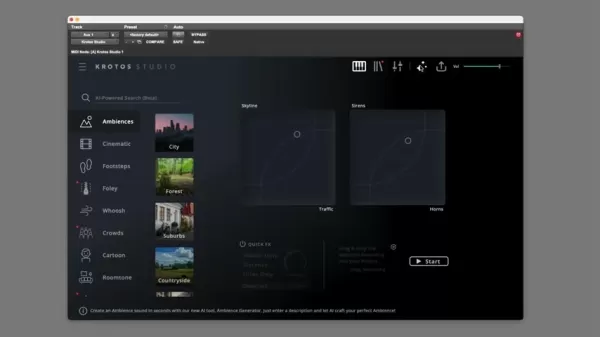
The AI Ambience Generator in Krotos Studio is a big deal. It lets you move beyond just using pre-recorded sound libraries or manually crafting sounds. Now, you can use AI to generate unique, dynamic ambiences just by typing in a text prompt. This opens up a world of customization and creative exploration, helping you build the perfect sound environment for any project. The generator is designed to be easy to use, so you can quickly create and adjust sounds to your heart's content.
Crafting Sonic Landscapes: How the AI Ambience Generator Works
From Prompt to Soundscape: The Generation Process
The magic of the AI Ambience Generator is how it turns a simple text description into a rich, believable sonic world.
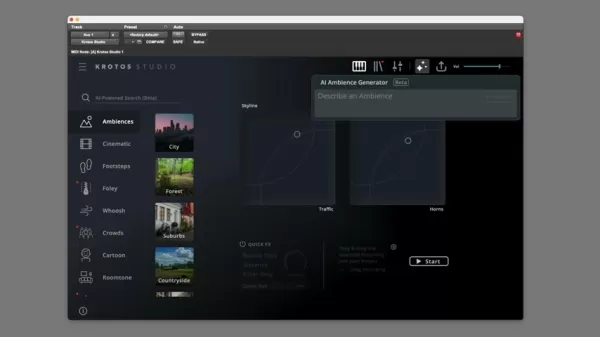
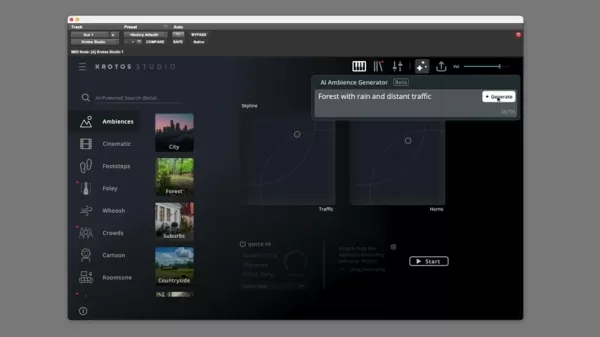
- Enter a Prompt: Type in a detailed description of what you want. Think "a forest with rain and distant traffic" or "a welding shop with air conditioning." The more specific you are, the better the ambience will be.
- Generate: Krotos Studio's AI goes to work, analyzing your prompt and pulling sounds from its library to create a dynamic ambience that matches your description.
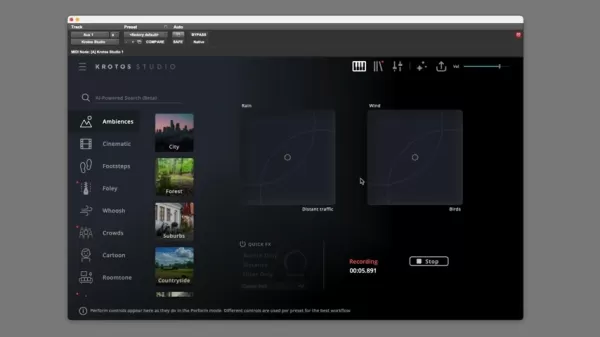
- Perform and Evolve: You can then play with these sounds in real time. The software's XY pad lets you blend different elements like rain or wind. You can record these performances and export them straight to your DAW, perfect for syncing sound to video on the fly.
Real-Time Performance and Dynamic Evolution
What makes Krotos Studio stand out is its focus on real-time performance. The ambiences you create aren't just static; they evolve and respond to your input, giving you that organic feel. You can tweak the intensity and balance of different sounds in real time, tailoring the ambience to fit the mood and action of your project. Imagine adjusting wind and rain for a chase scene or changing the level of chatter in a restaurant to match the on-screen action. Krotos Studio lets you craft immersive, interactive sound experiences.
Here's a quick summary of the key steps:
Step Description 1. Input Prompt Type a detailed description of the desired ambience. 2. Generate The AI engine processes the prompt and generates a soundscape. 3. Real-Time Control Manipulate individual sound elements and blend between sounds on the XY-pad. 4. Export Recording Record your performance and export it as an audio file for use in your project.
Beyond the Basics: Customization and Control
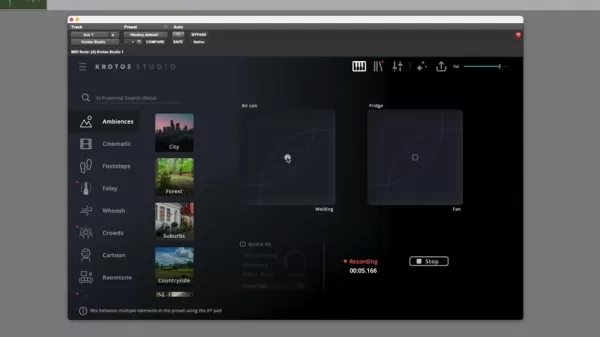
The AI Ambience Generator is great at creating convincing sound environments from text, but it also gives you tons of options to fine-tune your results. Krotos Studio lets you adjust parameters like reverb, distance, and filters, so you can sculpt the ambience exactly how you want it. This control means you can blend the generated ambiences into your existing sound design workflow seamlessly and achieve a professional finish. Plus, you can perform these sounds live.
Step-by-Step Guide: Creating Ambiences with Krotos Studio
Step 1: Launch Krotos Studio
Start by opening Krotos Studio, either as a standalone app or as a plugin in your DAW. Make sure it's properly installed and activated in your DAW's plugin manager. It's usually best to add it to an AUX track for non-destructive audio layering.
Step 2: Access the AI Ambience Generator
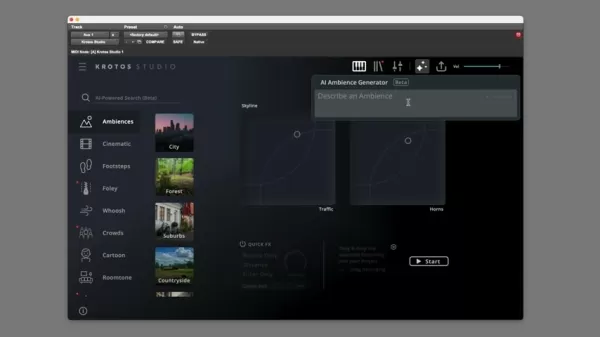
Find the AI Ambience Generator section in Krotos Studio. It's usually front and center or in a specific menu for creating ambiences.
Step 3: Enter Your Prompt
In the text field, describe the ambience you want. Be as specific as you can about the location, atmosphere, and key sound elements. For example, 'Cozy Cafe ambience with chatter, coffee machine, and cutlery sounds' or 'Busy Airport Terminal, announcements, footsteps, and rolling luggage.' The clearer you are, the better the AI can match your vision.
Step 4: Generate the Ambience
Hit the "Generate" button after entering your prompt. Krotos Studio will analyze your description and create a unique ambience. This might take a few seconds, depending on how complex your prompt is.
Step 5: Perform and Customize
Once the ambience is ready, you can play with it in real time using the XY pad for further customization. Use tools like Distance and Reverb to perfect your sound. When you're happy with it, you can add it to your DAW as an audio file.
Krotos Studio Pricing and Availability
Flexible Options to Suit Your Needs
Krotos offers different pricing options to fit various budgets and needs. You can choose between subscription plans and perpetual licenses. Subscriptions keep you up to date with the latest features, while perpetual licenses are a one-time purchase for long-term use.
Here's a sample pricing table:
License Type Price (USD) Features Monthly Subscription $XX/month Access to all features, regular updates, and support. Annual Subscription $XXX/year Discounted rate for annual commitment, all features, regular updates, and priority support. Perpetual License $XXXX One-time purchase, access to current features, limited updates, and standard support.
Advantages and Disadvantages of the AI Ambience Generator
Pros
- Rapid Ambience Creation: Quickly generate unique and interesting sounds.
- Increased Efficiency: AI handles the heavy lifting, freeing you up to be more creative.
- Cost Saving: Save money on royalty-free sound effects by using the plugin's unique sounds.
- Performance Driven Workflow: Adjust parameters and blend sounds on the fly!
Cons
- Steep Learning Curve: It might take some time for newcomers to master the tool and get high-quality results.
- Time to Generate High-Quality Results: Sometimes, the initial AI-generated sounds need a lot of manual tweaking to sound just right.
- Relatively Expensive Price Point: The cost might be a hurdle for new sound designers.
Krotos Studio's Core Features: Beyond Ambiences
A Comprehensive Sound Design Toolkit
The AI Ambience Generator is just one part of Krotos Studio's toolkit. The software also includes:
- Dehumaniser II: A vocal processing plugin for creating creature and monster voices.
- Reformer Pro: A tool for generating realistic impact sounds and Foley effects.
- Weaponiser: Specializes in designing and layering weapon sounds.
- Concept Series Plugins: A set of plugins for creating unique sonic textures and effects.
Unleashing Creativity: Krotos Studio's Diverse Use Cases
Applications Across Industries
Krotos Studio's versatility makes it valuable across different fields:
- Film and Television: Create immersive soundscapes for productions.
- Game Development: Design realistic and dynamic sound effects for video games.
- Music Production: Add unique sonic textures to your compositions.
- Virtual Reality (VR) and Augmented Reality (AR): Craft interactive audio experiences for VR and AR applications.
- Podcasting: Enhance the listening experience with immersive soundscapes.
Frequently Asked Questions (FAQ)
Is Krotos Studio compatible with my DAW?
Krotos Studio works with most major DAWs like Pro Tools, Logic Pro X, Ableton Live, Cubase, and Studio One. It supports VST, AU, and AAX plugin formats. Check the Krotos website for the latest compatibility info.
Can I use Krotos Studio for commercial projects?
Yes, Krotos Studio licenses generally allow for commercial use, but always review the license agreement for any restrictions.
Does Krotos Studio require an internet connection?
You need an internet connection for initial activation and some cloud-based features, but you can use the core functionality, including the AI Ambience Generator, offline.
Is there a trial version of Krotos Studio available?
Krotos usually offers a trial version, so you can test the software before buying. Check their website for details.
Related Questions
What are some alternative sound design tools?
While Krotos Studio offers a unique AI-powered approach, other tools worth considering include:
- Native Instruments Kontakt: A powerful sampler and virtual instrument platform.
- Spectrasonics Omnisphere: A flagship software synthesizer with a vast sound library.
- Output Portal: A granular effects plugin for creating otherworldly sonic textures.
- Sound Particles: A revolutionary immersive audio software for creating complex soundscapes.
- Waves Plugins: A wide range of audio processing plugins to achieve the perfect sound.
The best tool depends on your specific needs and budget. Experimenting with different tools can help you find what works best for your creative workflow.
Related article
 Google Tests Remy AI Agent for Gemini as Focus Shifts to User Control
According to Business Insider, Google is testing Remy, a new AI personal agent for Gemini. This tool aims to execute tasks on behalf of users, streamlining both professional workflows and daily routines.Currently, Remy is undergoing testing in an int
How to fix Core Web Vitals for better SEO rankings
Streamline Report Card Comments with AI ToolsIntroductionAI Tools for Generating Report Card CommentsMagic SchoolAlmanac AIChat GPTUsing Magic School to Generate Report Card CommentsLogging into Magic SchoolSelecting the Report Card Comments ToolCust
Slackbot Becomes an AI Agent
Slackbot, the automated assistant embedded in Salesforce’s corporate messaging platform Slack, is evolving into an AI agent. Salesforce CTO Parker Harris envisions it achieving viral status comparable to OpenAI’s ChatGPT.The cloud software giant laun
Related Special Topic Recommendations
writing
Google Tests Remy AI Agent for Gemini as Focus Shifts to User Control
According to Business Insider, Google is testing Remy, a new AI personal agent for Gemini. This tool aims to execute tasks on behalf of users, streamlining both professional workflows and daily routines.Currently, Remy is undergoing testing in an int
How to fix Core Web Vitals for better SEO rankings
Streamline Report Card Comments with AI ToolsIntroductionAI Tools for Generating Report Card CommentsMagic SchoolAlmanac AIChat GPTUsing Magic School to Generate Report Card CommentsLogging into Magic SchoolSelecting the Report Card Comments ToolCust
Slackbot Becomes an AI Agent
Slackbot, the automated assistant embedded in Salesforce’s corporate messaging platform Slack, is evolving into an AI agent. Salesforce CTO Parker Harris envisions it achieving viral status comparable to OpenAI’s ChatGPT.The cloud software giant laun
Related Special Topic Recommendations
writing
 Best AI Outline Generators for Long-Form SEO Articles
2026 Latest Best Top-Rated AI Outline Generators for Long-Form SEO Articles, meticulously curated by XIX.AI. These powerful tools offer game-changing assistance in creating high-quality content quickly, boosting writing efficiency significantly. Get a free vs paid comparison along with real-world tests and detailed rankings to help you find the must-try option that suits your needs. Explore now to unlock your AI edge.
 8 tools
 xix.ai
Education and Learning
AI Study Tools for Homework and Exam Prep
xix.ai
Education and Learning
AI Study Tools for Homework and Exam Prep
2026 Latest Best AI Study Tools for Homework and Exam Prep! XIX.AI curates a top-rated list of powerful, game-changing tools that help students boost productivity, streamline homework completion, and ace exams through real-world tests. Get a free vs paid comparison, detailed rankings, and must-try options to unlock your AI edge. Explore now!
10 tools
xix.ai
Music composition
AI Vocal Demo Tools for Songwriters, Hooks, Toplines, and Multilingual Draft Sessions
2026 Latest Best AI Vocal Demo Tools for Songwriters, Hook Creators, and Multi-Language Content Teams! XIX.AI has curated a top-rated list of powerful game-changing tools that go through rigorous real-world tests. You’ll find detailed free vs paid comparison data, comprehensive rankings, and must-try options to help you boost writing efficiency and unlock your creative potential. Explore now to discover your perfect tool for all your content needs!
9 tools
xix.ai
Business
Best AI Competitive Research Tools for Small Businesses
2026 Latest Best Top-rated AI Competitive Research Tools for Small Businesses! XIX.AI has curated a highly powerful game-changing collection, updated weekly with rigorous real-world tests and detailed rankings. You can find a comprehensive free vs paid comparison to help you identify the must-try tools that boost your productivity and give you a competitive edge. Explore now to discover your perfect tool!
9 tools
xix.ai
Image editing
Photoshop AI Retouch Tools for Ecommerce Apparel, Skin Cleanup, and Color Consistency
2026 Latest Best Photoshop AI retouch tools for ecommerce apparel, skin cleanup, and color consistency! This top-rated curated list features powerful game-changing solutions that help you boost writing efficiency, streamline content creation, and achieve perfect visual results effortlessly. Each tool has undergone real-world tests through weekly updated rankings, complete with free vs paid comparison details. Backed by XIX.AI, it’s the must-try guide for anyone aiming to unlock your AI edge. Explore now!
10 tools
xix.ai
Prompt
Best AI Prompt Libraries for ChatGPT Workflows
2026 Latest Best Top-Rated AI Prompt Libraries for optimizing all types of ChatGPT workflows. XIX.AI has curated a powerful, game-changing collection that goes through rigorous real-world tests to ensure top performance. You can find detailed free vs paid comparisons and expert rankings to help you choose the must-try tools that boost your productivity and unlock your AI edge. Explore now!
11 tools
xix.ai

 Comments (14)
0/500
Comments (14)
0/500
![FrankSmith]()
와..Krotos Studio 같은 AI 도구가 나오니까 작업 흐름이 완전히 바뀌겠어요. 정말 놀라워! 근데 이런 AI 발전이 결국 전문가의 직업을 위협할까 조금 걱정돼ㅠㅠ 어쨌든 앞으로 효과음 디자인이 더 흥미로워질 것 같아요!
![DonaldBrown]()
Ну вот, снова ИИ заменяет творческих людей... Звукорежиссёры скоро останутся без работы? 🤔 Хотя инструмент выглядит удобным для быстрых проектов, но где же тогда человеческое искусство? Мне кажется, мы теряем что-то важное в погоне за эффективностью.
![DanielThomas]()
와...이런 AI 툴이 있다니 진짜 혁신적인 것 같아요! 사운드 디자인할 때 배경음 만드는 게 항상 시간이 많이 걸렸는데, 이제 훨씬 편해질 것 같네요. 근데 완전히 AI에게 의존하면 창의성이 줄어들까 걱정되기도 하네요 ㅎㅎ
![PaulWilson]()
This AI Ambience Generator sounds like a total game-changer for sound designers! I love how it simplifies creating unique soundscapes. Can't wait to try it out and see if it lives up to the hype! 🎶
![DonaldGonzález]()
Krotos StudioのAIアンビエンスジェネレーターは、サウンドデザインの世界を変えるツールです!カスタムサウンドを簡単に作れるのが素晴らしいです。ただ、時々自動化されすぎるのが気になります。それでも、サウンドデザイナーには必須のツールですね!🎵
![EricScott]()
Krotos Studio's AI Ambience Generator is a total game-changer for sound design! It's so easy to create custom sounds that fit perfectly. The only thing is, it can be a bit too automated for my taste sometimes. Still, it's a must-have for any sound designer! 🎵
The world of sound design is always on the move, with new tools constantly popping up to help sound designers push their creativity and streamline their work. Enter Krotos Studio, a game-changer with its AI-powered ambience generator. This innovative tool makes it a breeze to whip up custom, dynamic background ambiences that feel real and engaging. Whether you're a seasoned pro or just starting out, Krotos Studio's AI Ambience Generator could seriously shake up your sound design process, giving you the kind of control and sonic realism that's hard to beat.
Key Points
- AI-powered ambience generation within Krotos Studio.
- Ability to create custom ambiences from text prompts.
- Real-time sound performance capabilities.
- Seamless integration with digital audio workstations (DAWs).
- Dynamic ambience evolution synchronized to video or performance.
- Wide range of sound categories and customizable parameters.
- Time-saving and creatively stimulating tool for sound designers.
Unveiling Krotos Studio's AI Ambience Generator
What is Krotos Studio?
Krotos Studio is at the forefront of sound design software, designed to give both professionals and hobbyists the tools they need to create, tweak, and perform sound effects, ambiences, and Foley sounds. You can use it as a standalone program or as a plugin with popular DAWs like Pro Tools, Logic Pro X, and Ableton Live. Krotos Studio is all about making your workflow smooth and letting you perform sounds in real time, making it a go-to for film, TV, game development, and music production.
The AI Ambience Generator: A Paradigm Shift in Sound Design
The AI Ambience Generator in Krotos Studio is a big deal. It lets you move beyond just using pre-recorded sound libraries or manually crafting sounds. Now, you can use AI to generate unique, dynamic ambiences just by typing in a text prompt. This opens up a world of customization and creative exploration, helping you build the perfect sound environment for any project. The generator is designed to be easy to use, so you can quickly create and adjust sounds to your heart's content.
Crafting Sonic Landscapes: How the AI Ambience Generator Works
From Prompt to Soundscape: The Generation Process
The magic of the AI Ambience Generator is how it turns a simple text description into a rich, believable sonic world.
- Enter a Prompt: Type in a detailed description of what you want. Think "a forest with rain and distant traffic" or "a welding shop with air conditioning." The more specific you are, the better the ambience will be.
- Generate: Krotos Studio's AI goes to work, analyzing your prompt and pulling sounds from its library to create a dynamic ambience that matches your description.
- Perform and Evolve: You can then play with these sounds in real time. The software's XY pad lets you blend different elements like rain or wind. You can record these performances and export them straight to your DAW, perfect for syncing sound to video on the fly.
Real-Time Performance and Dynamic Evolution
What makes Krotos Studio stand out is its focus on real-time performance. The ambiences you create aren't just static; they evolve and respond to your input, giving you that organic feel. You can tweak the intensity and balance of different sounds in real time, tailoring the ambience to fit the mood and action of your project. Imagine adjusting wind and rain for a chase scene or changing the level of chatter in a restaurant to match the on-screen action. Krotos Studio lets you craft immersive, interactive sound experiences.
Here's a quick summary of the key steps:
| Step | Description |
|---|---|
| 1. Input Prompt | Type a detailed description of the desired ambience. |
| 2. Generate | The AI engine processes the prompt and generates a soundscape. |
| 3. Real-Time Control | Manipulate individual sound elements and blend between sounds on the XY-pad. |
| 4. Export Recording | Record your performance and export it as an audio file for use in your project. |
Beyond the Basics: Customization and Control
The AI Ambience Generator is great at creating convincing sound environments from text, but it also gives you tons of options to fine-tune your results. Krotos Studio lets you adjust parameters like reverb, distance, and filters, so you can sculpt the ambience exactly how you want it. This control means you can blend the generated ambiences into your existing sound design workflow seamlessly and achieve a professional finish. Plus, you can perform these sounds live.
Step-by-Step Guide: Creating Ambiences with Krotos Studio
Step 1: Launch Krotos Studio
Start by opening Krotos Studio, either as a standalone app or as a plugin in your DAW. Make sure it's properly installed and activated in your DAW's plugin manager. It's usually best to add it to an AUX track for non-destructive audio layering.
Step 2: Access the AI Ambience Generator
Find the AI Ambience Generator section in Krotos Studio. It's usually front and center or in a specific menu for creating ambiences.
Step 3: Enter Your Prompt
In the text field, describe the ambience you want. Be as specific as you can about the location, atmosphere, and key sound elements. For example, 'Cozy Cafe ambience with chatter, coffee machine, and cutlery sounds' or 'Busy Airport Terminal, announcements, footsteps, and rolling luggage.' The clearer you are, the better the AI can match your vision.
Step 4: Generate the Ambience
Hit the "Generate" button after entering your prompt. Krotos Studio will analyze your description and create a unique ambience. This might take a few seconds, depending on how complex your prompt is.
Step 5: Perform and Customize
Once the ambience is ready, you can play with it in real time using the XY pad for further customization. Use tools like Distance and Reverb to perfect your sound. When you're happy with it, you can add it to your DAW as an audio file.
Krotos Studio Pricing and Availability
Flexible Options to Suit Your Needs
Krotos offers different pricing options to fit various budgets and needs. You can choose between subscription plans and perpetual licenses. Subscriptions keep you up to date with the latest features, while perpetual licenses are a one-time purchase for long-term use.
Here's a sample pricing table:
| License Type | Price (USD) | Features |
|---|---|---|
| Monthly Subscription | $XX/month | Access to all features, regular updates, and support. |
| Annual Subscription | $XXX/year | Discounted rate for annual commitment, all features, regular updates, and priority support. |
| Perpetual License | $XXXX | One-time purchase, access to current features, limited updates, and standard support. |
Advantages and Disadvantages of the AI Ambience Generator
Pros
- Rapid Ambience Creation: Quickly generate unique and interesting sounds.
- Increased Efficiency: AI handles the heavy lifting, freeing you up to be more creative.
- Cost Saving: Save money on royalty-free sound effects by using the plugin's unique sounds.
- Performance Driven Workflow: Adjust parameters and blend sounds on the fly!
Cons
- Steep Learning Curve: It might take some time for newcomers to master the tool and get high-quality results.
- Time to Generate High-Quality Results: Sometimes, the initial AI-generated sounds need a lot of manual tweaking to sound just right.
- Relatively Expensive Price Point: The cost might be a hurdle for new sound designers.
Krotos Studio's Core Features: Beyond Ambiences
A Comprehensive Sound Design Toolkit
The AI Ambience Generator is just one part of Krotos Studio's toolkit. The software also includes:
- Dehumaniser II: A vocal processing plugin for creating creature and monster voices.
- Reformer Pro: A tool for generating realistic impact sounds and Foley effects.
- Weaponiser: Specializes in designing and layering weapon sounds.
- Concept Series Plugins: A set of plugins for creating unique sonic textures and effects.
Unleashing Creativity: Krotos Studio's Diverse Use Cases
Applications Across Industries
Krotos Studio's versatility makes it valuable across different fields:
- Film and Television: Create immersive soundscapes for productions.
- Game Development: Design realistic and dynamic sound effects for video games.
- Music Production: Add unique sonic textures to your compositions.
- Virtual Reality (VR) and Augmented Reality (AR): Craft interactive audio experiences for VR and AR applications.
- Podcasting: Enhance the listening experience with immersive soundscapes.
Frequently Asked Questions (FAQ)
Is Krotos Studio compatible with my DAW?
Krotos Studio works with most major DAWs like Pro Tools, Logic Pro X, Ableton Live, Cubase, and Studio One. It supports VST, AU, and AAX plugin formats. Check the Krotos website for the latest compatibility info.
Can I use Krotos Studio for commercial projects?
Yes, Krotos Studio licenses generally allow for commercial use, but always review the license agreement for any restrictions.
Does Krotos Studio require an internet connection?
You need an internet connection for initial activation and some cloud-based features, but you can use the core functionality, including the AI Ambience Generator, offline.
Is there a trial version of Krotos Studio available?
Krotos usually offers a trial version, so you can test the software before buying. Check their website for details.
Related Questions
What are some alternative sound design tools?
While Krotos Studio offers a unique AI-powered approach, other tools worth considering include:
- Native Instruments Kontakt: A powerful sampler and virtual instrument platform.
- Spectrasonics Omnisphere: A flagship software synthesizer with a vast sound library.
- Output Portal: A granular effects plugin for creating otherworldly sonic textures.
- Sound Particles: A revolutionary immersive audio software for creating complex soundscapes.
- Waves Plugins: A wide range of audio processing plugins to achieve the perfect sound.
The best tool depends on your specific needs and budget. Experimenting with different tools can help you find what works best for your creative workflow.







 Google Tests Remy AI Agent for Gemini as Focus Shifts to User Control
According to Business Insider, Google is testing Remy, a new AI personal agent for Gemini. This tool aims to execute tasks on behalf of users, streamlining both professional workflows and daily routines.Currently, Remy is undergoing testing in an int
Google Tests Remy AI Agent for Gemini as Focus Shifts to User Control
According to Business Insider, Google is testing Remy, a new AI personal agent for Gemini. This tool aims to execute tasks on behalf of users, streamlining both professional workflows and daily routines.Currently, Remy is undergoing testing in an int
 How to fix Core Web Vitals for better SEO rankings
Streamline Report Card Comments with AI ToolsIntroductionAI Tools for Generating Report Card CommentsMagic SchoolAlmanac AIChat GPTUsing Magic School to Generate Report Card CommentsLogging into Magic SchoolSelecting the Report Card Comments ToolCust
How to fix Core Web Vitals for better SEO rankings
Streamline Report Card Comments with AI ToolsIntroductionAI Tools for Generating Report Card CommentsMagic SchoolAlmanac AIChat GPTUsing Magic School to Generate Report Card CommentsLogging into Magic SchoolSelecting the Report Card Comments ToolCust
 Slackbot Becomes an AI Agent
Slackbot, the automated assistant embedded in Salesforce’s corporate messaging platform Slack, is evolving into an AI agent. Salesforce CTO Parker Harris envisions it achieving viral status comparable to OpenAI’s ChatGPT.The cloud software giant laun
Slackbot Becomes an AI Agent
Slackbot, the automated assistant embedded in Salesforce’s corporate messaging platform Slack, is evolving into an AI agent. Salesforce CTO Parker Harris envisions it achieving viral status comparable to OpenAI’s ChatGPT.The cloud software giant laun

2026 Latest Best Top-Rated AI Outline Generators for Long-Form SEO Articles, meticulously curated by XIX.AI. These powerful tools offer game-changing assistance in creating high-quality content quickly, boosting writing efficiency significantly. Get a free vs paid comparison along with real-world tests and detailed rankings to help you find the must-try option that suits your needs. Explore now to unlock your AI edge.
8 tools
xix.ai

2026 Latest Best AI Study Tools for Homework and Exam Prep! XIX.AI curates a top-rated list of powerful, game-changing tools that help students boost productivity, streamline homework completion, and ace exams through real-world tests. Get a free vs paid comparison, detailed rankings, and must-try options to unlock your AI edge. Explore now!
10 tools
xix.ai

2026 Latest Best AI Vocal Demo Tools for Songwriters, Hook Creators, and Multi-Language Content Teams! XIX.AI has curated a top-rated list of powerful game-changing tools that go through rigorous real-world tests. You’ll find detailed free vs paid comparison data, comprehensive rankings, and must-try options to help you boost writing efficiency and unlock your creative potential. Explore now to discover your perfect tool for all your content needs!
9 tools
xix.ai

2026 Latest Best Top-rated AI Competitive Research Tools for Small Businesses! XIX.AI has curated a highly powerful game-changing collection, updated weekly with rigorous real-world tests and detailed rankings. You can find a comprehensive free vs paid comparison to help you identify the must-try tools that boost your productivity and give you a competitive edge. Explore now to discover your perfect tool!
9 tools
xix.ai

2026 Latest Best Photoshop AI retouch tools for ecommerce apparel, skin cleanup, and color consistency! This top-rated curated list features powerful game-changing solutions that help you boost writing efficiency, streamline content creation, and achieve perfect visual results effortlessly. Each tool has undergone real-world tests through weekly updated rankings, complete with free vs paid comparison details. Backed by XIX.AI, it’s the must-try guide for anyone aiming to unlock your AI edge. Explore now!
10 tools
xix.ai

2026 Latest Best Top-Rated AI Prompt Libraries for optimizing all types of ChatGPT workflows. XIX.AI has curated a powerful, game-changing collection that goes through rigorous real-world tests to ensure top performance. You can find detailed free vs paid comparisons and expert rankings to help you choose the must-try tools that boost your productivity and unlock your AI edge. Explore now!
11 tools
xix.ai

와..Krotos Studio 같은 AI 도구가 나오니까 작업 흐름이 완전히 바뀌겠어요. 정말 놀라워! 근데 이런 AI 발전이 결국 전문가의 직업을 위협할까 조금 걱정돼ㅠㅠ 어쨌든 앞으로 효과음 디자인이 더 흥미로워질 것 같아요!
Ну вот, снова ИИ заменяет творческих людей... Звукорежиссёры скоро останутся без работы? 🤔 Хотя инструмент выглядит удобным для быстрых проектов, но где же тогда человеческое искусство? Мне кажется, мы теряем что-то важное в погоне за эффективностью.
와...이런 AI 툴이 있다니 진짜 혁신적인 것 같아요! 사운드 디자인할 때 배경음 만드는 게 항상 시간이 많이 걸렸는데, 이제 훨씬 편해질 것 같네요. 근데 완전히 AI에게 의존하면 창의성이 줄어들까 걱정되기도 하네요 ㅎㅎ
This AI Ambience Generator sounds like a total game-changer for sound designers! I love how it simplifies creating unique soundscapes. Can't wait to try it out and see if it lives up to the hype! 🎶
Krotos StudioのAIアンビエンスジェネレーターは、サウンドデザインの世界を変えるツールです!カスタムサウンドを簡単に作れるのが素晴らしいです。ただ、時々自動化されすぎるのが気になります。それでも、サウンドデザイナーには必須のツールですね!🎵
Krotos Studio's AI Ambience Generator is a total game-changer for sound design! It's so easy to create custom sounds that fit perfectly. The only thing is, it can be a bit too automated for my taste sometimes. Still, it's a must-have for any sound designer! 🎵












