


 Home
HomeAI Lip Sync Technology: Mastering Realistic Video Dubbing with Kling AI
In 2025, AI-driven video production has soared to new levels, with Kling AI's lip sync tool leading the charge. This guide dives into crafting lifelike AI-dubbed videos, from audio uploads to mastering animation styles, equipping you to produce professional-grade content. Discover how this innovative tool operates.
Highlights
Kling AI delivers a cutting-edge lip sync feature for authentic video dubbing.
Simply upload audio files and click the 'Lip Sync' button for seamless operation.
Optimized for videos showcasing human faces.
Close-up facial shots yield the best lip-syncing outcomes.
Action sequences or dynamic videos may need fine-tuning.
Integrate AI-generated voices effortlessly using platforms like Eleven Labs.
Exploring Kling AI Lip Sync
What is Kling AI Lip Sync?
Kling AI’s lip sync tool is a state-of-the-art solution that aligns audio with video, creating compelling and believable AI-generated content. It processes video frames to sync character mouth movements with uploaded audio, ideal for animations, marketing, and educational videos. Upload an audio file, press the Lip Sync button, and the AI handles the rest.
The goal is to achieve natural-looking AI video dubbing by capturing the subtleties of human speech and translating them into visual movements. Kling AI considers speech pace, mouth shapes, and subtle facial expressions for flawless audio-video integration.
Supported audio formats include MP3, WAV, M4A, FLAC, AAC, and OGG, with a 20MB file size limit and a 60-second duration cap. For longer audio, manual cropping is needed, defaulting to start at 0 seconds.
Its versatility shines across video styles, from photorealistic to 3D animations, empowering you to create audience-resonating content that meets your goals.
How to Use Kling AI’s Lip Sync Feature
Using Kling AI’s lip sync feature is intuitive. Follow these steps to get started:
- Sign into Kling AI: Log into your Kling AI account or create one on the platform.
- Access the AI Video Interface: Navigate to the AI video tools for video creation and editing.
- Upload a Base Video:
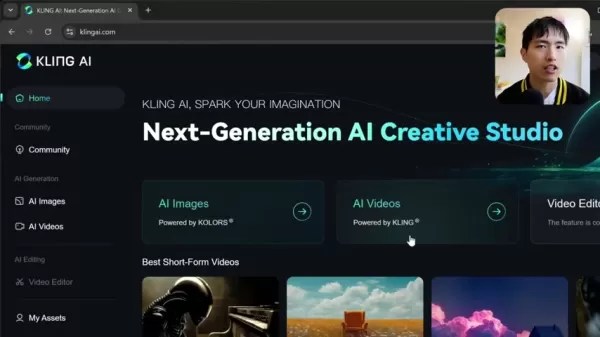
Start with a base video for lip syncing. Use Kling AI’s text-to-video or image-to-video tools to create one, or upload an existing video.
- Ensure Clear Facial Visibility: Choose a video with a close-up of a face for accurate lip syncing.
- Add a Prompt: Enter a prompt like "The woman is speaking" to guide the AI in identifying the speaker.
- Click 'Match Mouth Type': Initiate lip syncing by clicking the 'Match Mouth Type' button.
- Upload Your Audio: Upload an audio file (MP3, WAV, etc., max 20MB, 60 seconds) for synchronization.
- Adjust Audio if Needed: Crop audio to fit the video’s duration if it’s too long.
- Activate Lip Sync: Click the Lip Sync button to process the video and align audio with mouth movements.
- Wait for Processing: Processing may take up to 10 minutes, though it’s often faster.
- Review and Refine: Check the output and use the redo button to re-upload audio if needed.
Enhancing Results Across Video Styles
Realistic Videos and 3D Animations
Kling AI’s lip sync excels with realistic videos and 3D animations, accurately tracking mouth movements for a natural viewing experience.
3D animations are versatile across various character types.
Success factors include:
- Clear Facial Visibility: Ensure the face is unobstructed throughout the video.
- Stable Lighting: Consistent lighting aids accurate facial tracking.
- Minimal Head Movement: Subtle motion or static camera prompts enhance lip sync accuracy.
These formats demand precision, and the lip sync tool ensures a polished, professional look.
Tips for Multi-Character Videos
For videos with multiple characters, Kling AI selects one for dubbing without user control over the choice.
Key considerations:
- Focus on Close-Ups: Close-up shots of the intended speaker improve results.
- Match Voice Gender: Aligning voice gender with the character enhances AI selection accuracy.
These steps increase the chances of the AI syncing the correct character.
Tackling Lip Sync Challenges
Despite its power, Kling AI’s lip sync may face issues:
- Inconsistent Face Detection: Non-humanoid characters may disrupt detection. Focus on humanoid faces and retry the prompt.
- Sync Issues: Frequent face movement off-screen can cause misalignment.
- Anime-Style Video Quality: Anime videos may appear choppy, with less precise lip syncing compared to 3D or realistic formats.
For best results, minimize head movement and use prompts like subtle motion, static camera, or person speaking.
Step-by-Step: Creating Lip-Synced Videos with Kling AI
Step 1: Upload Your Video
Log into Kling AI and access the video creation or editing interface.
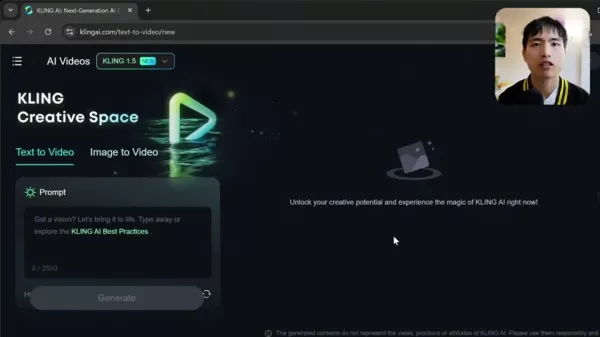
Upload a video that meets platform specs for file size and format.
Note: High-resolution source videos significantly boost output quality.
Step 2: Add Your Audio File
Prepare a clear, edited audio file matching the video’s narrative and upload it.
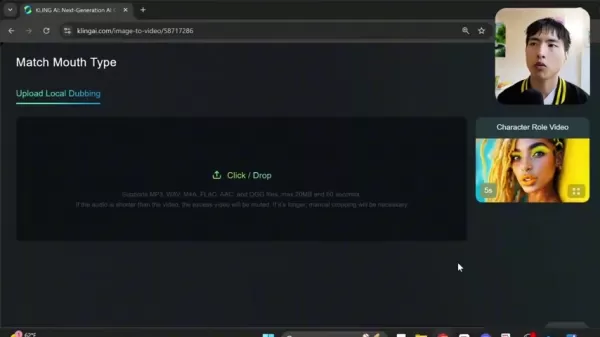
Crop audio if it exceeds the video’s duration.
Tip: Use AI voice tools like Eleven Labs for realistic, customized voiceovers. Select a voice, input text, and generate a voiceover easily.
Step 3: Sync Audio and Video
Select the lip sync feature and align audio with video mouth movements.
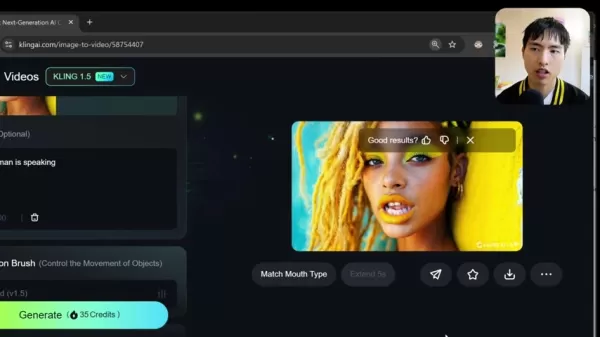
Click 'Match Mouth Type' and activate lip sync. Processing time varies by video and audio complexity.
Note: Clear facial shots are crucial for precise audio-visual alignment.
Step 4: Review and Adjust
Check the synced video for alignment and natural movement. Use editing tools to refine or redo with new audio if necessary.
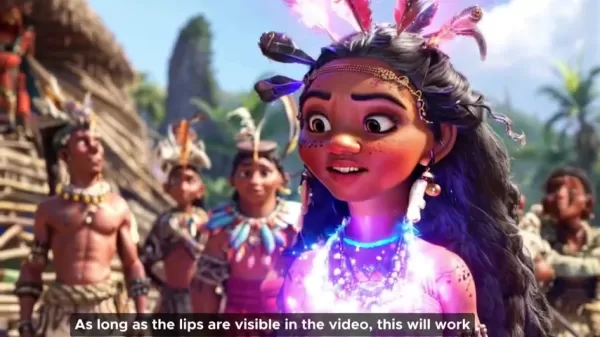
Use the re-dub button to retry with different audio.
Pro-Tip: Focus on transitions and obscured mouth areas for manual tweaks to ensure a seamless look.
Step 5: Export and Share
Export the finalized video in your preferred format and share it on platforms like Facebook or YouTube for marketing, education, or entertainment.
Final Check: Review for rendering or audio issues to ensure a professional, high-quality output.
Kling AI Pricing Overview
Kling AI Credits
Lip syncing costs 5 credits, applicable across all Kling AI features.
Credit costs include:
- Generate button: 35 credits.
- Lip Sync: 5 credits.
Pros and Cons of Kling AI Lip Sync
Pros
Lifelike and Captivating Dubbing
User-Friendly Interface
Supports Diverse Video Styles
Cost-Effective Pricing
Cons
Limited Character Selection Control
Requires Clear Facial Shots for Best Results
Performance Varies by Video Quality and Style
Kling AI’s Core Capabilities
AI Video Creation
The lip sync feature enhances Kling AI’s video generation tools, allowing text or image-based video creation and object motion control via Motion Brush.
Use Cases: Harnessing Kling AI Lip Sync
Marketing and Advertising
Craft compelling video ads with realistic lip sync for global campaigns, enabling localized content.
E-Learning and Education
Create engaging educational videos with synced audio to improve comprehension and retention.
Content Creation and Entertainment
Produce professional, realistic videos for social media or YouTube, ideal for character-driven stories.
Corporate Training and Communication
Enhance training videos and corporate messages with precise lip sync, using avatars for consistent delivery.
Frequently Asked Questions
Which audio files work with lip sync?
Kling AI supports MP3, WAV, M4A, FLAC, AAC, and OGG files. Use clear, well-edited audio for optimal results.
Can synchronization be adjusted post-processing?
Yes, editing tools allow fine-tuning to ensure perfect audio-visual alignment.
Does lip sync work with multi-character videos?
Yes, but the AI auto-selects one character. Experiment with styles and audio for best results.
What if the AI can’t detect a face?
Ensure clear, unobstructed facial shots with good lighting and minimal head movement. Use humanoid faces and retry the prompt.
Related Questions
How does Kling AI stack up against other AI video tools?
Kling AI excels with its intuitive interface, realistic lip sync, and versatility across video styles, often surpassing similar tools in accessibility and efficiency.
What mistakes should I avoid with AI lip sync?
Avoid low-resolution videos, unclear audio, excessive head movements, or incorrect prompts to ensure optimal lip sync results.
Related article
 Suno to Watermark Songs Amid Legal Battles
Suno, the platform enabling users to generate AI-created music, has unveiled new features to label platform-produced tracks, restrict downloads, and update community standards to curb unauthorized replicas. These updates arrive as Suno confronts mult
Musk Admits Grok Build Leaked User Code, Promises to Erase All Historical Data
Elon Musk directly addressed the privacy controversy surrounding Grok Build, beginning with a simple "True" to confirm the incident's validity. He pledged that all user data previously uploaded to SpaceXAI would be permanently erased, stating, "not a
U.S. Stocks Hit Historic Milestone as AI and Aerospace Giants Prepare for Trillion-Dollar Debut
Elon Musk, Sam Altman, and Dario Amodei, three titans of the technology sector, are advancing toward initial public offerings for their respective ventures. With SpaceX, OpenAI, and Anthropic—three industry behemoths nearing trillion-dollar valuation
Related Special Topic Recommendations
SEO
Suno to Watermark Songs Amid Legal Battles
Suno, the platform enabling users to generate AI-created music, has unveiled new features to label platform-produced tracks, restrict downloads, and update community standards to curb unauthorized replicas. These updates arrive as Suno confronts mult
Musk Admits Grok Build Leaked User Code, Promises to Erase All Historical Data
Elon Musk directly addressed the privacy controversy surrounding Grok Build, beginning with a simple "True" to confirm the incident's validity. He pledged that all user data previously uploaded to SpaceXAI would be permanently erased, stating, "not a
U.S. Stocks Hit Historic Milestone as AI and Aerospace Giants Prepare for Trillion-Dollar Debut
Elon Musk, Sam Altman, and Dario Amodei, three titans of the technology sector, are advancing toward initial public offerings for their respective ventures. With SpaceX, OpenAI, and Anthropic—three industry behemoths nearing trillion-dollar valuation
Related Special Topic Recommendations
SEO
 Best AI SERP Analysis Tools for Search Strategy
2026 Latest Best Top-rated AI SERP Analysis Tools for Search Strategy are curated by XIX.AI through rigorous real-world tests and weekly updated rankings. These powerful tools help you unlock hidden optimization opportunities, boost content performance, and gain a competitive edge in search. Discover your perfect tool to elevate your search strategy today. Explore now!
 13 tools
 xix.ai
Data Analysis
Best AI Anomaly Detection Tools for KPI Monitoring across SaaS and Ecommerce Teams
xix.ai
Data Analysis
Best AI Anomaly Detection Tools for KPI Monitoring across SaaS and Ecommerce Teams
2026 Latest Best Top-rated AI Anomaly Detection Tools for KPI Monitoring in SaaS and Ecommerce teams! XIX.AI has curated a powerful, game-changing collection based on rigorous real-world tests and weekly updated rankings. You’ll find detailed free vs paid comparison insights to help you identify the must-try solution that boosts productivity and unlocks your AI edge. Explore now!
10 tools
xix.ai
writing
Best AI Outline Generators for Long-Form SEO Articles
2026 Latest Best Top-Rated AI Outline Generators for Long-Form SEO Articles, meticulously curated by XIX.AI. These powerful tools offer game-changing assistance in creating high-quality content quickly, boosting writing efficiency significantly. Get a free vs paid comparison along with real-world tests and detailed rankings to help you find the must-try option that suits your needs. Explore now to unlock your AI edge.
8 tools
xix.ai
Education and Learning
AI Study Tools for Homework and Exam Prep
2026 Latest Best AI Study Tools for Homework and Exam Prep! XIX.AI curates a top-rated list of powerful, game-changing tools that help students boost productivity, streamline homework completion, and ace exams through real-world tests. Get a free vs paid comparison, detailed rankings, and must-try options to unlock your AI edge. Explore now!
10 tools
xix.ai
Music composition
AI Vocal Demo Tools for Songwriters, Hooks, Toplines, and Multilingual Draft Sessions
2026 Latest Best AI Vocal Demo Tools for Songwriters, Hook Creators, and Multi-Language Content Teams! XIX.AI has curated a top-rated list of powerful game-changing tools that go through rigorous real-world tests. You’ll find detailed free vs paid comparison data, comprehensive rankings, and must-try options to help you boost writing efficiency and unlock your creative potential. Explore now to discover your perfect tool for all your content needs!
9 tools
xix.ai
Business
Best AI Competitive Research Tools for Small Businesses
2026 Latest Best Top-rated AI Competitive Research Tools for Small Businesses! XIX.AI has curated a highly powerful game-changing collection, updated weekly with rigorous real-world tests and detailed rankings. You can find a comprehensive free vs paid comparison to help you identify the must-try tools that boost your productivity and give you a competitive edge. Explore now to discover your perfect tool!
9 tools
xix.ai

 Comments (2)
0/500
Comments (2)
0/500
![IsabellaLevis]()
唇の動きが本当に自然で驚いた!これなら海外ドラマの吹き替えも違和感なくなりますね✨ただ、俳優の表情がAIで操作される時代になると、演技の価値ってどうなるのか少し不安…
![AndrewPerez]()
Kling AI的唇語同步技術真的超自然!不過會不會哪天連網紅都可以用AI完全取代啊?這樣以後還要追真人嗎 🤔 科技進步快到我都有點跟不上了...
In 2025, AI-driven video production has soared to new levels, with Kling AI's lip sync tool leading the charge. This guide dives into crafting lifelike AI-dubbed videos, from audio uploads to mastering animation styles, equipping you to produce professional-grade content. Discover how this innovative tool operates.
Highlights
Kling AI delivers a cutting-edge lip sync feature for authentic video dubbing.
Simply upload audio files and click the 'Lip Sync' button for seamless operation.
Optimized for videos showcasing human faces.
Close-up facial shots yield the best lip-syncing outcomes.
Action sequences or dynamic videos may need fine-tuning.
Integrate AI-generated voices effortlessly using platforms like Eleven Labs.
Exploring Kling AI Lip Sync
What is Kling AI Lip Sync?
Kling AI’s lip sync tool is a state-of-the-art solution that aligns audio with video, creating compelling and believable AI-generated content. It processes video frames to sync character mouth movements with uploaded audio, ideal for animations, marketing, and educational videos. Upload an audio file, press the Lip Sync button, and the AI handles the rest.
The goal is to achieve natural-looking AI video dubbing by capturing the subtleties of human speech and translating them into visual movements. Kling AI considers speech pace, mouth shapes, and subtle facial expressions for flawless audio-video integration.
Supported audio formats include MP3, WAV, M4A, FLAC, AAC, and OGG, with a 20MB file size limit and a 60-second duration cap. For longer audio, manual cropping is needed, defaulting to start at 0 seconds.
Its versatility shines across video styles, from photorealistic to 3D animations, empowering you to create audience-resonating content that meets your goals.
How to Use Kling AI’s Lip Sync Feature
Using Kling AI’s lip sync feature is intuitive. Follow these steps to get started:
- Sign into Kling AI: Log into your Kling AI account or create one on the platform.
- Access the AI Video Interface: Navigate to the AI video tools for video creation and editing.
- Upload a Base Video:
Start with a base video for lip syncing. Use Kling AI’s text-to-video or image-to-video tools to create one, or upload an existing video.
- Ensure Clear Facial Visibility: Choose a video with a close-up of a face for accurate lip syncing.
- Add a Prompt: Enter a prompt like "The woman is speaking" to guide the AI in identifying the speaker.
- Click 'Match Mouth Type': Initiate lip syncing by clicking the 'Match Mouth Type' button.
- Upload Your Audio: Upload an audio file (MP3, WAV, etc., max 20MB, 60 seconds) for synchronization.
- Adjust Audio if Needed: Crop audio to fit the video’s duration if it’s too long.
- Activate Lip Sync: Click the Lip Sync button to process the video and align audio with mouth movements.
- Wait for Processing: Processing may take up to 10 minutes, though it’s often faster.
- Review and Refine: Check the output and use the redo button to re-upload audio if needed.
Enhancing Results Across Video Styles
Realistic Videos and 3D Animations
Kling AI’s lip sync excels with realistic videos and 3D animations, accurately tracking mouth movements for a natural viewing experience.
3D animations are versatile across various character types.
Success factors include:
- Clear Facial Visibility: Ensure the face is unobstructed throughout the video.
- Stable Lighting: Consistent lighting aids accurate facial tracking.
- Minimal Head Movement: Subtle motion or static camera prompts enhance lip sync accuracy.
These formats demand precision, and the lip sync tool ensures a polished, professional look.
Tips for Multi-Character Videos
For videos with multiple characters, Kling AI selects one for dubbing without user control over the choice.
Key considerations:
- Focus on Close-Ups: Close-up shots of the intended speaker improve results.
- Match Voice Gender: Aligning voice gender with the character enhances AI selection accuracy.
These steps increase the chances of the AI syncing the correct character.
Tackling Lip Sync Challenges
Despite its power, Kling AI’s lip sync may face issues:
- Inconsistent Face Detection: Non-humanoid characters may disrupt detection. Focus on humanoid faces and retry the prompt.
- Sync Issues: Frequent face movement off-screen can cause misalignment.
- Anime-Style Video Quality: Anime videos may appear choppy, with less precise lip syncing compared to 3D or realistic formats.
For best results, minimize head movement and use prompts like subtle motion, static camera, or person speaking.
Step-by-Step: Creating Lip-Synced Videos with Kling AI
Step 1: Upload Your Video
Log into Kling AI and access the video creation or editing interface.
Upload a video that meets platform specs for file size and format.
Note: High-resolution source videos significantly boost output quality.
Step 2: Add Your Audio File
Prepare a clear, edited audio file matching the video’s narrative and upload it.
Crop audio if it exceeds the video’s duration.
Tip: Use AI voice tools like Eleven Labs for realistic, customized voiceovers. Select a voice, input text, and generate a voiceover easily.
Step 3: Sync Audio and Video
Select the lip sync feature and align audio with video mouth movements.
Click 'Match Mouth Type' and activate lip sync. Processing time varies by video and audio complexity.
Note: Clear facial shots are crucial for precise audio-visual alignment.
Step 4: Review and Adjust
Check the synced video for alignment and natural movement. Use editing tools to refine or redo with new audio if necessary.
Use the re-dub button to retry with different audio.
Pro-Tip: Focus on transitions and obscured mouth areas for manual tweaks to ensure a seamless look.
Step 5: Export and Share
Export the finalized video in your preferred format and share it on platforms like Facebook or YouTube for marketing, education, or entertainment.
Final Check: Review for rendering or audio issues to ensure a professional, high-quality output.
Kling AI Pricing Overview
Kling AI Credits
Lip syncing costs 5 credits, applicable across all Kling AI features.
Credit costs include:
- Generate button: 35 credits.
- Lip Sync: 5 credits.
Pros and Cons of Kling AI Lip Sync
Pros
Lifelike and Captivating Dubbing
User-Friendly Interface
Supports Diverse Video Styles
Cost-Effective Pricing
Cons
Limited Character Selection Control
Requires Clear Facial Shots for Best Results
Performance Varies by Video Quality and Style
Kling AI’s Core Capabilities
AI Video Creation
The lip sync feature enhances Kling AI’s video generation tools, allowing text or image-based video creation and object motion control via Motion Brush.
Use Cases: Harnessing Kling AI Lip Sync
Marketing and Advertising
Craft compelling video ads with realistic lip sync for global campaigns, enabling localized content.
E-Learning and Education
Create engaging educational videos with synced audio to improve comprehension and retention.
Content Creation and Entertainment
Produce professional, realistic videos for social media or YouTube, ideal for character-driven stories.
Corporate Training and Communication
Enhance training videos and corporate messages with precise lip sync, using avatars for consistent delivery.
Frequently Asked Questions
Which audio files work with lip sync?
Kling AI supports MP3, WAV, M4A, FLAC, AAC, and OGG files. Use clear, well-edited audio for optimal results.
Can synchronization be adjusted post-processing?
Yes, editing tools allow fine-tuning to ensure perfect audio-visual alignment.
Does lip sync work with multi-character videos?
Yes, but the AI auto-selects one character. Experiment with styles and audio for best results.
What if the AI can’t detect a face?
Ensure clear, unobstructed facial shots with good lighting and minimal head movement. Use humanoid faces and retry the prompt.
Related Questions
How does Kling AI stack up against other AI video tools?
Kling AI excels with its intuitive interface, realistic lip sync, and versatility across video styles, often surpassing similar tools in accessibility and efficiency.
What mistakes should I avoid with AI lip sync?
Avoid low-resolution videos, unclear audio, excessive head movements, or incorrect prompts to ensure optimal lip sync results.








 Suno to Watermark Songs Amid Legal Battles
Suno, the platform enabling users to generate AI-created music, has unveiled new features to label platform-produced tracks, restrict downloads, and update community standards to curb unauthorized replicas. These updates arrive as Suno confronts mult
Suno to Watermark Songs Amid Legal Battles
Suno, the platform enabling users to generate AI-created music, has unveiled new features to label platform-produced tracks, restrict downloads, and update community standards to curb unauthorized replicas. These updates arrive as Suno confronts mult
 Musk Admits Grok Build Leaked User Code, Promises to Erase All Historical Data
Elon Musk directly addressed the privacy controversy surrounding Grok Build, beginning with a simple "True" to confirm the incident's validity. He pledged that all user data previously uploaded to SpaceXAI would be permanently erased, stating, "not a
Musk Admits Grok Build Leaked User Code, Promises to Erase All Historical Data
Elon Musk directly addressed the privacy controversy surrounding Grok Build, beginning with a simple "True" to confirm the incident's validity. He pledged that all user data previously uploaded to SpaceXAI would be permanently erased, stating, "not a
 U.S. Stocks Hit Historic Milestone as AI and Aerospace Giants Prepare for Trillion-Dollar Debut
Elon Musk, Sam Altman, and Dario Amodei, three titans of the technology sector, are advancing toward initial public offerings for their respective ventures. With SpaceX, OpenAI, and Anthropic—three industry behemoths nearing trillion-dollar valuation
U.S. Stocks Hit Historic Milestone as AI and Aerospace Giants Prepare for Trillion-Dollar Debut
Elon Musk, Sam Altman, and Dario Amodei, three titans of the technology sector, are advancing toward initial public offerings for their respective ventures. With SpaceX, OpenAI, and Anthropic—three industry behemoths nearing trillion-dollar valuation

2026 Latest Best Top-rated AI SERP Analysis Tools for Search Strategy are curated by XIX.AI through rigorous real-world tests and weekly updated rankings. These powerful tools help you unlock hidden optimization opportunities, boost content performance, and gain a competitive edge in search. Discover your perfect tool to elevate your search strategy today. Explore now!
13 tools
xix.ai

2026 Latest Best Top-rated AI Anomaly Detection Tools for KPI Monitoring in SaaS and Ecommerce teams! XIX.AI has curated a powerful, game-changing collection based on rigorous real-world tests and weekly updated rankings. You’ll find detailed free vs paid comparison insights to help you identify the must-try solution that boosts productivity and unlocks your AI edge. Explore now!
10 tools
xix.ai

2026 Latest Best Top-Rated AI Outline Generators for Long-Form SEO Articles, meticulously curated by XIX.AI. These powerful tools offer game-changing assistance in creating high-quality content quickly, boosting writing efficiency significantly. Get a free vs paid comparison along with real-world tests and detailed rankings to help you find the must-try option that suits your needs. Explore now to unlock your AI edge.
8 tools
xix.ai

2026 Latest Best AI Study Tools for Homework and Exam Prep! XIX.AI curates a top-rated list of powerful, game-changing tools that help students boost productivity, streamline homework completion, and ace exams through real-world tests. Get a free vs paid comparison, detailed rankings, and must-try options to unlock your AI edge. Explore now!
10 tools
xix.ai

2026 Latest Best AI Vocal Demo Tools for Songwriters, Hook Creators, and Multi-Language Content Teams! XIX.AI has curated a top-rated list of powerful game-changing tools that go through rigorous real-world tests. You’ll find detailed free vs paid comparison data, comprehensive rankings, and must-try options to help you boost writing efficiency and unlock your creative potential. Explore now to discover your perfect tool for all your content needs!
9 tools
xix.ai

2026 Latest Best Top-rated AI Competitive Research Tools for Small Businesses! XIX.AI has curated a highly powerful game-changing collection, updated weekly with rigorous real-world tests and detailed rankings. You can find a comprehensive free vs paid comparison to help you identify the must-try tools that boost your productivity and give you a competitive edge. Explore now to discover your perfect tool!
9 tools
xix.ai

唇の動きが本当に自然で驚いた!これなら海外ドラマの吹き替えも違和感なくなりますね✨ただ、俳優の表情がAIで操作される時代になると、演技の価値ってどうなるのか少し不安…
Kling AI的唇語同步技術真的超自然!不過會不會哪天連網紅都可以用AI完全取代啊?這樣以後還要追真人嗎 🤔 科技進步快到我都有點跟不上了...












