


 Home
HomeUnboxing and Full Review of Kawtco's AI Voice Recorder
In our fast-paced world, it's more important than ever to capture important conversations, meetings, or lectures clearly. The Kawtco AI Voice Recorder offers a compact, feature-packed solution suitable for both professional and personal use. This guide delivers a detailed unboxing, setup instructions, and a thorough feature overview to help you get the most from this device. Whether you're a student, journalist, or business professional, this AI-powered recorder is designed to be an invaluable tool for reliable, high-quality audio capture. This guide is structured with SEO and user experience in mind for a seamless read.
Key Points
Unboxing the Kawtco AI Voice Recorder: Find out exactly what's in the box, from the main device to accessories like the charging cable and magnetic attachment ring.
Setting up the recorder: Learn how to power on the device, connect it to the companion AI DVRLink app, and adjust settings for optimal performance.
Recording in standalone mode: The Kawtco AI Recorder can record meetings and lectures on its own without needing the app.
Utilizing AI features: Transcribe and summarize recorded audio using the advanced OpenAI ChatGPT-4o integration within the app.
Understanding the magnetic design: See how the included magnetic ring allows for convenient attachment to your smartphone for recording calls.
Kawtco AI Voice Recorder: An In-Depth Guide
Unboxing and First Impressions
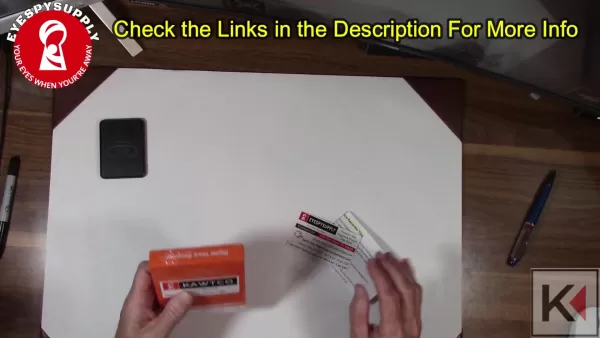
The Kawtco AI Voice Recorder arrives in a neatly packaged box, signaling a quality user experience from the start. Let's see what's inside.
.
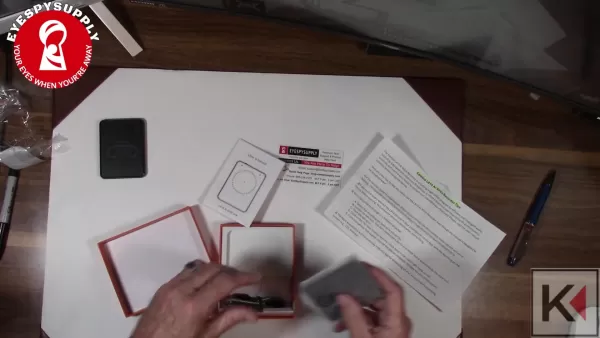
- The Kawtco AI Voice Recorder itself: A compact, black device with a magnetic back.
- User Manual: A detailed guide to help you navigate all features and settings.
- EYESPY SUPPLY Support Card: Provides contact information for technical assistance.
- Quick Start Guide: Offers helpful tips not covered in the main manual.
- Charging Cable: For powering up the device.
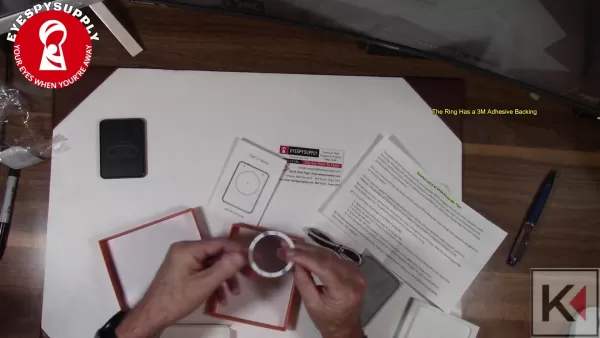
- Magnetic Ring: Enables easy attachment to smartphones for call recording.
The initial impression is one of quality and thoughtful design, with every component included to enhance functionality. This voice recorder stands out thanks to its AI capabilities and integrated magnetic design.
Setting Up Your Kawtco AI Voice Recorder
Getting your Kawtco AI Voice Recorder ready is simple. Just follow these steps for a smooth setup process.
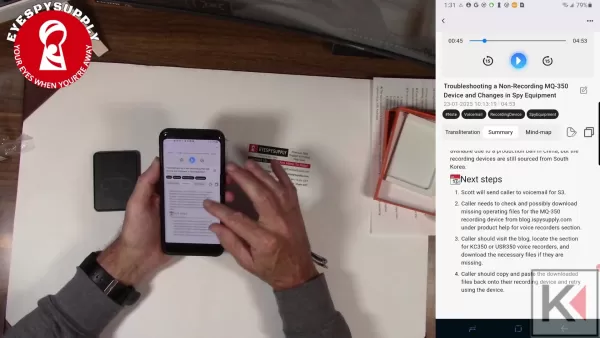
Powering On: Find the power switch on the top of the device and turn it on. A blue indicator light shows the recorder is active and ready.
.
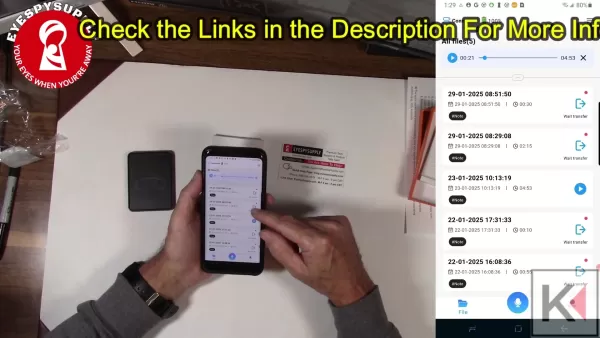
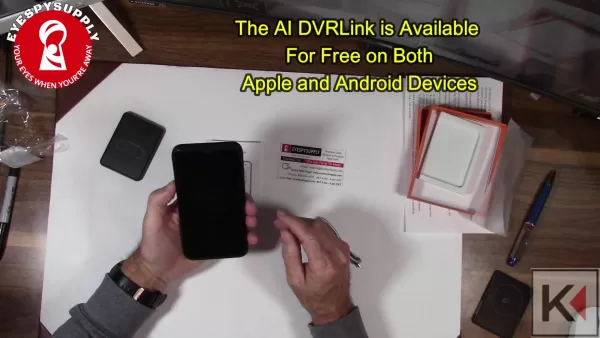
Downloading the AI DVRLink App: The AI DVRLink app is free and available for both Apple iOS and Android devices. This app lets you manage recordings, transcribe audio, and summarize content using AI.
.
Connecting to the App: Make sure the voice recorder is on and broadcasting a Bluetooth signal. Open the AI DVRLink app, and it will automatically recognize and connect to the device.
Adjusting Settings: Once connected, explore the app settings to customize recording preferences, transcription language, and other AI features.
Testing the Recorder: Before relying on it for important sessions, run a quick test to ensure audio capture is clear and all AI features are working correctly. This final step prepares your recorder for a wide range of needs.
Recording with Kawtco: Standalone and App-Integrated Modes
The Kawtco AI Voice Recorder provides flexible recording options to suit different situations. Here's how to use both its standalone and app-integrated modes.
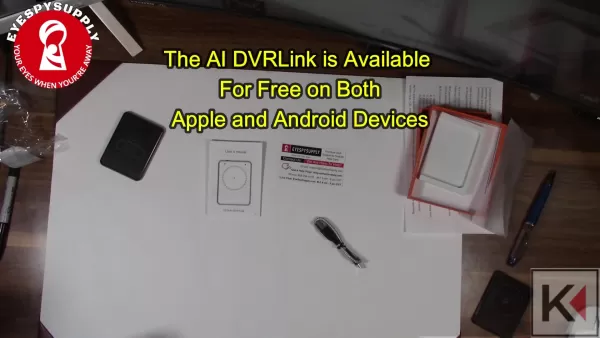
Standalone Recording: Activate the device by holding the power button for three seconds. A flashing red light indicates recording has begun. This mode is perfect for capturing student lectures or business meetings on the go.
- To pause the recording, press the button briefly. The light will turn solid, showing it's paused.
.
- To save the recording, hold the button again for three seconds until the light turns off. The file is now saved.
App-Integrated Recording: Connect your Kawtco AI Voice Recorder to your smartphone via Bluetooth and open the AI DVRLink app.
- Tap the microphone icon within the app to start recording.
- The red light on the recorder will flash to confirm recording is in progress.
- You can pause and save your recordings directly from the app for seamless management.
Whether you choose to record standalone or through the app, the Kawtco AI Voice Recorder ensures your audio is captured reliably and in high quality.
Leveraging AI Transcription and Summarization
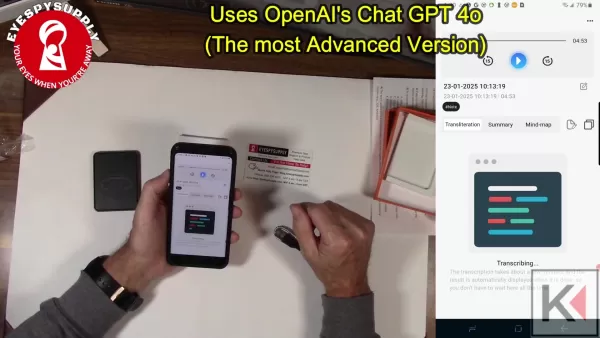
A standout feature of the Kawtco AI Voice Recorder is its integration with OpenAI's ChatGPT-4o for advanced transcription and summarization. This AI technology significantly boosts the usefulness of your recordings.
Transcription: After making a recording, select it in the AI DVRLink app and choose the transcription option. Pick the correct language (e.g., English) to ensure an accurate text conversion.
Summarization: Once you have a transcript, you can summarize it to extract the main points and key information. This is especially useful for long recordings, helping you quickly grasp the essentials.
Mind Map: The app can also generate a visual mind map from your content. This tool is excellent for organizing thoughts and identifying key themes and their relationships.
By using these AI features, the Kawtco AI Voice Recorder transforms raw audio into structured, easily digestible information.
Utilizing the Magnetic Design for Phone Call Recording
The Kawtco AI Voice Recorder is designed to integrate seamlessly with your smartphone for recording phone calls. The included magnetic ring makes this setup very convenient.
.
Attaching the Magnetic Ring: Peel off the adhesive backing from the magnetic ring and stick it to the back of your smartphone. Note that many modern smartphones already have built-in magnetic capabilities, which might make the ring unnecessary.
Positioning the Recorder: Align the magnetic back of the Kawtco AI Voice Recorder with the magnetic ring on your smartphone.
Recording Phone Calls: Make or receive a phone call as you normally would. The recorder's internal sensors will capture both sides of the conversation clearly.
This magnetic design ensures stable, hands-free call recording, which is essential for journalists, researchers, and professionals who need to document conversations accurately.
The AI DVRLink App Deep Dive
Exploring the Features of the AI DVRLink App
The AI DVRLink app is the central hub for the Kawtco AI Voice Recorder's advanced features. Once you've downloaded it and connected your device, the app opens up powerful ways to manage and enhance your recordings.
User Interface and Navigation
The app features a clean, intuitive interface that's easy to navigate. The main screen displays a list of your recordings with clear timestamps and titles. A quick tap lets you play back, rename, or delete files. The bottom navigation bar provides fast access to core functions:
- Recording: Start a new recording instantly with a single tap.
- Files: Manage and organize your saved audio files.
- Settings: Customize your recording preferences and AI feature settings.
AI-Powered Audio Enhancement
One of the app's best features is its use of OpenAI's ChatGPT-4o to automatically enhance your audio experience by:
- Transcription: The app can transcribe audio into multiple languages including English, Japanese, Korean, and more.
- Audio Summary: After transcription, the app provides a thorough summary of the content.
Bluetooth Connectivity Management
Beyond recording, the app also manages the Bluetooth connection, allowing you to:
- Connect easily with your devices.
- Monitor the connection status.
- Manage device-specific settings.
File Management and Export Options
The AI DVRLink app also offers robust file management:
- Easy-to-use folder and file organization.
- A simple, user-friendly interface.
- The ability to transfer files between devices.
Key technical details available within the app's settings:
Feature Description Bluetooth Name L815 Device S/N 815241030000210 Space Management 59.62G/59.52G Hide Recording Enabled Device Version 2.1.1
Step-by-Step Guide: Using the Kawtco AI Voice Recorder
Step 1: Preparing the Device
Start by unboxing your Kawtco AI Voice Recorder and checking all included parts. Charge the device using the provided cable. The recorder has a simple, single-button interface for ease of use.
.
Step 2: Powering On and Connecting
Locate the power switch and slide it to 'ON'. A blue light will indicate the device is active. Next, download the AI DVRLink app from your device's app store (available for iOS and Android). Follow the in-app prompts to connect your voice recorder via Bluetooth. This connection enables advanced features like AI-powered transcription and summarization.
Step 3: Recording Audio
To start a standalone recording, press and hold the button for three seconds until a red light flashes. The recorder is now capturing audio.
. For app-integrated recording, initiate the process via the AI DVRLink app after a Bluetooth connection is established. This allows for real-time monitoring and control from your smartphone.
Step 4: Managing Recordings
Once recording is finished, save the audio by pressing the button again. Connect the recorder to the AI DVRLink app to access your files. Within the app, you can manage, rename, and use AI features to transcribe and summarize your recordings.
.
Step 5: AI Transcription and Summarization
Select a recording and choose the 'Transcription' option. The AI DVRLink app uses advanced OpenAI ChatGPT-4o technology to accurately convert your audio to text. Once transcribed, use the 'Summarization' feature to pull out the key points. These tools save significant time and make your recorded information much more usable.
Pricing and Availability
Details on the Kawtco AI Voice Recorder's cost
The Kawtco AI Voice Recorder is available for purchase through EYESPY SUPPLY and other authorized retailers. For current pricing, visit the EYESPY SUPPLY website. Given its advanced AI integration and versatility, the device offers excellent value for both professional and personal users. Keep an eye out for promotional offers and bundle deals to get the best value.
Evaluating the Kawtco AI Voice Recorder: Pros and Cons
Pros
High-quality audio capture ensures clear and reliable recordings.
AI-powered transcription and summarization save time and streamline information processing.
Magnetic design allows for convenient, hands-free phone call recording.
Compact and portable design makes it easy to carry anywhere.
Versatile use cases meet a wide range of professional and personal needs.
Cons
App-integrated features require a stable Bluetooth connection.
The speed and accuracy of AI transcription depend on the clarity of the original audio.
The magnetic ring may be redundant for smartphones with built-in magnetic capabilities.
Initial setup involves downloading and pairing with the AI DVRLink app.
Using a third-party AI service for transcription may raise privacy considerations for some users.
Key Features of the Kawtco AI Voice Recorder
AI-Powered Transcription and Summarization
Leveraging OpenAI's ChatGPT-4o, the device accurately transcribes audio into text and provides concise summaries. This allows users to process recordings efficiently and extract vital information quickly.
Magnetic Design for Phone Call Recording
With the included magnetic ring, the recorder easily attaches to smartphones, enabling users to clearly capture both sides of phone conversations. This hands-free setup is reliable and ideal for professionals and researchers.
Standalone and App-Integrated Modes
Offering flexible recording options, users can record in standalone mode for simplicity or use the AI DVRLink app for advanced control and features. The standalone function doesn't require a smartphone and is perfect for meetings and lectures.
Compact and Portable Design
Its compact size ensures the recorder can be easily carried in a pocket or bag, providing ultimate convenience for recording on the go. It's an excellent tool for students needing to capture lectures.
High-Quality Audio Capture
Engineered for clear audio capture, the device performs reliably in various environments, ensuring your important moments are documented accurately. Clear audio also improves the results of AI transcription and summarization.
Versatile Use Cases for the Kawtco AI Voice Recorder
Journalism and Interviews
Journalists can rely on the device to record interviews, transcribe conversations, and summarize key details quickly. The magnetic design simplifies hands-free call recording, streamlining the documentation process.
Academic Lectures and Note-Taking
Students can use the recorder to capture lectures, transcribe key information, and create concise study notes. The standalone recording mode makes it simple to use in lecture halls without needing a phone.
Business Meetings and Documentation
Professionals can record meetings, transcribe minutes, and summarize action items using the AI features. The high-quality audio ensures every detail is captured reliably for accurate documentation.
Legal and Research Purposes
Researchers can capture interviews and discussions, transcribe them, and analyze content for deeper insights. The ability to generate mind maps further aids in organizing and visualizing complex information.
Personal Memos and Ideas
Individuals can use the recorder to capture spontaneous ideas, voice notes, and reminders while on the move. Its user-friendly design makes it perfect for quickly capturing thoughts and insights.
Frequently Asked Questions (FAQ)
How do I turn on the Kawtco AI Voice Recorder?
Locate the power switch on the top of the device and slide it to the 'ON' position. A blue light indicates the device is active.
How do I start a recording?
For standalone recording, press and hold the button for three seconds until a red light flashes. For app-integrated recording, use the controls within the AI DVRLink app.
How do I pause a recording?
Press the button briefly during a recording to pause it. A solid red light shows the device is paused.
How do I save a recording?
To save your recording, press and hold the button again for three seconds until the light turns off. The file is now saved.
How do I connect to the AI DVRLink app?
Download and open the app, ensure your recorder is powered on and emitting a Bluetooth signal, then follow the in-app connection instructions.
How do I use the AI transcription feature?
Select a recording in the app and tap the 'Transcription' option. Choose the correct language for the most accurate text conversion.
How do I use the AI summarization feature?
Once you have a transcript, select the 'Summarization' option to extract the main points and key information from the recording.
What is the purpose of the
Related article
 ByteDance’s Seed launches global campus drive, offering virtual shares to win top large model talent
In the competitive landscape of large language models, securing top-tier talent remains the most critical strategic asset.On April 1st, ByteDance announced the launch of its Seed global campus recruitment initiative, part of its large model talent de
Suno to Watermark Songs Amid Legal Battles
Suno, the platform enabling users to generate AI-created music, has unveiled new features to label platform-produced tracks, restrict downloads, and update community standards to curb unauthorized replicas. These updates arrive as Suno confronts mult
Musk Admits Grok Build Leaked User Code, Promises to Erase All Historical Data
Elon Musk directly addressed the privacy controversy surrounding Grok Build, beginning with a simple "True" to confirm the incident's validity. He pledged that all user data previously uploaded to SpaceXAI would be permanently erased, stating, "not a
Related Special Topic Recommendations
Design & Art
ByteDance’s Seed launches global campus drive, offering virtual shares to win top large model talent
In the competitive landscape of large language models, securing top-tier talent remains the most critical strategic asset.On April 1st, ByteDance announced the launch of its Seed global campus recruitment initiative, part of its large model talent de
Suno to Watermark Songs Amid Legal Battles
Suno, the platform enabling users to generate AI-created music, has unveiled new features to label platform-produced tracks, restrict downloads, and update community standards to curb unauthorized replicas. These updates arrive as Suno confronts mult
Musk Admits Grok Build Leaked User Code, Promises to Erase All Historical Data
Elon Musk directly addressed the privacy controversy surrounding Grok Build, beginning with a simple "True" to confirm the incident's validity. He pledged that all user data previously uploaded to SpaceXAI would be permanently erased, stating, "not a
Related Special Topic Recommendations
Design & Art
 AI Visual Style Reference Tools for Character Sheets, Moodboards, and Pitch Decks
2026 Latest Best AI Visual Style Reference Tools for Character Sheets, Moodboards, and Pitch Decks are here on XIX.AI! This curated top-rated list features powerful game-changing tools that go through rigorous real-world tests. You’ll find a free vs paid comparison, detailed rankings, and must-try options to help you boost creativity and streamline your workflow. Explore now to discover your perfect tool for boosting productivity!
 11 tools
 xix.ai
SEO
Best AI SERP Analysis Tools for Search Strategy
xix.ai
SEO
Best AI SERP Analysis Tools for Search Strategy
2026 Latest Best Top-rated AI SERP Analysis Tools for Search Strategy are curated by XIX.AI through rigorous real-world tests and weekly updated rankings. These powerful tools help you unlock hidden optimization opportunities, boost content performance, and gain a competitive edge in search. Discover your perfect tool to elevate your search strategy today. Explore now!
13 tools
xix.ai
Data Analysis
Best AI Anomaly Detection Tools for KPI Monitoring across SaaS and Ecommerce Teams
2026 Latest Best Top-rated AI Anomaly Detection Tools for KPI Monitoring in SaaS and Ecommerce teams! XIX.AI has curated a powerful, game-changing collection based on rigorous real-world tests and weekly updated rankings. You’ll find detailed free vs paid comparison insights to help you identify the must-try solution that boosts productivity and unlocks your AI edge. Explore now!
10 tools
xix.ai
writing
Best AI Outline Generators for Long-Form SEO Articles
2026 Latest Best Top-Rated AI Outline Generators for Long-Form SEO Articles, meticulously curated by XIX.AI. These powerful tools offer game-changing assistance in creating high-quality content quickly, boosting writing efficiency significantly. Get a free vs paid comparison along with real-world tests and detailed rankings to help you find the must-try option that suits your needs. Explore now to unlock your AI edge.
8 tools
xix.ai
Education and Learning
AI Study Tools for Homework and Exam Prep
2026 Latest Best AI Study Tools for Homework and Exam Prep! XIX.AI curates a top-rated list of powerful, game-changing tools that help students boost productivity, streamline homework completion, and ace exams through real-world tests. Get a free vs paid comparison, detailed rankings, and must-try options to unlock your AI edge. Explore now!
10 tools
xix.ai
Music composition
AI Vocal Demo Tools for Songwriters, Hooks, Toplines, and Multilingual Draft Sessions
2026 Latest Best AI Vocal Demo Tools for Songwriters, Hook Creators, and Multi-Language Content Teams! XIX.AI has curated a top-rated list of powerful game-changing tools that go through rigorous real-world tests. You’ll find detailed free vs paid comparison data, comprehensive rankings, and must-try options to help you boost writing efficiency and unlock your creative potential. Explore now to discover your perfect tool for all your content needs!
9 tools
xix.ai

 Comments (1)
0/500
Comments (1)
0/500
![DanielAllen]()
So ein kleines Ding mit KI-Unterstützung? Spannend, wie sich die Aufnahmetechnologie entwickelt! Fände es aber praktisch, wenn solche Geräte mehr auf europäische Datenschutzanforderungen ausgelegt wären – immerhin speichern sie ja sensible Gespräche. Vielleicht wäre das ein Vorteil gegenüber gängigen Smartphone-Apps! 😊
In our fast-paced world, it's more important than ever to capture important conversations, meetings, or lectures clearly. The Kawtco AI Voice Recorder offers a compact, feature-packed solution suitable for both professional and personal use. This guide delivers a detailed unboxing, setup instructions, and a thorough feature overview to help you get the most from this device. Whether you're a student, journalist, or business professional, this AI-powered recorder is designed to be an invaluable tool for reliable, high-quality audio capture. This guide is structured with SEO and user experience in mind for a seamless read.
Key Points
Unboxing the Kawtco AI Voice Recorder: Find out exactly what's in the box, from the main device to accessories like the charging cable and magnetic attachment ring.
Setting up the recorder: Learn how to power on the device, connect it to the companion AI DVRLink app, and adjust settings for optimal performance.
Recording in standalone mode: The Kawtco AI Recorder can record meetings and lectures on its own without needing the app.
Utilizing AI features: Transcribe and summarize recorded audio using the advanced OpenAI ChatGPT-4o integration within the app.
Understanding the magnetic design: See how the included magnetic ring allows for convenient attachment to your smartphone for recording calls.
Kawtco AI Voice Recorder: An In-Depth Guide
Unboxing and First Impressions
The Kawtco AI Voice Recorder arrives in a neatly packaged box, signaling a quality user experience from the start. Let's see what's inside.
.
- The Kawtco AI Voice Recorder itself: A compact, black device with a magnetic back.
- User Manual: A detailed guide to help you navigate all features and settings.
- EYESPY SUPPLY Support Card: Provides contact information for technical assistance.
- Quick Start Guide: Offers helpful tips not covered in the main manual.
- Charging Cable: For powering up the device.
- Magnetic Ring: Enables easy attachment to smartphones for call recording.
The initial impression is one of quality and thoughtful design, with every component included to enhance functionality. This voice recorder stands out thanks to its AI capabilities and integrated magnetic design.
Setting Up Your Kawtco AI Voice Recorder
Getting your Kawtco AI Voice Recorder ready is simple. Just follow these steps for a smooth setup process.
Powering On: Find the power switch on the top of the device and turn it on. A blue indicator light shows the recorder is active and ready.
.
Downloading the AI DVRLink App: The AI DVRLink app is free and available for both Apple iOS and Android devices. This app lets you manage recordings, transcribe audio, and summarize content using AI.
.
Connecting to the App: Make sure the voice recorder is on and broadcasting a Bluetooth signal. Open the AI DVRLink app, and it will automatically recognize and connect to the device.
Adjusting Settings: Once connected, explore the app settings to customize recording preferences, transcription language, and other AI features.
Testing the Recorder: Before relying on it for important sessions, run a quick test to ensure audio capture is clear and all AI features are working correctly. This final step prepares your recorder for a wide range of needs.
Recording with Kawtco: Standalone and App-Integrated Modes
The Kawtco AI Voice Recorder provides flexible recording options to suit different situations. Here's how to use both its standalone and app-integrated modes.
Standalone Recording: Activate the device by holding the power button for three seconds. A flashing red light indicates recording has begun. This mode is perfect for capturing student lectures or business meetings on the go.
- To pause the recording, press the button briefly. The light will turn solid, showing it's paused.
.
- To save the recording, hold the button again for three seconds until the light turns off. The file is now saved.
- To pause the recording, press the button briefly. The light will turn solid, showing it's paused.
App-Integrated Recording: Connect your Kawtco AI Voice Recorder to your smartphone via Bluetooth and open the AI DVRLink app.
- Tap the microphone icon within the app to start recording.
- The red light on the recorder will flash to confirm recording is in progress.
- You can pause and save your recordings directly from the app for seamless management.
Whether you choose to record standalone or through the app, the Kawtco AI Voice Recorder ensures your audio is captured reliably and in high quality.
Leveraging AI Transcription and Summarization
A standout feature of the Kawtco AI Voice Recorder is its integration with OpenAI's ChatGPT-4o for advanced transcription and summarization. This AI technology significantly boosts the usefulness of your recordings.
Transcription: After making a recording, select it in the AI DVRLink app and choose the transcription option. Pick the correct language (e.g., English) to ensure an accurate text conversion.
Summarization: Once you have a transcript, you can summarize it to extract the main points and key information. This is especially useful for long recordings, helping you quickly grasp the essentials.
Mind Map: The app can also generate a visual mind map from your content. This tool is excellent for organizing thoughts and identifying key themes and their relationships.
By using these AI features, the Kawtco AI Voice Recorder transforms raw audio into structured, easily digestible information.
Utilizing the Magnetic Design for Phone Call Recording
The Kawtco AI Voice Recorder is designed to integrate seamlessly with your smartphone for recording phone calls. The included magnetic ring makes this setup very convenient.
.
Attaching the Magnetic Ring: Peel off the adhesive backing from the magnetic ring and stick it to the back of your smartphone. Note that many modern smartphones already have built-in magnetic capabilities, which might make the ring unnecessary.
Positioning the Recorder: Align the magnetic back of the Kawtco AI Voice Recorder with the magnetic ring on your smartphone.
Recording Phone Calls: Make or receive a phone call as you normally would. The recorder's internal sensors will capture both sides of the conversation clearly.
This magnetic design ensures stable, hands-free call recording, which is essential for journalists, researchers, and professionals who need to document conversations accurately.
The AI DVRLink App Deep Dive
Exploring the Features of the AI DVRLink App
The AI DVRLink app is the central hub for the Kawtco AI Voice Recorder's advanced features. Once you've downloaded it and connected your device, the app opens up powerful ways to manage and enhance your recordings.
User Interface and Navigation
The app features a clean, intuitive interface that's easy to navigate. The main screen displays a list of your recordings with clear timestamps and titles. A quick tap lets you play back, rename, or delete files. The bottom navigation bar provides fast access to core functions:
- Recording: Start a new recording instantly with a single tap.
- Files: Manage and organize your saved audio files.
- Settings: Customize your recording preferences and AI feature settings.
AI-Powered Audio Enhancement
One of the app's best features is its use of OpenAI's ChatGPT-4o to automatically enhance your audio experience by:
- Transcription: The app can transcribe audio into multiple languages including English, Japanese, Korean, and more.
- Audio Summary: After transcription, the app provides a thorough summary of the content.
Bluetooth Connectivity Management
Beyond recording, the app also manages the Bluetooth connection, allowing you to:
- Connect easily with your devices.
- Monitor the connection status.
- Manage device-specific settings.
File Management and Export Options
The AI DVRLink app also offers robust file management:
- Easy-to-use folder and file organization.
- A simple, user-friendly interface.
- The ability to transfer files between devices.
Key technical details available within the app's settings:
| Feature | Description |
|---|---|
| Bluetooth Name | L815 |
| Device S/N | 815241030000210 |
| Space Management | 59.62G/59.52G |
| Hide Recording | Enabled |
| Device Version | 2.1.1 |
Step-by-Step Guide: Using the Kawtco AI Voice Recorder
Step 1: Preparing the Device
Start by unboxing your Kawtco AI Voice Recorder and checking all included parts. Charge the device using the provided cable. The recorder has a simple, single-button interface for ease of use.
.
Step 2: Powering On and Connecting
Locate the power switch and slide it to 'ON'. A blue light will indicate the device is active. Next, download the AI DVRLink app from your device's app store (available for iOS and Android). Follow the in-app prompts to connect your voice recorder via Bluetooth. This connection enables advanced features like AI-powered transcription and summarization.
Step 3: Recording Audio
To start a standalone recording, press and hold the button for three seconds until a red light flashes. The recorder is now capturing audio.
. For app-integrated recording, initiate the process via the AI DVRLink app after a Bluetooth connection is established. This allows for real-time monitoring and control from your smartphone.
Step 4: Managing Recordings
Once recording is finished, save the audio by pressing the button again. Connect the recorder to the AI DVRLink app to access your files. Within the app, you can manage, rename, and use AI features to transcribe and summarize your recordings.
.
Step 5: AI Transcription and Summarization
Select a recording and choose the 'Transcription' option. The AI DVRLink app uses advanced OpenAI ChatGPT-4o technology to accurately convert your audio to text. Once transcribed, use the 'Summarization' feature to pull out the key points. These tools save significant time and make your recorded information much more usable.
Pricing and Availability
Details on the Kawtco AI Voice Recorder's cost
The Kawtco AI Voice Recorder is available for purchase through EYESPY SUPPLY and other authorized retailers. For current pricing, visit the EYESPY SUPPLY website. Given its advanced AI integration and versatility, the device offers excellent value for both professional and personal users. Keep an eye out for promotional offers and bundle deals to get the best value.
Evaluating the Kawtco AI Voice Recorder: Pros and Cons
Pros
High-quality audio capture ensures clear and reliable recordings.
AI-powered transcription and summarization save time and streamline information processing.
Magnetic design allows for convenient, hands-free phone call recording.
Compact and portable design makes it easy to carry anywhere.
Versatile use cases meet a wide range of professional and personal needs.
Cons
App-integrated features require a stable Bluetooth connection.
The speed and accuracy of AI transcription depend on the clarity of the original audio.
The magnetic ring may be redundant for smartphones with built-in magnetic capabilities.
Initial setup involves downloading and pairing with the AI DVRLink app.
Using a third-party AI service for transcription may raise privacy considerations for some users.
Key Features of the Kawtco AI Voice Recorder
AI-Powered Transcription and Summarization
Leveraging OpenAI's ChatGPT-4o, the device accurately transcribes audio into text and provides concise summaries. This allows users to process recordings efficiently and extract vital information quickly.
Magnetic Design for Phone Call Recording
With the included magnetic ring, the recorder easily attaches to smartphones, enabling users to clearly capture both sides of phone conversations. This hands-free setup is reliable and ideal for professionals and researchers.
Standalone and App-Integrated Modes
Offering flexible recording options, users can record in standalone mode for simplicity or use the AI DVRLink app for advanced control and features. The standalone function doesn't require a smartphone and is perfect for meetings and lectures.
Compact and Portable Design
Its compact size ensures the recorder can be easily carried in a pocket or bag, providing ultimate convenience for recording on the go. It's an excellent tool for students needing to capture lectures.
High-Quality Audio Capture
Engineered for clear audio capture, the device performs reliably in various environments, ensuring your important moments are documented accurately. Clear audio also improves the results of AI transcription and summarization.
Versatile Use Cases for the Kawtco AI Voice Recorder
Journalism and Interviews
Journalists can rely on the device to record interviews, transcribe conversations, and summarize key details quickly. The magnetic design simplifies hands-free call recording, streamlining the documentation process.
Academic Lectures and Note-Taking
Students can use the recorder to capture lectures, transcribe key information, and create concise study notes. The standalone recording mode makes it simple to use in lecture halls without needing a phone.
Business Meetings and Documentation
Professionals can record meetings, transcribe minutes, and summarize action items using the AI features. The high-quality audio ensures every detail is captured reliably for accurate documentation.
Legal and Research Purposes
Researchers can capture interviews and discussions, transcribe them, and analyze content for deeper insights. The ability to generate mind maps further aids in organizing and visualizing complex information.
Personal Memos and Ideas
Individuals can use the recorder to capture spontaneous ideas, voice notes, and reminders while on the move. Its user-friendly design makes it perfect for quickly capturing thoughts and insights.
Frequently Asked Questions (FAQ)
How do I turn on the Kawtco AI Voice Recorder?
Locate the power switch on the top of the device and slide it to the 'ON' position. A blue light indicates the device is active.
How do I start a recording?
For standalone recording, press and hold the button for three seconds until a red light flashes. For app-integrated recording, use the controls within the AI DVRLink app.
How do I pause a recording?
Press the button briefly during a recording to pause it. A solid red light shows the device is paused.
How do I save a recording?
To save your recording, press and hold the button again for three seconds until the light turns off. The file is now saved.
How do I connect to the AI DVRLink app?
Download and open the app, ensure your recorder is powered on and emitting a Bluetooth signal, then follow the in-app connection instructions.
How do I use the AI transcription feature?
Select a recording in the app and tap the 'Transcription' option. Choose the correct language for the most accurate text conversion.
How do I use the AI summarization feature?
Once you have a transcript, select the 'Summarization' option to extract the main points and key information from the recording.
What is the purpose of the








 ByteDance’s Seed launches global campus drive, offering virtual shares to win top large model talent
In the competitive landscape of large language models, securing top-tier talent remains the most critical strategic asset.On April 1st, ByteDance announced the launch of its Seed global campus recruitment initiative, part of its large model talent de
ByteDance’s Seed launches global campus drive, offering virtual shares to win top large model talent
In the competitive landscape of large language models, securing top-tier talent remains the most critical strategic asset.On April 1st, ByteDance announced the launch of its Seed global campus recruitment initiative, part of its large model talent de
 Suno to Watermark Songs Amid Legal Battles
Suno, the platform enabling users to generate AI-created music, has unveiled new features to label platform-produced tracks, restrict downloads, and update community standards to curb unauthorized replicas. These updates arrive as Suno confronts mult
Suno to Watermark Songs Amid Legal Battles
Suno, the platform enabling users to generate AI-created music, has unveiled new features to label platform-produced tracks, restrict downloads, and update community standards to curb unauthorized replicas. These updates arrive as Suno confronts mult
 Musk Admits Grok Build Leaked User Code, Promises to Erase All Historical Data
Elon Musk directly addressed the privacy controversy surrounding Grok Build, beginning with a simple "True" to confirm the incident's validity. He pledged that all user data previously uploaded to SpaceXAI would be permanently erased, stating, "not a
Musk Admits Grok Build Leaked User Code, Promises to Erase All Historical Data
Elon Musk directly addressed the privacy controversy surrounding Grok Build, beginning with a simple "True" to confirm the incident's validity. He pledged that all user data previously uploaded to SpaceXAI would be permanently erased, stating, "not a

2026 Latest Best AI Visual Style Reference Tools for Character Sheets, Moodboards, and Pitch Decks are here on XIX.AI! This curated top-rated list features powerful game-changing tools that go through rigorous real-world tests. You’ll find a free vs paid comparison, detailed rankings, and must-try options to help you boost creativity and streamline your workflow. Explore now to discover your perfect tool for boosting productivity!
11 tools
xix.ai

2026 Latest Best Top-rated AI SERP Analysis Tools for Search Strategy are curated by XIX.AI through rigorous real-world tests and weekly updated rankings. These powerful tools help you unlock hidden optimization opportunities, boost content performance, and gain a competitive edge in search. Discover your perfect tool to elevate your search strategy today. Explore now!
13 tools
xix.ai

2026 Latest Best Top-rated AI Anomaly Detection Tools for KPI Monitoring in SaaS and Ecommerce teams! XIX.AI has curated a powerful, game-changing collection based on rigorous real-world tests and weekly updated rankings. You’ll find detailed free vs paid comparison insights to help you identify the must-try solution that boosts productivity and unlocks your AI edge. Explore now!
10 tools
xix.ai

2026 Latest Best Top-Rated AI Outline Generators for Long-Form SEO Articles, meticulously curated by XIX.AI. These powerful tools offer game-changing assistance in creating high-quality content quickly, boosting writing efficiency significantly. Get a free vs paid comparison along with real-world tests and detailed rankings to help you find the must-try option that suits your needs. Explore now to unlock your AI edge.
8 tools
xix.ai

2026 Latest Best AI Study Tools for Homework and Exam Prep! XIX.AI curates a top-rated list of powerful, game-changing tools that help students boost productivity, streamline homework completion, and ace exams through real-world tests. Get a free vs paid comparison, detailed rankings, and must-try options to unlock your AI edge. Explore now!
10 tools
xix.ai

2026 Latest Best AI Vocal Demo Tools for Songwriters, Hook Creators, and Multi-Language Content Teams! XIX.AI has curated a top-rated list of powerful game-changing tools that go through rigorous real-world tests. You’ll find detailed free vs paid comparison data, comprehensive rankings, and must-try options to help you boost writing efficiency and unlock your creative potential. Explore now to discover your perfect tool for all your content needs!
9 tools
xix.ai

So ein kleines Ding mit KI-Unterstützung? Spannend, wie sich die Aufnahmetechnologie entwickelt! Fände es aber praktisch, wenn solche Geräte mehr auf europäische Datenschutzanforderungen ausgelegt wären – immerhin speichern sie ja sensible Gespräche. Vielleicht wäre das ein Vorteil gegenüber gängigen Smartphone-Apps! 😊












