


 Home
HomeJobs-Scout's AI Editor Simplifies Resume Importing and Editing Efficiently
In today's competitive job market, a polished resume is your ticket to career opportunities. Jobs-Scout's intelligent resume builder provides AI-powered tools to craft targeted resumes that get noticed. Our comprehensive guide demonstrates how to import existing resumes into the editor and customize them for specific positions while preserving your original files.
Key Features
AI-Enhanced Editor: Intelligent tools to strengthen resume content instantly
Seamless Import: Effortlessly bring existing resumes into the editing platform
Version Control: Maintain multiple customized resumes for different applications
Non-Destructive Editing: Original documents remain unchanged during revisions
Smart Optimization: Tailor content to match job descriptions precisely
Professional Formatting: Tools to create visually appealing document layouts
Getting Started with Jobs-Scout Resume Editor
The Intelligent Resume Assistant
Jobs-Scout revolutionizes resume creation with smart technology that analyzes and enhances your professional profile. The platform's intuitive interface makes professional resume building accessible while powerful AI provides real-time suggestions to strengthen content, identify relevant keywords, and improve overall impact.
Whether crafting your first resume or updating an existing one, the editor adapts to your needs. AI capabilities surface valuable insights to highlight your strongest qualifications while maintaining authentic representation of your experience.
Preparing Documents for Upload
Ensure smooth importing by reviewing your resume before upload:
- Verify all professional details are current
- Check file format compatibility (.doc, .docx, PDF)
- Organize content in clear sections
- Review for spelling/grammar errors
Essential Resume Optimization Techniques
AI-Powered Section Enhancement
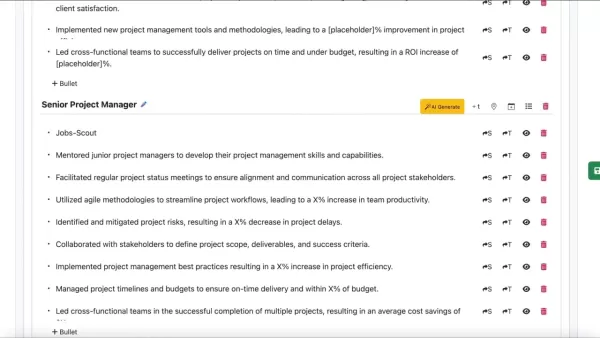
Transform each resume component with intelligent recommendations:
- Professional Summary: Craft compelling opening statements
- Work History: Highlight achievements with impact metrics
- Skills: Prioritize relevant competencies for each application
- Education: Showcase academic credentials effectively
Formatting for Maximum Impact
Apply professional design principles with ease:
- Select clean, modern fonts (11-12pt size)
- Maintain consistent spacing and margins
- Use strategic bullet points to emphasize key points
- Export final versions as PDF to preserve formatting
Step-by-Step Resume Import & Editing
Uploading Your Document
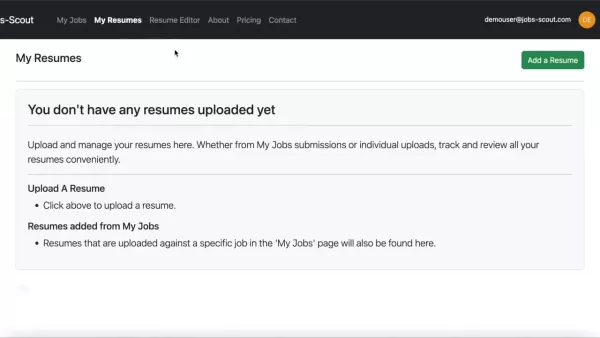
- Log in to your Jobs-Scout account
- Navigate to 'My Resumes' section
- Select 'Add Resume' and choose your file
- Confirm successful upload verification
Advanced Editing Features
Once imported, leverage powerful editing tools:
- Live format preview while editing
- Section reorganization with drag-and-drop
- Conversion between bullet points and title headers
- Version comparison tools
Subscription Options
Plan Comparison
Feature Basic Premium Professional AI Recommendations Limited Full Access Full Access + Expert Review Template Selection Standard Expanded Premium Designs Support Basic Priority Dedicated
Analytical Breakdown
Strengths
- Intelligent content optimization tools
- Effortless version management
- Original document protection
- Industry-specific customization
Considerations
- Format adjustments may be needed post-import
- Advanced features require premium access
- Processing time for complex documents
Common Questions
File Compatibility
The platform accepts .txt, .doc, .docx and PDF formats for seamless uploading.
Version Control
Create unlimited customized versions while preserving original files intact.
Processing Time
Most resumes process within minutes, though complex documents may require additional time.
Professional Tips
Making Your Resume Stand Out
- Quantify achievements with specific metrics
- Use targeted keywords from job descriptions
- Maintain clean, scannable formatting
- Showcase relevant certifications
- Proofread multiple times before submission
Related article
 Google Tests Remy AI Agent for Gemini as Focus Shifts to User Control
According to Business Insider, Google is testing Remy, a new AI personal agent for Gemini. This tool aims to execute tasks on behalf of users, streamlining both professional workflows and daily routines.Currently, Remy is undergoing testing in an int
How to fix Core Web Vitals for better SEO rankings
Streamline Report Card Comments with AI ToolsIntroductionAI Tools for Generating Report Card CommentsMagic SchoolAlmanac AIChat GPTUsing Magic School to Generate Report Card CommentsLogging into Magic SchoolSelecting the Report Card Comments ToolCust
Slackbot Becomes an AI Agent
Slackbot, the automated assistant embedded in Salesforce’s corporate messaging platform Slack, is evolving into an AI agent. Salesforce CTO Parker Harris envisions it achieving viral status comparable to OpenAI’s ChatGPT.The cloud software giant laun
Related Special Topic Recommendations
writing
Google Tests Remy AI Agent for Gemini as Focus Shifts to User Control
According to Business Insider, Google is testing Remy, a new AI personal agent for Gemini. This tool aims to execute tasks on behalf of users, streamlining both professional workflows and daily routines.Currently, Remy is undergoing testing in an int
How to fix Core Web Vitals for better SEO rankings
Streamline Report Card Comments with AI ToolsIntroductionAI Tools for Generating Report Card CommentsMagic SchoolAlmanac AIChat GPTUsing Magic School to Generate Report Card CommentsLogging into Magic SchoolSelecting the Report Card Comments ToolCust
Slackbot Becomes an AI Agent
Slackbot, the automated assistant embedded in Salesforce’s corporate messaging platform Slack, is evolving into an AI agent. Salesforce CTO Parker Harris envisions it achieving viral status comparable to OpenAI’s ChatGPT.The cloud software giant laun
Related Special Topic Recommendations
writing
 Best AI Outline Generators for Long-Form SEO Articles
2026 Latest Best Top-Rated AI Outline Generators for Long-Form SEO Articles, meticulously curated by XIX.AI. These powerful tools offer game-changing assistance in creating high-quality content quickly, boosting writing efficiency significantly. Get a free vs paid comparison along with real-world tests and detailed rankings to help you find the must-try option that suits your needs. Explore now to unlock your AI edge.
 8 tools
 xix.ai
Education and Learning
AI Study Tools for Homework and Exam Prep
xix.ai
Education and Learning
AI Study Tools for Homework and Exam Prep
2026 Latest Best AI Study Tools for Homework and Exam Prep! XIX.AI curates a top-rated list of powerful, game-changing tools that help students boost productivity, streamline homework completion, and ace exams through real-world tests. Get a free vs paid comparison, detailed rankings, and must-try options to unlock your AI edge. Explore now!
10 tools
xix.ai
Music composition
AI Vocal Demo Tools for Songwriters, Hooks, Toplines, and Multilingual Draft Sessions
2026 Latest Best AI Vocal Demo Tools for Songwriters, Hook Creators, and Multi-Language Content Teams! XIX.AI has curated a top-rated list of powerful game-changing tools that go through rigorous real-world tests. You’ll find detailed free vs paid comparison data, comprehensive rankings, and must-try options to help you boost writing efficiency and unlock your creative potential. Explore now to discover your perfect tool for all your content needs!
9 tools
xix.ai
Business
Best AI Competitive Research Tools for Small Businesses
2026 Latest Best Top-rated AI Competitive Research Tools for Small Businesses! XIX.AI has curated a highly powerful game-changing collection, updated weekly with rigorous real-world tests and detailed rankings. You can find a comprehensive free vs paid comparison to help you identify the must-try tools that boost your productivity and give you a competitive edge. Explore now to discover your perfect tool!
9 tools
xix.ai
Image editing
Photoshop AI Retouch Tools for Ecommerce Apparel, Skin Cleanup, and Color Consistency
2026 Latest Best Photoshop AI retouch tools for ecommerce apparel, skin cleanup, and color consistency! This top-rated curated list features powerful game-changing solutions that help you boost writing efficiency, streamline content creation, and achieve perfect visual results effortlessly. Each tool has undergone real-world tests through weekly updated rankings, complete with free vs paid comparison details. Backed by XIX.AI, it’s the must-try guide for anyone aiming to unlock your AI edge. Explore now!
10 tools
xix.ai
Prompt
Best AI Prompt Libraries for ChatGPT Workflows
2026 Latest Best Top-Rated AI Prompt Libraries for optimizing all types of ChatGPT workflows. XIX.AI has curated a powerful, game-changing collection that goes through rigorous real-world tests to ensure top performance. You can find detailed free vs paid comparisons and expert rankings to help you choose the must-try tools that boost your productivity and unlock your AI edge. Explore now!
11 tools
xix.ai

 Comments (4)
0/500
Comments (4)
0/500
![StephenGreen]()
このAI搭載のレジュメビルダー、すごく便利そう!でもAIが書きすぎると個性が消えそうでちょっと心配…🤔 就活生ってみんな同じような履歴書になりませんか?
![BruceClark]()
このAIレジュメ編集機能、すごく便利そう!でもAIが履歴書を書く時代って、ちょっと怖くない?人間らしさが失われそうで…🤔 就職活動中の友達に教えてあげようかな。
![HarperJones]()
AI 이력서 편집기 신기하네요! 저도 최근에 취업 준비 중인데 PDF에서 내용 추출 기능은 진짜 유용한 것 같아요. 다만 AI가 너무 많은 개인정보를 처리할 때 프라이버시 문제는 없는지 조금 걱정되네요. 🇰🇷 혹시 다른 사람들도 경험이 있는지 궁금해요~
![EmmaTurner]()
このAIレジュメビルダー、便利そうだけど、本当に効果あるのかな😅 最近はAIを使ったサービスが多すぎて、どれを信じていいか分からなくなる。でも、競争の激しい就活市場では、少しでも有利になりたいから試してみようかな。
In today's competitive job market, a polished resume is your ticket to career opportunities. Jobs-Scout's intelligent resume builder provides AI-powered tools to craft targeted resumes that get noticed. Our comprehensive guide demonstrates how to import existing resumes into the editor and customize them for specific positions while preserving your original files.
Key Features
AI-Enhanced Editor: Intelligent tools to strengthen resume content instantly
Seamless Import: Effortlessly bring existing resumes into the editing platform
Version Control: Maintain multiple customized resumes for different applications
Non-Destructive Editing: Original documents remain unchanged during revisions
Smart Optimization: Tailor content to match job descriptions precisely
Professional Formatting: Tools to create visually appealing document layouts
Getting Started with Jobs-Scout Resume Editor
The Intelligent Resume Assistant
Jobs-Scout revolutionizes resume creation with smart technology that analyzes and enhances your professional profile. The platform's intuitive interface makes professional resume building accessible while powerful AI provides real-time suggestions to strengthen content, identify relevant keywords, and improve overall impact.
Whether crafting your first resume or updating an existing one, the editor adapts to your needs. AI capabilities surface valuable insights to highlight your strongest qualifications while maintaining authentic representation of your experience.
Preparing Documents for Upload
Ensure smooth importing by reviewing your resume before upload:
- Verify all professional details are current
- Check file format compatibility (.doc, .docx, PDF)
- Organize content in clear sections
- Review for spelling/grammar errors
Essential Resume Optimization Techniques
AI-Powered Section Enhancement
Transform each resume component with intelligent recommendations:
- Professional Summary: Craft compelling opening statements
- Work History: Highlight achievements with impact metrics
- Skills: Prioritize relevant competencies for each application
- Education: Showcase academic credentials effectively
Formatting for Maximum Impact
Apply professional design principles with ease:
- Select clean, modern fonts (11-12pt size)
- Maintain consistent spacing and margins
- Use strategic bullet points to emphasize key points
- Export final versions as PDF to preserve formatting
Step-by-Step Resume Import & Editing
Uploading Your Document
- Log in to your Jobs-Scout account
- Navigate to 'My Resumes' section
- Select 'Add Resume' and choose your file
- Confirm successful upload verification
Advanced Editing Features
Once imported, leverage powerful editing tools:
- Live format preview while editing
- Section reorganization with drag-and-drop
- Conversion between bullet points and title headers
- Version comparison tools
Subscription Options
Plan Comparison
| Feature | Basic | Premium | Professional |
|---|---|---|---|
| AI Recommendations | Limited | Full Access | Full Access + Expert Review |
| Template Selection | Standard | Expanded | Premium Designs |
| Support | Basic | Priority | Dedicated |
Analytical Breakdown
Strengths
- Intelligent content optimization tools
- Effortless version management
- Original document protection
- Industry-specific customization
Considerations
- Format adjustments may be needed post-import
- Advanced features require premium access
- Processing time for complex documents
Common Questions
File Compatibility
The platform accepts .txt, .doc, .docx and PDF formats for seamless uploading.
Version Control
Create unlimited customized versions while preserving original files intact.
Processing Time
Most resumes process within minutes, though complex documents may require additional time.
Professional Tips
Making Your Resume Stand Out
- Quantify achievements with specific metrics
- Use targeted keywords from job descriptions
- Maintain clean, scannable formatting
- Showcase relevant certifications
- Proofread multiple times before submission







 Google Tests Remy AI Agent for Gemini as Focus Shifts to User Control
According to Business Insider, Google is testing Remy, a new AI personal agent for Gemini. This tool aims to execute tasks on behalf of users, streamlining both professional workflows and daily routines.Currently, Remy is undergoing testing in an int
Google Tests Remy AI Agent for Gemini as Focus Shifts to User Control
According to Business Insider, Google is testing Remy, a new AI personal agent for Gemini. This tool aims to execute tasks on behalf of users, streamlining both professional workflows and daily routines.Currently, Remy is undergoing testing in an int
 How to fix Core Web Vitals for better SEO rankings
Streamline Report Card Comments with AI ToolsIntroductionAI Tools for Generating Report Card CommentsMagic SchoolAlmanac AIChat GPTUsing Magic School to Generate Report Card CommentsLogging into Magic SchoolSelecting the Report Card Comments ToolCust
How to fix Core Web Vitals for better SEO rankings
Streamline Report Card Comments with AI ToolsIntroductionAI Tools for Generating Report Card CommentsMagic SchoolAlmanac AIChat GPTUsing Magic School to Generate Report Card CommentsLogging into Magic SchoolSelecting the Report Card Comments ToolCust
 Slackbot Becomes an AI Agent
Slackbot, the automated assistant embedded in Salesforce’s corporate messaging platform Slack, is evolving into an AI agent. Salesforce CTO Parker Harris envisions it achieving viral status comparable to OpenAI’s ChatGPT.The cloud software giant laun
Slackbot Becomes an AI Agent
Slackbot, the automated assistant embedded in Salesforce’s corporate messaging platform Slack, is evolving into an AI agent. Salesforce CTO Parker Harris envisions it achieving viral status comparable to OpenAI’s ChatGPT.The cloud software giant laun

2026 Latest Best Top-Rated AI Outline Generators for Long-Form SEO Articles, meticulously curated by XIX.AI. These powerful tools offer game-changing assistance in creating high-quality content quickly, boosting writing efficiency significantly. Get a free vs paid comparison along with real-world tests and detailed rankings to help you find the must-try option that suits your needs. Explore now to unlock your AI edge.
8 tools
xix.ai

2026 Latest Best AI Study Tools for Homework and Exam Prep! XIX.AI curates a top-rated list of powerful, game-changing tools that help students boost productivity, streamline homework completion, and ace exams through real-world tests. Get a free vs paid comparison, detailed rankings, and must-try options to unlock your AI edge. Explore now!
10 tools
xix.ai

2026 Latest Best AI Vocal Demo Tools for Songwriters, Hook Creators, and Multi-Language Content Teams! XIX.AI has curated a top-rated list of powerful game-changing tools that go through rigorous real-world tests. You’ll find detailed free vs paid comparison data, comprehensive rankings, and must-try options to help you boost writing efficiency and unlock your creative potential. Explore now to discover your perfect tool for all your content needs!
9 tools
xix.ai

2026 Latest Best Top-rated AI Competitive Research Tools for Small Businesses! XIX.AI has curated a highly powerful game-changing collection, updated weekly with rigorous real-world tests and detailed rankings. You can find a comprehensive free vs paid comparison to help you identify the must-try tools that boost your productivity and give you a competitive edge. Explore now to discover your perfect tool!
9 tools
xix.ai

2026 Latest Best Photoshop AI retouch tools for ecommerce apparel, skin cleanup, and color consistency! This top-rated curated list features powerful game-changing solutions that help you boost writing efficiency, streamline content creation, and achieve perfect visual results effortlessly. Each tool has undergone real-world tests through weekly updated rankings, complete with free vs paid comparison details. Backed by XIX.AI, it’s the must-try guide for anyone aiming to unlock your AI edge. Explore now!
10 tools
xix.ai

2026 Latest Best Top-Rated AI Prompt Libraries for optimizing all types of ChatGPT workflows. XIX.AI has curated a powerful, game-changing collection that goes through rigorous real-world tests to ensure top performance. You can find detailed free vs paid comparisons and expert rankings to help you choose the must-try tools that boost your productivity and unlock your AI edge. Explore now!
11 tools
xix.ai

このAI搭載のレジュメビルダー、すごく便利そう!でもAIが書きすぎると個性が消えそうでちょっと心配…🤔 就活生ってみんな同じような履歴書になりませんか?
このAIレジュメ編集機能、すごく便利そう!でもAIが履歴書を書く時代って、ちょっと怖くない?人間らしさが失われそうで…🤔 就職活動中の友達に教えてあげようかな。
AI 이력서 편집기 신기하네요! 저도 최근에 취업 준비 중인데 PDF에서 내용 추출 기능은 진짜 유용한 것 같아요. 다만 AI가 너무 많은 개인정보를 처리할 때 프라이버시 문제는 없는지 조금 걱정되네요. 🇰🇷 혹시 다른 사람들도 경험이 있는지 궁금해요~
このAIレジュメビルダー、便利そうだけど、本当に効果あるのかな😅 最近はAIを使ったサービスが多すぎて、どれを信じていいか分からなくなる。でも、競争の激しい就活市場では、少しでも有利になりたいから試してみようかな。












