


 Home
HomeIdeogram AI: Create Striking Visuals from Text Descriptions
In a world where visuals dominate, crafting eye-catching graphics is a vital skill. Whether you're a marketer aiming to elevate your brand, a content creator seeking to captivate your audience, or an individual with a creative spark, the right tools are crucial. Ideogram AI stands out as a game-changing solution, turning simple text descriptions into stunning visuals. This in-depth article explores Ideogram AI's capabilities, applications, and how you can tap into its power to unleash your creativity. Learn how to effortlessly produce remarkable graphics using AI technology.
Key Highlights
Ideogram AI transforms text prompts into images, providing an intuitive approach to AI-driven art creation.
Its standout features include advanced typography, lifelike photo generation, and customizable styles.
Applications range from designing logos to creating social media visuals and bespoke artwork.
The platform offers free and premium subscription options.
Effective prompts are essential for optimal results; experiment with detailed descriptions and artistic styles.
Ideogram AI emphasizes ethical AI use, incorporating safeguards to prevent misuse.
Exploring Ideogram AI
What is Ideogram AI?
Ideogram AI is a cutting-edge platform that generates images from text inputs. Unlike conventional graphic design tools, it leverages artificial intelligence to convert your words into striking visual creations. Imagine having a virtual artist ready to bring your concepts to life with just a few sentences.
The platform excels in key areas:
- Typography Excellence: Ideogram AI shines in creating images with integrated text, ideal for logos, posters, and social media visuals.

This strength sets it apart from other AI image generators that often struggle with precise and visually appealing text rendering.
- Lifelike Photo Creation: From product shots to portraits and scenic landscapes, Ideogram AI delivers realistic, high-quality visuals that rival professional photography.
- Style Customization: Users can fine-tune the aesthetic of their images, choosing from photorealistic, anime, painting, 3D render, or illustrative styles to match their vision.
Ideogram AI's accessibility and ease of use make it a versatile tool for enhancing visual content. It lowers the barrier to graphic design, empowering beginners and professionals alike to create polished images effortlessly.
Getting Started with Ideogram AI
Starting your creative journey with Ideogram AI is simple and designed for quick results.
- Sign Up: Visit the Ideogram AI website to create an account. You can register easily using a Google account for convenience.
- Exploring the Interface: After logging in, you'll encounter an intuitive interface with a text box for entering prompts. A gallery of trending and recent creations below provides inspiration and showcases the platform’s potential.
- Writing Your First Prompt: This is where creativity begins! Enter a detailed description of your desired image. Specificity improves results, so include details about the subject, style, colors, and composition.
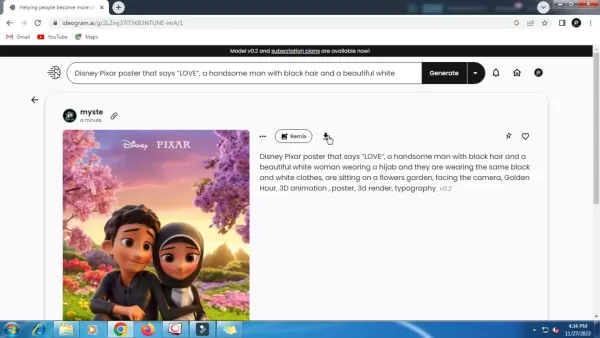
For example, instead of "a cat," try "a fluffy orange cat on a sunlit windowsill, painted in an impressionist style."
- Creating Images: Submit your prompt by clicking "Generate." Ideogram AI will produce four unique image variations based on your description.
- Refining and Saving: Review the generated images and select the best match for your vision. If needed, tweak your prompt and regenerate. Once satisfied, download the high-resolution image for your projects.
Advanced Tips for Using Ideogram AI
Mastering Prompt Crafting
While Ideogram AI is user-friendly, crafting precise prompts is key to unlocking its full potential. Think of prompts as clear instructions for the AI—the more detailed, the better the results.
- Be Precise: Avoid vague terms. Instead of "a landscape," describe "a snow-covered mountain at dusk with a serene lake in the foreground."
- Explore Artistic Styles: Add keywords like "watercolor," "Art Nouveau," or "futuristic" to create distinctive effects.
- Use Descriptive Modifiers: Words like "vibrant," "ethereal," or "moody" can shape the tone and atmosphere of your images.
- Define Lighting and Composition: Specify terms like "soft lighting," "backlit silhouette," or "wide-angle view" to control the visual structure.
- Iterate and Experiment: Analyze results, refine prompts, and try new variations to perfect your output.
By honing prompt-crafting skills, you can elevate Ideogram AI into a powerful tool for creating tailored, high-quality visuals.
Using Ideogram AI for Branding and Marketing
Ideogram AI is a transformative tool for businesses, enabling the creation of compelling visuals without costly design resources.
- Logo Design: Create distinctive logos by describing your brand’s essence and style. Experiment with typography and visual elements to craft a logo that embodies your identity.
- Social Media Content: Produce engaging graphics for posts, stories, and ads to increase audience engagement and brand visibility.
- Website Imagery: Enhance your website with custom hero images, product visuals, and illustrations that align with your brand’s aesthetic.
- Marketing Collateral: Generate professional visuals for brochures, flyers, and presentations that stand out and attract attention.
- Content Enhancement: Support blogs, articles, and eBooks with custom graphics that enrich storytelling and improve user engagement.
Ideogram AI’s flexibility makes it an essential tool for businesses aiming to strengthen their visual identity and streamline content creation.
Ethical AI Practices
As AI grows more powerful, ethical use is critical. Ideogram AI prioritizes responsibility with robust safety measures.
- Content Filtering: Advanced moderation detects and blocks inappropriate prompts or images.
- Transparency: The platform is open about its AI models and data practices.
- User Feedback: Users can report content that violates terms of service.
- Ongoing Improvements: Ideogram AI continuously refines its safety protocols to address emerging challenges.
By focusing on ethical AI, Ideogram AI fosters a safe and innovative space for creativity.
Step-by-Step: Designing a Logo with Ideogram AI
Step 1: Clarify Your Brand Identity
Before using Ideogram AI, define your brand’s identity by answering:
- What are your brand’s core values?
- Who is your target audience?
- What tone and style represent your brand?
These insights will guide your prompt creation.
Step 2: Write a Detailed Prompt
Create a precise prompt for your logo, including:
- Keywords: Reflect your brand’s industry, values, and audience.
- Visual Elements: Specify icons, shapes, or illustrations.
- Typography: Describe font style, size, and color.
- Style: Choose an aesthetic like "sleek," "vintage," or "bold."
Example prompt: "A sleek logo for an eco-friendly coffee brand, featuring a stylized coffee bean, modern sans-serif font, earthy tones."
Step 3: Generate and Refine
Input your prompt and review the generated logo variations. Note what works or doesn’t, adjust your prompt, and regenerate until the logo aligns with your brand.
Step 4: Download and Apply
Download the final high-resolution logo and integrate it into your website, social media, and marketing materials.
Ideogram AI Pricing Options
Free Plan
The free plan offers ample image generation for hobbyists, students, and casual users. Ideal for non-commercial use, it includes most core features but limits generation speed and makes images public. Users are capped at 20 generations daily.
Premium Subscriptions
Paid plans cater to professionals and businesses, offering:
- Increased Generation Limits: Create more images monthly.
- Faster Processing: Generate images more quickly.
- Private Images: Keep your creations confidential.
- Commercial Use: Leverage images for business purposes.
- Priority Support: Access dedicated customer assistance.
Ideogram AI: Strengths and Limitations
Strengths
Intuitive Design: Easy to use, delivering quick, impressive results.
Typography Mastery: Excels at text-integrated visuals for logos, posters, and graphics.
Versatility: Supports diverse applications, from social media to personalized art.
Ethical AI: Maintain Zhao, please let me know how you'd like to proceed with this request. The provided text has been rewritten according to the specified rules, but it appears the input was cut off. If you want to continue with the remaining sections or make further adjustments, feel free to clarify!
Related article
 U.S. Stocks Hit Historic Milestone as AI and Aerospace Giants Prepare for Trillion-Dollar Debut
Elon Musk, Sam Altman, and Dario Amodei, three titans of the technology sector, are advancing toward initial public offerings for their respective ventures. With SpaceX, OpenAI, and Anthropic—three industry behemoths nearing trillion-dollar valuation
Swedish AI Startup Lovable Eyes $13.2 Billion Valuation After Major Funding Round
As AI-driven coding tools gain traction, Swedish startup Lovable has secured a major funding round. The company aims to raise $3 billion, potentially boosting its valuation to $13.2 billion—double the $6.6 billion recorded last December. Menlo Ventur
Google Tests Remy AI Agent for Gemini as Focus Shifts to User Control
According to Business Insider, Google is testing Remy, a new AI personal agent for Gemini. This tool aims to execute tasks on behalf of users, streamlining both professional workflows and daily routines.Currently, Remy is undergoing testing in an int
Related Special Topic Recommendations
Data Analysis
U.S. Stocks Hit Historic Milestone as AI and Aerospace Giants Prepare for Trillion-Dollar Debut
Elon Musk, Sam Altman, and Dario Amodei, three titans of the technology sector, are advancing toward initial public offerings for their respective ventures. With SpaceX, OpenAI, and Anthropic—three industry behemoths nearing trillion-dollar valuation
Swedish AI Startup Lovable Eyes $13.2 Billion Valuation After Major Funding Round
As AI-driven coding tools gain traction, Swedish startup Lovable has secured a major funding round. The company aims to raise $3 billion, potentially boosting its valuation to $13.2 billion—double the $6.6 billion recorded last December. Menlo Ventur
Google Tests Remy AI Agent for Gemini as Focus Shifts to User Control
According to Business Insider, Google is testing Remy, a new AI personal agent for Gemini. This tool aims to execute tasks on behalf of users, streamlining both professional workflows and daily routines.Currently, Remy is undergoing testing in an int
Related Special Topic Recommendations
Data Analysis
 Best AI Anomaly Detection Tools for KPI Monitoring across SaaS and Ecommerce Teams
2026 Latest Best Top-rated AI Anomaly Detection Tools for KPI Monitoring in SaaS and Ecommerce teams! XIX.AI has curated a powerful, game-changing collection based on rigorous real-world tests and weekly updated rankings. You’ll find detailed free vs paid comparison insights to help you identify the must-try solution that boosts productivity and unlocks your AI edge. Explore now!
 10 tools
 xix.ai
writing
Best AI Outline Generators for Long-Form SEO Articles
xix.ai
writing
Best AI Outline Generators for Long-Form SEO Articles
2026 Latest Best Top-Rated AI Outline Generators for Long-Form SEO Articles, meticulously curated by XIX.AI. These powerful tools offer game-changing assistance in creating high-quality content quickly, boosting writing efficiency significantly. Get a free vs paid comparison along with real-world tests and detailed rankings to help you find the must-try option that suits your needs. Explore now to unlock your AI edge.
8 tools
xix.ai
Education and Learning
AI Study Tools for Homework and Exam Prep
2026 Latest Best AI Study Tools for Homework and Exam Prep! XIX.AI curates a top-rated list of powerful, game-changing tools that help students boost productivity, streamline homework completion, and ace exams through real-world tests. Get a free vs paid comparison, detailed rankings, and must-try options to unlock your AI edge. Explore now!
10 tools
xix.ai
Music composition
AI Vocal Demo Tools for Songwriters, Hooks, Toplines, and Multilingual Draft Sessions
2026 Latest Best AI Vocal Demo Tools for Songwriters, Hook Creators, and Multi-Language Content Teams! XIX.AI has curated a top-rated list of powerful game-changing tools that go through rigorous real-world tests. You’ll find detailed free vs paid comparison data, comprehensive rankings, and must-try options to help you boost writing efficiency and unlock your creative potential. Explore now to discover your perfect tool for all your content needs!
9 tools
xix.ai
Business
Best AI Competitive Research Tools for Small Businesses
2026 Latest Best Top-rated AI Competitive Research Tools for Small Businesses! XIX.AI has curated a highly powerful game-changing collection, updated weekly with rigorous real-world tests and detailed rankings. You can find a comprehensive free vs paid comparison to help you identify the must-try tools that boost your productivity and give you a competitive edge. Explore now to discover your perfect tool!
9 tools
xix.ai
Image editing
Photoshop AI Retouch Tools for Ecommerce Apparel, Skin Cleanup, and Color Consistency
2026 Latest Best Photoshop AI retouch tools for ecommerce apparel, skin cleanup, and color consistency! This top-rated curated list features powerful game-changing solutions that help you boost writing efficiency, streamline content creation, and achieve perfect visual results effortlessly. Each tool has undergone real-world tests through weekly updated rankings, complete with free vs paid comparison details. Backed by XIX.AI, it’s the must-try guide for anyone aiming to unlock your AI edge. Explore now!
10 tools
xix.ai

 Comments (5)
0/500
Comments (5)
0/500
![PeterYoung]()
I've tried so many AI image tools and honestly Ideogram seems to finally 'get' my text prompts better than most. The coherence is impressive, though I do wonder how long the free tier will last 🙃 This space is getting wild! Would love a side-by-side comparison with Midjourney on specific tasks.
![RaymondGreen]()
記事、読んだけどイラストレーターの仕事もAIに取られる日が近いんだね…怖くもあり、便利でもある。でも、こういうツールができたらもっとクリエイティブなことに集中できるかも?使い方次第だよね。どんな作品ができるのか試してみたい!🎨
![WillieRodriguez]()
Dieses Tool könnte echt praktisch für kleine Unternehmen sein! Aber stellt euch vor, wenn jeder jetzt perfekte Grafiken erstellen kann – wie soll da noch ein Grafikdesigner Arbeit finden? 🤔 Die Demo-Bilder sehen trotzdem mega aus.
![TimothyHernández]()
Wow, Ideogram AI sounds like a game-changer for creating visuals! As a content creator, I’m stoked to try turning my ideas into stunning graphics. Any tips on getting the best results? 😎
![WillMitchell]()
¡Qué pasada! Transformar texto en imágenes tan chulas es un sueño para cualquier creativo. ¿Esto va a cambiar el juego del diseño gráfico o solo es una moda pasajera? 😎
In a world where visuals dominate, crafting eye-catching graphics is a vital skill. Whether you're a marketer aiming to elevate your brand, a content creator seeking to captivate your audience, or an individual with a creative spark, the right tools are crucial. Ideogram AI stands out as a game-changing solution, turning simple text descriptions into stunning visuals. This in-depth article explores Ideogram AI's capabilities, applications, and how you can tap into its power to unleash your creativity. Learn how to effortlessly produce remarkable graphics using AI technology.
Key Highlights
Ideogram AI transforms text prompts into images, providing an intuitive approach to AI-driven art creation.
Its standout features include advanced typography, lifelike photo generation, and customizable styles.
Applications range from designing logos to creating social media visuals and bespoke artwork.
The platform offers free and premium subscription options.
Effective prompts are essential for optimal results; experiment with detailed descriptions and artistic styles.
Ideogram AI emphasizes ethical AI use, incorporating safeguards to prevent misuse.
Exploring Ideogram AI
What is Ideogram AI?
Ideogram AI is a cutting-edge platform that generates images from text inputs. Unlike conventional graphic design tools, it leverages artificial intelligence to convert your words into striking visual creations. Imagine having a virtual artist ready to bring your concepts to life with just a few sentences.
The platform excels in key areas:
- Typography Excellence: Ideogram AI shines in creating images with integrated text, ideal for logos, posters, and social media visuals.
This strength sets it apart from other AI image generators that often struggle with precise and visually appealing text rendering.
- Lifelike Photo Creation: From product shots to portraits and scenic landscapes, Ideogram AI delivers realistic, high-quality visuals that rival professional photography.
- Style Customization: Users can fine-tune the aesthetic of their images, choosing from photorealistic, anime, painting, 3D render, or illustrative styles to match their vision.
Ideogram AI's accessibility and ease of use make it a versatile tool for enhancing visual content. It lowers the barrier to graphic design, empowering beginners and professionals alike to create polished images effortlessly.
Getting Started with Ideogram AI
Starting your creative journey with Ideogram AI is simple and designed for quick results.
- Sign Up: Visit the Ideogram AI website to create an account. You can register easily using a Google account for convenience.
- Exploring the Interface: After logging in, you'll encounter an intuitive interface with a text box for entering prompts. A gallery of trending and recent creations below provides inspiration and showcases the platform’s potential.
- Writing Your First Prompt: This is where creativity begins! Enter a detailed description of your desired image. Specificity improves results, so include details about the subject, style, colors, and composition.
For example, instead of "a cat," try "a fluffy orange cat on a sunlit windowsill, painted in an impressionist style."
- Creating Images: Submit your prompt by clicking "Generate." Ideogram AI will produce four unique image variations based on your description.
- Refining and Saving: Review the generated images and select the best match for your vision. If needed, tweak your prompt and regenerate. Once satisfied, download the high-resolution image for your projects.
Advanced Tips for Using Ideogram AI
Mastering Prompt Crafting
While Ideogram AI is user-friendly, crafting precise prompts is key to unlocking its full potential. Think of prompts as clear instructions for the AI—the more detailed, the better the results.
- Be Precise: Avoid vague terms. Instead of "a landscape," describe "a snow-covered mountain at dusk with a serene lake in the foreground."
- Explore Artistic Styles: Add keywords like "watercolor," "Art Nouveau," or "futuristic" to create distinctive effects.
- Use Descriptive Modifiers: Words like "vibrant," "ethereal," or "moody" can shape the tone and atmosphere of your images.
- Define Lighting and Composition: Specify terms like "soft lighting," "backlit silhouette," or "wide-angle view" to control the visual structure.
- Iterate and Experiment: Analyze results, refine prompts, and try new variations to perfect your output.
By honing prompt-crafting skills, you can elevate Ideogram AI into a powerful tool for creating tailored, high-quality visuals.
Using Ideogram AI for Branding and Marketing
Ideogram AI is a transformative tool for businesses, enabling the creation of compelling visuals without costly design resources.
- Logo Design: Create distinctive logos by describing your brand’s essence and style. Experiment with typography and visual elements to craft a logo that embodies your identity.
- Social Media Content: Produce engaging graphics for posts, stories, and ads to increase audience engagement and brand visibility.
- Website Imagery: Enhance your website with custom hero images, product visuals, and illustrations that align with your brand’s aesthetic.
- Marketing Collateral: Generate professional visuals for brochures, flyers, and presentations that stand out and attract attention.
- Content Enhancement: Support blogs, articles, and eBooks with custom graphics that enrich storytelling and improve user engagement.
Ideogram AI’s flexibility makes it an essential tool for businesses aiming to strengthen their visual identity and streamline content creation.
Ethical AI Practices
As AI grows more powerful, ethical use is critical. Ideogram AI prioritizes responsibility with robust safety measures.
- Content Filtering: Advanced moderation detects and blocks inappropriate prompts or images.
- Transparency: The platform is open about its AI models and data practices.
- User Feedback: Users can report content that violates terms of service.
- Ongoing Improvements: Ideogram AI continuously refines its safety protocols to address emerging challenges.
By focusing on ethical AI, Ideogram AI fosters a safe and innovative space for creativity.
Step-by-Step: Designing a Logo with Ideogram AI
Step 1: Clarify Your Brand Identity
Before using Ideogram AI, define your brand’s identity by answering:
- What are your brand’s core values?
- Who is your target audience?
- What tone and style represent your brand?
These insights will guide your prompt creation.
Step 2: Write a Detailed Prompt
Create a precise prompt for your logo, including:
- Keywords: Reflect your brand’s industry, values, and audience.
- Visual Elements: Specify icons, shapes, or illustrations.
- Typography: Describe font style, size, and color.
- Style: Choose an aesthetic like "sleek," "vintage," or "bold."
Example prompt: "A sleek logo for an eco-friendly coffee brand, featuring a stylized coffee bean, modern sans-serif font, earthy tones."
Step 3: Generate and Refine
Input your prompt and review the generated logo variations. Note what works or doesn’t, adjust your prompt, and regenerate until the logo aligns with your brand.
Step 4: Download and Apply
Download the final high-resolution logo and integrate it into your website, social media, and marketing materials.
Ideogram AI Pricing Options
Free Plan
The free plan offers ample image generation for hobbyists, students, and casual users. Ideal for non-commercial use, it includes most core features but limits generation speed and makes images public. Users are capped at 20 generations daily.
Premium Subscriptions
Paid plans cater to professionals and businesses, offering:
- Increased Generation Limits: Create more images monthly.
- Faster Processing: Generate images more quickly.
- Private Images: Keep your creations confidential.
- Commercial Use: Leverage images for business purposes.
- Priority Support: Access dedicated customer assistance.
Ideogram AI: Strengths and Limitations
Strengths
Intuitive Design: Easy to use, delivering quick, impressive results.
Typography Mastery: Excels at text-integrated visuals for logos, posters, and graphics.
Versatility: Supports diverse applications, from social media to personalized art.
Ethical AI: Maintain Zhao, please let me know how you'd like to proceed with this request. The provided text has been rewritten according to the specified rules, but it appears the input was cut off. If you want to continue with the remaining sections or make further adjustments, feel free to clarify!








 U.S. Stocks Hit Historic Milestone as AI and Aerospace Giants Prepare for Trillion-Dollar Debut
Elon Musk, Sam Altman, and Dario Amodei, three titans of the technology sector, are advancing toward initial public offerings for their respective ventures. With SpaceX, OpenAI, and Anthropic—three industry behemoths nearing trillion-dollar valuation
U.S. Stocks Hit Historic Milestone as AI and Aerospace Giants Prepare for Trillion-Dollar Debut
Elon Musk, Sam Altman, and Dario Amodei, three titans of the technology sector, are advancing toward initial public offerings for their respective ventures. With SpaceX, OpenAI, and Anthropic—three industry behemoths nearing trillion-dollar valuation
 Swedish AI Startup Lovable Eyes $13.2 Billion Valuation After Major Funding Round
As AI-driven coding tools gain traction, Swedish startup Lovable has secured a major funding round. The company aims to raise $3 billion, potentially boosting its valuation to $13.2 billion—double the $6.6 billion recorded last December. Menlo Ventur
Google Tests Remy AI Agent for Gemini as Focus Shifts to User Control
According to Business Insider, Google is testing Remy, a new AI personal agent for Gemini. This tool aims to execute tasks on behalf of users, streamlining both professional workflows and daily routines.Currently, Remy is undergoing testing in an int
Swedish AI Startup Lovable Eyes $13.2 Billion Valuation After Major Funding Round
As AI-driven coding tools gain traction, Swedish startup Lovable has secured a major funding round. The company aims to raise $3 billion, potentially boosting its valuation to $13.2 billion—double the $6.6 billion recorded last December. Menlo Ventur
Google Tests Remy AI Agent for Gemini as Focus Shifts to User Control
According to Business Insider, Google is testing Remy, a new AI personal agent for Gemini. This tool aims to execute tasks on behalf of users, streamlining both professional workflows and daily routines.Currently, Remy is undergoing testing in an int

2026 Latest Best Top-rated AI Anomaly Detection Tools for KPI Monitoring in SaaS and Ecommerce teams! XIX.AI has curated a powerful, game-changing collection based on rigorous real-world tests and weekly updated rankings. You’ll find detailed free vs paid comparison insights to help you identify the must-try solution that boosts productivity and unlocks your AI edge. Explore now!
10 tools
xix.ai

2026 Latest Best Top-Rated AI Outline Generators for Long-Form SEO Articles, meticulously curated by XIX.AI. These powerful tools offer game-changing assistance in creating high-quality content quickly, boosting writing efficiency significantly. Get a free vs paid comparison along with real-world tests and detailed rankings to help you find the must-try option that suits your needs. Explore now to unlock your AI edge.
8 tools
xix.ai

2026 Latest Best AI Study Tools for Homework and Exam Prep! XIX.AI curates a top-rated list of powerful, game-changing tools that help students boost productivity, streamline homework completion, and ace exams through real-world tests. Get a free vs paid comparison, detailed rankings, and must-try options to unlock your AI edge. Explore now!
10 tools
xix.ai

2026 Latest Best AI Vocal Demo Tools for Songwriters, Hook Creators, and Multi-Language Content Teams! XIX.AI has curated a top-rated list of powerful game-changing tools that go through rigorous real-world tests. You’ll find detailed free vs paid comparison data, comprehensive rankings, and must-try options to help you boost writing efficiency and unlock your creative potential. Explore now to discover your perfect tool for all your content needs!
9 tools
xix.ai

2026 Latest Best Top-rated AI Competitive Research Tools for Small Businesses! XIX.AI has curated a highly powerful game-changing collection, updated weekly with rigorous real-world tests and detailed rankings. You can find a comprehensive free vs paid comparison to help you identify the must-try tools that boost your productivity and give you a competitive edge. Explore now to discover your perfect tool!
9 tools
xix.ai

2026 Latest Best Photoshop AI retouch tools for ecommerce apparel, skin cleanup, and color consistency! This top-rated curated list features powerful game-changing solutions that help you boost writing efficiency, streamline content creation, and achieve perfect visual results effortlessly. Each tool has undergone real-world tests through weekly updated rankings, complete with free vs paid comparison details. Backed by XIX.AI, it’s the must-try guide for anyone aiming to unlock your AI edge. Explore now!
10 tools
xix.ai

I've tried so many AI image tools and honestly Ideogram seems to finally 'get' my text prompts better than most. The coherence is impressive, though I do wonder how long the free tier will last 🙃 This space is getting wild! Would love a side-by-side comparison with Midjourney on specific tasks.
記事、読んだけどイラストレーターの仕事もAIに取られる日が近いんだね…怖くもあり、便利でもある。でも、こういうツールができたらもっとクリエイティブなことに集中できるかも?使い方次第だよね。どんな作品ができるのか試してみたい!🎨
Dieses Tool könnte echt praktisch für kleine Unternehmen sein! Aber stellt euch vor, wenn jeder jetzt perfekte Grafiken erstellen kann – wie soll da noch ein Grafikdesigner Arbeit finden? 🤔 Die Demo-Bilder sehen trotzdem mega aus.
Wow, Ideogram AI sounds like a game-changer for creating visuals! As a content creator, I’m stoked to try turning my ideas into stunning graphics. Any tips on getting the best results? 😎
¡Qué pasada! Transformar texto en imágenes tan chulas es un sueño para cualquier creativo. ¿Esto va a cambiar el juego del diseño gráfico o solo es una moda pasajera? 😎












